Listed from the MCP registry; nobody on Odel publishes it.

Headroom
Watch RAM and disk on your Windows PC. Cleanup tools return plans only.
Runs on your machine from its package; the steps are below.
What it does
- Reads
- Writes
- High impact
At most: only reads or looks up information.
What it costs
FreeOdel charges nothing per call. The publisher may charge for its own service.
Runs locally over stdio
This server isn't hosted — your MCP client launches it from a package registry. Use one of the commands below, or drop the config into your client (e.g. Claude Desktop).
Run
uvx headroom-pc
MCP client config
{
  "mcpServers": {
    "headroom": {
      "command": "uvx",
      "args": [
        "headroom-pc"
      ]
    }
  }
}Headroom


A quiet watcher for the RAM and disk on your Windows PC.
Headroom sits in the tray, keeps a small history, and shows what is full. Cleanup is limited to an allowlist. Type YES to delete. Type MOVE to send a reviewed file to the Recycle Bin or to an archive folder.
Jasdish Singh. MIT, 2026.
What it does
- Watches RAM, commit charge, page file, and free space.
- Records history and a short report (disk trend, likely leaks, folders that grew).
- Cleans only
user_temp,windows_temp,chrome_cache,edge_cache,firefox_cache,thumbnail_cache, andrecycle_bin. Config cannot add a path. - Reviews files, duplicate copies, old downloads, and startup programs.
- Serves a page on
127.0.0.1and a read-only desktop pet, Roomy. - Exposes a local MCP server.
clean,move, andstartup_disablereturn a plan. They do not change the PC.
Install
The command is headroom.
Exe. headroom-<version>-windows-x64.exe from GitHub Releases. It is one portable file. Save it as headroom.exe in a folder you keep.
winget, after the manifest is accepted:
winget install JasdishSingh.Headroom
pip. The PyPI name is headroom-pc. Python 3.11 or newer.
py -3.12 -m pip install "headroom-pc[tray]"
headroom status
tray adds the tray icon. The MCP server is always included.
Quick start
headroom status
headroom top
headroom clean --dry-run
headroom watch
headroom dashboard
headroom watch takes a sample immediately, then every 30 seconds (slower on battery, faster under pressure). headroom install starts it at sign-in. A second watch, dashboard, or pet does not start another copy.
headroom dashboard prints and opens http://127.0.0.1:<port>/?token=.... Before the first stored sample, the page shows the live reading.
Commands, defaults, and exit codes: docs/commands.md.
Roomy
Roomy is a small beige monitor. The cord is the tail. It walks a little and shows the PC's RAM usage in a speech bubble, like "RAM 62% used". It cannot clean, move, or delete.
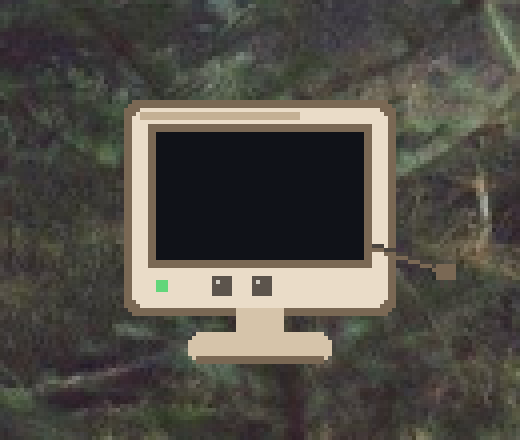
headroom pet
headroom widget
headroom pet --skin midnight
headroom pet --skin tower --lite
headroom widget is the same pet. Click opens the dashboard. Drag remembers the spot. Right-click: dashboard, report, mute, hide, quit.
The dashboard has an on/off toggle for Roomy. It starts or stops the pet and remembers the choice across restarts, overriding widget.autostart.
Skins and the frame budget: docs/roomy.md.
MCP
headroom mcp is a stdio server on this PC. Point a client at the installed exe:
headroom.exe mcp
Claude Desktop (claude_desktop_config.json):
{
  "mcpServers": {
    "headroom": {
      "command": "headroom.exe",
      "args": ["mcp"]
    }
  }
}
Cursor (.cursor/mcp.json):
{
  "mcpServers": {
    "headroom": {
      "command": "headroom.exe",
      "args": ["mcp"]
    }
  }
}
Codex and ChatGPT (config.toml):
[mcp_servers.headroom]
command = "headroom.exe"
args = ["mcp"]
With the pip package on PATH, the command is headroom and the argument is still mcp.
mcp-name: io.github.Jasdish-Singh/headroom
Quick start with AI
Paste this into Claude, ChatGPT, or Cursor after connecting the MCP server.
You have access to Headroom, a local tool that monitors and protects this PC's RAM and disk.

Start a full health check:
1. Call `status` and tell me current RAM, commit, page file and free disk space in plain English.
2. Call `top` and list the 5 biggest RAM users, saying whether each is normal or worth closing.
3. Call `analyze` and `scan` to find what's taking up disk space, grouped into important, safe to clean, and needs my review.
4. Call `dupes` and `startup_list`, and point out duplicate files and startup apps slowing my PC.
5. Call `changes` and `report` to tell me what changed recently and any trends to watch.

Finish with a short summary: my overall PC health (good / watch / act now), the top 3 things to do, and how much space or RAM each would free.

Rules: only read and explain. If cleanup helps, call `clean`, `move` or `startup_disable` only to show me a plan. Never delete, move or disable anything yourself. I'll approve inside Headroom.
The same text is docs/ai-starter-prompt.md and the MCP prompt health_check. Tool list: docs/commands.md.






