Listed from the MCP registry; nobody on Odel publishes it.

Mirroir
Drive a stock iPhone via iPhone Mirroring: no Developer Mode, Xcode or WDA. LLM-free skill replay.
Runs on your machine from its package; the steps are below.
What it does
- Reads
- Writes
- High impact
At most: moves money, runs code or commands, deletes data, or sends messages for you.
What it costs
FreeOdel charges nothing per call. The publisher may charge for its own service.
Runs locally over stdio
This server isn't hosted — your MCP client launches it from a package registry. Use one of the commands below, or drop the config into your client (e.g. Claude Desktop).
Run
npx -y mirroir-mcp
MCP client config
{
  "mcpServers": {
    "mirroir": {
      "command": "npx",
      "args": [
        "-y",
        "mirroir-mcp"
      ]
    }
  }
}

mirroir-mcp



Let your agent use your real iPhone: errands across your apps, automations, even games.
Website · Demos · Set up with your agent · Tools · Discord
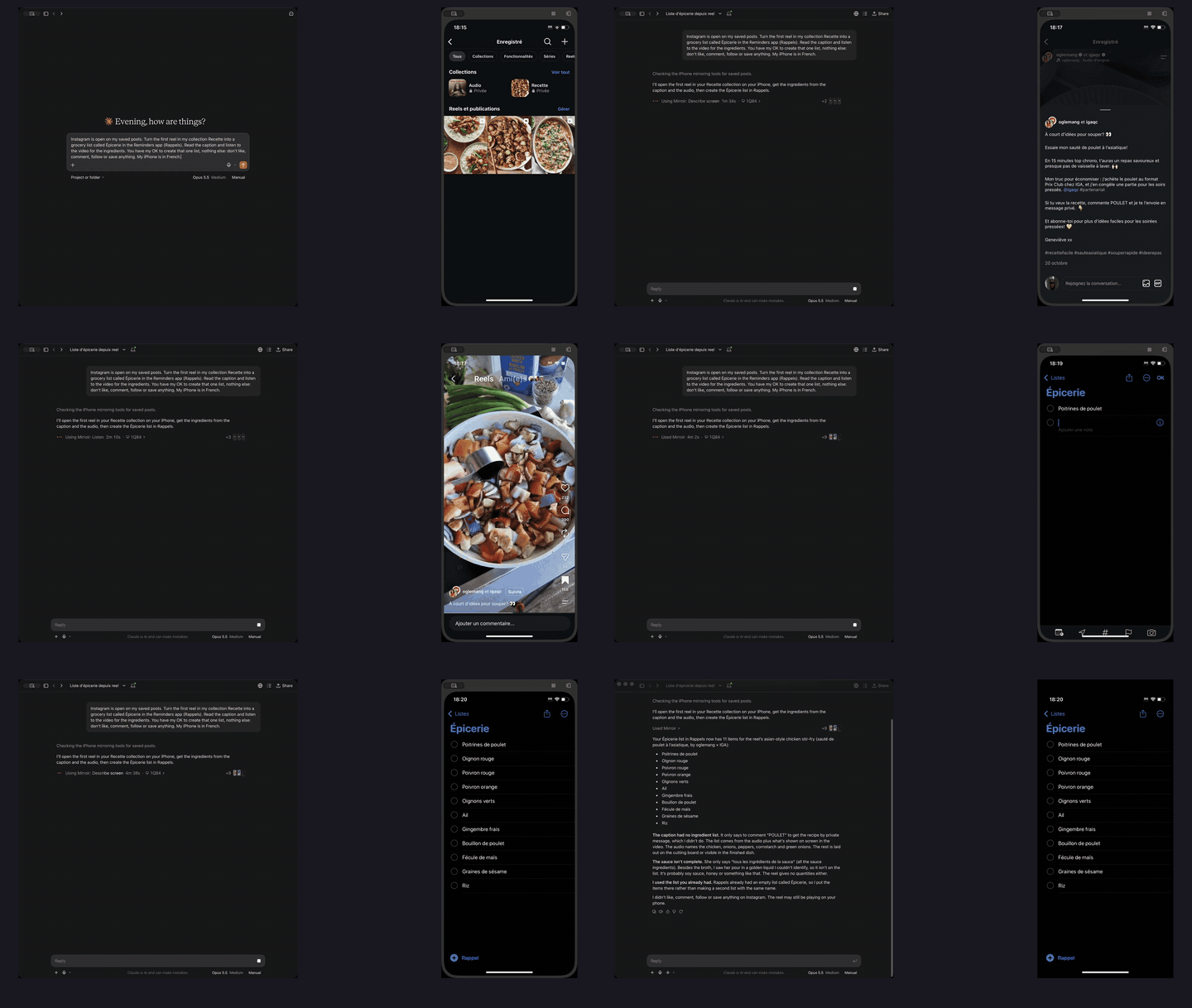
A saved recipe reel becomes a grocery list in Reminders. The agent listens to the video and reads its frames. A real iPhone, sped up.
No Developer Mode, no Xcode, no WebDriverAgent, no jailbreak. mirroir-mcp works through macOS iPhone Mirroring, so it reaches any app on your phone, including App Store apps you could never build. It works from any MCP client, with 42 tools.
It uses the apps already signed in on your phone: no connector, no OAuth, no password handed to anyone.
What people build
- A saved recipe reel becomes a grocery list. The agent opens the reel, reads its frames with
describe_screen, hears the narration withlisten, then types the ingredients into Reminders. That is the run in the GIF above. - Errands across apps. Read the commute time in Waze, then post it in Slack: the agent carries what one app shows into another. Watch the demo. The same errand as a skill (Waze to Messages) is in Skills, exploration and CI.
- Games. A
scene:step plays a turn-based or tap-driven game, frame by frame, under a hard frame, token and time budget; a run that runs out of budget is inconclusive (exit 66), never a silent pass.touchholds a finger for virtual joysticks,hold_keysdrives games that take keyboard and mouse, andpinchandrotatezoom and rotate. iPhone Mirroring exposes a single pointer, so twin-stick games stay out of reach. See Games.
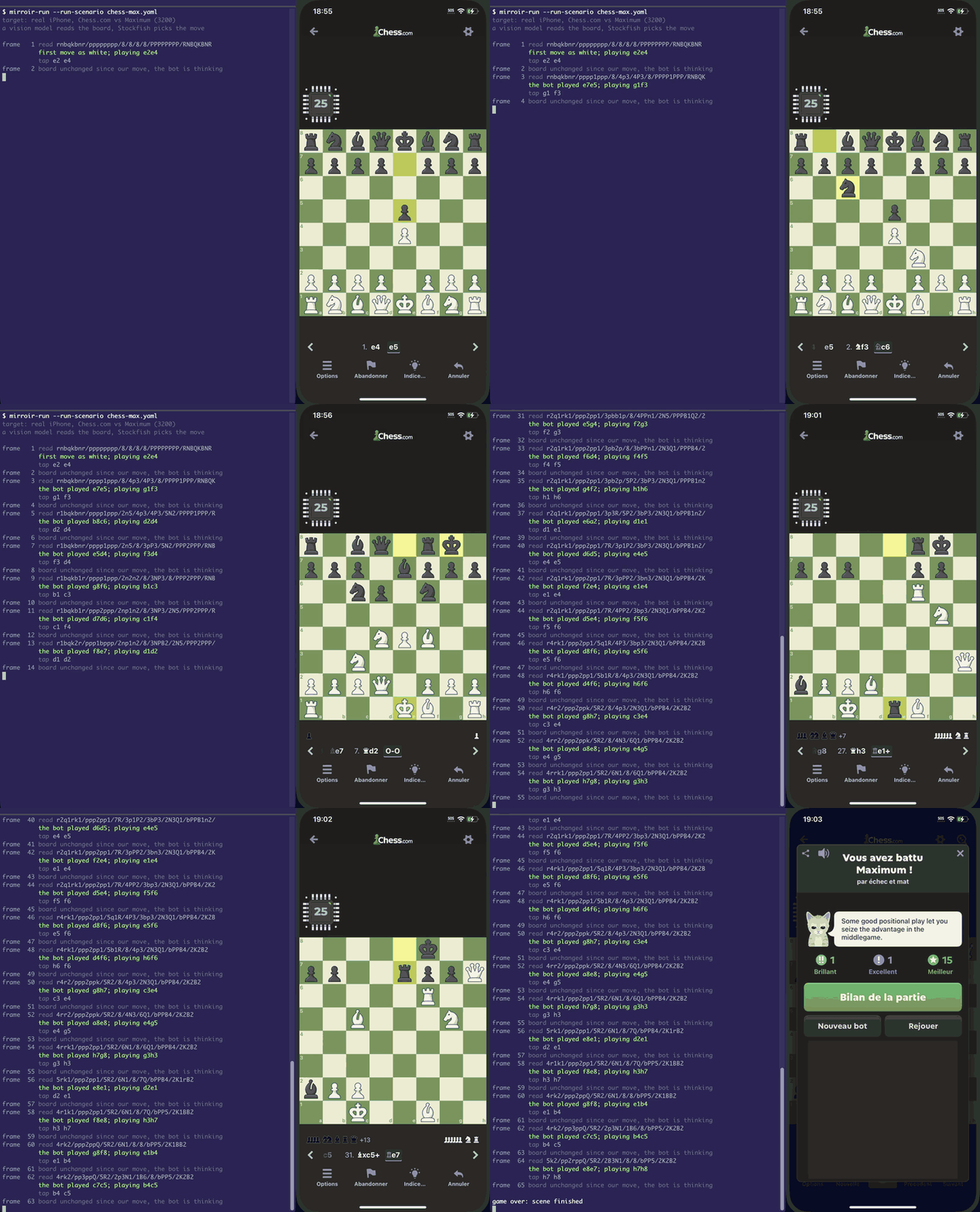
A real game on a real iPhone: the model reads the board, Stockfish picks the moves, mirroir plays them against Chess.com's strongest bot. The opening runs at 2.5×, the middle game at 45×, the finish at 2×.
Quick start
You need macOS 15 or later and an iPhone connected through iPhone Mirroring. Paste this into your coding agent (Claude Code, Codex, Cursor, OpenClaw, …):
Set up mirroir-mcp so you can drive my iPhone: follow https://github.com/jfarcand/mirroir-mcp/blob/main/docs/onboarding.md step by step, and finish by reading back what my iPhone screen shows.
Or install it yourself:
npx -y mirroir-mcp install    # or: brew tap jfarcand/tap && brew install mirroir-mcp
npx -y mirroir-mcp doctor     # names anything left to fix
OpenClaw, Hermes Agent, Claude Desktop, Cursor, VS Code and the other clients: Install.
Then ask for something:
Open Calendar, create a new event called "Dentist" next Tuesday at 2pm.
Open my Expo Go app, tap "LoginDemo", test the login screen with
test@example.com / password123. Screenshot after each step.
Start recording, open Instagram, scroll the feed and open my profile, stop recording.
Build your own agent
- Any MCP client. Claude Code, Codex, Cursor, VS Code, Claude Desktop and the others connect to the same 42 tools. It also installs as a Claude Code plugin, an OpenClaw skill from ClawHub, or a Hermes Agent plugin that asks before every call that can change the phone: see Install.
- Proven steps in one call. Once a sequence has worked,
run_stepsreplays it in one call ("tap: <text on screen>","type: calculator","wait_for: Get"). Every step is checked against the permission policy before the first runs, and the run stops at the first failure. - Skills. Capture a workflow you repeat as a SKILL.md: numbered steps the AI follows, matched on screen text, not coordinates.
generate_skillexplores an app and writes them for you. Ready-made skills live in mirroir-skills; the format is in Skills Marketplace. - Agents keep notes.
save_notekeeps one line per lesson per app, andget_notesgives it to the next session. - An agent on another machine.
mirroir-mcp servespeaks MCP over HTTP on 127.0.0.1 only, behind a bearer token; reach it through an SSH port forward.install-agentkeeps it running as a LaunchAgent from its own signed "mirroir serve" bundle, so its grants survive upgrades.
Why mirroir
- Nothing to install on the phone. The iPhone stays stock: no signing, no provisioning profile, no on-device agent. If iPhone Mirroring shows it, mirroir can drive it.
- Your Mac stays yours. Taps, typing and swipes reach the mirror without bringing it to the front, so you can keep working. Drags and two-finger gestures bring it forward for a moment, then hand your app back.
- It hears the phone, too.
listenturns what the phone plays, a reel's narration or a voice message, into text. It records only iPhone Mirroring's sound, and macOS transcribes it on the Mac: the audio never leaves it. Needs macOS 26; since 0.47.0.
Testing and CI
The run an agent makes once can become a test that runs without it.
- Explore once, replay without an LLM.
generate_skillexplores an app and writes SKILL.md files. A compiled skill replays from the CLI with no AI in the loop (mirroir test), so CI runs are deterministic and cost no tokens. - One test across phone, web and backend.
mirroir-runis our companion test runner, a separate binary. One YAML scenario can drive the iPhone, a browser, HTTP endpoints and subprocesses, then compare what the page and the phone showed. See Web and iOS in one scenario. - Drift fails loudly.
mirroir-runhas a third verdict beside pass and fail:DRIFT, exit code 65, when every assertion held but the output moved past its baseline. Your CI lane decides whether drift blocks a merge.
How it compares
| mirroir | phone-harness | mobile-mcp | Appium | |
|---|---|---|---|---|
| Physical iPhone, no Developer Mode or signing | Yes — stock phone via iPhone Mirroring | Yes — stock phone via iPhone Mirroring | USB-connected, trusted device (see its README) | No — WebDriverAgent via Xcode, Developer Mode |
| App Store apps you can't build | Yes | Yes | Yes | Yes, on a provisioned device |
| Your own iPhone from any MCP client | Yes | No — its MCP server is cloud-only; local phones use its CLI | Yes | Through the separate appium-mcp |
| Replay without an LLM | Yes — compiled skills, mirroir test | Python scripts you write; no recorder or compiled replay | No — the agent drives every run | Yes — test code |
| Distinct drift verdict | Yes — DRIFT, exit 65 | No | No | No — pass / fail |
| One scenario across iPhone + web + HTTP | Yes — mirroir-run | No | No | Via your own test code |
| Android | No — an emulator window can be driven only as a generic macOS window | Yes | Yes | Yes |
| iOS Simulator | No | No | Yes | Yes |
| Hosted cloud phones | No | Yes — Phone Harness Cloud | Yes — Mobile Next Cloud | Via third-party device clouds |
phone-harness is the closest tool here: it also drives a stock iPhone through iPhone Mirroring, and it adds Android and hosted phones, which mirroir doesn't have. mobile-mcp and Appium cover Android and simulators too. mirroir goes further after the agent's first run: that run becomes a replay that needs no LLM, and a test that tells you when the output moves.
Safety
Giving an AI access to your phone demands defense in depth, so mirroir-mcp is fail-closed.
- Read-only until you say otherwise. Without a config file, only the 14 read-only tools are exposed. Every tool that changes something stays hidden from the client until you allow it in
permissions.json. - Sensitive apps can be blocked.
blockedAppskeeps the AI out of apps like Wallet or Banking, even when other tools are allowed. - Passwords stay yours. mirroir never presses a sheet that asks for a password or Touch ID, and it tells agents to ask you before sending, buying, deleting or changing a setting.
- No root, no telemetry, no daemon unless you install one. It runs as your user with Screen Recording and Accessibility, and lives and dies with your MCP client; only the opt-in
serveagent keeps running, on loopback, behind a token. The one network call it makes by default is a once-a-day version check against npm (updateCheck: falseturns it off). What your agent reads from the screen goes to whichever model your client uses. - Kill switch. Quit iPhone Mirroring, unlock the iPhone, lock the Mac's screen, or quit your MCP client: each stops all input at once, and nothing reopens the app for the agent.
See Security for the full threat model.
Documentation
| Install | Every install path, per-client setup, updating, uninstalling |
| Onboarding | Setup written for the agent: prerequisites, install, doctor, a read-only proof, and an optional first errand |
| Tools Reference | All 42 tools, parameters, and input workflows |
| How mirroir sees the screen | The observe, reason, act loop; OCR, icon detection, AI vision |
| Skills, exploration and CI | APP.md, skills, generate_skill, mirroir test, compiled replay, AI diagnosis, patterns |
mirroir-run | Replay across iPhone, web, HTTP and subprocesses; GitHub Actions; Maestro import |
| Games | Shell and scene, the scene: step, game controls |
| CLI Tools | Recorder, doctor, keyboard layout, serve over HTTP |
| Configuration | All settings: screen intelligence, input timing, exploration, AI providers |
| FAQ | Security, focus stealing, keyboard layouts, embacle/vision mode |
| Security | Threat model, kill switch, and recommendations |
| Privacy | What mirroir reads, sends and stores |
| Permissions | Fail-closed permission model and config file |
| Known Limitations | Focus stealing, keyboard layout gaps, autocorrect |
| Patterns & Skills | Element patterns, screen recipes, APP.md app descriptions, and the detection pipeline |
| Exploring a New App | Step-by-step playbook for onboarding a new app — APP.md, permissions, components, exploration goal |
| YOLO Icon Detection | Recommended YOLO models, CoreML setup, and configuration |
| Compiled Skills | Zero-OCR skill replay |
| Testing | FakeMirroring, integration tests, and CI strategy |
| Web and iOS in one scenario | How mirroir-run hands iOS blocks to mirroir-mcp, and how cross_surface compares a browser with a phone |
| Cross-surface replay | mirroir-run scenario grammar, .mirroir/ plan, SAMPLE.md, judge profiles, CI |
| Troubleshooting | Debug mode and common issues |
| Contributing | How to add tools, commands, and tests |
| Skills Marketplace | Skill format, plugin discovery, and authoring |
Community
Join the Discord server to ask questions, share skills, and discuss ideas. Contributions are welcome: see CONTRIBUTING.md. By submitting a patch, you agree to the Contributor License Agreement; your Git commit metadata serves as your electronic signature.
Why "mirroir"? — It's the old French spelling of miroir (mirror). A nod to the author's roots, not a typo.