Listed from the MCP registry; nobody on Odel publishes it.

LrC-AVG
An AI edits the selected photo in Lightroom Classic with native Develop sliders, pass by pass.
Runs on your machine from its package; the steps are below.
What it does
- Reads
- Writes
- High impact
At most: moves money, runs code or commands, deletes data, or sends messages for you.
What it costs
FreeOdel charges nothing per call. The publisher may charge for its own service.
Runs locally over stdio
This server isn't hosted — your MCP client launches it from a package registry. Use one of the commands below, or drop the config into your client (e.g. Claude Desktop).
Distributed as an MCP bundle (`https://github.com/jimjohnbeebe-jpg/LrC_Autonomous_Gateway/releases/download/v1.10.0/lrc-avg-1.10.0.mcpb`) — download it and import the bundle in your MCP client.
LrC-AVG — Lightroom Classic Autonomous Vision Gateway
LrC-AVG lets Claude, in Claude Desktop, edit a photo in Lightroom Classic, raw or JPEG or any other format Lightroom develops (see Supported formats), the way a photographer does: set a few Develop sliders, look at the result, measure it, adjust again, up to a capped number of passes. It uses only Lightroom's own Develop settings, so every change shows on the sliders, sits in History as a named step, and can be undone. A local engine measures each render (clipping, histogram, pass-to-pass changes) and keeps every pass within clipping limits; Claude's vision makes the aesthetic calls.
One setup file installs everything: a Lightroom plugin, the engine that Claude Desktop starts (an MCP server), and the Deck, a small window that follows an edit. Other AI apps can start the engine too: see Other AI apps.
Built and tested on one Windows 11 PC with Lightroom Classic 15.5.1 and 15.6. Where this page states how something behaves, the evidence is listed under Sources.
See it work
The website, foliovector.com/lrc-avg, has the intro video (1:23) and two worked examples: a written brief, and three variants to pick from.
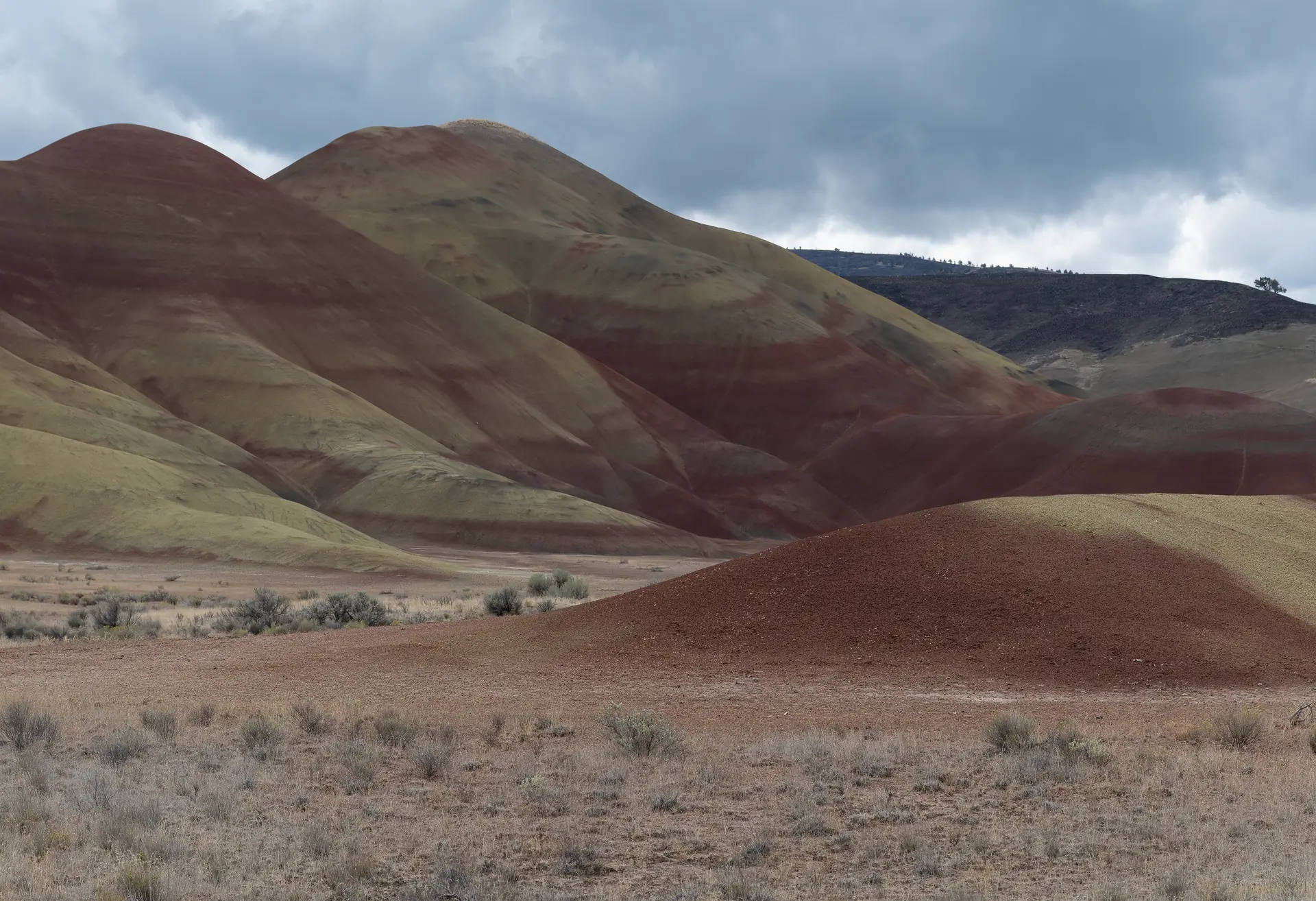
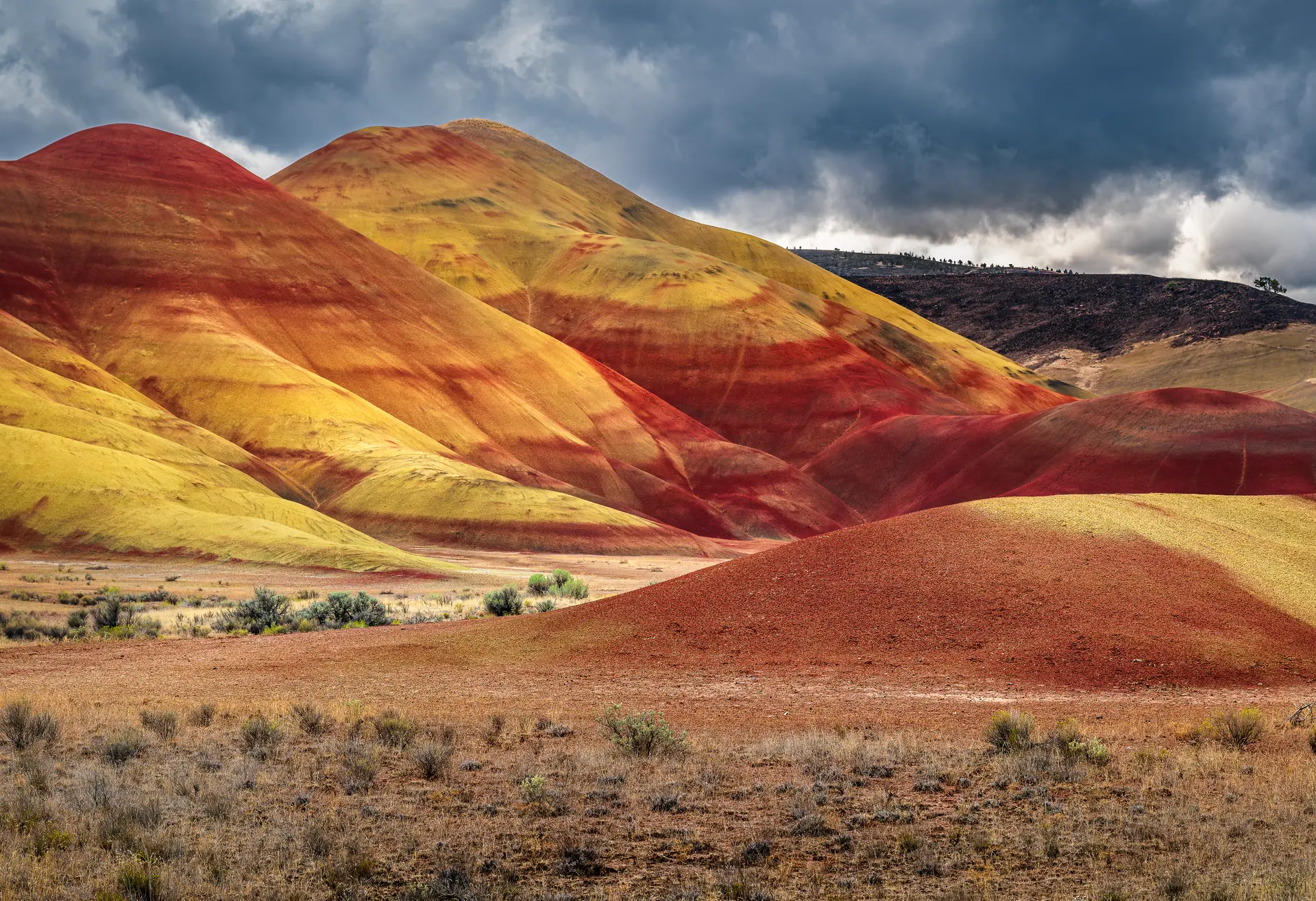
A Painted Hills raw, edited from a brief typed into Claude Desktop (the whole example):
| Before, straight from the camera | After, the same raw edited in Lightroom |
|---|---|
 |  |
The HUD in Lightroom during that edit, at pass 4 (what it shows):

What you need
- Windows 10 or 11, 64-bit (tested on Windows 11 only).
- Lightroom Classic 15.0 or later (see Supported Lightroom versions).
- Claude Desktop, signed in, and started at least once in this Windows account, or another AI app from
docs/CLIENTS.md. The AI model must be able to see images. - Nothing else: the setup brings its own copy of Node.js, and no administrator rights are needed.
Supported Lightroom versions
LrC-AVG supports Lightroom Classic 15.0 and later, and was tested on 15.6. Earlier versions may work but are untested. On a version older than 15.0 or newer than 15.6, nothing is blocked: the HUD says so once when an edit starts, and Claude sees the same notice when it reads the photo's details. If a newer Lightroom no longer offers a setting LrC-AVG uses, Claude is told which one is not available and the edit stays open. A photo on a process version newer than LrC-AVG knows can be described but not edited.
Supported formats
Lightroom develops every file through one of two pipelines: raw (camera raw files and raw DNGs) or rendered (JPEG, TIFF, PNG and the others below). LrC-AVG reads which one a photo uses from its Develop settings, not from its file name, so a .dng can be either. Both get the same sliders and intents. Two things differ:
- White balance: on a raw photo, temperature is in Kelvin; on a rendered photo, temperature and tint are relative, -100 to +100.
- Profiles: a raw photo takes the Adobe and camera-matching profiles; a rendered photo takes Color or Monochrome. Each intent names one of each.
Each format below was tested on one Windows 11 PC with Lightroom Classic 15.6. A full session means: the intent's starting settings, two passes, an exact revert, a sync onto another photo, and a preset made from it.
| Format | Pipeline | Tested |
|---|---|---|
| Camera raw (Nikon NEF) | raw | Full session on 11 photos, virtual copies included |
| DNG | raw | Full session on 3 photos |
| DNG (rendered, e.g. from Photoshop) | rendered | Full session on 2 photos |
| JPEG | rendered | Full session on 6 photos; all 11 intents on one JPEG; one Claude Desktop chat |
| TIFF (8-bit, 16-bit, 32-bit HDR, CMYK) | rendered | Full session on 4 photos, one of each |
| PSD | rendered | Full session on 2 photos |
| PSB (Photoshop Large Document) | rendered | Full session on 1 photo |
| PNG | rendered | Full session on 1 photo |
| AVIF (HDR) | rendered | Full session on 1 photo |
| JPEG XL | rendered | Full session on 1 photo |
| HEIC / HEIF | rendered | On 1 photo: every slider's limits written and read back, Color and Monochrome, an export, and put back; not in the full-session test |
- Older photos: Lightroom's process versions 5 and 6 edit as they are. Four photos on version 5, raw and JPEG, were in the test. An older process version is refused; Claude says so.
- Between raw and rendered: a sync from a raw photo onto a JPEG (or back) copies everything except white balance and the profile, and says it left those two out.
- HDR photos (the 32-bit TIFF, the HDR AVIF) edit like the others, with exposure limited to ±5.
- Video is not supported: Lightroom does not develop it.
Install
- Download
LrC-AVG-Setup-<version>.exefrom the latest release. - Double-click it. Windows will probably show Windows protected your PC. Click More info, check that the app is
LrC-AVG-Setup-<version>.exe, then click Run anyway. Why the setup is not signed explains this. - If Lightroom Classic or Claude Desktop is open, the setup asks you to close them. Close them, then click Retry.
- Click through the setup. It installs into your own Windows account, so Windows does not ask for an administrator.
- At the end, a message says what the setup did with Claude Desktop's settings. Click OK, then Finish.
- Start Lightroom Classic and Claude Desktop again.
The setup does three things:
- It puts the plugin into Lightroom's plugin folder,
%APPDATA%\Adobe\Lightroom\Modules\LrC-AVG.lrplugin. Lightroom lists it as LrC-AVG (Autonomous Vision Gateway), switched on. - It adds an entry named
lrc-avgto Claude Desktop's settings file and keeps a backup of the old file next to it. Your other entries stay as they are. - It installs the program files, with the Deck, into
%LOCALAPPDATA%\LrC-AVG, and adds LrC-AVG to Windows' installed apps.
To check the download, compare its SHA-256 with the SHA256SUMS.txt file on the release page. In File Explorer, hold Shift, right-click the setup and choose Copy as path. Then in PowerShell type Get-FileHash and paste the path, for example Get-FileHash "D:\Downloads\LrC-AVG-Setup-<version>.exe". Your Downloads folder may not be under C:\Users\<you>.
Updating: download the new setup and run it the same way. It replaces the old version and keeps your settings, intents and logs.
Other ways to install
The setup is the way for most people. These are the others, each with the date it was last tested:
| Way | For | Tested |
|---|---|---|
| The setup (above) | Claude Desktop, with the Deck | 2026-10-17, install, update and uninstall on one PC |
Claude Desktop extension (.mcpb) and the plugin zip | Claude Desktop without the setup and without the Deck | 2026-10-27, on one PC that has Node.js 24 installed |
| Claude Code plugin, from a copy of this repository | Developers | 2026-10-27 |
| An entry in another AI app's settings | The apps in Other AI apps | Per app, in docs/CLIENTS.md |
Claude Desktop extension. From the release after v1.1.0 on (v1.1.0 has only the setup):
- From the latest release, download
lrc-avg-<version>.mcpbandLrC-AVG.lrplugin-<version>.zip. - Unzip the zip into a folder you keep, for example
%USERPROFILE%\LrC-AVG. Lightroom loads the plugin from that folder, so do not delete it. - In Lightroom, choose File > Plug-in Manager, click Add, and choose the
LrC-AVG.lrpluginfolder from step 2. Lightroom lists it as LrC-AVG (Autonomous Vision Gateway). - In Claude Desktop, open Settings > Extensions and drag the
.mcpbfile onto it. Leave the Tool profile setting atfull(Tool profiles).
Use the extension or the setup, not both: with both, Claude Desktop runs two LrC-AVG engines and Lightroom has two copies of the plugin under the same id. If the setup is installed, do not add the zip.
Claude Code plugin. In PowerShell, in a copy of this repository: npm install, npm run build, then claude --plugin-dir <the repository folder>. Add the plugin from plugin\LrC-AVG.lrplugin in the Plug-in Manager, as docs/DEVELOPMENT.md describes.
Check that it works
In Lightroom, choose File > Plug-in Extras > LrC-AVG - Status. Outside a chat, it reads LrC-AVG status: ENGINE NOT CONNECTED (normal outside a chat). That is normal: the engine connects at Claude's first LrC-AVG tool call and lets go after a minute without one. During a chat it reads LrC-AVG status: READY.
If something goes wrong
- If Status says BRIDGE NOT RUNNING, quit Lightroom (File > Exit), start it again, then choose the menu item again.
- If Status says RESTART LIGHTROOM TO FINISH THE UPDATE, quit Lightroom and start it again.
- If Status says the AI client has not started LrC-AVG yet, or Claude says it has no LrC-AVG tools: quit Claude Desktop (right-click the Claude icon in the system tray > Quit) and start it again. If that does not help, run the setup again and read its last message.
- If Claude answers ENGINE_BUSY ("Another LrC-AVG engine ... is using the Lightroom bridge"), another chat, Cowork or Code task, or another AI app is using LrC-AVG. Go back to that one and end its edit if it has one open, wait a minute, then ask again here. See One Claude surface at a time under Known limitations.
- If there is no LrC-AVG - Status under File > Plug-in Extras, open File > Plug-in Manager, select LrC-AVG (Autonomous Vision Gateway) and click Enable.
- To report a problem, choose LrC-AVG - Status first: it saves its text as
%LOCALAPPDATA%\LrC-AVG\status.txt. Then open an issue and attach that file.
Why the setup is not signed
Windows trusts a program more when its publisher has signed it with a code-signing certificate. LrC-AVG is a free project by one person, and a certificate costs money every month, so the setup is not signed yet. Free signing for open-source projects (SignPath Foundation) is planned once people use LrC-AVG: issue #171.
What that means for you:
- SmartScreen shows Windows protected your PC for the downloaded setup. More info > Run anyway starts it. Every new version starts out unknown to SmartScreen again.
- Smart App Control blocks unsigned programs, and Windows has no "Run anyway" for it. If it is on (Windows Security > App & browser control > Smart App Control), LrC-AVG cannot be installed on that PC for now.
- The setup is built from this repository's source by GitHub Actions (
.github/workflows/release.yml), and the release page lists its SHA-256.
What leaves your PC
- The engine and the plugin talk to each other only on this PC (127.0.0.1). The engine makes no internet connections, and LrC-AVG sends no usage data.
- To judge an edit, the AI looks at preview JPEGs of your photo (1600 pixels on the long side by default). Your AI app sends them, with your chat, to its AI provider (Anthropic for Claude), as it does with any image you share in a chat.
- Your original files are never changed. Every edit is a Develop setting in your Lightroom catalog.
Other AI apps
LrC-AVG is a standard MCP server, so other MCP clients can start it as well: Claude Code, OpenCode, Hermes Agent and Antigravity CLI were tested on 2026-10-16. Entries for Codex CLI, Cursor, VS Code (GitHub Copilot) and Windsurf are written from those apps' documentation and have not been tested. The setup writes only Claude Desktop's entry. The entries for the others, with the paths the setup installs to, are in docs/CLIENTS.md.
Tool profiles
LrC-AVG has 65 tools. A long tool list costs the AI context and makes a wrong pick likelier, above all for smaller models (issue #165). So the engine offers two profiles:
| Profile | Tools the AI sees |
|---|---|
full (the default) | Every tool |
edit | The 16 tools a chat needs to edit the selected photo: lr_help, lr_get_active_photo_context, lr_get_preview, lr_list_intents, lr_save_intent, lr_begin_session, lr_step, lr_set_regions, lr_approve_pass, lr_select_variant, lr_end_session, lr_list_masks, lr_create_mask, lr_edit_mask, lr_delete_mask, lr_crop |
The edit list is less than half the size of the full one: 56,984 characters of tool list against 133,038, measured when the engine had 62 tools [handle: tools/list of the built engine under each profile, over the MCP SDK's in-memory transport, 2026-10-28]; how many tokens that is depends on the model [inference]. Under edit, a call to another tool is refused with a message saying that the full profile has it. lr_help names the profile in force (tool_profile).
To use the edit profile with Claude Desktop, quit Claude Desktop, then run in PowerShell:
& "$env:LOCALAPPDATA\LrC-AVG\resources\node\node.exe" `
  "$env:LOCALAPPDATA\LrC-AVG\resources\engine\dist\setup\setup-cli.js" --tools edit
and start Claude Desktop again. --tools full goes back. Running the setup again, an update included, keeps the profile you chose. Other AI apps: add "LRC_AVG_TOOLS": "edit" to the env of the lrc-avg entry (docs/CLIENTS.md). The .mcpb bundle offers the profile as a setting when it is installed [unverified: not yet tried in Claude Desktop].
LrC-AVG and Automaat/lightroom-mcp
LrC-AVG began as a fork of Automaat/lightroom-mcp and is meant to complement it, not replace it. Of the 68 tools upstream has at commit 1040453, 54 have an lr_* equivalent here; the rest are planned or wait for a decision. On top of that, LrC-AVG adds the measured, guarded edit loop, the looks, the HUD and the provenance logs. The tool-by-tool map, and how to run both servers side by side (they use different plug-in ids and ports), are in docs/PARITY.md (section "Using both servers"). How we follow upstream's changes: docs/UPSTREAM_SYNC.md. Code taken from upstream is credited in each half's THIRD_PARTY_NOTICES.md.
Your first session
- In Lightroom, select one photo (in Library or Develop), raw or JPEG or any format in Supported formats.
- In Claude Desktop, start a new chat and type: Tune the active photo for golden hour landscape.
- If Claude Desktop asks whether LrC-AVG may use a tool, allow it.
What happens next:
- The engine saves a Develop snapshot of the photo, named AVG pre-session …. Aborting goes back to it.
- The HUD, a small floating window, opens in Lightroom and follows the session (below).
- Your words come first. Claude starts from an intent (a set of starting values, below) only when one fits what you asked for, and leaves it when you ask for something else; with no intent, pass 0 changes nothing but clipping.
- Pass 0 sets the intent's camera profile, lens corrections and starting values. Claude then makes up to 8 more passes (the Max passes setting). Before each pass it looks at a fresh render and the engine's measurements. Each pass is one History step, named AVG <id> pass n/N.
- The engine caps how far each slider moves per pass, and keeps clipping within limits: by default at most 0.5 % of pixels blown out and 1.0 % crushed to black. Blown out means two or more colour channels at the top; a saturated colour with one channel at the top (bright orange leaves, a red sign) is not corrected, and Claude is told which channel it is.
- The session ends when Claude accepts the edit, or when you click Accept or Abort in the HUD.
Claude Desktop shows the renders Claude looks at only inside the tool-call boxes in the chat: click a box to expand it. The photo in Lightroom shows the same edit.
What else you can ask
-
Other looks. Eleven intents come with the engine: Black and white; Landscape — blue hour, forest shade, golden hour, midday high contrast, overcast flat light; Neutral technical correction; Night — stars and Milky Way; Pet — fur detail; Portrait — natural light, skin first. Ask "Which intents are there?" to see them, with your own.
-
Variants. "Make three golden-hour variants of this photo." The engine makes virtual copies AVG <intent> A, B and C with different looks and shows them side by side. You pick one, with Pick A/B/C in the HUD or in the chat, and the remaining passes go to your pick. Select the original photo, not a virtual copy, before you ask. Every intent except Neutral technical correction has variants.
-
Sync a burst. After a session you accepted: "Sync this edit to the selected photos." It copies the settings to the photos selected in Lightroom, up to 500. For a burst of the same scene, Claude can instead match each photo's brightness to the edited one. A request works for about 30 seconds; Claude then asks again for the photos left, until all are done. Each photo gets its own snapshot AVG pre-sync … first.
-
Vignette and grain. "Add a soft dark vignette and a little grain." Claude uses the Effects panel's Post-Crop Vignetting sliders (Amount, Midpoint, Roundness, Feather, Highlights and the Style, by number 1 to 3) and its Grain sliders (Amount, Size, Roughness), on raw and rendered photos alike.
-
Black-and-white mix and Calibration. "Make it black and white and darken the blue sky." Once the photo has a black-and-white profile (Adobe Monochrome on a raw photo, Monochrome on a JPEG or other rendered photo), Claude uses the B&W panel's eight colour sliders, Red to Magenta. The Calibration panel's Shadows Tint and the Red, Green and Blue Primary Hue and Saturation work on any photo.
-
Save a preset. "Save this photo's settings as a preset called …". It is saved in the group LrC-AVG, and Lightroom lists it after a restart.
-
Save your own intent. Describe the look you want and ask Claude to save it as an intent. Claude shows you the intent first and saves it only after you approve. An intent names one profile for raw photos and one for JPEG, TIFF, PNG and the other rendered photos (
"profile": { "raw": "Adobe Landscape", "rendered": "Color" }), and keeps white-balance starting values for each in"priors_by_pipeline", because a raw photo's temperature is in Kelvin and a JPEG's is relative. Intent files written for engines before 0.22.0 are skipped with a warning that says how to rewrite them. -
Save an edit as a look. Select a photo you have edited the way you like and ask "Save this edit as a look called my_look." Claude shows you the look first and saves it only after you approve. A look keeps the photo's profile, tone and presence (exposure, contrast, highlights, shadows, whites, blacks, texture, clarity, dehaze, vibrance, saturation), white balance, tone curves, HSL, colour grading, vignette and grain, B&W mixer and calibration. Pass 0 then writes those values on the next photo you edit with it, and Claude adjusts from there (Looks says how). Sharpening, noise reduction, lens corrections and crop stay with each photo. A look's white balance applies only to photos of the same kind as the one you saved it from (raw, or JPEG and the other rendered formats), because the units differ.
-
Copy, rename or delete your intents. "Copy golden hour as my_golden_hour with warmer shadows", "Delete my_golden_hour." Claude asks you before it saves or deletes. Only your own intents can be deleted; deleting one that replaced a bundled intent brings the bundled one back.
-
Find, rate and keyword photos. "Find my five-star photos from September 7 with the keyword heron", "Which collections do I have?", "Rate the selected photos three stars", "Add the keyword pond to these photos." Claude searches by file name, keywords, star rating, capture date and collection, and sets star ratings and keywords on at most 100 photos per request. Claude tells you which photos will change first. Ratings and keywords are not Develop settings: History and snapshots don't cover them, but Claude can put the earlier values back on request.
-
Keywords in a hierarchy. "Which keywords do I have under Places?", "Add Places > Europe > Paris to these photos." Claude lists your keyword tree and writes a nested keyword as a path, parent first with
|between the levels (Places|Europe|Paris), creating the levels that are missing. A plain name means the top-level keyword of that name. -
GPS positions. "Set the location of these photos to 48.5818, 7.7509", "Remove the GPS position from this photo." Claude sets or removes the latitude and longitude of at most 100 photos per request, with each photo's earlier position in the answer. LrC-AVG does not write the altitude.
-
Where a photo was taken and where its file is. "Where was this photo taken?", "Which folder are the selected photos in?" Search results, the selected photos and the photo open in Develop come with each photo's GPS position (empty for none); search results and the selected photos also come with the file's path. This needs plugin 0.21.0; with an older plugin Claude says so.
-
Pick flags, titles and captions. "Flag these photos as picks", "Reject the blurry ones", "Give these photos the title Heron at dawn and a caption." Claude sets the pick flag (pick, reject or none) and the IPTC title, caption and headline of at most 100 photos per request, with each photo's earlier values in the answer. Like ratings, these are not Develop settings: History and snapshots don't cover them.
-
What a photo already has. "What title, flag and keywords do these photos have?", "Is this photo in a stack?" Claude reads each photo's title, caption, headline, flag, keywords, GPS position and stack.
-
Photos of one folder. "Find the photos in D:\Photos\2026\2026-09-07", with or without its subfolders. Give the folder's full path.
-
Look through a shoot. "Show me the photos of this folder one by one", "Which of these is sharpest?" Claude can see any photo of the catalog by its id, without selecting it, about 3 seconds each.
-
AI Denoise. "Denoise the selected photos at 50." Lightroom Classic 15 or later. For each photo Lightroom switches to Develop and selects it, then goes back to where you were. Each photo Denoise changes first gets a snapshot AVG pre-denoise …, which puts it back. Lightroom computes Denoise in the background (its Activity Center shows it), about 10 seconds a photo, so Claude works through a large selection over several requests.
-
Colour range, depth range and brush masks. In an edit: "Brighten only the orange of the leaves", "Darken the background by distance", "Paint a brush stroke along the horizon and lift it." A colour range copies its colour from a Color Range you click in Lightroom (Tools > Create New Mask > Color Range); a brush is painted from strokes Claude draws (no erase); a depth range works only on photos with depth data, such as iPhone Portrait photos.
-
Collections. "Create a collection 2026-10-04 in the set 2026 > Trips and put the selected photos in it." Claude creates a collection (and any missing collection sets), and adds photos to it or takes them out, up to 500 per request. Photos cannot be added to a smart collection: Lightroom fills it by its rules. Claude can also make a smart collection from search filters and delete a collection after you confirm (version 1.5.0, not yet tried in Lightroom).
-
Remove photos, undo, settings by Lightroom key (not yet tried in Lightroom). "Remove these three copies from the catalog" (the files stay on disk; a master only together with all its virtual copies; Lightroom Classic 14.3 or later), "Undo Lightroom's last step", "Set LensManualDistortionAmount to 10": settings by Lightroom's own key names, a snapshot first, outside a session and without its per-round limits. Each asks for your go-ahead where it cannot be undone.
-
More catalog and Develop tools (version 1.5.0, not yet tried in Lightroom). Colour labels, renaming keywords, the folder list, IPTC creator, copyright and location, a metadata export to a JSON file, searching by camera, lens, ISO and more; Develop presets listed, compared, exported and applied; Auto Tone and Auto White Balance, Reset, process version, snapshots and virtual copies; sharpness and statistics for up to 20 photos. Each tool that changes a photo takes a snapshot first or gives the earlier values back. The full list:
docs/PARITY.md. -
Export. "Export the five-star photos of the collection Ella's Wedding to a new folder Ella Wedding Exports on my desktop, as PNG files that fit 2040 x 1080." Claude exports with your edits as JPEG, PNG or TIFF, full size or resized, or the original file. A file of the same name already in the folder gets a new name (
name-2.png) unless you ask to overwrite or skip it. -
Import. "Import the photos on G:\DCIM that are not in the catalog yet, copied into D:\Photos\2026." Claude imports the photo files of a folder, where they are or copied first (never overwriting), and skips files the catalog already holds at that path. A photo imported earlier from another folder is not recognised as the same photo.
-
Import into dated folders. "Import G:\DCIM copied into D:\Photos, in yyyy-mm-dd folders, renamed yyyymmdd-name, and show me the plan first." Copies can go into folders and names made from the capture date (tokens
{yyyy}{mm}{dd}{name}), XMP sidecars renamed with them; a dry run lists where each file would go and changes nothing. The engine reads the date from NEF, DNG and other TIFF-based raws, TIFF and JPEG; a file it cannot read (CR3, RAF, HEIC, PNG, PSD) is listed as failed and not copied. -
Stack brackets at import (not yet tried in Lightroom). "Import G:\DCIM and stack the brackets, frames within 2 seconds." Frames shot close together are stacked as they are imported, the first frame on top. A photo already in the catalog is not stacked, and stacks cannot be undone or made later from Claude: use Photo > Stacking in Lightroom.
-
Export and import work for about 30 seconds per request, then Claude goes on with another request until all are done. Each imported photo is listed with the file it came from (
source), the file the catalog holds (path, the copy when copying first) and its capture time (empty if Lightroom has not read it yet).
Sync, presets, ratings, keywords, GPS positions, collections, exports and imports are not available while a session is open.
Looks
A look is an intent that carries a style: your own edit, a preset, or one you describe. Claude starts each photo from it and then adapts it to that photo.
- Save an edit as a look. Select a photo you edited the way you like and ask "Save this edit as a look called warm_film." Claude shows you the look and saves it only after you approve. Besides the sliders listed above, it keeps the photo's AI masks that Lightroom finds by itself (subject, sky, background, the landscape kinds, and every person's skin, hair, clothes and other parts), by kind, name and slider values, not their shape. Masks of one person, gradients, brushes and ranges stay with the photo.
- Make a look from a preset. "Make a look from my preset Warm Evening." Claude reads the preset's settings and shows you the look first. Settings the look cannot hold, such as a preset's masks, are listed and left out.
- Reference photos. A look saved from an edit remembers that photo. During a session the engine compares each pass with it, and with any other photos you name ("use my collection Favourite Sunsets as references"). Claude sees how far the photo is from them; nothing is forced toward them.
- How a look treats the tones. Each look has a tone mode, and you can ask for another one in a session ("use Lightroom's Auto for the tones"):
- adapt (looks saved from an edit): the look's exposure, contrast, highlights, shadows, whites, blacks, texture, clarity and dehaze are a starting point, and Claude adapts them to the photo, using the reference photos as a guide.
- set (the bundled intents, and looks you describe): the values are written as they are, and Claude adjusts from there.
- auto: Lightroom's own Auto Tone sets the tones first, then the look's colour and character go on top. The Auto step shows in History under Lightroom's own name; Abort and revert put the photo back as for any other session.
- Classic methods. Three bundled looks follow a classic method:
classic_zone_system(Ansel Adams' Zone System: a full tonal scale, then dodging and burning),classic_high_keyandclassic_low_key(chiaroscuro). Each names the measured ranges its method expects, for example "the darkest 5% reach Zone II". Every pass reports whether the photo is inside each range (look_checks); nothing is refused for them. You can add suchchecksto your own looks. - Masks in a session. When a look has masks, Claude makes them on each photo and adjusts them to it; each mask uses one pass.
- Looks in the prompt menu. Each look is also a prompt,
look-<name>, in the AI app's menu of prompts, in apps that show MCP prompts. Claude Desktop shows none in its + menu [stated: Jim, 2026-10-31,docs/reports/phase10/PHASE10.md"Observed"], so there you ask for the look by name in the chat. Pick one with a photo selected in Lightroom to edit it with that look. - Not sure which look? Ask for an edit without naming one, and Claude may suggest two or three looks that fit, or none.
The HUD
The HUD opens by itself when an edit starts (if it is not open already), and from File > Plug-in Extras > LrC-AVG - Show Vision Gateway HUD. It takes the keyboard when it opens: click Lightroom's main window before you use keyboard shortcuts.
Below, <AI> stands for the name of the AI client you edit with (for example Claude Code or OpenCode), or "the AI" when the client gives no name or no engine is connected.
From top to bottom it shows:
- The headline: whose turn it is. <AI> is working. Nothing needed from you. while the AI works. When something is needed from you it starts with "Your turn": Your turn: pick a copy, or tell <AI> which one.; Your turn: approve pass n so <AI> can go on.; Your turn: <AI> thinks the edit is done.; Your turn: select the edit's photo again. After an edit ends: Done: the edit is kept. or Done: the photo is back as it was.
- The buttons (below).
- A feedback line: what your last click did (for example "Accept sent; waiting for <AI>."), or the plugin's latest note.
- Photo: the file name (and copy name).
- Camera: ISO, shutter speed, aperture, lens and lens-profile status.
- Step: what is happening, for example Setting profile, lens corrections and baseline; Applying pass 2 of 8; Rendering a preview; Measuring the preview; <AI> is looking at the result; Waiting for your pick; Waiting for your approval; <AI> thinks the edit is done; Accepted; Aborted. From pass 1 on, the label is followed by the pass, for example "(pass 2 of 8)".
- The selection line: Selection: the edit's photo., or Target changed: … if you select a different photo during the edit.
- Changes in the latest pass: a grid with the slider, before, after and change, up to 12 rows. Sliders carry the names Lightroom's Develop panel shows, such as Orange Saturation.
- The clipping sentence: Clipping: within limits., or one sentence saying what the guardrails did, for example that a pass was undone, a clipping was corrected, or a slider was held back.
- The settings the edit uses (between edits, the settings page's).
- The connection line: Connected to <AI> · <model>. (the model the AI named when the edit began; Connected to <AI>. without one), Not connected to <AI>., or LrC-AVG is not running in Lightroom. The HUD keeps the name from the last edit after the AI disconnects. The Deck shows the same <AI> · <model> under its step line.
A line that is too long for the window continues on a second line, and ends with "..." if it still does not fit.
Buttons:
| Button | What it does |
|---|---|
| Pick A / B / C | Variants mode, while a pick is awaited: continue on that copy. |
| Approve pass n | Approve-each-pass mode, while pass n waits for you (below). |
| Accept | Ends the session and keeps the edit, once the running step has finished. |
| Abort | Stops the running step before its next write, then puts the photo back to the AVG pre-session … snapshot. It is the last button. While Lightroom computes an AI mask, Abort ends the wait within a few seconds; it puts the photo back only if the mask's result has shown, otherwise it leaves the photo as it is and names the snapshot: wait until the mask's shape shows in Lightroom before you click that snapshot. |
The buttons are greyed out while the engine is not connected, and while the HUD checks an edit after a reconnect. After a click they all stay off until the engine answers that click, or for at most 10 s. When an edit ends, the HUD stays open and shows the outcome until you close it or the next edit starts.
Menu items
Under File > Plug-in Extras, in this order:
| Menu item | What it does |
|---|---|
| LrC-AVG - Status | Says whether the plugin's bridge runs and whether the engine is connected; shows the plugin and engine versions, the Claude Desktop entry, whether the Deck is installed and its version, the ports and the plugin log, and saves the same text as %LOCALAPPDATA%\LrC-AVG\status.txt to attach to a GitHub issue. |
| LrC-AVG - Show Vision Gateway HUD | Opens the HUD. |
| LrC-AVG - Pick A, Pick B, Pick C | The HUD's Pick buttons. |
| LrC-AVG - Approve Pass | The HUD's Approve pass n. |
| LrC-AVG - Accept Edit | The HUD's Accept. |
| LrC-AVG - Abort Edit | The HUD's Abort. |
Each of the last five waits up to 20 s for the engine, and for an edit being checked after a reconnect, and reports in the HUD's feedback line. If it cannot send, the line says why, for example "Pick A not sent: no pick is waiting."
There are no keyboard shortcuts.
Settings
File > Plug-in Manager, select LrC-AVG (Autonomous Vision Gateway): the LrC-AVG settings section. Values are saved as you change them, and the AI's next session reads them; a session already open keeps its own. Claude can override a value for one session if you ask (for example "use 6 passes"), and an intent's own clipping limits come before the page's.
| Setting | Default | Allowed |
|---|---|---|
| Mode | Autonomous | Autonomous, Approve each pass |
| Max passes per photo | 8 | 1-16, not counting pass 0 |
| Variant count | 3 | 2-3 copies in Variants mode |
| Step decay per pass | 1.0, 0.6, 0.4, 0.25 | 1 to 8 numbers, each above 0 and at most 1: the share of each slider's per-pass maximum that pass 1, 2, 3, … may use |
| Highlight clipping, % of pixels | 0.5 | 0-100; pixels at 253 or above |
| Shadow crushing, % of pixels | 1.0 | 0-100; pixels at 2 or below |
| Preview long edge, pixels | 1600 | 800-1920 |
| Preview JPEG quality | 75 | 60-90 |
| Temp preview folder | %TEMP%\LrC-AVG\previews | shown only; cannot be changed |
| Intents folder | blank: LrC-AVG\intents in your Documents folder (usually C:\Users\<you>\Documents\LrC-AVG\intents) | any folder |
| Log folder | blank: %LOCALAPPDATA%\LrC-AVG\logs | any folder |
| Receive port / Send port | 8765 / 8766 | 1024-65535, different from each other and not 8767 (the engine's own); used from the next Lightroom start |
If you opened this section before 1.2.0, it stored Max passes 4 then. 1.2.0 changes a stored 4 to 8 once, the first time the engine or this page reads the settings; a 4 you set after that stays.
A value that is not valid is not used: the default takes its place, and the bottom of the section lists it with the reason. A changed log folder does not hide older sessions: the engine remembers every log folder it has used.
Approve each pass
Set Mode to Approve each pass to see each pass before Claude makes the next one.
- Pass 1 needs no approval.
- From pass 2 on, Claude's next pass waits up to 40 s for Approve pass n in the HUD.
- If you have not approved by then, nothing is written, and Claude is told to let you know the pass waits for your approval. Click Approve pass n in the HUD, or approve in the chat; Claude then records your approval and goes on.
- In Variants mode, picking a copy approves the pass it was picked at.
In testing, Claude also asked in the chat before each pass on its own.
Undoing an edit
- During a session: Abort, in the HUD or the menu.
- Afterwards: in Develop, the Snapshots panel has AVG pre-session … for each session and AVG pre-sync … for each synced photo; the History panel has every pass as its own step.
- Virtual copies from Variants mode stay in the catalog, including the ones you did not pick. After the session, ask Claude to remove the ones you do not want: it asks you first, and needs Lightroom Classic 14.3 or later. Or select them in Library, choose Photo > Remove Photos…, then Remove.
- Lightroom's own undo. Between sessions, Claude can undo Lightroom's last step (Edit > Undo) after you agree. It undoes whatever was last, which may be your own change.
Where files go
| Folder | What is there |
|---|---|
%LOCALAPPDATA%\LrC-AVG\logs | engine-<yyyymmdd>.jsonl, a record of every tool call (see "Which log folder" below) |
%LOCALAPPDATA%\LrC-AVG\logs (or the log folder set on the settings page) | <yyyymmdd>-<id>.json, each session's full log; <yyyymmdd>-<id>.recipe.json, each accepted session's final settings |
Documents\LrC-AVG\intents in your Documents folder, wherever Windows keeps it (usually C:\Users\<you>\Documents\LrC-AVG\intents), or the intents folder set on the page | Your own intents, <id>.json. One with the id of a bundled intent replaces it. The bundled intents stay inside the installed engine. The folder is outside AppData on purpose: with Claude Desktop from the Microsoft Store, Windows keeps files saved under AppData inside Claude's own data, where File Explorer and other programs do not see them. Older versions saved intents in %LOCALAPPDATA%\LrC-AVG\intents or inside Claude's own data (%LOCALAPPDATA%\Packages\Claude_<id>\LocalCache\Local\LrC-AVG\intents). The first time the engine uses this folder as its default, it looks once at those two places, if either exists: it copies the intents that are missing into this folder, leaves the old files where they are, and writes migrated-from-appdata.txt in this folder, which lists what it copied (nothing, when this folder had every intent). While that file is there it does not look again, so an intent you delete or rename here does not come back; delete the file to make it look again. The first list of intents after a copy reports what was copied. An intent in the old schema v1 is skipped with a warning; ask Claude to rewrite it as schema v3 and save it over the old file. |
%LOCALAPPDATA%\LrC-AVG | The program: LrC-AVG Deck.exe, the uninstaller, and resources\ with Node.js, the engine and a copy of the plugin; status.txt from LrC-AVG - Status; setup-result.txt, the setup's last message |
%APPDATA%\Adobe\Lightroom\Modules\LrC-AVG.lrplugin | The plugin Lightroom loads |
%APPDATA%\Adobe\CameraRaw\Settings | Presets LrC-AVG saves, <name>.xmp (Lightroom's own preset folder) |
%TEMP%\LrC-AVG | previews\, the renders (deleted when a session ends and when the engine starts); bridge.log, the plugin's log; bridge_status.json |
%USERPROFILE%\.lrc-avg | bridge_token and bridge_ports.json, written by the plugin at each Lightroom start; log_folders.json, the log folders used |
| Claude Desktop's folder | claude_desktop_config.json with the lrc-avg entry, and the backups the setup made (claude_desktop_config.json.backup-<time>) |
Which log folder. Session logs and recipes go to the Log folder on the settings page, or to %LOCALAPPDATA%\LrC-AVG\logs when it is blank. If the LRC_AVG_LOG_DIR environment variable is set for the engine (in a client's lrc-avg entry), that folder is used instead of both. The record of tool calls, engine-<yyyymmdd>.jsonl, is written to LRC_AVG_LOG_DIR or %LOCALAPPDATA%\LrC-AVG\logs, not to the settings-page folder. Each session's start names its own log file (log_path), so you can ask the AI where the log of a session is. With Claude Desktop from the Microsoft Store, Windows keeps what its engine writes under %LOCALAPPDATA% inside Claude's own data (%LOCALAPPDATA%\Packages\Claude_<id>\LocalCache\Local\LrC-AVG\logs), so File Explorer does not show those logs at %LOCALAPPDATA%\LrC-AVG\logs. A Log folder outside AppData on the settings page puts the session logs and recipes where you can see them; the tool log stays in Claude's own data.
Uninstall
- Quit Lightroom Classic.
- Open Settings > Apps > Installed apps, find LrC-AVG, and choose … > Uninstall.
- The uninstaller has a box, Delete the application data:
- Leave it unticked to keep your session logs and recipes in
%LOCALAPPDATA%\LrC-AVG, for a later install. - Tick it to delete them too, with
%TEMP%\LrC-AVGand%USERPROFILE%\.lrc-avg. - Either way, your intents in
Documents\LrC-AVG\intentsstay: the uninstaller does not touch your Documents folder.
- Leave it unticked to keep your session logs and recipes in
- If it says the LrC-AVG engine is running, click OK to close it.
- Quit Claude Desktop from the tray icon and start it again.
The uninstaller removes the program, the plugin from Lightroom's plugin folder, and the lrc-avg entry from Claude Desktop's settings. Entries you added to other AI apps (docs/CLIENTS.md) stay; delete them there.
Your edits stay in the Lightroom catalog: History steps, snapshots, virtual copies and presets are Lightroom's own, and uninstalling does not touch them. The plugin's settings stay in Lightroom's preferences.
Known limitations
- One PC tested: Windows 11, Lightroom Classic 15.5.1 and 15.6.
- Windows only. macOS is deferred as future development and is not being worked on (decision D4, 2026-10-28, issue #207).
- The
.mcpbextension without Node.js: it was tested on a PC that has Node.js 24 installed. Whether it runs on a PC without Node.js has not been tested. - Process version: a photo on a Lightroom process version older than version 5 is refused. Update the photo to the current process version in Develop first, or ask Claude to (version 1.5.0).
- Missing originals: a photo whose original file Lightroom cannot find is refused, even when it has a smart preview. Claude tells you the file name and its last known folder. Reconnect the file in Lightroom (Library > Find All Missing Photos), then ask again. A sync skips such a photo and syncs the rest. If the file goes missing during an edit, the HUD says so, and Abort still puts the photo back.
- Masks: linear, radial, luminance, colour range, depth range, brush and AI masks. Colour range, depth range and brush masks are made whole: Claude can change their sliders, name, visibility and inversion, not their shape, and does not combine them with other parts; depth ranges are not yet checked in Lightroom. A mask of two parts is made only in the forms checked in Lightroom: a linear with a radial added, subtracted or intersected; a radial with an AI part (sky, subject, …) added, subtracted or intersected; an AI mask with a radial added; a linear minus a linear; a radial minus a radial; a radial intersected with a luminance part. Only sky was checked among the AI kinds. Claude names any other form it was asked for and leaves the mask as it was. Brush and Color Range masks you made yourself are kept, and take the same edits.
- Crop and straighten: Claude crops and straightens inside an edit. It is not yet checked in Lightroom, and photos turned a quarter turn, JPEG and other rendered photos are not checked by the planned check either. Mirrored photos are refused. HDR photos edit, with exposure limited to ±5.
- One Claude surface at a time. Use LrC-AVG from one chat, Cowork task or Code task at a time, and from one AI app at a time. Claude Desktop runs more than one LrC-AVG engine (in testing, the chat and a Cowork task each had their own), and only one engine at a time can talk to Lightroom. It keeps Lightroom until a minute after its last LrC-AVG call, and for as long as its edit is open. Any other surface gets ENGINE_BUSY until then: end the edit in the first one, wait a minute, then ask again. In testing, a Cowork task got ENGINE_BUSY twice, each time within a minute of the chat's call (report).
- One session at a time. Sync, presets, ratings, keywords and GPS positions are not available until it ends.
- Keep Plug-in Manager closed during a session. Lightroom pauses the plugin while Plug-in Manager or a menu is open (2.5 to 15 s in testing). The engine waits up to 60 s for the plugin during a session, but a long pause during a session has not been tested.
- Approve and Claude Desktop: whether Claude Desktop waits the full 40 s for an Approve has not been tested (in testing, Claude asked in the chat instead of waiting).
- Long calls answer within 50 s. A tool call that is still working after 50 s (a slow export, an AI mask) answers that Lightroom is still working; the work goes on, and the AI gets the result when it makes the same call again. Whether every client's model makes that call again has not been tested.
- If the engine disconnects during an edit (for example, Claude Desktop is quit), the HUD says "Not connected to <AI>" and names the AVG pre-session … snapshot to apply in Develop > Snapshots. When the AI connects again, the HUD shows "Checking this edit with <AI>..."; if the AI no longer has the edit, it says so and the same snapshot line stays.
- The HUD takes the keyboard when it opens. Every HUD button has a menu item. Inside the HUD, Tab moves to the first button that is switched on, and Space or Enter clicks it.
- A long note or clipping sentence can end in "..." in Lightroom, cut off at the window's right side. A later change fixes it.
- Renders show only inside the expanded tool-call boxes in Claude Desktop, not in Claude's answer.
- Presets: a new preset shows only after Lightroom restarts. Only the group "LrC-AVG" has been tested. Adobe camera profiles (Adobe Color, Adobe Landscape, …) are left out of presets, as are temperature and tint while white balance is As Shot, and vignette and grain.
- Virtual copies from Variants mode are never removed by LrC-AVG.
- Sync: at most 500 photos; Claude works through them about 30 seconds at a time.
- Keywords: a plain name always means the top-level keyword of that name, for adding and removing alike, even when a nested keyword has the same name; give the path to reach a nested keyword. Upper and lower case count as the same. A keyword removed from photos, and every level created, stays in the Keyword List; delete it there if you no longer want it. The keyword list Claude reads is kept for 2 minutes, so a keyword you add or rename in Lightroom yourself shows after at most 2 minutes, or at once if you ask Claude to read the keywords again.
- Keyword paths and GPS positions have not yet been tried in Lightroom. Keywords and GPS positions need plugin 0.10.0.
- Stacks: Claude can read a photo's stack but cannot make or break one: Lightroom's plugin interface has no way to stack photos already in the catalog. Use Lightroom's own stacking commands.
- Flags, titles, captions, headlines, reading them back and the folder search need plugin 0.22.0. The folder must be one Lightroom's Folders panel lists; any other folder gets the answer that the catalog has no such folder. Searching a folder's subfolders has not yet been tried in Lightroom.
Development
Building from source, the development install and the project's checks: docs/DEVELOPMENT.md.
Sources
The evidence behind the behaviour this page describes. Paths are in this repository unless they are URLs. Marks as in .claude/rules/02-sourcing.md: [handle: …] can be checked; [unverified] has not been observed yet; [inference] is reasoning; [community] is a user report.
| Section | Claim | Source |
|---|---|---|
| Version | Tested PC and versions | [handle: docs/reports/phase5/PHASE5.md "Numbers", "Plugin, engine, connect time": LrC 15.5.1; "Draft for LR_SDK_NOTES": Windows 11]; LrC 15.6 [handle: docs/reports/phase6/lrc-version-check/check.txt section 1] |
| Supported Lightroom versions | 15.0 the supported baseline, earlier versions untested; 15.6 the newest tested | [stated: Jim, 2026-10-03, "Set version 15.0 as the baseline, but note that it might work on earlier versions (untested.)"]; [handle: docs/reports/phase6/lrc-version-check/check.txt section 1, "Lightroom 15.6"] |
| Supported Lightroom versions | The notice outside 15.0-15.6, once in the HUD and in lr_get_active_photo_context; a setting Lightroom no longer reports named as not available, the edit kept open; a newer process version read but not edited | [handle: engine/src/bridge/lightroom.ts; engine/src/mcp/errors.ts readbackError, featureUnavailable; engine/src/params/map.ts checkProcessVersion]; tested against the simulated Lightroom [handle: engine/tests/lrc-baseline.test.ts]; in a Lightroom outside 15.0-15.6 [unverified] |
| What you need, Install | One setup with its own Node.js, the plugin, the engine and the Deck; installed per user, no administrator | [handle: tools/setup/build.ts:1-12; tools/setup/node-pin.json (Node 24.11.1 win-x64); hud/src-tauri/tauri.setup.conf.json installMode: currentUser]; the install on Windows 11 [handle: docs/reports/phase9/local-install.md "Numbers"]; Windows 10 [unverified] |
| Install | The setup from the latest GitHub release; SmartScreen's Windows protected your PC, More info > Run anyway | [unverified] until the first release is downloaded from GitHub (vault PHASE9_PLAN.md "PR 3"): a local build showed no prompt because it carries no Mark of the Web [handle: docs/reports/phase9/local-install.md "Observed", Jim after run 1b] |
| Install | The request to close Lightroom and Claude Desktop with Retry; the message about Claude Desktop's settings; the restart line | [handle: hud/src-tauri/windows/hooks.nsh:80-131]; the message box and the wizard's last page [handle: docs/reports/phase9/local-install.md "Observed", run 1b] |
| Install | Plugin into Modules, listed and switched on; the lrc-avg entry with a backup, other entries kept; program files in %LOCALAPPDATA%\LrC-AVG; LrC-AVG in installed apps | [handle: hooks.nsh:105-125; engine/src/setup/apply-config.ts:41-55; hud/src-tauri/tauri.conf.json productName]; listed and "Installed and running" without a click [handle: docs/reports/phase9/local-install.md "Numbers", run 1b] |
| Install | An update replaces the old version and keeps the data | [handle: hooks.nsh:133-178, no removal when a new setup runs the old uninstaller]; the upgrade over a running install [handle: docs/reports/phase9/local-install.md "Numbers", run 1, before the last fixes] |
| Install | SHA256SUMS.txt beside the setup; Get-FileHash gives SHA-256 | [handle: tools/setup/build.ts main; .github/workflows/release.yml]; (Get-FileHash README.md).Algorithm printed SHA256 (PowerShell 7, 2026-10-17) |
| Install | Lightroom loads the plugin at its start | [handle: plugin/LrC-AVG.lrplugin/Info.lua LrForceInitPlugin] |
| Other ways to install | The setup tested 2026-10-17: install, update and uninstall | [handle: docs/reports/phase9/local-install.md (status accepted)] |
| Other ways to install | The .mcpb installed in Claude Desktop with every tool working, and the Claude Code plugin loaded with claude --plugin-dir, on 2026-10-27, on a PC with Node.js 24 | [stated: Jim, 2026-10-27, docs/reports/phase11/DISTRIBUTION.md "Run 1"]; the PC's Node.js [handle: docs/reports/phase11/DISTRIBUTION.md "Smoke test", Node 24.11.1] |
| Other ways to install | v1.1.0 has only the setup and SHA256SUMS.txt; the .mcpb and the plugin zip come with the next release | [handle: gh release view v1.1.0 --json assets, 2026-10-29, printed LrC-AVG-Setup-1.1.0.exe, SHA256SUMS.txt]; the next release's assets [stated: Jim, 2026-10-29, "Go on all.", the plan's decision 4 (a)] |
| Other ways to install | npm run package writes the .mcpb and LrC-AVG.lrplugin-<version>.zip, whose root holds the LrC-AVG.lrplugin folder | [handle: engine/src/devtools/package-cli.ts:68-70; engine/src/devtools/mcpb-manifest.ts] |
| Other ways to install | The zip's plugin shows as LrC-AVG (Autonomous Vision Gateway) | [handle: engine/src/setup/plugin-id.ts productInfoLua (moved from tools/setup/), applied to the zip by engine/src/devtools/package-cli.ts, both from the branch fix/distribution-artefacts]; [unverified] in Lightroom from the zip |
| Other ways to install | Two engines and two plugins under one id when both the setup and the extension are installed | Two engines: [inference: the setup's lrc-avg entry and the extension each start one]; what Lightroom does with two plugins of one id [unverified] |
| Other ways to install | The drag onto Settings > Extensions | [unverified: Jim's run installed the .mcpb, the click path was not written down (docs/reports/phase11/DISTRIBUTION.md "Run 1")] |
| Other ways to install | The Claude Code plugin: .claude-plugin/plugin.json starts engine/dist/mcp/main.js, so it needs npm run build | [handle: .claude-plugin/plugin.json mcpServers; docs/reports/phase11/DISTRIBUTION.md "Purpose" item 2] |
| Other AI apps | Four apps tested 2026-10-16; Codex CLI, Cursor, VS Code and Windsurf from their documentation, not tested | [handle: docs/CLIENTS.md status table and the doc URLs there]; Codex not run through on 2026-10-29: it could not refresh its sign-in [handle: npm run clients:probe with LRC_AVG_PROBE_CLIENTS=codex, 2026-10-29, Codex answered "Your access token could not be refreshed"] |
| If something goes wrong | The Status headlines and the "has not started LrC-AVG yet" line; status.txt | [handle: plugin/LrC-AVG.lrplugin/MenuStatus.lua:114-156, 132]; Plug-in Manager's Enable button [unverified] |
| Why the setup is not signed | Not signed for cost; SignPath Foundation once people use it | [stated: Jim, 2026-10-17, "it is just a waste of money, I might as well wait to see if it is downloaded by anyone and then do the SignPath signing if so"]; issue #171; SignPath's conditions [handle: https://signpath.org/terms] |
| Why the setup is not signed | Smart App Control blocks unsigned programs with no override | [handle: https://support.microsoft.com/en-us/topic/what-is-smart-app-control-285ea03d-fa88-4d56-882e-6698afdb7003, read 2026-10-17: "There is currently no way to bypass Smart App Control protection for individual apps"]; the Windows Security path [unverified]; each new version unknown to SmartScreen again [inference: unsigned reputation goes by the file] |
| What leaves your PC | Engine and plugin on 127.0.0.1 only; no internet connections from the engine; no usage data | [handle: engine/src/bridge/client.ts:52; vault PRD.md NFR-4; grep -rn "fetch(|node:https|node:http" engine/src found nothing, 2026-10-17] |
| What leaves your PC | Previews go to the AI as images, 1600 px by default; the client sends them to its provider | [handle: engine/src/mcp/server.ts:64; plugin/LrC-AVG.lrplugin/Prefs.lua:37]; what the client does with them is [inference] |
| Check that it works | Status headlines and contents | [handle: plugin/LrC-AVG.lrplugin/MenuStatus.lua]; the headline outside a chat in Lightroom 15.6 [handle: docs/reports/phase9/local-install.md "Numbers", run 1b] |
| Check that it works | The engine connects at the first tool call and lets go after 60 s without one | [handle: engine/src/mcp/main.ts:6-7, IDLE_RELEASE_MS; docs/reports/phase5/PHASE5.md "Numbers", "Bridge back after each chat"] |
| Your first session | Snapshot name, pass 0, History step names, per-pass caps, clipping limits and defaults | [handle: engine/src/mcp/defs-session.ts lr_begin_session, lr_step; engine/src/mcp/defs-help.ts HELP_TEXT item 5, clip_baseline]; AC-4 held on every pass of the Phase 5 check [handle: PHASE5.md "Numbers", "AC-4"] |
| Your first session | The golden-hour chat ran on six photos | [handle: PHASE5.md "Numbers", "The six golden-hour chats"] |
| Your first session | Renders show only inside the expanded tool-call box | [handle: docs/reports/phase0/S3.md "Analysis"; stated by Jim there] |
| What else you can ask | The bundled intents (eleven starters, three classic-method looks) and which have variants | [handle: engine/intents/*.json label, variants] |
| What else you can ask | Variants, copy names, the pick | [handle: engine/src/mcp/defs-help.ts HELP_TEXT "Variants mode", defs-session.ts lr_select_variant]; the HUD pick in Lightroom [handle: PHASE5.md "Numbers", "AC-3"] |
| What else you can ask | Sync: limit 500, about 30 s per request, snapshots, not during a session | [handle: engine/src/sync/types.ts:18, engine/src/library/files.ts:42, engine/tests/sync-budget.test.ts; engine/src/mcp/defs-propagation.ts lr_sync_series] |
| What else you can ask, Known limitations | Vignette and grain: the nine sliders, limits on both pipelines, left out of presets | [handle: engine/src/params/canonical.ts (Effects entries), docs/reports/phase8.5/effects.md "Numbers" (verdict Go); engine/src/presets/select.ts leaveOut; engine/tests/params-effects.test.ts]; the slider names as Lightroom shows them, and Claude using them in a chat, [unverified] until Jim checks with engine 0.32.0 |
| What else you can ask, Known limitations | Presets: group, folder, shown after a restart, what is left out; only the "LrC-AVG" group tested | [handle: defs-propagation.ts lr_create_preset_from_active; engine/src/presets/folder.ts; docs/reports/phase4/S7.md "Consequences"; docs/reports/phase4/WB.md]; groups other than "LrC-AVG" [unverified] |
| What else you can ask | Saving an intent only after approval | [handle: engine/src/mcp/defs-intents.ts lr_save_intent] |
| What else you can ask | Save an edit as a look: what it keeps, values written as they are, white balance per kind of photo | [handle: engine/src/mcp/look-capture.ts LOOK_GROUPS; engine/tests/look-capture.test.ts (simulated Lightroom, both pipelines)]; in Lightroom and Claude Desktop [unverified] until Jim uses engine 1.3.0 |
| Looks | Masks kept by kind, name and sliders without shape; a preset's look and what is left out; the source photo as reference; the three tone modes, the Auto step's History name, revert after Auto; a mask uses a pass; prompts per look; 2-3 looks offered | [handle: engine/src/mcp/look-capture.ts captureMasks, presetLook; engine/src/intents/schema.ts TONE_MODES, LOOK_MASK_KINDS; engine/src/session/auto-tone.ts, look-brief.ts; plugin/LrC-AVG.lrplugin/DevelopTools.lua:13-15; engine/src/mcp/prompts.ts, defs-help.ts INSTRUCTIONS; engine/tests/session-tone-modes.test.ts, engine/tests/look-authoring.test.ts (simulated Lightroom)]; the look session, the source photo as reference, the Auto step and revert after Auto observed in Lightroom [handle: docs/reports/phase10/PHASE10.md "Numbers"]; the look prompts are not shown in Claude Desktop (same report, "Observed") |
| Looks | The three classic-method looks, their sources, and checks reported each pass, never refused | [handle: engine/intents/classic_zone_system.json, classic_high_key.json, classic_low_key.json (brief names each source); engine/src/metrics/reference-gap.ts lookChecks; engine/tests/look-checks.test.ts, engine/tests/session-bundled-intents.test.ts (simulated Lightroom)]; in Lightroom [unverified] until npm run phase10:check |
| Your first session, What else you can ask | Your words first; no intent; copy, rename, delete; bundled not deleted | [handle: defs-session.ts lr_begin_session, defs-intents.ts lr_delete_intent; engine/tests/session-no-intent.test.ts, engine/tests/intents.test.ts "deletes the user's own intents only"]; with Claude in Lightroom [unverified] until Jim's chat after engine 0.25.0 |
| Where files go | Claude Desktop from the Microsoft Store keeps what its engine saves under %LOCALAPPDATA% in its own data, so the intents folder moved to Documents | [handle: docs/reports/phase8.5/issue108/msix-intents-folder.txt:23-30; docs/reports/phase9/issue180.md "Pre-run findings"]; that it is MSIX virtualization [handle: https://learn.microsoft.com/en-us/windows/msix/desktop/desktop-to-uwp-behind-the-scenes "Common file system operations"]; that the engine of Claude Desktop now saves to Documents and File Explorer shows it [unverified] until Jim's npm run intents:check |
| Where files go | The intents folder is Documents\LrC-AVG\intents, Documents as Windows' User Shell Folders value "Personal" gives it; the copy from the two older places, once (the marker is written after every look, also when nothing was copied), never overwriting | [handle: engine/src/intents/folder.ts documentsFolder, defaultUserIntentsDir; engine/src/intents/migrate.ts; engine/tests/intents-folder.test.ts, engine/tests/intents-migrate.test.ts]; the registry value read on the dev PC [handle: docs/reports/phase9/issue180.md "Pre-run findings"]; a moved Documents folder (OneDrive) [unverified] |
| Where files go | The logs of Claude Desktop from the Microsoft Store are in its own data | [handle: docs/reports/phase9/issue180.md "Pre-run findings": ...\Packages\Claude_pzs8sxrjxfjjc\LocalCache\Local\LrC-AVG\logs\engine-20261017.jsonl]; that a Log folder outside AppData escapes it [inference]: the doc redirects only AppData |
| What else you can ask | An intent's profile per kind of photo, white balance per kind, older files skipped with a warning | [handle: engine/src/intents/schema.ts, engine/src/intents/loader.ts check; engine/tests/intents.test.ts "checks schema v2 per pipeline"; engine/tests/session-bundled-intents.test.ts]; Kelvin vs relative [handle: docs/reports/phase8/S10.md "Observed"]; on rendered photos in Lightroom [unverified] until the Phase 8 check |
| What else you can ask, Known limitations | Search filters, collections, ratings and keywords: limit 100, before and after values, not during a session, exact names, removed keywords kept | [handle: engine/src/mcp/defs-catalog.ts; engine/src/library/write.ts MAX_PHOTOS; plugin/LrC-AVG.lrplugin/Library.lua; docs/reports/phase6/catalog-tools-smoke/smoke.txt]; in Lightroom [handle: docs/reports/phase6/catalog-tools-check/check.txt] |
| What else you can ask | History and snapshots don't cover ratings and keywords | [inference]: they are catalog metadata, written with setRawMetadata and addKeyword, not applyDevelopSettings (Library.lua) |
| What else you can ask, Known limitations | Keyword paths, the | separator, the ambiguity rules, levels created and kept; GPS set or removed, altitude not written, limit 100; neither tried in Lightroom yet | [handle: engine/src/mcp/defs-catalog.ts lr_set_keywords, lr_list_keywords, lr_set_gps; engine/src/library/keywords.ts; plugin/LrC-AVG.lrplugin/KeywordTree.lua, Library.lua setGps; engine/tests/catalog-keywords-gps.test.ts]; the separator [upstream claim: Automaat KeywordTree.lua:3-6 at 11c0b93]; in Lightroom [unverified] |
| Known limitations | The keyword list kept 2 minutes, read again after the tools' own keyword changes or |