Listed from the MCP registry; nobody on Odel publishes it.
Doubao
Drive your LOCAL Doubao (豆包) desktop app on macOS & Windows from any agent.
Runs on your machine from its package; the steps are below.
What it does
- Reads
- Writes
- High impact
At most: moves money, runs code or commands, deletes data, or sends messages for you.
What it costs
FreeOdel charges nothing per call. The publisher may charge for its own service.
Runs locally
This server runs on your machine over stdio, but its source registry didn't list a distribution package. Check the source repository for setup instructions.
English · 简体中文

豆包遥控器 · Doubao Remote
让任意 Agent 驱动本机豆包桌面端 —— Skill 一句话装,CLI 零注册,MCP 可选。
Drive the local Doubao desktop app (豆包.app) from any agent.






macOS 12+ ✅ 已支持 · Windows 11 ✅ 已支持 · 其余平台未测试
一条命令,装之前自动认出你的系统
一句话安装
把这段复制给你的 Agent(Claude Code / Cursor / DSH / Codex 都行),它会自己认系统、装好、自检:
帮我装好「豆包遥控器」并接上:https://github.com/JimmyWangJimmy/doubao-remote
按 README 的「安装」一节装,跑 doubao status 确认 "ok": true,之后我用「让豆包去做…」直接使唤它。细节不用问我。
安装(自己动手)
macOS 12+
curl -fsSL https://raw.githubusercontent.com/JimmyWangJimmy/doubao-remote/main/install.sh | bash
Windows 11(PowerShell)
irm https://raw.githubusercontent.com/JimmyWangJimmy/doubao-remote/main/install.ps1 | iex
装完跑一句 doubao status,期望 "ok": true。不需要开服务、不需要改配置。
平台能力对照与可选参数见 平台支持。
这是什么
把本机安装的豆包桌面端,变成 Agent 能直接调用的一组能力:
| 能力 | 你能说的话 |
|---|---|
| 💬 对话 | 「问豆包一句……」「把它最后一句读出来」 |
| 🖼️ 出图 | 「让豆包画一张……」「把图给我」 |
| 🎛️ 控制 | 「切到豆包 2.1 Lite」「打开技能面板」「去工作台」 |
| 📎 附件 | 「把这份 PDF 丢给它,让它总结」 |
| 🔌 形态 | doubao 命令(零注册)或 MCP(给没有 shell 的客户端) |
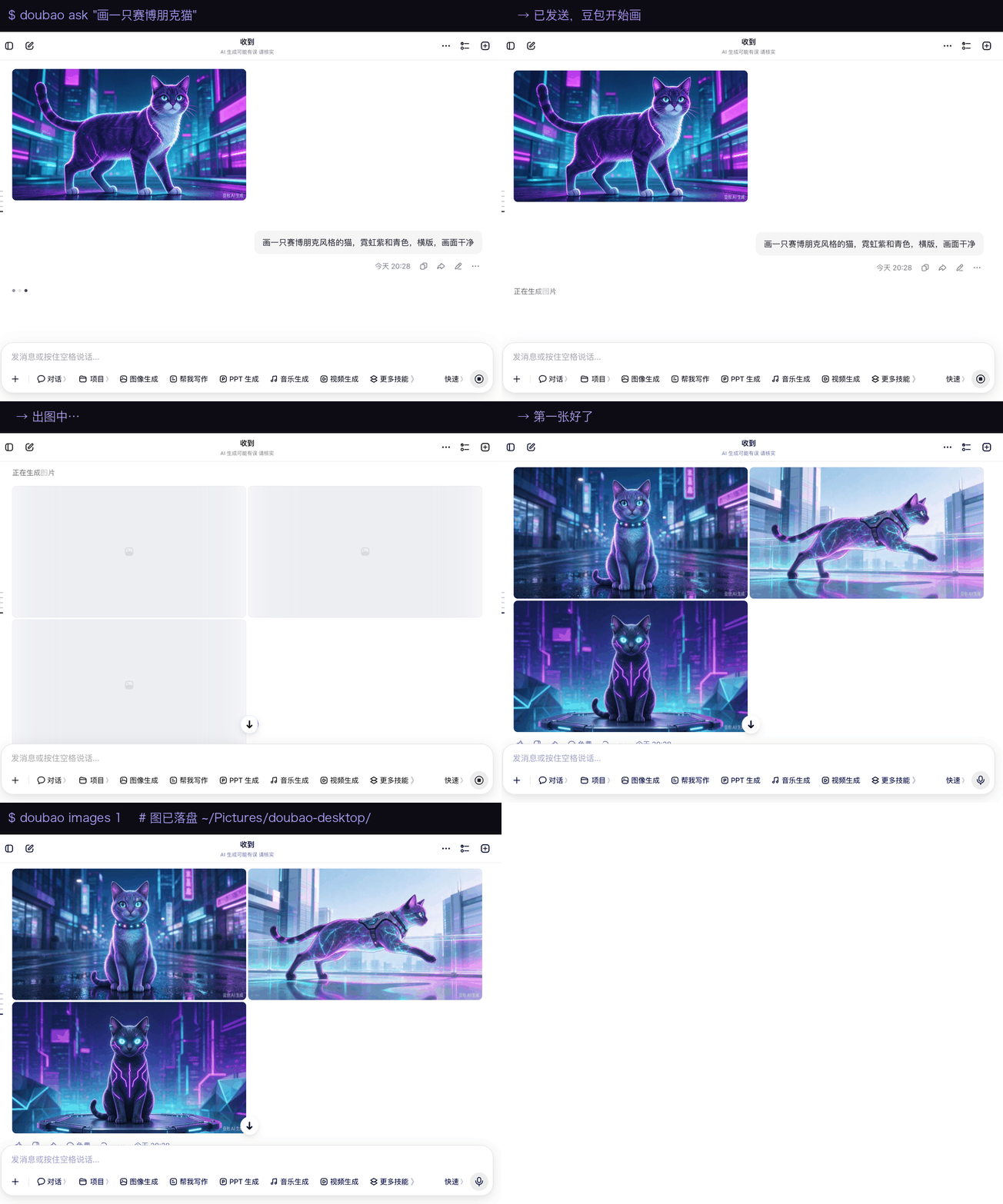
一句命令 → 豆包自己画 → 图落盘。没有脚本、没有模拟点击。
不需要云端 API key,跑的是你自己的豆包账号与额度。
平台支持
两个平台能力对等,差异只在"入口在哪"。完整说明见 docs/WINDOWS.md。
| 能力 | macOS 12+ | Windows 11 | 备注 |
|---|---|---|---|
| 对话 / 读回复 | ✅ | ✅ | |
| 出图 / 抓图 | ✅ | ✅ | 图自动落到本地文件夹 |
| 切模型(13 档 + 推理强度) | ✅ | ✅ | Windows 的空会话里只显示「快速 / 专家」,打开已有会话才有完整列表 |
| 技能面板 | ✅ | ✅ | |
| 插件 / 伙伴 | ✅ | ✅ | Windows 的工具栏没有插件按钮,工具改从「插件 · 技能 · 伙伴」页读取 |
| 会话 / 导航 / 搜索 / 上传 / 截图 | ✅ | ✅ | |
| MCP 常驻 | ✅ launchd | ✅ 登录任务或启动文件夹 | 非管理员时自动回退到启动文件夹 |
| 自带冒烟 | 28/28 | 28/28 | npm run smoke |
两个安装器都带平台识别:
install.sh在 Git Bash 里跑会自动转交install.ps1,install.ps1在非 Windows 上会提示改用install.sh。复制错一行也不会装坏。
冒烟想连"需要生成图样本"的用例一起跑(会消耗一次出图额度):
npm run smoke -- --gen-sample
手动装:带注释与验证
# macOS 12+(终端)
curl -fsSL https://raw.githubusercontent.com/JimmyWangJimmy/doubao-remote/main/install.sh | bash
# 国内 raw 偶尔被重置,等价命令:
#   git clone https://github.com/JimmyWangJimmy/doubao-remote.git && bash doubao-remote/install.sh

doubao status        # 期望 "ok": true
doubao ask "用一句话介绍你自己"
# Windows 11(PowerShell,先装 Node ≥ 21:winget install OpenJS.NodeJS.LTS)
irm https://raw.githubusercontent.com/JimmyWangJimmy/doubao-remote/main/install.ps1 | iex

doubao status        # 期望 "ok": true
doubao ask "用一句话介绍你自己"
Windows 也可以
git clone之后双击install.cmd,或powershell -ExecutionPolicy Bypass -File .\install.ps1。
两个平台的安装器做同样四件事:装 doubao 到用户 bin 目录、带调试端口拉起豆包、自检、打印下一步。
装完即可用,不需要开启任何服务。两个可选开关:
| 参数 | macOS / Linux | Windows | 作用 |
|---|---|---|---|
| 装 Agent 技能 | --skill | -Skill | 把技能装进 ~/.agents/skills/doubao-desktop(Windows:%USERPROFILE%\.agents\skills) |
| 常驻 MCP | --service | -Service | http://127.0.0.1:18812/mcp 长期在线(复杂任务或纯 MCP 宿主才需要);macOS 用 launchd,Windows 用登录任务或启动文件夹 |
| 全都要 | --all | -All | 等价于上面两个 |
Windows 的安装细节、平台差异与已知限制见 docs/WINDOWS.md。
从源码跑(开发者 / 想改代码)
git clone https://github.com/JimmyWangJimmy/doubao-remote.git && cd doubao-remote
open -a Doubao --args --remote-debugging-port=9333   # macOS,只需一次;Windows 用 doubao ensure
node src/server.js                                   # → http://127.0.0.1:18812/mcp
18812 已占用(
EADDRINUSE)说明 MCP 已在跑:doubao service status确认即可,别再起第二个。
接入客户端
| 你的情况 | 选哪条 |
|---|---|
| Agent 能跑 shell(Claude Code / Cursor / DSH / Codex) | 只装 Skill + CLI,不开服务。复杂任务 Agent 自己 doubao service start |
| 宿主只能走 MCP(没有 bash) | bash install.sh --service,把 http://127.0.0.1:18812/mcp 填进客户端 |
| 要给别人 / 别的程序复用同一连接 | 同上,MCP 更适合长连接与结构化参数 |
各客户端配置样例:docs/CLIENTS.md
用法示例
| 想做的事 | 跑这条 |
|---|---|
| 问一句 | doubao ask "用一句话介绍你自己" |
| 出图并取回 | doubao ask "画一张紫罗兰短发少女立绘,3:4" 180000 → doubao images 1 |
| 看它现在在干什么 | doubao screenshot |
| 换模型 / 看技能 | doubao set-model "豆包 2.1 Lite" · doubao skills |
| 找历史对话 | doubao conversations 20 → doubao open "介绍自己" |
📚 文档
| 文档 | 内容 |
|---|---|
| docs/TOOLS.md | 23 个工具清单 + CLI 速查 |
| docs/CLIENTS.md | 各客户端配置样例 |
| docs/CAPABILITIES.md | 13 个模型、30 个内置技能、本机技能注入、全部 testid |
| docs/ARCHITECTURE.md | 模块职责与数据流 |
| docs/PITFALLS.md | 14 条踩坑 |
| docs/SMOKE.md | 28 项冒烟报告 |
| docs/WINDOWS.md | Windows 安装、平台差异、实测结果与已知限制 |
| docs/ROADMAP.md | 待办与不做的事 |
| skills/doubao-desktop/SKILL.md | Agent 用的 Skill |
| docs/LAUNCH.md | 推广手册:渠道矩阵、可直接复制的文案、目录提交清单 |
| CONTRIBUTING.md · CHANGELOG.md | 怎么改、改了什么 |
许可
MIT。仅供本机自动化与自用;豆包的服务条款、账号与内容归属仍归字节跳动与你本人。






