Listed from the MCP registry; nobody on Odel publishes it.
Is this yours? Claim it
LinkedIn Post Search
Search public LinkedIn posts by keyword, name or hashtag, with engagement, via a hosted MCP server.
One address for any MCP client. Your key stays in your Odel vault.
What it does
- Reads
- Writes
- High impact
At most: only reads or looks up information.
What it costs
FreeOdel charges nothing per call. The publisher may charge for its own service.
What it asks for at sign-in
| Access to | Read | Change |
|---|---|---|
| Full api access | Not stated: full_api_access | |
From the sign-in at console-backend.apify.com, as the endpoint publishes it. You approve it there.
Tools
None listed · checked 3 Nov 2026Odel could not list its tools without signing in.
🔎 LinkedIn Post Search API: Search LinkedIn Posts by Keyword from Python and MCP
LinkedIn post search by keyword, name, phrase or #hashtag: get every matching public post as JSON, with the full text, author, date, reactions, comments, images and links. No LinkedIn login, no cookie.
- Actor: LinkedIn Post Search API on Apify
- Input schema: input parameters
- Get a free API token: apify.com
This repo is a Python and MCP quick-start for the LinkedIn Post Search API on Apify. Give it keywords, names or hashtags and a date window such as the past day or the past week, and it returns the public LinkedIn posts that mention them, one row per post. It is the search LinkedIn itself only offers to logged-in members, run as an API over the public side of LinkedIn: no account, no session cookie, nothing attributed to you. Run it on a schedule and it becomes a LinkedIn social listening feed; run it once with a date range and it is research for a story, a launch or an event.
Coverage is the public, indexed part of LinkedIn. Posts from members who keep their activity private, and posts published in the last few hours, may be missing, and a signed-out visitor sees at most 10 comments per post. For a mention monitor that is usually what you want: the posts that are public and spreading.
Responsible use: the API returns only what LinkedIn shows signed-out visitors and collects no contact details, and you are responsible for using the data lawfully.
Video Walkthrough
Text walkthrough
The LinkedIn Post Search API turns a keyword into a list of public LinkedIn posts. You pass keywords (up to 20 names, phrases or #hashtags, each matched as an exact phrase), pick postedWithin (day, week, month, year) or a startDate and endDate, and cap the run with maxPostsPerKeyword. Each row carries text, authorName, authorUrl, authorType, datePosted, numLikes, numComments, topComments, hashtags, images, embeddedLinks, taggedPeople and taggedCompanies, plus matchedKeyword and the search page and rank it came from. For LinkedIn hashtag analytics, pass #semiconductors with postedWithin: "week" and sort the rows by numLikes to see which posts and authors lead the tag; for brand monitoring, pass your company and your executives with postedWithin: "day" on a daily schedule. The default run in this repo asks for five posts about one event and costs well under a cent; posts and search pages read in the last 7 days come back from a shared cache, so repeats are cheaper and faster.
Quick Start
Prerequisites
- Python 3.11 or higher
- An Apify account and API key (get a free key here)
-
Clone the repository
bashgit clone https://github.com/johnisanerd/Apify-LinkedIn-Post-Search-API.git cd Apify-LinkedIn-Post-Search-API -
Install dependencies with UV
bash# Install UV if you do not have it: curl -LsSf https://astral.sh/uv/install.sh | sh # Install project dependencies: uv sync -
Configure your API key
bashcp .env.example .env # Edit .env and add your Apify API key # Get your free API key at: https://apify.com?fpr=9n7kx3 -
Run the example
bashuv run python linkedin-post-search-api-example.py
The script starts one run for "Jackson Hole Symposium" with maxPostsPerKeyword: 5, waits for it to finish, prints each post with its author, date, reactions and link, and then prints the run's RUN_SUMMARY (pages fetched, cache hits, why each keyword stopped). Three recipe helpers mirror the use cases on the Actor's Examples tab:
uv run python linkedin-post-search-api-example.py hashtag    # track #semiconductors this week
uv run python linkedin-post-search-api-example.py mentions   # past-day brand and executive mentions
uv run python linkedin-post-search-api-example.py top        # most liked posts on a topic this week
Alternative: set the API key directly
export APIFY_API_TOKEN="your_api_key_here"
uv run python linkedin-post-search-api-example.py
Why Use This LinkedIn Post Search API?
No LinkedIn login or cookie
The API reads only what LinkedIn shows a signed-out visitor. There is no field for an account, a password or an li_at cookie, so no LinkedIn account is ever at risk, and anyone with a free Apify token can search LinkedIn posts without an account.
A date window that is checked, not guessed
postedWithin and the startDate / endDate range are applied to the search and then checked against every post's own timestamp before it is delivered, so you are never billed for a post outside the window. LinkedIn's own feed cannot filter posts by date; this API can.
Engagement and context on every post
Each row carries reactions, comment count, up to 10 of the comments a signed-out visitor sees, the people and companies tagged in the post, the hashtags, the media and links, and the original post when the match is a share.
A shared cache that makes monitors cheap
Posts and search pages read in the last 7 days are reused across runs. Cached search pages are free, and a daily monitor pays only for the pages and posts that are new.
Pay per search page and per post, no start fee
One small event per page of search results fetched fresh and one per post delivered. Error rows, posts outside the window and cached pages cost nothing.
Recipes
These are the use cases the Actor's Examples tab is built around. Each is a ready input you can paste into the Apify Console or into RUN_INPUT in the example script.
Track a LinkedIn hashtag: posts, reactions and comments
{ "keywords": ["#semiconductors"], "postedWithin": "week", "maxPostsPerKeyword": 50 }
Every public post under the tag this week, with numLikes, numComments, author and date. Sort by reactions for LinkedIn hashtag analytics: which posts and which authors lead the conversation.
Monitor brand mentions on LinkedIn every day
{ "keywords": ["Your Company", "Your CEO"], "postedWithin": "day", "maxPostsPerKeyword": 100 }
LinkedIn social listening on a schedule. Save this as a task, attach a schedule such as 0 7 * * *, and each morning's dataset is the list of new public posts that mention you.
Search LinkedIn posts by keyword and export to CSV
{ "keywords": ["Jackson Hole Symposium"], "maxPostsPerKeyword": 50 }
A flat row per post: text, authorName, authorUrl, datePosted, numLikes, numComments. The run's Posts view downloads straight to CSV or Excel.
Find the most liked LinkedIn posts on a topic this week
{ "keywords": ["artificial intelligence"], "postedWithin": "week", "maxPostsPerKeyword": 100 }
The viral posts on a topic, ready to sort by numLikes. The top recipe in the example script prints the five most liked.
Search LinkedIn posts by date range for an event
{ "keywords": ["Jackson Hole Symposium"], "startDate": "2026-08-18", "endDate": "2026-08-29", "includeArticles": true }
Every public post and long-form article about an event in its window, each with datePosted, author and text. Useful for research after the fact, when LinkedIn's own search cannot go back by date.
Schedule tip
Any of these inputs becomes a monitor: save it as a task, attach a schedule (0 7 * * * daily, 0 */6 * * * every six hours, 0 9 * * 1 Mondays), and send each run's rows onward with Apify integrations to Slack, Google Sheets, a webhook or a database.
Features
Core Capabilities
- Up to 20 keywords, names or #hashtags per run, each searched as an exact phrase across public LinkedIn posts
- Rolling windows (
postedWithin: day, week, month, year) or a customstartDateandendDate maxPostsPerKeywordfrom 1 to 1,000 to cap cost;includeArticlesto add long-form LinkedIn articles- Posts and search pages reused from a shared cache for 7 days, with short windows refreshed every 6 hours (day) and daily (week)
- Datasets download as JSON, CSV or Excel, with a ready-made Posts view
- Works as an MCP tool in Claude, Cursor and ChatGPT (see the install sections below)
Data Quality
- Every post's own timestamp is checked against the window before delivery; posts outside it are never fetched or billed
matchedKeyword,searchPageandsearchRankon every row, so results are traceable- A post found by two keywords is delivered once
fromCacheandfetchedAtshow whether a row came from the shared cache and when it was read- A keyword or post that cannot be read produces an error row with a plain-language reason, never a charge
RUN_SUMMARYreports pages fetched and cached, posts delivered and skipped, and why each keyword stopped
It pairs with the rest of the LinkedIn suite: the LinkedIn Posts API for everything one person or company has posted, the LinkedIn Profile API for full profiles of the authors you find (Python example repo), the LinkedIn Company API for the companies that post (Python example repo), and the LinkedIn People Search API to find people by name, title or company.
Coverage, speed and limits
- Coverage. The API finds posts that search engines have indexed from the public side of LinkedIn. Posts from private accounts are not found, and new posts appear within hours, not seconds (three to four hours in testing).
- Speed. A one-keyword, one-page run finishes in under a minute. A busy keyword with hundreds of posts takes several minutes, so the example script starts the run and waits rather than using the synchronous endpoint.
- Comments. Up to 10 per post, which is what LinkedIn shows a signed-out visitor. Reposts and share counts are not shown to guests.
- Not available. Who reacted, private posts, LinkedIn's own relevance ranking, and author filters that need a login.
Pricing
The API is priced per event: one search page event per page of results fetched fresh for a keyword (about 8 to 10 posts per page; pages served from the shared cache are free), and one post scraped event per post delivered. Error rows, posts outside your window and duplicates in a run are never charged. Check the Pricing tab on the Actor page for current rates; the default five-post run here is one page plus five posts. You can set a maximum cost per run in the Apify Console, or pass max_total_charge_usd to start() in Python as the example does.
Usage Examples
Basic Example
The default run in the example script:
{ "keywords": ["Jackson Hole Symposium"], "maxPostsPerKeyword": 5 }
Advanced Example
Two keywords in a custom date range, articles included, using every input parameter:
{
  "keywords": ["Jackson Hole Symposium", "#semiconductors"],
  "startDate": "2026-08-18",
  "endDate": "2026-08-29",
  "maxPostsPerKeyword": 100,
  "includeArticles": true
}
From an AI agent over MCP
When an assistant calls the API, keep the cap small and ask a question it can answer from the rows:
{ "keywords": ["#semiconductors"], "postedWithin": "day", "maxPostsPerKeyword": 20 }
"Which of these posts got the most reactions, and who wrote them?"
Input Parameters
Only keywords is required. Everything else narrows or limits the run.
| Parameter | Type | Required | Default | Description |
|---|---|---|---|---|
keywords | array of string | YES | prefilled ["Jackson Hole Symposium"] | Names, phrases, companies or #hashtags to find, as plain words. Each is searched as an exact phrase. Up to 20 per run. Search operators and quote marks are refused. |
postedWithin | string | no | any | Only posts from the past day, week, month or year. Ignored when a start or end date is set. |
startDate | string (YYYY-MM-DD) | no | empty | Only posts published on or after this day (UTC). Overrides postedWithin. |
endDate | string (YYYY-MM-DD) | no | empty | Only posts published on or before this day (UTC). |
maxPostsPerKeyword | integer | no | 50 | Stop after delivering this many posts for one keyword, 1 to 1,000. |
includeArticles | boolean | no | false | Also search long-form LinkedIn articles (linkedin.com/pulse). Each keyword then runs two searches. |
Output Format
A post row from a real run, shortened:
{
  "resultType": "post",
  "postId": "7363908644226125825",
  "postUrl": "https://www.linkedin.com/posts/andrew-krei-cfa_the-feds-jackson-hole-symposium-is-always-activity-7363908644226125825-w3c1",
  "postType": "repost",
  "mediaType": "image",
  "datePosted": "2025-08-20T12:23:55.561Z",
  "text": "The Fed's Jackson Hole symposium is always a big event for markets, but this week's gathering will be especially important...",
  "authorName": "Andrew Krei, CFA",
  "authorUrl": "https://www.linkedin.com/in/andrew-krei-cfa",
  "authorFollowers": 2758,
  "authorType": "Person",
  "numLikes": 58,
  "numComments": 1,
  "taggedCompanies": [{ "name": "Bloomberg News", "link": "https://www.linkedin.com/company/bloomberg-news" }],
  "summary": "Post by Andrew Krei, CFA, 58 reactions, 1 comments, posted 2025-08-20",
  "matchedKeyword": "Jackson Hole Symposium",
  "searchRank": 1,
  "searchPage": 1,
  "fromCache": false,
  "fetchedAt": "2026-10-10T14:03:22Z"
}
An error row, which is never charged:
{
  "resultType": "error",
  "errorMessage": "Search page 2 for 'Jackson Hole Symposium' could not be fetched: the search service was busy.",
  "matchedKeyword": "Jackson Hole Symposium",
  "searchPage": 2
}
Fields you will use most:
| Field | Rows | Description |
|---|---|---|
resultType | all | post for a post or article, error for a keyword or post that could not be read. |
postUrl, postId | post | The public post link and LinkedIn's post id, a stable key for deduplication across runs. |
datePosted | post | When the post was published (ISO 8601, UTC). |
text, title | post | The full post text and its first line. |
authorName, authorUrl, authorType | post | Who posted it, and whether the author is a Person or an Organization. |
authorHeadline, authorFollowers | post | The author's headline and follower count, when LinkedIn shows them. |
numLikes, numComments | post | Reactions and comments. |
topComments | post | Up to 10 comments, each with the commenter's name, date, text and reactions. |
mediaType, images, videos, embeddedLinks, document | post | What the post carries: text, image, video, document or article, with the media and links. |
taggedPeople, taggedCompanies, hashtags | post | @-mentions and hashtags in the post. |
resharedPost | post | The original post, when this one shares another. |
matchedKeyword, searchPage, searchRank | post | Which keyword found the post and where it ranked. |
fromCache, fetchedAt | post | Whether the row came from the shared cache, and when it was read. |
errorMessage | error | What could not be done and why, in plain language. |
The run's RUN_SUMMARY record (key-value store) reports searchPagesFetched, searchPagesFromCache, postsDelivered, postsSkippedOutsideWindow and pagesStoppedBy for every run.
People also search for
Will this put my LinkedIn or LinkedIn Recruiter account at risk?
No. It reads public LinkedIn pages only, the ones anyone can open while signed out. It never logs in and never asks for your cookies: there is no input for an account, a password or an li_at session cookie. Nothing it does is tied to your LinkedIn account, your LinkedIn Recruiter seat or your Sales Navigator license. The requests run on Apify's servers, not in your browser, so nothing connects them to you, and you can keep working in Recruiter while a run is going.
How do I search LinkedIn posts by keyword?
Put the keyword in keywords and run the API. Each keyword is matched as an exact phrase across public LinkedIn posts, and every match comes back as a row with text, author, date and engagement. Add postedWithin or a date range to narrow it.
Can I search LinkedIn posts without an account or login?
Yes, for public posts. LinkedIn's own content search needs a login, so the API finds public posts through search-engine indexing and reads each post's public page the way a signed-out visitor sees it.
How do I do LinkedIn social listening?
Save a past-day search for your brand, products and executives as a task and schedule it every morning. Each run's dataset is that day's mention list; send it to Slack, a sheet or a database with Apify integrations. The Monitor brand mentions recipe above is the starting input.
How do I track a hashtag on LinkedIn?
Enter the hashtag with the # and pick a window. Every post under the tag comes back with reactions, comments and author, so LinkedIn hashtag analytics is a sort by numLikes away.
Can I search LinkedIn posts by date?
Yes. postedWithin covers the past day, week, month or year, and startDate with endDate covers any range. Every post's own timestamp is checked against the window before it is delivered.
Is there a social listening API for LinkedIn?
This is one: keyword in, public posts with authors and engagement out, on a schedule if you want it, callable from Python, n8n, Make, Zapier or an AI agent over MCP.
Install in Claude Cowork Desktop
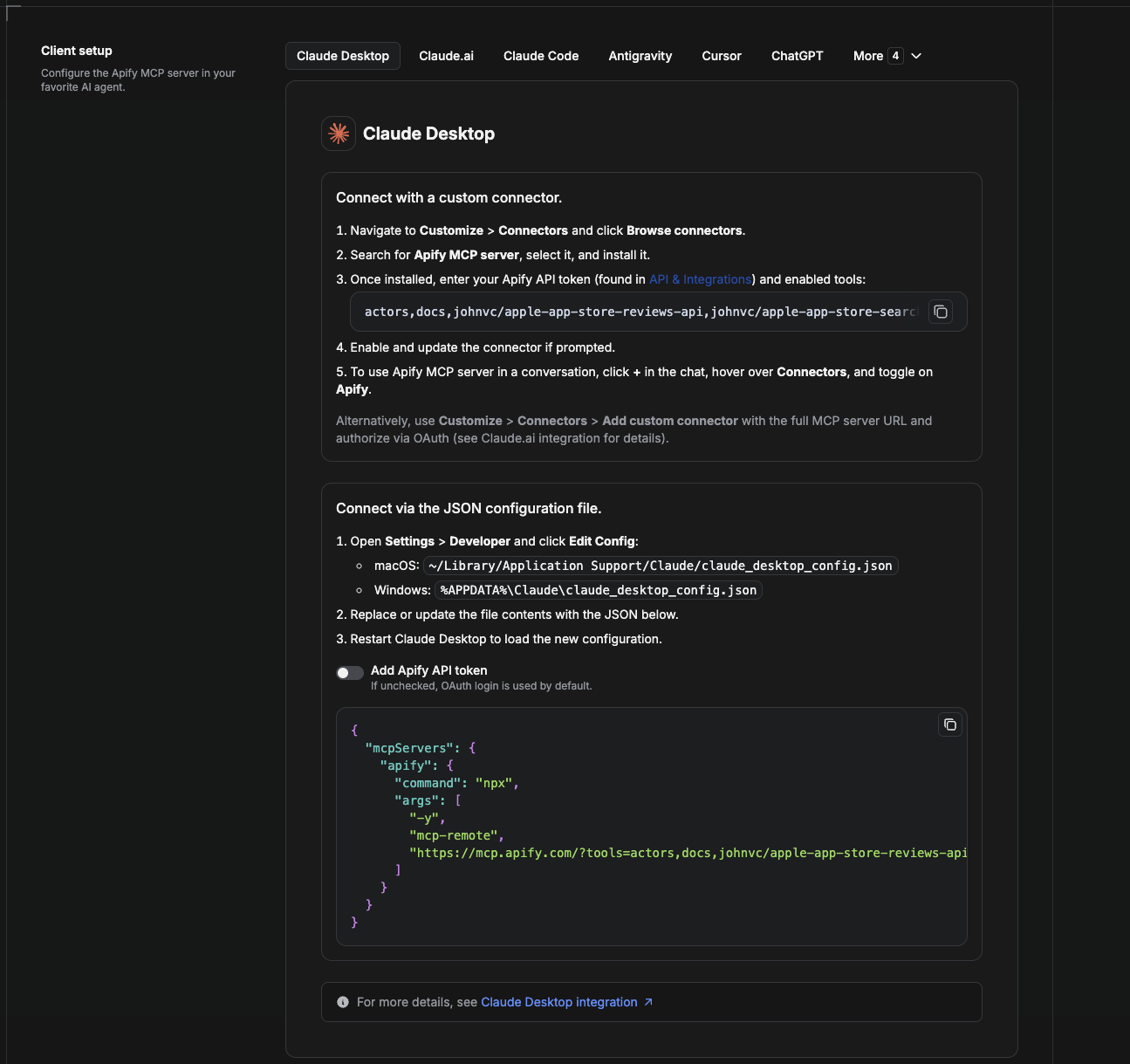
Cowork is the desktop app's automation mode. To give it the LinkedIn Post Search API as a tool, add the Apify MCP server as a connector.
- Open the Claude desktop app and go to Settings → Connectors (or Settings → Developer → Edit Config to edit
claude_desktop_config.jsondirectly).- macOS:
~/Library/Application Support/Claude/claude_desktop_config.json - Windows:
%APPDATA%\Claude\claude_desktop_config.json
- macOS:
- Add the Apify MCP server, preloaded with only this Actor:
{
  "mcpServers": {
    "apify": {
      "command": "npx",
      "args": [
        "-y",
        "mcp-remote",
        "https://mcp.apify.com/?tools=actors,docs,johnvc/linkedin-post-search-api"
      ]
    }
  }
}
- Restart the app. When Cowork first calls the tool, complete the OAuth prompt in your browser, or add your Apify API token in the connector settings to skip OAuth.
- In a Cowork chat, confirm the tool is available and ask it to run the LinkedIn Post Search API.
Download the desktop app and start a free trial: https://claude.ai/referral/uIlpa7nPLg More help: https://docs.apify.com/platform/integrations/claude-desktop
Install in Claude Code
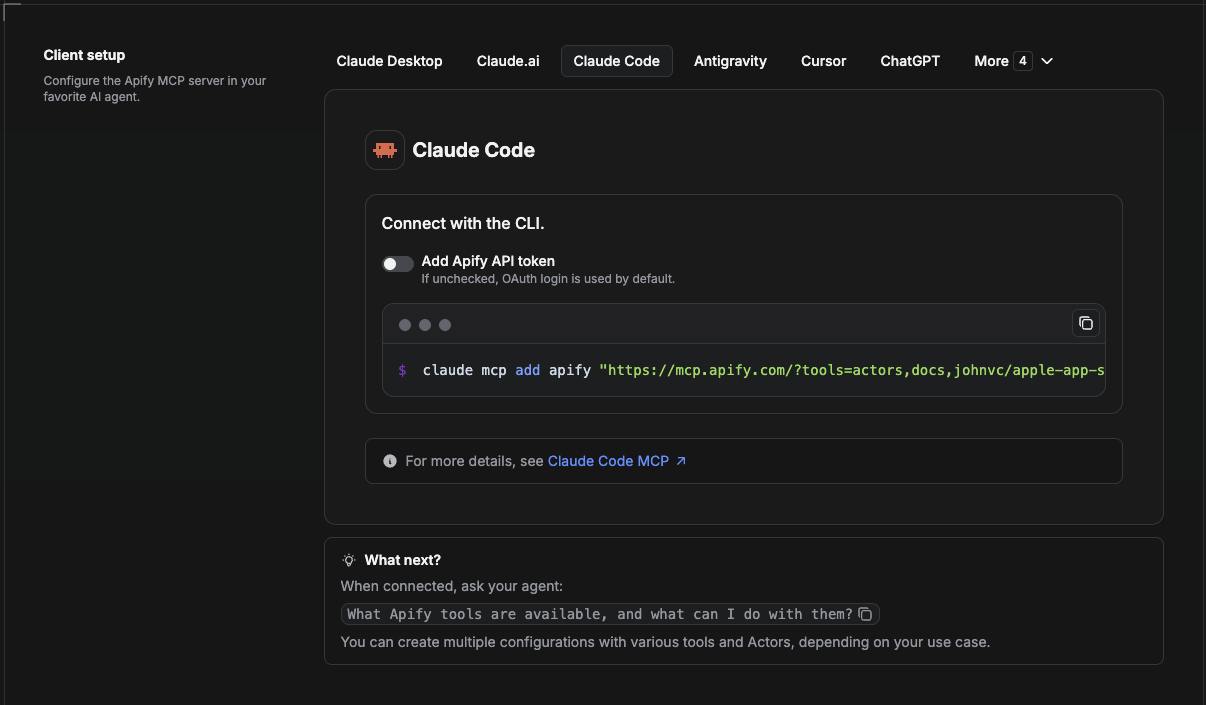
Claude Code is the command-line tool. Add the Actor's MCP server with one command:
claude mcp add --transport http apify \
  "https://mcp.apify.com/?tools=actors,docs,johnvc/linkedin-post-search-api"
To use a token instead of browser OAuth:
claude mcp add --transport http apify \
  "https://mcp.apify.com/?tools=actors,docs,johnvc/linkedin-post-search-api" \
  --header "Authorization: Bearer YOUR_APIFY_TOKEN"
Then verify with claude mcp list, or run /mcp inside a session. Ask Claude Code to call the LinkedIn Post Search API.
Try Claude Code free: https://claude.ai/referral/uIlpa7nPLg Claude Code MCP docs: https://code.claude.com/docs/en/mcp
Install in Claude (website)
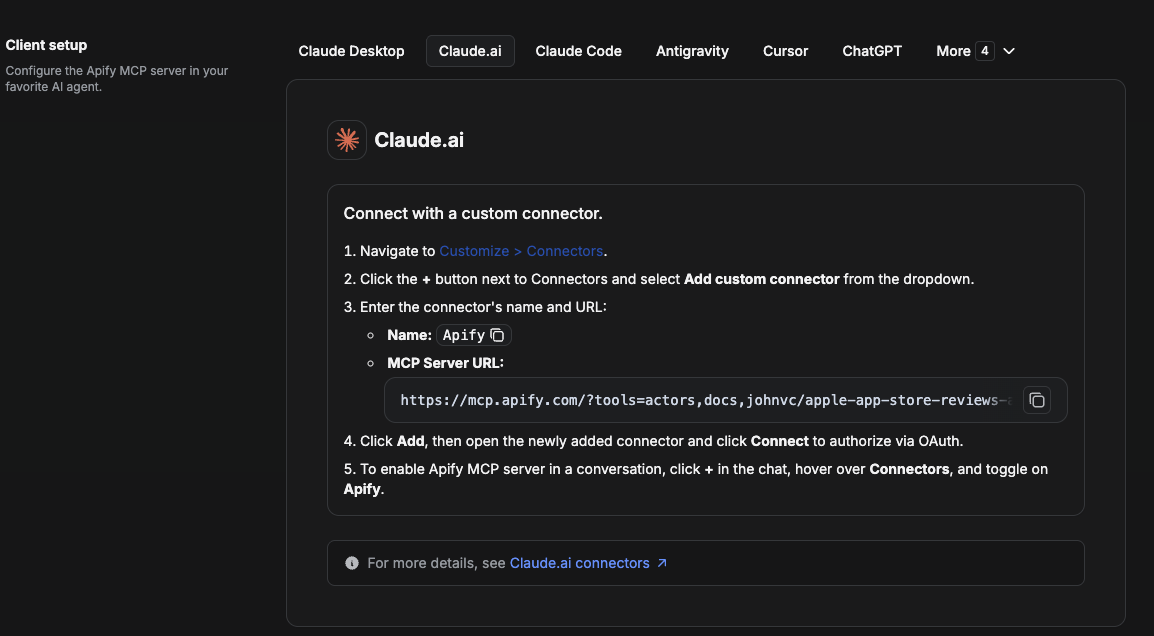
On claude.ai you add Apify as a connector, then enable just this Actor's tool.
- Go to Settings → Connectors → Browse connectors and search for Apify MCP server. Install it (enable or update if prompted).
- When connecting, authenticate with your Apify API token, and enable the tool
johnvc/linkedin-post-search-api. - In any chat, open + → Connectors and turn on Apify.
- Alternatively, choose Add custom connector and paste the full MCP URL
https://mcp.apify.com/?tools=actors,docs,johnvc/linkedin-post-search-api, using OAuth when prompted. - Ask Claude to run the LinkedIn Post Search API.
Open Claude on the web: https://claude.ai
Install in Cursor
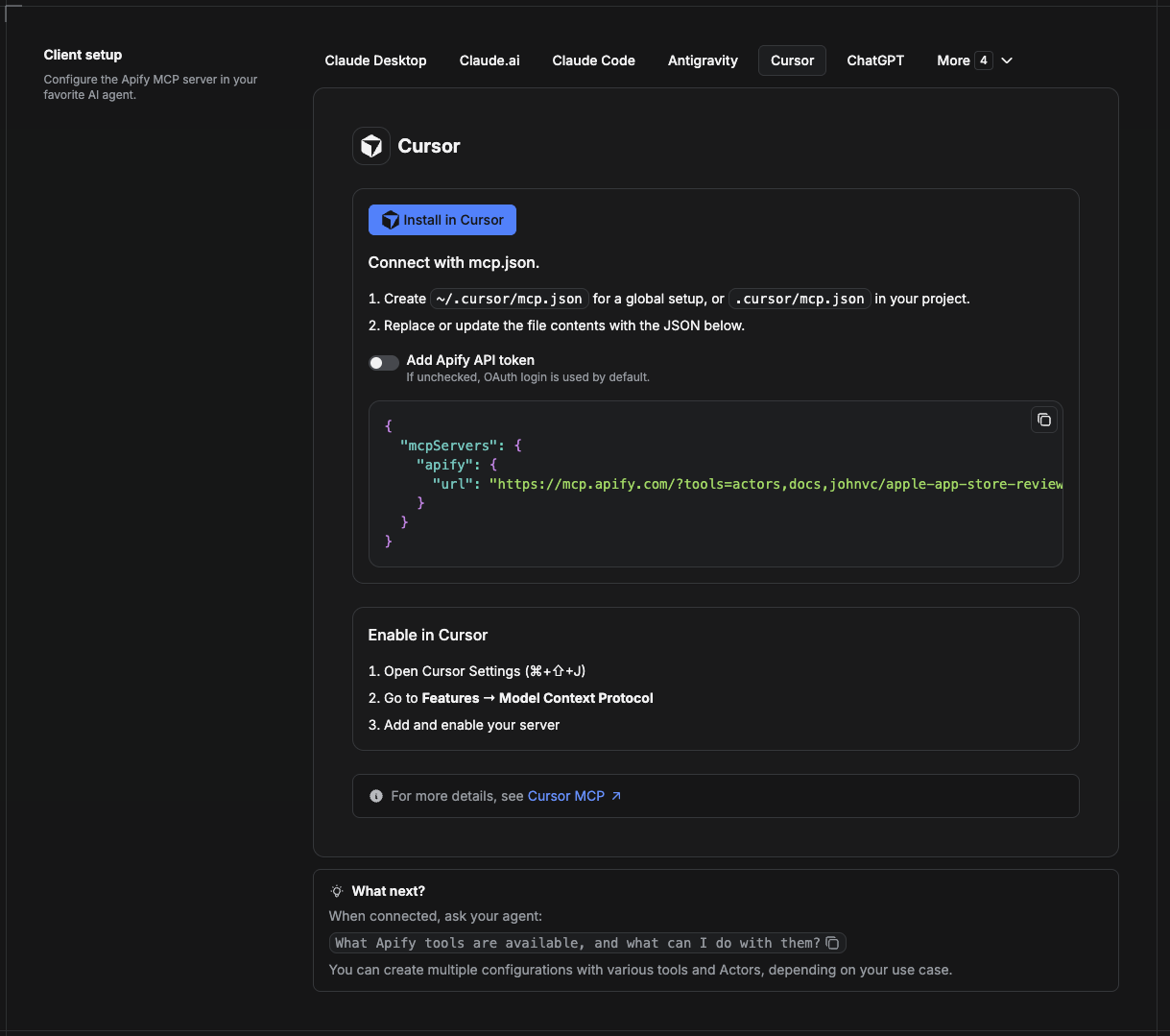
Cursor reads MCP servers from a project file at .cursor/mcp.json.
- In your project, create
.cursor/mcp.json:
{
  "mcpServers": {
    "apify": {
      "url": "https://mcp.apify.com/?tools=actors,docs,johnvc/linkedin-post-search-api"
    }
  }
}
- If you prefer token auth over browser OAuth, add a header:
{
  "mcpServers": {
    "apify": {
      "url": "https://mcp.apify.com/?tools=actors,docs,johnvc/linkedin-post-search-api",
      "headers": { "Authorization": "Bearer YOUR_APIFY_TOKEN" }
    }
  }
}
- Open Cursor → Settings → MCP and confirm the apify server is connected (green dot).
- In Composer or Chat, ask Cursor to call the LinkedIn Post Search API.
New to Cursor? Get it here: https://cursor.com/referral?code=XQP4VBLI3NNX
Install in ChatGPT
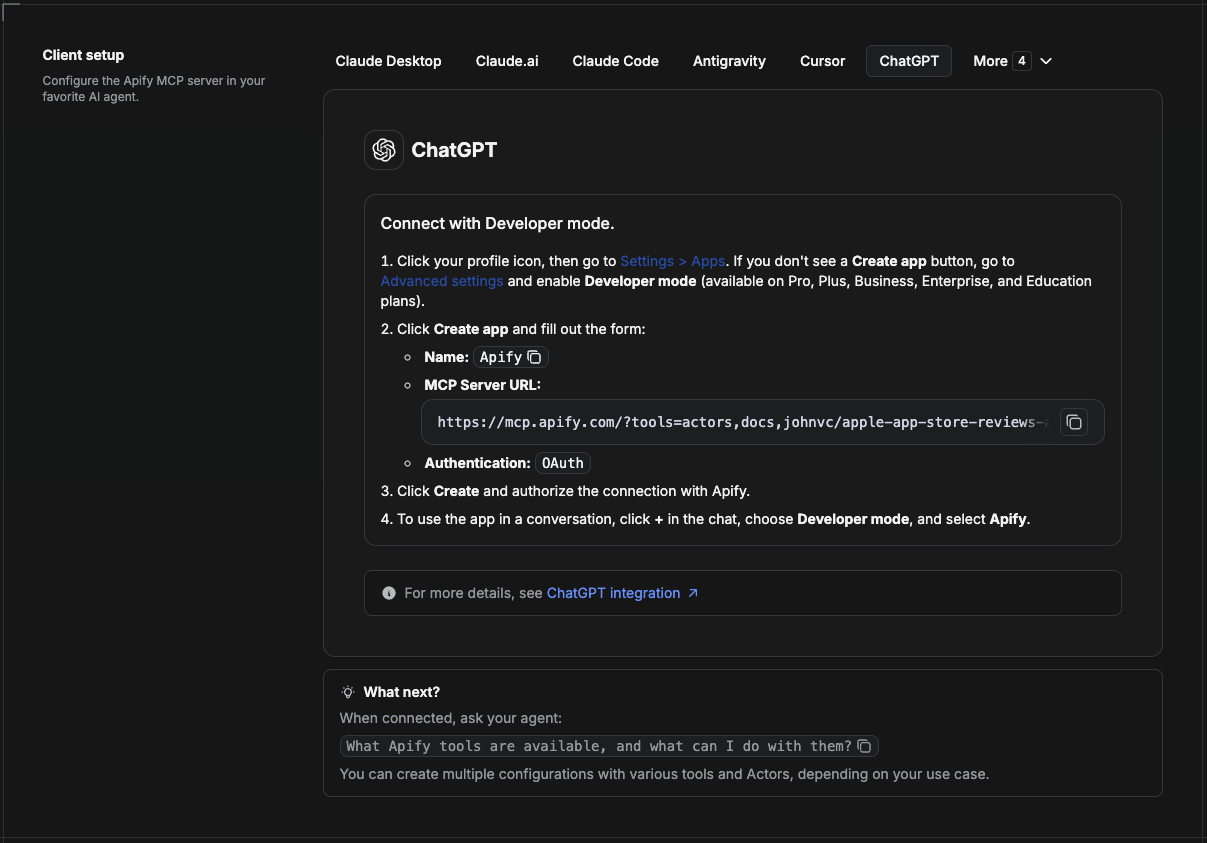
ChatGPT connects to the Apify MCP server through Developer mode (available on ChatGPT Pro, Plus, Business, Enterprise, and Education plans).
- Click your profile icon, then go to Settings > Apps. If you do not see a Create app button, open Advanced settings and enable Developer mode.
- Click Create app and fill out the form:
- Name: Apify
- MCP Server URL:
https://mcp.apify.com/?tools=actors,docs,johnvc/linkedin-post-search-api - Authentication: OAuth
- Click Create and authorize the connection with Apify.
- To use the app in a conversation, click + in the chat, choose Developer mode, and select Apify.
More help: https://docs.apify.com/platform/integrations/mcp
🌐 About Alpha OSINT
This example repo is part of Alpha OSINT, toolset of financial and operations data sources and APIs. See the Alpha OSINT LinkedIn map for the rest of the LinkedIn suite and how the Actors chain together. For support or requests for this actor, please start a ticket directly on our support page.
Use the LinkedIn Post Search API to power your mention monitoring, hashtag analytics and research workflows with structured results.
Last Updated: 2026.10.20








