
Runs on your machine from its package; the steps are below.
What it does
- Reads
- Writes
- High impact
At most: only reads or looks up information.
What it costs
FreeOdel charges nothing per call. The publisher may charge for its own service.
Runs locally over stdio
This server isn't hosted — your MCP client launches it from a package registry. Use one of the commands below, or drop the config into your client (e.g. Claude Desktop).
Run
npx -y engram-rs-mcp
MCP client config
{
  "mcpServers": {
    "engram": {
      "command": "npx",
      "args": [
        "-y",
        "engram-rs-mcp"
      ]
    }
  }
}engram-rs



Memory engine for AI agents. Two axes: time (three-layer decay & promotion) and space (self-organizing topic tree). Important memories get promoted, noise fades, related knowledge clusters automatically.
Most agent memory is a flat store — dump everything in, keyword search to get it back. No forgetting, no organization, no lifecycle. engram-rs adds the part that makes memory actually useful: the ability to forget what doesn't matter and surface what does.
Single Rust binary, one SQLite file, zero external dependencies. No Python, no Redis, no vector DB — curl | bash and it runs. ~10 MB binary, ~100 MB RSS, single-digit ms search latency.
Quick Start
# Install (interactive — will prompt for embedding provider config)
curl -fsSL https://raw.githubusercontent.com/kael-bit/engram-rs/main/install.sh | bash

# Store a memory
curl -X POST http://localhost:3917/memories \
  -d '{"content": "Always run tests before deploying", "tags": ["deploy"]}'

# Recall by meaning
curl -X POST http://localhost:3917/recall \
  -d '{"query": "deployment checklist"}'

# Restore full context (session start)
curl http://localhost:3917/resume
What It Does
Three-Layer Lifecycle
Inspired by the Atkinson–Shiffrin memory model, memories are managed across three layers by importance:
Buffer (short-term) → Working (active knowledge) → Core (long-term identity)
      ↓                       ↓                           ↑
   eviction              importance decay           LLM quality gate
- Buffer: Entry point for all new memories. Temporary staging — evicted when below threshold
- Working: Promoted via consolidation. Never deleted, importance decays at different rates by kind
- Core: Promoted through LLM quality gate. Never deleted
LLM Quality Gate
Promotion isn't rule-based guesswork — an LLM evaluates each memory in context and decides whether it genuinely warrants long-term retention.
Buffer → [LLM gate: "Is this a decision, lesson, or preference?"] → Working
Working → [sustained access + LLM gate] → Core
Automatic Decay
Decay is activity-driven — it only fires during active consolidation cycles, not wall-clock time. If the system is idle, memories stay intact.
Exponential decay follows the Ebbinghaus forgetting curve — fast at first, then long-tail. Memories never fully vanish (floor = 0.01), remaining retrievable under precise queries. When a memory is recalled, it gets an activation boost, strengthening frequently-used knowledge.
| Kind | Decay rate | Half-life | Use case |
|---|---|---|---|
episodic | Fastest | ~35 epochs | Events, experiences, time-bound context |
semantic | Medium | ~58 epochs | Knowledge, preferences, lessons (default) |
procedural | Slowest | ~173 epochs | Workflows, instructions, how-to |
Algorithm Visualizations
| Chart | What it shows |
|---|---|
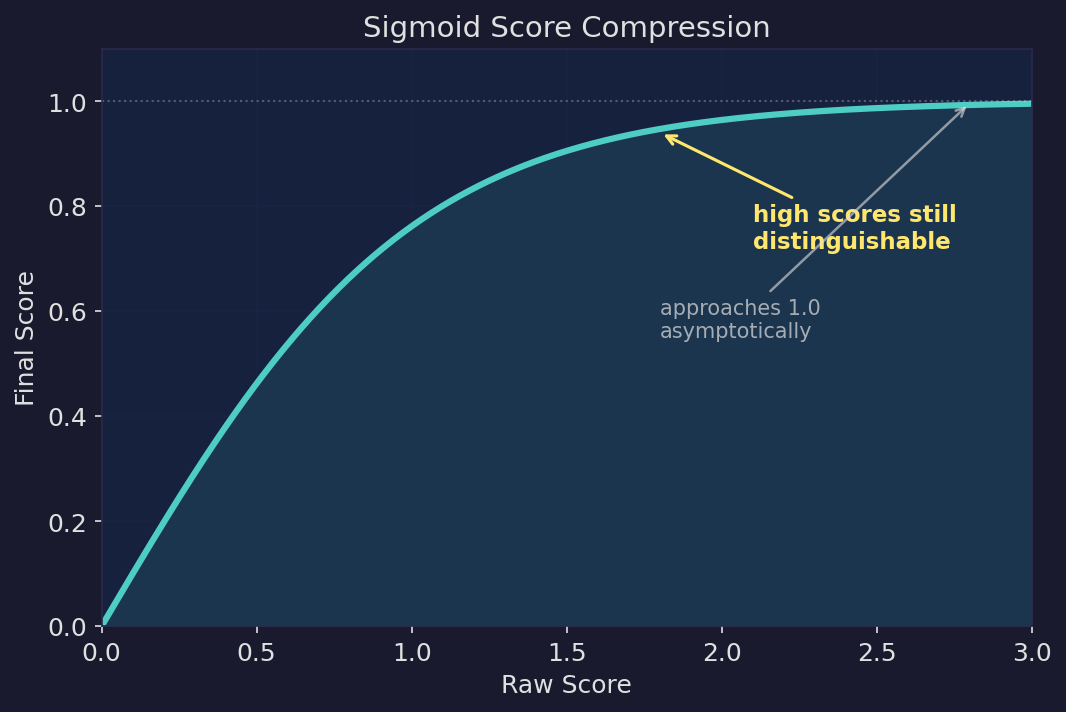 | Sigmoid score compression. Raw scores are mapped through a sigmoid function, approaching 1.0 asymptotically. High-relevance results remain distinguishable instead of being crushed into the same value. |
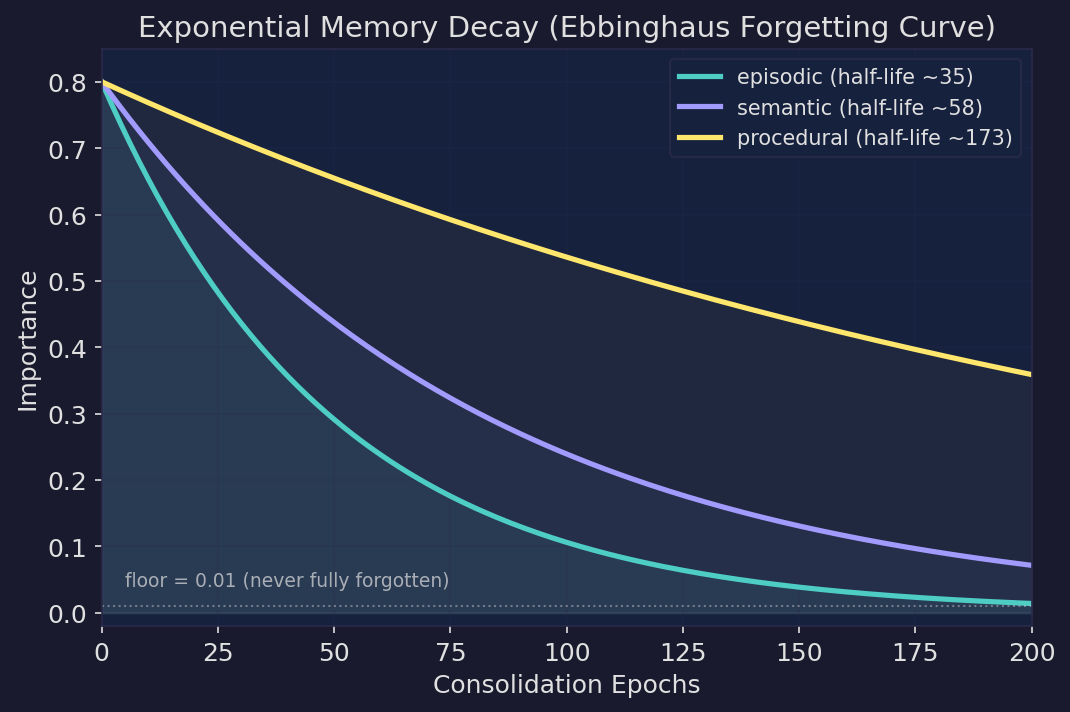 | Ebbinghaus forgetting curve. Exponential decay with kind-differentiated rates — episodic memories fade fastest, procedural slowest. Floor at 0.01 means memories never fully vanish; they remain retrievable under precise queries. |
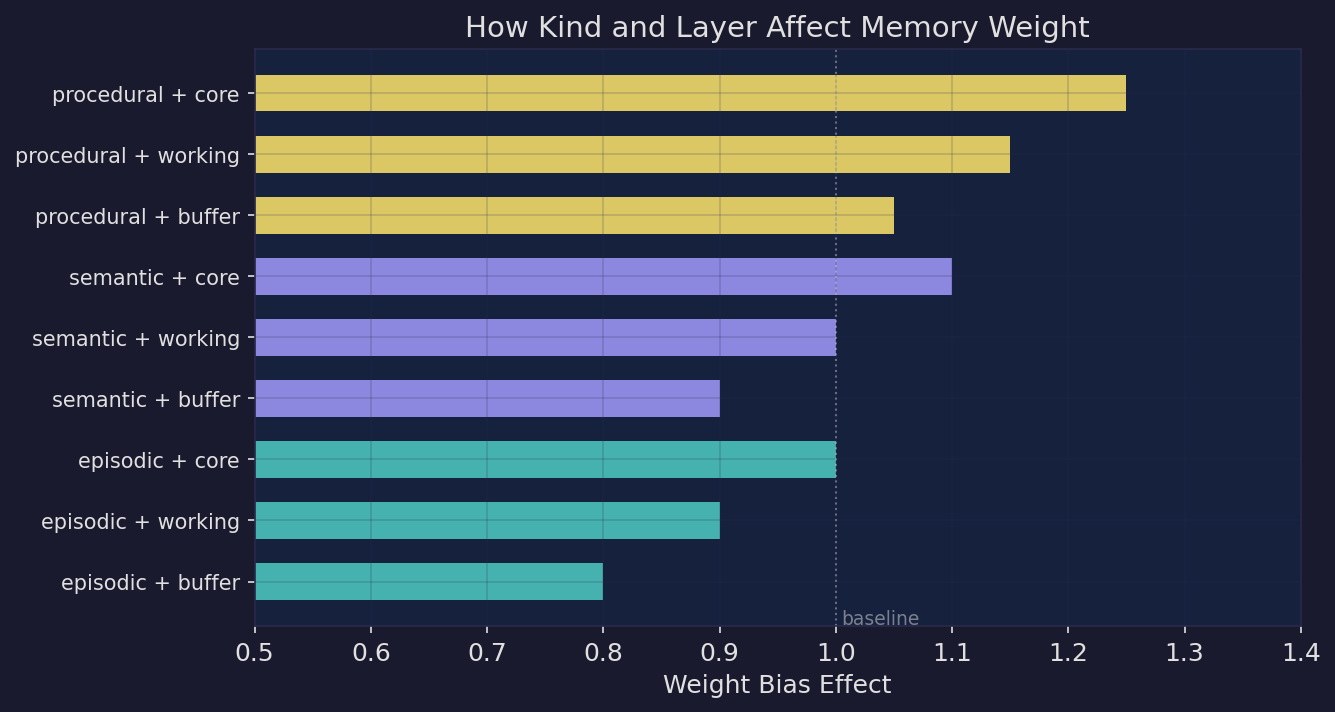 | Kind × layer weight bias. Additive biases adjust memory weight by type and layer. Procedural+core memories rank highest, episodic+buffer lowest — but the spread stays bounded so no single combination dominates. |
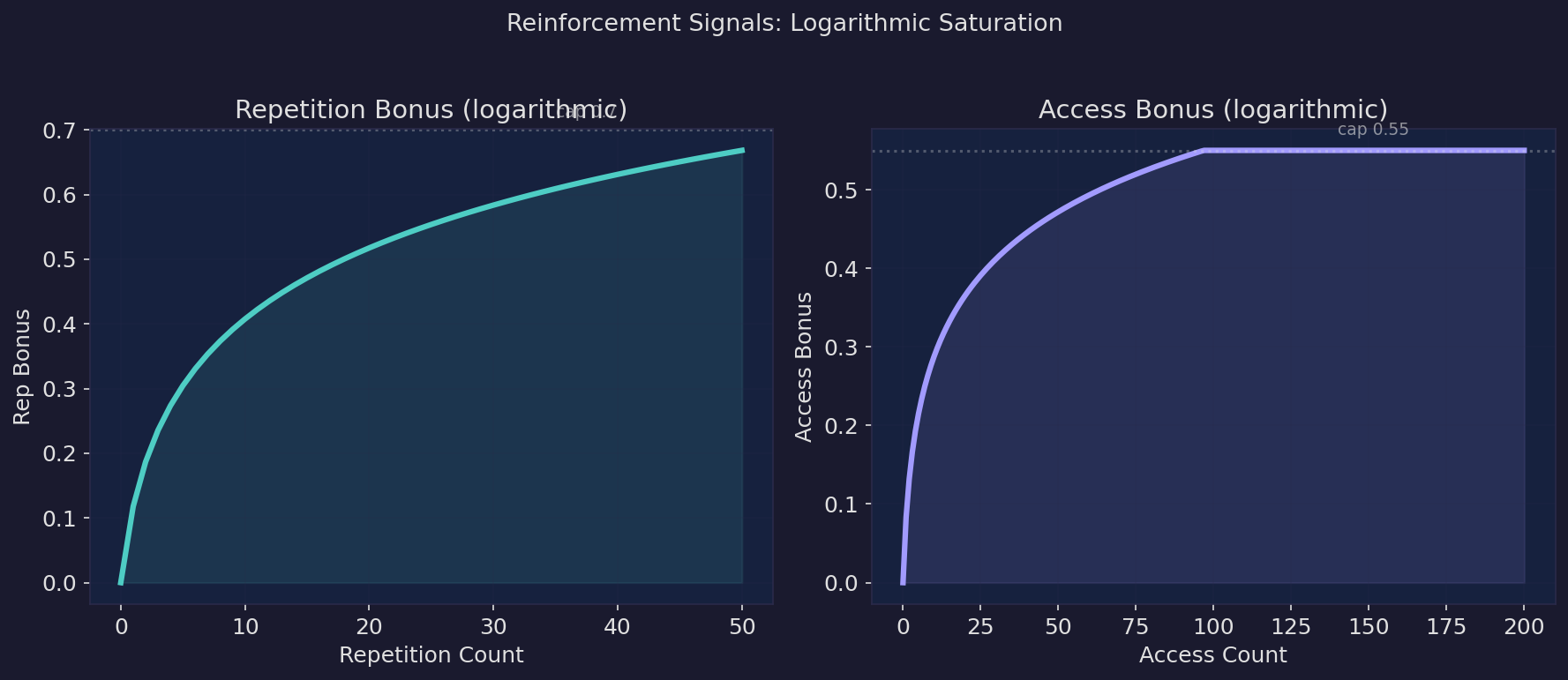 | Reinforcement signals. Repetition and access bonuses follow logarithmic saturation. Early interactions matter most; later ones contribute diminishing returns, discriminating between "used occasionally" and "used daily". |
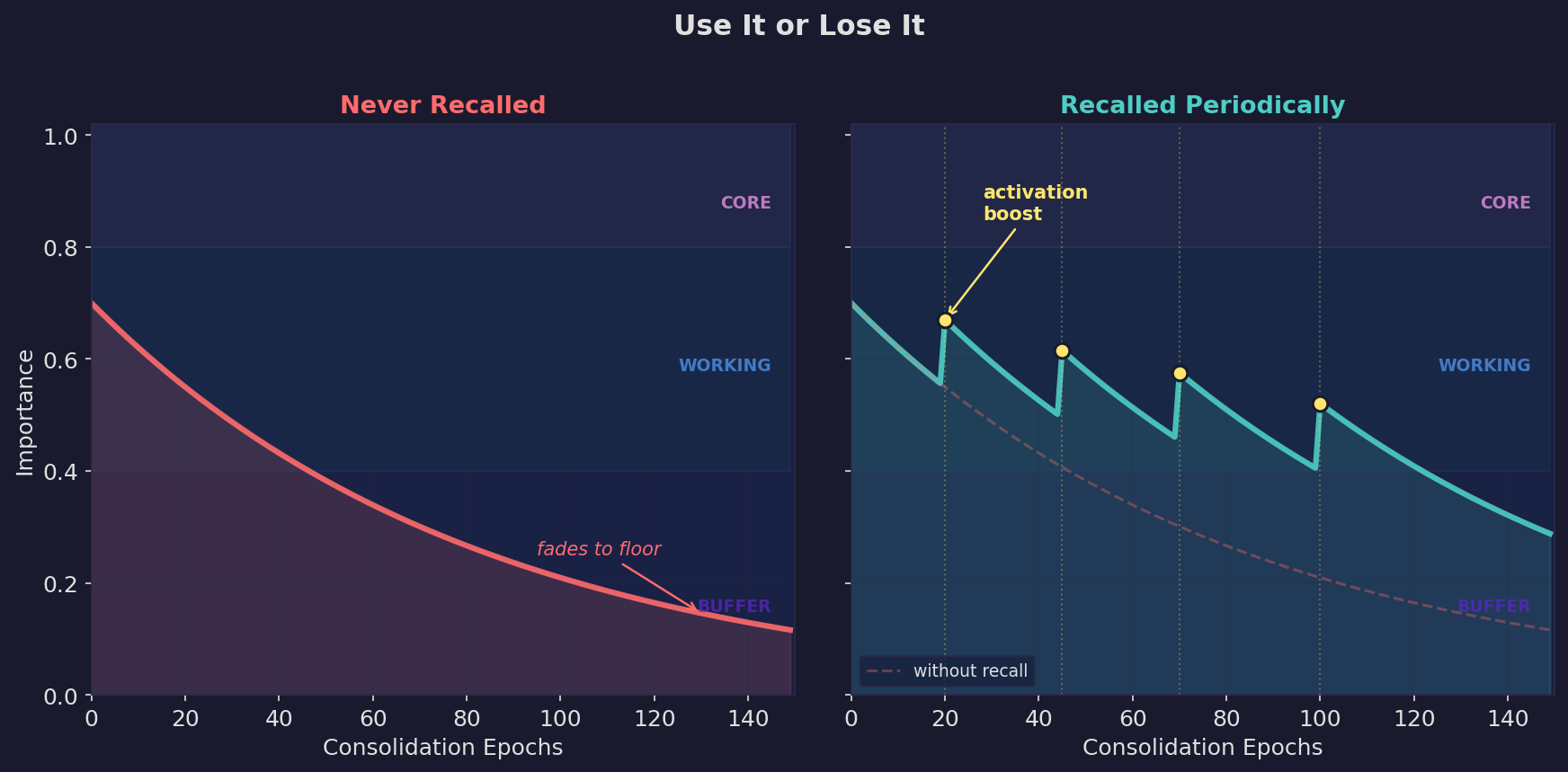 | Use it or lose it. Left: a memory that's never recalled decays into the buffer layer. Right: periodic recall triggers activation boosts that keep the memory in the working layer. Dashed line shows the unrecalled trajectory for comparison. |
Semantic Dedup & Merge
Two memories saying the same thing in different words? Detected and merged automatically:
"use PostgreSQL for auth" + "auth service runs on Postgres"
→ Merged into one, preserving context from both
Self-Organizing Topic Tree
Vector clustering groups related memories together, LLM names the clusters. No manual tagging required:
Memory Architecture
├── Three-layer lifecycle [4]
├── Embedding pipeline [3]
└── Consolidation logic [5]
Deploy & Ops
├── CI/CD procedures [3]
└── Production incidents [2]
User Preferences [6]
The problem this solves: vector search requires asking the right question. Topic trees let agents browse by subject — scan the directory, drill into the right branch.
Triggers
Tag a memory with trigger:deploy, and the agent can recall all deployment lessons before executing:
curl -X POST http://localhost:3917/memories \
  -d '{"content": "LESSON: always backup DB before migration", "tags": ["trigger:deploy", "lesson"]}'

# Pre-deployment check
curl http://localhost:3917/triggers/deploy
Session Recovery
Agent wakes up, calls GET /resume, gets full context back. No file scanning needed:
=== Core (24) ===
deploy: test → build → stop → start (procedural)
LESSON: never force-push to main
...

=== Recent ===
switched auth to OAuth2
published API docs

=== Topics (Core: 24, Working: 57, Buffer: 7) ===
kb1: "Deploy Procedures" [5]
kb2: "Auth Architecture" [3]
kb3: "Memory Design" [8]
...

Triggers: deploy, git-push, database-migration
| Section | Content | Purpose |
|---|---|---|
| Core | Full text of permanent rules and identity | The unforgettable stuff |
| Recent | Recently changed memories | Short-term continuity |
| Topics | Topic index (table of contents) | Drill in on demand, no full load |
| Triggers | Pre-action tags | Auto-recall lessons before risky ops |
Agent reads the directory, finds relevant topics, calls POST /topic to expand on demand.
Search & Retrieval
Semantic embeddings + BM25 keyword search with CJK tokenization (jieba). IDF-weighted scoring — rare terms get boosted, common terms auto-downweighted. No stopword lists to maintain.
# Semantic search
curl -X POST http://localhost:3917/recall \
  -d '{"query": "how do we handle auth", "budget_tokens": 2000}'
# Note: min_score defaults to 0.30. Use "min_score": 0.0 to get all results.

# Topic drill-down
curl -X POST http://localhost:3917/topic \
  -d '{"ids": ["kb3"]}'
Background Maintenance
Fully automatic, activity-driven — no writes means the cycle is skipped:
Consolidation (every 30 minutes)
- Decay — reduce importance of unaccessed memories
- Dedup — merge near-identical memories (cosine > 0.78)
- Triage — LLM categorizes new Buffer memories
- Gate — LLM batch-evaluates promotion candidates
- Reconcile — resolve ambiguous similar pairs (results cached)
- Topic tree rebuild — re-cluster and name
Topic Distillation — when a topic grows too large (10+ memories), overlapping content is condensed into fewer, richer entries.
Namespace Isolation
Single instance, multiple projects. Use X-Namespace to isolate:
curl -X POST http://localhost:3917/memories \
  -H "X-Namespace: my-project" \
  -d '{"content": "API uses OAuth2 bearer tokens"}'
Install
# macOS / Linux
curl -fsSL https://raw.githubusercontent.com/kael-bit/engram-rs/main/install.sh | bash

# Windows (PowerShell)
irm https://raw.githubusercontent.com/kael-bit/engram-rs/main/install.ps1 | iex
Docker
docker run -d --name engram-rs \
  -p 3917:3917 \
  -v engram-data:/data \
  -e ENGRAM_LLM_URL=https://api.openai.com/v1 \
  -e ENGRAM_LLM_KEY=sk-... \
  ghcr.io/kael-bit/engram-rs:latest
LLM Configuration
engram-rs works without an LLM — keyword search and rule-based lifecycle still function. Adding an LLM unlocks intelligent features (triage, gate, merge, topic naming):
export ENGRAM_LLM_URL=https://api.openai.com/v1
export ENGRAM_LLM_KEY=sk-...

# Any OpenAI-compatible API (Ollama, LM Studio, etc.)
export ENGRAM_LLM_URL=http://localhost:11434/v1

# Anthropic native
export ENGRAM_LLM_PROVIDER=anthropic
export ENGRAM_LLM_KEY=sk-ant-...
Two-tier model config — strong model for judgment, lightweight for text processing:
ENGRAM_GATE_MODEL=gpt-4o          # quality decisions
ENGRAM_LLM_MODEL=gpt-4o-mini     # text processing
For AI Agents
Add to your agent's system prompt:
Set up engram-rs (persistent memory) by following the guide at:
https://raw.githubusercontent.com/kael-bit/engram-rs/main/docs/SETUP.md
Integration
Works with Claude Code, Cursor, Windsurf, OpenClaw, and any MCP-compatible tool.
17 MCP tools (MCP docs) | Full HTTP API (Setup guide)
# MCP (Claude Code)
npx engram-rs-mcp

# MCP (Cursor / Windsurf / generic)
{"mcpServers": {"engram": {"command": "npx", "args": ["-y", "engram-rs-mcp"]}}}
Web Dashboard
Built-in web UI at http://localhost:3917/ui for browsing memories, viewing the topic tree, and monitoring LLM usage.
Specs
| Binary | ~10 MB |
| Memory | ~100 MB RSS in production |
| Storage | SQLite, no external database |
| Language | Rust |
| Platforms | Linux, macOS, Windows (x86_64 + aarch64) |
| License | MIT |
License
MIT







