Listed from the MCP registry; nobody on Odel publishes it.
Is this yours? Claim it
Kanera
Manage Kanera workspaces, boards, cards, checklists, comments, notes, automations, and reports.
One address for any MCP client. You sign in at api.kanera.app once, after adding it.
What it does
- Reads
- Writes
- High impact
At most: only reads or looks up information.
What it costs
FreeOdel charges nothing per call. The publisher may charge for its own service.
What it asks for at sign-in
| Access to | Read | Change |
|---|---|---|
| Kanera |
From the sign-in at api.kanera.app, as the endpoint publishes it. You approve it there.
Tools
None listed · checked 18 Nov 2026Odel could not list its tools without signing in.

Self-hostable project management where your team and your AI agents work on the same boards.
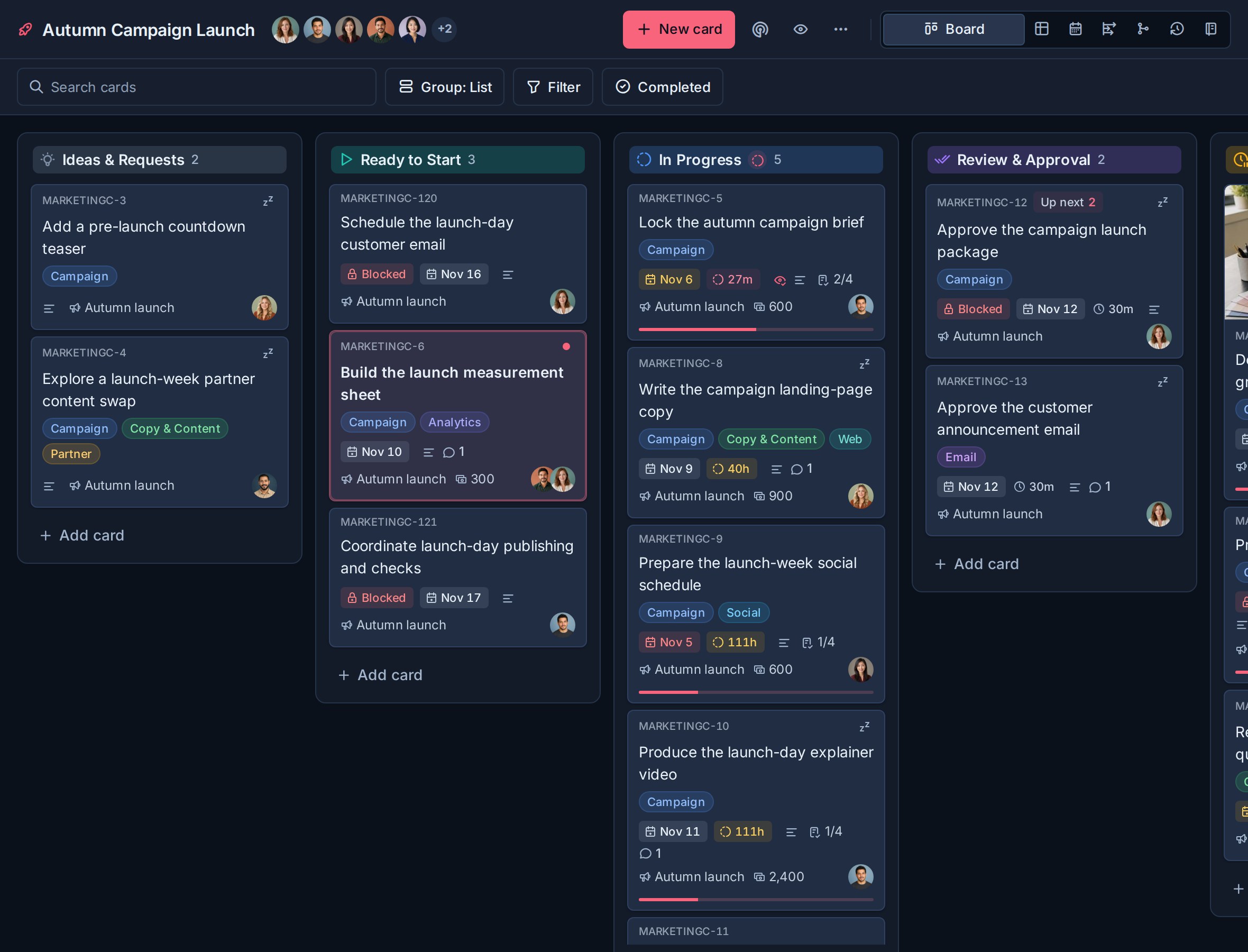
Kanban, Table, Calendar, Timeline, and dependency views over one set of cards. More structure than a basic Kanban board, without the overhead of a heavyweight work suite.




Try it free · Self-host with Docker · Connect an AI agent · Feature tour · Docs
Why Kanera
- Agents work on your board, not in a side chat. Claude, Codex, Cursor, and other agents pick up cards over MCP or the
kaneraCLI. A live chip shows each run on its card, turns amber when the agent needs you, and every change is attributed via Claude or via Codex. - Every board in a workspace shares one setup. Lists, labels, custom fields, and automations are defined once per workspace, so
In RevieworClientmeans the same thing on every board and cross-board views line up without cleanup. - See what blocks what. Link prerequisites across boards, then read the dependency map or the Timeline's critical path, slack, and projected finish.
- Self-hosted has no gating. No plans and no per-seat fees. Guests, the REST API, webhooks, and notifications to Slack, Discord, ntfy, Gotify, and more are all included.
Self-host with Docker
With Docker running (Compose 2.23 or newer), Bash, curl, and OpenSSL installed, run:
curl -fsSL https://www.kanera.app/install.sh | bash
The interactive installer asks whether you want localhost or production, generates the secrets, downloads the release's prebuilt images, and starts Kanera. No checkout or build is needed. For localhost, open http://localhost:4200 when setup finishes.
To supply the mode directly:
# Localhost
curl -fsSL https://www.kanera.app/install.sh | bash -s -- --mode localhost

# Production with automatic HTTPS (requires public DNS and inbound ports 80/443)
curl -fsSL https://www.kanera.app/install.sh | bash -s -- --mode production --domain kanera.example.com
Already have an HTTPS proxy? Add --https existing to the production command and point your proxy
at 127.0.0.1:4200. The installer creates a new ./kanera directory; use --directory to choose another.
DEPLOY.md covers setup, email, backups, and upgrades;
DOKPLOY_DEPLOY.md covers Dokploy.
Prefer not to run it yourself? The hosted service has a free plan and a 30-day Pro trial with no card required.
One place for moving work forward
- Plan in the view that fits. Move between Kanban, Table, Calendar, Dependencies, My Cards, Team Cards, and Work Done without duplicating work.
- See what unblocks the team. Connect prerequisites across boards, trace the chain in Map, Timeline, or Steps, spot risks and bottlenecks, and edit blocking links directly on the map.
- Keep the details with the task. Add descriptions, comments, attachments, labels, custom fields, watchers, and assignable checklist items to cards.
- Connect the code to the task. Link GitHub pull requests automatically through card keys, follow their review and merge states, and render commit links with readable change summaries.
- Set clear priorities. Use Home and a ranked Up next queue to keep urgent work visible across every board.
- Make progress visible. Review what was created, moved, completed, or checked off without chasing another status update.
- Keep knowledge nearby. Use personal, workspace, and board notes for decisions, processes, references, and project context, with Scratchpad ready for quick capture.
- Stay in flow from the keyboard. Open search and personal tools, jump between core pages, switch board views, create cards, and update an open card with contextual shortcuts. Press
?to see what is available. - Delegate to AI agents. Give your agent cards to work on, follow live runs and blockers, and review results with clear agent attribution.
- Automate and integrate. Handle repetitive updates with trigger-based automations, post card activity into Slack, Discord, Telegram, or Zulip, and connect other tools through the REST API, webhooks, and MCP server.
- Get told what matters, where you want it. Choose per notification type whether an update reaches email, browser push, ntfy, Gotify, or your own webhook, then add per-workspace exceptions so one busy board does not drown out the rest.
- Work together in real time. Stay current with live updates, mentions, activity history, and controlled guest access.
- Work from any screen. The full Kanera experience adapts to phones, tablets, and desktops, and installs as a PWA on iOS, Android, and desktop.
Workspaces and standalone boards
Organisation
  ├─ Workspace
  │    └─ Board
  │         └─ Card
  └─ Standalone board
       └─ Card
Use a workspace when several boards should follow the same operating model. Lists, labels, custom fields, checklist templates, and automations are configured once and used across its boards, keeping workflows and reporting consistent as projects grow.
That means a status like In Review or a field like Client has the same meaning everywhere—no rebuilding each board or reconciling mismatched setups later.
For work that does not need to share that setup, create a standalone board. It keeps its own lists, labels, custom fields, checklist templates, automations, members, access, and integrations independently of your workspaces.
Work with AI agents, with progress you can see
Use Claude, ChatGPT, Codex, Cursor, or another agent you already work with to pick up cards, read their context, carry out tasks, and report back in Kanera. Agent work stays on the same boards as your team's work, with live progress, visible blockers, and a record of who did what for whom.
Know what is running and what needs you
An agent opens a run before multi-step work and updates it with a short progress note. Everyone viewing the board sees a live chip on the card; it turns amber when the agent is waiting on a person. Open the card to see the agent, its current work, and when it last reported. A pull request or session link can take you straight to the result.
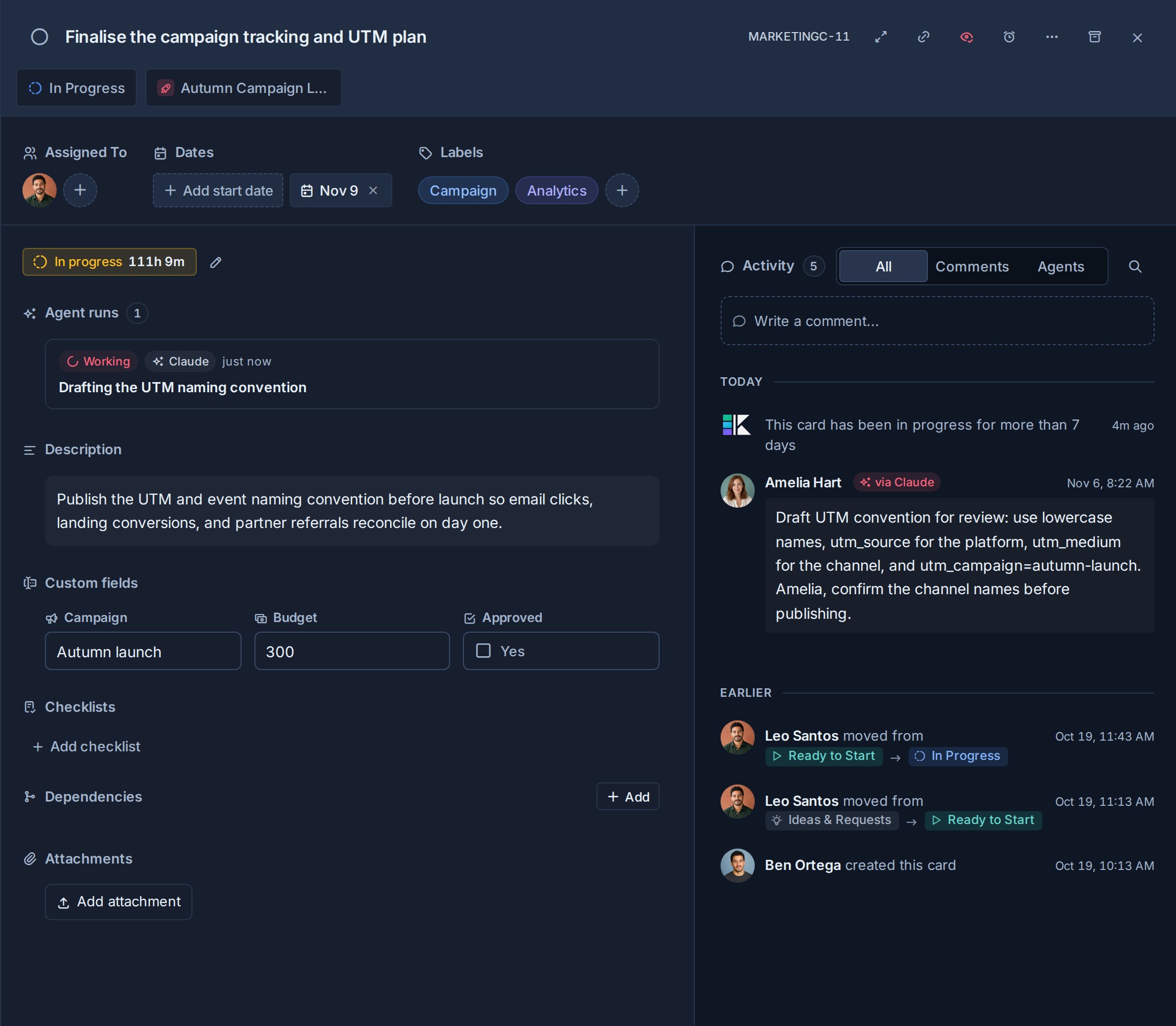
When the run ends, its outcome and closing summary stay in the card's activity. Runs that stop reporting are marked stalled after fifteen minutes, so an interrupted agent does not leave work looking active. A blocked run makes the wait visible; the agent should also comment with its question so watchers and assignees are notified.
Follow your agent's work without losing attribution
With an OAuth connection, comments and changes show the person the agent acted for plus a via Claude, via Codex, or other agent badge. That includes browser sign-in through the CLI: name the agent with kanera auth login --agent "Claude Code". Personal API keys attribute actions to their owner without a via badge; workspace and board keys use the key's name.
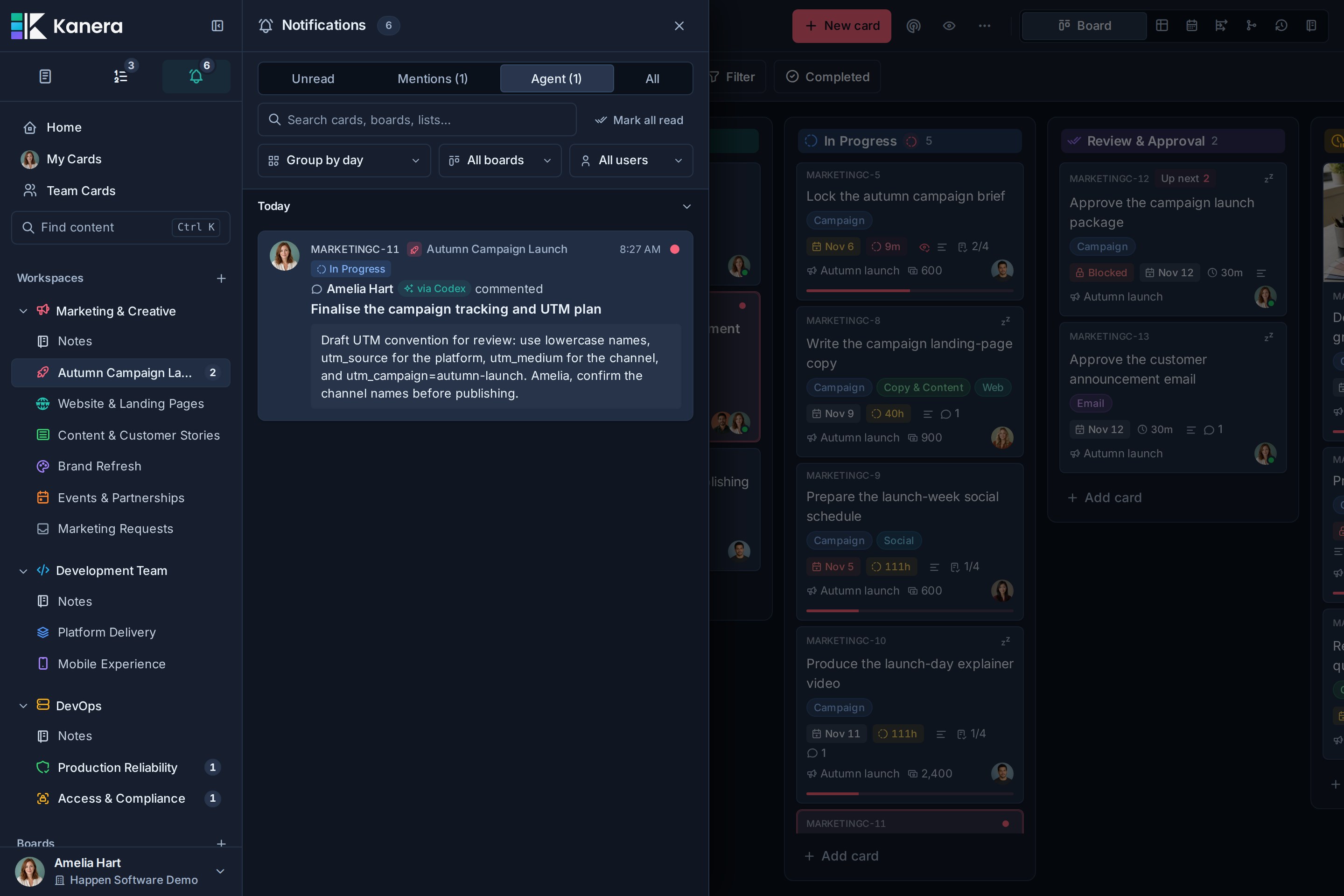
Your agent's changes can notify you even though it acts on your behalf. The Agent tab brings those updates together, and Work Done distinguishes agent output from your own actions. Agents still operate within the connected person's current board permissions, and read-only credentials prevent writes at the server.
Read more about agent runs, attribution, and the Agent Workflow template.
Connect your agent through MCP or the CLI
| Interface | Use it for | Get started |
|---|---|---|
kanera CLI | Terminals, scripts, CI, and coding agents that can run shell commands | npm install --global @kanera/cli · CLI docs |
| MCP server | Claude, ChatGPT, Codex, GitHub Copilot, Cursor, Gemini CLI, OpenCode, and other MCP clients, connected with OAuth | https://mcp.kanera.app/mcp · MCP setup guides |
| Agent Skill | Teaching Claude Code, Codex, and other agents to use Kanera reliably | kanera setup claude or npx -y skills add https://github.com/happendev/Kanera/tree/main/integrations/skills/kanera · skill source |
| TypeScript SDK | Your own applications and integrations | npm install @kanera/sdk · SDK docs |
| REST API and webhooks | Any language, sync jobs, and event-driven integrations | API docs |
The CLI and the MCP server expose the same tool layer, so anything an agent can do over MCP it can also do with kanera from a shell. That includes the Timeline view's schedule: work.schedule (CLI kanera schedule <boardId>, SDK kanera.work.schedule()) returns the critical path, slack in working days, scheduling conflicts and the projected finish for a board or workspace, so an agent can answer "when will this finish" and "what slips if this moves" with the same numbers the chart shows, and the schedule.conflict_detected and schedule.critical_path_slipped events, or scheduling_conflict_appears / critical_path_slips automations, tell it when a plan needs attention. Try the CLI without installing it:
npx -y @kanera/cli commands
Read-only credentials are enforced by the server, and self-hosted Kanera exposes its own MCP address and API for the same CLI and SDK. See Work with coding agents from the terminal for picking up cards and reporting progress from Claude Code or Codex.
A board for delegating work and reviewing results
Start with the Agent Workflow template: Backlog → Agent Working → Waiting on Me → Review → Done. Describe the task on a card, then ask your agent to pick it up. Following Kanera's agent instructions, it moves the card as work starts, needs your input, or finishes. You review the result and decide when it belongs in Done.
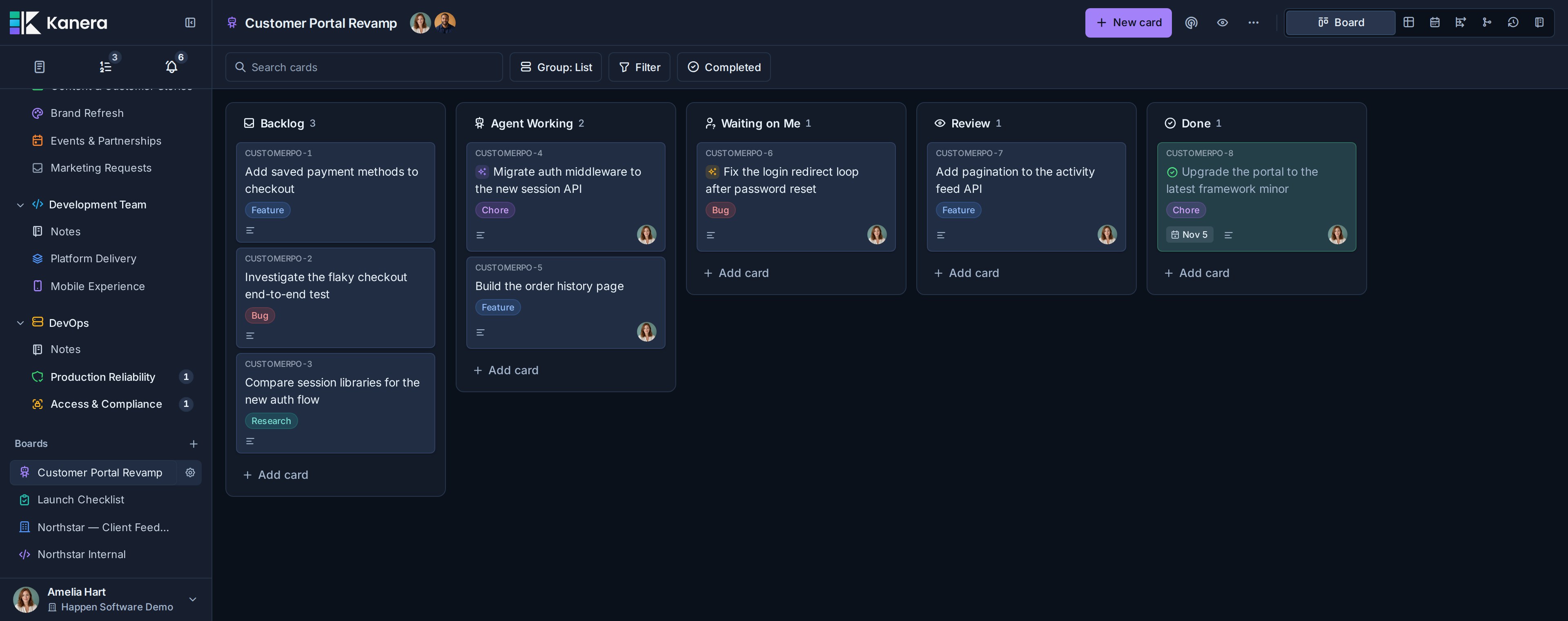
The workflow combines ordinary cards with agent runs. Runs track a working session; card moves remain explicit actions by the agent or a person, so starting or finishing a run does not silently move the card.
See Kanera in action
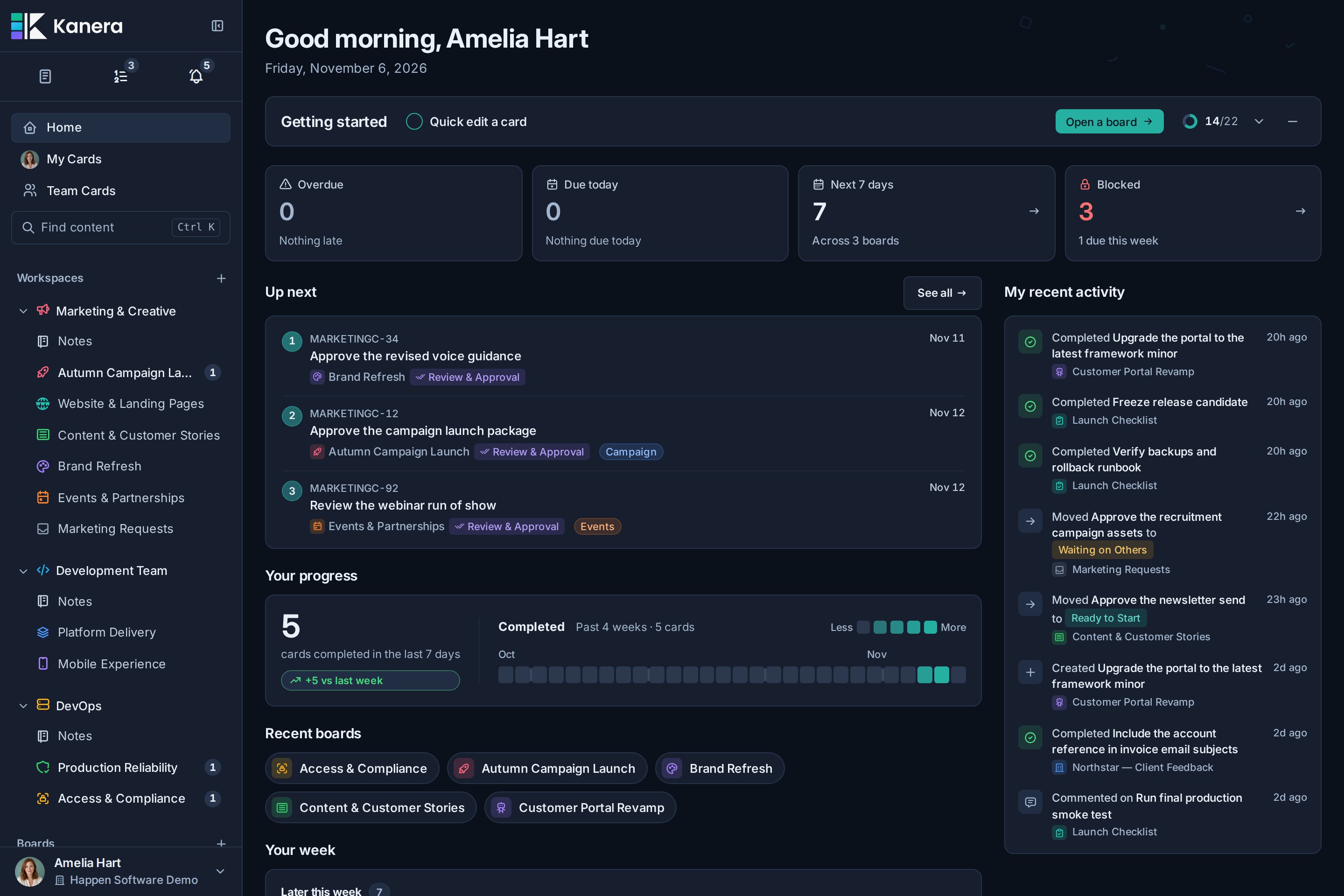
Home keeps today and the week in focus
Start with overdue work, items due today, the next seven days, and recent progress in one focused view. Jump back into active boards and scan the week without opening each project separately.
Boards and shared lists keep the workflow visible
Move cards through lists while keeping labels, assignees, due dates, checklist progress, and visual covers in view. Boards in a workspace share the same ordered lists, so stages such as Intake, In progress, Review, and Done remain consistent across related projects.
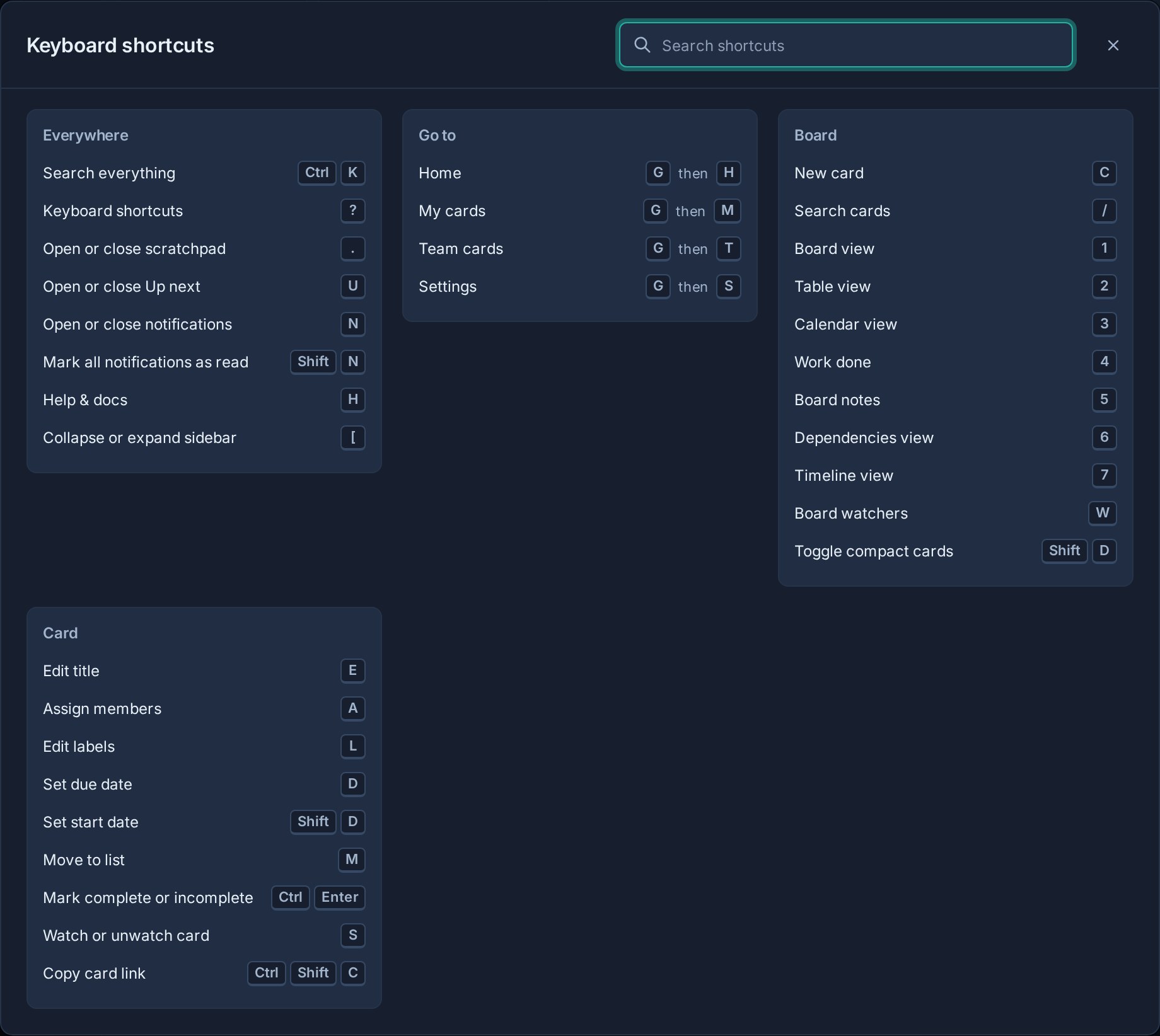
Keyboard shortcuts keep routine actions close
Press ? to open a shortcut sheet that reflects the current screen. Use two-key sequences to jump to Home, My Cards, Team Cards, or Settings; single keys to open Scratchpad, Up next, notifications, and board tools; and contextual card shortcuts for assignment, labels, due dates, lists, completion, watching, and copying links. Letter shortcuts automatically stand down while you type.
Up next keeps priorities in order
Build one ranked queue from cards assigned to you across every accessible board. Reorder it as priorities change, keep source boards and due dates visible, and see the same order on Home, My Cards, board cards, and Table.
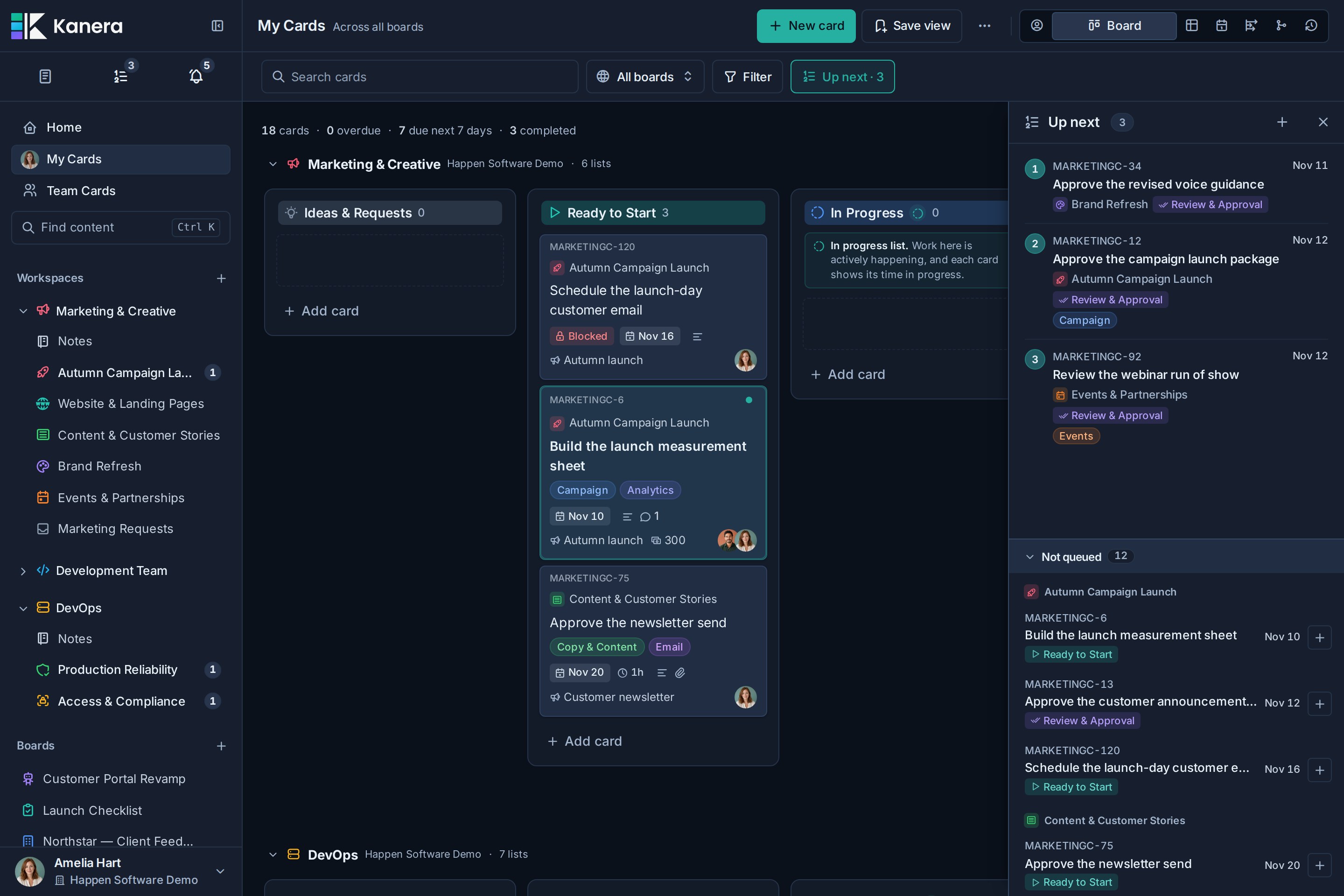
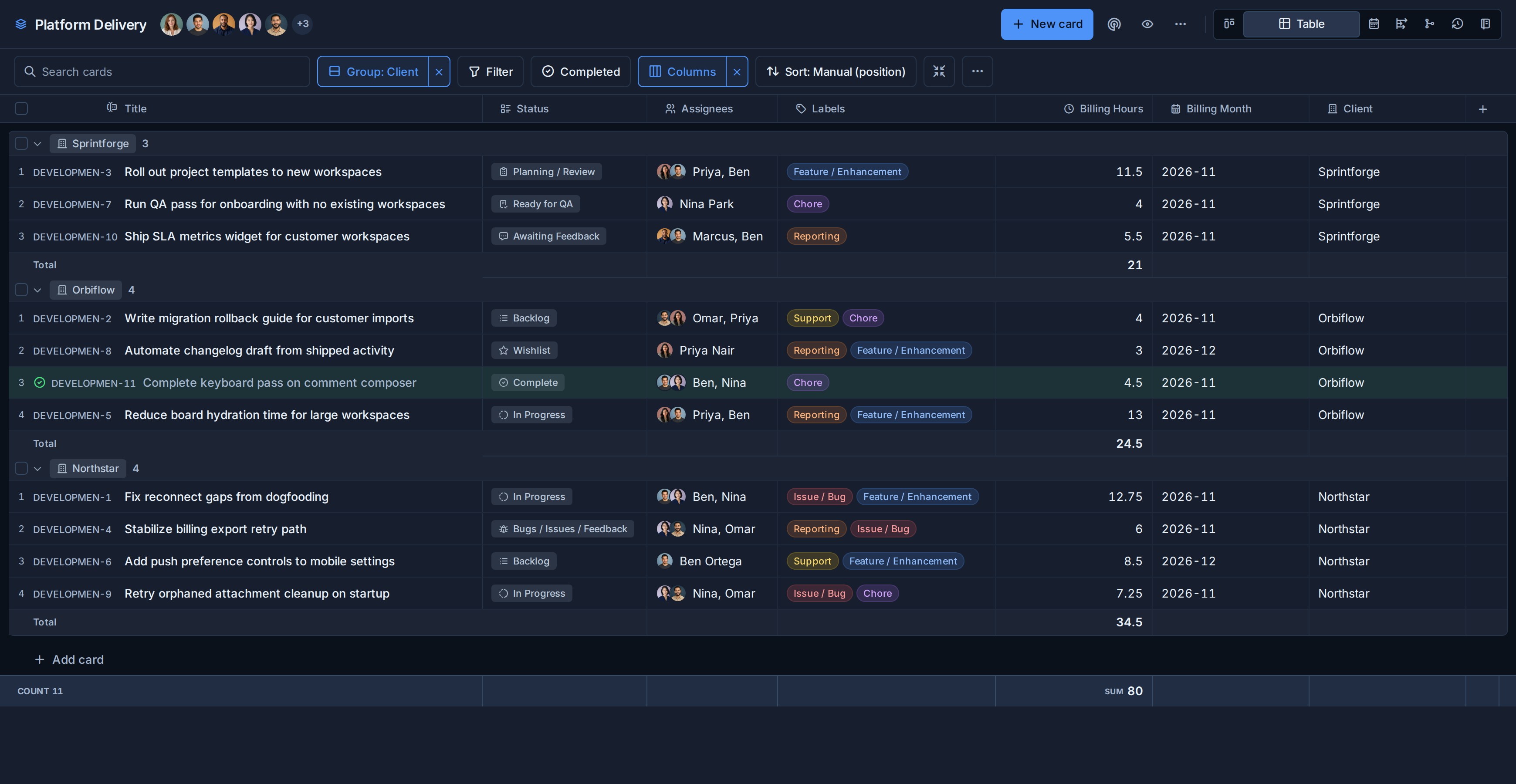
Table view turns live work into structured reports
Group and sort cards by list, assignee, due date, label, status, or custom field, then choose the columns that matter and edit any of them in place. Numeric custom fields support sum and average aggregates per group, with a second breakdown dimension for questions such as hours by client and work type.
Export the filtered result to Excel as a multi-sheet workbook containing card rows, spreadsheet-friendly summaries, and a readable report when aggregates are enabled.
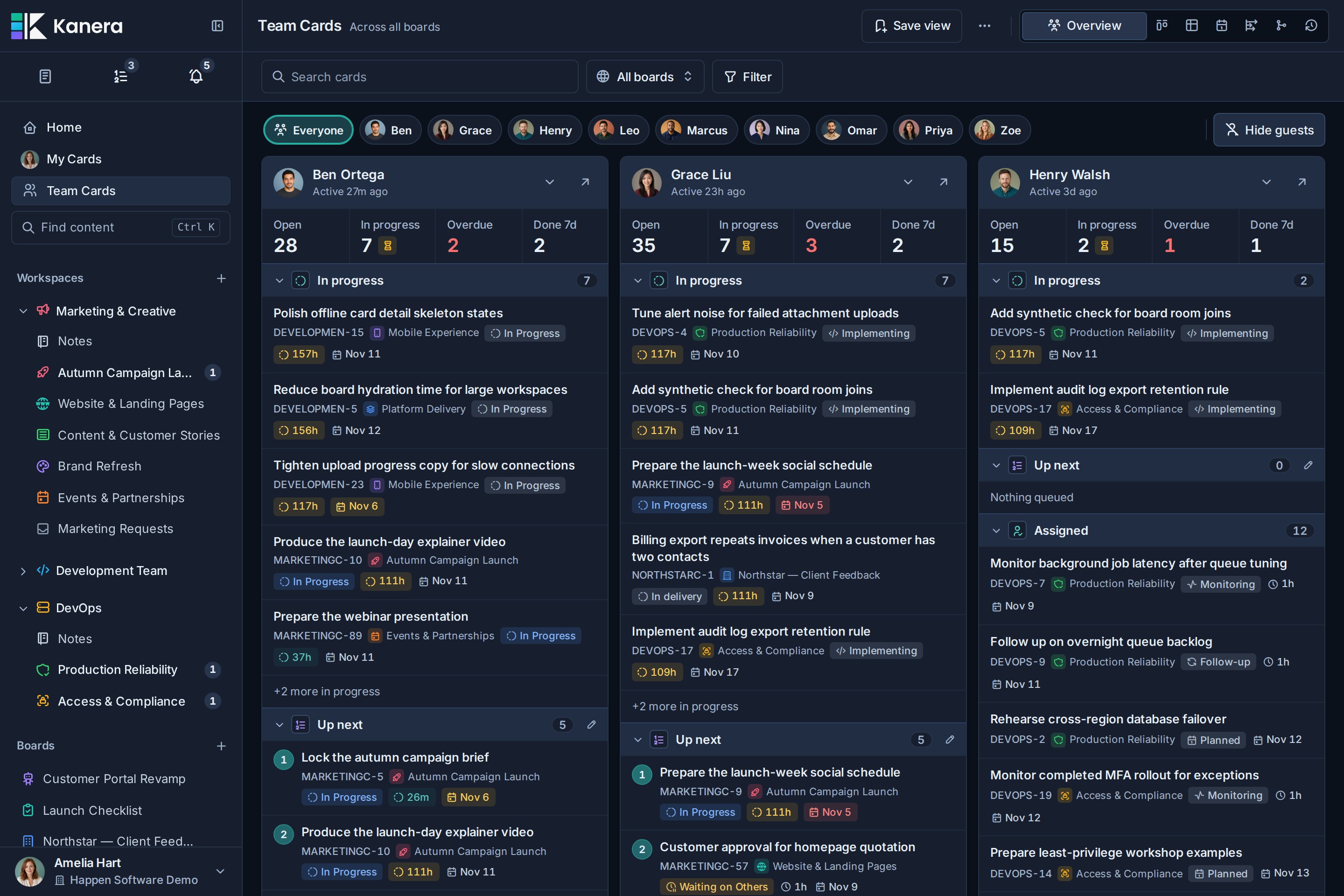
Team Cards Overview shows what everyone is busy with
Open Overview in Team Cards to see everyone’s work across boards. One panel per teammate answers "what is each person working on, and what is next?" without opening each board in turn: their In progress cards longest-running first with time in progress, what they recently moved or created themselves, the head of their Up next queue, their other assigned cards by due date, and what they finished this week. Open, In progress, Overdue, and Done counts expand into the full list, in-progress work with no assignee gets its own panel, and folding a section folds it for everyone.
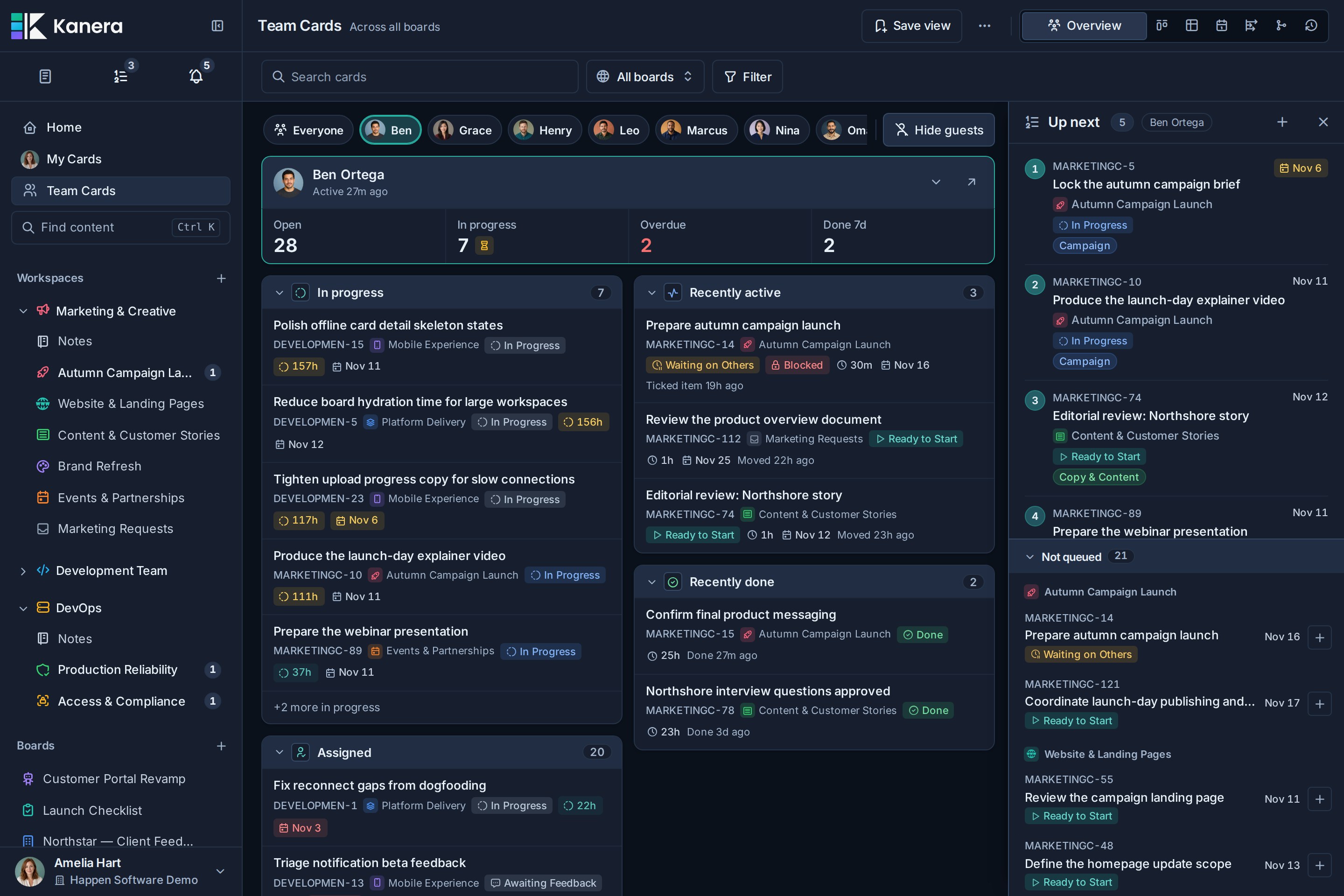
Pick one teammate to see just their panel with their Up next queue docked beside it. Reorder their queue, and queue what they should do next from the open cards they have not queued yet, listed soonest due first.
Dependencies show what can move next
Connect cards with Blocks, Blocked by, or Relates to relationships, including across boards. Kanera makes blocked work visible and shows when the last active prerequisite clears, helping the next person pick up the handoff.
Open Dependencies on a board, in My Cards, or in Team Cards. Follow the chain in Map, compare due weeks in Timeline, or read a numbered Steps list that adapts to your phone. On a workspace board, switch between the board's chains and the wider workspace while keeping each card's source and permissions intact.
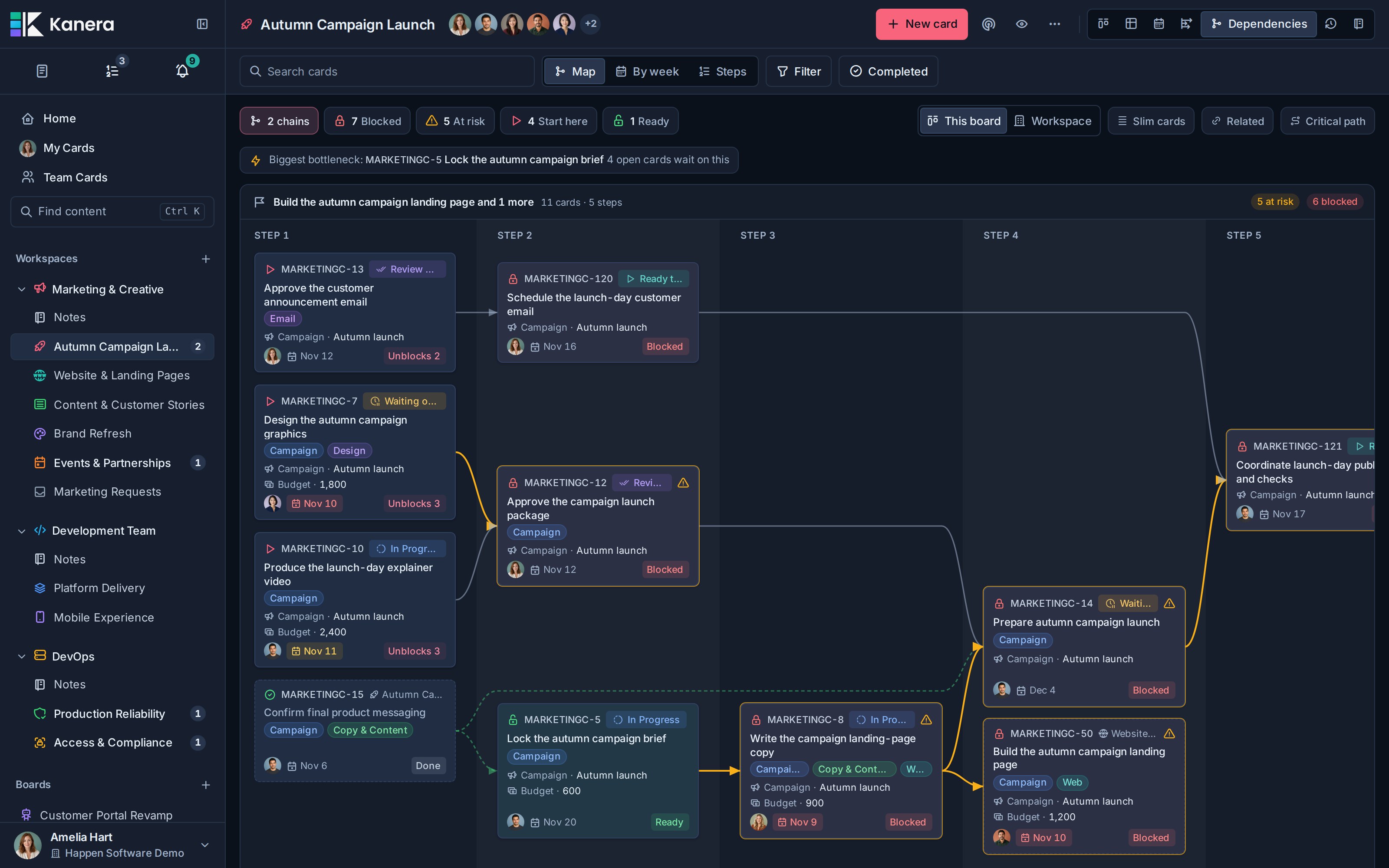
Find Blocked, At risk, Start here, and Ready work without losing the chain around it. The biggest bottleneck points to the card holding up the most open work; Critical path highlights the longest routes by number of open cards. Timeline aligns every chain to shared due-week columns and marks prerequisites due after their dependents in amber.
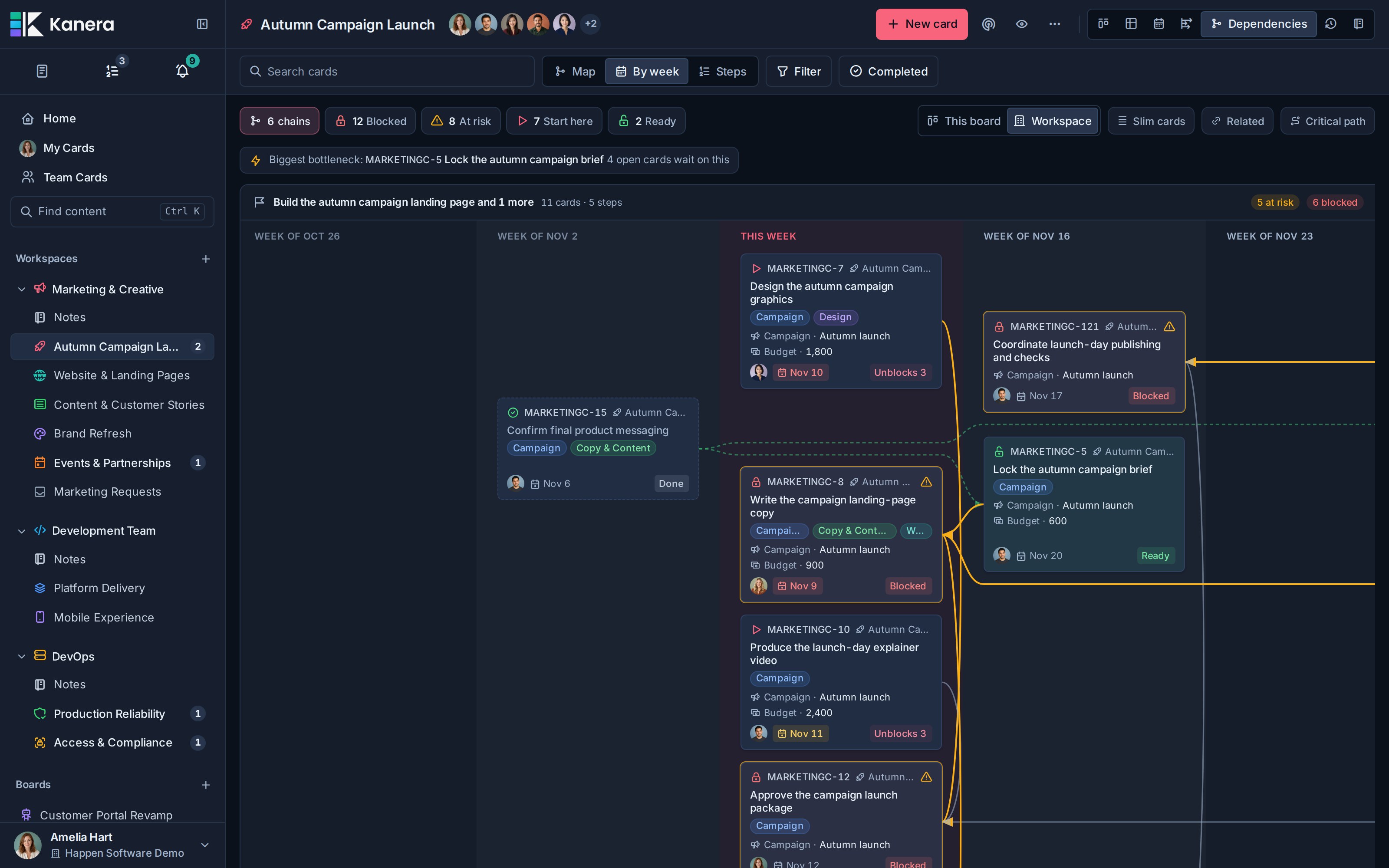
In Map or Timeline, drag from a card's + handle to add a blocking link, or select a connector to remove it. Tap-to-link and keyboard controls work too, with Undo and Redo for your map edits. Changes update live, and agents can inspect the same chains through MCP, the CLI, SDK, or REST API.
Read the Dependencies view, timeline, and editing guide or learn about card relationships and blocking.
Timeline view plans the work ahead
Give a card a start date next to its due date and the board's Timeline view draws it as a bar on a Gantt-style chart, grouped by list, assignee or label. Drag a bar to reschedule it (its working-day length is kept), pull an end to change its length, click an empty lane to place an unscheduled card, and drag from one bar's end to another to make the second wait on the first. Critical path runs a working-day schedule over the board's blocking links, highlights the chain with no slack, fades the rest and shows how far each other card could slip. Cards whose prerequisite is planned to finish after they start are flagged as scheduling conflicts.
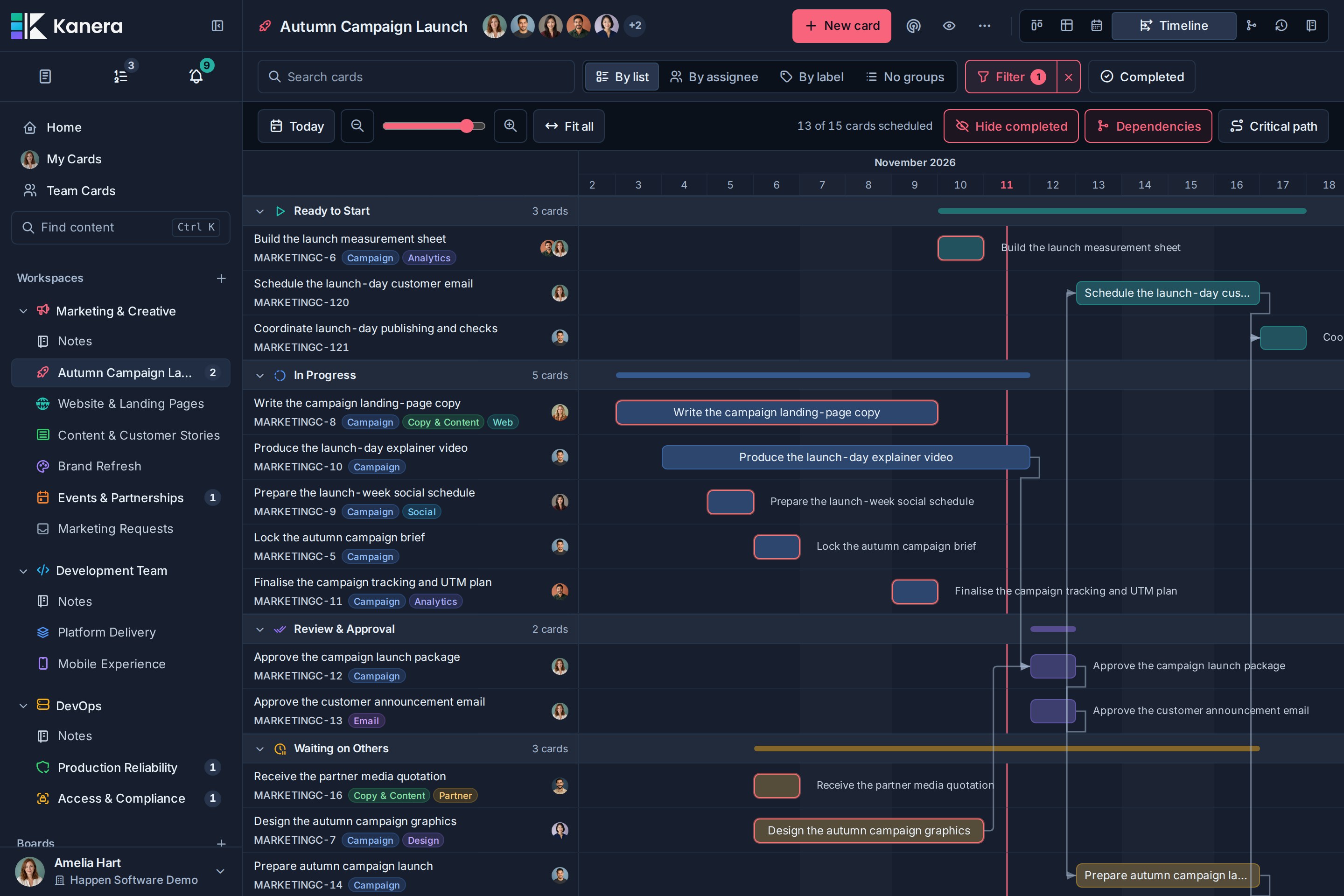
Read the Timeline and Start Dates guide for working-day scheduling, desktop and phone controls, MCP planning examples, and schedule events.
Keep GitHub pull requests and commits with the work
Keep implementation and review beside the task's requirements, discussion, and delivery history.
Pull requests link themselves and stay in sync
Connect your organisation's GitHub App, then include a card key such as KAN-123 in a pull request's branch name, title, or description. Copy branch name in card detail or the card menu gives you a branch name containing the key.
The card's Pull requests section shows the repository, PR number, title, and added and deleted lines when available. GitHub webhooks keep draft, open, merged, and closed states current, and linking and state changes appear in the card's activity. Open any entry to jump straight to the review on GitHub.
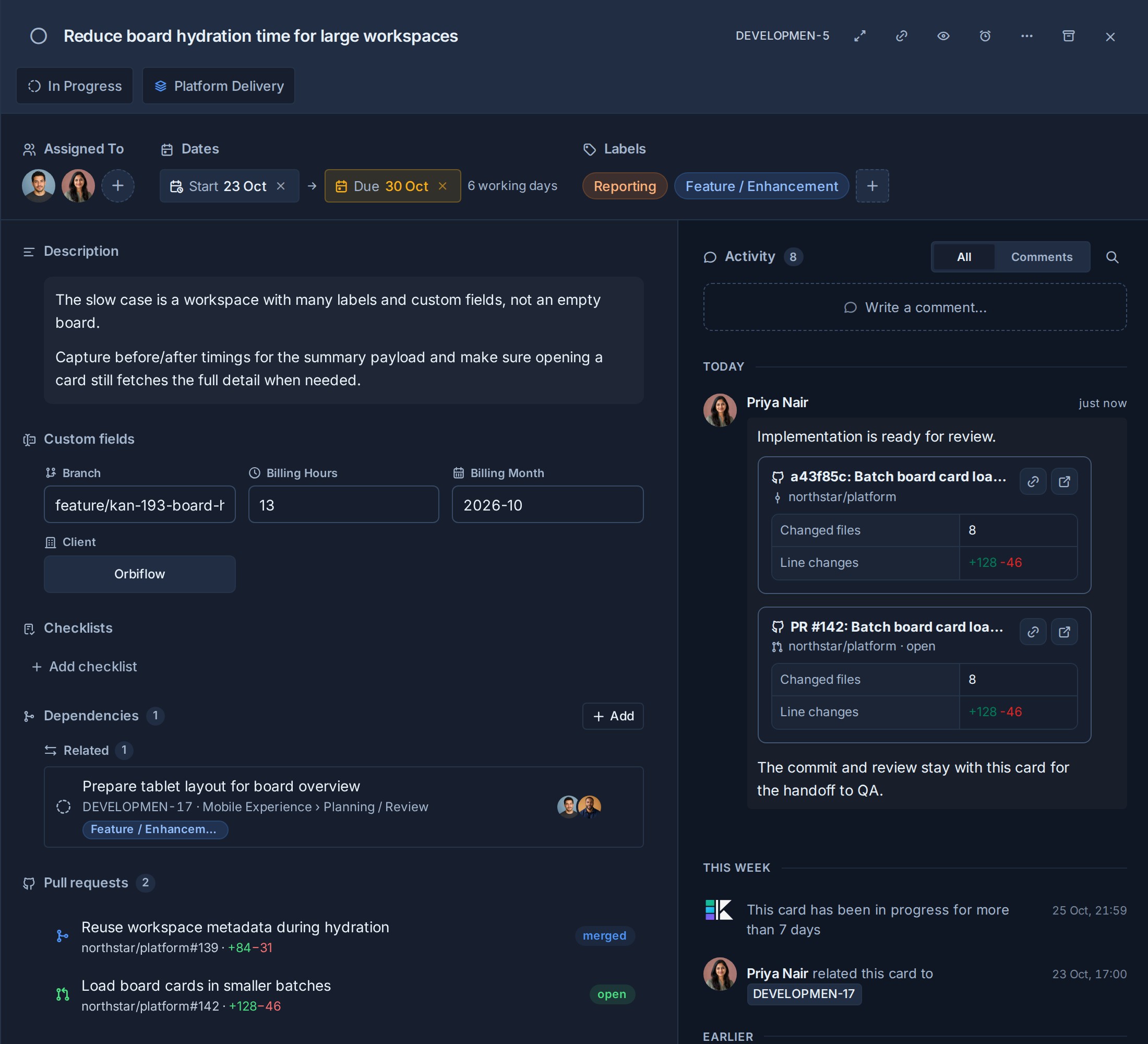
Pull requests from forks are ignored. Self-hosted deployments can bootstrap the GitHub App in-app or supply its credentials, and must configure webhook delivery for PR sync; see GitHub App setup and webhook configuration.
Commit links become readable change summaries
Paste a GitHub commit URL into a card comment and save it to see the commit title, short SHA, repository, changed-file count, and added and deleted lines when available. Pull request links also render rich previews, so implementation and review updates stay readable in the conversation. The same rendering works in descriptions and notes, with support for repository, issue, and release links too.
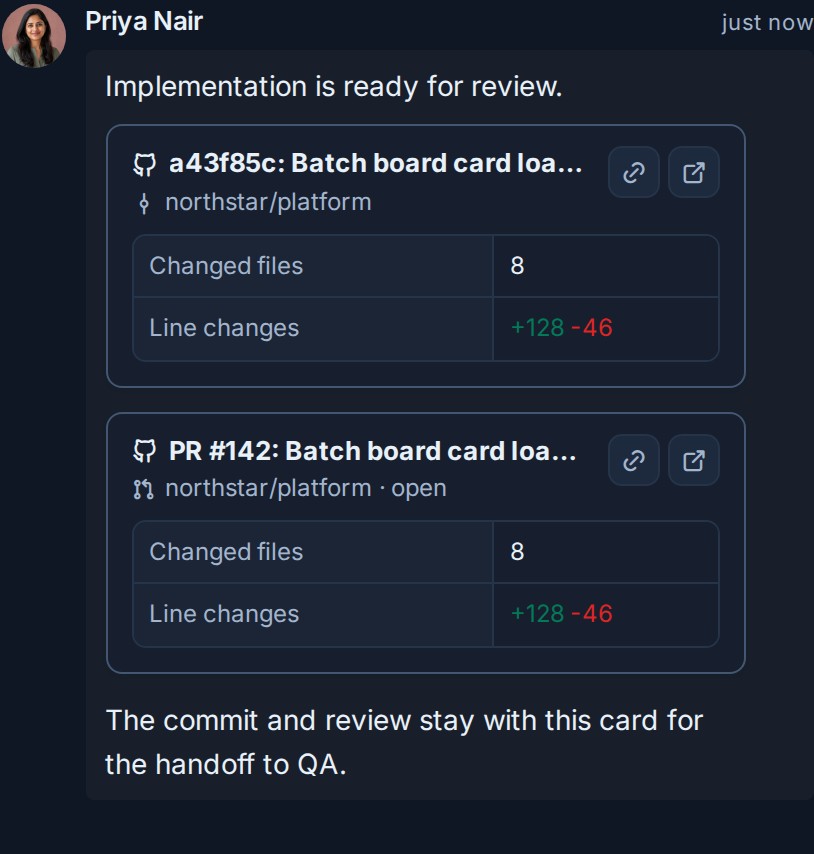
Public repository previews work without a GitHub App connection. Connect the App to preview private repositories it can access in workspace and board content.
Notifications keep important changes together
Review mentions, assignments, comments, due-date changes, and other updates without losing the board context behind them. Group the feed by day, board, or person, narrow it to one board or one colleague, and search it by card, board, or list.
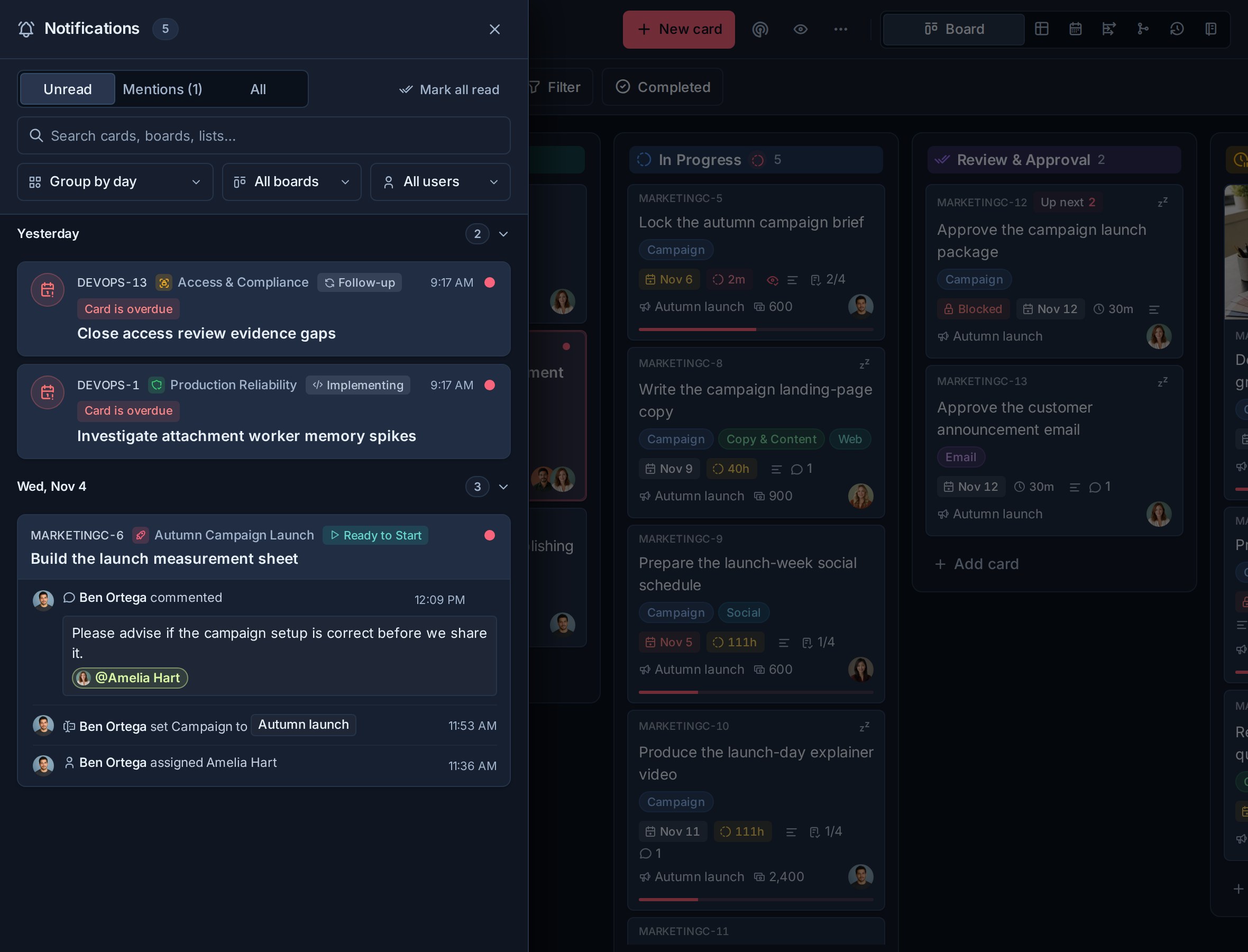
Then decide where each notification type reaches you: email, browser push, ntfy, Gotify, or a signed webhook of your own. Per-workspace rules pause or narrow a single noisy workspace without weakening your account defaults, and the in-app drawer always keeps the complete history regardless of what is switched off elsewhere.
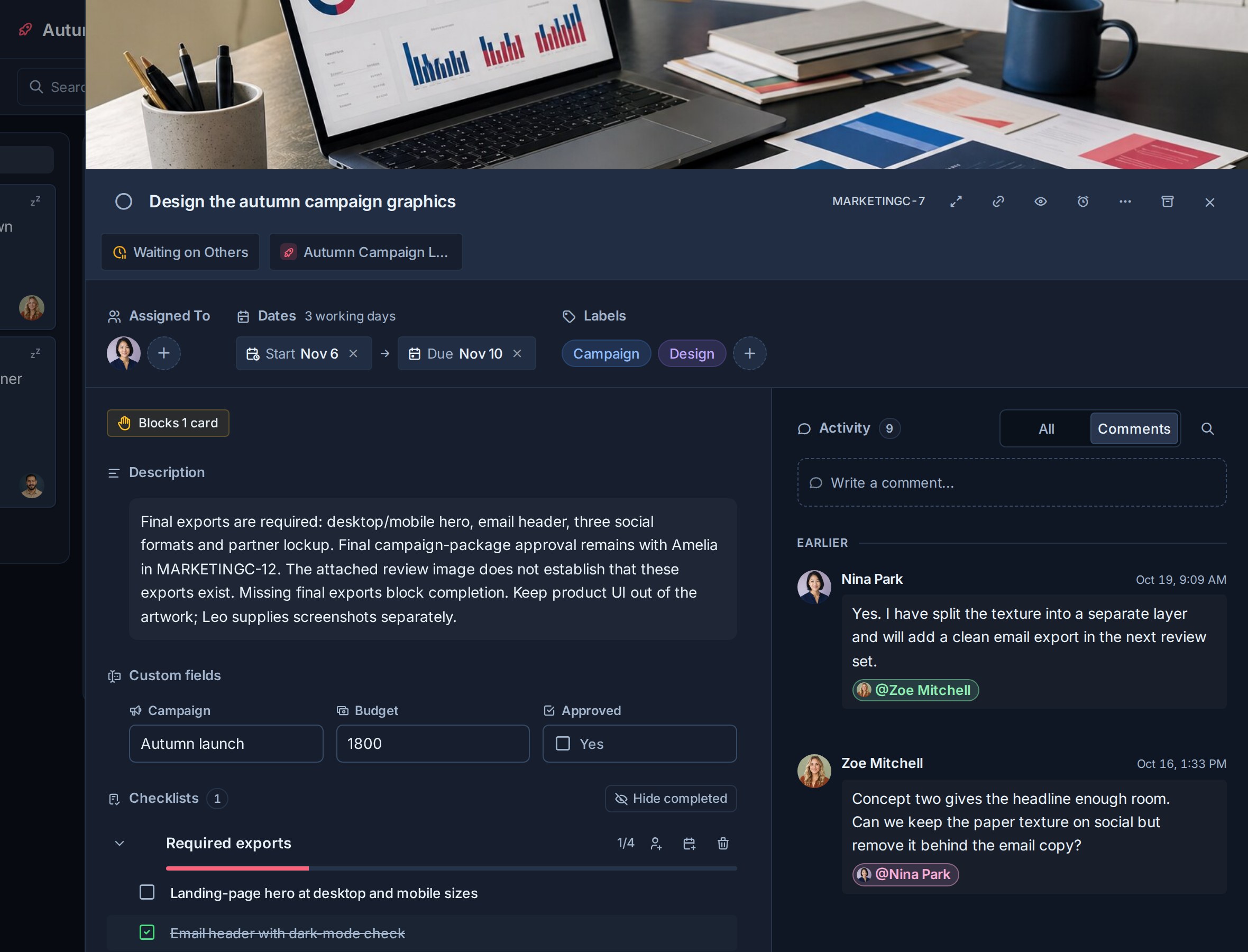
Rich cards keep the work and its context together
Descriptions, custom fields, checklists, due dates, comments, attachments, and activity all live in one focused card view.
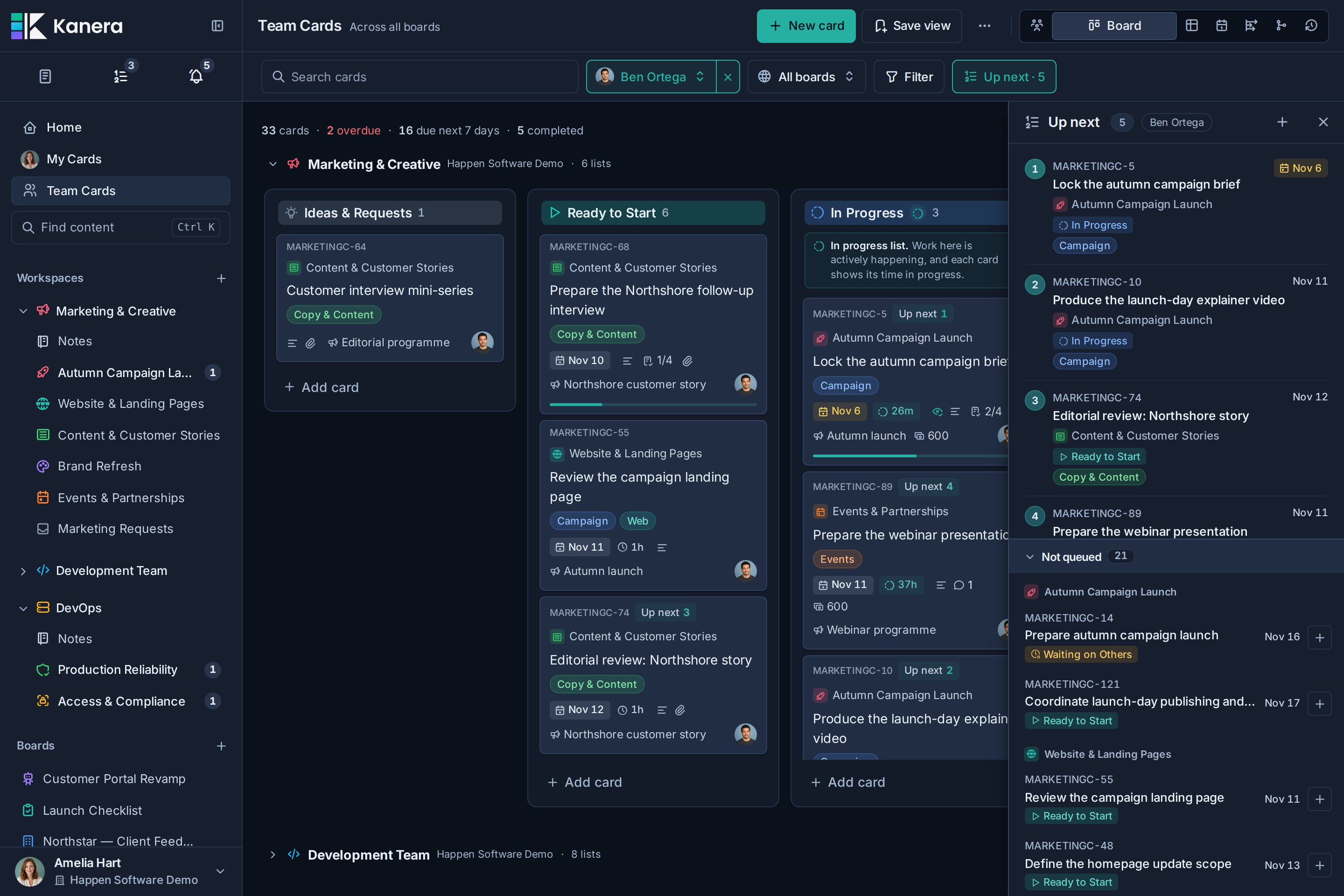
Team Cards brings assigned work together across boards
See the whole visible team or focus on one teammate without losing each card's board, list, fields, or permissions. Switch between Board, Team overview, Table, Calendar, Dependencies, and Work Done views to review ownership, workload, and execution order across projects.
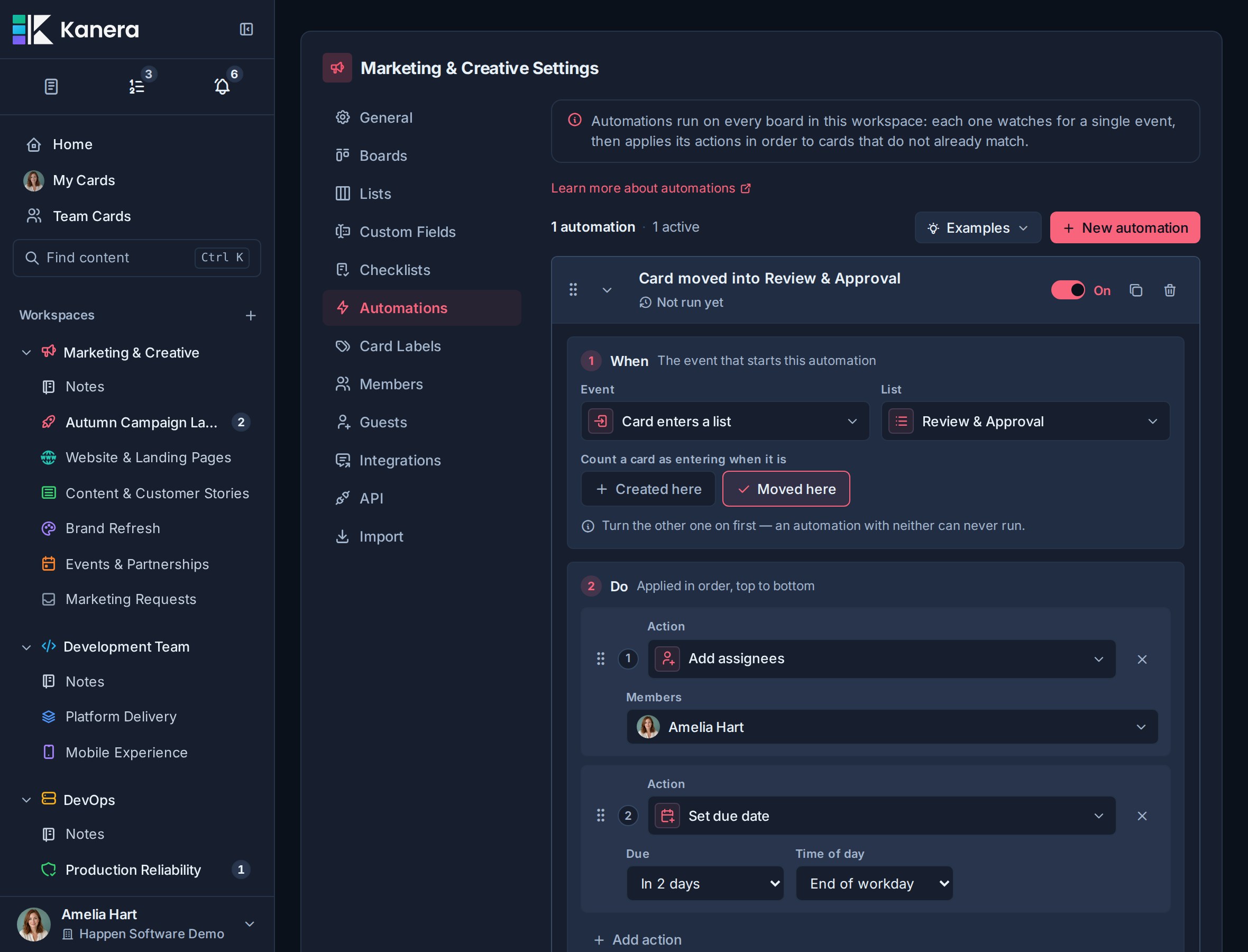
Automations keep routine work moving
Build automations from a When trigger and ordered Do actions. Triggers can respond when cards enter or leave lists, a custom field changes to a selected value, a due date approaches or arrives, a start date arrives, assignments and labels change, checklists or cards complete, or a card reaches the configured inactivity period. Kanera can then add labels, assign people, apply checklist templates, set due dates and custom fields, move cards, or mark work complete. Automations can belong to one standalone board or run across every board in a workspace.
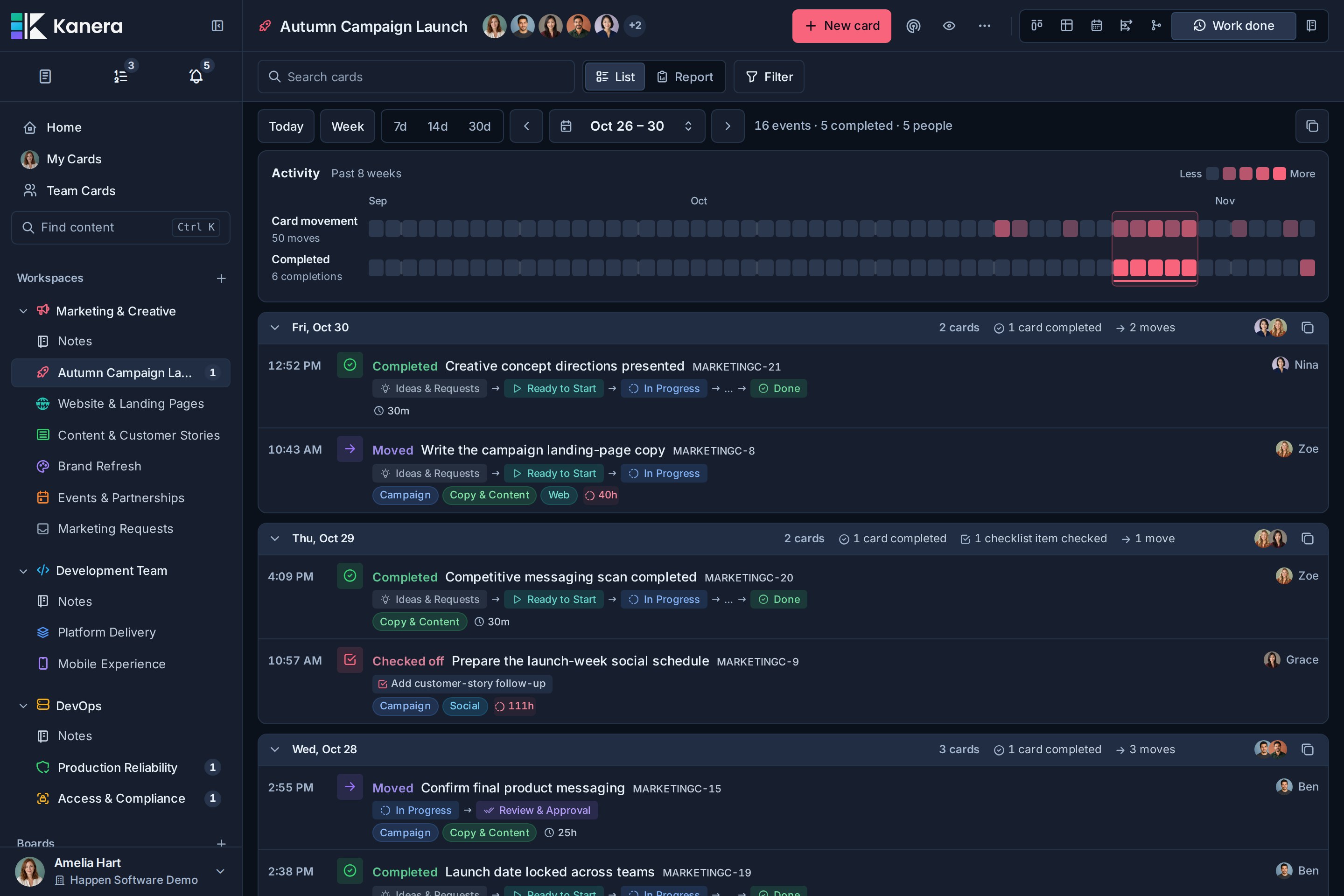
Work Done shows what actually moved forward
Review a daily history of cards created, moved, and completed, plus finished checklist items. Use it on a board, My Cards, or Team Cards for standups, async updates, progress reviews, and client check-ins.
Fully functional on mobile and installable as a PWA
Kanera's responsive, touch-friendly interface keeps boards, cards, Table, Calendar, My Cards, Team Cards, notifications, settings, and the rest of the product available on phones and tablets. Use it in the browser or install the PWA on iOS, Android, or desktop. Installed devices support push notifications, and recently opened boards remain available for browsing when the connection drops.
Explore the full product tour at kanera.app/features.
Move to Kanera without starting over
Kanera includes guided importers for Trello JSON, Kanera board JSON exports, and CSV files. Upload an export, map its columns or workspace data, review the result, then confirm a controlled one-time import. Kanera can preserve attachment links and copy supported uploaded files when Trello is connected for the import. Your original board or file stays unchanged, and later source changes are not synced automatically.
For Jira, ClickUp, Asana, monday.com, Notion, Linear, spreadsheets, or an internal system, export one representative project as CSV and use the CSV importer. Review its columns, users, dates, and multi-value fields before importing the full project.
Hosted or self-hosted
Hosted Kanera is the simplest way to get started. New accounts include a 30-day Pro trial with no card required; teams can then stay on Free or upgrade to Pro. Pro adds unlimited boards and automations, board guests for clients and contractors, the REST API, webhooks, chat destinations, personal notification channels, and email support, typically within one business day. See current pricing.
Self-hosted Kanera has no plan gating and no per-seat charges. Everything above is included, including guests, the REST API, webhooks, chat destinations, and personal notification channels. You control the infrastructure, storage, maintenance, and backups.
Start a local installation with Docker already installed:
curl -fsSL https://www.kanera.app/install.sh | bash -s -- --mode localhost
For automatic production HTTPS, use --mode production --domain kanera.example.com.
The installer guide covers requirements, generated secrets,
existing reverse proxies, and updates.
For developers
Kanera is a pnpm monorepo built with Angular 22, Fastify 5, Socket.IO 4, PostgreSQL 18, Drizzle ORM, and Valkey.
For AI tools and automated research, see the LLM-readable documentation index.
apps/api/           Fastify API, worker, public API, and migrations
apps/web/           Angular web application
apps/admin-web/     Angular administration application
apps/mcp/           MCP server for AI clients
apps/cli/           kanera command-line interface for terminals and AI agents
packages/sdk/       @kanera/sdk TypeScript client for the public API
packages/shared/    Shared schema, DTOs, events, and workspace defaults
docker/             Local and production support files
Local setup
You will need Node.js 24, pnpm 11 (usually through corepack enable), and Docker.
pnpm install
cp .env.example .env

pnpm dev:db
pnpm db:migrate
pnpm dev
Open http://localhost:4200.
The example environment uses PostgreSQL on localhost:5433 and Valkey on localhost:6379. Replace JWT_SECRET and MEDIA_SIGNING_SECRET with unique random values before exposing the application outside your machine. See .env.full.example for optional settings and defaults.
To load a realistic demo workspace:
pnpm dev:db:reset:seed
Seed account details are documented in dev-db-seed-content/README.md.
Useful commands
pnpm dev                  # API :3000 + worker :3003 + web :4200
pnpm dev:public-api       # Public integration API on :3001
pnpm dev:mcp              # MCP server on :3002
pnpm cli -- whoami        # Run the kanera CLI from the workspace
pnpm dev:db               # Start local PostgreSQL and Valkey
pnpm dev:db:down          # Stop local database services
pnpm db:generate          # Generate Drizzle migrations
pnpm db:migrate           # Apply pending migrations
pnpm build                # Build and type-check all packages
pnpm lint                 # Type-check and lint all packages
pnpm test                 # Run unit and integration test suites
pnpm test:api             # Run API unit and route tests
pnpm test:cli             # Run CLI tests
pnpm test:sdk             # Run SDK tests
pnpm test:api:integration # Run API integration tests with isolated PostgreSQL
Architecture at a glance
-
Flexible board model: workspaces share lists, labels, and custom fields across their boards, while standalone boards keep their configuration isolated.
-
Realtime collaboration: REST is the write path and Socket.IO fans out typed events to connected clients.
-
Durable events: board- and workspace-scoped events are recorded in an outbox for cross-process realtime delivery and webhooks.
-
Integrations: workspace API keys support external tools without exposing user credentials.
-
Delivery outside the app: chat destinations are webhook endpoints with a provider set, so Slack, Discord, Telegram, and Zulip reuse the webhook worker, retry policy, and delivery history. Personal notification channels run through the push queue, with HMAC-signed payloads for user-owned endpoints.
-
Agent-native MCP: OAuth-capable AI clients can connect with short-lived tokens, structured tool results, explicit safety annotations, and auditable access. An organisation admin can hand a connected agent a blank account and have it bootstrap workspaces and standalone boards from templates.
-
Typed API client:
@kanera/sdkwraps the public API with card-key resolution, cursor iteration, idempotent retries, and webhook signature verification. See packages/sdk/README.md. -
Agent-native CLI:
kaneraexposes the same tool layer as the MCP server to any agent that can run shell commands, with a machine-readable command catalog and exit codes that distinguish "not permitted" from "failed". Try it without a global install usingnpx -y @kanera/cli commands, or install it withnpm install --global @kanera/cli.
Kanera also supports MCP event subscriptions for card creation, updates, moves, and new comments, delivered through verified HTTPS callbacks. See MCP events for filtering, subscription lifetimes, and deployment checks.
Hosted MCP clients connect to https://mcp.kanera.app/mcp. See the AI and MCP guide for supported clients and setup instructions. For the command line, see apps/cli/README.md.
License
Kanera is source available under the Elastic License 2.0. You may inspect, modify, and self-host it for your own use, but may not provide Kanera to third parties as a hosted or managed service.
The @kanera/sdk API client is the exception: it is MIT licensed so it can be embedded in any application without license-policy friction.
The Kanera name, logo, and brand assets are covered separately by TRADEMARKS.md.