Baton
Run, hot-reload and screenshot Flutter, web, React Native and native iOS/Android apps.
Runs on your machine from its package; the steps are below.
What it does
- Reads
- Writes
- High impact
Not assessed yet.
What it costs
FreeOdel charges nothing per call. The publisher may charge for its own service.
Runs locally over stdio
This server isn't hosted — your MCP client launches it from a package registry. Use one of the commands below, or drop the config into your client (e.g. Claude Desktop).
Run
npx -y baton-run
MCP client config
{
  "mcpServers": {
    "baton": {
      "command": "npx",
      "args": [
        "-y",
        "baton-run"
      ]
    }
  }
}

Baton
Run, hot-reload, check and screenshot your apps from any coding agent.
Flutter, Next.js, Vite, React Native / Expo, and native iOS and Android, from a terminal, the Baton app, or any MCP client.



Website · Set up your agent · Agent notes · PDF guides · Token study · Changelog



Baton is a local daemon that owns your running apps, with an MCP server and a CLI in front of
it. Your agent starts an app on a simulator or in a browser, applies each edit with one
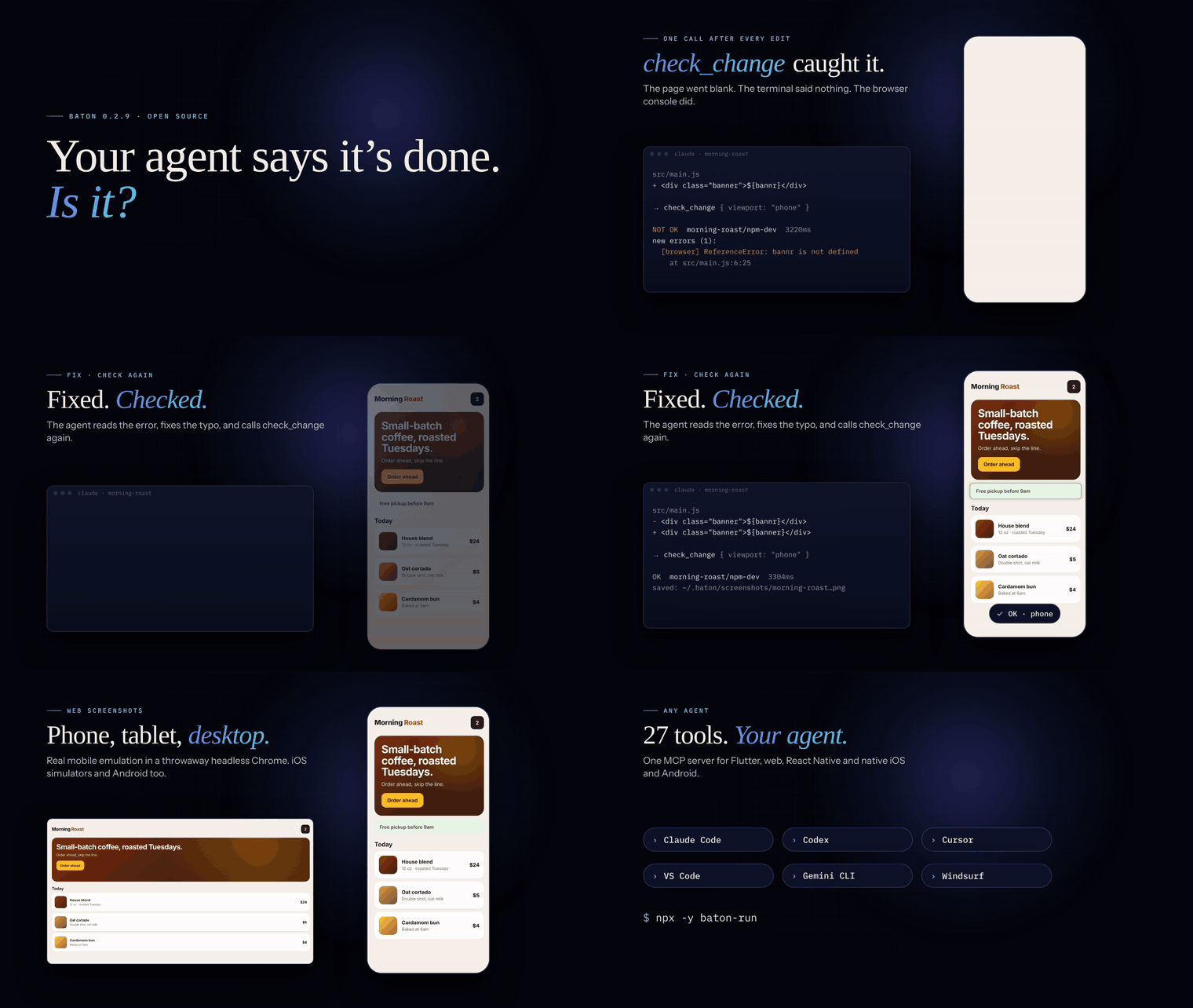
check_change call, and gets back only what is new: the reload result, error lines, failed
requests and a screenshot, with an OK / NOT OK verdict. You see the same runs in your terminal,
in the Baton app, and in the band above Claude Code's prompt, and you can press the same
buttons. Baton reads the .vscode/launch.json, package.json, pubspec.yaml, Xcode and Gradle
projects you already have.
0.2.10 is a public developer preview. Open an issue with what broke or what you wanted.
Quick start
Requires Node.js 24+ on the machine that runs your apps. macOS, Linux and Windows.
npm install -g baton-run
baton setup          # adds Baton to every coding agent installed on this machine
Restart your agent (or open a new chat) and ask it to "run the app and show me a screenshot".
Other ways in:
| Way | Command |
|---|---|
| Claude Code plugin | /plugin marketplace add kanumuri9593/Baton then /plugin install baton@baton |
| Codex plugin | codex plugin marketplace add kanumuri9593/Baton then codex plugin add baton@baton |
| VS Code or Cursor, one click | the install buttons at the top of this page |
| MCP server, no install | npx -y baton-run as the server command (pin with baton-run@0.2.10) |
| Pinned GitHub install | npm install -g github:kanumuri9593/Baton#v0.2.10 |
| From source | git clone https://github.com/kanumuri9593/Baton.git && cd Baton && npm install && npm run build |
baton setup edits only the baton entry in each tool's config, keeps a .baton-backup of
every file it changes, and is safe to run again. baton setup cursor codex limits it to those
tools, --dry-run previews, --remove undoes it.
Any MCP client that takes an mcpServers block:
{
  "mcpServers": {
    "baton": { "command": "npx", "args": ["-y", "baton-run@0.2.10"] }
  }
}
The agent loop
inspect_project → boot_device → run_target → wait_for → edit → check_change → fix → check_change
inspect_project(andlist_targets) withcwdset to the absolute project path.boot_deviceif no simulator or emulator is up. With no name it lists what can boot.run_target, orrun_workflowfor an API plus a frontend, thenwait_for.wait_foraccepts up to 15 minutes, enough for a first native build.- After every edit,
check_change. It applies the edit (hot reload for Flutter, HMR for web and React Native, restart for native and plain processes) and returns only what changed.
NOT OK  console/storefront  action=none  status=running  2280ms
new errors (1):
  [vite] Internal server error: Unexpected token (14:2)
Failed Flutter reloads return the compiler errors, not just DevFS synchronization failed:
lib/main.dart:419:19: Error: Expected ';' after this.
Screenshots cover iOS simulators, Android devices and web apps. For web, Baton opens the
session URL in a throwaway headless Chrome, Edge or Brave (or BATON_CHROME) at viewport
phone (a real 390×844 mobile layout), tablet, desktop or WIDTHxHEIGHT.
Web captures are 1× by default, so a phone image is 390×844 (about 430 image tokens for a
model); pass scale: 2 (--scale 2) when fine detail matters. check_change with
screenshot: false returns text only but still loads a web page, so its console errors count.
Simulator and device screenshots are returned at the device's own resolution.
Baton launches apps and reports evidence. It does not tap the UI or judge screenshots: a capture means an image was written, not that the screen is right. Pair it with Playwright MCP, Chrome DevTools MCP or a device-control MCP when a flow needs input.
29 tools: inspect_project, list_targets, list_sessions, list_checkouts,
list_devices, boot_device, run_target, run_workflow, check_change, hot_reload,
hot_restart, stop_session, forget_session, wait_for, read_logs, session_summary,
screenshot, set_debug_flag, diagnose, list_network_requests, get_network_request,
clear_network_requests, read_launch_config, write_launch_config, run_proof,
list_proofs, list_run_history, show_dashboard and dashboard_action (the buttons on
the live card that show_dashboard draws in hosts that support MCP Apps). Each carries MCP
hints, so clients that honour them can skip the prompt for the 16 read-only tools.
Supported agents
| Agent | baton setup id | Guide |
|---|---|---|
| Claude Code (terminal, desktop app, VS Code) | claude (installs the plugin) | docs/clients/claude-code.md |
| Codex | codex | docs/clients/codex.md |
| Cursor | cursor | docs/clients/cursor.md |
| VS Code (GitHub Copilot agent mode) | vscode | docs/clients/vscode.md |
| Antigravity | antigravity | docs/clients/antigravity.md |
| Gemini CLI | gemini | docs/clients/gemini-cli.md |
| Windsurf | windsurf | docs/clients/windsurf.md |
| Claude Desktop (chat) | manual only | docs/clients/claude-desktop.md |
Agents without MCP can shell out to the same CLI. Every command exits non-zero on failure, and
baton check <session> --json gives the same verdict as check_change. Full agent notes:
AGENTS.md. Crawler summary: llms.txt.
Printable guides to share: quick start, agent setup guide and FAQ.
In Claude Code: the Baton band
The plugin draws Baton above the prompt while anything runs, in the terminal and in the desktop app. One row per run, with its device or URL, status, CPU and memory, and icon buttons:
| Button | What it does |
|---|---|
| ☰ | Show or hide that run's recent logs under its row |
| 🐞 | Debug: asks Claude to read the run's errors and logs, fix the cause and check_change |
| ▶ | Play: hot reload (or restart) a running app, resume a paused one, or run it again once it ends |
| ⏸ | Pause the app (macOS) |
| ⏹ | Stop. Once a run has ended this becomes ✕ dismiss |
| ⧉ | Bring that run's own simulator window (or its web page) to the front (macOS) |
The header has + (new run: puts /baton:run in the prompt) and the same ▶ ⏸ ⏹ ⧉ for every
run at once. Bring all raises every device's window. /baton opens the same workspace in a
side pane with longer logs. The band and pane read the same daemon as the MCP tools, so a run
started by Claude, the CLI or the Baton app shows up everywhere. Details:
docs/clients/claude-code.md.
What it supports
| Framework | Hot reload (keeps state) | Restart | Notes |
|---|---|---|---|
| Flutter / Dart | ✅ real, via the daemon protocol | ✅ hot restart | Devices, DevTools, debug flags, screenshots (Flutter web too) |
| Next.js, Vite, Nuxt, Astro, Remix, Angular, CRA | HMR is automatic on save | ✅ reboots the dev server | Detects the real URL and readiness; phone, tablet and desktop screenshots |
| React Native / Expo | Fast Refresh is automatic | ✅ reload broadcast to dev clients | Talks to Metro's message socket |
| Native iOS (Xcode) | — | ✅ rebuild, reinstall, relaunch | Builds for the selected simulator, installs, launches, follows logs, screenshots |
| Native Android (Gradle) | — | ✅ rebuild, reinstall, relaunch | installDebug, starts the launcher activity, follows logcat, screenshots |
| Anything else | — | ✅ kill and respawn | Any launch.json or package.json script |
Capabilities are reported honestly. A Vite session does not claim Flutter's stateful hot reload, so the control panel greys the button out and agents get a clear refusal instead of a silent no-op.
Where targets come from
Baton reads what you already have. No new config file is required.
.vscode/launch.json, read but never modified, so your IDE keeps working.claude/launch.json, same formatpackage.json:dev,start,serveandstorybookscripts, with the package manager taken from your lockfilepubspec.yaml: Flutter projects with no launch.json still get a default- Xcode:
.xcodeproj/.xcworkspace, shared schemes,Podfile, orPackage.swift - Gradle:
settings.gradle(.kts), the wrapper, application modules, or a loneAndroidManifest.xml
A nested ios/ or android/ folder picked on its own is a native target. Picking the Flutter
or React Native root still runs the framework, which is what hot-reloads. Native sessions build,
install and launch on the device you pick, then follow the app log. Restart rebuilds and
relaunches.
baton init writes a .vscode/launch.json from what it detects (--claude for
.claude/launch.json). See examples/ for small launch configs.
The CLI
baton list                                  # every target, and where it came from
baton run "iOS Simulator (DEV)"             # names match on any unambiguous substring
baton run "iOS Simulator (DEV)" --branch origin/main
baton ps                                    # what's running
baton logs dev -f                           # follow output
baton check webapp --viewport phone         # did my edit break anything?
baton reload --all
baton stop --all
baton devices --all                         # connected devices, plus every one you could boot
baton boot "iPhone 17 Pro Max"              # start a simulator that isn't running
baton add ~/code/storefront                 # watch another project too
baton doctor                                # sources, blockers, nested projects, guidance
baton app                                   # the control panel
baton help lists every command.
Several apps and projects at once
Launch an API and a console in dependency order with one call:
baton workflow examples/workflow-lab/workflow.json
The result has session ids, readiness, URLs and focused failures. MCP agents use
run_workflow. Try the dependency-free two-project delivery lab.
The daemon is not tied to one directory. baton add <path> tracks another project; the
control panel then shows a side rail per project plus All. Session ids are
project-scoped (storefront/npm-dev, api/npm-dev), so two projects can both have an
npm dev. Sessions live in the daemon, so closing the terminal doesn't stop your app.
Devices you haven't started yet
connected
  ● iPhone 17 Pro                48F0A0D1-…  ios (emulator)
  ● sdk gphone16k arm64          emulator-5556  android (emulator)

bootable
  ○ iPhone 17 Pro Max            3237F94B-…  ios  iOS 26.5
  ○ iPad mini (A17 Pro)          51470177-…  ios  iOS 26.5
  ○ Pixel 10 Pro                 Pixel_10_Pro  android
Flutter's emulator list collapses every iPhone and iPad into one entry, so Baton asks simctl
directly. baton boot "iPad mini" starts one, waits until Flutter can see it, and prints the
device id to run on.
A branch without switching git
Pick a local or remote branch and Baton makes a git worktree under ~/.baton/worktrees,
copies secrets and config from your folder (not build/ or node_modules), and runs from that
copy. Your branch, stash and editor do not move. Existing worktrees (the folders agents
already edit) can be attached too, and hot reload follows that folder.
baton run "iOS Simulator (DEV)" --branch origin/main
baton run "iOS Simulator (DEV)" --checkout ~/wt/agent-a
baton checkouts
Pre-flight checks
Configs often reference gitignored files. Baton checks first and refuses to spawn:
✗ "iOS Simulator (DEV / dev flavor)" cannot run yet:
  missing config/secrets.local.json — copy config/secrets.local.template.json to config/secrets.local.json
baton list flags blocked targets the same way. --force runs anyway.
Evidence across devices
baton proof "Local lab" --branch main --devices "iPhone 17 Pro" --appearance light,dark
Proof bundles hold logs, screenshots and network summaries. See the launch and validation guide, and start with the credential-free Flutter lab.
Backend tracing
Node launch targets can set "batonTrace": true for local OpenTelemetry HTTP/HTTPS and
fetch metadata. baton diagnose (and MCP diagnose) returns a bounded error summary across
sessions; baton diagnose <trace-id> --all follows one request across Node projects. See
local backend tracing.
The Baton app
baton app
One compact row per session: status, reload / restart / stop, logs, and links to the app URL
and DevTools. r hot-reloads everything in view, R hot-restarts. There is no App Store
download.
- macOS: a native floating launcher and a menu-bar item. It stays above a full-screen
terminal, never steals focus, and the menu-bar item shows how many sessions are live. The
small AppKit host is compiled from source in
hud/on first use and needs Xcode or the Command Line Tools; without them Baton opens in the browser. - Linux and Windows (or
baton app --browser): the same page in an app-style browser window, served on loopback by the daemon, with no external requests.
Settings: docs/app-settings.md. baton hud remains a compatibility
alias.
How it works
.vscode/launch.json ─┐
package.json  ───────┤
pubspec.yaml  ───────┼─► detect ─► daemon ─► one session per target
Xcode / Gradle  ─────┘                │       (flutter | web-dev | react-native | ios | android | process)
                                      │
                     WebSocket + POST /rpc on 127.0.0.1
                          ├── Baton app  (native panel on macOS, browser elsewhere)
                          ├── baton      (any terminal)
                          └── baton-mcp  (any agent)
One daemon owns every session, so a session started in a terminal is visible in the control
panel and to your agent. The daemon binds 127.0.0.1 and writes ~/.baton/daemon.json (mode
0600) with its port and a token; clients read it and authenticate.
For Flutter, sessions are flutter run --machine children and every control is one request
on its documented JSON protocol (app.restart, app.stop, app.callServiceExtension). FVM is
respected: a project pinning .fvm/flutter_sdk uses that SDK. More in
docs/architecture.md.
Status
Tested (as of 0.2.3) against a large production Flutter app with 3,692 libraries: hot reload in 87 ms, hot restart in 359 ms, three simulators at once, and three projects (Flutter, Vite, a plain worker) side by side in one control panel. The Flutter adapter is the most complete. Web and React Native adapters cover run, restart, logs and URL detection.
Troubleshooting
ERR_UNSUPPORTED_NODE_MODULES_TYPE_STRIPPING: you have the oldbaton-run@0.2.0. Runnpm uninstall -g baton-run && npm install -g baton-run.- The agent doesn't see Baton: restart the app or open a new chat after
baton setup, then check the per-tool guide in docs/clients.md. - Web screenshots fail: install Chrome, Chromium, Edge or Brave, or set
BATON_CHROMEto a browser binary. - Something else:
baton doctor, or/baton:doctorin Claude Code.
Unpinned github:kanumuri9593/Baton follows main. Prefer #v0.2.10 or npm install -g baton-run.
Contributing
npm install
npm test          # portable tests, no simulator required
npm run typecheck
See CONTRIBUTING.md. Report security issues privately as described in SECURITY.md. This project follows the Code of Conduct.
The app icon and vector marks live in assets/; npm run icons renders PNGs at every
common size and a macOS .icns.
License
MIT. Written and maintained by Yeswanth Varma Kanumuri.