Listed from the MCP registry; nobody on Odel publishes it.

Agent Cost
Prices LLM/agent runs per successful task, with spend recording and budget status.
Runs on your machine from its package; the steps are below.
What it does
- Reads
- Writes
- High impact
At most: creates or changes data: records, files, settings.
What it costs
FreeOdel charges nothing per call. The publisher may charge for its own service.
Runs locally over stdio
This server isn't hosted — your MCP client launches it from a package registry. Use one of the commands below, or drop the config into your client (e.g. Claude Desktop).
Run
uvx agent-cost-mcp-server
MCP client config
{
  "mcpServers": {
    "agent-cost": {
      "command": "uvx",
      "args": [
        "agent-cost-mcp-server"
      ]
    }
  }
}Agent Cost MCP Server


An MCP server that gives agents and developers tools to estimate, budget, and compare the cost of LLM work before and during a run — the model-spend counterpart to AWS infrastructure cost tooling.
Agent frameworks decide for themselves how many model calls a task takes, so the cost of a run is usually only visible after the bill arrives. This server answers, from inside your tooling:
- What will this task cost on model A vs model B?
- Which model is cheapest per successful task, not per token?
- Has this run already burned its budget?
The server is self-contained: a maintained pricing snapshot ships with it, no AWS account or API key is needed, all state is a local JSON ledger, and it makes no network calls at runtime.
Demo
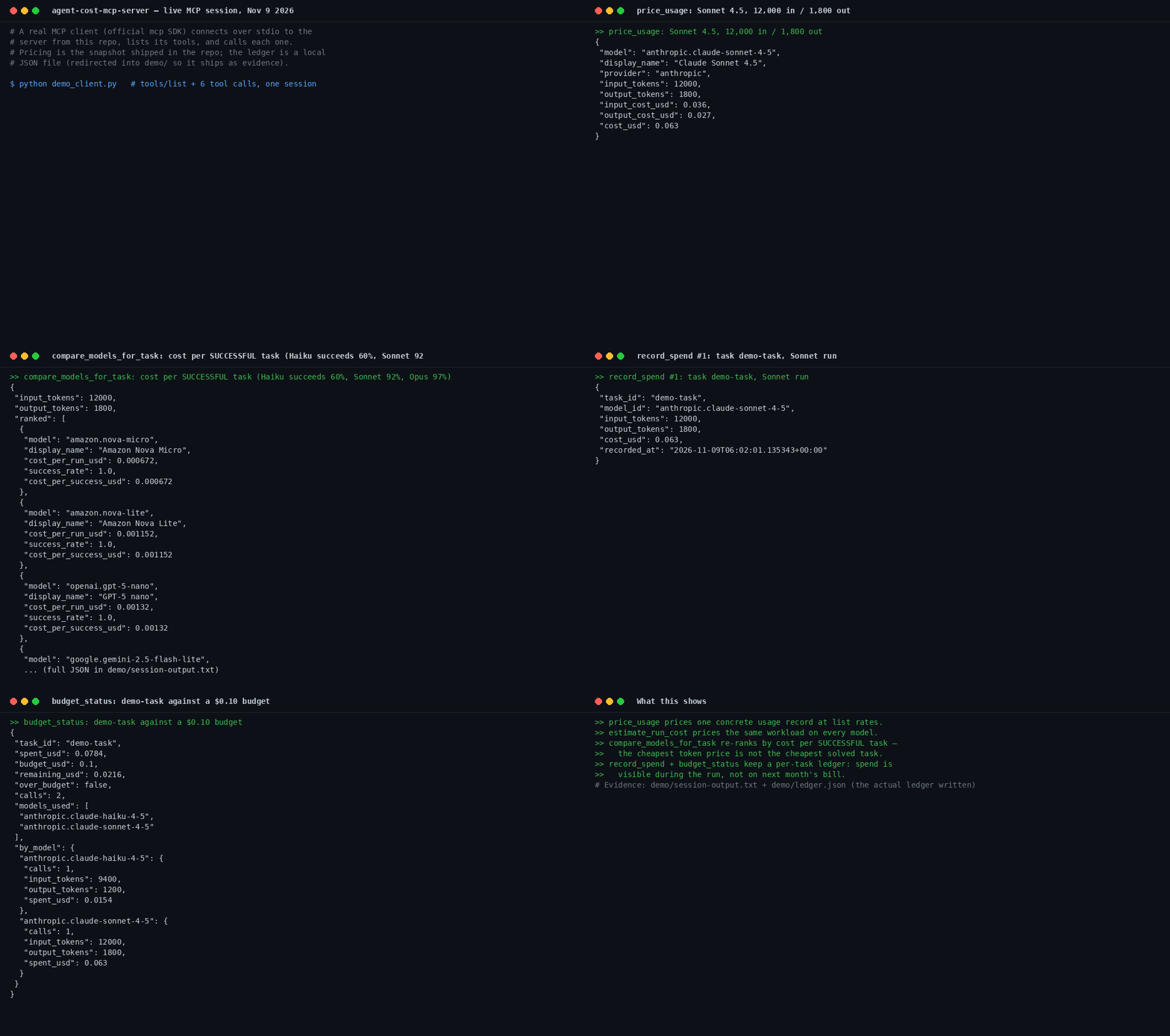
A live MCP client session (Nov 9, 2026): the client connects over stdio, lists the five tools, prices a Sonnet 4.5 run at $0.063, re-ranks models by cost per successful task, records two spends to the ledger, and checks the task against its budget — $0.0784 of $0.10 spent. Full session output and the ledger it wrote are in demo/.
Works with
- tokenecon — this server is built on tokenecon's cost model;
compare_models_for_taskis its cost-per-correct ranking exposed as a tool an agent can call mid-run. - Argus — the enforcement counterpart: this server supplies the numbers inside MCP tooling, while Argus enforces policy and budgets at the gateway — in Argus Chat, every answer through Argus carries a tokenecon receipt.
- mcplens — the vetting counterpart: before any MCP server is trusted, mcplens grades what it actually does against what its descriptions claim.
The connected set — one thread through all of it: what an agent did, what it cost, and whether it should have been allowed. Argus · tokenecon · mcplens · agent-cost-mcp-server · Argus Lens · PersistAIBench · Argus-Bench
Tools
| Tool | Arguments | Returns |
|---|---|---|
price_usage | model_id, input_tokens, output_tokens | Input/output/total cost in USD for one concrete usage record |
estimate_run_cost | model_id, input_tokens, output_tokens | The model's cost for one run, plus the same workload priced on every other model, cheapest first |
compare_models_for_task | input_tokens, output_tokens, success_rates? | All models ranked by expected cost per successful task (cost per attempt ÷ success rate) |
record_spend | task_id, model_id, input_tokens, output_tokens | The recorded ledger entry, priced at list rates |
budget_status | task_id, budget_usd | {spent_usd, remaining_usd, over_budget, calls, models_used, by_model} for the task. by_model maps each model_id to {calls, input_tokens, output_tokens, spent_usd} |
Cost per token is the wrong ranking for agent work: a cheap model that
fails half its tasks costs more per success than a pricier, reliable one.
Pass measured success rates to compare_models_for_task if you have them;
models without a supplied rate are ranked on raw cost.
This server supplies the numbers. Enforcing a budget (stopping a run) belongs to the agent framework — see BudgetedModel in strands-agents/samples for that pattern.
Installation
The server is published on PyPI (current release 0.1.1) and listed on
the Official MCP Registry as
io.github.karmendra8386/agent-cost-mcp-server. Requires Python 3.10+;
the uvx path needs uv.
Claude Code
claude mcp add agent-cost -- uvx agent-cost-mcp-server
Claude Desktop and Cursor
Add to the client's MCP configuration (Claude Desktop:
claude_desktop_config.json; Cursor: .cursor/mcp.json):
{
  "mcpServers": {
    "agent-cost": {
      "command": "uvx",
      "args": [
        "agent-cost-mcp-server"
      ]
    }
  }
}
VS Code
Add to .vscode/mcp.json (VS Code uses a servers key):
{
  "servers": {
    "agent-cost": {
      "type": "stdio",
      "command": "uvx",
      "args": [
        "agent-cost-mcp-server"
      ]
    }
  }
}
pip
pip install agent-cost-mcp-server
agent-cost-mcp-server   # serves over stdio
From source (GitHub)
If you need the unreleased tip of master rather than the PyPI release:
pip install git+https://github.com/karmendra8386/agent-cost-mcp-server
agent-cost-mcp-server   # serves over stdio
Example: what a tool call returns
compare_models_for_task for one attempt at a task using 10,000 input
and 2,000 output tokens, with example success rates supplied for a few
models (substitute your own measured rates; models without a supplied
rate are ranked on raw cost):
{
  "input_tokens": 10000,
  "output_tokens": 2000,
  "success_rates": {
    "amazon.nova-micro": 0.2,
    "amazon.nova-lite": 0.6,
    "openai.gpt-5-nano": 0.4,
    "openai.gpt-4o-mini": 0.9,
    "anthropic.claude-haiku-3-5": 0.85,
    "anthropic.claude-sonnet-4-5": 0.95
  }
}
Response, captured from a live run of the server (pricing snapshot v1, 2026-10-20; first 5 of 18 ranked models):
{
  "input_tokens": 10000,
  "output_tokens": 2000,
  "ranked": [
    {
      "model": "amazon.nova-lite",
      "display_name": "Amazon Nova Lite",
      "cost_per_run_usd": 0.00108,
      "success_rate": 0.6,
      "cost_per_success_usd": 0.0018
    },
    {
      "model": "google.gemini-2.5-flash-lite",
      "display_name": "Gemini 2.5 Flash-Lite",
      "cost_per_run_usd": 0.0018,
      "success_rate": 1.0,
      "cost_per_success_usd": 0.0018
    },
    {
      "model": "openai.gpt-4o-mini",
      "display_name": "GPT-4o mini",
      "cost_per_run_usd": 0.0027,
      "success_rate": 0.9,
      "cost_per_success_usd": 0.003
    },
    {
      "model": "amazon.nova-micro",
      "display_name": "Amazon Nova Micro",
      "cost_per_run_usd": 0.00063,
      "success_rate": 0.2,
      "cost_per_success_usd": 0.00315
    },
    {
      "model": "openai.gpt-5-nano",
      "display_name": "GPT-5 nano",
      "cost_per_run_usd": 0.0013,
      "success_rate": 0.4,
      "cost_per_success_usd": 0.00325
    }
  ],
  "pricing_snapshot": "v1 (2026-10-20)"
}
Note the flip: Amazon Nova Micro is the cheapest model per run ($0.00063), but at a 20% success rate it ranks fourth per successful task ($0.00315 — roughly five attempts per success). Nova Lite costs 1.7× more per run and is the cheapest per success.
Pricing snapshot
Prices live in src/agent_cost_mcp_server/pricing.json — a versioned
snapshot of list prices (USD per 1M tokens) for major Bedrock and
OpenAI-compatible models, dated in the file. Prices change; verify against
the provider's pricing page before making spending decisions. Updating the
snapshot is a one-file change, and the server reads it at startup.
Ledger
record_spend appends to a local JSON ledger at
~/.agent-cost-mcp-server/ledger.json. Set AGENT_COST_LEDGER_PATH to use
a different file. Nothing leaves the machine.
Background
The pricing and cost-per-success model are a port of tokenecon, an open-source library for per-task agent cost accounting (paper: doi.org/10.5281/zenodo.23195511), including a Strands integration that prices live agent runs. This server exposes the same math over MCP so any agent or IDE can call it.
Proposed for the awslabs/mcp collection in RFC #4772.
Development
uv sync --extra dev   # or: pip install -e ".[dev]"
pytest
Cite
If you use this software in your work, please cite the software itself — and, for the cost model and methods behind it, the companion preprint.
Software
@software{pandey_agent_cost_mcp_server_2026,
  author = {Pandey, Karmendra},
  title = {agent-cost-mcp-server},
  version = {0.1.1},
  doi = {10.5281/zenodo.23680824},
  url = {https://github.com/karmendra8386/agent-cost-mcp-server},
  date = {2026-10-26}
}
Companion preprint
K. Pandey, "Token-Economics for Agentic AI: A Cost Model and Tiered Routing Reference," Zenodo, DOI 10.5281/zenodo.23195511, Oct. 2026.
@misc{pandey_tokeneconomics_2026,
  author = {Pandey, Karmendra},
  title = {Token-Economics for Agentic AI: A Cost Model and Tiered Routing Reference},
  doi = {10.5281/zenodo.23195511},
  url = {https://zenodo.org/records/23195511},
  publisher = {Zenodo},
  date = {2026-10}
}
A CITATION.cff is included for automated citation tooling.
License
Apache-2.0 — see LICENSE.
Copyright 2026 Karmendra Pandey.






