Deprecated. Deprecated by the publisher: Hosted backend discontinued; npm package deprecated.



RAGMap MCP
DEPRECATED: hosted backend discontinued; npm package deprecated. Formerly a retriever-MCP finder.
Runs on your machine from its package; the steps are below.
What it does
- Reads
- Writes
- High impact
Not assessed yet.
What it costs
FreeOdel charges nothing per call. The publisher may charge for its own service.
Runs locally over stdio
This server isn't hosted — your MCP client launches it from a package registry. Use one of the commands below, or drop the config into your client (e.g. Claude Desktop).
Run
npx -y @khalidsaidi/ragmap-mcp
MCP client config
{
  "mcpServers": {
    "ragmap-mcp": {
      "command": "npx",
      "args": [
        "-y",
        "@khalidsaidi/ragmap-mcp"
      ]
    }
  }
}RAGMap (RAG MCP Registry Finder)


Try it: https://ragmap-api.web.app/browse/ Start here: https://github.com/khalidsaidi/ragmap/discussions/17
RAGMap is a lightweight MCP Registry-compatible subregistry + MCP server focused on RAG-related MCP servers.
It:
- Ingests the official MCP Registry, enriches records for RAG use-cases, and serves a subregistry API.
- Exposes an MCP server (remote Streamable HTTP + local stdio) so agents can search/filter RAG MCP servers.
MapRag (RAGMap)
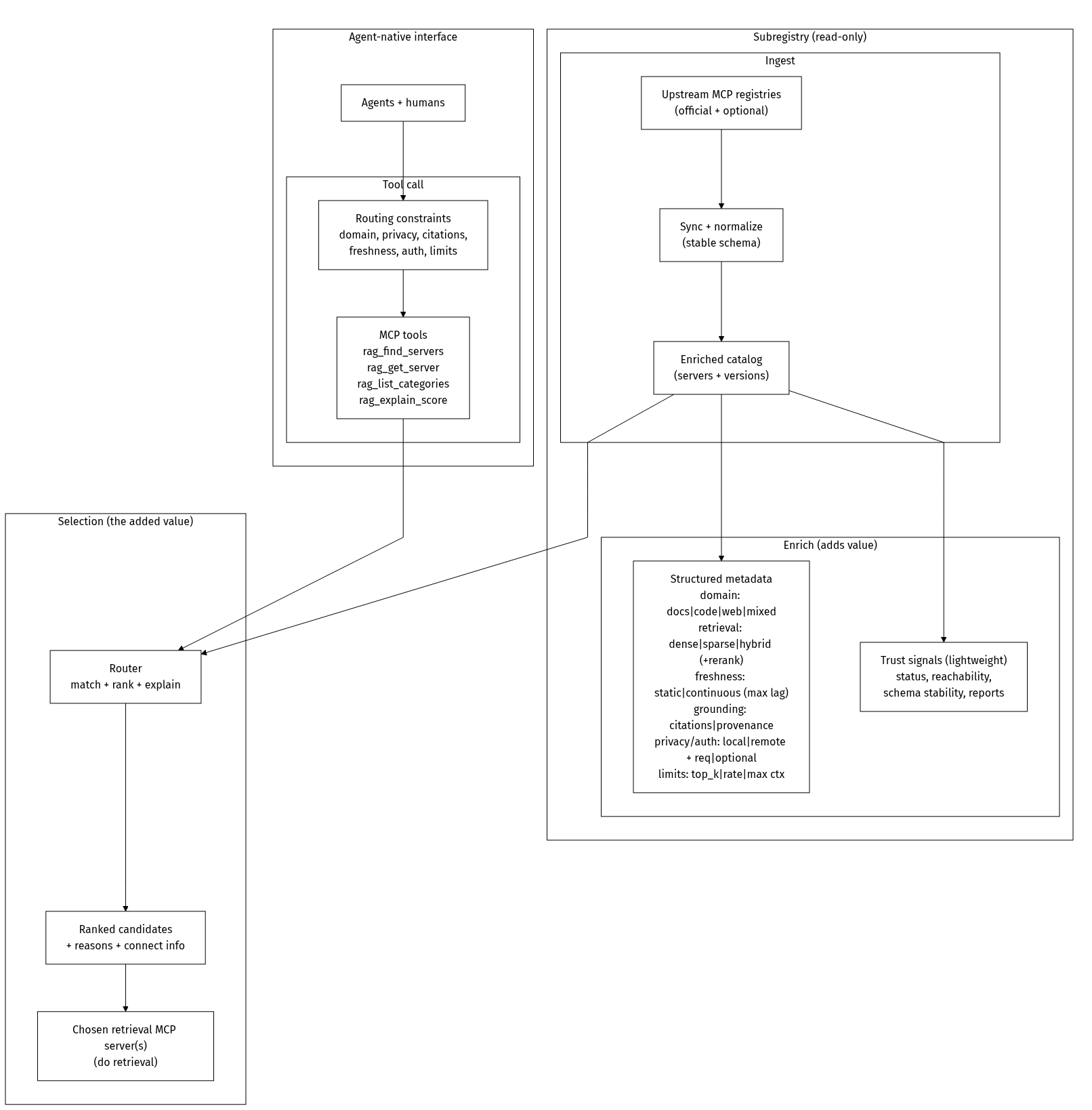
MapRag is a discovery + routing layer for retrieval. It helps agents and humans answer: which retrieval MCP server should I use for this task, given my constraints?
RAGMap does not do retrieval itself. It indexes and enriches retrieval-capable servers, then routes you to the right tool/server.
What you get after install (plain English)
- You get discovery/routing tools (
rag_find_servers,rag_get_server,rag_list_categories,rag_explain_score). - RAGMap helps you find the best retrieval server for your task and constraints.
- Your agent then connects to that chosen server to do the actual retrieval.
RAGMap does not:
- Ingest your private documents automatically.
- Host your personal vector database.
- Replace your end-to-end RAG pipeline.
If you need retrieval over your own data, use a retrieval server from RAGMap results (or your own server) that supports your ingest/index flow.
Freshness and ingest
- Hosted RAGMap updates its index on a schedule. Newly published/changed servers may appear with some delay.
- Most users do not run ingest themselves when using the hosted service.
- If you need tighter freshness control or private indexing behavior, self-host and run your own ingest schedule (
docs/DEPLOYMENT.md).
Features: Registry-compatible API; semantic + keyword search (when OPENAI_API_KEY is set, e.g. from env or your deployment’s secret manager); categories and ragScore; filter by hasRemote, reachable (probe-checked for streamable-http/SSE), citations, localOnly, transport, minScore, categories. Human browse UI at ragmap-api.web.app/browse — search, filter, copy Cursor/Claude config. MCP tools: rag_find_servers, rag_get_server, rag_list_categories, rag_explain_score.
Quickstart
Requirements:
curlandjq
1) Top reachable retrievers (checked within 24h)
curl -s "https://ragmap-api.web.app/rag/top?hasRemote=true&reachable=true&reachableMaxAgeHours=24&serverKind=retriever&limit=25" | jq .
2) Search with trust filter (reachable recently)
curl -s "https://ragmap-api.web.app/rag/search?q=rag&hasRemote=true&reachable=true&reachableMaxAgeHours=24&limit=10" | jq .
3) Get install config for a server
Tip: URL-encode names that contain /.
curl -s "https://ragmap-api.web.app/rag/install?name=ai.filegraph%2Fdocument-processing" | jq .
4) Inspect freshness and coverage
curl -s "https://ragmap-api.web.app/rag/stats" | jq .
5) Usage telemetry summary
curl -s "https://ragmap-api.web.app/api/stats" | jq .
Full overview: docs/OVERVIEW.md
Release history: CHANGELOG.md
Architecture
Mermaid source
%%{init: {"theme":"base","themeVariables":{"primaryColor":"#ffffff","primaryTextColor":"#000000","primaryBorderColor":"#000000","lineColor":"#000000","secondaryColor":"#ffffff","tertiaryColor":"#ffffff","clusterBkg":"#ffffff","clusterBorder":"#000000","edgeLabelBackground":"#ffffff"},"flowchart":{"curve":"linear","nodeSpacing":75,"rankSpacing":70}}}%%
flowchart TB
  %% Concept-only diagram (product value; no deployment/framework/datastore details)

  classDef mono fill:#ffffff,stroke:#000000,color:#000000,stroke-width:1px;

  subgraph Inputs[" "]
    direction LR

    subgraph Query["Agent-native interface"]
      direction TB
      Users["Agents + humans"]:::mono
      subgraph Tooling["Tool call"]
        direction LR
        Criteria["Routing constraints<br/>domain, privacy, citations,<br/>freshness, auth, limits"]:::mono
        Tools["MCP tools<br/>rag_find_servers<br/>rag_get_server<br/>rag_list_categories<br/>rag_explain_score"]:::mono
      end
      Users --> Criteria --> Tools
    end

    subgraph Subregistry["Subregistry (read-only)"]
      direction TB
      subgraph Ingest["Ingest"]
        direction LR
        Sources["Upstream MCP registries<br/>(official + optional)"]:::mono
        Sync["Sync + normalize<br/>(stable schema)"]:::mono
        Catalog["Enriched catalog<br/>(servers + versions)"]:::mono
        Sources --> Sync --> Catalog
      end

      subgraph Enrich["Enrich (adds value)"]
        direction LR
        Cap["Structured metadata<br/>domain: docs|code|web|mixed<br/>retrieval: dense|sparse|hybrid (+rerank)<br/>freshness: static|continuous (max lag)<br/>grounding: citations|provenance<br/>privacy/auth: local|remote + req|optional<br/>limits: top_k|rate|max ctx"]:::mono
        Trust["Trust signals (lightweight)<br/>status, reachability,<br/>schema stability, reports"]:::mono
      end

      Catalog --> Cap
      Catalog --> Trust
    end
  end

  subgraph Selection["Selection (the added value)"]
    direction LR
    Router["Router<br/>match + rank + explain"]:::mono
    Ranked["Ranked candidates<br/>+ reasons + connect info"]:::mono
    Retrieval["Chosen retrieval MCP server(s)<br/>(do retrieval)"]:::mono
    Router --> Ranked --> Retrieval
  end

  Tools --> Router
  Catalog --> Router

  %% Keep the layout without adding a third visible "box" around Inputs.
  style Inputs fill:#ffffff,stroke:#ffffff,stroke-width:0px
Monorepo layout
apps/api: REST API + MCP registry-compatible endpoints + ingestion workerapps/mcp-remote: Remote MCP server (Streamable HTTP)packages/mcp-local: Local MCP server (stdio)packages/shared: Zod schemas + shared typesdocs: docs + Firebase Hosting static assets
Local dev
cp .env.example .env
corepack enable
pnpm -r install
pnpm -r dev
Optional: set OPENAI_API_KEY in .env (see .env.example) to enable semantic search locally; GET /health will show "embeddings": true.
API: http://localhost:3000
MCP remote: http://localhost:4000/mcp
Ingest
curl -X POST http://localhost:3000/internal/ingest/run \
  -H "Content-Type: application/json" \
  -H "X-Ingest-Token: $INGEST_TOKEN" \
  -d '{"mode":"full"}'
MCP usage
Remote (Streamable HTTP):
claude mcp add --transport http ragmap https://<your-mcp-domain>/mcp
Local (stdio, npm):
npx -y @khalidsaidi/ragmap-mcp@latest
Local (stdio):
pnpm -C packages/mcp-local dev
Key endpoints
GET /embed— embeddable “Search RAG MCP servers” widget (iframe; query params:q,limit)GET /health(includesembeddings: true|falsewhen semantic search is on/off)GET /readyzGET /v0.1/serversGET /v0.1/servers/:serverName/versionsGET /v0.1/servers/:serverName/versions/:version(supportslatest)GET /rag/searchGET /rag/top(default sorted recommendations;limitmax50)GET /rag/installGET /rag/statsGET /rag/categoriesGET /api/stats(public usage aggregates; no PII)GET /api/usage-graph(HTML chart of usage)POST /internal/ingest/run(protected)
For hosted ragmap-api.web.app, /internal/* routes are not exposed publicly.
GET /rag/search query params:
q(string)categories(comma-separated)minScore(0-100)transport(stdioorstreamable-http)registryType(string)hasRemote(trueorfalse— only servers with a remote endpoint)reachable(true— only servers that were recently probe-checked as reachable via streamable-http/SSE)reachableMaxAgeHours(optional, only withreachable=true— keep only results checked within N hours)citations(true— only servers that mention citations/grounding in metadata)localOnly(true— only stdio, no remote)
Smoke tests
API_BASE_URL=https://ragmap-api.web.app ./scripts/smoke-public.sh
MCP_URL=https://ragmap-api.web.app/mcp ./scripts/smoke-mcp.sh
Docs
docs/DISCOVERY-LINK-CONVENTION.md— optionaldiscoveryServicein server.json so clients can show “Discover more”docs/AGENT-USAGE.md— for agents: discovery, REST API, MCP install (no human intervention)docs/DEPLOYMENT.mddocs/OVERVIEW.mddocs/DATA_MODEL.mddocs/PRIVACY.mddocs/PUBLISHING.mddocs/GLAMA-CHECKLIST.mddocs/GLAMA-DOCKERFILE.mdscripts/glama-score-status.sh— print public Glama score flags (inspectable/release/usage)



