Listed from the MCP registry; nobody on Odel publishes it.

tinyprobe
API testing in YAML: inspect, call and run endpoints and workflows, with the guide to write them.
Runs on your machine from its package; the steps are below.
What it does
- Reads
- Writes
- High impact
At most: moves money, runs code or commands, deletes data, or sends messages for you.
What it costs
FreeOdel charges nothing per call. The publisher may charge for its own service.
Runs locally over stdio
This server isn't hosted — your MCP client launches it from a package registry. Use one of the commands below, or drop the config into your client (e.g. Claude Desktop).
Run
docker run -i --rm ghcr.io/kikutano/tinyprobe:0.26.0
MCP client config
{
  "mcpServers": {
    "tinyprobe": {
      "command": "docker",
      "args": [
        "run",
        "-i",
        "--rm",
        "ghcr.io/kikutano/tinyprobe:0.26.0"
      ]
    }
  }
}

tinyprobe


Why tinyprobe · Install · Quick start · Migrate with your AI · Command line · Workflow format · Guide for coding agents · Roadmap
API tests your AI writes and your CI runs. Give your coding agent a Postman collection, an OpenAPI document or your backend's code: it writes the tests as YAML files in your repository, checks them with tinyprobe until they pass, and tells you what it could not convert. Then the same files run in your terminal, in CI, in VS Code and in a small app, from one native binary. No account, no cloud.
curl -fsSL https://raw.githubusercontent.com/kikutano/tinyprobe/main/install.sh | sh
Why tinyprobe
- Your AI does the migration, and checks its own work. tinyprobe has no importers: the agent you already use converts the collection, following a guide built into the binary (
tinyprobe guide). It validates every file withinspect, tries requests withcalland runs the workflows withrununtil they pass, then writesMIGRATION.mdwith what it could not convert. On our Postman benchmark (20 requests, 4 planted cases with no equivalent), Claude Code with Sonnet and with Haiku covered 18 of 18 convertible requests, reported 4 of 4 untranslatable cases, invented no syntax and committed no secrets. - Mistakes before requests. A file is validated as a whole before anything is sent: every problem with its
file:line:columnand a "did you mean". A failing check shows the actual value. That is what lets an agent, or you, fix a test in one round. - No hidden state. API files only describe endpoints; workflows run them, and every value a step uses is saved by a step you can read above it. Each workflow starts from zero, so it gives the same result on your machine, in CI and in any order (decision 0003).
- Made for CI. One Native AOT binary of about 9 MB that starts in about 20 ms: no runtime, nothing to install on the runner. A GitHub Action that annotates failing steps in pull requests, a Docker image, and JUnit reports for any CI server.
- One engine, wherever you work. The same YAML files and the same
tinyproberun in the terminal, in the VS Code extension, in the app for people who don't use a terminal, and in your coding agent through MCP. - Your files, your repository. Tests are plain YAML next to your code, reviewed in pull requests. Free and open source under the GPL-3.0.
Install
Linux / macOS
curl -fsSL https://raw.githubusercontent.com/kikutano/tinyprobe/main/install.sh | sh
Windows (PowerShell)
irm https://raw.githubusercontent.com/kikutano/tinyprobe/main/install.ps1 | iex
Then tinyprobe --version. tinyprobe update updates it in place, with the checksum verified. Archives for every platform, the Docker image (ghcr.io/kikutano/tinyprobe) and the other options are in docs/cli.md.
Quick start
hello.yaml:
name: Hello tinyprobe
base_url: https://jsonplaceholder.typicode.com

endpoints:
  create_post:
    method: POST
    path: /posts
    body:
      title: ${title}
      userId: 1
  get_user:
    path: /users/${id}

steps:
  - name: Create a post
    call: create_post
    with:
      title: hello
    expect:
      status: 201
      body:
        $.id: 101
        $.title: hello
    save:
      postId: $.id              # available as ${postId} in the next steps

  - call: get_user
    with:
      id: 1
    expect:
      body:
        $.email: Sincere@april.biz
        $.address.city: { contains: Gwen }
      duration: { lt: 2s }
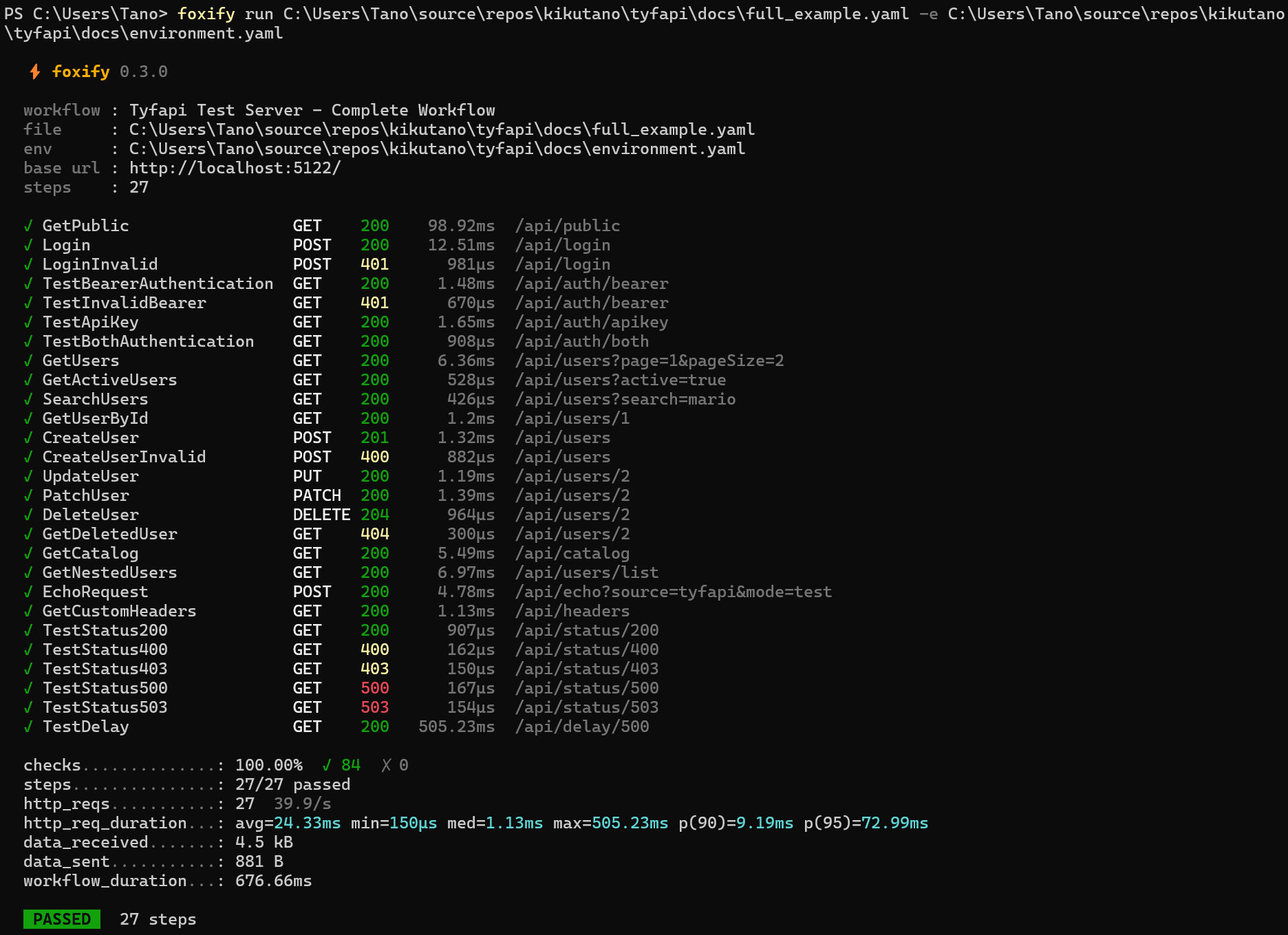
Run it:
tinyprobe run hello.yaml
  ⚡ tinyprobe 0.26.0

  workflow : Hello tinyprobe
  file     : hello.yaml
  steps    : 2

  ✓ Create a post  POST   201   587.33ms  /posts
  ✓ get_user id=1  GET    200    76.89ms  /users/1

  checks..............: 100.00%  ✓ 6  ✗ 0
  steps...............: 2/2 passed
  http_reqs...........: 2  3/s
  http_req_duration...: avg=332.11ms min=76.89ms med=332.11ms max=587.33ms p(90)=536.28ms p(95)=561.8ms
  data_received.......: 559 B
  data_sent...........: 28 B
  workflow_duration...: 666.86ms

   PASSED   2 steps
When a step fails, every check of that step is listed with the actual value, and the steps after it are not run:
  ✗ Wrong expectations  GET    200     4.73ms  /api/headers
      ✗ header X-Custom-Header == "something-else"  actual "hello-world"
      ✓ $.message contains "headers"
      ✗ duration < 1ms  actual 4.73ms
A mistake in the YAML is reported before any request is sent, with every problem and its location:
  ✗ The workflow is not valid (2 problems)

  tests/users.yaml:12:5: unknown endpoint 'logn' (did you mean 'login'?)
  tests/users.yaml:16:5: unknown key 'expcet' in a step (did you mean 'expect'?)
To try more without writing anything, example/ tests a free public API: clone this repository, then cd example && tinyprobe run workflows/01-read.yaml -e environment.yaml.
Migrate with your AI
Start with tinyprobe init at the root of your repository. It creates the tinyprobe/ folder (api/, workflows/, sequences/, the env files), adds the env files with credentials to .gitignore, and adds a section to AGENTS.md that tells every coding agent to read tinyprobe guide before touching the tests. It never overwrites a file.
Then give your agent (Claude Code, Cursor, Copilot, Codex...) one of these prompts.
From a Postman collection. Export the collection (Collection v2.1) and each environment into the repository, for example in postman/:
Read https://raw.githubusercontent.com/kikutano/tinyprobe/main/docs/llm-guide.md (or run `tinyprobe guide`)
and follow its section on migrating from Postman: convert the collection and the environments in postman/
to tinyprobe files in tinyprobe/, one folder at a time, and run each workflow until it passes. Put secrets
only in tinyprobe/env.local.yaml and add it to .gitignore. Write tinyprobe/MIGRATION.md with what you
converted, what you skipped and why, and tell me which failures look like backend bugs.
Variants of the same request ("Login", "Login - wrong password") become one endpoint called with different arguments, and the values your scripts saved become save. What has no equivalent (a script that computes a signature, pm.sendRequest) is not guessed: it is listed in MIGRATION.md, so you know what the tests do not cover. The same prompt works for Insomnia, Bruno or another tool's exports: name the folder and the tool.
From an OpenAPI document:
Read https://raw.githubusercontent.com/kikutano/tinyprobe/main/docs/llm-guide.md (or run `tinyprobe guide`)
and follow it, starting from the OpenAPI document openapi.yaml: write one tinyprobe endpoint per operation
and workflows that check the documented status codes and response fields, then run them against the
local backend until they pass. Take test values from the seed data, not from the examples in the
document. Put credentials only in tinyprobe/env.local.yaml and add it to .gitignore. Tell me where the
backend does not do what the document says.
From the backend code:
Read https://raw.githubusercontent.com/kikutano/tinyprobe/main/docs/llm-guide.md (or run `tinyprobe guide`)
and follow it: look at this backend's routes, authentication and seed data, write the tinyprobe API
file and workflows in tinyprobe/, then run them with tinyprobe until they pass. Put credentials only in
tinyprobe/env.local.yaml and add it to .gitignore. Tell me which failures look like backend bugs.
Give your agent the tinyprobe tools. tinyprobe mcp is an MCP server with the tools guide, inspect, call and run, with JSON arguments and results:
claude mcp add tinyprobe -- tinyprobe mcp # Claude Code (--scope project shares it in .mcp.json)
{ "servers": { "tinyprobe": { "type": "stdio", "command": "tinyprobe", "args": ["mcp"] } } }
That is .vscode/mcp.json for VS Code. Cursor reads .cursor/mcp.json with { "mcpServers": { "tinyprobe": { "command": "tinyprobe", "args": ["mcp"] } } }, Codex ~/.codex/config.toml with [mcp_servers.tinyprobe], command = "tinyprobe", args = ["mcp"]. It is listed in the MCP Registry as io.github.kikutano/tinyprobe. call and run send requests to your backend, so your agent may ask you before using them.
agents/ has ready-made instructions that send an agent to tinyprobe guide: a Claude Code plugin (/plugin install tinyprobe --marketplace kikutano/tinyprobe), a Cursor rule, Copilot instructions, and llms.txt.
Run in CI
- uses: actions/checkout@v4
- uses: kikutano/tinyprobe@v0.26.0      # installs tinyprobe 0.26.0
  with:
    path: tinyprobe/workflows
    env-file: tinyprobe/env.ci.yaml
    vars: |
      token=${{ secrets.API_TOKEN }}
The action runs every workflow of the folder, also after a failing one, puts a summary on the job page and marks each failing step at its line in the pull request. On other CI servers use the Docker image or the binary, with --junit for the test tab: see docs/cli.md for GitLab and the others. Exit codes: 0 passed, 1 a step failed, 2 an invalid file or arguments.
The format at a glance
Endpoints and tests live in separate files, so the same endpoints serve many workflows:
# api/server.yaml: endpoints only, no expectations
base_url: ${baseUrl}
auth:
  bearer:
    Authorization: "Bearer ${token}"
endpoints:
  login:
    method: POST
    path: /api/login
    params:
      username: admin        # default
      password:              # required
    body:
      username: ${username}
      password: ${password}
  get_user:
    path: /api/users/${id}
    auth: bearer
# workflows/users.yaml: steps that call the endpoints
name: Users
import:
  - ../api/server.yaml
steps:
  - call: login
    with: { password: password }
    save: { token: $.access_token }

  - call: get_user
    with: { id: 1 }
    expect:
      status: 200
      body:
        $.email: gaetano@example.com
        $.orders: { gt: 0, lt: 100 }       # several conditions on one value: all must pass
        $.role: { in: [admin, owner] }     # OR: one of these values
| In a step | Description |
|---|---|
call / with | The endpoint to call and its arguments. |
use | Run a shared sequence of steps here (a login), with with for its params, or once per item with for_each. |
expect | status, and checks on the body (by JSONPath), headers, cookies and duration: equality, comparisons, contains, in, any, matches (a regular expression) and schema (JSON Schema, also from an OpenAPI document). |
save | Values of the response for the next steps, or a cookie's value. |
for_each | Repeat the call once per item: a list, a variable or a CSV or JSON file. |
until | Polling: repeat the call until conditions pass, every so often, up to a timeout. |
sleep | A pause, e.g. sleep: 2s. |
API files also have auth sets (bearer, API key, Basic, OAuth2 client credentials), query strings, forms and file uploads, and global variables for calling endpoints by hand: globals: { token: $.access_token } on login, and with tinyprobe call … --globals globals.local.json every later call of get_user gets the token, no workflow needed. Workflows have variables, generated values (${$uuid}, ${$now+2h}) and named imports for several services. Everything is in docs/workflow-format.md. docs/example/ uses every feature against a test server you start with one command, and is what CI runs.
VS Code extension
tinyprobe for VS Code runs the same files from the editor: problems underlined as you save, completion and go to definition, ▶ Call above every endpoint, ▶ Run workflow and the Test Explorer, Run to here on every step, the workflow drawn as a diagram that lights up as it runs, the history of your calls and an environment editor.
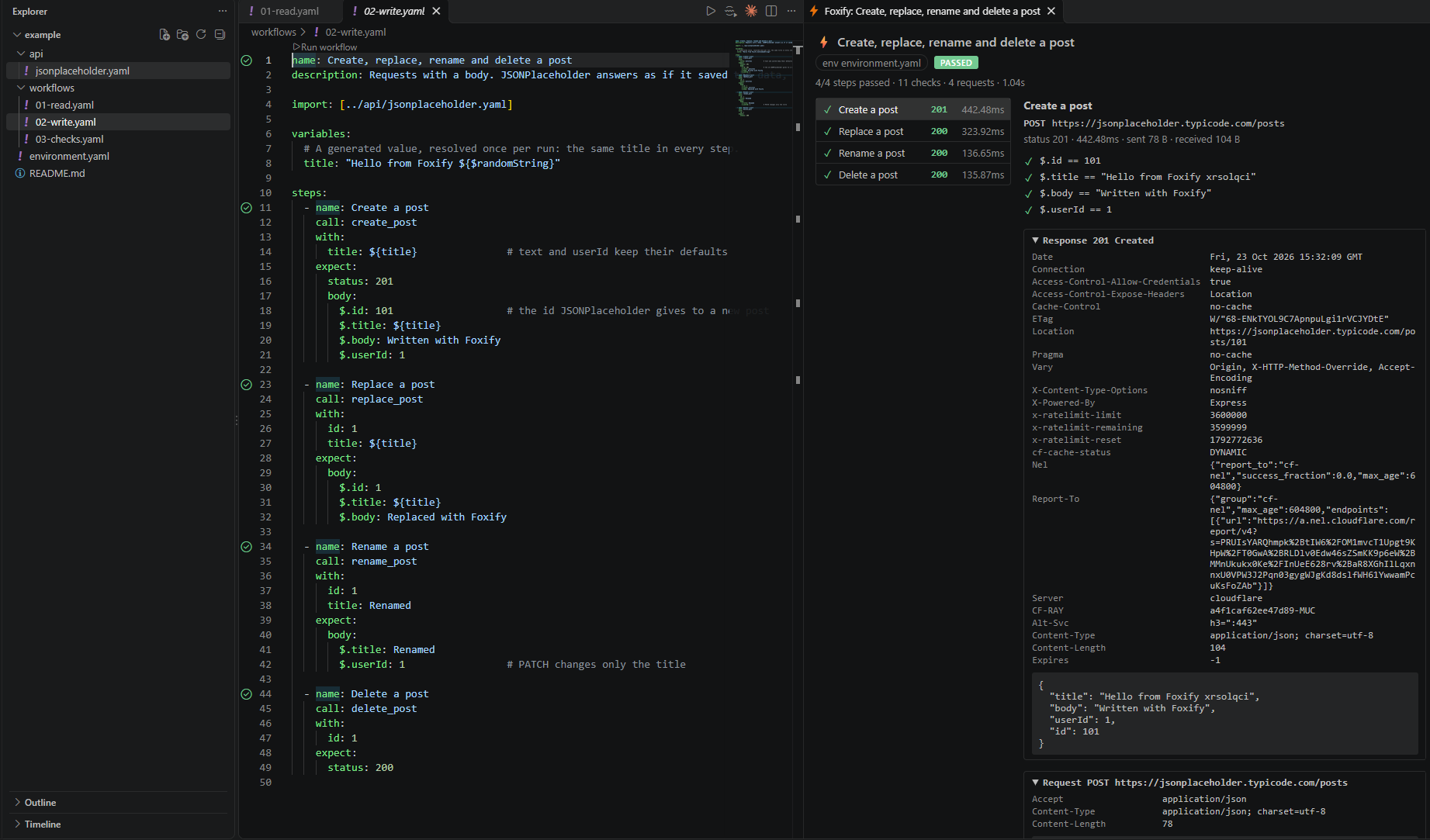
Install it from the VS Code Marketplace, or Open VSX for Cursor, Windsurf and VSCodium: code --install-extension kikutano.tinyprobe-vscode.
The app
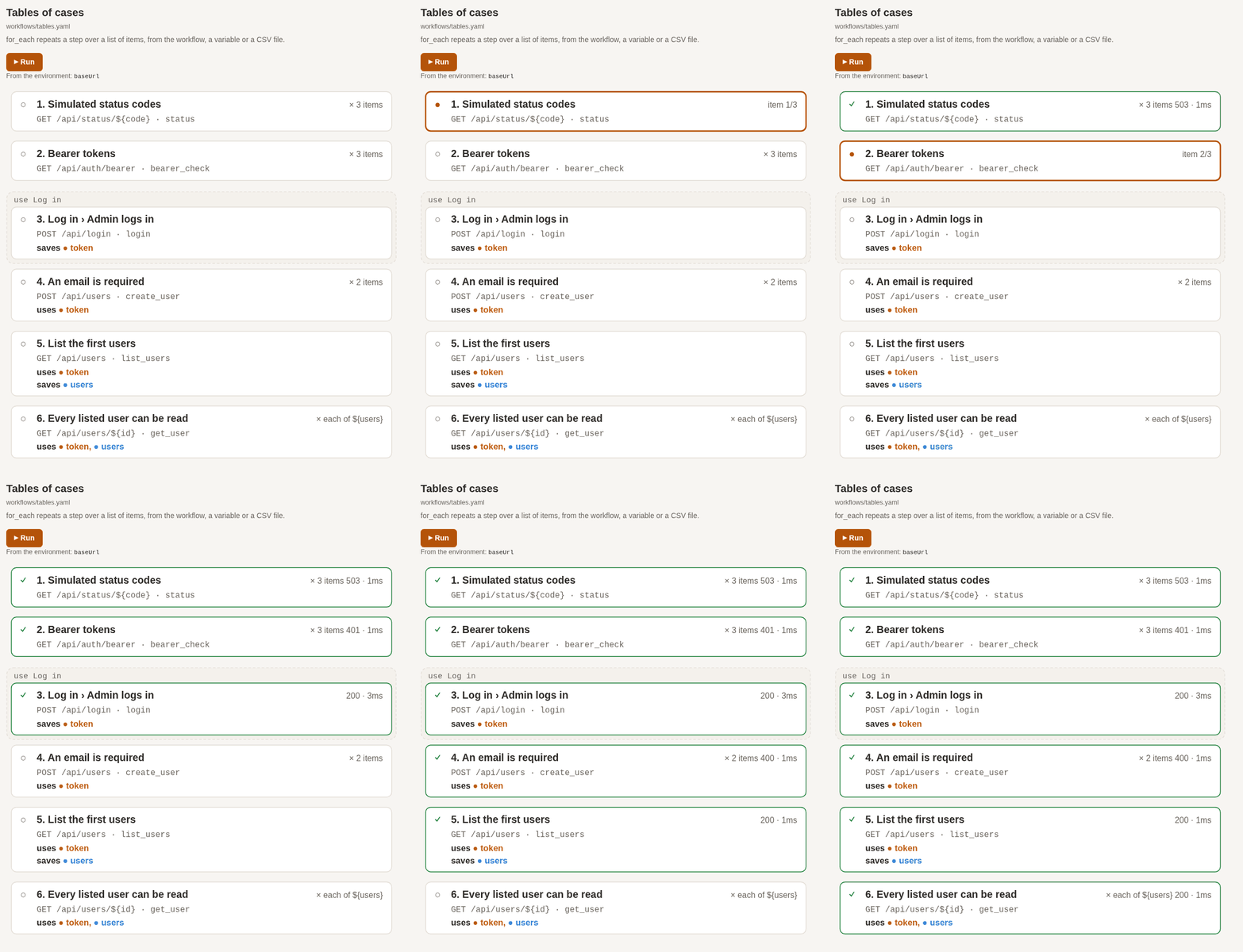
tinyprobe-app is tinyprobe for people who use neither a terminal nor VS Code: one small download for Windows, macOS and Linux that opens in the browser. Send any request from a form, run workflows and watch them as a diagram, and edit endpoints and steps with forms instead of YAML. It works on the same files, so what you do in the app runs unchanged in a terminal and in CI.
Learn more
- docs/cli.md: every command and option, CI, exploring an API with
inspectandcall, the JSON for other tools. - docs/workflow-format.md: the complete format.
- docs/llm-guide.md: the guide for coding agents, also printed by
tinyprobe guide. - docs/protocol.md: the JSON of
inspect --json, the run events and the MCP tools. - docs/comparison.md: tinyprobe next to Postman, Bruno and Hurl, and when to choose which.
- example/ and docs/example/: a first look against a public API, and every feature against the test server.
- CONTRIBUTING.md: building from source and how changes are made. ROADMAP.md: what comes next.
License
Copyright (C) 2026 Gaetano Luigi Lenoci
tinyprobe is free software: you can use, change and share it under the terms of the GNU General Public License, version 3 (GPL-3.0-only). A changed version may be shared, even for a fee, only under the same license and together with its source code.
Releases up to 0.21.0 were published under the MIT License, which still applies to them.







