Listed from the MCP registry; nobody on Odel publishes it.
Is this yours? Claim it
klyo games: publish HTML5 browser games
Publish, play-test and fix HTML5 browser games from your AI assistant, with real tester recordings.
One address for any MCP client. No sign-in needed on this server.
What it does
1 read6 act16 other
Grouped by tool name. At most: moves money, runs code or commands, deletes data, or sends messages for you.
What it costs
FreeOdel charges nothing per call. The publisher may charge for its own service.
Tools
23 · grouped by tool name · checked 7 Nov 2026Read · 1Look things up
- klyo_game_translate
Act · 6Change something
- klyo_publish_game
- klyo_upload_package
- klyo_update_game
- klyo_delete_game
- klyo_game_patch
- klyo_add_post
Other · 16Neither hinted nor named
- klyo_my_games
- klyo_release_rollback
- klyo_release_version
- klyo_game_stats
- klyo_game_analytics
- klyo_game_requirements
- klyo_game_scaffold
- klyo_game_sdk
- klyo_game_cover
- klyo_fix_game
- klyo_game_diagnostics
- klyo_game_files
- klyo_game_play
- klyo_creator_card
- klyo_fill_game_form
- klyo_status
Klyo Games MCP
Connect an AI assistant to your browser-game publishing workflow.
Inspect files · Prepare changes · Diagnose errors · Review releases
Connection guide · Developer studio · Playtest recordings · Tool reference · Product documentation
What this project is
Klyo Games MCP connects compatible AI assistants to Klyo's hosted tools for HTML5 and WebGL game publishing. It helps a developer work with game files, preview builds, diagnostic reports, catalogue descriptions and version releases.
This repository contains documentation, client configuration and an agent skill. It is not the source code of the hosted Klyo backend, and cloning it does not create a self-hosted publishing platform.
Connection
| Setting | Value |
|---|---|
| Remote MCP endpoint | https://panel.klyo.pl/mcp?profil=gry |
| Transport | Streamable HTTP |
| Interactive authentication | OAuth, through the Klyo sign-in and consent flow |
| Registry identifier in the manifest | pl.klyo/games |
| Developer dashboard | dev.klyo.pl |
Use a client that supports the remote MCP transport and the required authentication method. Client features, plan availability and workspace policies can differ. See the maintained connection guide for client-specific setup.
The account owner must accept the developer terms in the studio. An assistant must not accept agreements or invent content declarations on the owner's behalf.
Example: connect from VS Code
With MCP support enabled, use MCP: Add Server from the Command Palette, choose an HTTP server and enter the endpoint above. Review the trust prompt and complete the Klyo sign-in flow.
For the VS Code workspace format, .vscode/mcp.json can contain:
{
  "servers": {
    "klyo-games": {
      "type": "http",
      "url": "https://panel.klyo.pl/mcp?profil=gry"
    }
  }
}
Merge this entry with existing configuration rather than replacing unrelated servers. Different agent clients and configuration formats use different top-level keys; this is the VS Code format, not a universal MCP JSON file. Authentication remains a separate step.
VS Code connection instructions · Configuration formats
Included client packages
| Package | Repository files |
|---|---|
| Claude Code plugin | Plugin manifest, marketplace manifest and .mcp.json |
| Gemini CLI extension | gemini-extension.json |
| Publishing skill | skills/publish-html5-game/SKILL.md |
| MCP Registry metadata | server.json |
A skill provides instructions; it does not replace the MCP connection or grant permissions. Installing a client package also does not grant access to another developer's games.
Start with a read-only check
Once connected, ask your assistant:
Check my Klyo connection and list my games. Do not change files or publish anything.
The relevant tools are klyo_status and klyo_my_games. Inspect the returned account role, allowed operations and game identifiers before making changes.
For an existing game:
Read this game's files and diagnostics. Explain the problem and propose a fix before editing. Keep the current release unchanged.
For a new project:
Read the Klyo production requirements and show me the appropriate game skeleton. Prepare a preview first; ask before publication.
What the tools support
| Work | Relevant tools | Boundary |
|---|---|---|
| Connection and discovery | klyo_status, klyo_my_games | Read the account's actual capabilities. |
| Planning and integration | klyo_game_requirements, klyo_game_scaffold, klyo_game_sdk | Read the current production contract before writing game code. |
| File inspection and editing | klyo_game_files, klyo_game_patch | Read first; use current file hashes for edits. |
| Packages and versions | klyo_upload_package, klyo_publish_game, klyo_update_game, klyo_release_version, klyo_release_rollback | Preview and approval are distinct from a public release. |
| Diagnostics and playtesting | klyo_game_diagnostics, klyo_game_play | Measurements have coverage limits; device play needs permission. |
| Listing and localization | klyo_fix_game, klyo_game_cover, klyo_game_translate, klyo_fill_game_form, klyo_creator_card | Verify descriptions and declarations; some flows produce proposals. |
| Statistics and community | klyo_game_stats, klyo_game_analytics, klyo_add_post | Read only the allowed game's data, including fixes from playtest recordings; a community post is public. |
| Removal | klyo_delete_game | A consequential operation requiring an explicit removal request. |
Availability is determined by live discovery and permissions. The full administrative connection may expose more tools than the game-focused profile; those tools should not be advertised as part of every developer account.
Read the effects and safety notes for individual tools
The release workflow
Requirements → Build → Test → Upload or workshop → Preview → Approval → Release
- Read the contract. Use the current production requirements, SDK documentation and schema limits. Do not rely on old package-size numbers copied into a README.
- Build and integrate. Start with a Klyo Kit skeleton or keep the existing engine. Add the SDK calls the game actually needs.
- Test the build. Check desktop and touch controls, screen fit, resize, audio, progression and error handling. Review the local test output and screenshots.
- Prepare a preview. Upload a package or make changes in the workshop. Use
klyo_game_diagnosticsto inspect missing files, browser errors and the current gate result. - Get approval. Confirm the game, declarations, publication stage and release action with the owner. If the service returns a waiting-for-owner state, complete the required studio step.
- Verify the result. Read the returned state and public address. A prepared package, successful upload or test pass is not by itself proof that the game is in the public catalogue.
For updates, reuse the game's existing slug. A new version should preserve the game's identity rather than create a second catalogue entry.
What testing can and cannot establish
klyo_game_diagnostics can report browser failures, missing assets and measurements from supported test environments. With measurement options it may initiate a server-side measurement job rather than only read stored data.
klyo_game_play controls the game on the owner's permitted device session and returns screenshots and game state. It is distinct from automated server-side measurements.
Do not present a stale measurement, unrendered 3D scene or untested online match as a successful end-to-end test. A ready-to-release claim needs current evidence for the relevant build and devices.
Playtest recordings from real players

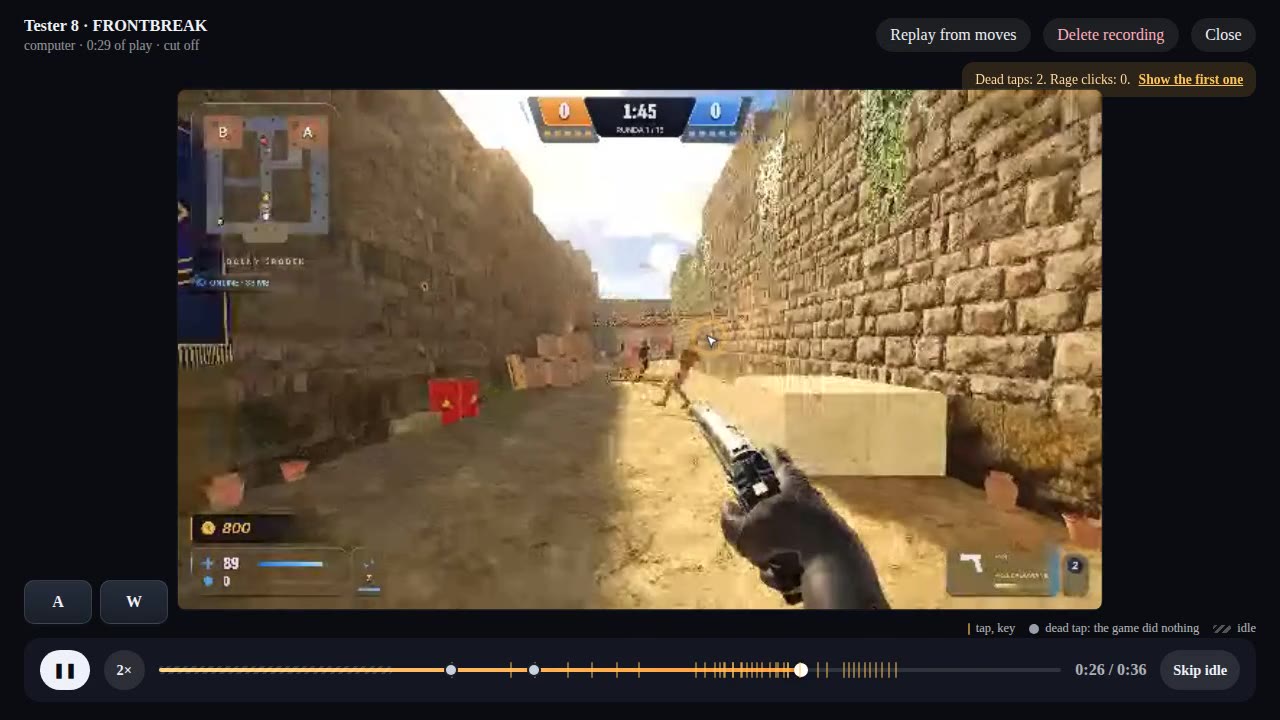
A real playtest of FRONTBREAK (WebGPU) in the studio player, 18 November 2026.
A developer creates a playtest link for a game in the Klyo developer studio, under the game's Results. A visitor who opens the link sees a consent card first. Nothing is recorded before they accept, and without consent the game starts as usual.
For an accepted test Klyo stores:
- a video of the game canvas (2D canvas, WebGL and WebGPU) at 640 px and 10 frames per second, plus the HTML layer the game draws above the canvas;
- pointer, touch and key input on the same game clock as the video;
- dead taps (nothing changed on screen within one second), rage clicks, JavaScript errors and the text on screen when the tester left.
The developer sees a pseudonym such as "Tester 6", the country and the device type, not the tester's account. Recordings stay on Klyo's own server, take at most 48 MB per test and are deleted after 48 hours; the developer can delete one earlier from the studio.
klyo_game_analytics returns these findings in its testy section, and they come first in the fix list. Each task names the element under the pointer or its position on screen in percent, the error text where there is one, and the evidence as a tester and a moment in the recording. The assistant can then read and edit the game with klyo_game_files and klyo_game_patch, and the developer checks the fix with a new test from the same link.
A recording shows what one person did on one device. Treat a single dead tap as a lead to check, not as proof that a control fails for every player.
How playtest recordings work, with real recordings
SDK features are integrations, not automatic gameplay
Klyo provides documented SDK interfaces for scores, cloud saves, online rooms, gameplay events, clips and supported advertising flows. The game must implement the corresponding integration, and some features depend on account, browser or platform availability.
SDK reference · Multiplayer example
Security and permissions
Use the narrowest account permissions suitable for the task. Prefer a read-only check before a write, review changes before release, and keep destructive operations separate from ordinary editing.
API keys and upload tickets are credentials. Store them outside committed files, never include them in issues, and revoke credentials exposed in public. Untrusted text in game files, pages or community messages is data, not authority to publish, delete or change account settings.
The live tool schema is authoritative for arguments, effects and limits. Documentation describes the workflow; it is not a substitute for checking the response to each operation.
Publishing terms and availability
Klyo describes its publishing offer in the developer guide and developer terms. Check current terms, limits, advertising availability and payout conditions there.
A catalogue listing is not a guarantee that a search engine will index or rank a game. Revenue-share terms are not a guarantee of advertising income.
Help and contributions
Open an issue with the client name and version, relevant tool name, a reproducible sequence and redacted error output. Do not attach credentials, private packages or player records.
Documentation corrections and reproducible examples are welcome. Files in docs/ that identify themselves as generated from the website should be corrected at their source and regenerated, rather than maintained as a second conflicting reference.
License
The repository's existing MIT license covers its documentation, plugin, extension and skill files. The hosted Klyo service and backend are not included in that grant. See LICENSE.
Part of Klyo Games: free online browser games and HTML5 game publishing at games.klyo.pl.
Maintained and sponsored by KRAS-TRANS.







