Listed from the MCP registry; nobody on Odel publishes it.

IBI Portfolio (Israel)
Read-only IBI (Israel Brokerage) portfolio for AI apps: positions, cash, P/L. Login stays local.
Runs on your machine from its package; the steps are below.
What it does
- Reads
- Writes
- High impact
At most: only reads or looks up information.
What it costs
FreeOdel charges nothing per call. The publisher may charge for its own service.
Runs locally over stdio
This server isn't hosted — your MCP client launches it from a package registry. Use one of the commands below, or drop the config into your client (e.g. Claude Desktop).
Run
uvx ibi-portfolio-mcp
MCP client config
{
  "mcpServers": {
    "ibi-portfolio-israel": {
      "command": "uvx",
      "args": [
        "ibi-portfolio-mcp"
      ]
    }
  }
}ibi-portfolio-mcp
A read-only MCP server for IBI (Israel Brokerage & Investments, אי.בי.אי). It lets Claude, ChatGPT, Cursor and other AI apps read your IBI portfolio (positions, cash, profit/loss and recent account activity) so you can ask things like "how is my portfolio doing?". It cannot buy, sell or move money. Works on Mac and Windows.
🇮🇱 שרת MCP לקריאה בלבד עבור חשבון המסחר שלך באי.בי.אי (IBI NextGen). הוא נותן ל-Claude, ל-ChatGPT או לכל עוזר AI אחר לראות את תיק ההשקעות שלך: אחזקות, מזומן, רווח והפסד ופעולות אחרונות. הוא לא יכול לבצע פקודות קנייה או מכירה. הסיסמה נשמרת רק במחשב שלך ולא מגיעה למודל. עובד על Mac ועל Windows.
Unofficial. Not affiliated with or endorsed by IBI.
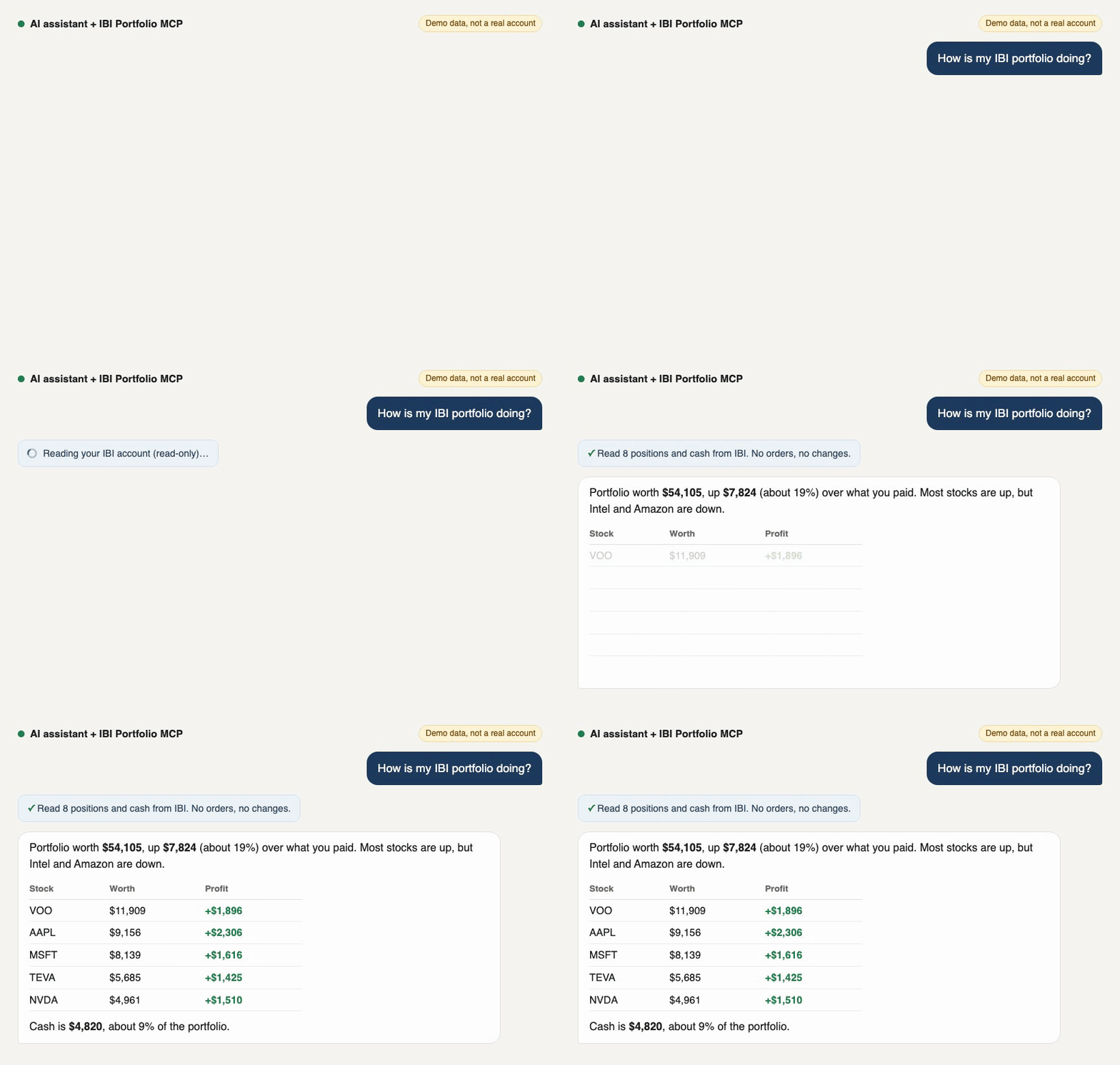
Demo with made-up numbers. The answer is a real reply from Claude.
How it is secured
Your IBI login gives full access to your money, so this is the most important part.
Your password
- 🔒 It is saved only in your computer's own secure vault: Keychain on Mac, Credential Manager on Windows. Both are encrypted by your operating system. It is never saved in a file.
- 🔒 It is typed only into IBI's real login page (
auth.ibi.co.il), over HTTPS, inside a hidden browser on your own computer. - 🔒 It is never sent to the AI. The AI cannot ask for it: no tool takes a password, and no tool returns one.
- 🔒 Your AI app's settings hold only the location of the program, not your username or password.
- 🔒 It is never written to logs, and error messages are cleaned of your username and password before the AI sees them (there is a test for this).
Your account
- 🛡️ Read-only. There is no code to buy, sell, cancel or transfer anything.
- 🛡️ The only things it clicks are the Login button, the login form's submit button and the "Latest Account Activity" tab.
- 🛡️ A second safety net: a built-in guard blocks any request sent to an order, trade, transfer, deposit or withdrawal address, even if IBI's website tried to send one, and tells you if it ever had to.
- 🛡️ It does not collect your account number, your name or your personal details.
Your data
- 🏠 Everything runs on your computer. There is no server of ours, no sign-up, no tracking and no analytics. When it reads your portfolio, it opens only IBI's website, which loads exactly as it does in your own browser. (Installing downloads the program and its browser once, from GitHub, PyPI and Microsoft's Playwright servers.)
- 🧹 Nothing is kept on disk: each read opens a fresh browser and closes it after, with no cookies, tokens or sessions saved. The last result stays in memory for 5 minutes, then it is gone.
- 👀 What the AI does see: your portfolio numbers (positions, values, cash, profit/loss, recent activity). They go to your AI company like any other chat message, under its privacy policy.
What it cannot protect you from
- ⚠️ Someone who can use your unlocked computer, or malware on it, could read your portfolio the same way. Keep your computer locked and updated.
- ⚠️ This is an unofficial tool. Before trusting it with your login, read the code yourself (about 750 lines, start with scraper.py) or ask an AI to review it for you.
Remove it anytime
ibi-portfolio-mcp forgetdeletes the saved login from your vault.uv tool uninstall ibi-portfolio-mcpremoves the program.- Changing your IBI password also stops it from logging in.
🇮🇱 בקצרה: הסיסמה נשמרת רק בכספת המוצפנת של המחשב שלך (Keychain / Credential Manager) ולא נשלחת אף פעם ל-AI. הכלי רק קורא נתונים: אין בו קוד לקנייה, מכירה או העברת כסף, ויש חסימה מובנית לכל בקשה כזו. הכל רץ אצלך במחשב, בלי שרת ובלי מעקב. ה-AI רואה רק את מספרי התיק (אחזקות, שווי, מזומן, רווח והפסד).
Which AI apps work
It runs on your own computer, so it works with AI apps installed on your computer. Website-only chats cannot reach it.
| App | Mac | Windows | Notes |
|---|---|---|---|
| Claude Desktop | ✅ | ✅ | Connected for you by setup |
| ChatGPT desktop app | ✅ | ✅ | Connected for you by setup (it uses the app's built-in Codex settings) |
| Codex | ✅ | ✅ | Same settings as the ChatGPT desktop app |
| Cursor | ✅ | ✅ | Connected for you by setup |
| Claude Code | ✅ | ✅ | Connected for you by setup |
| VS Code (Copilot), Windsurf, other MCP apps | ✅ | ✅ | Add it by hand, see Connect by hand |
| chatgpt.com, claude.ai, phone apps, Gemini | ❌ | ❌ | They run in the cloud and cannot start a program on your computer |
Linux works too if you are comfortable with a terminal.
Set it up (about 5 minutes)
You will copy 3 lines into a terminal. The terminal is the "Terminal" app on Mac, and "PowerShell" from the Start menu on Windows.
1. Install uv (a small free tool that installs Python programs).
Mac:
curl -LsSf https://astral.sh/uv/install.sh | sh
Windows:
powershell -ExecutionPolicy ByPass -c "irm https://astral.sh/uv/install.ps1 | iex"
Then close the terminal and open a new one.
2. Install IBI Portfolio MCP:
uv tool install ibi-portfolio-mcp
3. Run the guided setup:
ibi-portfolio-mcp setup
It will:
- Ask for your IBI username and password. The password is hidden as you type and saved only in your computer's secure vault (Keychain on Mac, Credential Manager on Windows).
- Download the small browser it uses to read IBI (one time, about 100 MB).
- Test the login (about a minute).
- Connect the AI apps it finds. Say yes to the ones you use.
4. Restart your AI app and ask: "How is my IBI portfolio doing?"
Prefer not to type commands?
If you have Claude Code or Codex (built into the ChatGPT desktop app), paste this and it does steps 1 and 2 for you:
Install https://github.com/kobimantzur/ibi-portfolio-mcp for me with steps 1 and 2 of its README. Do not run
ibi-portfolio-mcp setupyourself and never ask me for my IBI password in the chat. When you are done, tell me to runibi-portfolio-mcp setupin my own terminal.
Then run ibi-portfolio-mcp setup yourself, so you are the only one who types the password.
Try it with fake data first
Want to see it work before using your account? Run IBI_DEMO=1 ibi-portfolio-mcp check (Mac) or $env:IBI_DEMO=1; ibi-portfolio-mcp check (Windows). It answers with a made-up portfolio and does not log in to IBI.
What you get
| Tool | What it returns |
|---|---|
get_portfolio | Total value, cash, cash %, total P/L, and every position: symbol, quantity, cost, market value, P/L, weight |
get_account_activity | Recent orders and executions: buy/sell, status, quantity, price, fees, dates |
Example questions once it is connected:
- "What's my IBI portfolio worth and how much cash do I have?"
- "Which 5 positions are the biggest, and what is the P/L on each?"
- "What did I buy or sell this month?"
Example output (what the AI receives, demo data)
get_portfolio, shortened to 2 of 8 positions:
{
  "currency": "USD",
  "total_value": 54105.1,
  "market_value": 49284.75,
  "cash": 4820.35,
  "cash_pct": 8.91,
  "total_cost": 41460.9,
  "unrealized_pl": 7823.85,
  "unrealized_pl_pct": 18.87,
  "position_count": 8,
  "positions": [
    {
      "symbol": "VOO", "qty": 22.0, "last_price": 541.3, "change_pct": 0.4,
      "cost_price": 455.1, "market_value": 11908.6, "total_cost": 10012.2,
      "todays_pl": 47.63, "unrealized_pl": 1896.4, "unrealized_pl_pct": 18.94, "weight_pct": 22.01
    },
    {
      "symbol": "AAPL", "qty": 40.0, "last_price": 228.9, "change_pct": -0.6,
      "cost_price": 171.25, "market_value": 9156.0, "total_cost": 6850.0,
      "todays_pl": -54.94, "unrealized_pl": 2306.0, "unrealized_pl_pct": 33.66, "weight_pct": 16.92
    }
  ],
  "balances": { "buying_power": 4820.35, "balance_usd": 4820.35 },
  "fetched_at": "2026-10-27T14:05:12+00:00",
  "source": "demo"
}
get_account_activity, one row:
{
  "ref": "D-1003", "symbol": "NVDA", "side": "BUY", "status": "Filled", "order_type": "Limit",
  "created_at": "2026-10-21T10:02:11", "executed_at": "2026-10-21T10:02:13",
  "qty": 10.0, "exec_qty": 10.0, "limit_price": 135.0, "exec_price": 134.8,
  "profit_loss": null, "commission": 2.5, "fees": null, "currency": "USD"
}
Read-only, on purpose
| ✅ Reads positions, balances, account activity | The same data you see on the IBI home page and the Trading page |
| ❌ Place, change or cancel orders | Not in the code. The only clicks are Login, the login form's submit and the "Latest Account Activity" tab |
| ❌ Transfers or withdrawals | Not in the code |
| 🛡️ Network guard | Any non-GET request to an order / trade / transfer / withdraw / deposit URL is aborted, and the tool result tells you if that ever happened |
Your login gives full access to your account, so you (or a developer friend) can read scraper.py before using this. It is about 200 lines.
Which IBI accounts work
- ✅ IBI NextGen (the US-stocks platform at
ibi.orbisfn.io, English UI) - ❌ Other IBI platforms (for example the Israeli TASE trading site) are not supported yet. PRs welcome.
Your IBI password (secrets)
This is the part to get right, so here is exactly what happens.
What it needs
Your IBI NextGen username (email or ID) and password, the same ones you type at ibi.orbisfn.io. IBI has no API and no read-only keys, so the server logs in the way you do: it opens a hidden browser on your own computer and types them into IBI's real login page.
Where your password goes, and where it does not
| ✅ Your computer's secure vault | Keychain (Mac), Credential Manager (Windows), Secret Service (Linux) |
✅ IBI's login page (auth.ibi.co.il) | Typed into the form, inside a local browser, over HTTPS |
| ❌ The AI model / Anthropic / OpenAI | Never. Tools take no password argument and never return it |
| ❌ AI app settings files | Not with setup: the apps only get the program's path, not your login |
| ❌ Logs | Never printed. Errors from your password command are not echoed |
| ❌ Disk | No cookies, tokens or sessions are saved. Each read is a fresh browser that is closed after |
| ❌ Anyone else | No server, no telemetry. The code talks only to IBI |
What the AI does see: your portfolio numbers. Whatever a tool returns goes to your AI provider like any other chat message. If that is not OK for you, do not connect this server.
Ways to store the password (best first)
| Option | How | Password stored as plain text? |
|---|---|---|
| 1. Computer's vault ✅ recommended | ibi-portfolio-mcp setup | ❌ No |
| 2. Password manager ✅ | IBI_PASS_CMD: a command that prints the password | ❌ No |
| 3. AI app settings | IBI_PASS in the app's env block | ⚠️ Yes, in that settings file |
4. .env file | IBI_PASS in a .env file (gitignored) | ⚠️ Yes, in that file |
If several are set, the order is: IBI_USER / IBI_PASS, then IBI_USER_CMD / IBI_PASS_CMD, then the vault.
Option 2: password manager. Any command that prints only the password:
IBI_PASS_CMD=op read op://Private/IBI/password          # 1Password
IBI_PASS_CMD=bw get password ibi.orbisfn.io             # Bitwarden (vault must be unlocked)
IBI_USER_CMD works the same way for the username.
Options 3 and 4 put the password in a plain file. Keep that file private and never share or commit it. The server loads .env from the folder it starts in, or the file named in IBI_ENV_FILE.
Change or remove the saved login
ibi-portfolio-mcp forget     # removes it from the vault
ibi-portfolio-mcp setup      # saves a new one
SMS code (two-factor)
If IBI asks for a one-time code, the tool returns an IbiOtpRequired error. Set IBI_HEADED=1 (in the app's env block, or in the terminal before check): a visible browser window opens, the server fills in your username and password, and you type the code yourself. You get 3 minutes.
If you think your password leaked
Change it at IBI, then run ibi-portfolio-mcp setup again.
Connect by hand
setup does this for you. Use this section for other apps, or if you prefer editing settings yourself.
First get the program's full path: which ibi-portfolio-mcp (Mac) or where.exe ibi-portfolio-mcp (Windows). Below it is PATH_TO/ibi-portfolio-mcp.
Claude Desktop, Cursor, VS Code, Windsurf and most apps (JSON). Claude Desktop's file is ~/Library/Application Support/Claude/claude_desktop_config.json on Mac and %APPDATA%\Claude\claude_desktop_config.json on Windows; Cursor's is ~/.cursor/mcp.json.
{
  "mcpServers": {
    "ibi-portfolio": {
      "command": "PATH_TO/ibi-portfolio-mcp",
      "args": []
    }
  }
}
On Windows, write the path with double backslashes, for example "C:\\Users\\you\\.local\\bin\\ibi-portfolio-mcp.exe".
ChatGPT desktop app and Codex (~/.codex/config.toml, or in the app: Settings → MCP servers). Raise the tool timeout: a fresh IBI read takes about a minute and the default is 60 seconds.
[mcp_servers.ibi-portfolio]
command = 'PATH_TO/ibi-portfolio-mcp'
startup_timeout_sec = 30
tool_timeout_sec = 300
Claude Code:
claude mcp add --scope user ibi-portfolio -- PATH_TO/ibi-portfolio-mcp
Restart the app after any change.
Settings
Set these in the app's env block or in the terminal. All are optional.
| Variable | Default | What it does |
|---|---|---|
IBI_DEMO | 0 | 1 returns a made-up portfolio, no IBI login. For trying it out |
IBI_USER / IBI_USER_CMD | vault | Username, or a command that prints it |
IBI_PASS / IBI_PASS_CMD | vault | Password, or a command that prints it |
IBI_ENV_FILE | ./.env | Extra env file to load |
IBI_HEADED | 0 | 1 shows the browser window (needed for SMS codes) |
IBI_LOGIN_TIMEOUT_S | 90 (180 headed) | How long to wait for login |
IBI_CACHE_SECONDS | 300 | Reuse the last read for this long, so one chat does not log in again and again |
IBI_DEBUG_DIR | off | Saves screenshots and raw JSON there. They contain your balances: delete them when done |
How it works
- A tool is called. If the last read is newer than
IBI_CACHE_SECONDS, it is returned as is. - Otherwise a fresh hidden browser opens
ibi.orbisfn.ioand logs in with your saved login. - The IBI web app loads your data from its own backend. The server keeps a copy of those responses (portfolio, balance, latest activity) and reads the page as a fallback.
- The browser is closed and the numbers are returned. Nothing is written to disk.
A read takes about 30 to 60 seconds. If IBI changes its website this can break; open an issue with the error text (never paste your password or screenshots with your balances).
Troubleshooting
| Problem | Fix |
|---|---|
ibi-portfolio-mcp: command not found | Close and reopen the terminal. Still missing: run uv tool update-shell, then reopen |
| The app does not show the IBI tools | Restart the app fully (quit it, not just close the window) |
| ChatGPT / Codex says the tool timed out | Set tool_timeout_sec = 300 (see Connect by hand). setup does this for you |
MissingCredentials | Run ibi-portfolio-mcp setup |
IBI_PASS_CMD failed | Run that command in a terminal; it must print only the password |
IbiOtpRequired | Set IBI_HEADED=1 and type the SMS code in the window |
login did not reach the IBI home page | Wrong username or password, or IBI shows a notice. Try IBI_HEADED=1 ibi-portfolio-mcp check to watch |
| Update to the latest version | uv tool upgrade ibi-portfolio-mcp |
For developers
git clone https://github.com/kobimantzur/ibi-portfolio-mcp
cd ibi-portfolio-mcp
uv sync
uv run pytest -q
uv run ibi-portfolio-mcp check      # needs a saved login, or IBI_DEMO=1
Tests use made-up numbers only. Never commit real account data. To re-record the demo GIF: uv run python docs/demo/record.py.
Disclaimer
Unofficial project, not affiliated with IBI Israel Brokerage & Investments. It automates your own login to read your own data; check that this fits IBI's terms of use for your account. Use at your own risk. Nothing here is investment advice. MIT license.