Listed from the MCP registry; nobody on Odel publishes it.

OFAC Match
Explainable OFAC sanctions name screening against the SDN list. Runs locally, no API key.
Runs on your machine from its package; the steps are below.
What it does
- Reads
- Writes
- High impact
At most: only reads or looks up information.
What it costs
FreeOdel charges nothing per call. The publisher may charge for its own service.
Runs locally over stdio
This server isn't hosted — your MCP client launches it from a package registry. Use one of the commands below, or drop the config into your client (e.g. Claude Desktop).
Published to NuGet as `OfacMatch.Mcp` — run it with your .NET MCP host.







Free, open-source OFAC sanctions name screening that tells you why a name matched, and runs on your own machine, so the names you screen never leave your systems.
Built for the teams who screen customers and can't justify a vendor: title and escrow, lenders, credit unions, money transmitters, exporters, nonprofits, and the developers who build for them.
▶ Try it in your browser · no install, no sign-up
Screen one name, or upload a customer list (CSV, or Excel saved as CSV) and download an audit file with every potential match, the reason for it, and columns for the reviewer's decision.
Ways to use it
| You are | Use | Get started |
|---|---|---|
| Compliance or operations staff | The browser page: one name or a whole list, audit file out | Open it |
| A team using Python, Java, Node, Go, an ERP or a no-code tool | A self-hosted REST API in Docker, on your own server | docker run -p 8080:8080 ghcr.io/krunalsolanki/ofacmatch-api (guide) |
| A Python developer or data team | The Python client (no dependencies), plus a CSV command | pip install ofacmatch (guide) |
| A .NET developer | The library, in your own process | dotnet add package OfacMatch (quick start) |
| Using an AI assistant or agent | The MCP server for Claude, VS Code and Visual Studio | claude mcp add ofac-match -- dnx OfacMatch.Mcp --yes (more) |
All of them use the same matcher, explain every match the same way, and check the OFAC SDN list. A person must still review every potential match.
Why I built this
I spent ten years building title and mortgage systems at First American, including OFAC screening that stops a loan from going to someone on the Treasury's sanctions list. Name matching sounds simple until a compliance analyst asks why a name was flagged, or why a misspelled one wasn't.
Many teams still search OFAC's website by hand or rely on screening logic they can't see inside. I wanted something small and open: load the official list, score names the way OFAC describes in its own FAQ, and show the reasoning behind every score.
What it does
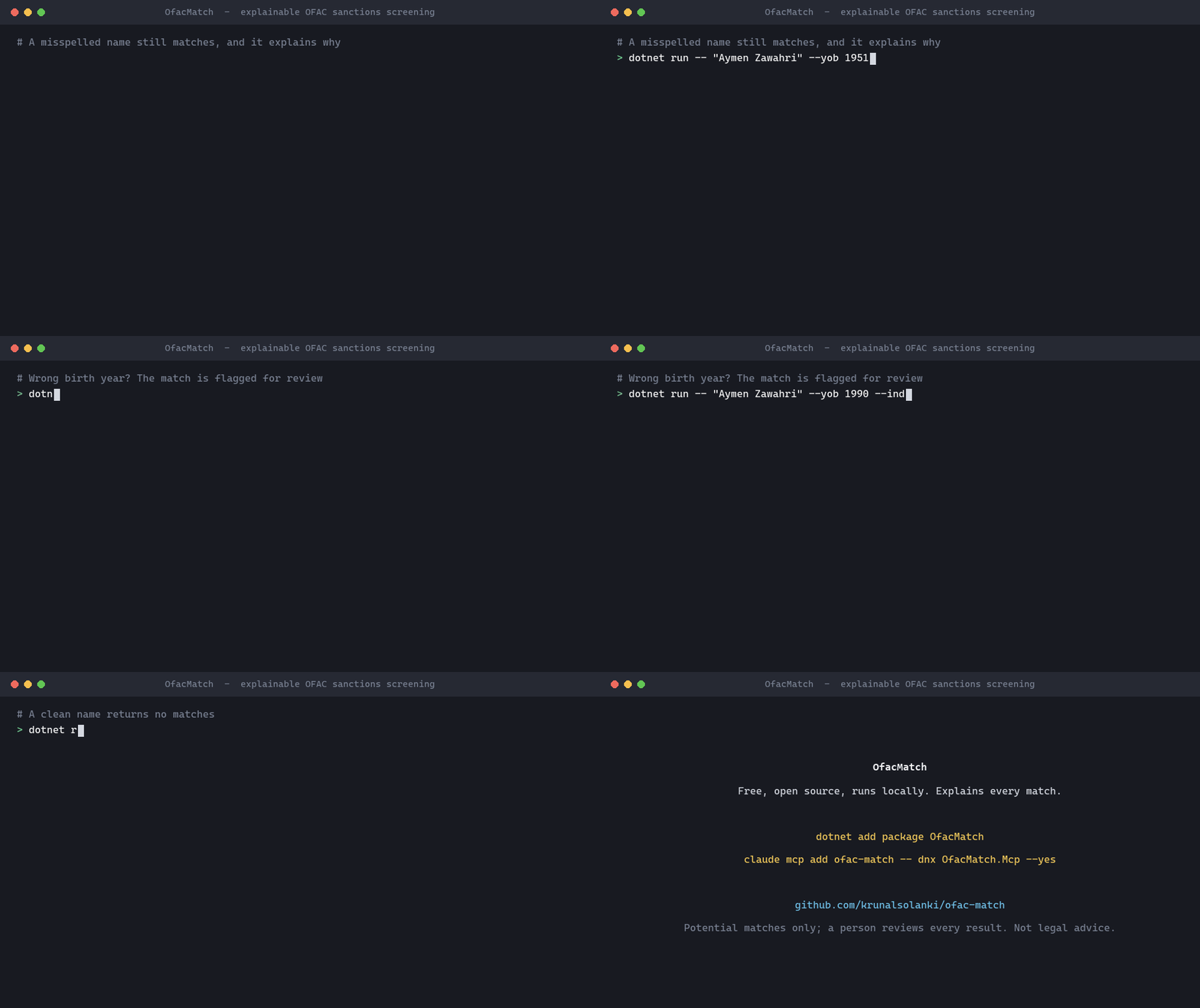
OfacMatch downloads the Specially Designated Nationals (SDN) list from OFAC, screens names against it, and gives each potential match a score from 0 to 100, the same scale OFAC's search tool uses. Every match comes with an explanation: which name or alias it hit, and how each part of the name paired up.
It handles the messy parts of real names: accents, LAST, First ordering, apostrophes and hyphens, titles like "Dr.", company endings like LLC or LTD (even misspelled), and aliases. If you pass a year of birth or country that disagrees with the listed record, the match is flagged rather than hidden, because that call belongs to a person.
It also checks the email addresses, phone numbers, websites and crypto addresses that OFAC lists for many entries. These often stay the same when a party changes its name: in OFAC's 2026 settlement with Pegasus Worldwide Logistics, a supplier traded under a new name but kept the email address and phone number on its SDN entry. Give an email, phone, website or crypto address with the name, and an entry that lists it is returned even when the names look nothing alike.
It has no dependencies, runs inside your own process (names never leave your systems), and works on modern .NET as well as .NET Framework 4.7.2+.
I measured it on the real list rather than guessing, on names it was never tuned on: at a threshold of 85 it finds all 4,235 realistic variations of listed names in a held-out test, and 99.6% of 2,160 harder ones such as a wrong first letter, a nickname or an extra middle name. It is also compared with eight standard name-matching methods. The results below have the details, including where a simpler method does better.
Version 2.1 adds screening by email, phone, website and crypto address. Version 2.0 changed how a searched name with extra parts is scored; see the changelog. Feedback, bug reports and name variations that score badly are very welcome.
OfacMatch helps you screen; it doesn't make compliance decisions and isn't legal advice. A score says how alike two names are written, not whether two records are the same person. Pick your threshold from your own risk assessment and have someone review every potential match. More in Using OfacMatch responsibly.
Quick start
dotnet add package OfacMatch
using OfacMatch.Data;
using OfacMatch.Screening;

using var http = new HttpClient();
var list = await SanctionsList.DownloadAsync(http, saveToDirectory: "ofac-data");

var screener = new SanctionsScreener(list, new ScreeningOptions { MinScore = 85 });

foreach (var match in screener.Screen("Aymen Zawahri"))
{
    Console.WriteLine(match.Explain());
}
Output against the SDN list published 27 October 2026:
Score 95.8 via NameParts against Primary name "AL ZAWAHIRI, Dr. Ayman"
  Entry 2676: AL ZAWAHIRI, Dr. Ayman (Individual; programs: SDGT)
  Full-name score 84.5; name-parts score 95.8
  AYMEN -> AYMAN: similarity 0.907, sounds alike
  ZAWAHRI -> ZAWAHIRI: similarity 0.946, sounds alike
How scoring works walks through this example step by step.
Screening with more context
var request = new ScreeningRequest("John Michael Doe")
{
    Type = EntryType.Individual, // a borrower is a person, so skip companies and vessels
    YearOfBirth = 1971,          // flags matches whose listed dates of birth disagree
    Country = "United States",   // flags matches whose listed addresses are all elsewhere
    Email = "j.doe@example.com", // also matched against the emails and websites OFAC lists
    Phone = "+1 555 0100",       // any format; compared digit by digit
};

var matches = screener.Screen(request);
A match found by an email, phone, website or crypto address has MatchedBy set to Identifier (or NameAndIdentifier), lists what matched in IdentifierMatches, and comes first. To check one value without a name: screener.ScreenIdentifier(IdentifierType.Email, "sales@example.com"). For a supplier that changed its name but kept its website domain, Explain() starts with:
Identifier match; name score 36.4 via NameParts against Primary name "YOULI TECHNOLOGY DEVELOPMENT CO., LTD."
  Entry 41376: YOULI TECHNOLOGY DEVELOPMENT CO., LTD. (Entity; programs: ILLICIT-DRUGS-EO14059)
  Email sales@yolimachine.com has the same domain as listed Website www.yolimachine.com
Offline use
var list = SanctionsList.LoadFromDirectory("ofac-data"); // SDN.CSV, ALT.CSV, ADD.CSV, SDN_COMMENTS.CSV
OFAC updates the list often. Reload it at least daily, and screen against the current list before every decision.
Use it from an AI assistant (MCP server)
OfacMatch.Mcp lets Claude, GitHub Copilot and other MCP clients screen names, look up SDN entries and explain scores. It runs locally and needs no API key.
Try it first, without installing: open OfacMatch on Glama and click Try in Browser. Glama runs the server and lets you call the tools from a chat. Use test names only, since anything you type goes to Glama.
Claude Desktop: download the extension for your computer from the latest release (ofac-match-windows.mcpb or ofac-match-mac-*.mcpb) and double-click it. No .NET or config file needed.
Claude Code plugin (adds the server plus a skill for reporting results responsibly; needs the .NET 10 SDK):
/plugin install ofac-match --marketplace krunalsolanki/ofac-match
Claude Code and other clients (needs the .NET 10 SDK):
claude mcp add ofac-match -- dnx OfacMatch.Mcp --yes
Tools: screen_name, screen_names, get_sanctions_entry, compare_names, get_list_info. See the MCP server guide for other clients and settings.
REST API (self-hosted, Docker)
For other languages (Python, Java, Node, Go, an ERP or a no-code tool), run OfacMatch as an HTTP service on your own server. Names are screened inside that container and never sent anywhere else.
docker run -p 8080:8080 ghcr.io/krunalsolanki/ofacmatch-api
curl -X POST http://localhost:8080/v1/screen -H "Content-Type: application/json" \
     -d '{"name": "Aymen Zawahri", "yearOfBirth": 1951}'
It downloads the SDN list at start-up and refreshes it daily, screens up to 1,000 names per request (about 1.6 seconds for 1,000 on a laptop), and can require an API key. See the REST API guide.
From Python, with the Python client (no dependencies; it also screens a CSV from the command line):
from ofacmatch import Client

result = Client("http://localhost:8080").screen_batch(
    [{"reference": "CUST-1", "name": "Aymen Zawahri", "year_of_birth": 1951}])
Command line
dotnet run --project samples/OfacMatch.Cli -- "Aymen Zawahri" --min 85 --yob 1951
Results on the real SDN list
OfacMatch was improved on a development set of names, then frozen and tested once on a separate held-out set: 600 other listed parties (400 individuals, 200 companies) and 3,000 ordinary names from a vocabulary never used during development, against the SDN list published 27 October 2026. The evaluation protocol explains the rules.
| Threshold | Variations found (4,235) | Harder variations found (2,160) | Two-part ordinary names that alert | Three-part ordinary names that alert |
|---|---|---|---|---|
| 80 | 100.0% | 99.9% | 75.7% | 51.0% |
| 85 | 100.0% | 99.6% | 37.5% | 10.3% |
| 90 | 100.0% | 98.4% | 10.2% | 2.2% |
| 95 | 99.6% | 83.4% | 2.1% | 0.0% |
- Variations: exact, surname first, lower case without punctuation, one wrong letter, two letters swapped, one letter missing, different transliteration, joined particles ("ALZAWAHIRI"), middle name left out, and changed company suffix.
- Harder variations: wrong first letter ("Qassim" for "Kassim"), two wrong letters, a nickname or the same name in another language ("Sasha" for "Aleksandr"), first name as an initial, and an extra middle name that is not on the list.
Compared with other methods. The same cases were screened with eight standard methods, including Levenshtein, Jaro-Winkler, RapidFuzz-style token ratios and trigram TF-IDF (full comparison). To compare them fairly, each method gets the threshold at which the same share of ordinary names alerts. The strongest simple method, a token set ratio, found slightly more of the harder variations than OfacMatch (98.9% against 96.7% when 5% of ordinary names alert). OfacMatch raised clearly fewer alerts on names that share a first name with a listed person, such as "Ayman Smith" (11.9% against 16.4%), and it explains every score. For a review team, fewer alerts and a reason for each one is usually worth more than the last two points of recall, but that trade-off is yours to make.
Three things stand out in these numbers. Screening on a name alone alerts a lot: at 85, more than a third of ordinary two-part names look like something on the list. Date of birth and country are what let a reviewer clear those quickly. Moving the threshold from 85 to 90 cut those alerts by about three quarters while still finding every variation and 98.4% of the harder ones, so the threshold deserves a deliberate choice rather than a default. And since 2.0, a listed two-part name inside a longer searched name scores high, so three-part names alert more often at 85 than in 0.1.2 (10.3% against 3.3%).
You can re-run it yourself on the development set:
dotnet run -c Release --project eval/OfacMatch.Evaluation -- --data ofac-data --out docs/evaluation.md
dotnet run -c Release --project eval/OfacMatch.Evaluation -- --data ofac-data --baselines --out docs/baselines.md
Documentation
| Guide | What it covers |
|---|---|
| Why OfacMatch | Benefits and comparison with other options |
| How scoring works | Every step, with a worked example |
| Article: I tested 9 name-matching methods on the OFAC sanctions list | A readable walkthrough of the method, the test results and picking a threshold |
| API and configuration reference | Types, options and defaults |
| Using OfacMatch responsibly | Thresholds, review, record keeping, limits |
| Compare your screening tool | A 25-row test file to run through any tool, with the answer key |
| Evaluation protocol | How the development and held-out sets are kept apart, and how settings were chosen |
| Held-out results and comparison | Results on names never used during development, and against eight standard methods |
| Development results, comparison and tuning | The set used while improving the method |
| MCP server | Using OfacMatch from AI assistants |
| REST API | Running OfacMatch as a self-hosted HTTP service in Docker |
What's next
Things I'd like to work on, roughly in order:
- Evaluation on the real list
- Comparison with standard methods, and a held-out test
- Extra middle names in the search (2.0)
- Nicknames and equivalent names (Sasha, Aleksandr), from an independent source so they can be tested fairly
- Give rare words more weight ("CUBA" should count more than "BANK"), to cut alerts on common names
- Catch typos at the start of company endings ("LTMITED")
- Support OFAC's Consolidated (non-SDN) list and the Advanced XML format
- Faster screening (about 4 times faster, same results)
- Email, phone, website and crypto-address screening (2.1)
- Passport, national ID, tax ID and vessel IMO numbers
- Self-hosted REST API in Docker
- A Python client for the REST API
- A
dotnet toolpackage
If you'd like to help with any of these, or have a case that scores badly, open an issue. CONTRIBUTING.md has the details.
Citation
If you use OfacMatch in research or a write-up, please cite the paper:
Solanki, K. (2026). Explainable Name Screening Against the OFAC SDN List: An Open Implementation and Reproducible Evaluation (preprint). Zenodo. https://doi.org/10.5281/zenodo.23930926
@misc{solanki2026ofacmatch,
  author    = {Solanki, Krunal},
  title     = {Explainable Name Screening Against the {OFAC} {SDN} List: An Open Implementation and Reproducible Evaluation},
  year      = {2026},
  publisher = {Zenodo},
  note      = {Preprint},
  doi       = {10.5281/zenodo.23930926},
  url       = {https://doi.org/10.5281/zenodo.23930926}
}
To cite the software itself:
Solanki, K. OfacMatch: explainable OFAC sanctions name screening (software). Zenodo. https://doi.org/10.5281/zenodo.23926803
Both DOIs always point to the latest version; each version also has its own DOI on Zenodo. GitHub's Cite this repository button gives the paper citation in other formats.
Credits
Built by Krunal Solanki. The idea and the compliance background come from my work on OFAC screening in mortgage lending.
Privacy Policy
OfacMatch never collects the names you screen. They are processed on your own computer, or in your browser for the web page, and are never sent anywhere. The library and MCP server make one network request, the download of the public SDN list from OFAC, which is cached locally. The web page also counts visits (no cookies, no screening data). Full details: PRIVACY.md.
Data
The SDN list is published by the U.S. Department of the Treasury's Office of Foreign Assets Control. OfacMatch downloads it from OFAC's Sanctions List Service and does not redistribute it. The unit tests use fictional names only.