Listed from the MCP registry; nobody on Odel publishes it.

librarian
Any HTTP API for your agents, without its credentials: reads in policy, writes a person approves.
Runs on your machine from its package; the steps are below.
What it does
- Reads
- Writes
- High impact
At most: moves money, runs code or commands, deletes data, or sends messages for you.
What it costs
FreeOdel charges nothing per call. The publisher may charge for its own service.
Runs locally over stdio
This server isn't hosted — your MCP client launches it from a package registry. Use one of the commands below, or drop the config into your client (e.g. Claude Desktop).
Run
uvx librarian-a2a
MCP client config
{
  "mcpServers": {
    "librarian": {
      "command": "uvx",
      "args": [
        "librarian-a2a"
      ]
    }
  }
}Run
docker run -i --rm ghcr.io/kultar/librarian:0.23.2
MCP client config
{
  "mcpServers": {
    "librarian": {
      "command": "docker",
      "args": [
        "run",
        "-i",
        "--rm",
        "ghcr.io/kultar/librarian:0.23.2"
      ]
    }
  }
}
An A2A agent that learns APIs on demand and gives other agents safe, audited access to them: reads freely within policy, writes only with human approval.
Agents shouldn't each carry their own Jira token, GitHub token and API client. With librarian, agents ask one specialist, over A2A, for the data they need. The librarian learns the API the first time it is needed (from its OpenAPI spec, or from its documentation when there is no spec), asks a human for a credential (once, out of band), and from then on serves every agent, without ever handing the credential out.

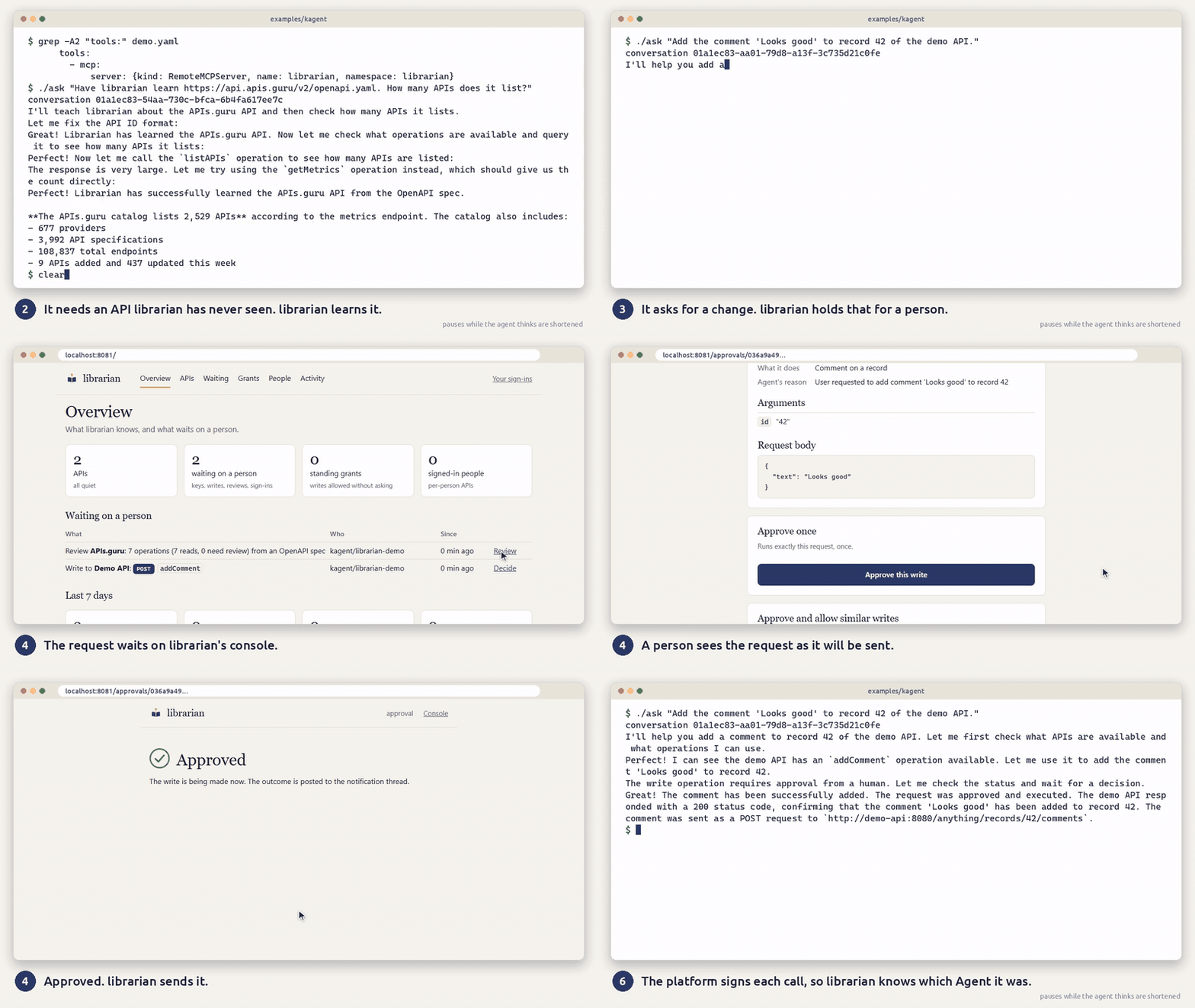
A real run: an agent on kagent that holds no credentials asks for a change, a person approves it on librarian's page, and the agent is told it is done. The full minute also shows librarian learning an API on the spot.
 your agents ──A2A / MCP──► librarian ──(policy engine)──► Jira, GitHub, internal APIs, ...
                               │
                               ├── registry (its database): what each API is, and what people decided
                               ├── secret store: credentials (agents only ever see references)
                               ├── the record (GitHub, optional): a commit for every decision
                               └── planner (Pydantic AI, optional) ──► any model / LiteLLM
Status: alpha (v0.23). Expect breaking changes. Website: librarian-agent.com.
Why
- One choke point. Every call from every agent goes through one deterministic policy engine and lands in one audit log.
- Credentials never travel through agents. Secrets enter via a one-time secure page, straight
into the secret store. Agents, messages, logs and the LLM only see references like
jira/readonly. If an API sends the key back in its answer, librarian removes it first. - Learn once, reuse everywhere. The first agent that needs an API triggers onboarding; every agent after that benefits.
- The LLM proposes, code decides. The optional planner can suggest any call, but only the rule engine (no LLM) can approve it. No prompt can talk its way into a write.
- Decisions are made in one place. What agents may do is decided by signed-in approvers on librarian's own pages and stored in its database, in effect at once. GitHub receives a commit for every decision and is never asked.
- Agents can run without any key. On Agent Substrate and kagent an agent's sandbox holds no credentials, not even one for librarian: the platform's gateway signs each call, and librarian knows which agent is calling.
- Access is held three ways, and none of them by an agent. A shared read-only key an approver adds once; a separate write credential, used only after a person approves the write; or, for APIs where what you see depends on who you are, each person's own OAuth sign-in, done once in their browser and used only for their requests (see Acting as the person).
- Where the API allows it, no long-lived key is sent at all. librarian makes what a call goes out with: an OAuth token that expires by itself, a GitHub App token for the one repository the call names (read-only for a read), or an AWS signature that fits one request (see Credentials made for each call).
What your agents save
- Seven tools instead of hundreds. An agent with direct access to an API carries that API's
tool definitions in its context on every request (GitHub's spec has 1,242 operations). Through
librarian an agent sees seven tools and asks
capabilitiesfor the handful it needs. - Learning is paid once. Reading an API's documentation, searching for it and extracting its
operations is the expensive model work. It runs once per API, with a model of your choice
(
learning.model), then serves every agent. - Most calls use no model at all.
executewith a known operation is plain code: policy check, HTTP call, provenance. Plain-languagefetchcosts one planner call, and a successful plan is saved as a recipe and replayed without the model next time. - Smaller answers. Field selection and a response-size cap return the fields an agent asked for, not a whole payload into its context; pagination is handled on librarian's side.
- Operations exist once. Credentials, rotation, retries, change detection and the audit trail live in one place instead of in every agent.
What it does not shrink is an agent's own reasoning: librarian removes the overhead around the call, not the thinking before and after it. The audit log records every call with its byte count and whether a model was involved, so a week of real traffic shows the split.
Get started
| I want to... | Go to |
|---|---|
| Try it on my laptop (10 minutes, Docker) | docs/getting-started.md |
| Try it with kagent (10 minutes, a kind cluster or your own) | examples/kagent |
| Try it behind agentgateway (5 minutes, Docker) | examples/agentgateway |
| Run it for my team (Kubernetes, step by step) | docs/deploy.md (no internet exposure needed: network) |
| Connect agents (LiteLLM, agentgateway, kagent and Agent Substrate, MCP clients, A2A) | docs/integrations.md |
| Fix something | docs/troubleshooting.md |
pip install librarian-a2a                  # the CLI and import are `librarian`
uvx librarian-a2a serve                    # or run it without installing (same CLI)
docker pull ghcr.io/kultar/librarian:0.23.2
What happens on a request
- An agent asks for data from an API librarian doesn't know yet.
- librarian learns it: from its OpenAPI spec, else its documentation (found by itself if needed), else the model's knowledge. The API is usable for reads at once, and approvers are asked to review it: approving makes it verified, there and then.
- If the API needs a key, the agent's task waits and approvers get a Slack card. Someone follows the link, signs in and adds the key (it goes straight to your secret store), and the task carries on by itself. If the API needs the person's own sign-in (OAuth), the person behind the agent gets the link instead, signs in to the provider once, and every later request for them carries their own token.
- Writes wait for a person's approval every time, unless a narrow, expiring grant covers them or an approver chose automatic approval for that operation (capped per day, never DELETE). A write nobody has enabled yet is not refused silently: approvers are asked to enable it, from Slack or the console, and their decision is in effect at once.
Nothing is set up per API in advance: the registry fills itself as agents need things.
Where decisions live. librarian's database is the source of truth: every API it knows and every decision a person made about it (approved, writes enabled, blocked) is saved there and is in effect on every replica the moment it is made. So that this also lives somewhere outside the database, librarian can write each approved entry and each later decision to a GitHub repository, one commit per decision, saying who decided (the record). GitHub is written to, never asked: nothing merged or edited there changes what agents may do.
Skills (A2A)
| Skill | What it does | LLM? |
|---|---|---|
execute | Run one read operation: {"skill":"execute","api":"jira","operation":"getIssue","args":{"issueIdOrKey":"ABC-1"}}. Optional select (dotted paths, e.g. ["fields.summary"]) and max_pages | No |
capabilities | List APIs and read operations, each with the arguments it takes (args; team? may be left out): {"skill":"capabilities","query":"issues"}, with "api":"jira" that API alone, and with "api" and "operation" that operation in full, with what its body holds. An agent that may ask for writes on an API also gets its write_operations, each with whether writes through it are enabled. An answer too large for an agent's context is shortened and says how to see the rest (more) | No |
onboard | Learn an API: {"skill":"onboard","api":"jira","spec_url":"https://..."}, "base_url" to auto-discover, or "docs_url" + "base_url" when there is no spec | No |
write | Change data, with human approval or a grant: {"skill":"write","api":"jira","operation":"addComment","args":{...},"body":{...},"reason":"why"}. Optional idempotency_key: a repeat returns the first result instead of running again. The answer says how it ran (approved by whom, under which grant, or automatically) | No |
plan | Several writes on one API, approved as one and made in order: {"skill":"plan","api":"github","reason":"why","steps":[{"id":"blob","operation":"...","args":{...},"body":{...}}, ...]}. A later step takes a value an earlier one returned with {"$from":"blob.sha"} (more) | No |
fetch | Plain language: "open bugs assigned to the payments team" (only when a model is configured) | Yes |
The same skills are available as MCP tools at /mcp (Streamable HTTP, same caller keys):
capabilities, execute, fetch, write, write_plan, write_status, enable_status,
onboard. MCP calls do not wait on a human unless the agent asks: writes and plans return
pending_approval and librarian finishes them once approved (write_status reports where a
write stands and, once run, its result dated as of execution; for a plan, every step), or
write_not_enabled when nobody has enabled that operation yet (approvers are asked;
enable_status says where the request stands). An agent that wants the outcome within its
turn asks write_status with wait_seconds: it answers as soon as the write has ended, or
after that time (at most mcp_max_wait_seconds, 50) with where it stands. librarian
works behind the LiteLLM and agentgateway gateways as both an MCP server and an A2A
agent, and as the tool server of kagent agents: see
In the stack you already run.
Results are A2A artifacts with the data plus provenance: which API and operation, the URL (secrets redacted), when, for which calling agent and principal, and which credential reference.
When a credential is missing, the task enters A2A's TASK_STATE_AUTH_REQUIRED, approvers are
notified (Slack by default), and the task resumes on its own once someone adds the key. The
caller polls or subscribes to the task as usual.
Configuration
Settings come from a YAML file (--config) and/or LIBRARIAN_* environment variables (env wins;
nested keys use __, e.g. LIBRARIAN_NOTIFIER__SLACK__BOT_TOKEN). Every setting is listed
under Settings; examples/librarian.yaml is a
commented example.
Models / LiteLLM. fetch needs a model. Use any Pydantic AI model string
(model: anthropic:claude-sonnet-5-5, with the provider's usual API-key env var), or point at any
OpenAI-compatible gateway such as LiteLLM:
model: claude-sonnet-5-5            # the model name your gateway serves
model_base_url: http://litellm:4000/v1
model_api_key: sk-litellm-...       # or LIBRARIAN_MODEL_API_KEY
Secrets. Choose a backend with secrets_backend:
file(default): one0600file per secret, good locally or on a mounted volume.aws: AWS Secrets Manager (uv sync --extra aws).jira/readonlymaps to the secret<prefix>jira/readonly; append#keyto read one key of a JSON secret (service/jira#api_token). Values are cached briefly (aws_secrets.cache_seconds).
Environment variables are always checked last (jira/readonly → LIBRARIAN_SECRET_JIRA_READONLY).
Internal secrets (caller keys, the link-signing key) live under the reserved librarian/ prefix.
Internal APIs. URLs that agents supply (onboarding) and the entries learned from them may only reach public addresses, so no agent can point librarian at your network. List the internal domains agents may learn on demand:
internal_hosts: ["*.internal.example.com", "jira.corp"] # or LIBRARIAN_INTERNAL_HOSTS='["*.internal.example.com"]'
A matching host may resolve to private addresses (never loopback or link-local, i.e. cloud
metadata), with the same DNS pinning as public hosts; everything else stays public-only. The
review page and the audit log say when an API was learned under one of these patterns.
allow_private_networks: true allows everything and is for a laptop.
State. The registry (every API and the decisions made about it), credential requests,
approvals and A2A tasks are stored in SQLite by default (.librarian/librarian.db), so they
survive restarts. For several replicas use
Postgres (database_url: postgresql+asyncpg://..., the postgres extra; in the image) and
secrets_backend: aws: then every replica shares everything, an API learned through one is usable
through the others at once, and pods need no volume. Set replicas (the Helm chart does) and
librarian refuses to start with per-replica state. Rate limits are counted in the database
too, so every replica enforces the same limit together.
Writes and plain-language requests. fetch_timeout_seconds (100) stops a plain-language
request and returns what it has, marked partial, before the caller's own timeout;
max_calls_per_fetch (8) caps its API calls.
Caller authentication. List agents and the secret holding each one's key:
callers:
  - agent: release-notes-agent
    key_ref: librarian/callers/release-notes-agent   # internal secrets live under librarian/
    apis: ["jira", "github-*"]                       # glob patterns; default ["*"]
    can_onboard: false                               # may this agent teach new APIs?
An agent only sees and uses the APIs its patterns allow, in capabilities, execute and fetch.
With no callers configured the server is open: fine on a laptop, never in a shared deployment.
Agents running on Agent Substrate or kagent need no key at all. Their sandboxes hold no credentials; the platform's egress gateway puts a signed token naming the agent into each request, librarian verifies it against the cluster's issuer, and a rule says what that agent may do:
substrate:
  issuer: https://idp.ate-system.svc
  kagent_url: http://kagent-controller.kagent.svc:8083
  rules:
    - match: {namespace: payments}
      write_apis: [github]
      owner: payments-leads@example.com
    - match: {}                           # every other agent: reads and learning
See integrations; the Helm chart sets it up
with substrate.enabled.
In the stack you already run
librarian is one more server behind whatever already carries your agents' traffic. Nothing in that stack changes to try it, and what you add is small. For each way agents reach it there is something to run, and the last column says how it is tested: by what, and how often.
| Your agents run on | What you add | Try it | How it is tested |
|---|---|---|---|
| Any MCP client (Claude Code, an IDE, your own harness) | One MCP server: librarian's address and the agent's key | Getting started, on your laptop | With every commit, by the official MCP SDK's client over HTTP |
| Any A2A client | The address of librarian's agent card and the agent's key | examples/client | With every commit, by the official A2A SDK's client |
| LiteLLM | An mcp_servers entry, an agent entry, or both; the gateway holds one key for librarian. LiteLLM can be librarian's own model gateway too | The weekly run's stack; as a model gateway, examples/compose | Every week against a real LiteLLM (tests/integration/litellm), and in a real deployment |
| agentgateway | Two routes. Each agent's own key passes through, or the gateway signs people in and librarian checks the same token itself. On Kubernetes the Helm chart attaches librarian to your Gateway (agentgateway.enabled) | examples/agentgateway: five minutes with Docker | Every week against agentgateway v1.7.0 (tests/integration/agentgateway); the chart option by hand on kind |
| kagent and Agent Substrate | substrate.enabled and a rule per Agent in librarian's chart, which registers librarian as a RemoteMCPServer; one tools entry in the Agent. Agents hold no key at all (above). Plans, a subset of the tools per agent, kagent's own approval in front of librarian's | examples/kagent: ten minutes on kind | By hand, not on a schedule: the ten-minute path on 2026-11-17 with kagent 1.0.1 and Agent Substrate 1.0.0 on kind, and a longer run before it. With every commit: the token checks and the rules, against a stand-in. What is and is not tested |
Three things keep it well-behaved behind any of them:
- An answer never breaks on the way. Gateways and MCP clients stop at a megabyte or two
and say only that a message could not be sent. A tool result that large is never sent: the
agent gets the answer's outline and asks for less (
mcp_max_result_bytes, under Big APIs). - The first answer fits in an agent's context.
capabilitiesis what an agent asks first, and agent clients warn about a tool result of tens of thousands of tokens, put it aside in a file, or refuse it. Its answer stays undercapabilities_max_byteshowever many APIs there are, and says how to see what it left out (Big APIs). - An agent can wait for a person. Where nothing can wake an agent when an approval
arrives (a kagent session, a chat turn), it asks
write_statuswithwait_secondsand has the outcome in the same turn (mcp_max_wait_seconds).
Two things help an agent find librarian and use it well:
- A skill.
skills/librarianis an Agent Skill: oneSKILL.mdthat tells an agent how to read through librarian, how to ask for a change and wait for the person, and what to do with each answer (too_large,pending_approval,write_not_enabled, a refusal). It is in librarian's image as well, which is where a kagent Agent takes it from, by digest (integrations); any harness that reads Agent Skills can use the folder. - The MCP Registry. librarian is listed in the
MCP Registry as
io.github.kultar/librarian, fromserver.json, with every release: the PyPI package (uvx librarian-a2a serve) and the image, each serving MCP athttp://127.0.0.1:8080/mcp.
Through kagent librarian knows the agent, not the person behind it (kagent sends an MCP server
one or the other). A rule's owner approves that agent's writes; APIs that use each person's
own sign-in, and "only the requester may approve", need a person and do not work there yet.
What kagent can add is the signed-in user's name in a header nothing signs. With
substrate.claimed_user_header: X-User-Id librarian shows it to the approver and records it,
worded as what it is ("the agent's platform names kim@example.com: nothing signs that"), and
uses it for nothing else.
Observability
Set otel_enabled: true (install the otel extra; the Docker image has it) and the standard
OTEL_EXPORTER_OTLP_ENDPOINT. You get:
- Traces:
librarian.skillandlibrarian.callspans (plus the A2A SDK's and Pydantic AI's model-call spans). A calling agent'straceparentis honoured, so its trace continues through the librarian. Trace headers are never forwarded to third-party APIs. - Metrics:
librarian.api.calls(by API, operation, caller, status class),librarian.api.call.duration,librarian.policy.denials,librarian.credential.requests.
The JSONL audit log is separate and always on.
Big APIs
-
Operation search. Requests are matched to operations with BM25 ranking over operation ids (split into words:
getIssueWatchers-> issue, watch), tags, paths and summaries. On Jira's 620-operation API, "who is watching an issue" findsgetIssueWatchersfirst. -
What
capabilitieslists. With aquery: the ten APIs that fit it best, and of each the 20 best-matching reads (and the 20 best-matching writes, where the agent may ask for writes). Without one: every API the agent may use, with the first 50 of each. Withapi: that API alone. Each operation comes with the arguments it takes, andtotal_read_operationsandtotal_write_operationssay how many there are. On GitHub's API, an answer to a query is about 3 KB for an agent that only reads and 7 to 8 KB for one that may also ask for writes. -
What a request body holds. An agent that is told only that an operation takes a body has to guess what goes in it: from what it knows of a public API, from nothing for an internal one. librarian reads it from the API's description and tells it. Where operations are listed, each names the first fields of its body:
"body": ["head", "base", "title?", "labels?", "author.name?"](?: may be left out; a dot: a field inside another), withbody_morewhen there are more than ten. It does so always when asked about one API (api), and among several APIs where the whole answer has room for it: a few small APIs are told with it, and among large ones an operation saysbody: truethere. Asked about one operation (apiandoperation), it gets all of it: every argument with its type and description, and every field of the body with its type (list of stringfor a list), the values it takes and what it is for (up to 40 fields, three levels deep). A field is named by the keys that lead to it, as an agent writes them: whereitemsis alist of object,items.priceis the price of each item. Nothing is checked against this: the API accepts or refuses a body, and descriptions leave fields out.body: truesays only that the operation takes a body: in a list because the names had no room there, and asked about the one operation because its description does not say what is in it. Three limits to know:- It is read from OpenAPI and Swagger descriptions, not from documentation pages or a model's knowledge, and you can write it into an entry by hand (the format).
- An API learned before 0.23 gets it when its description next changes, or at once when a
person asks: Re-check now on the console's API page, or
librarian registry recheck <api>. For an approved API that is an update an approver takes, like any other; it touches nothing else about the operations. - A body is sent the way the description says the API takes it: as JSON, or as a form
(
application/x-www-form-urlencoded: Stripe's API, for every operation). The agent gives an object either way. In a form, a field inside another goes in brackets (metadata[order]=6735) and a list is written as that API's description writes lists (tag=a&tag=b,tag[0]=a&tag[1]=bortag=a,b). The answer says"sent_as": "form", and the approval page shows the fields as they go over the wire. A multipart body (a file upload) is not something librarian sends: the answer says so.
-
An answer that fits in an agent's context.
capabilitiesis the first thing an agent asks, and all of it goes into the agent's context. The answer stays undercapabilities_max_bytes(16,000 bytes of JSON: over MCP up to about 28,000 characters of text, some 9,000 tokens for a Claude model). When it would be larger, the lists of operations are cut, to the same length for every API, and anotein the answer says what was left out and how to see it:capabilitieswithapifor one API, and with a query for the operations that fit. Every API is still there with how many operations it has. With a query, the API that fits it best keeps its matches and the others are cut. Past a few dozen APIs not all of them fit even without operations: the first ones are listed andmore_apishas the ids of the others.capabilities_max_bytes: 0lifts the limit (over MCP,mcp_max_result_bytesstill holds: the lists are cut to that).Measured on five large APIs (GitHub, Stripe, Jira, PagerDuty and DigitalOcean: 3,911 operations) for an agent that may ask for writes and gives no query: the answer was 120,000 characters of text over MCP (39,000 tokens) and is 26,000 (8,500), with ten reads and ten writes for each API. Claude Code, for one, warns about a tool result of more than 10,000 tokens and puts text of more than 50,000 characters into a file instead of the context.
-
Answers an agent can take.
selectkeeps only the fields an agent names (["issues.key", "issues.fields.summary"]). Over MCP, an answer that would make a tool result of more thanmcp_max_result_bytes(1 MB as sent, about 480 KB of data) is not handed over at all: megabytes are no use to a model, and MCP clients and gateways on the way refuse them with errors that say nothing. The agent getstoo_largewith an outline instead (the fields, how many items a list has), and asks again withselect. -
Glossary. Registry entries can declare
discoveryreads that teach instance-specific names, e.g. Jira's/fieldmapscustomfield_10020to "Sprint". They run after a credential is approved (orlibrarian discover <api>), and the planner sees the relevant entries. -
Recipes. A successful plain-language request is saved as a template: "Is PAY-1 open?" becomes
Is {p0} open, and "Is PAY-7 open?" later replays the same calls without the LLM (still policy-checked, with the caller's permissions). Requests whose later calls use values from earlier results are never saved.librarian recipes list|delete;recipes_enabled: falseturns it off.
APIs without a spec, and APIs that change
Learning without a spec (needs model; set learning.model to use a stronger model for
learning only, since that happens once per API while fetch runs on every request;
fallback_model is tried once when a model fails or declines a request). librarian learns
from, in order of preference:
- An OpenAPI spec: given, found at a well-known path, or linked from the docs.
- Documentation pages: the model reads the page and related pages on the same site and
lists the operations, each with a verbatim quote. librarian checks every quote against the
fetched page and drops operations it can't find there. With only a
base_url, librarian finds the docs itself: the usual places first (/llms.txt,/docs,docs.<domain>, links on the homepage, one click further), then a web search if configured. - The model's own knowledge (nothing found): reads only, for well-known APIs.
Search results are untrusted (anyone can publish "Acme API docs"), so sources are ranked:
the API's own domain first, then well-known docs hosts (GitHub, ReadMe, GitBook, ...);
other sites are skipped unless learning.search.allow_third_party: true. The entry's notes
(shown on the review page) say how the docs were found and how far they are trusted.
learning:
  search:
    provider: model        # off | model | searxng | brave
    # url: https://searx.internal          (searxng)
    # api_key: via LIBRARIAN_LEARNING__SEARCH__API_KEY   (brave)
provider: model uses the model's own web search. Through a gateway such as LiteLLM that
needs the Anthropic API format (model_api: anthropic); with the OpenAI formats the search is
refused or silently dropped by the gateway, and librarian reports that instead of guessing.
Specs that declare no authentication are common even for APIs that need a key (GitHub's does). librarian then asks the model what the API really uses and writes it into the entry, for approval. Approvers never edit YAML: the review is approve or deny, and anything that needs a person's choice (the authentication, when the model can't tell) is a choice in the console. If such an API answers 401 later, librarian infers the authentication then and asks for a key; for a verified entry it tells the approvers what it thinks, and they choose in the console.
Documentation is untrusted, so the model never decides anything that matters: it has no tools;
the API host is always the base_url you gave (never one from the docs); read vs write is decided
by HTTP method; the auth type may come from the docs but where the key is stored never does.
Operations from docs or model knowledge are unconfirmed until a real call succeeds (callers
see a warning). One that keeps answering 404 is suspended and its owners are told.
uv run librarian learn dogs --docs-url https://dog.ceo/dog-api/documentation/ \
    --base-url https://dog.ceo/api --name "Dog CEO"
Noticing changes. Every drift.recheck_hours (default 24), one replica re-reads each entry's
spec or docs. A new model read only happens when the docs' text actually changed.
| Change | Provisional entry | Verified entry |
|---|---|---|
| New operations, optional parameters | updated | an update waits for an approver |
| Removed operation, new required parameter, moved path | updated | callers warned; writes suspended; an update waits |
| HTTP method changed (a read may now change data) | updated | suspended; an update waits |
Verified entries are never changed automatically. Approvers get a card and a page listing what changed; approving applies the update, keeping the decisions people made (writes enabled, reviewed reads, pagination) wherever the operation is still the same request, and lifts the suspensions it addresses. Denying keeps the entry as it is.
Calls also watch for change: Deprecation/Sunset headers, repeated 404/405/410 responses, and
responses that lose most of the fields seen before are reported to the API's owners (once), and
callers see a warning. librarian registry recheck [api] runs a check now;
librarian registry clear <api> <operation> lifts a suspension after checking by hand.
When an API misbehaves
APIs fail in ways an agent cannot act on by itself. librarian turns each into something it can:
- No answer. When an API cannot be reached or does not finish answering, the agent is told so in words, with the reason when there is one (the name did not resolve, the connection was refused, its certificate was not accepted, it did not answer in time): "Jira gave no answer: it could not be reached (its host name did not resolve). Nothing was read: retry later." For a write the message ends with what matters most: "The write was not sent", or "The write may have reached it: check before sending it again."
- A time limit for the whole request. Connecting, and each wait for the next part of an
answer, may take
request_timeout_seconds(30); one request as a whole twice that, however slowly the answer trickles in. An answer longer thanmax_response_bytes(2 MB) is cut off and markedtruncated. - An answer is passed on as data only if everything after librarian can handle it. JSON
nested deeper than 100 levels, cut off, or not parseable arrives as text;
NaNandInfinity, which are not JSON, becomenull. - A credential the API sends back is removed from the answer (
[redacted]) before it reaches the agent, a model, the audit trail or the stored result of a write. - A write always ends. Once librarian has taken an approved write to send it, its approval
reaches a final state that says what happened: the API's answer, "not sent", "may have
reached the API", or, when the replica stopped in the middle, "interrupted" (closed after 15
minutes, or ten times the request timeout if that is longer, and never sent again by
librarian). A repeat with the same
idempotency_keyis refused while the first is open.
librarian doctor checks that no credential is stored where it must not be. It compares
every credential in the secret store with every row of the database and every line of the
audit file, in each form a credential can take there, and names what it finds by the secret's
reference; it never prints one. --redact replaces the copies in the database. Versions before
0.20 could store one, so run it once after upgrading from them
(more).
Acting as the person (per-person OAuth)
Some APIs have no credential that is right for everyone: what Google Drive or Jira returns depends on who is asking. For those, librarian is the OAuth client and each person signs in once:
# in the registry entry (verified entries only)
auth:
  type: oauth2_user
  authorization_url: https://accounts.example.com/o/oauth2/auth
  token_url: https://oauth2.example.com/token
  scopes: [files.read]
  client_id: "<the OAuth client you registered for librarian>"
  client_secret_ref: drive/oauth-client          # in the secret store; omit for a public client
  extra_authorize_params: {access_type: offline, prompt: consent}   # provider extras
Register librarian with the provider once, with the redirect URI <public_url>/oauth/callback.
For GitHub, librarian github-app create --oauth-callback <public_url>/oauth/callback creates
an App that is also the OAuth client and saves its client secret next to the key (GitHub Apps
use the App's permissions, so scopes stays empty).
The first time a person's agent needs the API, that person (not the approver group) gets a
one-time link, by Slack direct message when Slack knows their address: they sign in to the
provider in their browser and librarian stores their tokens under <api>/users/<hash>. From
then on every request their agents make for them carries their own token, so the API enforces
their access and librarian's policy applies on top. Tokens are refreshed by librarian; a
rejected or expired sign-in simply asks the person again. Agents never see the tokens, and a
request for person B can never go out with person A's token (recipes and credentials are kept
per person). The console lists who is signed in to what and can disconnect them.
With principals.mode: required the person must be verified by your identity provider before
their token is used; with off (a laptop) the agent's claimed principal is trusted. Requests
with no person behind them are refused for these APIs. MCP callers get consent_pending while
the person signs in.
Credentials made for each call
A stored key is the same key for every call until someone replaces it: whoever gets hold of it has everything it can do. Three kinds of authentication avoid sending such a key to an API at all. librarian makes what each call goes out with, keeps it until shortly before it expires, and removes it from the answer like any other credential.
# OAuth 2.0 client credentials: the API gets a token that expires by itself. The client
# secret is stored, and goes to the token endpoint only.
auth:
  type: oauth2_client
  secret_ref: ledger/client          # the client secret, in the secret store
  token_url: https://login.example.com/oauth2/token
  client_id: librarian
  scopes: [ledger.read]              # give writes their own under write_auth
  # audience: https://ledger.example.com   # where the provider wants one
  # client_auth: basic                     # id and secret as HTTP basic instead of in the form

# A GitHub App instead of a personal token: a token for each call, valid for an hour,
# limited to the repository the call names, and read-only when the call is a read.
auth:
  type: github_app
  secret_ref: github/app-key         # the App's private key (PEM), in the secret store
  app_id: 123456
  # installation_id: 987654321       # for operations that name no owner (/user, search)
  # permissions: {contents: read}    # ask for exactly these instead of what is installed

# AWS Signature Version 4: every request is signed; there is no key to store.
auth: {type: aws_sigv4, service: execute-api, region: eu-west-1}
write_auth:                          # writes as a role assumed for this API, for 15 minutes
  type: aws_sigv4
  service: execute-api
  region: eu-west-1
  role_arn: arn:aws:iam::123456789012:role/orders-writer
Set them in the console (an API's page, Authentication, Describe it in full) or in a
registry file; only an approved entry may use them, because they say where a secret is sent
and whose identity is used. write_auth takes the same shapes, so reads and writes can have
different scopes, permissions or roles. When writes are enabled on an API that reads this way,
nobody is asked for a write key: a write is authenticated the same way, and a read still never
gets a token that can write.
- GitHub: create an App with the permissions your agents need, install it on the
repositories they may touch, and store its private key. For a read, librarian asks GitHub
for a token with every permission turned down to
read; GitHub itself then refuses a write made with it. Works with GitHub Enterprise Server (the entry'sbase_url). - AWS: without
role_arn, requests are signed with librarian's own identity (the role of its pod). With it, librarian assumes that role first: let its pod rolests:AssumeRoleonly the roles your entries name, and give each role only what that API needs.serviceis the signing name (execute-api,s3,es,lambda, ...). Needs theawsextra, which the image has. - When it does not work, the agent is told what to have fixed (a scope, where the App is installed, a role librarian may not assume) and no approver is asked for a key that would not help. A client secret or App key that is refused is asked for like any other key.
Limits inside an API
apis and write_apis say which APIs an agent may use. limits says what it may do inside
one: which operations, and which values its arguments may take.
callers:                                   # the same under substrate.rules
  - agent: release-notes
    key_ref: librarian/callers/release-notes
    apis: [github, jira]
    write_apis: [github]
    limits:
      github:                              # an API id (a glob pattern)
        arguments:
          owner: [acme]                    # only acme's repositories...
          repo: ["payments-*", docs]       # ...and only these (glob patterns)
        allow_without: [meta_get]          # an operation that takes neither argument
      jira:
        operations: ["get*", "search*"]    # only these operations
        arguments: {projectIdOrKey: [PAY]}
An operation may be called when it takes at least one of the limited arguments and every one
it takes is given with an allowed value. An argument the API treats as optional must then be
given: left out, the answer would cover everything. An operation that takes none of them (a
search across the whole site, "who am I", GraphQL) cannot be held to anything, so it is
refused unless allow_without names it. The policy engine decides this for reads, writes and
the planner's calls alike; a write outside the limits is refused, not put to an approver, and
no standing grant reaches past them. capabilities shows an agent only what it can reach,
and tells it its limits.
Matching is exact and case-sensitive, and only arguments are looked at: what a request
body says (a pull request's head, a JQL query) is not. Use a credential that cannot do more
where that matters; with a GitHub App the token itself is
for the one repository the call names.
Verified principals
By default the person an agent acts for (principal) is whatever the agent claims. Turn on
verification to require proof: the agent sends a token from your identity provider in the
X-Principal-Token header, and librarian checks its signature (issuer's published keys), issuer,
audience and expiry.
principals:
  mode: required          # off | optional | required
  issuers:
    - issuer: https://acme.okta.com/oauth2/default
      audience: librarian  # tokens must be minted for librarian
      claim: email
optional: verified when a token is present; a claimed principal without one is recorded but does not count as the requester for write approvals.required: a claimed principal without a valid token is refused. Requests with no person behind them (autonomous agents) still work.
Verified identities appear in provenance (principal_verified: true) and the audit log. How an
agent gets a token for librarian on a user's behalf is covered in
docs/integrations.md.
Slack notifications
- Create a Slack app from
deploy/slack-app-manifest.yamland install it to your workspace. - Set
notifier.type: slack, the bot token (LIBRARIAN_NOTIFIER__SLACK__BOT_TOKEN), a channel, and optionally an approver user-group ID (rendered as a real @mention).
Every API learned on demand gets a review card: what was learned, the authentication it will use, anything to check, and a Review button that opens a signed-in page where an approver sees what was learned, decides any operations that need it (read, write or exclude), and approves (the API is verified at once, on every replica) or denies (the API is forgotten). The card is updated with the outcome and who decided. Approvers also get one card per API that needs a key (deduplicated, with a live "waiting" count) and a Review request button that opens the secure page: add a key, use an existing secret, or deny. The card updates in place and the outcome is posted in the thread. The key itself never goes through Slack.
No Slack? notifier.type: webhook posts JSON events you can route anywhere.
What it looks like
In motion: a minute from a real run, with an agent on kagent, an API learned on the spot and a change approved on its page. In stills:
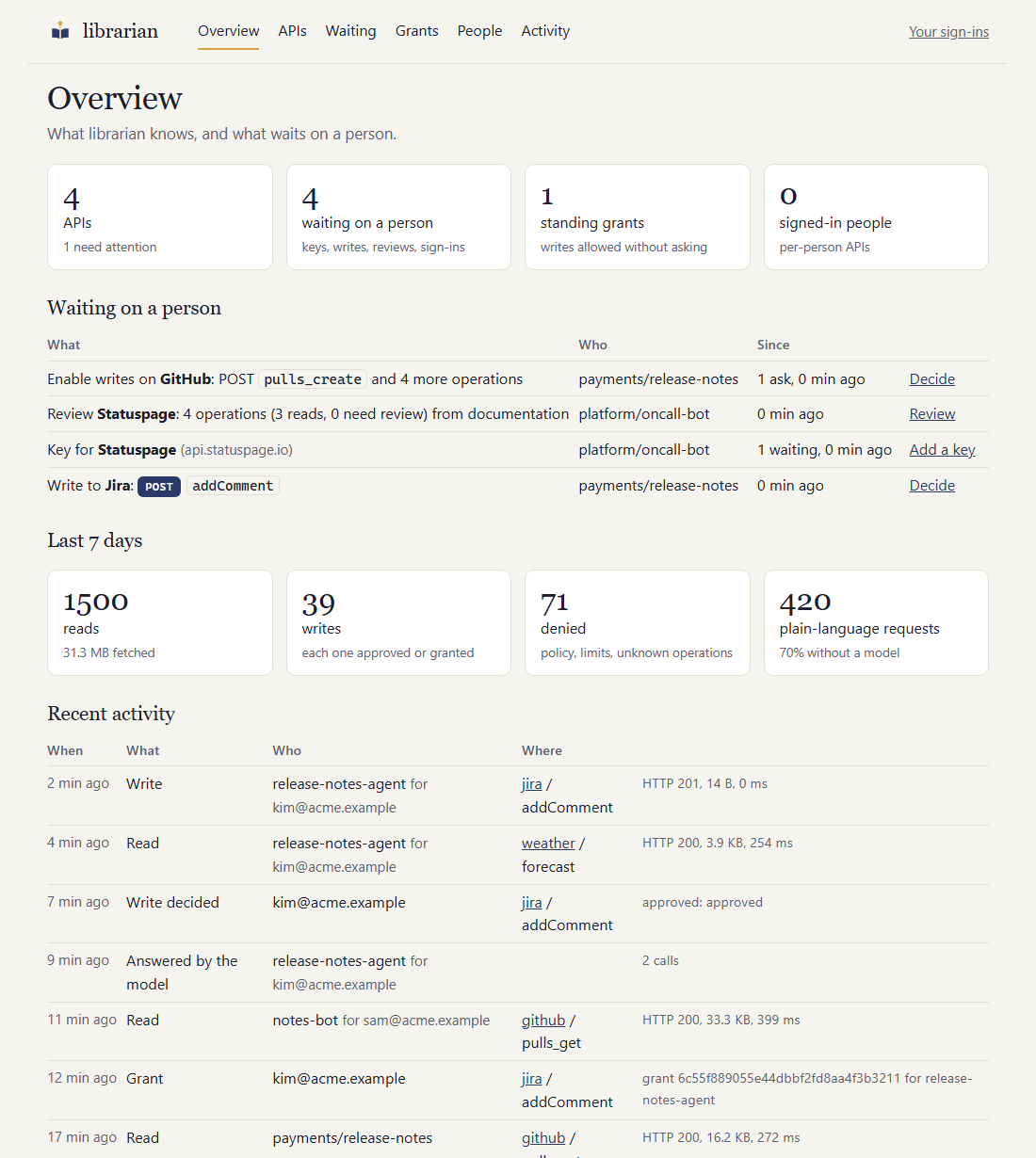
The console: what librarian knows, and what waits on a person.
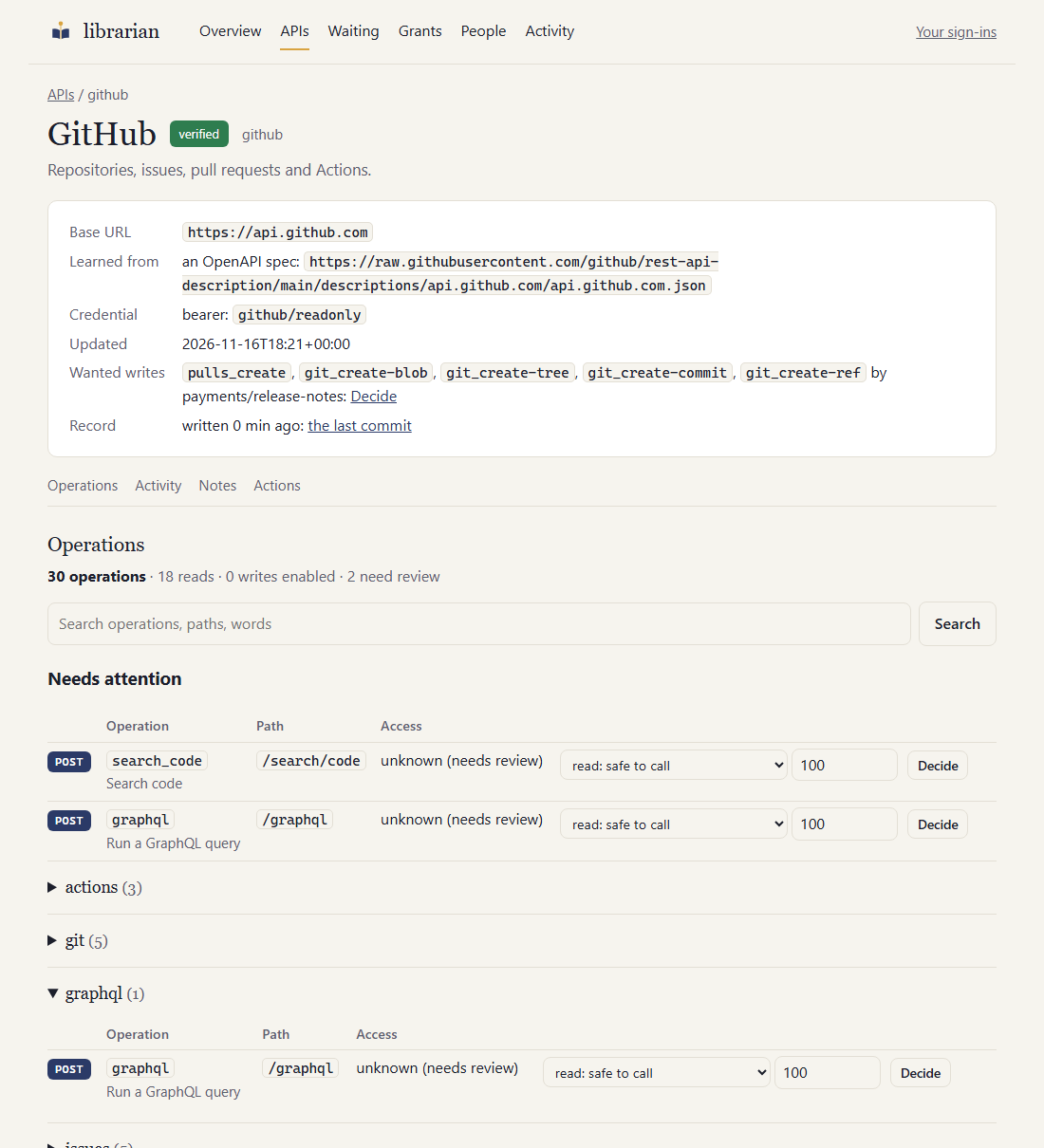
A large API: search, the operations that need a decision first, then groups by tag.
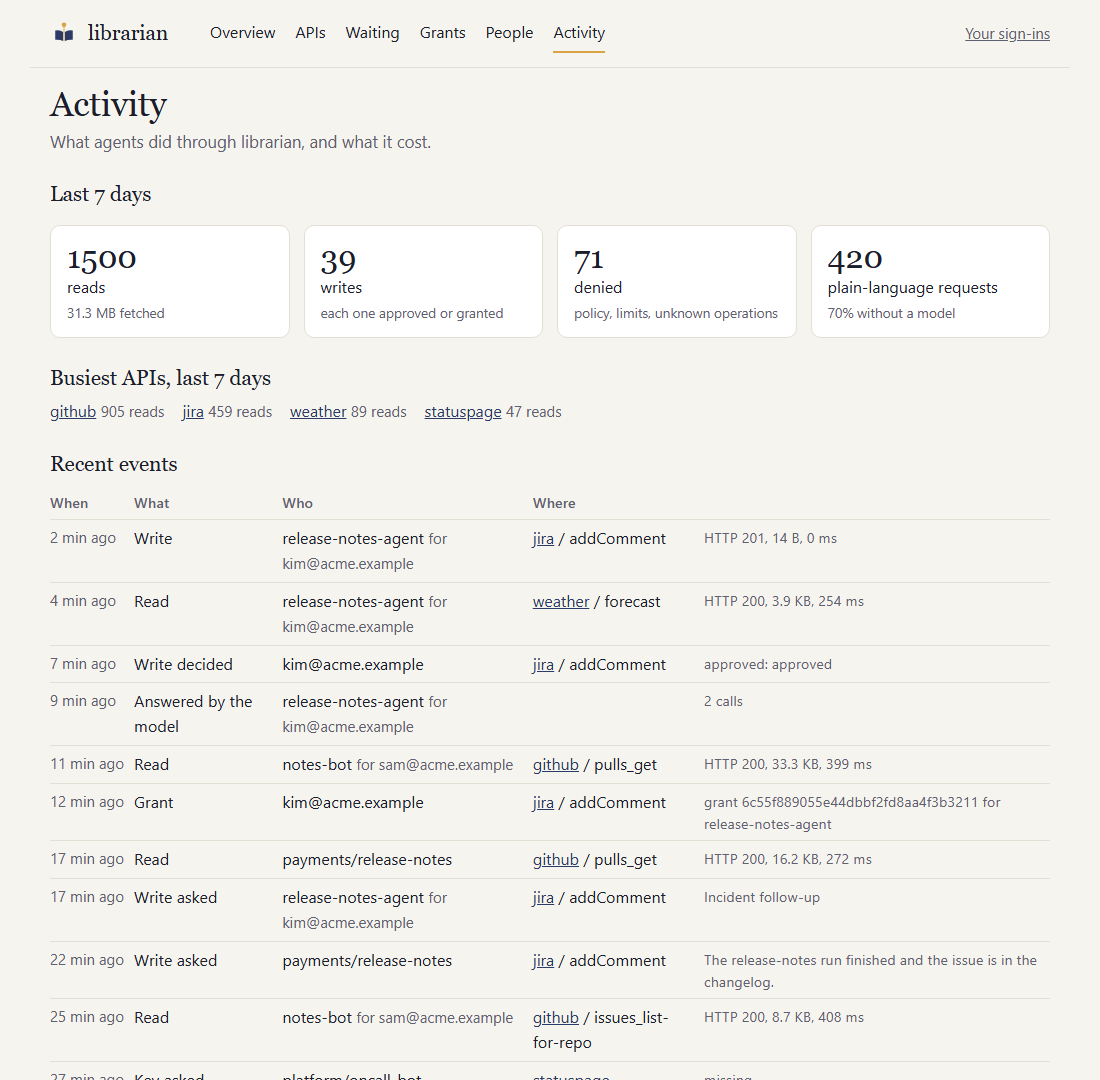
Activity: what agents did, and what it cost.
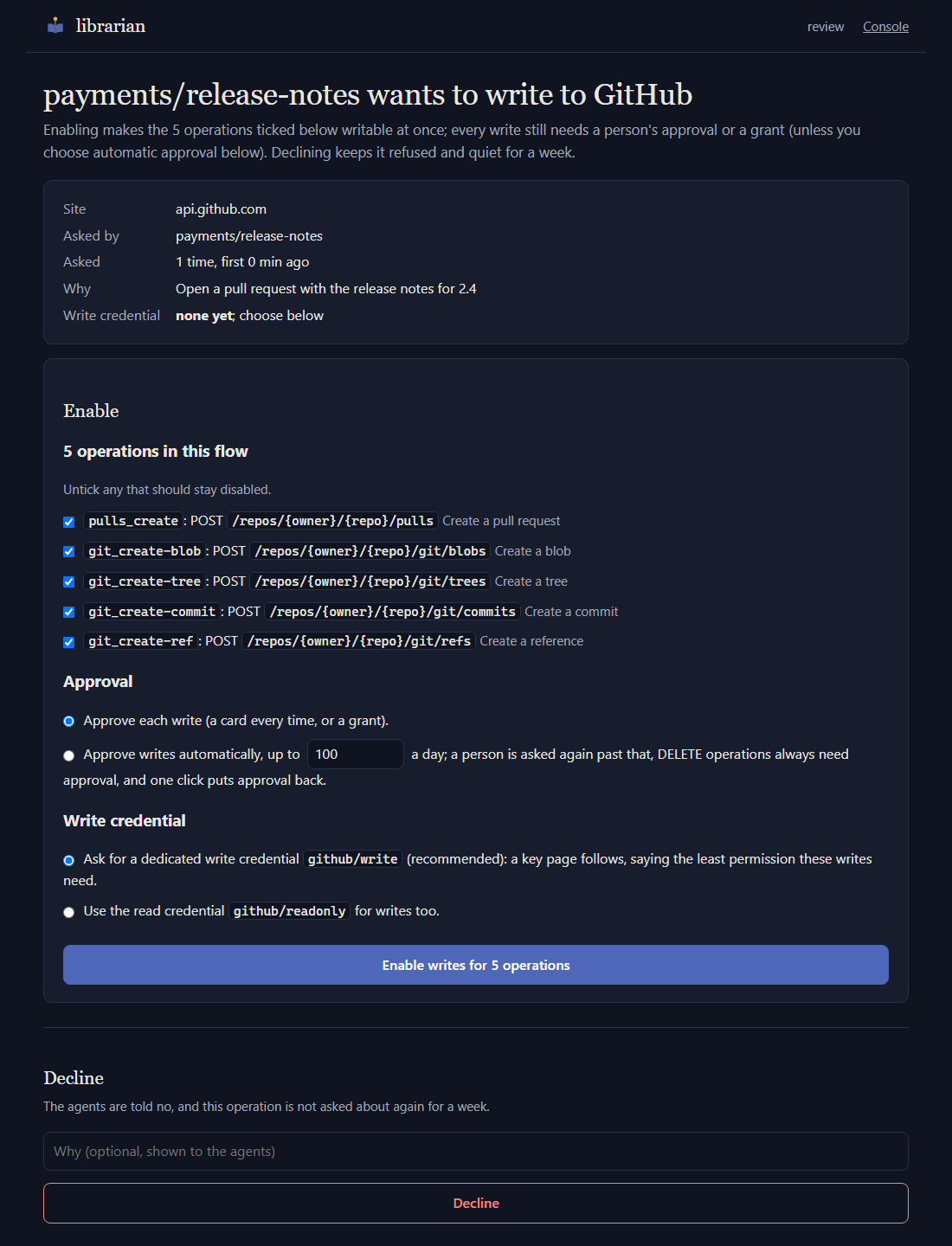
An agent wanted a write nobody had enabled: the approver enables the whole flow, chooses how writes are approved and where the write credential comes from.
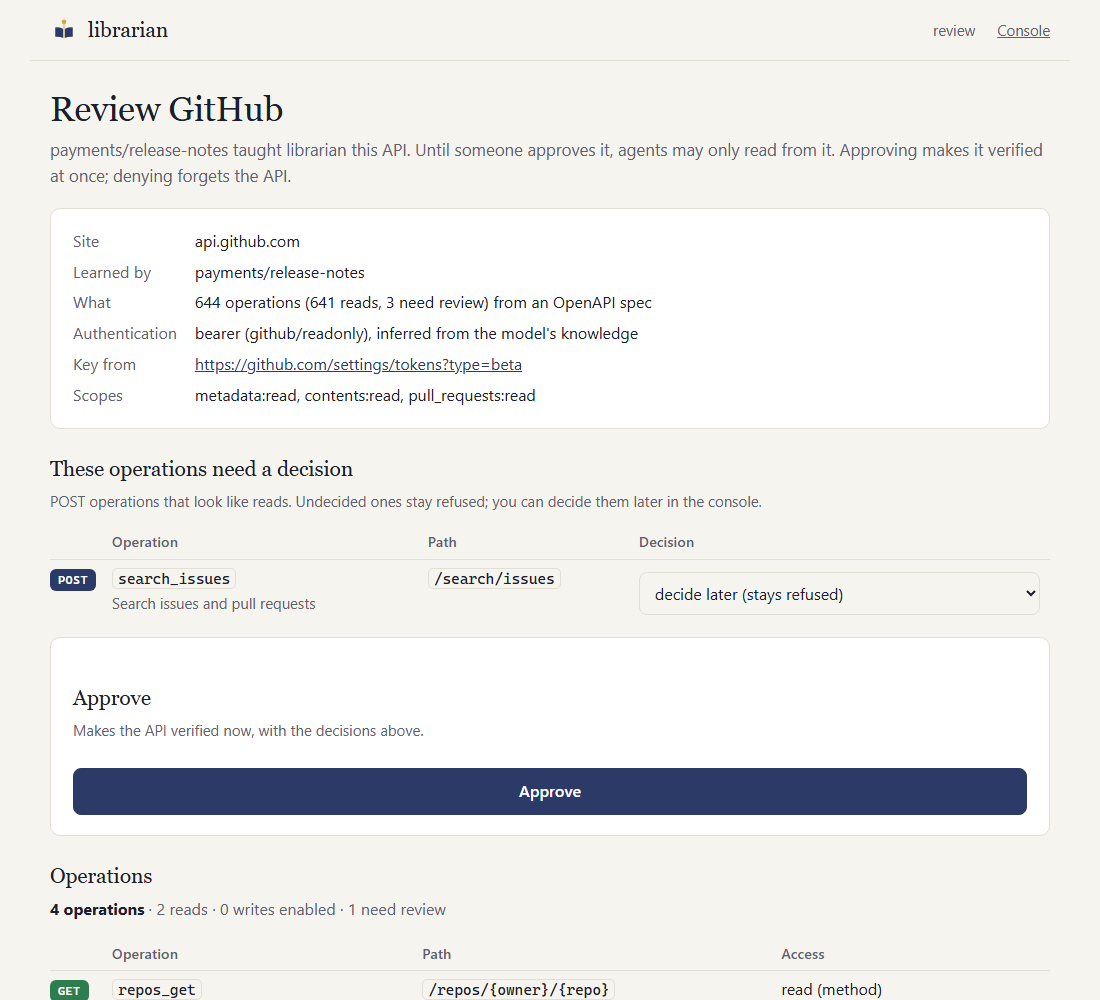 | 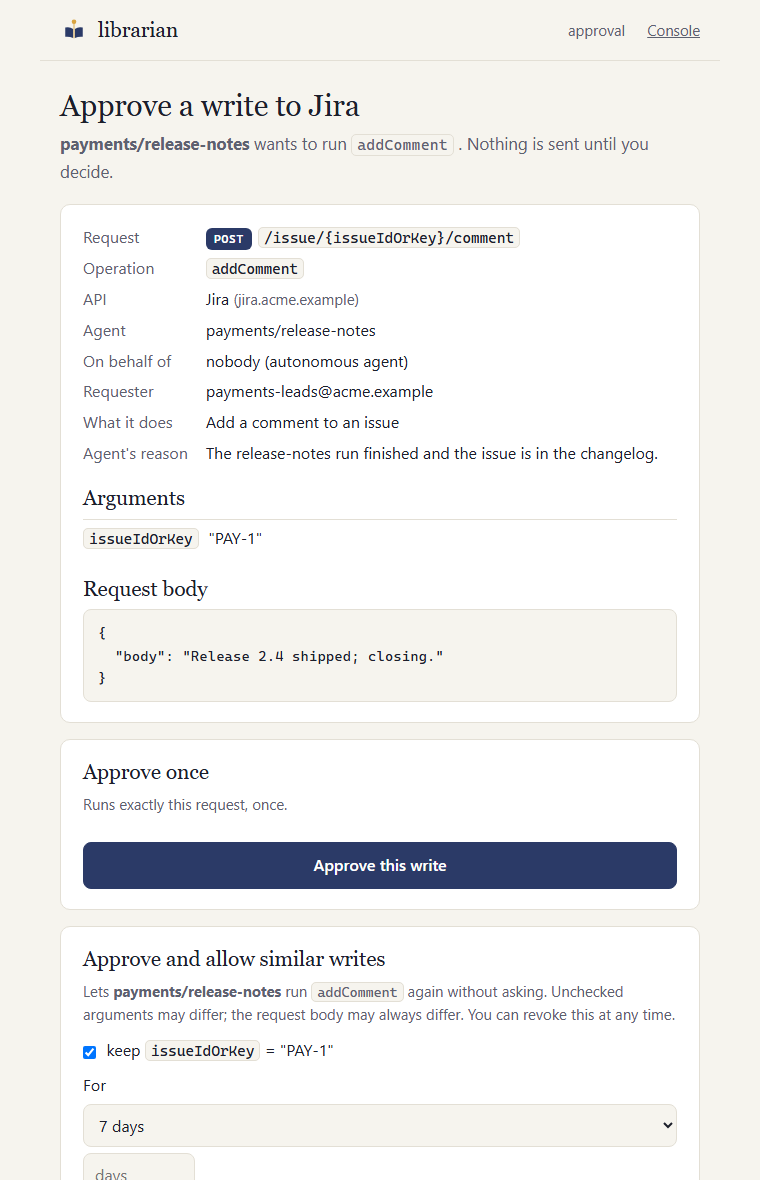 |
| Approving a learned API, from the Slack card. | Approving one write: exactly what will be sent. |
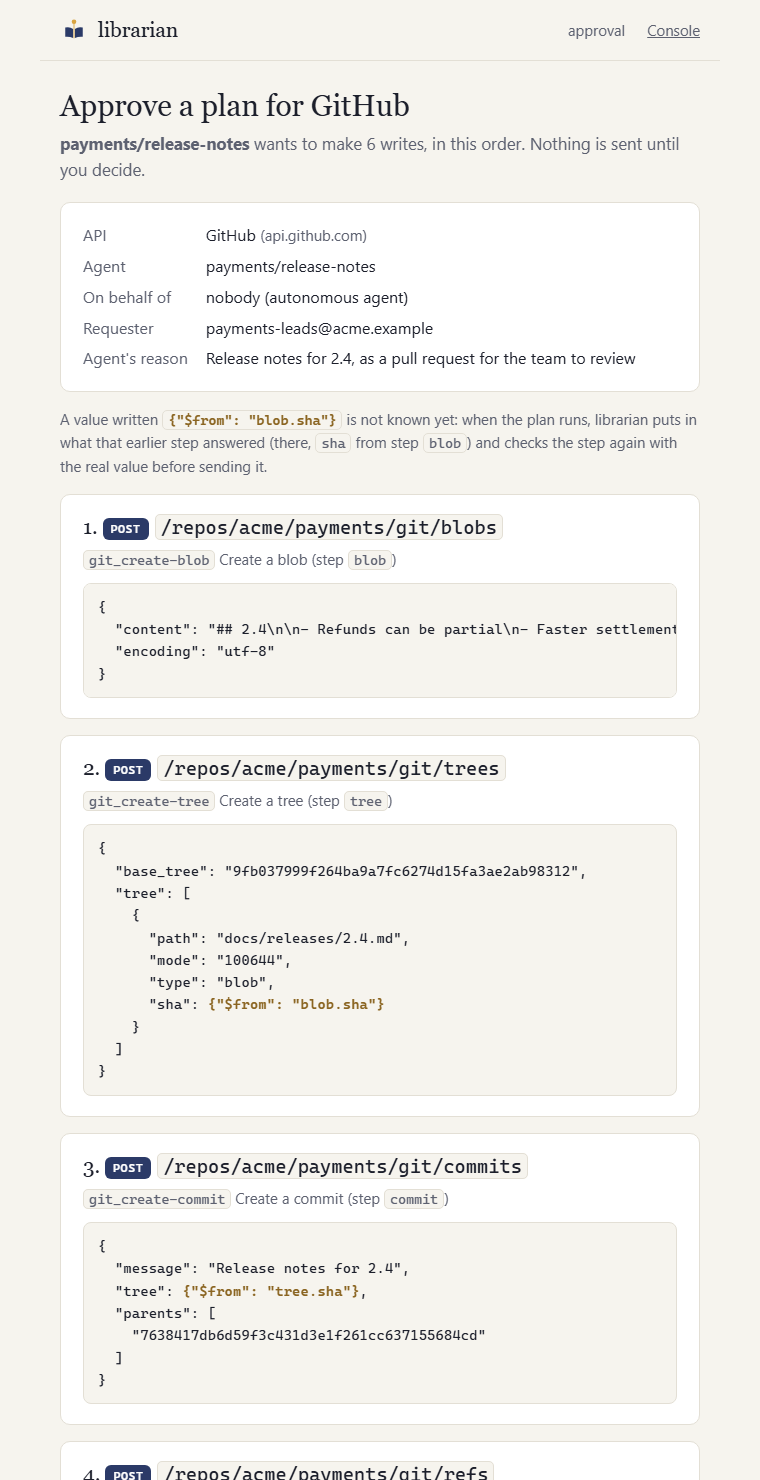
Approving a plan: a commit and its pull request are six requests and one decision.
The console
The pages listener's root (/) is a console for the people who run librarian, with pages for
the overview, the APIs (status, host, operations and where they were learned from), what is
waiting on a person (keys to add, writes to approve or enable, learned APIs and updates to review, sign-ins), the
standing grants, the people signed in to per-person APIs, each person's own sign-ins, and
activity: what agents did in the last seven days (reads, writes, denials, plain-language
requests answered from a recipe versus by the model, bytes fetched), the busiest APIs, and the
recent events for the whole deployment or one API. Activity needs the database; it keeps
audit_retention_days (30) of events, while the audit stream keeps everything. The console shows credential
references only, never values. From there a signed-in approver can revoke a grant,
approve a learned API, block or unblock one, forget one (its open review is closed, whatever waited on a
person for it is cancelled, and its file leaves the record), invalidate a credential (the next call asks for a fresh key), re-learn a provisional API from a documentation or spec URL you
give it, choose its authentication when the spec and the model couldn't tell, change any
operation's decision (read, write approved each time, write approved automatically with a daily
cap, or exclude; enabling writes asks for a write credential when the entry has none),
allow slashes in path arguments that are file paths or refs, re-check its source, and
clear a suspension. Every decision is saved to the database and in effect at once; the
API's page shows where it was written to the record, and offers to try again when GitHub
refused. Large APIs are shown by group (the spec's tags), with the
operations that need attention first and a search box. Every action is recorded in the
audit log with who did it. The console follows the approval pages' sign-in
(approvers.mode: trusted_header behind your auth proxy); approvers.console: open serves it
without sign-in on a laptop, off disables it.
Writes
Reads are the default; writes are opt-in at every level:
- An approver enables the operation on a verified entry (it lands in the entry's review
as
writable: true) and the entry has a separate write credential (write_auth). The approver adding a read key can also tick "allow approved writes with this key". - The agent is allowed to request writes on that API (
write_apisin its caller config). - Each write is approved by a human for that exact request, or matches a grant.
Writes nobody has enabled yet. When an agent asks to write through an operation that is not
enabled, or on an API with no write credential, the refusal is not silent. librarian opens one
enable-write request per operation (shared by every agent and replica that asks), tells the
approvers (a Slack card, and the console's waiting list) and answers the agent with
write_not_enabled (MCP) or a rejection saying approvers were asked (A2A). An approver follows
the link and enables or declines. Enabling takes effect at once; if the API has no
write credential, the approver chooses
a dedicated <api>/write credential (asked for through the secure key page, with the least
permission those writes need, inferred by the model when one is configured) or reuses the read
key. Decline keeps the operation refused and quiet for a week. The console's API page also offers
Enable writes on any write operation that is not enabled, without waiting for an agent to ask.
A decision an approver makes in the console or on an enable page is the approval: it is saved to
the database, so the agent's next try goes through (to the usual per-write approval).
A flow that needs several operations (create a blob, a tree, a commit, a ref) names the rest in
also_needs, so one request and one approver action cover them all; enable_status tells the
agent where the request stands (pending, enabled and waiting for the write credential, live,
declined until a date). Nobody edits YAML.
Automatic approval. When enabling writes (on the enable page, or with the per-operation
Change control on the console's API page) an approver can choose approve writes automatically:
from then on a write to that operation runs right after the policy checks, with no card, up to a
daily cap (default 100; then a person is asked again). It is recorded on the operation
(approval: auto, auto_limit_per_day), is in effect at once like any decision, is audited as
write_auto (the console's Activity page lists them) and logged; writes.announce_auto: true
also posts each one to the channel as an FYI with a Require approval again link (off by
default: it gets noisy). The same link is on the console's API page, where the Change control
puts per-write approval back. DELETE operations are never approved
automatically, the write rate limit still applies, and a suspended operation is refused as
always. The Change control also flips any decided operation: read, write, automatic or exclude.
Path arguments with slashes. A path argument may not contain / unless the parameter is marked
allow_slash: true (inferred when the API is learned for parameters that are file paths or git
refs, such as GitHub's path, ref and branch; the entry shows it). Even then, empty, .
and .. segments, a leading or trailing slash and encoded slashes are refused. The console's API
page offers Allow slashes for parameters that look like paths, which lands in the entry's review.
The approval card (Slack) shows the operation, arguments and full body. On the approval page the
approver can approve once, approve and allow similar writes (a grant for that agent and
operation, with the argument values they choose kept fixed, a length of their choosing from a day
to until revoked, and an optional use cap), or deny. DELETE operations can only ever be
approved once. The task waits in AUTH_REQUIRED and completes on its own after the decision.
Grants are adjusted or revoked from the console's Grants page at any time; writes.max_grant_days
caps how long one may last (no cap by default).
Who may approve (writes.approvers): the requester (the person the agent acts for, or the
agent's owner), the approver group, or either (default). Approvers sign in through your
SSO proxy (approvers.mode: trusted_header); the approver group is approvers.group, as your
identity provider names it (the chart's oauth2Proxy.approverGroup). The Slack user group
(notifier.slack.approver_group) is only who gets pinged. Agents can never approve.
Autonomous agents (no person behind them) get an owner, who stands in as requester. For
unattended work, configure bounded grants:
callers:
  - agent: triage-bot
    key_ref: librarian/callers/triage-bot
    owner: ops@example.com
    write_apis: ["jira"]
writes:
  approvers: requester_or_group
  grants:
    - agent: triage-bot
      api: jira
      operation: addLabel
      pinned_args: {}                  # e.g. {issueIdOrKey: PAY-1}; {} allows any issue
      max_uses_per_day: 50
      notify_owner: true               # FYI to the channel on each use
Each use of a grant is posted to the channel. writes.announce_grants: false stops that for all
grants, and the console's Grants page turns notices off per grant; every use is still in the
audit log and on the Activity page.
An agent with no owner and no person can only be approved by the approver group; if no one could
approve, the write is refused immediately. librarian grants list|revoke and librarian approvals list manage it all; revoking is the kill switch.
Several writes as one plan
Some changes are one decision made of several requests. A commit through GitHub's API is a blob, a tree, a commit and a branch, and then a pull request. Asked for one at a time, each needs its own approval, and the approver sees each without the others. A plan puts them in front of the approver together: every request as it will be sent, in the order it will be sent, approved once.
{"skill": "plan", "api": "github", "reason": "Release notes for 2.4",
 "steps": [
  {"id": "blob", "operation": "git_create-blob",
   "args": {"owner": "acme", "repo": "payments"},
   "body": {"content": "## 2.4\n...", "encoding": "utf-8"}},
  {"id": "tree", "operation": "git_create-tree",
   "args": {"owner": "acme", "repo": "payments"},
   "body": {"base_tree": "4f2a91...", "tree": [
     {"path": "NOTES.md", "mode": "100644", "type": "blob", "sha": {"$from": "blob.sha"}}]}},
  {"id": "commit", "operation": "git_create-commit",
   "args": {"owner": "acme", "repo": "payments"},
   "body": {"message": "Release notes for 2.4", "tree": {"$from": "tree.sha"},
            "parents": ["9fb037..."]}},
  {"id": "branch", "operation": "git_create-ref",
   "args": {"owner": "acme", "repo": "payments"},
   "body": {"ref": "refs/heads/notes-2.4", "sha": {"$from": "commit.sha"}}},
  {"id": "pull", "operation": "pulls_create",
   "args": {"owner": "acme", "repo": "payments"},
   "body": {"title": "Release notes for 2.4", "head": "notes-2.4", "base": "main"}}
 ]}
{"$from": "blob.sha"} stands for the value at sha in what the step called blob answered
(commit.tree.sha goes deeper; a number picks from a list). It can be an argument or sit
anywhere in a body, and it can only point at a step before it. Over MCP the tool is
write_plan, with the same api, steps and reason; it answers pending_approval, and
write_status then shows every step.
What holds for a plan:
- One API, writes only, at most 20 steps. What a step answers only ever goes back to the API that said it. Read what the plan needs first (a read needs no approval) and write the values into it, where the approver sees them.
- Every step is checked before anyone is asked, as the write it is: the agent may write there, the operation is enabled, the arguments are valid, the agent's limits hold. An argument that those limits restrict has to be written in the plan, not taken from an earlier step; and so has everything a DELETE is sent, so that the approver sees what is removed. Operations nobody has enabled yet are asked for together, in one enable request.
- A person approves exactly this plan, once. The approval page shows each request where
it will go, with its body, and marks what an earlier step will supply. A plan never runs
under a grant or automatic approval, even when each of its writes
would, and cannot be approved "and allow similar". A plan changed anywhere is another
plan. Against the write rate limit it counts as as many writes as it has steps, so
writes.rate_limit_per_minute(10 by default) is also the longest plan an agent can ask for. - Each step is checked again when its turn comes, with the values now filled in (what an API answers is not trusted to be a safe argument) and against the registry as it is then (an operation disabled or suspended in the meantime is not sent).
- The first step that fails ends the plan, and nothing is undone. librarian cannot take
back what an API has done, so order the steps so that a plan that stops part of the way
leaves nothing harmful (above: objects nothing refers to until the branch exists). The
outcome names the step and what was made before it, and gives every step its answer and a
state:
made,failed,not sent, orunknownwhen the request went out and no answer came back. - It ends, like any write. Each step is recorded before the next is sent. If librarian stops in the middle, the plan is closed with how far it got and is never carried on by itself.
- With an
idempotency_key, asking again returns the first outcome instead of running the plan again, and each step is sent with a key of its own made from it.
The registry
One entry per API, kept in librarian's database. Onboarded entries start as provisional:
- GET/HEAD operations are reads and usable immediately.
- POST operations that look like searches are marked
unknownand blocked until a human setsaccess: read+read_basis: reviewedand the entry isverified. Nobody edits that by hand: the review page and the console list these operations with a read / write / exclude choice. - Everything else is a write: refused unless an approver enables it (see Writes).
An approver makes it verified on the review page or in the console. That, and every later decision, is a write to the database: in effect at once, on every replica, with no pull request to merge and nothing to sync.
The record. With publish.type: github, librarian also writes what was decided to a
repository you own: one YAML file per approved API, one commit per decision, each saying what
was decided and by whom. It is there so the registry lives somewhere besides the database (a
history you can read, a copy you can restore from); it is not where anything is approved.
publish:
  type: github
  repo: acme/api-registry
  directory: registry
  github_app:                      # recommended: owned by the org, short-lived tokens
    app_id: "123456"
    private_key_file: .librarian/github-app.pem
  # or token: via LIBRARIAN_PUBLISH__TOKEN (contents:write + pull_requests:write)
- Written, never read. A change made in the repository changes nothing in librarian. Only
librarian registry restorereads it, on purpose: it brings the record's entries into an empty (or new) database (--replaceto overwrite what the database has). - After the decision, in the background. A decision does not wait for GitHub. If the write fails, the decision stands; the console shows which APIs are behind and why, librarian keeps trying (with a growing pause), and the API's page has Write it now.
- Commits to the base branch. Where a rule only lets changes in through pull requests, librarian opens one and merges it as the App in the same step; let the App bypass the rule if merging needs a review.
- Not everything. APIs nobody approved yet are not written; nor are names librarian looked up with a credential (the glossary).
librarian github-app create --repo acme/api-registry creates that GitHub App in one step:
one click on GitHub, install it on the repo, and it saves the key and prints the settings.
Files. YAML files in registry_dir are a way in for entries you write by hand (and the
whole registry when there is no database, database_url: null). With a database a new file
is imported into it, and an edited file is imported again as long as nobody has decided anything
about that API in librarian; after that the database's entry wins and the console says the file
is being ignored.
How librarian authenticates to an API is part of its entry (auth, and write_auth for
writes, which is always a credential of its own). Learned from the spec or the documentation,
and changeable on the API's page in the console:
type | What the API is sent |
|---|---|
none | Nothing |
bearer | Authorization: Bearer <secret> |
api_key | The secret in a header or a query parameter of your naming (in: header or query, name) |
basic | HTTP Basic; the secret holds username:password |
oauth2_user | The token of the person the agent acts for: Acting as the person |
oauth2_client, github_app, aws_sigv4 | A credential made for the call: Credentials made for each call |
The secret is named by a reference (secret_ref: jira/readonly), never written into the entry.
When learning an API, the librarian also looks for a cheap "who am I" read (/me, /myself,
/user, ...) and uses it to test every new credential.
Validate in CI with uv run librarian registry validate. Every field of an entry is described
in docs/registry.md. Example:
examples/registry/jira.yaml.
Reference
Everything that can be run or set, in one place. The sections above say what each is for.
Commands
All but the github-app commands take --config <file> and read the same settings as the server.
| Command | What it does |
|---|---|
librarian serve | Run the server: A2A at /, MCP at /mcp, the pages for people and the console |
librarian learn <api> | Learn an API from a spec, its documentation or the model's knowledge, and save it as provisional |
librarian call <api> <operation> | Run one read operation locally, under the same policy as the server |
librarian ask "<request>" | Run a plain-language request locally (the fetch skill) |
librarian discover <api> | Run an API's discovery reads into its glossary (e.g. Jira's custom field names) |
librarian doctor | Look for credentials stored where they must never be, and for ones that cannot be used; --redact replaces the copies in the database |
librarian registry recheck [api] | Re-read APIs' specs or documentation now and handle what changed |
librarian registry clear <api> <operation> | Lift a suspension or warning on an operation after checking it by hand |
librarian registry list | List the APIs librarian knows, including those learned on demand |
librarian registry validate | Validate every registry file; exits non-zero on errors (for CI) |
librarian registry restore | Bring the entries in the record repository into the database: after losing it, or when moving to a new one |
librarian grants list | Standing write permissions, from approvals and from the config |
librarian grants revoke <grant> | Revoke a grant at once: the kill switch for an agent's unattended writes |
librarian approvals list | Writes and plans waiting for a person, with their links |
librarian github-app create | Create a GitHub App for the record repository in one step |
librarian github-app init-repo | Make the first commit in an empty record repository, as the App |
librarian github-app check | Check that the App can make a token and reach the record repository |
librarian recipes list | Saved recipes, most used first |
librarian recipes delete <recipe> | Forget a recipe; the planner is used again for such requests |
Settings
In the YAML file given with --config, or as environment variables: LIBRARIAN_ and the
name in capitals, with __ between the levels (writes.max_grant_days is
LIBRARIAN_WRITES__MAX_GRANT_DAYS). The environment wins. [] marks a list.
examples/librarian.yaml is a file with most of them set.
The server
| Setting | Default | |
|---|---|---|
host | 127.0.0.1 | Address the listener for agents (A2A and MCP) binds to |
port | 8080 | Its port |
public_url | `http://127 |







