
context-doctor
Cut your Claude Code bill, measured on your own sessions. Profile and slim any LLM conversation.
Runs on your machine from its package; the steps are below.
What it does
- Reads
- Writes
- High impact
At most: moves money, runs code or commands, deletes data, or sends messages for you.
What it costs
FreeOdel charges nothing per call. The publisher may charge for its own service.
Runs locally over stdio
This server isn't hosted — your MCP client launches it from a package registry. Use one of the commands below, or drop the config into your client (e.g. Claude Desktop).
Run
npx -y context-doctor
MCP client config
{
  "mcpServers": {
    "context-doctor": {
      "command": "npx",
      "args": [
        "-y",
        "context-doctor"
      ]
    }
  }
}





See where your AI agent's tokens go, and stop paying for the ones that do nothing.
AI agents re-send their whole context on every message: old tool output, pasted files, long instructions. A 500k-token session pays for all of it again each time, and at full price after a coffee break, when the prompt cache has expired. context-doctor measures that waste on your own sessions, in dollars, and removes it at the moments it pays: before it enters the context, while it sits there, and on every request.
It runs on your machine, needs no API key, sends no telemetry, and works with Claude Code, Claude Desktop, Cursor, Codex, Gemini CLI, any app on the Anthropic, OpenAI or Gemini API, and CI. MIT licensed, Node 20+, macOS, Linux and Windows.
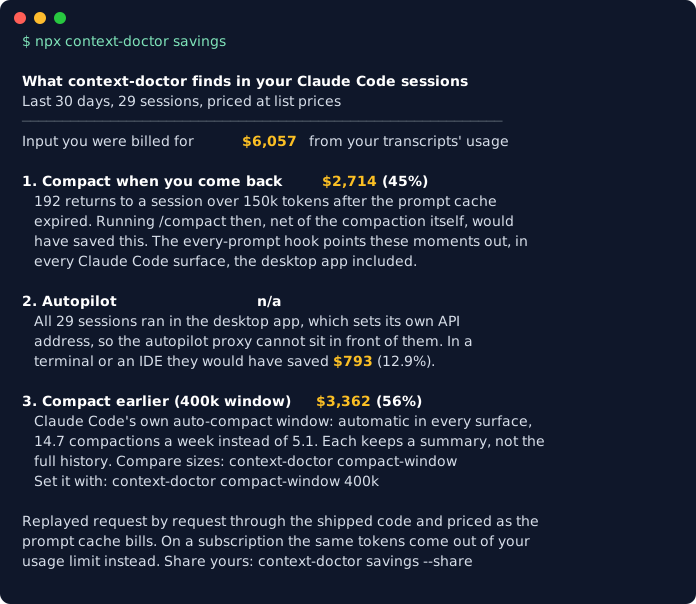
npx context-doctor savings # what your recent sessions cost, and what each fix would have saved
Quick start
Pick where you work. Each takes about a minute and is fully reversible.
| You use | Do this |
|---|---|
| Claude Code (terminal, IDE, desktop app) | Inside Claude Code: /plugin marketplace add KushalP1/context-doctor, then /plugin install context-doctor@context-doctor. You get the every-prompt check, the MCP tools and /context-doctor:savings, :checkup, :overhead, :pack, :autopilot, :compact-window |
| Everything on this machine at once | npm install -g context-doctor && context-doctor install wires Claude Code, Claude Desktop, Cursor, Codex and Gemini CLI. context-doctor doctor checks it; context-doctor uninstall removes it |
| Claude Desktop, Cursor or any MCP client | Add the server to the client's MCP config (or install the one-click .mcpb from the latest release in Claude Desktop):{"mcpServers": {"context-doctor": {"command": "npx", "args": ["-y", "context-doctor", "mcp"]}}} |
| claude.ai, ChatGPT, phone apps | npx context-doctor instructions --copy, then paste into the app's personal preferences |
| Your own app on an LLM API | Run npx context-doctor proxy --autopilot and point ANTHROPIC_BASE_URL, OPENAI_BASE_URL (add /v1) or GOOGLE_GEMINI_BASE_URL at http://localhost:8787. No proxy possible? Wrap the SDK client: withContextDoctor(new Anthropic()) |
| Python / RAG pipelines | pip install context-doctor (after the first PyPI release; until then pip install "git+https://github.com/KushalP1/context-doctor#subdirectory=python"), then pack_documents(retrieved_docs, question, budget=4000) trims LangChain or LlamaIndex results to the chunks that matter. Python README |
| GitHub pull requests | uses: KushalP1/context-doctor@v0.27.0 comments how much a PR grows CLAUDE.md, AGENTS.md and rules, and can fail over a budget (setup) |
What it does
Measure, in dollars, on your own history
savings: what your recent Claude Code sessions cost and what each fix below would have saved, replayed request by request against what you were billed.overhead: what every request re-reads before your message (system prompt, tools, MCP servers, CLAUDE.md, rules, memory), each file priced per month.tasks: cost per commit, per project, from each session's recorded usage and its owngit commitcalls.reads: the files read into session after session, and whether a CLAUDE.md summary orpackwould pay.session,watch,analyze,report,dashboard: token breakdown and wasted-context findings for any session, conversation file or agent trace.
Keep waste out of the context
pack(and thepack_contextMCP tool): only the chunks of a big document, PDF, log or codebase that a question needs, within a token budget, instead of the whole thing.overhead split: turns a heavy CLAUDE.md or memory file into a lean one plus a reference file the agent opens when needed, word for word, nothing lost.ciand the GitHub Action: review memory-file growth like any other cost.
Remove waste automatically
- An every-prompt hook (Claude Code, Codex, Gemini CLI; Cursor after each tool call) tells the model its real context size and the largest waste, and offers
/compactwhen you return to a big session after the cache expired. compact-window: sets Claude Code's own auto-compact window, measured on your history first. Works in the desktop app too.- Autopilot: a local proxy (or SDK wrapper) that clears stale tool output only when the prompt cache is cold, so a request never costs more.
What it has measured
On the author's own Claude Code history (mostly Opus and Fable models with the 1M window, priced at API list prices; savings computes yours the same way):
- Compacting when you come back after the cache expired: 401 such returns in 133 days; compacting then would have saved $4,053 net, about $914 a month. Details →
- A 400k auto-compact window instead of ~970k: 55% less input cost over 30 days ($6,119 to $2,757), for 15 compactions a week instead of 5. The trade-off →
- Autopilot: 9.8% less input cost, no session made more expensive.
- pack: 9 of 10 questions about this repository answered from 0.6% of its tokens. How →
- Counting Claude correctly: current Claude models pack 2.75 characters per token, not the 4 most tools assume, so estimates built on 4 undercount Claude by about 40%.
context-doctor accuracyre-checks the ratio on your own sessions.
On a Claude subscription you do not pay list price; the same tokens come out of your usage limit instead, so read the dollars as the size of the effect.
Built and maintained by gAI Ventures.
Which context-doctor is this? Several projects share the name. This one is
context-doctoron npm andio.github.KushalP1/context-doctorin the official MCP Registry.
A profile looks like this (npx context-doctor analyze conversation.json, or session for your latest Claude Code session):
Where the tokens go
────────────────────────────────────────────────────────
Tool results      ████████████████░░░░░░░░░░░░  57%  ~41k
System prompt     ██████░░░░░░░░░░░░░░░░░░░░░░  21%  ~15k
Assistant replies ████░░░░░░░░░░░░░░░░░░░░░░░░  13%  ~9.4k
User messages     ██░░░░░░░░░░░░░░░░░░░░░░░░░░   9%  ~6.5k

Findings (4)
────────────────────────────────────────────────────────
✖ Message #12 contains a base64/binary blob (~8.2k tokens). [save ~7.4k]
   → Never put base64 in text content — use the provider's file/image APIs.
▲ Tool result at message #7 (web_search) is ~6.1k tokens. [save ~4.9k]
   → Truncate or summarize large tool outputs before they enter history.
What it saves
Measured, not modelled, on every Claude Code session on the author's machine (mostly Opus 5 and Fable 5 with the 1M window), priced the way the prompt cache bills it (cached reads 0.1x, writes 1.25x) at API list prices. context-doctor savings runs the same measurement on yours.
1. Compacting when you come back (every Claude Code surface, desktop app included). 133 days, 401 returns to a session over 150k tokens after more than 65 idle minutes; median context at the return, 517k tokens.
Net saving had you run /compact after the first reply | $4,053 (about $914 a month) |
| Returns where it paid off | 296 of 401 |
| Worst single case | −$2.30 (a session left a few messages later) |
Each return counts only the messages up to the next return, and the compaction request is charged as a cost. Not counted: files the model may re-read after compacting, and what the summary leaves out. That is why this is advice with the numbers attached, not something done for you.
2. Autopilot (terminal and IDE sessions, API apps). 130 days, 43 sessions, replayed through the shipped autopilot code with real timestamps:
| Without autopilot | With autopilot | Saved | |
|---|---|---|---|
| Input tokens sent | 41.4 billion | 37.6 billion | 3.8 billion (9.2%) |
| Input cost at API list price | $48,962 | $44,268 | $4,694 (9.8%) |
| Sessions made more expensive | 0 of 43 |
The median session saves 1.9%, the best 37.7%: long sessions are where the money is (94% of input cost on that machine came from requests above 200k tokens). These sessions ran in the desktop app, which autopilot cannot reach, so for the author this is what the same sessions would have saved in a terminal; context-doctor savings separates the two for you.
3. Compacting earlier (automatic, every Claude Code surface, desktop app included). The offer in 1 is advice, and on the author's machine it was followed 1 time in 33. Claude Code has a native setting that needs nobody to follow anything: autoCompactWindow in ~/.claude/settings.json makes it compact as if the window were that size. context-doctor compact-window replays each session request by request at several sizes, priced as the cache bills (each simulated compaction pays its own request and a 20k-token summary at the output rate), and changes nothing until you pick one:
| Window | Input cost, last 30 days | Saved | Compactions a week |
|---|---|---|---|
| as now (~970k) | $6,119 | 5.1 | |
| 600k | $3,570 | $2,549 (42%) | 6.5 |
| 400k | $2,757 | $3,362 (55%) | 14.7 |
| 300k | $2,353 | $3,766 (62%) | 24.5 |
| 200k | $1,963 | $4,155 (68%) | 46.9 |
29 sessions. The replay's baseline came within 9% of what the transcripts say was billed, on the low side. The cost is real: each compaction replaces the session's history with a summary, so a smaller window trades detail for money. That is why the command shows the table first and sets a window only when you name one (context-doctor compact-window 400k; off undoes it, and a backup of settings.json is kept).
On a Claude subscription you do not pay list price; the same tokens come out of your usage limit instead. Anthropic does not publish how limits weight cached tokens, so read the dollars as the size of the effect, not as your bill.
What happens on each platform
| Where you work | Automatic, every request | What you get on top |
|---|---|---|
| Claude Code in the terminal, VS Code or JetBrains | Autopilot clears stale tool output (cold cache only, never more expensive). Hook on every prompt: real context size, largest waste, and a /compact offer when you return to a large session after the cache expired. compact-window, if you set one | |
| Claude Code in the desktop app's Code tab | Hook, as above, including the cold-resume /compact offer, shown to you as well as the model. compact-window, if you set one: Claude Code compacts earlier by itself. Not autopilot: the app sets its own API address and ignores the one in settings | Install via npm or as a plugin (/plugin marketplace add KushalP1/context-doctor). Status bar context meter, /context-doctor:savings, session, watch, report, dashboard |
| Cursor (agent) | A native after-tool-call hook (~/.cursor/hooks.json): in a heavy chat the agent gets the same hygiene guidance and the largest waste, once per 40% of growth. (Cursor's prompt hook can only allow or block a prompt, so this is the event where guidance reaches the model) | MCP tools, editor status bar extension, cursor profiler. With your own OpenAI key, autopilot too via a tokened tunnel (how) |
| Codex (ChatGPT app's Codex tab, IDE extension, CLI) | Every-prompt hook with the API's own token counts | MCP tools, skill, session reads Codex rollouts. On an API key, autopilot too (OPENAI_BASE_URL) |
| Gemini CLI | Every-prompt hook (BeforeAgent) with the API's own token counts. On an API key, autopilot too: GOOGLE_GEMINI_BASE_URL=http://127.0.0.1:8787 (Google sign-in traffic goes elsewhere) | MCP tools, session and watch read its chats, overhead sizes GEMINI.md |
| Your own apps on the Anthropic, OpenAI or Gemini API | Autopilot on /v1/messages, /v1/chat/completions, /v1/responses and Gemini's generateContent (ANTHROPIC_BASE_URL / OPENAI_BASE_URL / GOOGLE_GEMINI_BASE_URL), or the full optimizing proxy; no proxy possible (serverless, edge)? withContextDoctor(client) runs autopilot inside the SDK client | Exact usage and cache hit rates in /stats, prompt-cache placement advice |
| Claude Desktop chat | Standing context rules in every chat; one cheap profile_context call the model makes past ~30 turns or on any cost question; pack_context instead of reading a big local file whole | One-click .mcpb install, context_checkup prompt |
| claude.ai, ChatGPT, the phone apps | Your account's standing preferences (context-doctor instructions --copy) | Profile an exported chat with analyze |
| CI | analyze --fail-over-budget fails a build whose prompts outgrow a budget | .contextdoctorrc budgets and presets |
Not claimed, because no process on your machine sends those requests: trimming inside Claude Desktop chat, claude.ai, ChatGPT, Cursor's own subscription models, or Codex signed in with ChatGPT. Those get the rules and the measurements above, not autopilot.
Before it enters the context: pack and overhead
Everything above slims context that is already there. Two commands stop it getting in.
pack: only the parts of a document a question needs. A 60k-token manual pasted to answer one question is paid on that message and re-read on every message after it. pack splits files and folders along their own structure (markdown headings, top-level code declarations, paragraphs; one-line logs and minified files are cut too), ranks the chunks against your question with BM25, and returns the best ones that fit a budget. Every chunk carries an id and its line range, and the result names the next-best ids, so asking for more is one call. Without a question you get an outline to pick from.
context-doctor pack docs/ README.md --query "how do I rotate the signing key" --max-tokens 3000
context-doctor pack big-manual.md                     # outline: id, lines, tokens, heading per chunk
context-doctor pack big-manual.md --ids big-manual.md#12,big-manual.md#13
cat server.log | context-doctor pack - -q "timeout upstream"
$ context-doctor pack README.md src -q "how is the ledger kept from growing" --max-tokens 2000
PACKED ~1.9k of ~315k tokens (1%) from 80 files: 7 of 1026 chunks for "how is the ledger kept from growing", budget 2.0k.

── src/ledger.ts#6 · L108-128 · export function recordLedger(entry: Omit<LedgerEntry, "ts">): void { · ~404
...
── src/test/ledger.test.ts#1 · L1-22 · The ledger is capped, and everything it feeds is a LIFETIME total. · ~409
...
Not included: 1019 chunk(s). Next best: src/watch.ts#1 (...); src/test/compactwindow.test.ts#4 (...)
In Claude Desktop, Claude Code, Cursor and Codex the same thing is the pack_context MCP tool, and the standing instructions tell the model to use it when it needs to answer from a large file it is not editing. Ranking is lexical, offline and keyless; it misses pure paraphrase, which is what the outline is for. If you run Ollama with an embedding model (ollama pull nomic-embed-text), --semantic (or semantic: true on the MCP tool) also ranks by meaning and merges the two rankings; chunk vectors are cached, so repeat packs are fast. Without one it says so and stays lexical. Measured on this repository (README plus source, ~305k tokens): 9 of 10 factual questions were answered from a 2k-token pack. PDFs, Word (.docx, .doc, .rtf), PowerPoint and ODT files are read with tools the OS already has (pdftotext where installed, PDFKit and textutil on macOS, unzip elsewhere); when none is available, pack says what to install. Over HTTP (the ChatGPT connector mode) the tool reads no files, only text you pass.
overhead: what every request re-reads before your message. The system prompt, tool and MCP schemas, skills and your memory files ride on every request: cached, so each read is cheap, but read on every request of every session and written again at full price after each cold start. Transcripts never show them. overhead measures the fixed part from the first request of each recent Claude Code session (the API's own count, minus your first message), lists every memory file each agent loads in the current directory (Claude Code's CLAUDE.md with its @imports, rules and auto memory; Codex's AGENTS.md; Cursor's always-applied rules; GEMINI.md), and prices each per month from your own request and cold-start counts.
Claude Code, last 30 days: 71 sessions start at a median ~54k tokens (p90 ~62k) before the first message.
Memory files loaded here are ~3.4k of that; the rest is Claude Code's system prompt, tools, skills and MCP schemas.
At your usage (14,104 requests, 249 cold starts, claude-fable-5-1 list prices) every 1k tokens of it costs ~$16.97 a month;
Findings point at files over 2k tokens, paragraphs loaded twice from two files, and long code blocks that could live in a file the agent opens when it needs them.
To act on a finding, context-doctor overhead split <file> plans the fix: sections over ~400 tokens (or mostly code) move word for word to <name>.reference.md, each run of them leaving one pointer the agent follows when a task needs it. Lists of links are indexes and stay, and an auto-memory MEMORY.md keeps only its index, as Claude Code intends. Nothing is written until you add --write, which backs up the original first. On a copy of the author's auto-memory index: ~3.4k to ~1.7k tokens on every request, about $28 a month, nothing lost.
MCP servers are part of the same overhead: each one's tool definitions ride on every request. overhead counts calls per server from your transcripts, including servers the app or its connectors provide, and overhead --mcp launches each configured server once to size its definitions, flagging the ones you never call with what they cost a month. When Claude Code's tool search is on (the report says how often it was used), definitions are deferred and an idle server costs about its tool names instead.
What's new
- 0.29 Python, and where the work goes: a dependency-free Python package (
python/) withpack_documentsfor LangChain and LlamaIndex results,pack_context,estimate_tokensandprofile_messages, held byte for byte to the TypeScript by parity tests.context-doctor readsshows the files read into session after session;context-doctor tasksshows cost per commit per project, from your own transcripts. - 0.28 Wider reach:
/context-doctor:overheadand/context-doctor:packin the Claude Code plugin;packreads a folder inside a git repository the way git does, so.gitignore'd build output and secrets stay out;withContextDoctorwraps Google's@google/genaiclient too;overheadmeasures the fixed start-of-session cost of Codex and Gemini CLI sessions as well as Claude Code's, priced with each provider's cache rules. - 0.27 Keep waste out:
packand thepack_contextMCP tool put only the chunks of big files (text, code, PDF, Word, PowerPoint) a question needs into the context, within a budget;overheadmeasures and prices the front matter every request re-reads (system prompt, tools, CLAUDE.md, rules, memory, AGENTS.md, Cursor rules, GEMINI.md). MCP servers sized and their use counted;overhead splitturns a heavy memory file into a lean one plus a reference file.withContextDoctor(client)runs autopilot inside an Anthropic or OpenAI SDK client, for apps with no proxy. Gemini joins:installwires Gemini CLI's MCP server and every-prompt hook,sessionandwatchread its chats, and the proxy and autopilot carry Google's Gemini API. A GitHub Action (andcontext-doctor ci) reports memory-file growth on every pull request and gates on a budget. Re-verified on every surface: 229 tests on macOS, Linux and Windows, plus MCP, OpenAI and Gemini end-to-end smoke runs, now in CI, MCP over stdio and HTTP, the OpenAI proxy, and a livedoctor. - 0.26 Checked on every platform, three fixes: tested end to end in Claude Code (terminal, desktop app, plugin from GitHub), Claude Desktop, Cursor, Codex on GPT-5.5, VS Code, the MCP server on every launch path, and the proxy on OpenAI's APIs. Found and fixed: Cursor's agent never received the hook's guidance (Cursor runs Claude Code's hook where output cannot add context), so
installnow adds a native Cursor hook; Codex blocked the MCP tools behind an approval it never grants incodex exec, so the tools are now marked read-only; autopilot skipped Codex's newest tools (exec,wait) and some of Cursor's. Also: a history imported into Codex no longer reads as "2136% of the window", and the chat-app settings paths are current. - 0.25 Compact earlier, by itself: the
/compactoffer at cold resumes was followed 1 time in 33 on the author's machine, so two changes. The hook now also shows you the notice (it went only to the model, which rarely raised it), with the dollar cost of the message you just sent. Andcontext-doctor compact-windowmeasures and sets Claude Code's own auto-compact window, which works without anyone acting on advice, in every surface including the desktop app: 55% less input cost at 400k on the author's last 30 days.savingsshows it as a third lever. - 0.20 Autopilot: stale tool output cleared from every Claude Code request, only when the prompt cache is cold, so it cannot cost more (measured: 9.8% less input cost, ~$1,080 a month on the author's usage, no session worse); runs as a login service on macOS, Linux and Windows; now also for GPT via OpenAI's Chat Completions and Responses APIs.
- 0.24 A full audit, fixed: the session parser now rebuilds API messages from Claude Code's one-row-per-block transcripts (it had split each reply into several messages, breaking tool pairing in exported conversations and inflating profiles); the proxy forwards every non-conversation endpoint and never re-encodes bodies it does not rewrite (model listing and file uploads failed or were corrupted through it);
reportand the dashboard no longer count compaction as tokens context-doctor saved, and MCP sketches no longer inflate them;watchfollows plain conversation files; MCP inputs are bounded. 0.23: four dependency vulnerabilities patched, no false/compactalarm after compacting,savings --share. - 0.22 Honest about where each lever works, and a new one that works everywhere: the every-prompt hook now offers
/compactwhen you return to a large session after the cache expired (measured: ~$914 a month on the author's history), including in the desktop app. Found and fixed: autopilot cannot reach the desktop app's Code tab, anddoctornow says so instead of reporting ✓;savingscounted whole-file history as "last 30 days"; the hook quoted per-message cost at the uncached rate (10x too high).--versionadded. - 0.21 See it before you install it:
npx context-doctor savingsreplays your own recent sessions through autopilot and shows what it would have saved, against what you were actually billed. Install as a Claude Code plugin from inside Claude Code. Ready for the official MCP Registry (io.github.KushalP1/context-doctor), which every release now publishes to; any MCP client can launch it asnpx -y context-doctor mcp. - 0.20.1 Releases that finish themselves: one tag publishes to npm and creates a GitHub release with the Claude Desktop bundle (signed when a certificate is configured); the editor extension is ready for the VS Code Marketplace and Open VSX.
- 0.19 Measured Claude tokenizer: estimates were 40% low for Claude; fixed from the API's own counts, with a per-model check in
accuracy. - 0.18
proxy --tokenfor putting the proxy on a public URL safely. 0.17 Claude Desktop: aprofile_contextthe model can afford to call from chat,.mcpbbundle, standing preferences for web and mobile. 0.16 Codex. 0.15 Cursor.
Full history with the measurements behind each change: ROADMAP.md.
Setup details
install configures every app it detects and does not stop at the first problem: a corrupt Claude Desktop config still gets you Claude Code and Cursor. It does not pretend either. Any target that failed is named with a ✗ line, the summary reads "Done with N problem(s)" instead of "Done.", and the exit code is 1, so dotfiles and onboarding scripts can react. A broken config file is never overwritten; fix it and re-run.
npx context-doctor install works too, but autopilot needs the global install: a background service cannot point into npx's cache, which npm deletes at will.
No API keys, ever. Everything is deterministic local code; when an LLM is needed (summarizing pruned history), the model already running in your app does it. The proxy forwards your app's credentials untouched — context-doctor itself holds nothing.
What install actually does — and what happens in every session after
One run of context-doctor install writes these (each config edit makes a .backup first; uninstall reverses all of it):
- Claude Desktop config (
claude_desktop_config.json) — registers the MCP server - Claude Code config (
~/.claude.json) — registers the MCP server - Cursor config (
~/.cursor/mcp.json) — registers the MCP server - Agent Skill →
~/.claude/skills/context-doctor/— context-hygiene playbook for Claude Code - Every-prompt hook →
~/.claude/settings.json— the per-query context check for Claude Code - Cursor hook, when Cursor is present →
~/.cursor/hooks.json(postToolUse) — the same check for Cursor's agent, after each tool call - Codex, when present: MCP server in
~/.codex/config.toml, the hook in~/.codex/hooks.json, the skill in~/.codex/skills/ - With
--statusline: live context size, cache share and cost in Claude Code's status bar
context-doctor autopilot on is separate and opt-in: it adds the background proxy service and one line (env.ANTHROPIC_BASE_URL) to ~/.claude/settings.json, after the proxy has answered a health check.
In every chat afterward (Claude Desktop, Cursor): when the conversation starts, the app launches the MCP server, which hands the model standing instructions that stay in force for the whole chat:
- summarize large pastes and tool results instead of carrying them verbatim,
- reference earlier content instead of re-quoting it, never inline base64,
- once the chat passes ~30 turns or accumulates big pastes, proactively offer to profile it,
- answer any "what's eating my context / cost / latency" question by calling
profile_context, not by guessing.
In every Claude Code / Cowork session afterward: all of the above via MCP, plus two more layers:
- the skill loads whenever context work is relevant, and
- the hook runs on every single prompt you send: lean sessions cost a ~1ms file-size check; once a session is heavy it profiles on growth events and injects a note the model sees with your message — actual token count, cost per message, the single largest recoverable waste — with instructions to work leaner and offer you compaction. It re-fires only after ~40% further growth, can never break a prompt (any failure exits silently), and logs each deep check to a small local ledger that feeds
context-doctor report.
What it never does: delete or rewrite your history without asking (pruning is consent-only, and the model writes the replacement summary so nothing is lost silently), send data anywhere (everything runs on your machine), or touch an API key.
Do you need MCP? Only sometimes — all the ways to use context-doctor
MCP is just one of seven delivery mechanisms. It's only required when you want the AI inside a chat app to run the tools itself. Everything else works without it:
| How you use it | MCP needed? | What it requires |
|---|---|---|
CLI — analyze, optimize, session on files/transcripts | ❌ No | Nothing but npx — works in any terminal, scripts, CI |
| Autopilot — every Claude Code session, and GPT API apps | ❌ No | context-doctor autopilot on (a login service + one line in ~/.claude/settings.json) |
| Proxy — always-on optimization of your API apps | ❌ No | context-doctor proxy + one env var in your app |
| Claude Code every-prompt hook | ❌ No | Written by install; Claude Code invokes it directly |
| Agent Skill — hygiene behavior in Claude Code / claude.ai | ❌ No | A markdown file; install places it (or upload to claude.ai) |
Library — import { profileConversation } from "context-doctor" | ❌ No | npm install context-doctor in your project |
| In-chat tools — Claude Desktop, ChatGPT desktop, Cursor chat | ✅ Yes | This is the only MCP piece — so the model itself can call profile_context / optimize_context mid-conversation |
Practical upshot: a developer who only wants cheaper, faster API calls never touches MCP (proxy + CLI). A Claude Code user gets the hook and skill without MCP either — the MCP server just adds in-chat tools on top. install sets up all of it at once precisely so you don't have to think about which mechanism is which.
All commands at a glance
| Command | What it does |
|---|---|
context-doctor install / uninstall | Wire (or remove) everything: MCP for Claude Desktop/Code/Cursor/Codex, the Agent Skill, the every-prompt hook |
context-doctor savings [--days n] [--share [--copy]] | What your recent Claude Code sessions cost, and what /compact at cold resumes, autopilot and an earlier auto-compact window would save, replayed through the shipped code against your actual billed usage. --share prints totals only (no project names or paths) to post. A bare context-doctor in a terminal shows the same |
context-doctor compact-window [status|off|<size>] | Replay your last 30 days at auto-compact windows from 200k to 800k: input cost, saving, and how many more compactions each means. 400k (or 250000, 0.4m) sets Claude Code's autoCompactWindow, with a backup; off removes it. Works in every Claude Code surface, the desktop app included |
context-doctor mcp [--http] | The MCP server as a subcommand, for clients and registries that launch npx -y context-doctor mcp |
context-doctor autopilot on|off|pause|resume|status | Every new Claude Code session goes through the local proxy, which clears stale tool output only when the prompt cache is cold: measured 9.8% less input cost, no session worse |
context-doctor instructions [--copy] | The ~180-token standing rules (~120 on GPT) for claude.ai / ChatGPT preferences, for web and phones where no server runs |
context-doctor pack <files|dirs|-> --query "…" | Only the chunks of big documents, logs or code a question needs, ranked and fit to --max-tokens (default 4000). No query: an outline; --ids a#2,b#5 picks chunks from it. Offline, no key |
context-doctor overhead [--days n] [--mcp] | What every request re-reads before your message: measured first-request size (Claude Code, Codex and Gemini CLI sessions), each memory file (CLAUDE.md and imports, rules, auto memory, AGENTS.md, Cursor rules, GEMINI.md) priced per month, MCP calls per server; --mcp sizes each configured server's tool definitions and flags unused ones |
context-doctor overhead split <file> [--write] | Move a memory file's big or code-heavy sections word for word to <name>.reference.md, leaving pointers; indexes stay. A plan until --write, which backs up first |
context-doctor ci [--base <ref>] [--max-tokens n] [--max-increase n] | Memory files (CLAUDE.md, AGENTS.md, GEMINI.md, rules, their imports) at HEAD vs a base commit; exit 1 over budget. What the GitHub Action runs |
context-doctor analyze <file> | Profile a conversation: token breakdown, findings, cost + latency estimates. --fail-over-budget exits 1 on a breach, for CI |
context-doctor optimize <file> | Apply the safe fixes; add --strategy trim-tool-calls for big inline file writes, --strategy prune-history for consented lossy compaction |
context-doctor session [file] | Profile a Claude Code session: live context, findings, measured tokens and prompt-cache economics, where the wall clock went per tool, and what its subagents cost (their own windows, your bill; never in the parent's profile). Also reads ChatGPT data exports (conversations.json) |
context-doctor init [preset] | Write a .contextdoctorrc from a preset (chat, agent, batch) — a budget you can adopt in one command and tune later |
context-doctor experiment --task "…" | Run one task twice from the same commit, in a fresh session and forked from an --existing one, same model and tools; compare bill, cache split, wall clock, and whether --check passed. The only command here that spends money, so it caps spend per arm and refuses a dirty tree |
context-doctor diff <before> <after> | Compare two profiles: what moved by category, which findings were resolved or introduced, and what it saves in money and latency |
context-doctor accuracy | How much of what you are billed for is visible in your transcript (the fixed harness baseline, per-turn injected content), plus a tokenizer check: real chars/token per model from the API's own counts, next to the ratio the estimator uses |
context-doctor cursor [--list] | Profile a chat from Cursor's local history (both storage formats) |
context-doctor report | Machine-wide impact report (proxy savings persist across restarts): exact proxy savings, hook activity, how often the cold-resume /compact offer was followed by a compaction, recoverable waste in recent sessions |
context-doctor proxy | Always-on local proxy that optimizes every Anthropic/OpenAI API request in flight (/stats for cumulative savings) |
context-doctor watch [file] | Live monitor of a growing session transcript or agent trace (Claude Code / Codex JSONL, or a plain OpenAI/Anthropic conversation JSON file): token/cost line per change, findings as they appear |
context-doctor doctor | Self-check the whole installation — one pasteable ✓/✗ diagnosis with fixes |
context-doctor dashboard | Local savings dashboard on 127.0.0.1: tokens saved per day, sessions by context in use vs recoverable, budget status |
context-doctor statusline | Claude Code status bar: live context vs window, cache share, cost. Wired by install --statusline; never overwrites a statusLine you already have |
context-doctor hook | The every-prompt Claude Code hook (registered by install; you never run this yourself). Warning threshold tunable via CONTEXT_DOCTOR_WARN_TOKENS (default 80000) |
context-doctor-mcp | The MCP server itself — stdio by default (what the installer wires); --http [--port 8808] [--host H] serves streamable HTTP at /mcp for URL-based clients like ChatGPT developer-mode connectors |
What "always-on" means, per surface
| Where you run LLMs | Mechanism | Guarantee |
|---|---|---|
| Claude Code sessions, with autopilot on | The login-service proxy clears stale tool output from every request, only when the cache is cold | Every request; never more expensive (measured) |
| Your own apps/agents (API) | context-doctor proxy rewrites every request in flight, or proxy --autopilot for the cache-safe mode | Every call, automatic |
| Claude Code / Cowork sessions | install registers a UserPromptSubmit hook: every query measures the session; heavy sessions get injected hygiene guidance (silent when lean, rate-limited, never blocks a prompt) | Every query checked |
| Claude Desktop chat / Cursor | MCP server instructions — standing hygiene directives injected into every conversation where the server is enabled, plus prescriptive tool triggers | Every conversation carries the rules |
| claude.ai (web) / ChatGPT / phone apps | context-doctor instructions --copy, pasted once into the account's preferences (or upload skills/context-doctor/SKILL.md as a skill) | Every chat on that account carries the rules |
Without autopilot nothing runs in the background: the hook, skill, MCP server and its instructions are delivered by the apps themselves at the right moment. With autopilot, one small proxy runs as a login service (launchd / systemd user service / logon task) and is restarted by the service or by the next prompt's hook if it ever stops.
Or use the CLI directly, no install needed:
npx context-doctor analyze conversation.json --model claude-sonnet-5
npx context-doctor optimize conversation.json --out slimmed.json
Input is any of: OpenAI chat format, Anthropic messages format (with system and content blocks), or a bare [{role, content}] array. Use - to pipe from stdin.
Reports include dollar and latency estimates, not just tokens:
Cost:  ~$3.30 input per call · ~$3302 per 1k calls · ~13.2s of latency per call (estimates)
...
Potential recovery: ~5.9k tokens (~73% of context) ≈ $17.69 per 1k calls, 0.2s faster per call
Profile your actual Claude Code sessions
npx context-doctor session            # profile your most recent session
npx context-doctor session --list    # browse sessions
Parses the transcripts Claude Code writes locally and answers "where did my tokens go today?" — it will happily tell you that one giant skill load is 67% of your context.
Autopilot: every Claude Code session keeps its own context lean
context-doctor autopilot on        # once; survives reboots
context-doctor autopilot status    # what it has done
context-doctor autopilot pause     # instant passthrough, nothing restarts
context-doctor autopilot off       # remove it
autopilot on runs the local proxy as a background service (launchd on macOS, a systemd user service on Linux, a logon task on Windows), waits until it answers, and only then points Claude Code at it through env.ANTHROPIC_BASE_URL in ~/.claude/settings.json. Every Claude Code session started afterwards in a terminal or an IDE sends its requests through it. Not the desktop app's Code tab: it runs Claude Code "host-orchestrated", sets ANTHROPIC_BASE_URL from its own account configuration, and drops the same key from settings files (checked in Claude Code 2.1.284). autopilot on, autopilot status and doctor look at which surface your recent sessions ran in and warn when autopilot cannot reach them; for desktop sessions the levers that work are the cold-resume advice and compact-window. Your login (subscription or API key) passes through untouched.
What it does to each request: once old tool output adds up to 20k+ tokens (file reads, shell output, search and web results, screenshots inside them), it replaces that output with a one-line note, keeping the 3 most recent results. The tool call stays in the history, so the model can simply run it again if it needs the output. Your messages, its answers, answers you gave to its questions, subagent reports and MCP results are never touched.
Why it cannot make a session more expensive. A prompt cache matches a byte-identical prefix, and changing old history re-bills everything after the change at the write rate (1.25x instead of 0.1x). So autopilot changes history only when the cache is cold anyway: after an idle gap longer than the cache lifetime the request itself declares (1 hour for Claude Code on a subscription, 5 minutes otherwise), when the whole prompt is re-written regardless. Once cleared, an output stays cleared on every later request, so the prefix is identical between clearings and the cache keeps hitting.
Measured before it shipped, by replaying every Claude Code session on the author's machine (43 sessions, 130 days) request by request through the shipped code, priced as the cache bills it, with real timestamps: 3.8 billion input tokens not sent and $4,694 at list price, ~$1,080 a month (details). scripts/replay-autopilot.mjs does this on yours:
| Policy | Input cost saved | Worst session |
|---|---|---|
| Autopilot: clear only when the cache is cold (default) | 9.8% (9.2% of raw input tokens; best session 37.7%) | 0.00%, no session worse |
| Also clear on a warm cache when the saving "should" repay the rewrite | 9.9% | −0.13% (one session worse) |
| The proxy's general strategies (dedupe, trim, strip-base64) | 6.7% | −13% (one session worse) |
94% of input cost on that machine came from requests above 200k tokens, which is where the clearing lands. Smaller requests also mean later auto-compaction and a faster first token.
Never in the way: anything it cannot parse is forwarded unchanged; only Anthropic /v1/messages requests are touched. It adds about 7 ms to a 2.9 MB (~1M token) request. If the proxy dies, the service restarts it within seconds, and the every-prompt hook checks it before each prompt and starts it if needed (measured: 0.6 s once, when it had to). pause turns it into a passthrough without restarting anything; off removes the setting before stopping the service, and sessions started while it was on need a restart.
What it cannot reach (no process on your machine sends those requests): Claude Desktop's chat tab and claude.ai, which use the standing instructions and the profile_context sketch instead; Cursor's own models (Cursor's servers call the model; with your own OpenAI key, see the tunnel section below); and Codex signed in with ChatGPT, where the every-prompt hook still reports context size.
Always-on: optimize every request automatically
Run the proxy and every Anthropic/OpenAI API call your apps make gets optimized in flight — no code changes:
npx context-doctor proxy
Then point your app or SDK at it:
export ANTHROPIC_BASE_URL=http://localhost:8787      # Anthropic SDKs / tools
export OPENAI_BASE_URL=http://localhost:8787/v1      # OpenAI SDKs / tools
The proxy dedupes repeated content, trims stale tool results, and strips base64 blobs from the message history of each request, then forwards it to the real API. Your API key passes through in headers untouched, streaming (SSE) works unchanged, and per-request savings are logged with upstream latency:
[context-doctor] POST /v1/messages → 200 in 842ms | optimized 7.3k → 518 tokens (2 changes) | session total: 6.9k tokens ≈ $0.021 saved
Only conversation requests (/v1/messages, /v1/chat/completions, /v1/responses) are ever rewritten. Every other endpoint a client uses through the proxy (listing models, uploading files, counting tokens) is forwarded untouched, to Anthropic when the request carries anthropic-version or x-api-key and to OpenAI otherwise, and request bodies the proxy does not rewrite reach upstream byte for byte.
GET http://localhost:8787/stats returns cumulative savings (requests, tokens, estimated USD), exact upstream usage read from every response (JSON and SSE), and prompt-cache advisories — the proxy watches your real traffic and flags big stable prefixes missing cache_control or prefix churn that silently re-bills the cache. Per-model behavior via --config: The advisor now says where: for a large system/tools prefix it names the block to mark (the last tool definition, or the last system block), and when the older messages were byte-identical to the previous request it names the exact message to put cache_control on, with the token count that run is re-billing each turn. Anyone who already placed breakpoints is left alone.
{ "routes": [{ "modelPrefix": "gpt", "strategies": ["strip-base64"], "keepRecent": 4 }] }
Because prompt caching matches byte-identical prefixes, deterministic strategies are chosen so repeated requests stay stable — but if you rely on aggressive cache prefixes, start with --strategy strip-base64 --strategy dedupe and add more as you verify.
Putting the proxy on a public URL (Cursor with your own OpenAI key, remote apps)
Some apps let you set a base URL but call it from their servers, not your machine. Cursor is one: with your own OpenAI key, "Override OpenAI Base URL" is sent to Cursor's backend inside the model configuration, and Cursor's servers make the request (only the key-verification ping is client-side; we checked the app bundle, 3.18.25). So 127.0.0.1 cannot work there; the proxy has to be reachable from the internet, and an open relay on the internet is a bad idea. Hence the token:
npx context-doctor proxy --token "$(openssl rand -hex 16)"   # or CONTEXT_DOCTOR_PROXY_TOKEN=...
ngrok http 8787                                               # or any HTTPS tunnel / reverse proxy
With --token, every path except /health must start with /t/<token>/; anything else gets 401 before any upstream call, and the comparison is constant time. Then in Cursor: Settings > Models > OpenAI API Key > Override OpenAI Base URL = https://<your-host>/t/<token>/v1. Every agent request Cursor makes with your key now passes through the proxy: deduped, stale tool results trimmed, base64 stripped, real usage counted in /t/<token>/stats. This is the one Cursor path that is model-independent and needs no hook. It applies only to BYO-key traffic; Cursor's own subscription models never leave Cursor's servers.
Your API key still rides in the request headers, as before. The token protects the relay, not the key; keep the tunnel HTTPS.
Note on desktop chat apps: Claude Desktop and the ChatGPT app talk to their own backends — no tool can sit in that path. For those, use the MCP integration below (Claude Desktop gets the standing rules and a cheap
profile_contextsketch call) andcontext-doctor instructions --copyfor the per-account preferences.
Use with the Claude & ChatGPT apps
context-doctor ships an MCP server, so the AI itself can profile and slim context on demand. Before the setup table, the honest question: on which surfaces does it act by itself, and on which does it only nudge? MCP gives a server no way to see the conversation or intercept a turn; only a hook or a place in the data path can do that.
| Surface | Runs by itself | What that means |
|---|---|---|
| Claude Code | Yes: hook on every prompt, status line on every refresh | Past ~80k tokens the model receives hygiene guidance naming the largest waste; compaction is offered. Measured: 115 automatic checks, 48 warnings, across 32 sessions on one machine |
| Cursor | Yes, since 0.26: install adds a native postToolUse hook to ~/.cursor/hooks.json; Cursor passes it the agent transcript, and its additional_context reaches the model | In a heavy chat, the agent gets hygiene guidance and the largest recoverable waste, once per 40% of growth. Cursor's transcript records tool calls but not their output, and keeps turns Cursor has since summarized, so the note gives the chat's accumulated size, with no window share or price. Corrected in 0.26: Cursor also runs Claude Code's hook, but as beforeSubmitPrompt, whose output can only allow or block the prompt, so from 0.15 to 0.25 the guidance never reached Cursor's model |
| API traffic through the proxy | Yes: every request rewritten in flight | Fewer tokens, guaranteed, model not consulted |
| Claude Desktop | The standing instruction in every chat (we confirmed in the app bundle that Desktop's LocalMcpServerManager reads it), a one-click context_checkup prompt, and since 0.17 a profile_context the model can actually afford to call from chat | Until 0.17 the tool wanted the whole conversation as its argument, so calling it from chat meant re-typing 50k tokens; nobody did, and Desktop's log showed zero calls in a month. Now the model passes a ~120-token sketch (turn count, the large or repeated blocks) and gets a sized estimate, findings and the fix to apply. Still a nudge, not a hook: Desktop chat has no hook API and no transcript on disk |
Codex (OpenAI): ChatGPT.app's Codex tab, the Codex IDE extension, the codex CLI | Yes, since 0.16: install writes the hook to ~/.codex/hooks.json, the MCP server to ~/.codex/config.toml, and the skill to ~/.codex/skills/. Codex uses Claude Code's hook contract almost verbatim and passes its own rollout transcript, which carries the API's real usage figures | Same guidance as Claude Code, from measured tokens. One extra step, Codex's rule not ours: a new hook runs only after you trust it once (type /hooks in Codex). The MCP tools are marked read-only, so Codex runs them without an approval prompt, codex exec included. session and session --list read Codex rollouts too |
| ChatGPT chat UI | No | No MCP, no hooks, no data path in the chat product itself. Use Codex, or a developer-mode connector at a URL you host |
So "every chat inherently better" is true for Claude Code, Cursor, Codex and the proxy; for Claude Desktop it is "the rules ride in every chat and the checkup is one cheap tool call away"; and not a claim we make for the ChatGPT chat UI.
Where there is no hook and no MCP at all (claude.ai on the web, the Claude and ChatGPT phone apps, plain ChatGPT): the app's per-account preferences are read on every turn, which is the closest those surfaces have to a hook. context-doctor instructions --copy puts the ~180-token rules on your clipboard and tells you where to paste them (claude.ai Settings > General; ChatGPT Settings > Personalization > Custom instructions, "What traits should ChatGPT have?").
Do you need to configure anything by hand? Usually no:
| App | Setup |
|---|---|
| Claude Desktop | npx context-doctor install writes the config — just restart the app. Or one click: download context-doctor-<version>.mcpb from the latest release and open it (Settings > Extensions). The bundle runs on Desktop's own Node, no npm needed |
| Claude Code | Same command — MCP + skill + every-prompt hook, all automatic |
| Cursor | Same command — writes ~/.cursor/mcp.json and the after-tool-call hook in ~/.cursor/hooks.json. context-doctor doctor checks both |
| Codex (OpenAI) | Same command — ~/.codex/config.toml, ~/.codex/hooks.json, ~/.codex/skills/. Then, once, /hooks in Codex to trust the hook |
| ChatGPT (developer mode) | Manual + a reachable URL — ChatGPT connects to servers over the internet, never local commands. Run context-doctor-mcp --http on a host/tunnel, then add the URL as a connector. Normal ChatGPT (no dev mode) has no MCP — use the CLI |
For any other MCP client, the server entry is:
{
  "mcpServers": {
    "context-doctor": {
      "command": "npx",
      "args": ["-y", "context-doctor-mcp"]
    }
  }
}
How it works in Claude Desktop, step by step
- Run
npx context-doctor install(writes the config above for you) and restart Claude Desktop. Or open the.mcpbfrom the latest release: same server, no npm, installs as an Extension. - From then on, every conversation carries context-doctor's standing instructions. The MCP server hands them to Desktop on connect and Desktop puts them in front of Claude: summarize big pastes instead of re-quoting them, refer to earlier content by name, never inline base64, and past ~30 turns or on any question about tokens, cost, speed or limits, call
profile_contextbefore answering. - That call is cheap on purpose. Claude cannot export a Desktop chat, so it passes a sketch: how many turns, which blocks are large, repeated, stale or images, with one size hint each (~120 tokens). The server sizes it (usually within ±20%, measured; see "Why token counts are ~"), prices the per-turn re-read (on a subscription that is what spends your usage limit), and returns ranked findings with the action for each: "summarize the nginx config into the points still needed", "refer to test output by name", "offer a 300-token handoff summary for a fresh chat". The reply ends with an instruction to apply the top one, not just suggest it.
- One click instead of asking: the
context_checkupprompt in the + menu sends that request for you. - Say "optimize it" on an exported conversation and Claude applies the safe fixes; if you agree to pruning old history, Claude itself writes the replacement summary (that's the no-API-key summarization).
- For the same rules on your phone and on claude.ai, where no MCP server runs:
context-doctor instructions --copy, then paste into Settings > General > personal preferences.
What this does not do: read the chat behind Claude's back or trim it for you. Desktop chat has no hook API and no transcript on disk (checked in the app bundle, v2.2553). The model does the trimming, when the rules and the checkup tell it to.
How it works in ChatGPT, step by step (honest version)
ChatGPT's MCP support differs fundamentally from Claude Desktop's: it never spawns local processes. Its custom connectors (developer mode) have OpenAI's servers connect to a URL — so the MCP server must be reachable from the internet.
- Normal ChatGPT (no developer mode): no MCP at all. context-doctor still helps via the CLI: export the conversation and run
npx context-doctor analyze chat.json --model gpt-5/optimize— no account settings required. - ChatGPT developer mode: run our HTTP transport somewhere reachable —
context-doctor-mcp --http --port 8808on a small host (bind--host 0.0.0.0there), or expose your machine temporarily with a tunnel (ngrok http 8808). Then Settings → Connectors → Advanced → Developer mode → add connector with URLhttps://<your-host>/mcp. - Once connected, GPT gets the same three tools, each marked read-only (they only read their input and return text), with the same trigger guidance: ask "what's eating my context?" → it calls
profile_context; "optimize it" works the same, including GPT writing the pruning summary itself.
Security note for step 2: the HTTP endpoint is unauthenticated — put it behind your tunnel's auth or a reverse proxy if it stays up long-term.
claude.ai on the web and the phone apps
Your local MCP server can't reach the website, but the behavior can. Two options: context-doctor instructions --copy and paste into Settings > General > personal preferences (applies everywhere you are signed in, phone included), or upload skills/context-doctor/SKILL.md under Settings → Capabilities → Skills. Either way web and mobile conversations gain the same standing habits: summarize, don't re-quote, offer a handoff when heavy.
MCP tools
| Tool | What it does |
|---|---|
profile_context | Token breakdown by category, largest messages, findings with estimated savings. Takes either conversation (full JSON or text) or sketch (turns + large/repeated blocks, for chat apps) |
optimize_context | Rewrites the conversation: dedupe, trim stale tool results, strip base64, optional history pruning |
pack_context | Only the chunks of large local files or folders (or passed text) that a question needs, within max_tokens; outline without a query; ids to fetch more. Reads no files over HTTP |
context_best_practices | Curated checklist, optionally specialized for Anthropic / OpenAI |
Use it as a library
import { parseConversation, profileConversation, optimizeConversation } from "context-doctor";

const profile = profileConversation(parseConversation(chatJson), "claude-sonnet-5");
console.log(profile.totalTokens, profile.findings);

const { conversation, tokensBefore, tokensAfter } = optimizeConversation(chatJson, {
  strategies: ["dedupe", "trim-tool-results", "strip-base64"],
});

// Autopilot without a proxy: wrap the SDK client (Anthropic or OpenAI)
import Anthropic from "@anthropic-ai/sdk";
import { withContextDoctor, contextDoctorStats } from "context-doctor";
const client = withContextDoctor(new Anthropic());       // use exactly as before
await client.messages.create({ model, max_tokens, messages });
console.log(contextDoctorStats(client));                 // { requests, changed, tokensRemoved }

// RAG-style context packing: chunk, rank, fit a budget (no embeddings, no key)
import { packContext, renderPack } from "context-doctor";
const packed = packContext([{ name: "manual.md", text: manual }], { query: "rotate the signing key", budget: 3000 });
console.log(packed.selected.map((c) => `${c.id} L${c.startLine}-${c.endLine}`), renderPack(packed));
Autopilot inside your app: withContextDoctor
For apps that cannot send traffic through a local proxy (serverless and edge functions, managed hosts), wrap the SDK client. messages.create / stream, chat.completions.create / stream / parse and responses.create / stream / parse (beta namespaces too) and Google's models.generateContent / generateContentStream go through the same autopilot as the proxy: stale tool output is cleared only when the prompt cache is cold. Each request is cloned before it changes, so the history your app holds is never rewritten; only the copy on the wire is slimmer. State lives in the process: one long-lived process per conversation stream behaves like the proxy, and a conversation the process has not seen counts as warm, so a fresh serverless instance never clears blind (pass statePath on shared storage if many instances serve the same conversations). Tested with the real @anthropic-ai/sdk and openai packages.
Subagents: their own windows, your bill
A subagent has its own context window, so its tokens are correctly absent from the parent's profile. They are not absent from the bill. Claude Code writes each one to <session>/subagents/agent-<id>.jsonl, and session now reads them:
Subagents (their own windows, your bill)
────────────────────────────────────────────────────────
49 subagent(s) made 4560 API calls: 626.0M input billed, 1.0M output, ~$608.51.
That is 10% on top of the parent session's own input cost ($5846.45), and none of it appears in the profile above.
    $42.52   51 calls  ctx   319k    6m  You are auditing part of a FastAPI backend at /Users/kp/tech
    $37.48  107 calls  ctx   229k    6m  You are auditing the Turtle AI backend (FastAPI, Python) at
  … and 44 more
18 subagent(s) ended above 200k tokens of context. A subagent that big is doing a main session's job; give it a narrower brief, or split the task.
Per subagent: what it was asked, how many calls it made, the context it ended with, how long it ran, and its cost at list price with cache reads and writes priced correctly. Models without a price on file are counted but marked unpriced rather than costed at zero. On this machine that was 195 subagents across 19 sessions and about $1,844 at list price that no profile had ever shown.
The same number inside VS Code and Cursor
An extension in vscode/ puts context health in the editor's own status bar:
⌁ ctx 848k · 85% · cache 100% ⚠
It reads the newest Claude Code transcript for the open workspace folder, shows live context, share of window and cache share, turns to the warning colour past 70% (configurable), and opens a terminal running context-doctor session when clicked. Nothing leaves the machine; it only reads files Claude Code already writes. Until it is on the marketplace, build and install it locally:
cd vscode && npm ci && npm run package
code --install-extension context-doctor-vscode-0.1.0.vsix     # or: cursor --install-extension …
Context health in Claude Code's status bar
context-doctor install --statusline
Claude Code shows the first line a statusLine command prints, on every refresh, while you type. With this on, that line is the number that matters:
ctx 801k/1.0M ▮▮▮▮▮▮▮▮░░ 80% ⚠ · cache 100% · $12.34
Live context against the model's window, a warning mark from 70%, the share served from cache, and the session's cost. It reads the size from the status payload when Claude Code provides it, and otherwise from the last 256KB of the transcript (about 1ms on a 20MB file; 80ms end to end including Node startup). It is opt-in and polite: there is only one status line, so it never overwrites one you already have, and uninstall removes only its own. Any failure prints nothing rather than an error.
The same number in VS Code and Cursor's status bar: see the editor extension.
Does a smaller context actually help? Measure it
Everything else in this tool measures what is in the context. None of it can tell you whether the task succeeded, so a smaller transcript can be a cheaper failure. experiment is the honest test:
context-doctor experiment \
  --task "Add a null check to parseHeader in src/parse.ts and make the tests pass" \
  --check "npm test" \
  --existing 9c6f9dc9-457b-4d09-bf6d-a499c2f2f919 \
  --model sonnet --budget 1
It runs the task in a fresh session, resets the tree to the starting commit, then runs it again forked from your existing session (--resume … --fork-session, so your real session is never touched), same model, same tools. For each arm it records what you were billed (input, cache read, cache write, output), cost, wall clock, turns, and whether your --check command passed, then puts them side by side:
                               fresh      existing
──────────────────────────────────────────────────
billed input                     20k           65k
  of which cache read              0           60k
  of which cache write          8.0k          4.0k
cost                          $0.110        $0.420
wall clock                        4s            9s
check                           PASS      FAIL (1)

Verdict: fresh was cheaper AND passed; existing failed the check. Clear win for fresh.
The verdict line is the point: cheaper only counts if it also passed. Because this spends your Claude budget it caps spend per arm (--budget, default $1), refuses to start on a dirty tree (both arms must begin from one commit, and the tree is reset between them), and refuses to run from inside a Claude Code session, where the CLI cannot start. --dry-run shows the exact commands first.
Exact counts, and what they teach the estimator
The default token count is a chars-per-token heuristic so everything runs with no key and no tokenizer, with ratios per provider (see "Why token counts are ~" below). analyze --exact fetches a true count for the exact bytes just estimated (Anthropic's count-tokens API with ANTHROPIC_API_KEY; tiktoken for GPT if installed) and prints the drift.
Since 0.13.9 it also remembers the comparison, per model family, on this machine, and later estimates for that family are scaled by it. Nothing about this is silent: the profile header says estimates calibrated +12% from 3 exact count(s) you ran on this machine. No exact count ever run means no calibration and unchanged numbers; out-of-range samples are ignored; CONTEXT_DOCTOR_NO_CALIBRATION=1 returns to the raw heuristic. Samples are tied to the heuristic they were taken against: after 0.19 changed Claude's ratios, older samples are ignored and learning restarts, rather than stacking an old correction on a fixed estimator.
What it detects
- Oversized tool results — the #1 context killer in agent loops
- Oversized tool calls — a
Writeor acat > file <<EOFputs the whole file in context permanently. In file-heavy agent work these outweigh every tool result combined, and--strategy trim-tool-callsreclaims them - Duplicate content — the same doc/result pasted twice
- Near-duplicates — the same doc re-pasted with different surrounding words (shingle similarity, ≥60%)
- Repeated file reads — the same file pulled in three or more times, every copy still in context. Counts shell reads too (
cat,head,tail,less), which is where most of them hide in agent sessions - Retained error output — stack traces and failed commands kept verbatim long after the fix landed
- Repeated identical tool calls, split in


