LPC Character Generator
Generate LPC pixel-art character spritesheets and export them to Godot, Unity and the web.
Runs on your machine from its package; the steps are below.

What it does
- Reads
- Writes
- High impact
Not assessed yet.
What it costs
FreeOdel charges nothing per call. The publisher may charge for its own service.
Runs locally over stdio
This server isn't hosted — your MCP client launches it from a package registry. Use one of the commands below, or drop the config into your client (e.g. Claude Desktop).
Run
uvx lpc-character-mcp
MCP client config
{
  "mcpServers": {
    "lpc-character-generator": {
      "command": "uvx",
      "args": [
        "lpc-character-mcp"
      ]
    }
  }
}LPC Character Generator — MCP
English · Português


An MCP server that builds LPC pixel-art character spritesheets — the same parts as the Universal LPC Spritesheet Character Generator — and exports them ready for Godot, Unity and the web (Phaser/PixiJS).
Ask in plain language ("make a tanned blacksmith with a leather apron and a hammer") and your assistant assembles the character, shows an animated preview in the chat and saves the files.
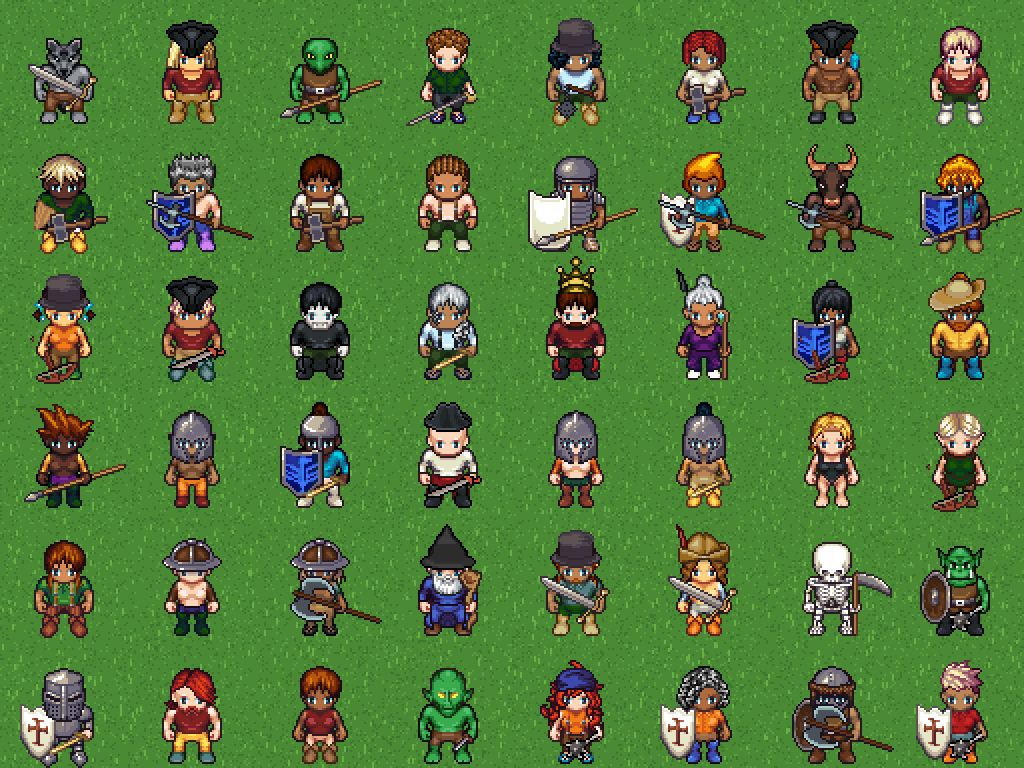
Every character above was generated by this MCP — themed ones (knight, viking, wizard, skeleton, orc, legionary, pirate, king...) and random ones.

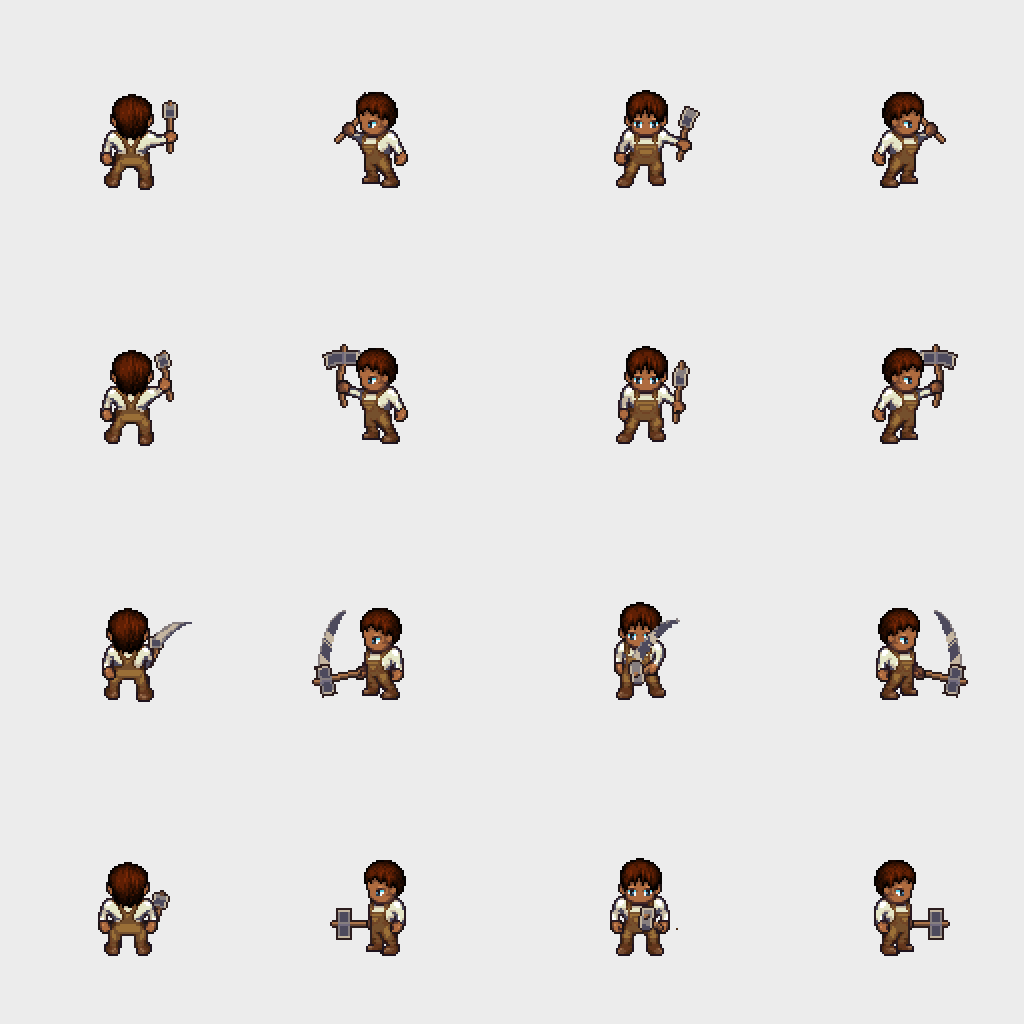
The in-chat preview (preview_character) is an animated GIF — here a blacksmith hammering:
Installation
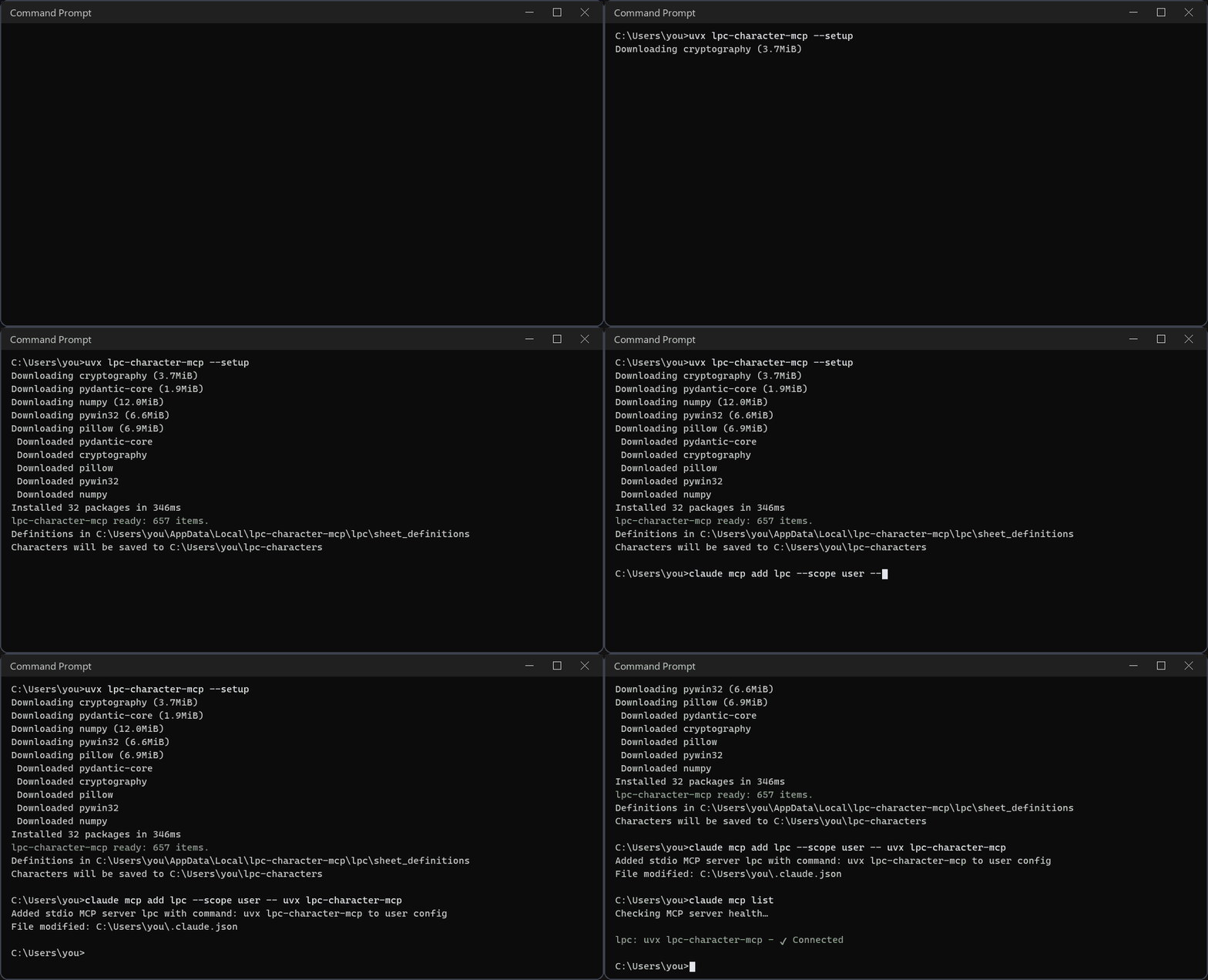
You need uv and Git. uv fetches the right Python and the package by itself — nothing to clone, no dependencies to install.
- Install uv (once):
- Windows:
powershell -c "irm https://astral.sh/uv/install.ps1 | iex" - macOS/Linux:
curl -LsSf https://astral.sh/uv/install.sh | sh
- Windows:
- Prepare the server (downloads the item definitions, ~10 s, only once):
uvx lpc-character-mcp --setup - Register it in your assistant (below). The command is always
uvx lpc-character-mcp.
To run the latest code straight from GitHub, replace uvx lpc-character-mcp with
uvx --from git+https://github.com/kyuza1/lpc-character-mcp lpc-character-mcp in any example.
Characters are saved to ~/lpc-characters (on Windows, C:\Users\<you>\lpc-characters).
Set LPC_OUTPUT_DIR to change it — for example, to your Godot/Unity sprites folder.
lpc-character-mcp --where prints every folder in use. Messages are in English; set
LPC_LANG=pt for Portuguese.
Claude Code
claude mcp add lpc --scope user -- uvx lpc-character-mcp
Claude Desktop
One click: download lpc-character-mcp.mcpb from the
latest release and open it
(or drag it into Settings → Extensions). You can pick the output folder and language
during install.
Or add it by hand in Settings → Developer → Edit config (claude_desktop_config.json):
{
  "mcpServers": {
    "lpc": { "command": "uvx", "args": ["lpc-character-mcp"] }
  }
}
Codex (OpenAI)
codex mcp add lpc -- uvx lpc-character-mcp
Or edit ~/.codex/config.toml (on Windows, %USERPROFILE%\.codex\config.toml):
[mcp_servers.lpc]
command = "uvx"
args = ["lpc-character-mcp"]
startup_timeout_sec = 60
Check with codex mcp list. The same file is used by the Codex VS Code extension.
Antigravity (Google)
In the agent panel click … → MCP Servers → Manage MCP Servers →
View raw config and add to mcp_config.json (~/.gemini/config/mcp_config.json;
on Windows, %USERPROFILE%\.gemini\config\mcp_config.json):
{
  "mcpServers": {
    "lpc": { "command": "uvx", "args": ["lpc-character-mcp"] }
  }
}
Save and click Refresh on the MCP Servers page. In the Antigravity CLI, use /mcp.
Directories
Listed on Smithery,
Glama and the official MCP Registry
as io.github.kyuza1/lpc-character-mcp, which clients and directories that read the
registry pick up automatically.
Other MCP clients
Any client that runs stdio servers works with the same uvx lpc-character-mcp command.
Without uv (pip)
pip install lpc-character-mcp
lpc-character-mcp --setup
Then register the lpc-character-mcp command (no arguments) in your assistant.
Tips
- Free disk space:
lpc-character-mcp --clear-cachedeletes cached images (--clear-cache 30only those unused for 30 days). - Update:
uvx lpc-character-mcp@latest --version - App can't find
uvx: use the full path (where uvxon Windows,which uvxelsewhere).
Example requests
- "Make a tanned blacksmith with a leather apron and a hammer, export for Godot"
- "Show me an animated preview of him hammering"
- "Generate 10 random villagers with seed 1, with Unity files"
- "Open this link and generate the character: https://liberatedpixelcup.github.io/...#sex=male&body=..."
- "Which aprons have an idle animation for the male body?"
Tools
| Tool | What it does |
|---|---|
generate_character(items, body_type, animations, filename, layout, split, export, prefer_complete, output_dir) | Builds the PNG, the credits, the animation report and (optionally) engine files |
preview_character(items, body_type, animation, animated) | In-chat preview: animated GIF with the 4 directions |
search_items(query, category, body_type, animation, type_name, complete_only) | Searches items with filters; complete items first |
get_item(item_id) | Colors, variants, multi-color parts and the animations available per body |
list_categories | Lists item categories |
random_character(body_type, seed, fixed_items) | Rolls a random character |
generate_batch(count, body_types, seed, prefix, fixed_items, ..., output_dir) | Generates many random NPCs at once |
from_site_url(url) / to_site_url(items, body_type) | Reads / builds generator site links (including old links); from_site_url also takes the site's "Export to Clipboard (JSON)" |
update_definitions(clear_image_cache) | Pulls new items and palettes from the official repository |
clear_cache(older_than_days, dry_run) | Deletes cached images (or only those unused for N days) |
Example items:
[
  {"id": "body/body", "color": "bronze"},
  {"id": "head/heads/human/heads_human_male"},
  {"id": "hair/short/hair_plain", "color": "dark_brown"},
  {"id": "torso/shirts/longsleeve/torso_clothes_longsleeve", "color": "white"},
  {"id": "torso/aprons/torso_aprons_overalls", "variant": "leather"},
  {"id": "legs/pants/legs_cuffed", "color": "white"},
  {"id": "feet/boots/feet_boots_basic", "color": "brown"},
  {"id": "tools/tool_hammer", "color": ["steel", "walnut"]}
]
Colors
"color": "blonde"— one color (seecolorsinget_item)."color": ["steel", "walnut"]— multi-part items (head and handle, armor and belt...). Parts are listed incolor_partsfromget_item;nullkeeps a part's default.- Head, ears, nose and other skin items without a color inherit the body color.
- One item per type, like the site: asking for two hairstyles keeps the last one (and
says so in
warnings).
Where to save
output_dir saves straight into a folder — e.g. your game's sprites folder:
"generate the blacksmith in C:/my-game/art/npcs and export for Godot". Otherwise files go
to LPC_OUTPUT_DIR or ~/lpc-characters.
Layout and parts
layout: "standard"(default) — same as the site: 832px wide, every animation always on the same row (walk at y=512, slash at y=768...). Oversized animations go below y=3456.layout: "compact"— only the requested animations, stacked.split— also saves pieces:"animation"(one PNG per animation),"frame"(one PNG per frame in<name>_frames/<animation>/<direction>_NN.png) and/or"item"(one sheet per item, for swapping outfits in-game). Accepts a list:["animation", "frame"].
Oversized animations
Big weapons and tools (swords, spears, hammer, axe, bow...) use 128 or 192px frames. They
are added automatically when their base animation is requested (asking for slash with
the hammer also produces tool_hammer).
Complete animations
Not every LPC item has art for all 15 animations (e.g. the apron has no idle, run,
jump...). In those animations the item simply disappears. To avoid surprises:
- Every result warns you.
generate_characteralways returnsanimation_check:The preview, batches and the web demo warn too.json"animation_check": { "complete": false, "incomplete_items": { "torso/aprons/torso_aprons_apron": { "missing": ["climb", "idle", "jump", "sit", "emote", "run", ...], "complete_alternatives": ["torso/aprons/torso_aprons_overalls", ...] } }, "summary": "ATENÇÃO: nem todas as animações ficaram completas: Apron não tem ..." } prefer_complete: truereplaces each incomplete item with the closest item that has every animation, keeping the color (e.g. apron → overalls). Replacements are listed inreplaced. The assistant is told to ask you first.- Search puts complete items first.
search_itemslists them first, showsmissing_animationsfor the others and acceptscomplete_only: true.get_itemshows what is missing and suggestscomplete_alternatives. - Random characters only use complete items.
Not counted as missing: face, nose, beard, glasses and necklaces in climb (the character
faces away), expressions in hurt, weapons/tools/shields — which by nature only appear in
their own animations (listed in equipment_only_in) — and animations the body itself
lacks (listed in body_missing).
Licenses (Steam, App Store)
LPC art comes under several licenses. For stores with DRM (Steam, App Store...) only
CC0 and OGA-BY art is safe. Pass licenses: ["CC0", "OGA-BY"] to search_items,
random_character, generate_batch or generate_character to stick to them — every art
part of the chosen body must offer one of those licenses (stricter than the site, which
accepts an item if any part does). Every result also has license_check:
"license_check": {"drm_safe": true, "share_alike_required": false, "summary": "..."}
Exporting to engines
Pass export to generate_character (you can combine them). Animations play in the same
frame order as the official generator (walk skips the standing frame, idle/sit/emote hold
frames...), and the site's extra animations are included: 1h_slash (one-handed slash) and
watering (with the watering can). zip: true packs everything into <name>.zip.
export | Files | How to use |
|---|---|---|
"godot" | <name>.tres (SpriteFrames) | Generate with output_dir inside your project (the res:// path is filled in automatically) or copy <name>.png and <name>.tres to res://characters/. Use the .tres as Sprite Frames of an AnimatedSprite2D. Animations: walk_down, idle_left, tool_hammer_right... Tested on Godot 4.6. |
"unity" | <name>.png.meta, <name>.controller + <name>_unity_anims/*.anim | Generate with output_dir inside Assets/ (or copy everything there). Sprites come pre-sliced (Multiple, Point filter, no compression) and the .controller has one state per animation (starts at idle_down): put it in the Animator of a SpriteRenderer object and call animator.Play("walk_left"). Tested on Unity 6. |
"web" | <name>.json (atlas) + <name>_demo.html | TexturePacker-style (hash) atlas with animations: Phaser 3 this.load.atlas(...), PixiJS Assets.load(...). Tested on Phaser 3.80 and PixiJS 8.5. The demo plays the character with arrows/WASD, Shift and Space — open it from a local server (python -m http.server). |
"site" | <name>_site.json | Paste it into the generator site's Import from Clipboard (JSON) button to keep editing there. |
Art credits
Every generation writes <name>_credits.txt and <name>_credits.csv with authors,
licenses and links for only the art that was used, plus a ready-to-paste text for your
game's credits screen (credits.statement). The sprites are LPC art
(CC-BY-SA 3.0, OGA-BY 3.0, GPL 3.0 and others) — if you ship a game, include these credits.
Limitations
- Some types have no complete version at all (capes, backpacks, dresses, skirts). With
prefer_completethey stay as they are andanimation_checksays so. - The LPC muscular, child and pregnant bodies lack some animations (e.g. muscular has no
shootorclimb);animation_checkreports them inbody_missing. - Godot 3 is not supported (Godot 4 only). Unity was tested on Unity 6.
- Runs locally (stdio); it does not work with clients that only accept remote servers.
Development
git clone https://github.com/kyuza1/lpc-character-mcp.git
cd lpc-character-mcp
pip install -e ".[dev]"
python -m pytest -q
From a clone, definitions, cache and output live inside the clone (lpc/, cache/,
output/). Tests run on GitHub Actions on Linux, Windows and macOS on every push and
every Monday (to catch changes in the official LPC repository). Releases are published to
PyPI automatically when a GitHub release is created. See CHANGELOG.md.
License
Code under MIT. The downloaded art belongs to the LPC artists and follows their licenses (see the generated credits files).