Listed from the MCP registry; nobody on Odel publishes it.

Legato
Computer use for Claude Code, Codex or Cursor: a Docker desktop, your own screen or E2B.
Runs on your machine from its package; the steps are below.
What it does
- Reads
- Writes
- High impact
At most: moves money, runs code or commands, deletes data, or sends messages for you.
What it costs
FreeOdel charges nothing per call. The publisher may charge for its own service.
Runs locally over stdio
This server isn't hosted — your MCP client launches it from a package registry. Use one of the commands below, or drop the config into your client (e.g. Claude Desktop).
Run
uvx legatolabs
MCP client config
{
  "mcpServers": {
    "legato": {
      "command": "uvx",
      "args": [
        "legatolabs"
      ]
    }
  }
}The fast, open-source computer-use runtime. Bring any model.
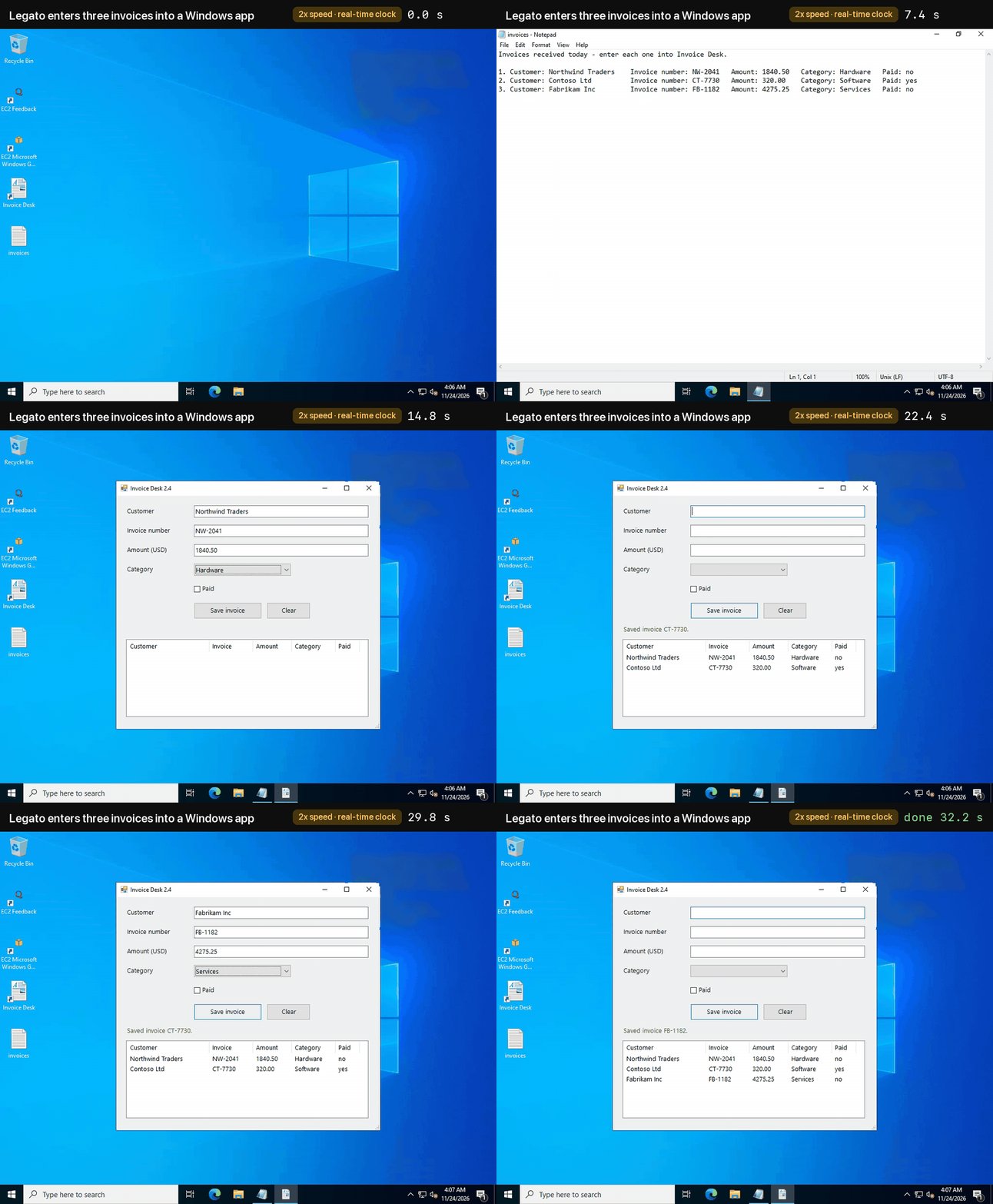
A real run on a Windows desktop, shown at 2x with the real-time clock: Legato reads three invoices from Notepad and enters them into a desktop app that has no API.
Start
Tell Claude Code, Codex or Cursor:
Set up Legato for me: https://legato.computer/setup
Or in a terminal:
pip install legatolabs
legato setup          # your model, where it works, your coding agents; offers a first task
Or on a Mac, with no code: download Legato for Mac, hold Fn and say what to do.
Or add the MCP server to Cursor in one click (it needs uv, and uses the desktop legato setup
saved): 
One agent, four ways in
Choose your model once. Every way in runs the same agent with it.
| How | What for | |
|---|---|---|
| Mac app | Hold Fn, say the task | Your own apps, no code (docs) |
| Terminal | legato run "On Wikipedia, look up the Eiffel Tower and tell me how tall it is" | One task at a time, scripts, cron |
| Your coding agent | Claude Code, Codex or Cursor gets a computer (MCP); legato setup adds it | Test the app you are building, do the GUI part of a task (docs) |
| Python | legato.run("..."), or legato.Harness(...).run(task, desktop) | Your own agent (docs) |
Any model with an OpenAI-compatible API and vision: Qwen, Claude, GPT, Gemini, Grok, through OpenRouter or the maker's own API, or on your own GPU with vLLM (Ollama and LM Studio serve the same API; untested so far), where nothing leaves your machine (models).
Any computer (desktops):
- In the background on your Mac (the default there): it works in one app's window while you keep using the Mac. Your mouse and keyboard stay yours.
- Your whole screen on macOS, Windows or Linux.
- A desktop container (Docker), a cloud desktop (E2B), or any sandbox or VM you can run a command in.
import legato

result = legato.run("On Wikipedia, look up the Eiffel Tower and tell me how tall it is")
print(result.answer)      # The Eiffel Tower is 330 metres (1,083 ft) tall.
print(result.report())    # done or failed, the turns, and where the time went
Results
Same model, same desktops, 24 office tasks per run. Method and raw data.
| Model | Compared with | Time | Success |
|---|---|---|---|
| Claude Sonnet 5.5 | Anthropic's demo loop (our re-implementation, legato.Harness.reference) | 1.48x faster | 48/48 vs 48/48 |
| Qwen3.8-27B | OSWorld's Qwen agent | same | 71/96 vs 53/96 |
We wrote the 24 tasks (LibreOffice, a spreadsheet into a deck). The Claude row is one run of two attempts a task.
Check it on your own tasks: examples/compare_with_reference.py.
Why it's fast
Most of a computer-use agent's time goes to waiting: on the model, and on the screen.
- It waits until the screen stops changing, not a fixed 2 s after every action.
- Up to three actions per turn, with one screenshot after them; on a Mac, one plan per turn, with a shell and AppleScript beside the screen where they are faster.
- Screenshots go as JPEG, and old ones are dropped in chunks so the prompt cache keeps hitting.
- A wall-clock timeout and a token budget on every model call, so nothing hangs.
Safety and limits
- Your own screen: risky keys and typed commands (
rm,sudo,Remove-Item, Cmd+Q, Alt+F4...) wait for your yes, and are refused when nobody can answer (an MCP server, a script;--yesallows them). It's a list, not a sandbox: a click on Delete isn't caught. Move the mouse into a corner to stop a run.--sandbox dockeror a cloud desktop keeps the agent off your screen and files. - What it reads: a page or document on screen can try to instruct the agent (prompt injection). In the background
it works in your own Safari, signed in where you are; for sites you don't trust, use
--sandbox docker. - Your data: screenshots and the task go to the model you chose and nowhere else. Legato has no server of its own and sends no telemetry.
- Limits you set:
timeout_sandmax_stepsbound a run, andresult.statussays how it ended (Python). - What it is not good at yet: tasks of many minutes across several apps, and anything that needs a drag in background mode (one app's window, Safari among browsers). It is an alpha: the API may change before 1.0.
Docs
Set up · Mac app · Coding agents (MCP) · Terminal and Python · Desktops · Models · Benchmarks · FAQ · Guides · Comparisons
For coding agents: llms.txt · AGENTS.md
Apache-2.0.






