Listed from the MCP registry; nobody on Odel publishes it.
OpenCaptions
Animated word-by-word captions for your videos, on your computer or your own OpenCaptions server
Runs on your machine from its package; the steps are below.
What it does
- Reads
- Writes
- High impact
At most: moves money, runs code or commands, deletes data, or sends messages for you.
What it costs
FreeOdel charges nothing per call. The publisher may charge for its own service.
Runs locally over stdio
This server isn't hosted — your MCP client launches it from a package registry. Use one of the commands below, or drop the config into your client (e.g. Claude Desktop).
Run
npx -y opencaptions
MCP client config
{
  "mcpServers": {
    "opencaptions": {
      "command": "npx",
      "args": [
        "-y",
        "opencaptions"
      ]
    }
  }
}
OpenCaptions
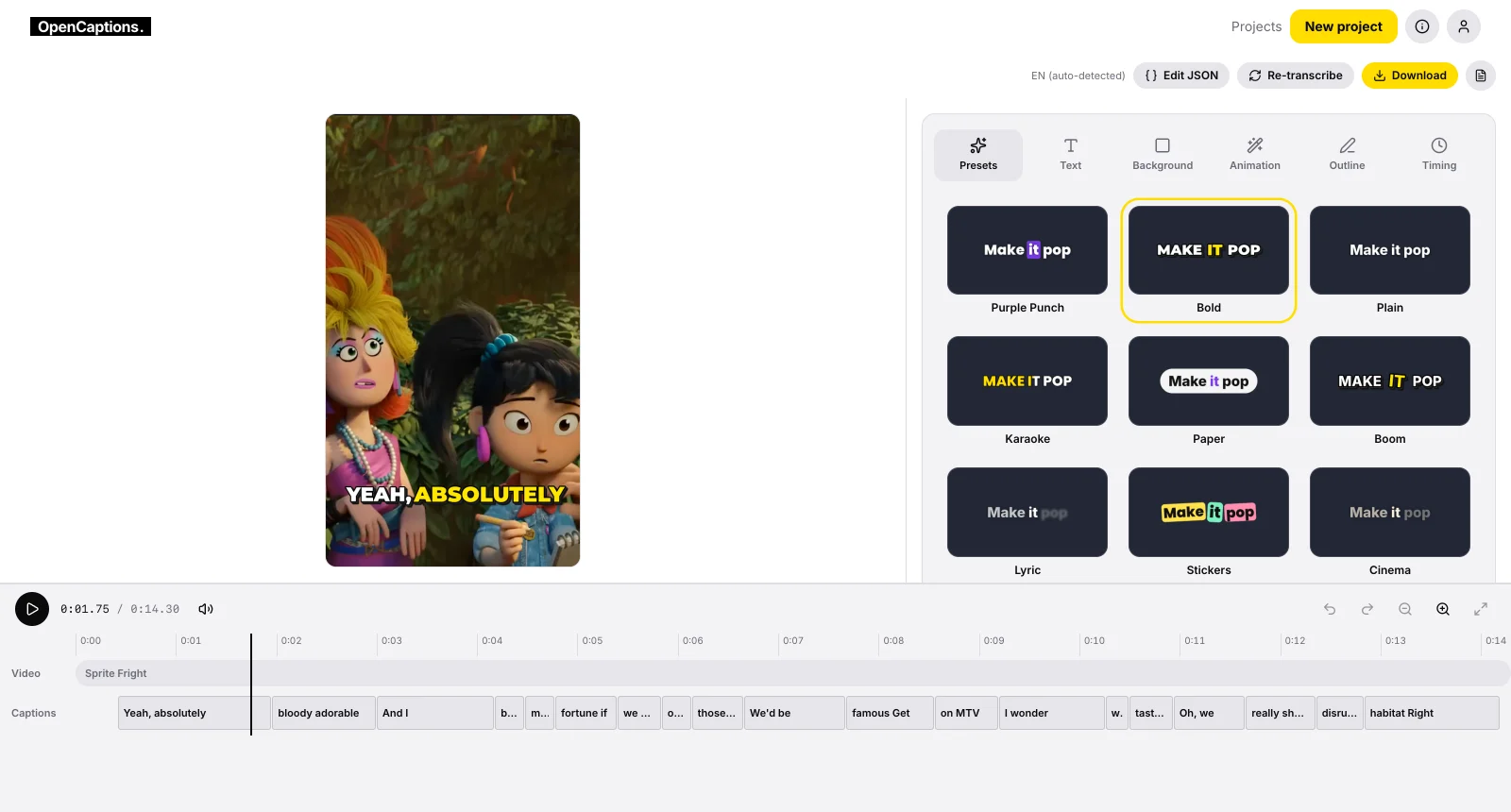
Animated captions for your videos. Open source, self-hosted, and on your iPhone.
Transcribe with Whisper or Parakeet, style every word, and export a burned-in video or subtitle files. Nothing leaves your machine unless you say so.
Get the iPhone app · Try it in your browser · Self-host it · Documentation



Clip: Sprite Fright by Blender Studio, CC BY 4.0
Features
- Word-level transcription with Parakeet or Whisper on your machine, the OpenAI API with your own key, or another OpenCaptions server (a GPU box at home, say)
- Animated styles with presets and a full custom panel: fonts, colours, outline, background, animation, position
- A real editor: a timeline to retime captions, fix a misheard word right on the video
- Export a burned-in MP4, WebM or ProRes, SRT, VTT and JSON, or just the captions on a green screen to key out in your video editor
- The preview is the export: one Rust engine draws both, so what you see is what you get
- iPhone, iPad and Mac app with on-device Whisper, Parakeet and Apple Speech, no server and no account. One purchase covers all three
- Many scripts and languages: Latin, Cyrillic, Arabic, Hebrew, Indic, Thai, CJK and more, and an interface in 13 languages
- From Claude and other agents: an MCP server and a command line (
npx opencaptions) that caption a video on your computer, with no server, or on yours: for Claude Code, Claude Desktop, Cursor or a video pipeline - Private by design: no telemetry, no tracking, accounts are local to your instance
Quick start
You need Docker Compose v2.24 or newer and one file:
curl -O https://raw.githubusercontent.com/leogaudin/opencaptions/main/docker-compose.yml
docker compose up -d
Open http://localhost:5173, create an account, drop a video in.
The compose file runs the edge images, which follow the main branch. To stay on a release, pin it:
OPENCAPTIONS_VERSION=1.3.4 docker compose up -d.
To build from source instead, clone the repository and run docker compose up -d --build
(or make up).
The web UI listens on every interface and signup is open. On a shared network or a public host, read Security first.
From Claude and other agents
No server needed: with Node.js and FFmpeg installed, the speech model and the engine run on your computer. Claude Code installs the tools in one step:
/plugin install opencaptions --marketplace leogaudin/opencaptions
Any other MCP client runs npx -y opencaptions mcp, and a script runs
npx opencaptions caption reel.mp4 --look Bold. With an API key from your server, the same tools run there
instead, with every language and the web editor. Setup for each is in
From Claude and other agents.
More
- Documentation: the guides, self-hosting, the HTTP API and the reference. It is plain Markdown in docs/, built into that site with Starlight
- Try it in your browser: the looks on a sample clip, nothing to install
- Self-hosting: installation, configuration, security, GPU acceleration, backups
- Architecture: how it works, including the engine and the iOS app
- iOS app: building and running it
- Contributing: dev setup and the acceptance gate (
make ci) - Security policy: threat model and reporting a vulnerability
Status
The iPhone, iPad and Mac app is on the App Store, and the self-hosted stack has tagged releases. What changed in each one is in the changelog.
Why is there a Pro?
The iPhone app is free. Pro is one purchase, with no subscription: it removes the mark on saved videos and adds 4K, 60 fps, HDR and every caption style. All of that code is here, and a build you make yourself has everything unlocked. The App Store version costs money so that someone signs it, ships it and keeps it working.
License
AGPL-3.0-only. If you offer a hosted version of OpenCaptions, the AGPL requires you to publish your modifications. Contributors accept a CLA so the maintainer can also ship the code where the AGPL cannot go, such as the App Store. Third-party components keep their own licences, see NOTICE. The name and the icon are covered by the trademark policy.
Built and maintained by Leo Gaudin.
Support the project
OpenCaptions is free and has no tracking. If it is useful to you, you can support it with crypto:
BTC | ETH | XMR |
BTC  bc1qac8u7xc5zan6a6fng8gqp7drapau9208d0l9wp
ETH  0xc5C9fE87f10BdC4FecEF9De48cD3ba942640774e
XMR  86bcvPxVaqpTgXuk7FPuJa9sYXbUZnAAFj1sdSiSpr8bWpmW2VhMAF4dzXP2Lead3XFRDurqHnYcKNC2RLPQWvVJ9hbM2Kg







