Listed from the MCP registry; nobody on Odel publishes it.
Is this yours? Claim it
Lettio MCP
Private, EU-hosted email for AI agents over JMAP: read, search, reply, draft, organize, send.
One address for any MCP client. You sign in at mcp.lettio.eu once, after adding it.
What it does
- Reads
- Writes
- High impact
At most: moves money, runs code or commands, deletes data, or sends messages for you.
What it costs
FreeOdel charges nothing per call. The publisher may charge for its own service.
Tools
None listed · checked 24 Nov 2026Odel could not list its tools without signing in.
Let your AI assistant read, search and send email from a private, EU-hosted mailbox.
Lettio MCP is a Model Context Protocol server that connects an AI agent (Claude, Cursor, and any other MCP client) to a Lettio mailbox over JMAP. Your assistant can triage your inbox, find a message, and send a reply.
- 🇪🇺 European by default — talks to your own EU-hosted mailbox, no third‑party middleman.
- 🔒 Safe sending — the server can only ever send as the mailbox it is signed in to. It cannot be tricked into sending from another address.
- 📬 Everything an agent needs — list, search, read and send, over the open JMAP standard.
- 👥 One or many mailboxes — configure a single account or several.
Prefer nothing to install? Lettio also runs as a hosted, OAuth‑secured MCP server at
https://mcp.lettio.eu/mcp— add that URL in your client and sign in. This npm package is the local / self‑hosted option for people who want to run it on their own machine.
Hosted server: mail cards in Claude
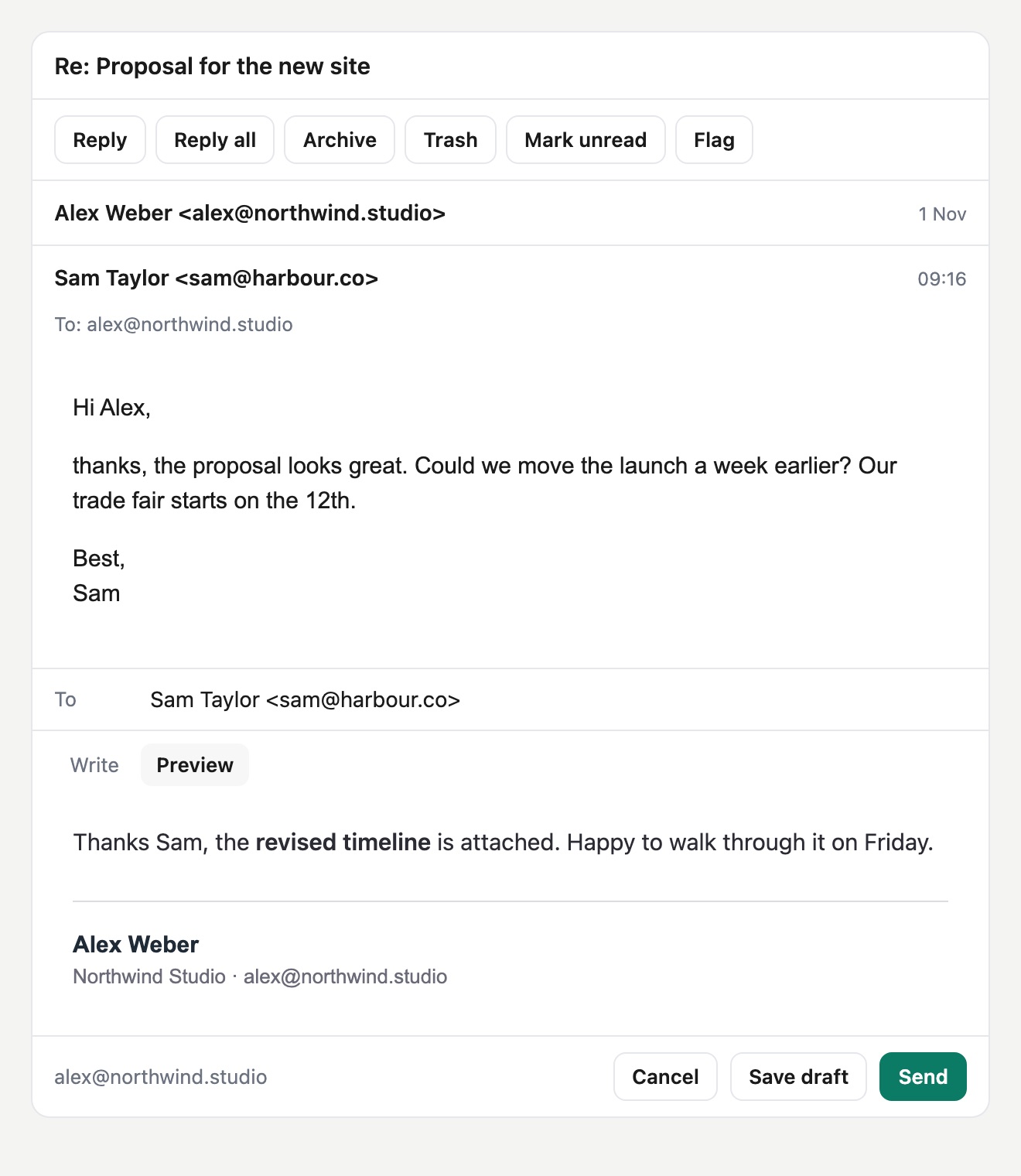
The hosted server at https://mcp.lettio.eu/mcp adds three tools that open interactive cards in clients that support MCP Apps, such as Claude:
show_emails: the inbox, a folder or search results as a list you can open, archive and flagshow_email: a whole conversation, with Reply, Reply all, Archive and Trashpreview_email: a drafted message you can edit, preview in your brand and send
Sending from a card always needs your click, even when the connection doesn't allow the agent to send on its own. One connection can cover up to 10 mailboxes; searches run across all of them.
Tools
| Tool | What it does |
|---|---|
whoami | Show the connected mailbox and whether it may send. |
list_accounts | List configured mailboxes (local server). |
list_mailboxes | List folders with message and unread counts. |
list_recent_emails | Latest messages in a folder, with paging. |
search_emails | Free text plus filters: sender, recipient, subject, dates, attachments, unread, folder. |
read_email | One message as text, with its attachments listed. HTML mail is converted. |
get_thread | A whole conversation, oldest first. |
get_attachment | Open an attachment: text and PDF as text, images as images, others as binary. Locally it can also save to a file. |
send_email | Send formatted mail as the signed-in mailbox, with attachments. |
reply_email | Reply in-thread, optionally to everyone, with attachments. |
create_draft | Save a message to Drafts without sending. |
create_reply_draft | Save a threaded reply to Drafts without sending. |
send_draft | Send a draft that is already in Drafts. |
set_read_status | Mark messages read or unread. |
flag_email | Flag or unflag messages. |
label_email | Add or remove a label. |
move_email | Move to a folder, archive, or trash (reversible). |
create_folder | Create a mail folder. |
Messages are written in Markdown and rendered as a styled email: headings, tables, quotes (end with > — Name), callouts (> [!NOTE] Title), code blocks, numbered steps and buttons ([Label](https://url "button")). The mailbox signature is added automatically; set it with set_signature.
To match your brand, set LETTIO_BRANDS to JSON (or a path to a JSON file) keyed by domain:
{ "example.com": { "primary": "#231F47", "accent": "#D8093A", "font": "Lexend, Arial, sans-serif" } }
Formatted mail goes out as HTML with a plain-text version. Pass format: "plain" to send text as written. Bulk tools take up to 100 ids.
Attachments can be base64 content, a local path, or from_email_id with attachment_id to reuse a file from another message.
Requirements
- Node.js 18 or newer.
- A Lettio mailbox and an app password for it (use a dedicated app password, not your main login).
Use with Claude Desktop
Add this to your claude_desktop_config.json:
{
  "mcpServers": {
    "lettio": {
      "command": "npx",
      "args": ["-y", "@lettio/mcp"],
      "env": {
        "LETTIO_USERNAME": "you@yourcompany.eu",
        "LETTIO_PASSWORD": "your-app-password"
      }
    }
  }
}
Restart Claude Desktop; the Lettio tools appear in the tools menu.
Configuration
Configured entirely through environment variables.
Single mailbox
| Variable | Required | Description |
|---|---|---|
LETTIO_USERNAME | yes | Full email address, e.g. you@yourcompany.eu. |
LETTIO_PASSWORD | yes | Mailbox app password. |
LETTIO_HOST | no | Mail host. Defaults to https://mail.lettio.eu. |
LETTIO_ACCOUNT_NAME | no | Friendly name for the account (default: the username). |
Several mailboxes
Set LETTIO_ACCOUNTS to a JSON array and omit the single‑account variables:
[
  { "name": "work", "username": "you@yourcompany.eu", "password": "app-password" },
  { "name": "sales", "username": "sales@yourcompany.eu", "password": "app-password" }
]
Then pass account: "work" to any tool to choose which mailbox to use.
Security
Sending is deliberately constrained. Before it sends, the server asks the mail host for the
identities the signed‑in mailbox is allowed to use and requires one that matches the login
address. The From header and the SMTP envelope MAIL FROM are both pinned to that
address. There is no parameter for choosing a different sender, so an agent can never send
"from" a foreign or arbitrary mailbox. Credentials are read from the environment, kept only in
memory, and never logged.
Run from source
npm install
npm run build
LETTIO_USERNAME=you@yourcompany.eu LETTIO_PASSWORD=app-password npm start
License
MIT © Valmia Solutions s.r.o.