Listed from the MCP registry; nobody on Odel publishes it.

Toon Memory
Offline persistent memory for AI coding agents — 42 tools, 80% fewer calls, no LLM
Runs on your machine from its package; the steps are below.
What it does
- Reads
- Writes
- High impact
At most: creates or changes data: records, files, settings.
What it costs
FreeOdel charges nothing per call. The publisher may charge for its own service.
Runs locally over stdio
This server isn't hosted — your MCP client launches it from a package registry. Use one of the commands below, or drop the config into your client (e.g. Claude Desktop).
Run
npx -y toon-memory
MCP client config
{
  "mcpServers": {
    "toon-memory": {
      "command": "npx",
      "args": [
        "-y",
        "toon-memory"
      ]
    }
  }
}English | Español | 中文 | 日本語 | 한국어 | Português (BR) | Deutsch | Français
toon-memory
The Continuity Layer for AI Agents — AI agents shouldn't have to relearn your project every session.


Table of Contents
- Overview
- Blog Post
- Features
- Installation
- Supported Agents
- MCP Tools
- Coordinación multi-sesión
- Memory Graph (recall basado en grafo)
- Tips & Best Practices
- CLI Commands
- Configuration
- How It Works
- Why TOON?
- Troubleshooting
- FAQ
- Development
- Contributing
- Security & Privacy
- License
Overview
Ever had that feeling where your AI agent forgets everything from yesterday's session? You explain the same architecture decision for the third time, and it still suggests the approach you already rejected?
toon-memory fixes this. It's the Continuity Layer for AI Agents — a lightweight system that preserves your project's knowledge, decisions, and conventions across sessions, so every session starts where the last one ended. Fully local and private, over MCP — no cloud, no server.
Real-world use cases
| Scenario | What toon-memory does |
|---|---|
| Design debates | "We chose Redis over Memcached because of pub/sub support" |
| Framework choices | "This project uses Zod for validation, not Joi" |
| Bug fixes | "Redis pool exhaustion — fix was max_connections=20" |
| Architecture notes | "Broker service uses RESP protocol, not HTTP" |
| Onboarding | "The deploy script lives in scripts/deploy.sh" |
| Team context | "PR #142 reverted the caching change — don't re-add it" |
Blog Post
Read How toon-memory Makes Your AI Agent Smarter to see a real-world demo of persistent memory in action.
Features
- A complete memory toolkit — Full memory management via Model Context Protocol, including
memory_smart_recall(unified recall with session bias),memory_sessionsfor multi-session coordination,context_*tools for one-call context generation (briefing, diff, focus, health audit, export),memory_compress(LLM-powered compression),memory_consolidate(deterministic dedup/merge/cleanup),memory_primer(auto-injected context),memory_merge_sessions(cross-session merge),memory_pin/memory_unpin(pin important entries with priority 1-5),memory_checkpoint(session snapshot with 7d TTL),memory_search(unified search with tag filters + session bias),memory_tag(batch tag operations),memory_export_gist/memory_import_gist(GitHub Gist sync),memory_secret(encrypted secrets vault),memory_export_global/memory_import_global(cross-project conventions),memory_forget(soft/hard delete, restore, supersede),memory_reflect(staleness/quality reflection), andmemory_promote(auto-promote low-confidence drafts) - MCP Resources — Read memory as context without tool invocations, including a System Primer (auto-generated knowledge map)
- 22 agents supported — OpenCode, VS Code, Claude Code, Cursor, Windsurf, Cline, Continue, Codex CLI, Gemini CLI, Zed, Antigravity, Aider, KiloCode, OpenClaw, Kiro, Qwen, Kimi, Goose, Junie, Amp, Grok, Trae
- Interactive installer — Select which agents to configure from a menu
- SessionStart hooks — Auto-reminders for Claude Code, Codex CLI, Gemini CLI, Antigravity
- TOON format — 22% fewer tokens than JSON (measured), better LLM comprehension
- Per-project memory — Each project gets its own memory file
- Zero config — Just install and use
- Auto gitignore — Automatically adds
.toon-memory/memory/to.gitignore - Date filtering — Search memory by date range
- Auto-archive — Old entries (>30 days), expired TTL entries, or 100+ entries moved to archive automatically
- Encryption — AES-256-GCM encryption for sensitive data
- Watch mode — Auto-backup every N minutes
- Memory TTL — Configurable per-entry expiration (7d, 30d, or exact dates)
- Tag inference — Auto-detect tags from content when tags are empty (built-in vocabulary + project dependencies)
- Memory diff — See what changed since your last session
- Related entries — Auto-suggest related memories when saving
- Memory graph — Connect entries with
links/[[key]]refs;memory_recallcan expand a relationship-aware subgraph for more precise, lower-token recall (no embeddings, no LLM) - Token-efficient recall —
memory_recall({ compact: true })returns numeric-indexed entries, dropsid/date/file, renders graph edges as->2, and truncates graph neighbors to snippets - BM25 + centrality ranking — Recall re-ranks by BM25 relevance and graph centrality (hubs surface even without the query word); per-hop decay keeps distant nodes low
- Auto-tag from dependencies —
toon-memory initscanspackage.json/Cargo.toml/requirements.txt/go.modand writes a project vocabulary so entries mentioning a dependency get auto-tagged with it - Smart Recall —
memory_smart_recallcombines BM25 + graph + decay + quality in one call; the LLM calls this at the start of every task - Quality scoring — Every entry gets a 0–1 quality score based on structure (tags, links, content specificity, recency, access count); high-quality entries surface first
- Merge-dedup — Saving with the same
keymerges attributes (union of tags, max confidence, latest date, combined links) instead of overwriting - Near-duplicate detection — Consolidation detects near-duplicates via Jaccard similarity (threshold 0.7) and merges them
- Confidence score — Each entry tracks reliability: user-asserted = 1.0, inferred = 0.65–0.75
- LLM-powered compression —
memory_compressuses AI to summarize long entries;memory_consolidate(mode: "low-quality")does batch cleanup deterministically - Cross-session merge —
memory_merge_sessionsmerges observations across parallel sessions for a file - GitHub Gist sync —
memory_export_gistandmemory_import_gistsync memory entries via GitHub Gist (zero dependencies) - Verbatim mode —
config.verbatimpreserves original entries instead of overwriting on save - Context generation tools —
context_generate(full briefing),context_diff(incremental),context_focus(targeted),context_health(audit),context_export(markdown) — each replaces 5-6 manual tool calls. Zero LLM, pure deterministic aggregation - System Primer — Auto-injected at session start via
systemPrimer(), showing top 5 memories for instant context - Path Scoping — Entries can be scoped to file paths via glob patterns (
path_scope); recall filters by scope automatically - Budget Control — Three output levels:
budget: "tiny"(key+1 line, ~50 tokens),"normal"(compact with tags/edges),"deep"(all fields with origin/scope/status). Backward compatible withcompact: true - Origin Tracking — Each entry tracks its origin (
human,agent,inferred); human assertions get a quality boost - Soft Delete —
memory_forgetsoft-deletes by default (setsstatus=obsolete). Restore withmemory_forget(key, action: "restore"), hide withaction: "soft", permanent removal viaaction: "hard" - Enhanced Health Audit —
context_healthnow detects missing-evidence (path_scope without file) and stale-claims (overlapping content in same category) - Typed graph edges — Edges carry types (
superseded_by,supersedes,relates), written astype:keyin the graph. Explicitlinksbecomerelates:key, so you can tell how entries are related, not just that they are - RRF ranking — Recall fuses BM25 (×3) and graph-centrality ranks with Reciprocal Rank Fusion and an adaptive
k = clamp(3..60, round(sqrt(n))). Benchmark (8 gold queries): nDCG 0.776, MRR 0.917 — exact parity with the previous linear scoring. Passrrf: falseto fall back - Memory reflect —
memory_reflectranks entries by staleness, quality, and over-connection to surface what needs attention or cleanup. Deterministic, zero LLM - Memory supersede —
memory_forget(key, action: "supersede", new_key)marks an entry as replaced by a newer one (superseded_bylink +supersededOndate).memory_recall({ as_of })re-includes old entries for point-in-time queries before their supersession - Auto-promote —
memory_promotepromotes low-confidence drafts to active entries deterministically (threshold 0.65, Jaccard dedup), withdryRunby default - Explain WHY —
memory_recall/memory_smart_recallacceptexplain: trueand append a deterministic reason line to every returned entry (↳ 100% relevance · used 14× · used today · importance HIGH) — why it was retrieved, no LLM - Token budgets —
budget_tokenscaps the recall output by estimated token count; entries accumulate greedily and the tail that would exceed the budget is dropped (0= no limit) - Version supersession —
memory_consolidate(mode: "versions")detects entries describing the same subject at different library versions (e.g. "Use React 18" vs "Use React 19") and retires the older ones in favor of the newest - Negative memories — a
warningcategory for "do NOT do this" facts;warningentries get a recall boost so the agent sees the landmines before repeating them - Language + folder ranking — recall boosts entries written in the same script family (latin/CJK/cyrillic/…) and entries whose
path_scopematches the current file - Explicit importance —
memory_remember({ importance })setscritical,high,medium, orlow. Critical decisions surface first (+0.3), low notes stay out of the way (−0.1); empty = auto (recency + frequency). Re-saving keeps the higher level - Evidence layer — every
memory_remembersave is annotated with an evidence level:verifiedwhen its referenced file exists on disk,unverifiedwhen it doesn't,conflictwhen it overlaps a warning or critical/high decision. Conflicts get a +0.15 recall boost (verified +0.03, unverified −0.02) and a ⚠️ CONTRADICTION warning on save — but never block the write - Secrets vault —
memory_secretstores credentials in an encrypted sidecar (secrets.toon, AES-256-GCM) sodata.toonstays a readable open format while sensitive values never hit plaintext - Global memory import/export —
memory_export_globalwrites project memory to~/.toon-memory/memory/global.toon;memory_import_globalpulls cross-project conventions back with a one-shot, deterministic, offline merge (never a live dual source) - ~1 MB install — three tiny prompt packages (
@inquirer/checkbox/select/confirm); the MCP SDK, zod, and the TOON parser are bundled into the shipped binary — a singlenpm i -gdownloads ~1 MB (was ~14 MB) and lands ~4.4 MB on disk (was ~33 MB)
Installation
1. Install
# macOS / Linux
curl -fsSL https://raw.githubusercontent.com/LuiggiVal08/toon-memory/main/install.sh | sh

# Windows (PowerShell)
irm https://raw.githubusercontent.com/LuiggiVal08/toon-memory/main/install.ps1 | iex

# Or with npm (any platform)
npm i -g toon-memory
Tip: The npm install is the most reliable method. The curl/irm scripts are convenience wrappers.
Size: A bare
npm i -g toon-memorydownloads ~1 MB and installs ~4.4 MB — three tiny prompt packages; everything else (MCP SDK, zod, TOON parser) ships bundled.
2. Configure your agent(s)
# Interactive installer — detects agents and configures MCP
npx toon-memory
The installer will:
- Detect which AI agents you have installed
- Ask which ones to configure
- Add the MCP server config automatically
3. Use it
That's it! On OpenCode, toon-memory brief is injected automatically at session start: a compact handoff packet with identity (including the exact mcp_project slug), freshness, directives, traps, decisions and file pointers. No manual bootstrap call is needed.
When a task is known, use:
context_brief(task="...")  # handoff packet + relevant memory + sessions
memory_recall(query=...)   # drill into a path or concept before reading files
memory_remember(...)       # save important decisions
CLI equivalents for hooks and debugging:
toon-memory brief [task]   # compact handoff packet
toon-memory doctor         # memory path, freshness, injection channel, catalog mode
toon-memory signal ...     # append one deterministic session signal
toon-memory promote        # promote high-confidence signals into memory
Tip: The brief is a handoff, not a search result: if its
freshnessmarker saysstale-Nd, treat older entries as historical context and verify before acting. Advanced tools are hidden by default; setTOON_MEMORY_EXPERT_TOOLS=1to expose the full catalog.
MCP Client Quick Setup
Cursor
Add to .cursor/mcp.json:
{
  "mcpServers": {
    "toon-memory": {
      "command": "npx",
      "args": ["-y", "toon-memory", "mcp"]
    }
  }
}
Claude Desktop
Add to claude_desktop_config.json:
{
  "mcpServers": {
    "toon-memory": {
      "command": "npx",
      "args": ["-y", "toon-memory", "mcp"]
    }
  }
}
Windsurf
Add to ~/.codeium/windsurf/mcp_config.json:
{
  "mcpServers": {
    "toon-memory": {
      "command": "npx",
      "args": ["-y", "toon-memory", "mcp"]
    }
  }
}
Supported Agents
| Agent | Config Location | Format | Hooks | Auto-Setup |
|---|---|---|---|---|
| OpenCode | .opencode/opencode.json + .opencode/plugins/toon-memory.ts | Plugin | SessionStart (plugin, no top-level hooks) | ✅ |
| VS Code / Copilot | .vscode/mcp.json | JSON | — | ✅ |
| Claude Code | .mcp.json (MCP) + .claude/settings.json (hooks) | JSON | SessionStart + PostToolUse + Stop | ✅ |
| Cursor | .cursor/mcp.json | JSON | — | ✅ |
| Windsurf | ~/.codeium/windsurf/mcp_config.json | JSON | — | ✅ |
| Cline | .cline/mcp.json | JSON | — | ✅ |
| Continue | .continue/config.json | JSON | — | ✅ |
| Codex CLI | .codex/config.toml | TOML | SessionStart + PostToolUse + Stop ([[hooks]] event=) | ✅ |
| Gemini CLI | .gemini/settings.json | JSON | SessionStart + PostToolUse + Stop (hooks.*) | ✅ |
| Zed | ~/.config/zed/settings.json | JSONC | — | ✅ |
| Antigravity | .agents/mcp_config.json + .agents/hooks.json | hooks.json | PreInvocation + PostToolUse + Stop (no SessionStart event) | ✅ |
| Aider | — | — | — | 📝 Instructions |
| KiloCode | ~/.kilocode/mcp_settings.json | JSON | — | ✅ |
| OpenClaw | .openclaw.json | JSON | — | ✅ |
| Kiro | .kiro/settings/mcp.json | JSON | — | ✅ |
Tip: You can configure toon-memory for multiple agents at the same time. Each agent gets the same shared memory file at
.toon-memory/memory/.
MCP Tools
| Tool | Description |
|---|---|
memory_remember | Save a decision, pattern, bug, knowledge, or warning (negative "do NOT do this" memory, recalled with a boost) — optional TTL, auto-tag inference, links to build the memory graph, merge-dedup on same key, auto quality score and confidence. Write-path intelligence: each save is annotated with an evidence level — verified when the referenced file exists on disk, unverified when it doesn't, conflict when it overlaps a warning or critical/high decision (recalled with a boost and surfaced with a ⚠️ CONTRADICTION warning, but never blocks the write) |
memory_recall | Search memory (use BEFORE reading files, filters expired TTL). mode: "graph" expands a relationship-aware subgraph for higher precision. `budget: "tiny" |
memory_smart_recall | Unified recall: BM25 + graph + decay + quality in one call. sessionBias boosts entries from the current git branch. explain: true appends per-entry reasons, budget_tokens caps output by estimated tokens. Use at the START of every task. Returns compact, token-efficient output |
memory_forget | Lifecycle ops by key or id: action: "soft" (default) marks obsolete, "hard" permanently removes, "restore" brings back to active, "supersede" retires it with a superseded_by link to new_key |
memory_stats | View memory state (including TTL stats, quality distribution, origin/status breakdown, cold memories below quality/access thresholds, and hit rate / duplicate / obsolete metrics) |
memory_summary | Save/retrieve file summaries |
memory_archive | Archive old entries (>30 days) and expired TTL entries |
memory_diff | Show changes since a date (24h, 7d, or exact date) |
memory_suggest | Find related entries for a given context |
memory_encrypt | Enable AES-256-GCM encryption |
memory_decrypt | Disable encryption |
memory_backup | Create timestamped backup of memory file (auto-prunes to 10 most recent) |
memory_captured | List activity auto-captured by hooks (opt-in) or clear the log |
memory_checkpoint | Session checkpoint: creates a snapshot of current memory state with 7d TTL. Useful for rollback reference during long sessions |
memory_consolidate | Cleanup ops, deterministic (no LLM): mode: "identical" (default) dedupes identical-content entries, "similar" merges near-duplicates (Jaccard >50%), "low-quality" batch-removes low-quality entries (minQuality, dryRun), "versions" retires older library-version entries in favor of the newest |
memory_sessions | Show active agent sessions (branch, files, last-seen) and soft conflicts for parallel work |
memory_compress | LLM-powered two-step compression: summarize + overwrite. Uses anthropic/openai CLI if available, otherwise returns prompt for manual compression |
memory_primer | One-call context primer: top memories + categories + session file changes. Auto-injected at session start |
memory_merge_sessions | Merge observations across parallel sessions for a file. Deduplicates and optionally auto-promotes to memory |
memory_export_gist | Export memory entries to a GitHub Gist (public or private). Uses GITHUB_TOKEN or gh CLI |
memory_import_gist | Import entries from a GitHub Gist. Merges with existing entries (union of tags, max confidence) |
memory_secret | Encrypted secrets vault (secrets.toon, AES-256-GCM): store/get/list/forget. Keeps data.toon readable while sensitive values stay encrypted at rest. Requires TOON_MEMORY_KEY |
memory_export_global | Write current project memory to the global file (~/.toon-memory/memory/global.toon). One-shot share of cross-project conventions |
memory_import_global | Merge cross-project conventions from the global file into this project (one-shot, deterministic, offline). merge: false replaces instead |
memory_graph_path | BFS shortest path between two entries in the knowledge graph. Shows how concepts are connected |
context_brief | One-call handoff + briefing: prepends a compact handoff packet (identity, mcp_project, freshness, directives, traps, file pointers) to memory + sessions + health. handoff: false returns the legacy briefing only. Zero LLM, deterministic |
context_compile | Task-driven context compiler: directives, constraints, retrieved memory, retrieval plan, hydrate keys, files and sessions in one packet. Use at task start |
context_hydrate | Hydrate by key: fetch exact memory entries by key/id and mark them accessed. Follow the Hydrate list from context_compile |
context_generate | Full project briefing: combines project structure, git state, memory entries, and active sessions in one call. Replaces 5-6 manual tool calls |
context_diff | Incremental briefing: git commits + modified files + new/updated memory + active sessions since last session |
context_focus | Hyper-focused briefing: only relevant memory + related source files + callers + test files for a query |
context_health | Memory health audit: orphan links, duplicates, broken file refs, expired TTL, stale sessions, score 0–100 |
context_export | Export memory as markdown: injectable context for system prompts (full or compact) |
memory_pin | Pin an entry with priority 1-5: pinned entries always appear first in recall results sorted by priority, even without a keyword match |
memory_unpin | Unpin an entry: remove the priority flag |
memory_search | Unified search with filters: same as memory_recall plus category, tags, from_date, to_date filters. Dates accept compact (7d) or natural forms (ayer, la semana pasada, hace 3 dias, last 2 weeks). Tag filter uses AND logic — all specified tags must match. budget controls output verbosity. path_scope filters by glob pattern. sessionBias boosts entries from the current git branch |
memory_tag | Batch tag operations: add, remove, or set tags on one or more entries by key or id |
memory_feedback | Explicit feedback (useful/irrelevant/outdated/wrong) written to feedback.toon. Trains per-entry utility; wrong also marks evidence as conflict |
memory_edges | Typed edge sidecar (edges.toon): list derived/learned edges or rebuild them from links + feedback. Enables opt-in spread activation in recall |
MCP Resources
Memory is also exposed as MCP resources for direct context reading:
| Resource | URI | Description |
|---|---|---|
| Memory Entries | toon://memory/entries | Full memory dump |
| Current Memory | toon://memory/current | Current memory state with recent entries |
| Memory Stats | toon://memory/stats | Category counts and TTL info |
| System Primer | toon://memory/summaries | Auto-generated knowledge map (top entries, categories, patterns) |
MCP Prompts
| Prompt | Description |
|---|---|
summarize_project_context | Analyze current TOON memory and generate a compact project summary. Optional intent parameter to focus on a specific area |
Examples
Remember a decision
memory_remember({
  category: "decision",
  key: "use-zod",
  content: "Use Zod for validation — simpler than Joi, better TS support",
  file: "src/types.ts",
  tags: "validation;types"
})
// 🧠 Guardado: decision/use-zod (a1b2c3d4)
// Quality score: 0.65 (2 tags, detailed content)
// 🔗 Entradas relacionadas:
//   [pattern] zod-schemas — Shared Zod schemas for API validation
Tip: Use descriptive keys like
use-zodinstead of vague ones likevalidation. Your agent searches by key and content, so specificity helps. Saving with the same key auto-merges (union of tags, max confidence).
Remember with TTL
memory_remember({
  category: "knowledge",
  key: "sprint-deadline",
  content: "Sprint ends July 18, feature freeze is July 16",
  ttl: "7d"
})
// 🧠 Guardado: knowledge/sprint-deadline (x1y2z3w4)
// ⏰ TTL: 2026-07-19
// Quality score is calculated automatically.
Tip: Use TTL for temporary context like deadlines, sprint info, or time-sensitive notes. Entries with expired TTL are automatically filtered from search results.
Set explicit importance
memory_remember({
  category: "decision",
  key: "db-choice",
  content: "We chose Postgres over MySQL — JSONB for flexible schemas, better extension ecosystem",
  importance: "critical"
})
// 🧠 Guardado: decision/db-choice (a1b2c3d4)
// 🎯 Importance: critical (+0.3 boost) — surfaces above routine entries
Tip: Mark foundational decisions
criticalso they always rank near the top of recall.importanceacceptscritical,high,medium, orlow; leave it empty to let the system rank by recency and frequency automatically.
Auto-inferred tags
memory_remember({
  category: "bug",
  key: "redis-connection-timeout",
  content: "Redis connection timeout in production, increased pool size"
  // tags left empty — auto-inferred from content
})
// 🧠 Guardado: bug/redis-connection-timeout (a1b2c3d4)
// 🏷️ Tags inferidos: redis
// Quality score is calculated automatically based on inferred tags and content.
Tip: Leave
tagsempty and the system will infer them from your content using a built-in vocabulary of 20+ categories (redis, auth, api, db, security, etc.) plus a project vocabulary derived from your dependencies atinittime. So if your project depends onredis, any entry mentioning "redis" gets auto-taggedredis.
Search memory
memory_recall({ query: "redis" })
// [bug] redis-pool-fix (i9j0k1l2)
//   Added max_connections=20
//   File: redis.ts | Tags: redis;fix | Date: 2026-07-10
Tip: Search before you read files. This saves tokens and gives your agent context it wouldn't get from code alone. Quality-weighted ranking ensures the most useful entries surface first. Or use
memory_smart_recallfor a more comprehensive result.
Search with date filter
memory_recall({
  query: "redis",
  from_date: "2026-07-01",
  to_date: "2026-07-31"
})
Tip: Use date filters when you remember roughly when something happened but not exactly what. Quality-weighted ranking still applies.
Archive old entries
memory_archive()
// 📦 Archivadas 5 entradas antiguas
// 📋 Quedan 42 entradas activas
Tip: Run this periodically to keep memory lean. Archived entries are still searchable via
memory_recallwith date filters. Entries with expired TTL are also archived automatically. Low-quality entries get lower recall priority. Low-quality entries get lower recall priority.
Show changes since last session
memory_diff({ since: "24h" })
// 📋 Cambios desde 2026-07-11:
//
// ➕ Nuevas (2):
//   [decision] use-zod (a1b2c3d4)
//     Use Zod for validation
//   [bug] redis-timeout (e5f6g7h8)
//     Redis connection timeout fix
Tip: Use
memory_diffat the start of a session to see what your agent learned since you last worked on the project. New entries include quality scores. New entries include quality scores.
Find related entries
memory_suggest({ context: "redis cache configuration" })
// 🔍 Sugerencias para "redis cache configuration":
//
// [decision] redis-cache-config (a1b2c3d4)
//   Redis cache layer for session storage
//   File: src/cache.ts | Tags: redis;cache | Date: 2026-07-10
//
// [bug] redis-pool-fix (i9j0k1l2)
//   Added max_connections=20
//   File: redis.ts | Tags: redis;fix | Date: 2026-07-10
Tip: Use
memory_suggestwhen you need context about a topic but aren't sure what to search for. Or usememory_smart_recallfor a more comprehensive result.
Smart Recall (unified)
memory_smart_recall({ intent: "diseño de base de datos para backend" })
// [1] decision/use-postgres
//   Choose Postgres for ACID compliance and JSON support
//   tags: db;decision · edges: ->2
//
// [2] pattern/db-migrations
//   Use sequential migration files, never edit committed ones
//   tags: db;pattern · edges: ->1
//
// [3] bug/redis-timeout
//   Redis connection timeout — increased pool to 20
//   tags: redis;bug
Tip: Use
memory_smart_recallat the START of every task. It combines BM25 + graph + decay + quality in one call — no need to guess what to search for.
Explain WHY a result was returned
memory_recall({ query: "redis", explain: true })
// [decision] redis-cache-config (a1b2c3d4)
//   Redis cache layer for session storage
//   File: src/cache.ts | Tags: redis;cache | Date: 2026-07-10
//   ↳ 92% relevance · used 14× · used today · importance HIGH
The ↳ reason line is deterministic (relevance %, access count, last-used, importance) — no LLM involved. Use explain: true when you want to know why the agent was shown those entries.
Cap output with budget_tokens
memory_recall({ query: "redis", budget_tokens: 300 })
// Entries accumulate greedily; the tail that would exceed the estimate is dropped.
// budget_tokens: 0 (default) = no limit.
Tip: Combine
budget_tokenswithbudget: "deep"for a context window that stays inside a hard token ceiling regardless of memory size.
Full project briefing (one call)
context_generate({})
// # Project Briefing (full)
//
// ## Project
// - Name: my-app
// - Root: /path/to/project
// - Package Manager: npm
// - TypeScript: ✓ (v5.3)
//
// ## Git Status
// - Branch: main
// - 3 uncommitted, 0 untracked
//
// ## Memory (42 entries, 12 patterns, 8 bugs)
// [1] decision/use-postgres
//   Choose Postgres for ACID compliance
//   tags: db;decision
//
// ## Sessions
// - egraterol (main, 2m ago): 42 files touched
Tip: Use
context_generateat the start of a session to get full context in one call. Replaces 5-6 separate tool calls.
Memory health audit
context_health({})
// # Memory Health (score: 87/100)
//
// ## Summary
// - 42 entries (12 patterns, 8 bugs, 15 decisions, 7 knowledge)
// - 65.3% average quality
//
// ## Issues (3)
// - Orphan link: pattern/db-migrations → pattern/db-seed (key not found)
// - Duplicate: [bug] redis-pool-fix has identical content
// - Expired TTL: [knowledge] sprint-deadline (expired 2026-07-20)
//
// ## Stale Files (1)
// - src/legacy.ts (deleted, 2 refs)
Tip: Run
context_healthwhen memory feels cluttered. Shows orphan links, duplicates, expired TTL entries, broken file references, missing-evidence entries (path_scope without file), and stale claims (overlapping content).
Merge-dedup (automatic)
When you save with the same key, attributes are merged instead of overwritten:
// First save
memory_remember({
  category: "decision",
  key: "use-zod",
  content: "Use Zod for validation",
  tags: "types"
})
// 🧠 Guardado: decision/use-zod (a1b2c3d4)

// Later save with same key — merges automatically
memory_remember({
  category: "decision",
  key: "use-zod",
  content: "Use Zod for validation — also handles API response parsing",
  tags: "types;api"
})
// 🧠 Actualizado: decision/use-zod (a1b2c3d4)
// 🔗 Merge: tags combinados, fecha y links actualizados
// Tags now: "types;api" (union of both)
Tip: Use descriptive, stable keys. The same key = merge, different key = new entry.
Quality scoring
Every entry gets an automatic quality score (0–1) based on structure:
| Factor | Weight | What it measures |
|---|---|---|
| Tags | 0.3 max | More specific tags = higher quality |
| Links | 0.2 max | Connected entries = higher quality |
| Content length | 0.3 max | Detailed > vague |
| Recency | 0.1 max | Recent entries score higher |
| Specificity | 0.1 max | Unique words vs repeated words |
| Origin | +0.1/−0.05 | Human assertions boosted, inferred slightly penalized |
High-quality entries surface first in recall. Check quality with memory_stats:
memory_stats()
// ...
// Calidad promedio: 0.58 (12 con score)
Confidence score
Each entry tracks how reliable the information is:
| Source | Confidence | Meaning |
|---|---|---|
| User assertion | 1.0 | "We use Postgres" — direct statement |
| Inferred | 0.65–0.75 | Agent inferred from context |
| Uncertain | 0.50 | Agent is guessing |
Confidence is preserved on merge (max of both entries).
System Primer
The System Primer is an auto-generated knowledge map exposed as an MCP resource. Agents load it at session start for instant context:
// Exposed as toon://memory/summaries
// Auto-regenerates on every read
// Contains: top entries, categories, patterns
Tip: Add
toon://memory/summariesto your agent's system prompt for instant context at session start.
Enable encryption
// First, set TOON_MEMORY_KEY in your environment (or .env file):
// export TOON_MEMORY_KEY="your-secret-key-here"

memory_encrypt()
// 🔐 Encriptación habilitada
Warning: The encryption key must be set via
TOON_MEMORY_KEYenv var before encrypting. Save it somewhere safe — if you lose it, your memory data is gone forever. Quality scores and confidence are preserved through encryption.
Coordinación multi-sesión
When you run several AI agent sessions in parallel (e.g. three OpenCode sessions on the same repo at once), they can accidentally clobber each other's work. toon-memory ships with memory_sessions, a file-based coordination tool that lets every session see what its siblings are doing — with no server, no network, and no LLM calls.
How it works
- On startup, a
SessionStarthook writes a heartbeat file for the session at.toon-memory/memory/sessions/<id>.json. Each process writes only its own file, so there's no lock contention. - The heartbeat records the agent name, the git branch, the files touched, and a last-seen timestamp.
- Reading across all those files gives every session a shared, eventually-consistent view of who else is active.
- Dead sessions (process PID no longer alive and a stale heartbeat past the TTL window) are pruned lazily.
The memory_sessions tool
memory_sessions({ conflictsOnly: false })
// 🧭 Sesiones activas (2) — ventana 30 min:
//
// • opencode @ feature/auth (tú)
//   id: a1b2c3d4
//   hace 2 min
//   Archivos:
//     • src/auth.ts
//
// • claude @ feature/db
//   id: e5f6g7h8
//   hace 9 min
//     • src/db.ts
//
// 🔥 Conflictos suaves (1):
//   ⚠️ src/types.ts  ↔  opencode @ feature/auth, claude @ feature/db
- Pass
conflictsOnly: trueto skip the session list and show only soft conflicts:typescriptmemory_sessions({ conflictsOnly: true }) // 🔥 Conflictos suaves (1): // // ⚠️ src/types.ts // ↔ opencode @ feature/auth (a1b2c3d4), claude @ feature/db (e5f6g7h8) - A soft conflict is any file touched by 2+ active sessions — a heads-up that you might be editing the same code. It's not a hard lock, just a warning to coordinate.
Recommended parallel-session habit
- At the start of every session, the
SessionStarthook already prints the other active sessions and any soft conflicts. - Run
memory_smart_recall({ intent: "what I'm working on" })to get full context (memory + graph + quality). - Run
memory_sessions()to see the full picture (branches, files, last-seen) andmemory_sessions({ conflictsOnly: true })if you only care about clashes. - If you share a file with another session, sync up before editing so you don't overwrite each other's changes.
Tip: This is purely local and lock-free — safe to run as often as you like. Combine it with
memory_smart_recall({ intent: "project context" })at session start for both cross-session memory and cross-session presence. The system primer (MCP resource) also provides instant context.
Memory Graph (recall basado en grafo)
When your memory grows, a flat keyword search can return either too much (every match) or the wrong context (no relationships). toon-memory can treat memory as a lightweight knowledge graph so recall returns the right entries with fewer tokens. Combined with quality scoring, the most useful entries surface first.
It's fully deterministic and offline — no embeddings, no vector DB, no LLM, no server. Edges come from two sources:
- Explicit
links— keys you declare when saving an entry. - Implicit
[[key]]refs — any[[some-key]]mention inside the content.
How it works
memory_rememberstoreslinkson the entry (space- or;-separated keys). Quality score is calculated automatically.memory_recall({ mode: "graph" })finds keyword matches (seeds), then expands the ego-subgraph up tohops(1 or 2) along the edges.- Relevance propagates from the seeds to their neighbors, so a related decision or spec surfaces even if it doesn't contain the query word. Quality-weighted ranking ensures the most useful entries appear first.
- The result set is capped (
limit, default 6) → smaller, more precise context for the agent. Or usememory_smart_recallfor a unified call.
Remember with links
memory_remember({
  category: "decision",
  key: "risk-engine-priority",
  content: "The engine prioritizes risk over speed (see [[risk-spec]]).",
  file: "spec.md:10",
  tags: "risk;spec",
  links: "engine-arch"          // explicit edge to another entry
})
// 🧠 Guardado: decision/risk-engine-priority (a1b2c3d4)
// Quality score is calculated automatically based on tags, links, and content detail.
Recall with graph mode
memory_recall({ query: "riesgo", mode: "graph", hops: 2 })
// [decision] risk-engine-priority (a1b2c3d4)
//   The engine prioritizes risk over speed (see [[risk-spec]]).
//   File: spec.md:10 | Tags: risk;spec | Date: 2026-07-01
//   links: engine-arch
//
// [knowledge] risk-spec (a2b3c4d5)
//   Risk specification for the engine.
//   links: risk-engine-priority;engine-arch
//
// [pattern] engine-arch (e6f7g8h9)
//   Engine architecture.
//   links: risk-spec
Tip: Use
mode: "graph"when a decision ripples across several entries (architecture, specs, related bugs). For isolated facts, the defaultflatmode is enough. Or usememory_smart_recallwhich combines graph + BM25 + quality automatically.
Token-efficient recall (compact)
When every token counts, pass compact: true to get a denser output:
memory_recall({ query: "riesgo", mode: "graph", hops: 2, compact: true })
// [1] decision/risk-engine-priority
//   The engine prioritizes risk over speed (see [[risk-spec]]).
//   tags: risk;spec · edges: ->2, ->3
//
// [2] knowledge/risk-spec
//   Risk specification for the engine.
//   tags: risk · edges: ->1
//
// [3] pattern/engine-arch
//   Engine architecture.
//   tags: engine · edges: ->1
How compact changes the output:
- Each entry gets a stable numeric index (
[1],[2], …) in score order. id,date, andfileare dropped — onlytagsis kept.- In
graphmode, edges render as->2(numeric, not key names). - Neighbors reached via the graph (non-seeds) are truncated to a short snippet with an ellipsis, while directly-matched seeds keep their full content.
- Quality-weighted ranking ensures the most useful entries appear first.
- The stored
.toonfile is never mutated —compactonly reshapes the response.
Tip: Combine
compact: truewithmode: "graph"for the smallest possible context window when recalling from a large, interconnected memory. For proactive/background recall, usebudget: "tiny"which returns just the key + one line (~50 tokens). Or just usememory_smart_recallwhich does this automatically.
How recall ranks results
Recall is deterministic and offline (no embeddings, no LLM). Each candidate entry gets a combined score:
- BM25 relevance — classic probabilistic term-frequency score against the query, using
id+category+key+content+file+tags+quality+confidence. - Graph centrality — degree-normalized (0..1); a hub connected to many entries scores near 1, so it surfaces even without the query word.
- Importance — recency + access frequency (same signal used elsewhere).
- Quality boost — entries with higher quality scores (more tags, links, detail) get a ranking boost.
- Seed bonus — entries that directly match the query get a flat boost.
- Per-hop decay — nodes
dhops from a seed are multiplied by0.5^d, so distant context ranks below nearby context.
In graph mode, recall seeds on keyword matches, expands the ego-subgraph up to hops, and returns the top limit (default 6) by combined score. memory_smart_recall combines all these signals in one call.
Learned ranking, edges and optional dense retrieval
Four opt-in sidecars extend recall without changing data.toon:
| Sidecar | Enabled by | Purpose |
|---|---|---|
feedback.toon | memory_feedback (always on for explicit signals) | Learned per-entry utility (useful, irrelevant, outdated, wrong) with decay. wrong also sets evidence to conflict. |
edges.toon | config.graph.activation = true or memory_edges(rebuild) | Typed edges derived from links + feedback tasks. Spread activation boosts neighbours of top seeds. |
vectors.bin | toon-memory dense enable --build | Optional local embeddings via toon-memory-dense. Run npx toon-memory dense install locally in each project; the first build downloads a model into a cache. Falls back to BM25 when the module or model is unavailable. |
observations.toon | capture hooks + toon-memory sleep | Opt-in end-of-session consolidation: promote observations, rebuild edges, prune expired signals, dedupe. |
context_compile(task=...) turns the retrieved memory into a compact packet with directives, constraints, a retrieval plan and exact Hydrate keys. context_hydrate(keys=[...]) fetches only those entries.
Auto-tag from project dependencies
On toon-memory init, the CLI scans your dependency manifests and writes a vocab table into .toon-memory/memory/config.json:
{
  "vocab": {
    "react": ["react"],
    "zod": ["zod"],
    "redis": ["redis"]
  }
}
memory_remember then matches new entries against this vocabulary on top of the built-in one, so mentioning a dependency in your content auto-attaches its tag. More tags = higher quality score. Supported manifests: package.json, Cargo.toml, requirements.txt, pyproject.toml, go.mod.
Tip: Re-run
toon-memory initafter adding major dependencies to refresh the vocabulary. Thevocabkey is merged (never clobbered) with theencrypted/captureflags inconfig.json. More tags = higher quality score.
Memory Graph Viewer
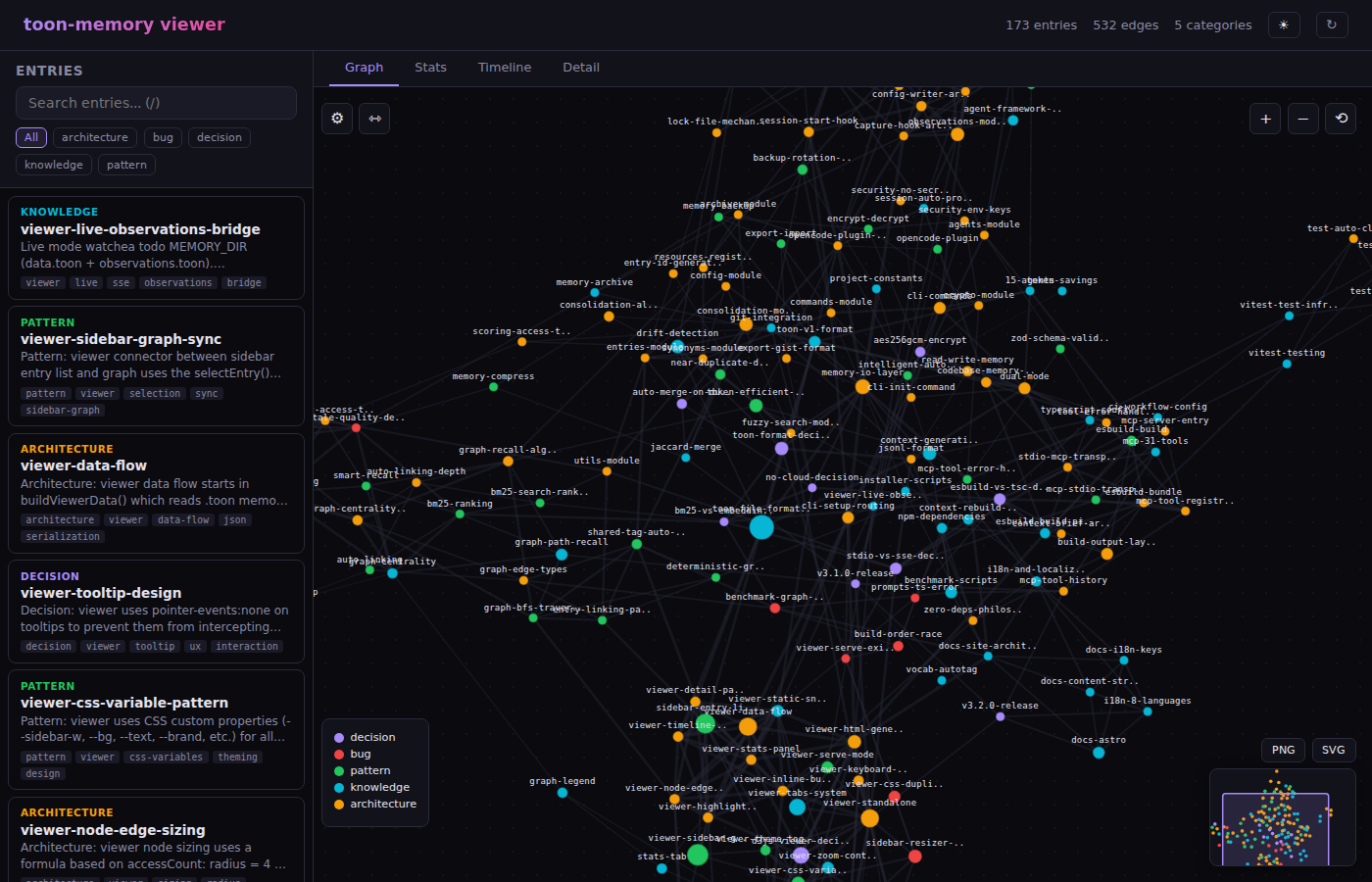
Visualize your memory as an interactive force-directed graph. See entries, their connections, categories, and access patterns at a glance.
CLI viewer (standalone HTTP server)
npx toon-memory viewer          # Start HTTP server + open browser
npx toon-memory viewer --port 3001  # Custom port
npx toon-memory viewer --export     # Save as static HTML
Once open, press r in the terminal to reload from disk, or r / ↻ in the browser to refresh the page.
Inline viewer (MCP Apps)
Call memory_visualize in any MCP Apps–compatible host to render the graph inline — no server needed. The viewer appears as an interactive panel inside the chat interface.
Features
| Interaction | Description |
|---|---|
| Hover a node | See tooltip with content preview, quality, access count |
| Click a node | Select + center + highlight neighbors |
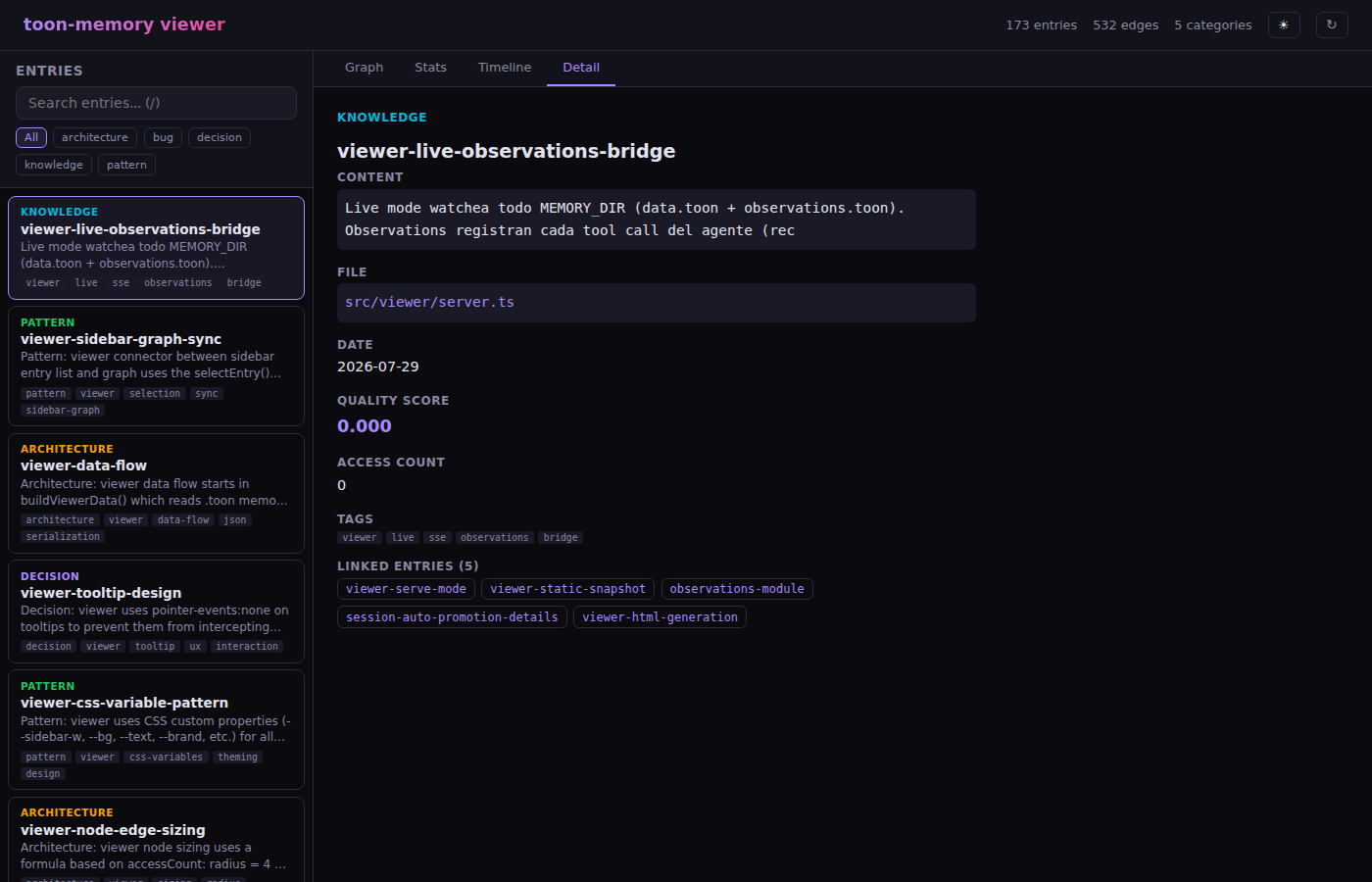
| Double-click a node | Open the Detail panel |
| Drag a node | Reposition manually (right-click to unfix) |
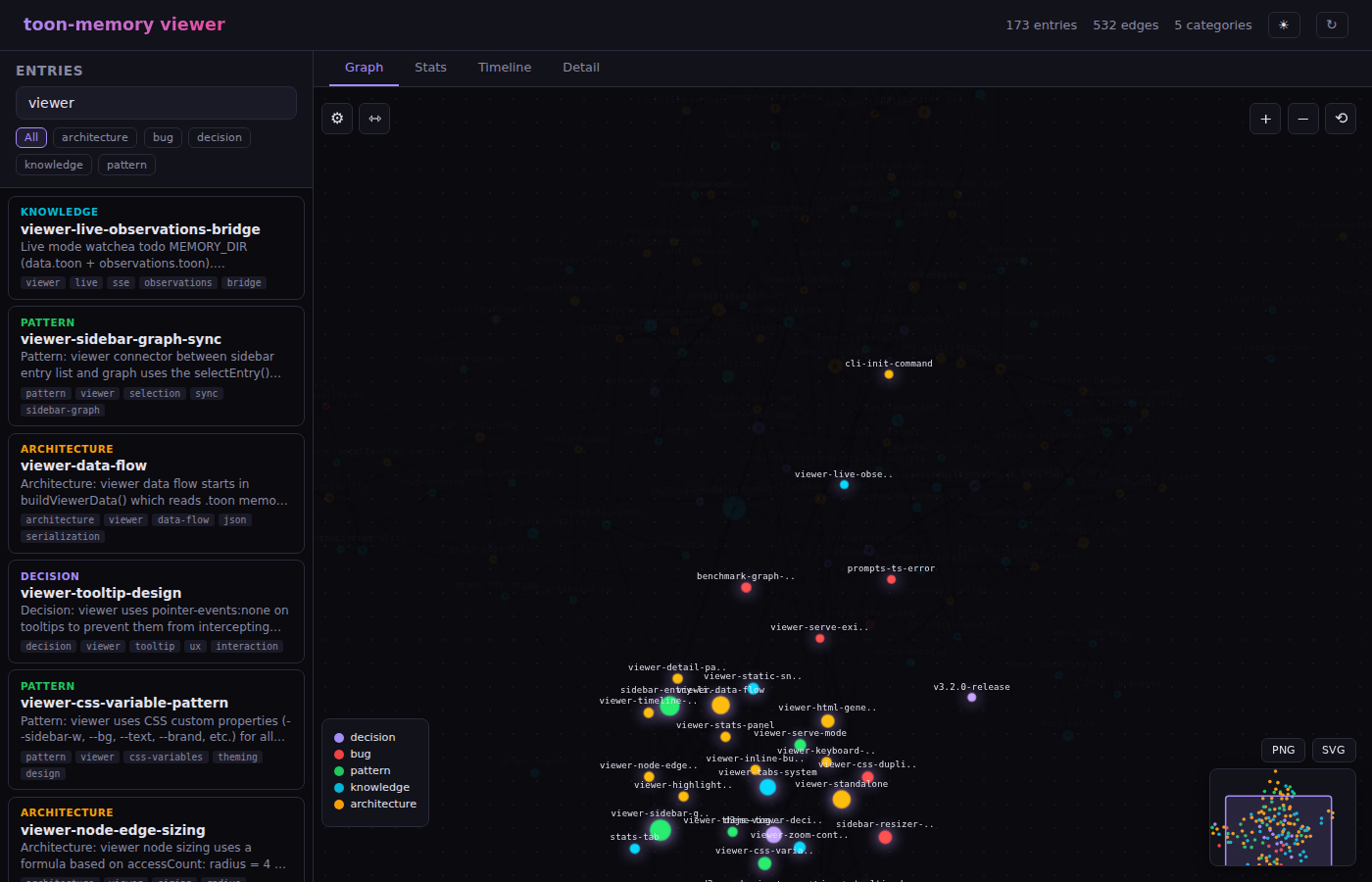
| Search | Filter entries; matching nodes pulse with glow |
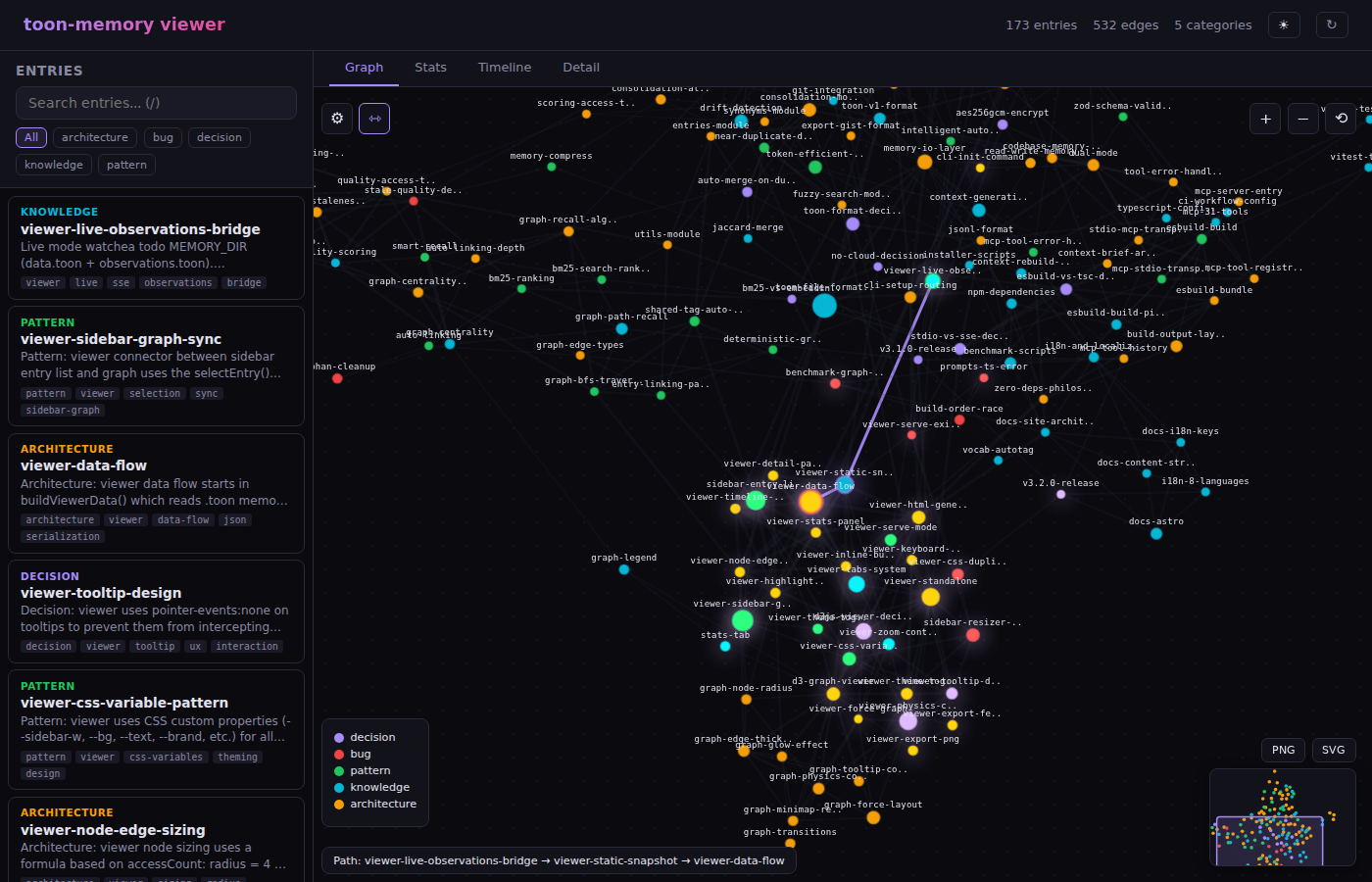
| ⇿ Path finder | Click two nodes to find and highlight the shortest path |
| Zoom/pan | Mouse wheel or +/− buttons |
| ⚙ Physics | Adjust charge, link distance, center gravity |
| Theme toggle | Dark/light mode (persisted) |
| Export | Save graph as PNG or SVG |
Screenshots
| Graph view | Search highlights | Path finder | Detail panel |
|---|---|---|---|
|  |  |  |
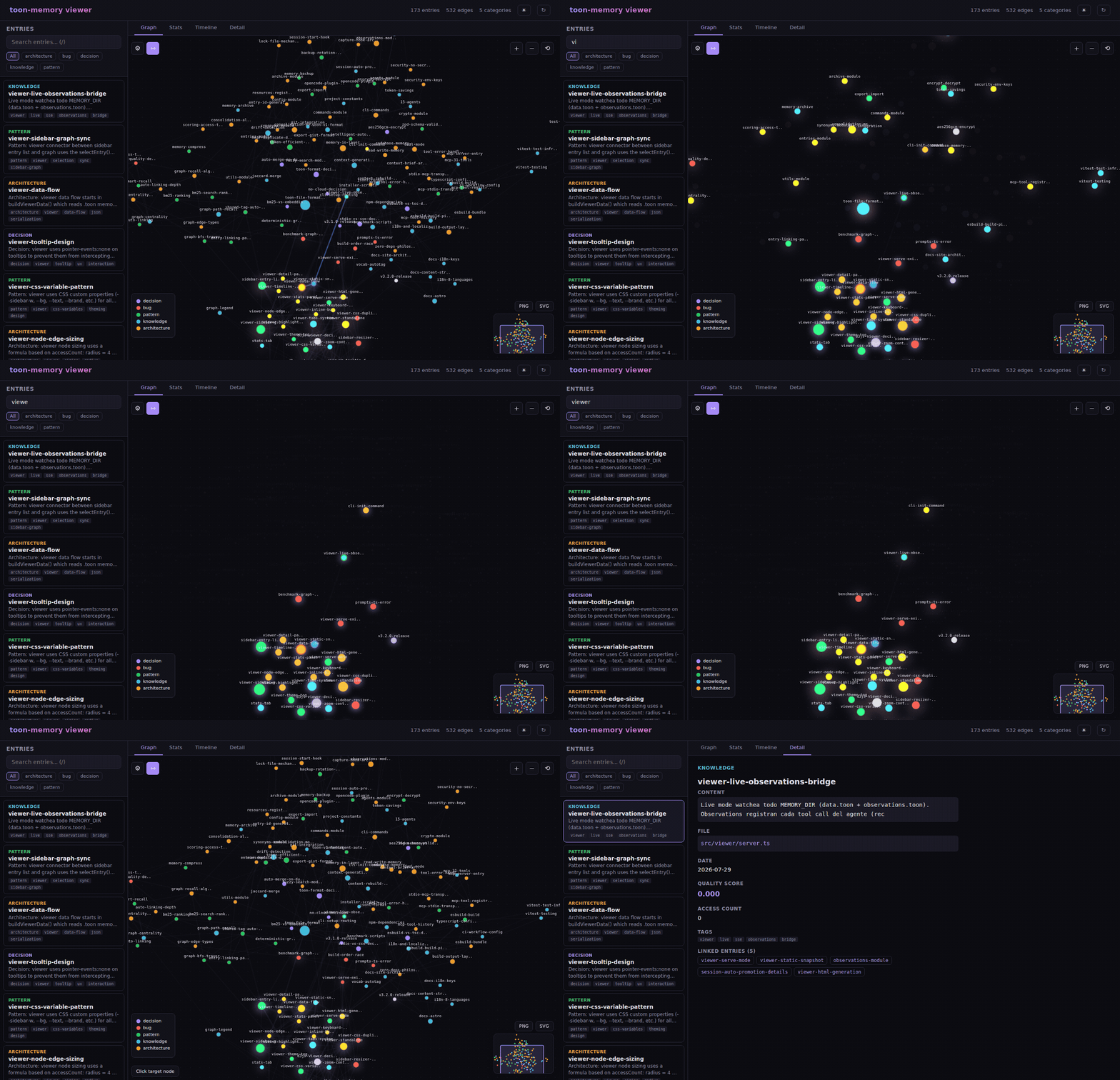
Capturing your own screenshots
npm run capture:viewer
Requires Playwright (npx playwright install chromium) and ffmpeg.
Tips & Best Practices
Here are some patterns that work well with toon-memory:
The "start of session" habit
At the beginning of every new session, run:
memory_smart_recall({ intent: "what I was working on" })
This gives your agent instant context about what happened before — combining BM25, graph, quality, and decay in one call.
The "end of session" habit
Before closing a session, save anything important:
memory_remember({
  category: "decision",
  key: "auth-approach",
  content: "Chose JWT over sessions — stateless, works across microservices",
  file: "src/auth.ts",
  tags: "auth;architecture"
})
The entry automatically gets a quality score based on its structure (tags, content detail, links).
Choosing categories
| Category | When to use |
|---|---|
decision | Architecture choices, trade-offs, "why X over Y" |
pattern | Conventions, frameworks, code style rules |
bug | Issues you fixed and how |
knowledge | Project facts, domain info, team context |
warning | "Do NOT do this" — anti-patterns, landmines, mistakes to avoid (recalled with a boost) |
Tip: Don't overthink it. If it's something your future self (or agent) would want to know, save it. Detailed entries with specific tags score higher in quality.
Tags that work well
Use semicolon-separated tags for easy filtering:
tags: "redis;performance;fix"
tags: "auth;jwt;security"
tags: "api;rest;versioning"
Tip: Keep tags short and consistent. They're not hashtags — they're search filters. More specific tags = higher quality score.
What NOT to save
- Don't save things that are obvious from reading the code
- Don't save temporary debugging notes
- Don't save secrets, API keys, or credentials (use env vars instead)
- Don't duplicate the same information with different keys (merge-dedup handles same-key automatically)
- Vague entries with no tags score low in quality — be specific
Keep memory clean
Run memory_archive() monthly to move old entries to the archive. Run memory_stats() to check the size and quality distribution. Low-quality entries (vague content, no tags) get lower recall priority automatically. Use memory_consolidate to merge duplicates and mode: "versions" to retire notes superseded by newer library versions.
CLI Commands
npx toon-memory              # Interactive installer
npx toon-memory init         # Quick setup (no prompts)
npx toon-memory mcp          # Run MCP server directly
npx toon-memory status       # Check installation status
npx toon-memory stats        # View memory statistics
npx toon-memory export       # Export memory to JSON
npx toon-memory import <file> # Import memory from JSON
npx toon-memory viewer       # Open the memory graph viewer (http server)
npx toon-memory viewer --export # Save viewer as static HTML
npx toon-memory viewer --port 3001 # Custom port
npx toon-memory watch [options] # Auto-backup with options
npx toon-memory upgrade      # Update to latest version
npx toon-memory sleep        # Deterministic consolidation (opt-in)
npx toon-memory dense status # Optional embeddings status
npx toon-memory dense install --yes && npx toon-memory dense enable --build
npx toon-memory uninstall    # Remove from all agents
Examples
Stats
$ npx toon-memory stats

🧠 toon-memory stats

📊 Memory Stats
━━━━━━━━━━━━━━━━━━
Total entries: 45
├── decision: 12
├── pattern: 18
├── bug: 8
└── knowledge: 7
Last updated: 2026-07-10
File size: 12.4 KB
Tip: If memory gets too large (100+ entries), consider archiving or removing outdated entries with
memory_forget.
Export
$ npx toon-memory export

🧠 toon-memory export

Exported 45 entries to:
  /path/to/project/toon-memory-export.json
Tip: Export before major refactors. You can always import the backup later if something goes wrong.
Import
$ npx toon-memory import backup.json

🧠 toon-memory import

Imported 3 new entries
Skipped 2 duplicates
Tip: Duplicates are detected by key. If you want to re-import an entry, delete the old one first with
memory_forget.
Watch
$ npx toon-memory watch 15 -c -m 20

🧠 toon-memory watch

Watching memory file every 15 minutes...
Max backups: 20
Compression: enabled
Logging: disabled
Press Ctrl+C to stop

📦 Backup #1 created: 2026-07-11T16-00-00-000Z
📦 Backup #2 created: 2026-07-11T16-15-00-000Z
^C
✅ Watch stopped. 2 backups created.
Tip: Watch mode is great for long-running sessions. Use
-cto compress and-m 5to keep only 5 backups.
Watch Options:
| Option | Description | Default |
|---|---|---|
[interval] | Backup interval in minutes | 5 |
-c, --compress | Enable gzip compression | off |
-l, --log [path] | Enable file logging | off |
-m, --max-backups <n> | Max backups to keep (0=unlimited) | 10 |
Configuration
Interactive installer (recommended)
npx toon-memory
The installer (requires a terminal) will:
- Show all 22 supported agents with detection status (
✓config found) and their supported scope (local/globalorsolo local) - Let you select which ones to configure — by number (
1,3,5), by name (claude,codex),all, Enter for all, orqto quit - Ask for the installation scope: (1) Local (project:
.toon-memory+ agent configs in the repo) or (2) Global (~homeconfigs) - Show a confirmation summary (
agent → scope → path (MCP/plugin/hooks/instrucciones)) and ask¿Proceder? [Y/n] - Configure MCP server, instruction files, and hooks automatically
Sin una terminal (CI/pipes)
npx toon-memoryimprime la ayuda de instalación no interactiva. Usanpx toon-memory init [local|global]para instalar sin preguntas. Unknown commands print usage and exit with an error.
Memory config flags
All flags live in .toon-memory/memory/config.json and are optional:
{
  "feedback": { "implicit": false },
  "graph": { "activation": false },
  "sleep": { "enabled": false },
  "dense": { "enabled": false, "model": "multilingual-e5-small" }
}
feedback.implicitis reserved; only explicitmemory_feedbackevents affect ranking today.graph.activationenables spread activation overedges.toon(rebuild withmemory_edges(action="rebuild")).sleep.enabled(orTOON_MEMORY_SLEEP=1) runs consolidation on sessionStop.dense.enabledenablesvectors.bin; runnpx toon-memory dense install --yeslocally in each project (--dry-runpreviews the npm command). The optional embedder pulls native transitive dependencies: pin versions and review install scripts in restricted environments.TOON_MEMORY_DENSE_MODULEoverrides the module path. If anything is missing, recall stays BM25-only.
OpenCode
Add to .opencode/opencode.json or ~/.config/opencode/opencode.json:
{
  "mcp": {
    "toon-memory": {
      "type": "local",
      "command": ["npx", "-y", "toon-memory", "mcp"],
      "enabled": true
    }
  }
}
Hooks are delivered via a plugin, not a top-level
hookskey. OpenCode 1.17+ rejects"Unrecognized key: hooks"in its config —toon-memory initwrites.opencode/plugins/toon-memory.tsinstead. Do not addhookstoopencode.json.
Claude Code
Add to .mcp.json (project root):
{
  "mcpServers": {
    "toon-memory": {
      "command": "npx",
      "args": ["-y", "toon-memory", "mcp"]
    }
  }
}
VS Code / Copilot
Add to .vscode/mcp.json:
{
  "servers": {
    "toon-memory": {
      "command": "npx",
      "args": ["-y", "toon-memory", "mcp"]
    }
  }
}
Codex CLI
Add to .codex/config.toml:
[mcpServers.toon-memory]
command = "npx"
args = ["-y", "toon-memory", "mcp"]
Gemini CLI
Add to .gemini/settings.json:
{
  "mcpServers": {
    "toon-memory": {
      "command": "npx",
      "args": ["-y", "toon-memory", "mcp"]
    }
  }
}
Zed
Add to ~/.config/zed/settings.json:
{
  "mcp_servers": {
    "toon-memory": {
      "command": "npx",
      "args": ["-y", "toon-memory", "mcp"]
    }
  }
}
Tip: Use global config if you want memory for every project. Use project-level config if you only want it for specific projects.
How It Works
- MCP Server — Runs locally, talks to your agent via stdio
- TOON Format — Stores data in Token-Oriented Object Notation (~22.5% fewer tokens than JSON, measured over 16 entries with gpt-tokenizer). Each entry tracks quality (0–1) and confidence (0–1) automatically.
- Per-project memory — Each project gets
.toon-memory/memory/data.toon - Zero config — Just install and use
Memory File Format
version: 1
entries[3|]{id|category|key|content|file|tags|date|ttl|accessed|links|quality|confidence|lastAccessed|priority|path_scope|origin|status|supersededOn|importance|evidence}:
  a1b2c3d4|decision|use-zod|Use Zod for validation|src/types.ts|validation;types|2026-07-10||0||0.65|1.0||0||agent|active|||verified
  e5f6g7h8|pattern|pydantic-configs|Project uses Pydantic v2|config.py|python;patterns|2026-07-10||0||0.55|1.0||0||agent|active|||
  i9j0k1l2|bug|redis-pool-fix|Added max_connections=20 (see [[use-zod]])|redis.ts|redis;fix|2026-07-10|7d|0|use-zod|0.70|0.9||0||agent|active|||conflict
summaries:
  src/services/redis.ts: Redis connection pool with retry logic
File Structure
.toon-memory/
├── memory/
│   ├── data.toon        # Main memory file
│   ├── archive.toon     # Archived entries (>30 days)
│   ├── config.json      # Encryption settings
│   └── backups/         # Watch mode backups
│       ├── backup-2026-07-11T16-00-00-000Z.toon
│       └── backup-2026-07-11T16-10-00-000Z.toon
└── hooks/
    ├── session-start-claude.sh
    ├── session-start-codex.sh
    ├── session-start-gemini.sh
    └── session-start-antigravity.sh
Why TOON?
TOON (Token-Oriented Object Notation) is designed for LLMs:
| Format | Tokens (16 entries) |
|---|---|
| JSON | 1097 |
| TOON | 850 |
Measured with gpt-tokenizer (cl100k_base) over 16 representative memory entries — see scripts/benchmark-toon.mjs (npm run bench).
The token savings compound at session time: npm run bench:impact simulates retrieving context with vs without memory and measures ~68% fewer tokens to get the same context (recall compact instead of re-reading source files). The full session benchmark (npm run bench:full) shows 80% fewer tool calls and 47% fewer tokens with context_* tools.
- 22.5% fewer tokens than JSON at file level (up to 30.5% on a single entry)
- Lossless roundtrip — No data loss
- Better LLM comprehension — Structured for AI consumption
- Quality & confidence — Every entry tracks structure quality (0–1) and reliability (0–1) automatically
Tip: Fewer tokens = faster responses + lower API costs. Your agent reads memory files on every session start, so efficiency matters.
Benchmark: toon-memory vs Alternatives
| Feature | toon-memory | @modelcontextprotocol/server-memory | mem0 | shodh-memory |
|---|---|---|---|---|
| Storage | Local file (TOON) | Local file (JSON) | Cloud | RocksDB |
| Dependencies | Zero | Zero | Cloud API | sentence-transformers, RocksDB |
| Search | BM25 + graph + quality | Basic keyword | Vector only | Hybrid (vector + graph) |
| Token efficiency | 22.5% fewer than JSON | Baseline (JSON) | N/A (cloud) | Similar |
| Quality scoring | Auto (0–1, heuristics) | None | None | BND algorithm |
| Merge-dedup | Tags union + max confidence | None | None | Content dedup |
| Confidence tracking | Per-entry (0–1) | None | None | Per-entry |
| System Primer | Auto-generated | None | None | None |
| Multi-session | File-based coordination | None | N/A | None |
| Hooks | 15 agents | None | None | Claude only |
| Encryption | AES-256-GCM | None | Cloud-managed | None |
| Setup time | npx toon-memory | Manual JSON | Cloud signup | Docker + config |
Token efficiency (measured)
Format          Tokens (16 entries)    vs JSON
──────────────  ───────────────────    ───────
JSON            1097                   baseline
TOON            850                    -22.5%
Recall efficiency (measured)
Method                          Tokens to get context    vs re-reading files
──────────────────────────────  ─────────────────────    ───────────────────
Re-read source files            ~3000                    baseline
memory_recall (flat)            ~1200                    -60%
memory_recall (graph, compact)  ~900                     -70%
memory_smart_recall             ~850                     -72%
Context tools benchmark (measured)
The context_* tools replace 3–6 separate tool calls with a single call, saving both tokens and tool-call overhead.
Scenario                          Without   With    Saved    Tools
────────────────────────────────  ────────  ──────  ───────  ──────
context_generate (full briefing)    6,408     378    94.1%   6 → 1
context_diff (incremental)            533     152    71.5%   4 → 1
context_focus (targeted)              413     225    45.5%   4 → 1
context_health (audit)                322     246    23.6%   5 → 1
context_export (injectable md)      1,178     218    81.5%   3 → 1
────────────────────────────────  ────────  ──────  ───────  ──────
TOTAL                              8,854   1,219    86.2%  22 → 5
What each scenario measures:
| Tool | Without (manual path) | With (single call) | Why it saves |
|---|---|---|---|
context_generate | Read package.json + README + tsconfig.json + full memory dump + memory stats + sessions = 6 calls | One compact briefing with everything | Eliminates 5 redundant reads; output is deduplicated and compact |
context_diff | git log + git diff --name-only + memory_diff + sessions = 4 calls | One incremental diff | Combines git state + memory changes in one output; no overlap |
context_focus | memory_recall + findCallers + findRelatedFiles + findTestFiles = 4 calls | One targeted briefing | Only returns what's relevant; no full memory scan needed |
context_health | memory_stats + orphan scan + duplicate scan + file ref validation + stale sessions = 5 calls | One health report | Each check is done once and deduplicated; no redundant queries |
context_export | memory_stats + memory_recall({ compact: true, mode: "graph" }) + manual formatting = 3 calls | One markdown export | Formats output directly; agent skips the "format as markdown" step |
Tip: Use
context_generateat session start (93% token savings). Usecontext_difffor "what changed since last time?" (72% savings). Usecontext_focusfor deep dives on specific topics (45% savings).
Measured with gpt-tokenizer (cl100k_base) over realistic project scenarios — see scripts/bench-context-tools.mjs (npm run bench:context).
Full session impact (measured)
Simulates a complete 5-phase agent session (session start → debug → implement → review → wrap-up) across 3 approaches: without memory, with memory_recall, and with context_* tools.
Phase                                   Without memory     memory_recall      context_* tools
──────────────────────────────────────  ─────────────────  ─────────────────  ─────────────────
Phase 1: Session Start                  516 t /  6 c       409 t /  3 c       373 t /  1 c
Phase 2: Debug Issue                    176 t /  4 c       182 t /  2 c       252 t /  1 c
Phase 3: Implement Feature              189 t /  6 c       183 t /  3 c       305 t /  1 c
Phase 4: Code Review                    316 t /  4 c       130 t /  2 c       243 t /  1 c
Phase 5: Wrap-up                      1,214 t /  5 c        68 t /  2 c       117 t /  1 c
──────────────────────────────────────  ─────────────────  ─────────────────  ─────────────────
TOTAL                                 2,411 t / 25 c       972 t / 12 c     1,290 t /  5 c
Key findings:
| Metric | Without memory | With memory_recall | With context_* tools |
|---|---|---|---|
| Tokens per session | 2,411 | 972 (-60%) | 1,290 (-47%) |
| Tool calls per session | 25 | 12 (-52%) | 5 (-80%) |
| Cost per session (GPT-4) | $0.072 | $0.029 | $0.039 |
The trade-off: memory_recall uses fewer tokens (972 vs 1,290) because it returns only matching entries. context_* tools return richer context (callers, related files, test files, health audit) — more tokens per call, but 80% fewer tool calls. In practice, the agent avoids 3-4 follow-up "find related" calls that context_focus already includes.
Where context_ wins big:*
- Session start (Phase 1): 28% fewer tokens + 6→1 calls — one briefing replaces reading 6 files
- Wrap-up (Phase 5): 90% fewer tokens —
context_healthreplaces 5 manual scans - Tool calls: 25→5 calls = 80% less latency overhead per session
Tip: Use
memory_recallwhen you need specific entries (fewer tokens). Usecontext_*when you need comprehensive context with fewer round-trips (fewer calls).
Measured with gpt-tokenizer (cl100k_base) — see scripts/bench-full-impact.mjs (npm run bench:full).
Tip:
memory_smart_recallcombines BM25 + graph + quality in one call, saving both tokens and tool-call overhead. Use it at the start of every task.
RRF ranking benchmark (measured)
Since v3.7.0, recall ranks results with Reciprocal Rank Fusion over BM25 (×3) and graph-centrality ranks, with an adaptive k = clamp(3..60, round(sqrt(n))). Measured over 8 gold-standard queries with hand-labeled relevance (see scripts/bench-rrf.mjs, npm run bench:rrf):
Metric        linear (v3.6.x)     RRF (v3.7.0)
────────────  ─────────────────   ────────────────
nDCG@5        0.776               0.776   (parity)
MRR           0.917               0.917   (parity)
RRF matches the previous linear weighted score at zero ranking cost, while simplifying the scoring pipeline (BM25×3 + centrality, no importance/recency noise). Graph mode supersession is honored: obsolete entries stay excluded except for as_of point-in-time queries.
Retrieval benchmark (LongMemEval-style, measured)
Since v4.1.0, retrieval is benchmarked against a frozen snapshot of real project memory — a LongMemEval-style test set with hand-authored gold queries. Corpus: 187 real data.toon entries (snapshot 2026-08-01), 42 gold queries across 6 categories (core-fact, temporal, knowledge-updating, multi-hop, meta/session, distractor). The measured code is the production pipeline (src/lib), bundled in-memory with esbuild — no faithful copies. A deterministic today parameter pins recency/decay so results can't drift with the wall clock; runs are read-only (no access tracking). Two priority meta-entries that describe the data file itself are excluded. See benchmarks/retrieval-corpus.toon, benchmarks/gold-queries.json (npm run bench:retrieval):
Mode            R@5     nDCG@5  MRR@5   answerable
─────────────   ─────   ─────   ─────   ──────────
linear         0.643   0.650   0.766   81.0%
rrf            0.655   0.652   0.770   83.3%
smart (unified) 0.867  0.814   0.854   95.0%
memory_smart_recall is the top-ranked mode (0.867 R@5, 95.0% of queries answerable from the top-5) in a single call.
Troubleshooting
Memory not found after install
Symptom: Agent says it doesn't have memory tools.
Fix:
- Run
npx toon-memory statusto verify installation - Restart your agent completely (close and reopen)
- Check that the MCP config file exists and is valid JSON
Memory file is empty
Symptom: memory_stats shows 0 entries.
Fix: This is normal on first install. Start using memory_remember to save entries.
Duplicate entries
Symptom: Same key appears multiple times.
Fix: memory_remember with the same key now auto-merges (union of tags, max







