Listed from the MCP registry; nobody on Odel publishes it.
Is this yours? Claim it
FiscaLLM
LLM prices, cost estimates and break-even, plus your app's AI cost and margin per user.
One address for any MCP client. No sign-in needed on this server.
What it does
8 read2 other
Grouped by tool name. At most: only reads or looks up information.
What it costs
FreeOdel charges nothing per call. The publisher may charge for its own service.
Tools
10 · grouped by tool name · checked 22 Nov 2026Read · 8Look things up
- list_llm_prices
- get_llm_price
- estimate_llm_cost
- compare_llm_costs
- get_margin_overview
- list_users_by_margin
- get_plan_margins
- get_cost_breakdown
Other · 2Neither hinted nor named
- subscription_break_even
- fiscallm_setup_guide


Free, open-source tools to make sure every user of your AI app or website pays for their AI.
Before launch: the pricing planner (free, no sign-up, runs in your browser) takes a model, tokens per action and your plans, and shows the margin on each plan, what a heavy user costs you, the lowest price for your target margin, a monthly AI limit per plan and the largest free tier you can afford.
After launch: give free, trial and paid plans their own AI allowance (10 messages a day on free, 500 a month on Pro, $8 of AI a month on any paid plan). FiscaLLM knows each user's plan from RevenueCat or Stripe, counts their usage, and answers one call from your backend: allow or refuse, and how much is left. It also adds up what each user costs you in AI and sets it next to what they pay you, so you can see who is profitable and who is losing you money.
const { allow, plan, limits } = await meter.check(userId);
if (!allow) return respond(402, { paywall: true, plan, resetsAt: limits[0]?.resetsAt });
// ... make the AI call, then meter.trackOpenAI(res, { userId })
return { reply, remaining: limits[0]?.remaining };   // "3 left today"
Limits are settings on the app's Limits page, not code. How to limit AI usage per plan · reference
Also free, for engineering teams: add five settings to Claude Code and its built-in OpenTelemetry export sends each model call to FiscaLLM: spend per developer and per team, budget alerts, and a warning when an agent loops. No proxy, nothing to install, prompts and code never stored. Setup and what Anthropic already gives you
Other tools are turned on the same way, each on the app's Sources page (beta): Codex CLI and Gemini CLI from their own OpenTelemetry export; Cursor, the OpenAI API and the Anthropic API with a read-only admin key; ElevenLabs, Perplexity and any other AI API with one SDK call. Each source is one file.
{ "env": {
  "CLAUDE_CODE_ENABLE_TELEMETRY": "1",
  "OTEL_LOGS_EXPORTER": "otlp",
  "OTEL_EXPORTER_OTLP_LOGS_PROTOCOL": "http/json",
  "OTEL_EXPORTER_OTLP_LOGS_ENDPOINT": "https://fiscallm.com/api/v1/otel/v1/logs",
  "OTEL_EXPORTER_OTLP_LOGS_HEADERS": "Authorization=Bearer <FISCALLM_KEY>"
} }
Open source (MIT) and free. Use the hosted service at fiscallm.com (free under fair use, best effort), or run your own.
Pricing planner · Live demo (no sign-up) · LLM pricing and cost-per-user calculator · Compare with alternatives · Docs · How it works · What it covers · Accuracy · Roadmap (board) · Changelog · Self-hosting · Contributing
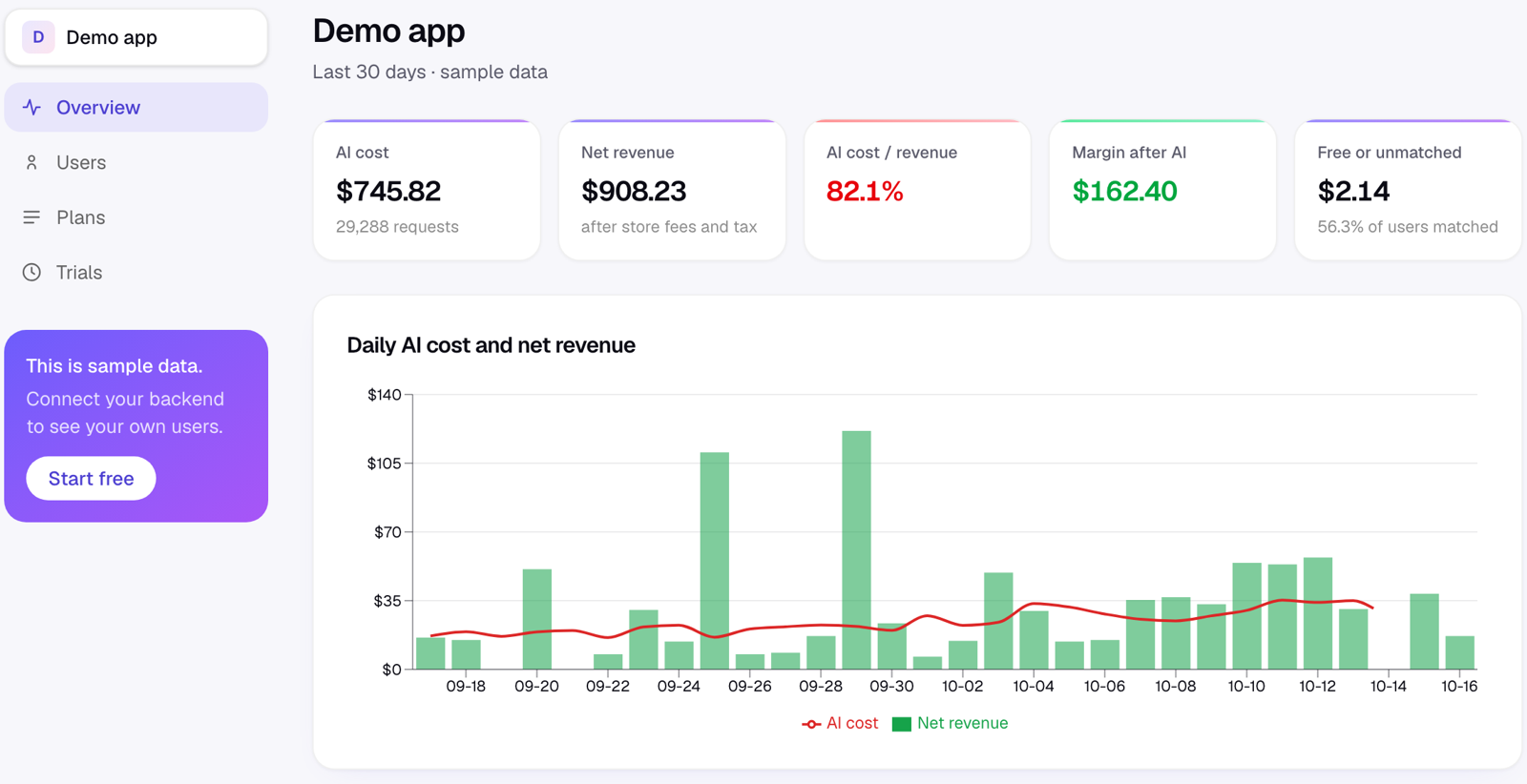
Sample data from the demo, not a real customer.
Get started with a product in three steps
For Claude Code, the five settings above are the whole setup. For a product you sell:
-
Create an app at fiscallm.com (or your own copy) and copy the ingest key.
-
Add one line after each AI call (it reads only the model name and token counts, never prompts or answers):
tsimport { createMeter } from "fiscallm"; // npm install fiscallm (Python: pip install fiscallm) const meter = createMeter({ apiKey: process.env.FISCALLM_KEY, waitUntil }); const res = await openai.chat.completions.create({ model, messages }); meter.trackOpenAI(res, { userId, feature: "chat" });Already tracing or using a gateway? Skip the SDK. Point an OpenTelemetry trace exporter at
https://fiscallm.com/api/v1/otel(guide, Vercel AI SDK), or add one callback to your LiteLLM config (guide). -
Connect revenue: press Connect RevenueCat (one click: adds the webhook and imports past subscribers), connect Stripe (webhook, plus a 12-month history import; with a read-only key, Stripe's exact fee, any currency and lost disputes), upload a CSV from any billing system, or send payments yourself with the revenue API.
Tracking a team's coding agents instead? Point Claude Code's built-in OpenTelemetry export at FiscaLLM for spend per developer and team: five environment variables, no proxy, prompts never stored (guide).
No AI key handy? FISCALLM_KEY=fsk_... node examples/send-sample-data.mjs fills a test app with sample users so you can see it working.
For AI agents
- MCP server (remote, read-only):
https://fiscallm.com/api/mcp. Current LLM prices, cost estimates, model comparison and subscription break-even with no key; your app's cost and margin per user, plan, model and feature with its key.claude mcp add --transport http fiscallm https://fiscallm.com/api/mcp· details - Free LLM pricing API (no key):
GET https://fiscallm.com/api/v1/prices,/api/v1/prices/<model>,/api/v1/estimate?model=&input=&output=· details - Price table as code:
import { priceOf, estimateCost } from "fiscallm/prices"(npm, no network call, no dependencies) - Read API:
GET /api/v1/metrics/overview,/users,/plans,/breakdownwith the app's key · openapi.json - Setup skill for coding assistants: fiscallm.com/skill.md
The problem
AI apps charge a flat price but pay a variable cost. One user costs $0.20 a month in AI, another costs $25. Your AI provider's bill shows tokens, your subscription tool shows payments, and neither shows the user.
How it works
import { createMeter } from "fiscallm";

const meter = createMeter({ apiKey: process.env.FISCALLM_KEY, waitUntil });

const res = await openai.chat.completions.create({ model, messages });
meter.trackOpenAI(res, { userId, feature: "chat" });
from fiscallm import Meter

meter = Meter(api_key=os.environ["FISCALLM_KEY"])
res = client.chat.completions.create(model=model, messages=messages)
meter.track_openai(res, user_id=user_id, feature="chat")
- The SDK reads only the model name and token counts from the response. Never prompts or answers.
- Events are batched and sent in the background. Tracking never throws and never blocks your response.
- Each event has a client-generated UUID, so retries cannot double count.
- Revenue comes from RevenueCat (one-click OAuth connect, or a webhook you add by hand), or from your own code with
trackRevenue/track_revenue. - Both are joined on the user ID. RevenueCat aliases are resolved, so anonymous and logged-in users merge.
- Budgets and alerts: email, Slack or signed webhooks when a user goes over budget, when a paying user loses money, or when one user burns a huge number of tokens in 5 minutes (a runaway loop).
- Jobs (pay-per-job apps, e.g. credits for a video render): tag AI calls with a
jobIdand report each job as pending, captured or refunded withmeter.trackJob/track_job. The Jobs page shows the AI cost of refunded jobs and of jobs that never resolved, per user. - Spending caps: mark a per-user budget as Block and call
meter.check(userId)before an AI call (TypeScript, Python). It says no once the user reaches the amount, If FiscaLLM is slow or down, a user it already refused stays refused; anyone else is allowed by default (or refused, withcheckOnError: "deny"). An optional local limit counts each user's calls and tokens in your process, so a runaway loop is stopped even with no network.
Cost is priced on arrival: exact costUsd if given, otherwise per-token (input, output, cache read and cache write priced separately) or per-unit (images, audio, video) from a price table. Unknown models are flagged as unpriced, never counted as zero.
Net revenue is price × (1 − tax − store commission).
Layout
| Path | What it is |
|---|---|
apps/web | Next.js site and dashboard |
apps/api | Hono API: ingest, RevenueCat webhook and OAuth callback, revenue API, cron jobs |
packages/shared | Drizzle schema, pricing, metrics, alerts |
packages/sdk | TypeScript SDK (fiscallm on npm) |
packages/sdk-python | Python SDK (fiscallm on PyPI) |
Stack: TypeScript, Next.js, Hono, Postgres (Supabase) with Drizzle, hosted on Vercel.
Limits
- It needs a backend between your app and the AI provider. Apps that call a provider straight from the phone are not covered yet.
- Revenue comes from RevenueCat, Stripe (any currency with a read-only key, otherwise USD) or the revenue API. Direct App Store and Google Play connections are not built yet.
Try it in ten minutes
- No AI key needed:
FISCALLM_KEY=fsk_... node examples/send-sample-data.mjsfills the dashboard with sample users (one heavy user who loses money). - Copy-paste starting points for Next.js and FastAPI, see examples.
- Run your own copy:
(create a Supabase project first, see SELF-HOSTING.md).
Development
pnpm install
pnpm dev:web   # http://localhost:3000
pnpm dev:api   # http://localhost:8787/api/health
pnpm test
Copy .env.example to apps/web/.env.local and packages/shared/.env and fill in the values.
pnpm db:generate
pnpm db:migrate
Contributing
Issues and pull requests are welcome. Read CONTRIBUTING.md first (it includes a short contributor agreement). The plan, including what we only build if there is demand, is in ROADMAP.md, with a public board. Vote with a 👍 on roadmap issues or share ideas in Discussions.
Where help is most wanted: prices for more models and providers (data only, no code knowledge needed), connectors for other billing systems (Adapty, Superwall), examples for AI frameworks, and a comparison of computed costs with a real provider invoice. See the good first issues.
Built by
Built and maintained by Mayur as an independent, open-source side project. Questions, bugs and ideas: open an issue or email theaicommit@gmail.com.
Contributors
Thank you to everyone who helps. Contribute: a good place to start is an issue labelled good first issue.
License
MIT. See LICENSE.






