Listed from the MCP registry; nobody on Odel publishes it.

BoaviztAPI
Environmental footprint of cloud instances, servers, GPUs and devices, via BoaviztAPI.
Runs on your machine from its package; the steps are below.
What it does
- Reads
- Writes
- High impact
At most: only reads or looks up information.
What it costs
FreeOdel charges nothing per call. The publisher may charge for its own service.
Runs locally over stdio
This server isn't hosted — your MCP client launches it from a package registry. Use one of the commands below, or drop the config into your client (e.g. Claude Desktop).
Run
uvx boaviztapi-mcp
MCP client config
{
  "mcpServers": {
    "boaviztapi": {
      "command": "uvx",
      "args": [
        "boaviztapi-mcp"
      ]
    }
  }
}boaviztapi-mcp


An MCP server that lets AI assistants answer questions about the environmental footprint of IT hardware: cloud instances, servers, GPUs and other components, and end-user devices. It asks BoaviztAPI and reports the answer with units, uncertainty ranges and caveats.
Unofficial community project. Every number comes from BoaviztAPI, built by Boavizta. See their methodology documentation for how impacts are computed.

Quick start
You need uv. The server talks to the public BoaviztAPI instance by default; see Configuration to use your own.
Claude Desktop, Cursor and other clients with an mcpServers config:
{
  "mcpServers": {
    "boaviztapi": {
      "command": "uvx",
      "args": ["boaviztapi-mcp"]
    }
  }
}
To use your own BoaviztAPI instance, add "env": {"BOAVIZTAPI_URL": "http://localhost:5000"} next to args.
Claude Code:
claude mcp add boaviztapi -- uvx boaviztapi-mcp
Add -e BOAVIZTAPI_URL=http://localhost:5000 before -- to use your own instance.
Docker, from a clone of this repository:
docker build -t boaviztapi-mcp .
docker run -i --rm boaviztapi-mcp
Pass -e BOAVIZTAPI_URL=... to docker run to change the instance. Inside a container, localhost is the container itself; use host.docker.internal (Docker Desktop) to reach an instance on your machine.
From source, without installing a release:
uvx --from git+https://github.com/malikmalikayesha/boaviztapi-mcp boaviztapi-mcp
Try it without a client using the MCP Inspector:
npx @modelcontextprotocol/inspector uvx boaviztapi-mcp
What you can ask
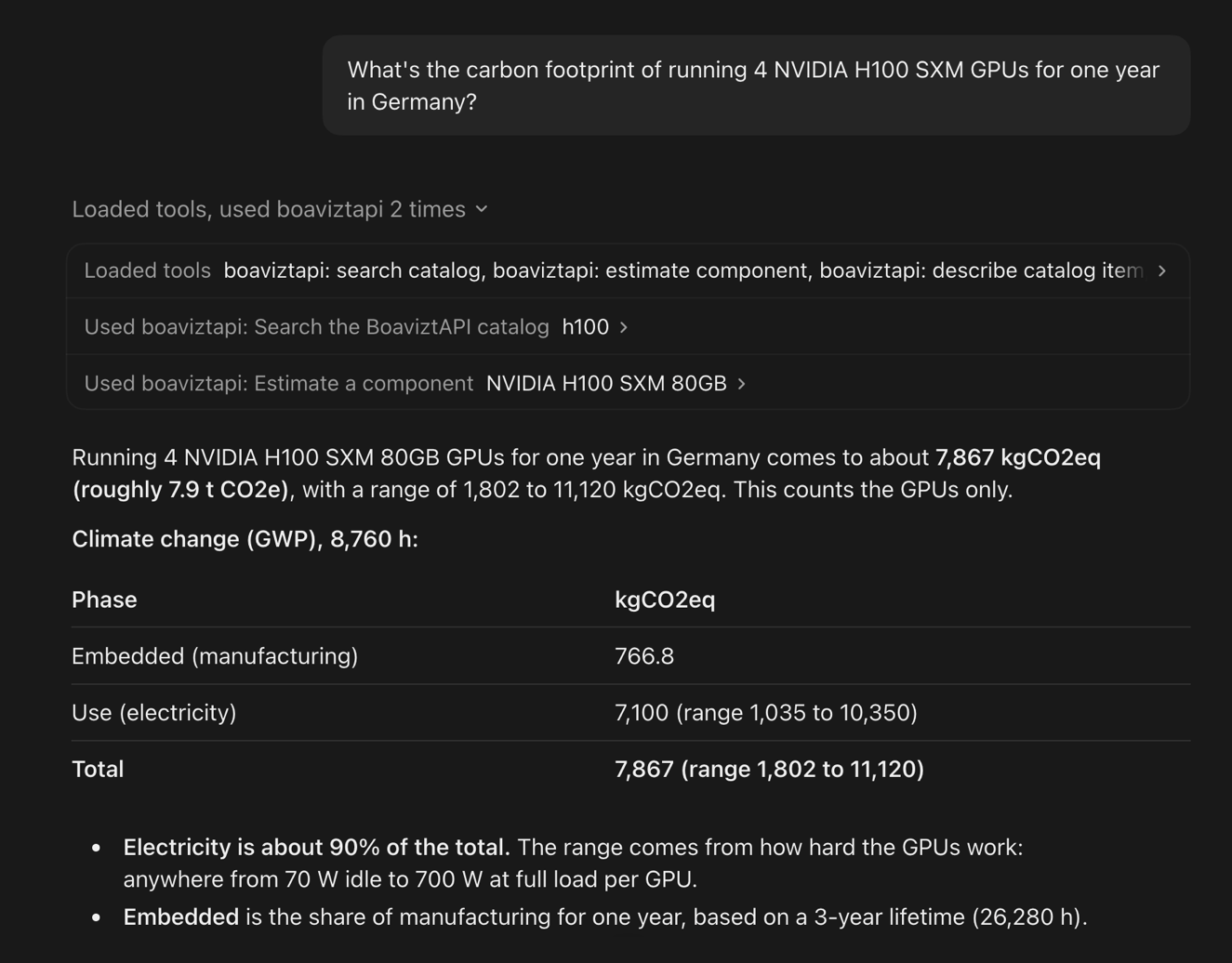
- "What is the footprint of 4 H100 SXM GPUs running for a year in Germany?"
- "Compare an AWS m5.xlarge in France and in the US over a month."
- "What is the embedded carbon of a typical laptop?"
- "Which is greener in eu-west-3 at 50% load: m5.xlarge or c5.2xlarge?"
- "What would a server with 2x Xeon Gold 6134 and 384 GB RAM emit over 5 years in France?"
- "What does
adpmean and what unit is it in?"
The first question in Claude Desktop, with the server's tools doing the lookup and the estimate:
The same answer as the server returns it (the summary field of estimate_component):
4x NVIDIA H100 SXM 80GB, over 8760 h (1 year), in Germany (DEU)
Embedded = the share of manufacturing allocated to 8760 h of a 26280 h lifetime.
gwp, Total climate change (kgCO2eq):
  embedded: 766.8
  use: 7100 (range 1035 to 10350)
  total: 7867 (range 1802 to 11120)
adp, Use of minerals and fossil ressources (kgSbeq):
  embedded: 0.007776
  use: 0.0015 (range 0.0002155 to 0.002155)
  total: 0.009276 (range 0.007992 to 0.009931)
pe, Consumption of primary energy (MJ):
  embedded: 10550
  use: 270000 (range 39880 to 398800)
  total: 280600 (range 50430 to 409400)
Assumptions: units 4, TDP 700 W, average power 479.5 W (range 70 to 700), load 65 % (range 0 to 100), use time ratio 1, lifetime 26280 hours, grid carbon intensity 0.422 kg CO2eq/kWh.
Note: GPU 'h100 sxm' was read as NVIDIA H100 SXM 80GB.
Note: GPU only; the host server is not included. Use estimate_server with a gpu block for a whole system.
Source: BoaviztAPI 2.6.0 at https://api.boavizta.org
A comparison (compare_estimates, first criterion shown):
Comparison over 8760 h (1 year):
- m5.xlarge: aws m5.xlarge, over 8760 h (1 year), in eu-west-3 (FRA)
- c5.2xlarge: aws c5.2xlarge, over 8760 h (1 year), in eu-west-3 (FRA)
gwp (kgCO2eq):
  m5.xlarge: total 27.4 (range 22.14 to 36.68)
  c5.2xlarge: total 61 (range 51.06 to 77.16), +122.6% vs m5.xlarge
  Lowest: m5.xlarge (ranges do not overlap).
Tools
All tools are read-only and carry the matching annotations and a display title. Each returns structured content (with an output schema) plus a plain-text summary.
The server speaks the current MCP specification, 2026-07-28 (stateless, with server/discover), and still accepts the 2025-11-25 handshake used by older clients. It uses none of the features deprecated in 2026-07-28 (logging, sampling, roots).
| Tool | What it does | Key inputs |
|---|---|---|
list_impact_criteria | Explains impact criteria codes and units | query |
search_catalog | Finds exact names before estimating | kind (cloud_provider, cloud_instance, cloud_region, server_archetype, device_archetype, gpu, cpu, country), query, provider, device_type |
describe_catalog_item | Shows what an instance, archetype, GPU or CPU contains | kind, name |
estimate_cloud_instance | Footprint of one cloud VM | provider, instance_type, region or usage_location, load_percent |
estimate_server | Footprint of an on-premise server, optionally with GPUs | archetype, cpu, ram, disks, gpu, usage fields |
estimate_component | Footprint of one GPU, CPU, RAM module, SSD or HDD | component, name, units, capacity_gb |
estimate_device | Footprint of a laptop, phone, monitor, IoT device and 9 other types | device_type, archetype |
compare_estimates | Ranks 2 to 5 options over the same period | items, duration_hours |
The estimate tools also take duration_hours, usage_location, criteria (default gwp, adp, pe) and detail (summary or breakdown). Every parameter, type and default is listed in the tool reference.
Names are matched carefully. "h100 sxm" finds "NVIDIA H100 SXM 80GB", and the result notes the interpretation. A name that could mean several items ("h100") or only partly matches one is refused with a list of candidates, so a missing item is never silently swapped for a similar one.
Reading the results
- Embedded vs use. Embedded is manufacturing (and transport where modelled); use is the electricity consumed. They are always reported separately, with a total only when both are numbers.
- Period. Without
duration_hours, figures cover the whole hardware lifetime. With it, embedded is the share of manufacturing for that period and use is the energy for that period. If the period is longer than the lifetime, BoaviztAPI counts manufacturing once; the result says so. - Ranges.
(range a to b)is BoaviztAPI's min and max. When two options' ranges overlap,compare_estimatessays the ranking is not certain. - Location. Use-phase impacts depend on the electricity mix. Without a location BoaviztAPI uses a European default with a wide range, and the result suggests passing a country.
- "not available from BoaviztAPI for this item" means there is no data for that criterion and phase. It is never a zero.
- Warnings such as "End of life is not included in the calculation" stay next to the phase they belong to.
Configuration
| Variable | Default | Meaning |
|---|---|---|
BOAVIZTAPI_URL | https://api.boavizta.org | BoaviztAPI base URL |
BOAVIZTAPI_TIMEOUT | 20 | Seconds per request |
BOAVIZTAPI_DEFAULT_CRITERIA | gwp,adp,pe | Criteria used when a call names none |
BOAVIZTAPI_CACHE_TTL | 86400 | Seconds to cache list and lookup responses; 0 disables caching |
Self-host BoaviztAPI for regular use
The public instance is a demo. For anything beyond occasional questions, run your own:
docker run -p 5000:5000 ghcr.io/boavizta/boaviztapi:latest
then set BOAVIZTAPI_URL=http://localhost:5000 in the server's environment. The server is polite either way: it identifies itself in the User-Agent, caches lists and recent estimates, sends at most four requests at a time, and retries only transient failures.
Upstream behaviour this server works around
Found while building this against BoaviztAPI 2.6.0. Each one has a live test that will start failing (on purpose) when upstream changes it.
- Unknown criteria and
criteria=allreturn HTTP 500, so criteria are checked locally andallis refused. - Unknown locations and cloud regions are accepted without an error and give generic results, so both are checked against the API's own lists.
name_to_gpusilently picks one GPU for an ambiguous name and returns 200 with a plain string when nothing matches, so names are resolved here and ambiguous ones are refused.- An
iot_devicewithout an archetype reports 0 for manufacturing, so an archetype is required. - The GPU endpoint returns 500 for some criteria on the public instance (fixed upstream in Boavizta/boaviztapi#621, not yet deployed). A failing multi-criteria request is retried one criterion at a time, and only the failing criteria are marked as errors.
Privacy
The server sends BoaviztAPI only what the tool call contains: hardware names and specifications, locations, durations and criteria. Requests go to BOAVIZTAPI_URL and nowhere else, with a User-Agent naming this package. There is no telemetry and nothing is written to disk; caches live in memory and end with the process. Logs go to stderr.
Limitations
- Figures are BoaviztAPI's model estimates, with ranges that can be wide. Treat them as orders of magnitude for comparing options, not as measurements.
- A cloud instance's footprint is its share of the host server; networking, storage services and data centre overheads beyond BoaviztAPI's model are not included.
- Not exposed yet: custom electricity factors, workload time series, standalone motherboards, power supplies and cases, IoT functional blocks, and CPU consumption profiles.
- The public BoaviztAPI instance is a demo without guaranteed availability. Self-host for anything regular.
Troubleshooting
| Symptom | What to do |
|---|---|
| "BoaviztAPI ... did not respond" | The instance is down or slow. Raise BOAVIZTAPI_TIMEOUT, or self-host and set BOAVIZTAPI_URL. |
| "Unknown GPU / CPU / instance type / location ..." | The message lists close matches. Use search_catalog to find the exact name. |
| "... matches N names" | The name is ambiguous; pick one of the listed exact names. |
| "BoaviztAPI failed (HTTP 500) for: ..." | Upstream cannot compute that criterion for this item. Other criteria are still returned. |
| Numbers differ from another BoaviztAPI front end | Check the BoaviztAPI version in the result's last line; methods and data change between releases. |
| The client shows no tools | Run uvx boaviztapi-mcp --version in a terminal to check it starts, then look at the client's MCP log. |
Development
uv sync
uv run pytest                 # unit and tool tests, replaying recorded responses
uv run ruff check . && uv run ruff format --check . && uv run pyright
- Recorded responses live in
tests/fixtures/. Re-record them after a BoaviztAPI release withuv run python scripts/record_fixtures.py --cleanand review the diff. - Summaries are checked against
tests/golden/; regenerate them withUPDATE_GOLDEN=1 uv run pytest tests/unit/test_formatting.py. - Live tests run against a real instance: start the Docker image above, then
BOAVIZTAPI_URL=http://localhost:5000 uv run pytest -m live -rxX. - Tool reference:
docs/tools.mdis generated from the tool schemas withuv run python scripts/gen_tool_docs.py; a test fails if it is out of date.
See CONTRIBUTING.md. Security issues: see SECURITY.md.
License
Apache-2.0. BoaviztAPI itself is AGPL-3.0 and is not bundled; see NOTICE.