Listed from the MCP registry; nobody on Odel publishes it.
Is this yours? Claim it
Doxtract
Invoices, receipts and statements into clean rows you can check and export. REST API and MCP.
One address for any MCP client. No sign-in needed on this server.
What it does
7 read8 act
Grouped by tool name. At most: creates or changes data: records, files, settings.
What it costs
FreeOdel charges nothing per call. The publisher may charge for its own service.
Tools
15 · grouped by tool name · checked 21 Nov 2026Read · 7Look things up
- whoami
- parse_document
- list_schemas
- get_schema
- list_inboxes
- get_inbox
- get_inbox_email
Act · 8Change something
- create_schema
- update_schema
- upload_document
- create_inbox
- create_inbox_from_schema
- update_inbox
- set_inbox_email_enabled
- set_inbox_webhook





Get an API key · API docs · Playground · MCP server · Benchmark
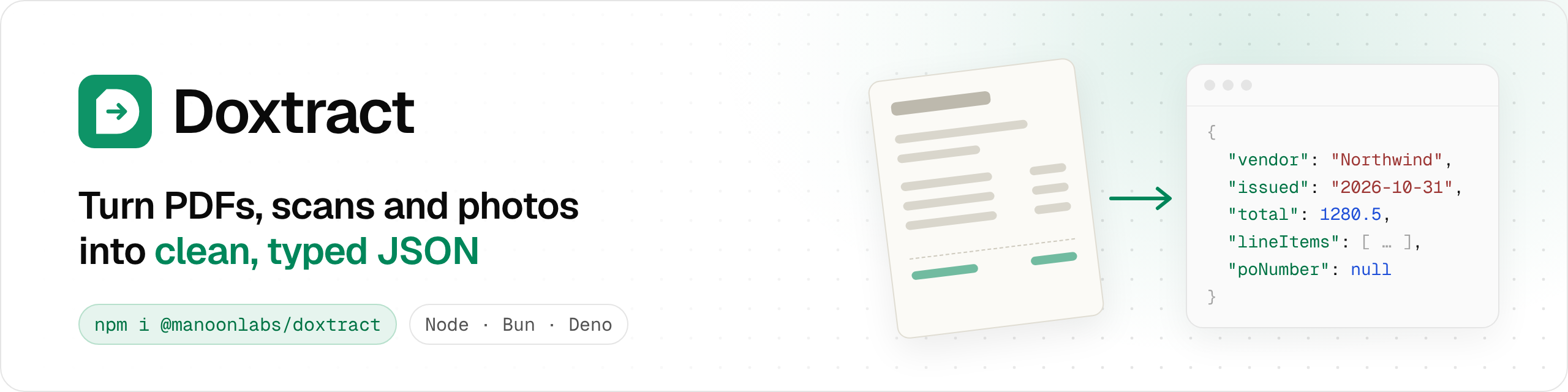
The official JavaScript and TypeScript SDK for Doxtract. Send a PDF, scan, phone photo or text, plus the schema you want. Get back JSON in that shape. If a field isn't on the document, you get null, not a guess.
import { Doxtract } from "@manoonlabs/doxtract";
import { z } from "zod";

const doxtract = new Doxtract(); // reads DOXTRACT_API_KEY

const Invoice = z.object({ vendor: z.string().nullable(), total: z.number().nullable() });

const { values } = await doxtract.parse("invoice.pdf", { schema: Invoice });
values.total; // number | null
Contents
- Why Doxtract
- Benchmark
- Citations
- Install
- Quick start
- Inputs
- Schemas
- Excel and CSV export
- Checking your key
- Async jobs
- Error handling
- Retries, timeouts and cancellation
- Options
- Runtime support
- MCP and the web app
- Pricing
- Development
- License
Why Doxtract
- It copes with messy input. Rotated pages, phone photos, scanned receipts and multi-page PDFs. That's where a plain LLM prompt starts guessing.
- The schema drives the output. You define the fields once, as a saved schema or inline. Every response matches that shape, and arrays are always arrays.
- Typed end to end. Pass a Zod schema and
valuesis typed from it, or useparse<T>()forvalues: T. Errors come back as classes you caninstanceof. - Zero runtime dependencies. The only package it asks for is
zodas a peer, for Zod schemas. It's built on nativefetchandFormData, ships as ESM and CommonJS, and runs server-side on Node 18+, Bun and Deno. - One API in three places. Use it over REST (this SDK), as an MCP server for AI agents and editors, or in the web app.
Benchmark
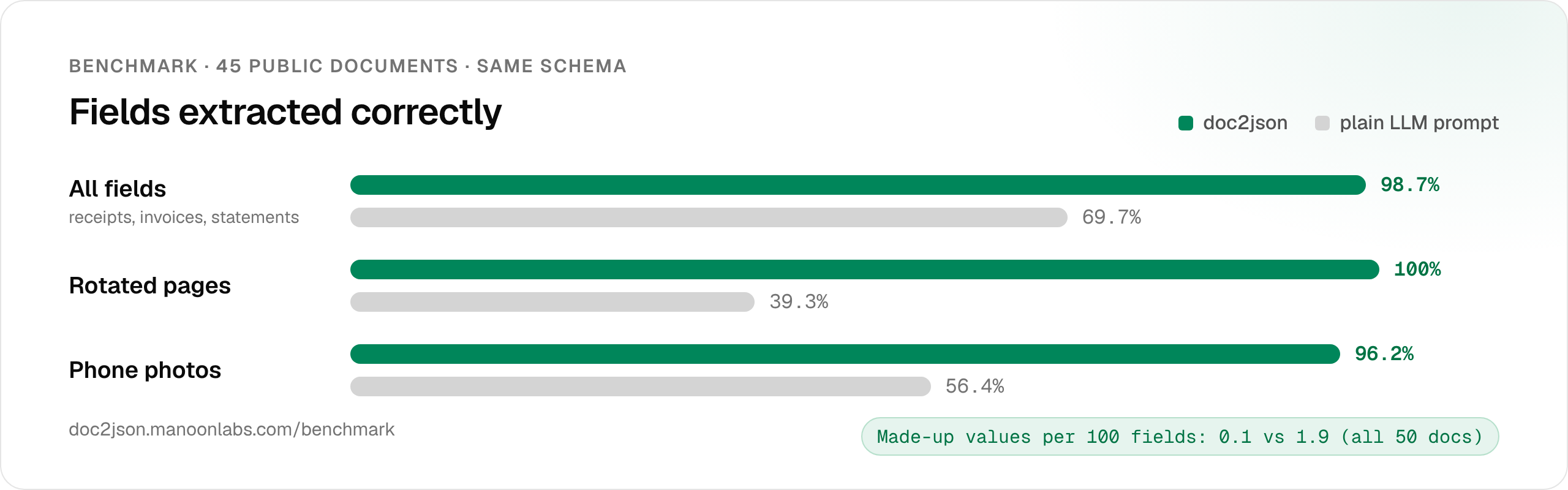
We ran Doxtract and a plain LLM prompt over 45 public documents with the same schema, then scored every field against a hand-checked answer key.
| Fields extracted correctly | Doxtract | Plain LLM prompt |
|---|---|---|
| All fields | 98.7% | 69.7% |
| Rotated pages | 100% | 39.3% |
| Phone photos | 96.2% | 56.4% |
| Made-up values per 100 fields (all 50 docs) | 0.1 | 1.9 |
The method, caveats and per-document CSV are on the benchmark page.
Citations
Every extracted value links back to where it came from. Click a value to see its box on the document, or click a box to jump to the value.
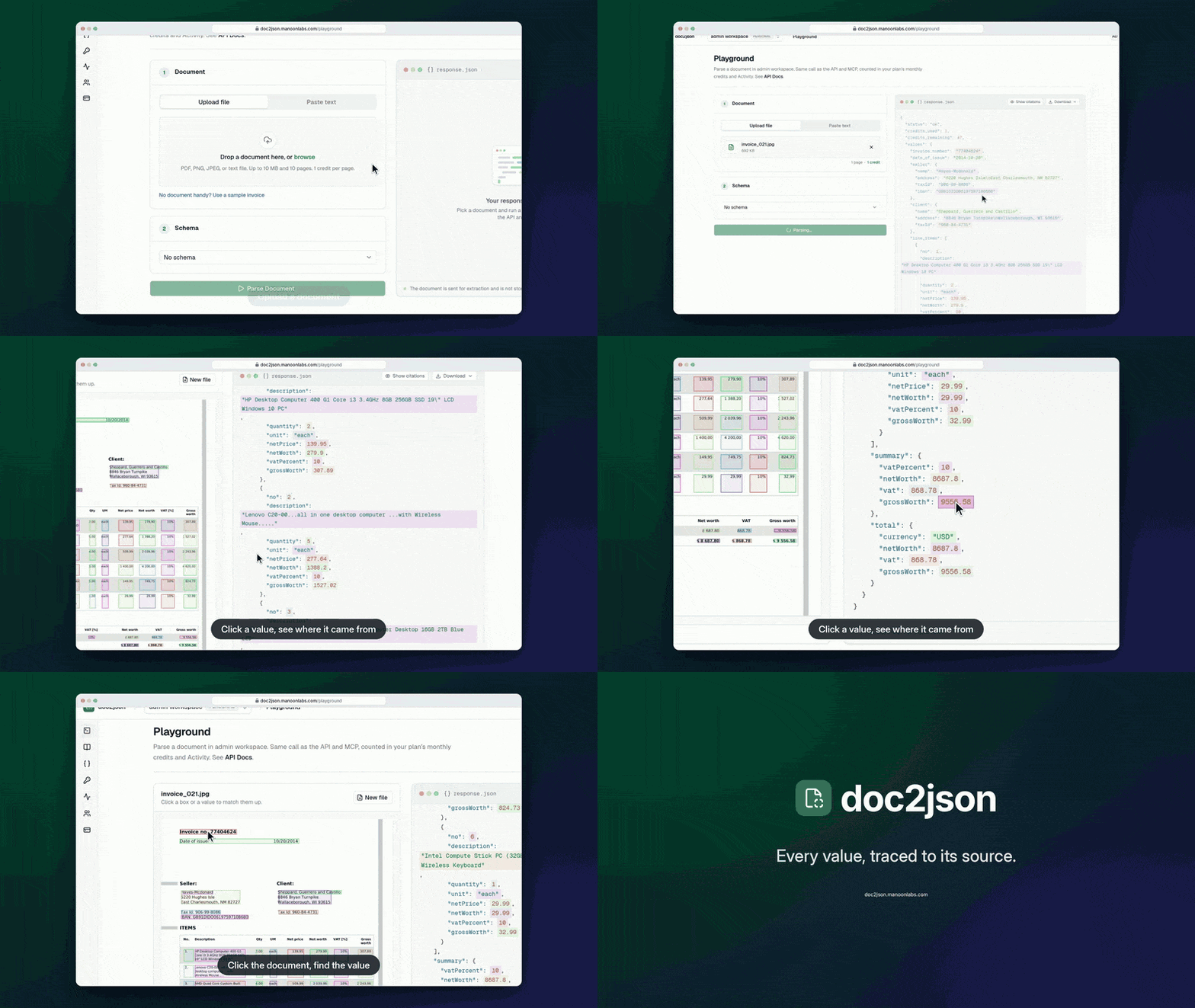
In the SDK, set citations: true:
const result = await doxtract.parse("invoice.pdf", { schema: Invoice, citations: true });

result.citations?.["total"];
// { page: 1, text: "Total 1,280.50", bbox: [0.62, 0.81, 0.91, 0.84], status: "verified", source: "text_layer" }
- Keys: one per value path, such as
totalorlineItems[0].amount. pageandtext: the 1-based page and the printed text the value was read from.pageisnullfor a text document.bbox:[x0, y0, x1, y1]as fractions of the page from the top left, ornullwhen there's no box.status:verified,fuzzy,mismatch,other_pageorunverified, from checking the text against the page.
Install
npm install @manoonlabs/doxtract
# or
pnpm add @manoonlabs/doxtract
yarn add @manoonlabs/doxtract
bun add @manoonlabs/doxtract
On Deno, import npm:@manoonlabs/doxtract.
zod (version 4) is a peer dependency, used only when you pass a Zod schema. npm 7 and later and pnpm install it for you. On Yarn, run yarn add zod if you want Zod schemas. Plain schemas work without it.
Quick start
-
Sign up and create a key on the API Keys page. The full secret is shown once.
-
Put the key in your environment:
shexport DOXTRACT_API_KEY=bk_live_... -
Parse a document:
tsimport { Doxtract } from "@manoonlabs/doxtract"; import { z } from "zod"; const doxtract = new Doxtract({ apiKey: process.env.DOXTRACT_API_KEY }); const Invoice = z.object({ vendor: z.string().nullable(), total: z.number().nullable(), }); const result = await doxtract.parse("invoice.pdf", { schema: Invoice }); console.log(result.values); // { vendor: "Northwind Supply", total: 1280.5 }
Not using Zod? Pass a plain JSON schema or a saved schema name instead. See Without Zod.
If you leave out apiKey, the client reads DOXTRACT_API_KEY, then DOC2JSON_API_KEY. If there's no key at all, the constructor throws a DoxtractError with code missing_api_key. Doc2Json and Doc2JsonError are still exported.
Want to see the output before writing code? Run a sample invoice in the Playground. No sign-in needed.
Inputs
parse() takes the document in whatever form you have it:
import { readFile } from "node:fs/promises";

// A file path (Node, Bun and Deno)
await doxtract.parse("./invoice.pdf");

// Bytes: Buffer, Uint8Array or ArrayBuffer
await doxtract.parse(await readFile("invoice.pdf"), { filename: "invoice.pdf" });

// A Blob or File, for example from an <input type="file">
await doxtract.parse(input.files[0]);

// Base64 (a data: URL prefix is removed for you)
await doxtract.parse({ base64: pdfBase64, filename: "invoice.pdf" });

// Plain text, such as an invoice email
await doxtract.parse({ text: "Invoice INV-1042 from Northwind Supply. Total 1280.50 USD." });
- Formats: PDF, PNG, JPEG and UTF-8 text files work. The type is read from the file bytes, not the name.
- Limits: on the Free plan, documents can be up to 10 MB and 10 pages. Paid plans allow 25 MB and 50 pages. A document over the page limit is refused before any credit is spent.
- Filename: this sets the document name used in your activity log and in export file names. It defaults to the file's own name.
Schemas
Without a schema, Doxtract chooses the fields. To control the output, pass a Zod schema, a plain JSON schema, or the name of a schema saved in your workspace.
Zod schemas
Pass a Zod 4 schema and values is typed with z.infer. There's no JSON to write and no generic to add. The SDK converts the schema for you:
import { z } from "zod";

const Invoice = z.object({
  vendor: z.string().nullable(),
  total: z.number().nullable(),
  issued: z.iso.date().nullable(), // yyyy-mm-dd
  lineItems: z.array(z.object({ description: z.string(), amount: z.number() })),
});

const result = await doxtract.parse("invoice.pdf", { schema: Invoice });

result.values.total; // number | null
result.validation.success; // true when values match Invoice
- Use
.nullable()on any field that might not be on the document. Doxtract returnsnullfor a missing value, and.nullable()keeps your types honest. - Hints:
.describe("...")tells Doxtract how to read a field. - Arrays: an array field is always an array, and
[]when there are no rows. - Validation: the result also has
validation, which isschema.safeParse(values). A mismatch never throws. Checkvalidation.success, and readvalidation.error.issuesfor the details.valuesis always the JSON the API sent, so readvalidation.dataif your schema uses transforms orz.coerce. - Install:
zodis a peer dependency. npm 7 and later install it with the SDK, so there's usually nothing to do. - Mapping:
z.string(),z.number()(and.int()),z.boolean()andz.object()map to the same Doxtract types.z.iso.date()becomesdate, sent back as ayyyy-mm-ddstring. An enum becomes astringwith the allowed values added to the hint, and a literal becomes its own type..optional()drops the key fromrequired. Shapes with no Doxtract type, such as a union of two types,z.record()orz.unknown(), becomeany. Checks like.min()or.regex()aren't sent, butvalidationstill applies them. - Dates as
Date:z.date()also becomesdate, but the API still sends a string. Usez.coerce.date()and readvalidation.datato get aDate. - See the result:
zodToSchema(Invoice)returns the definition the SDK sends. zod/minischemas work too. Zod 3 schemas don't, so upgrade tozod@4.
Without Zod
Pass the definition as a plain JSON schema object, and add the type yourself with parse<T>():
type Invoice = {
  vendor: string | null;
  total: number | null;
  issued: string | null; // yyyy-mm-dd
  lineItems: { description: string; amount: number }[];
};

const result = await doxtract.parse<Invoice>("invoice.pdf", {
  schema: {
    type: "object",
    properties: {
      vendor: { type: "string" },
      total: { type: "number" },
      issued: { type: "date" },
      lineItems: {
        type: "array",
        items: {
          type: "object",
          properties: {
            description: { type: "string" },
            amount: { type: "number" },
          },
          required: ["description", "amount"],
        },
      },
    },
    required: ["vendor", "total"],
  },
});

result.values.total; // number | null
- Field types:
string,number,boolean,date,array,object,nullandany. - Dates: a
datecomes back asyyyy-mm-dd. - Hints: add a
descriptionto any field to tell Doxtract how to read it. - Missing values: a value that isn't on the document is
null. - Arrays: an array field is always an array, and
[]when there are no rows. - No setup: plain schemas work without
zodinstalled.
Saved schemas
Save a schema once and refer to it by name from every app, key and MCP client in the workspace:
await doxtract.schemas.create({ name: "invoice", schema: Invoice }); // Zod or plain JSON
await doxtract.schemas.list(); // [{ id, name, keyCount, createdAt, updatedAt }]
await doxtract.schemas.get("invoice"); // also includes .schema, the definition
await doxtract.schemas.update("invoice", { name: "Invoice v2", schema: Invoice });
You can also build schemas visually in the schema editor.
Excel and CSV export
Set export to get a spreadsheet next to the JSON from the same parse:
import { writeFile } from "node:fs/promises";

const result = await doxtract.parse("invoice.pdf", { schema: "invoice", export: "xlsx" });

result.values; // the JSON is always returned
if (result.export) await writeFile(result.export.filename, result.export.data);
| Field | What it is |
|---|---|
export.format | "xlsx" or "csv" |
export.filename | A suggested name, <name>-<yyyy-mm-dd>.<ext> |
export.data | The decoded file as a Uint8Array |
export.content | The original base64 from the API |
export.contentType | The MIME type |
Checking your key
await doxtract.whoami(); // { workspaceId, tokenId, credits_remaining }
whoami() confirms that a key works. It doesn't spend anything.
Async jobs
A long parse can outlive an HTTP connection. Start it with jobs.create(), which returns a job id straight away, then poll it.
const { job_id } = await doxtract.jobs.create("big-report.pdf", { schema: "report" });

// Poll until it succeeds. Failed jobs throw the typed error for their failure.
const job = await doxtract.jobs.wait(job_id, { waitTimeout: 5 * 60_000 });
job.values;
job.job_status; // "succeeded"

await doxtract.jobs.get(job_id); // one status check
await doxtract.jobs.list({ status: "succeeded", pageSize: 20 }); // newest first, no values
job_status is queued, running, succeeded, failed or expired. Results are kept for 24 hours; after that jobs.get() throws ResultExpiredError. jobs.wait() polls every second at first, slows to every 10 seconds, and throws APITimeoutError when waitTimeout (default 10 minutes) runs out. Pass signal to cancel it.
Idempotency
Every parse() and jobs.create() call sends an X-Job-Id UUID. By default the SDK makes one per call and reuses it when it retries after a network error, 429 or 503, so a retry never runs or charges a parse twice. Pass your own idempotencyKey to make a call safe to repeat from your side too:
import { randomUUID } from "node:crypto";

const key = randomUUID(); // store it with your own record
await doxtract.jobs.create("invoice.pdf", { schema: "invoice", idempotencyKey: key });
// Same key, same request, within about 24 hours: returns the original job. Nothing is run or charged again.
const [existing] = (await doxtract.jobs.list({ clientJobId: key })).jobs;
The same key with a different document or options throws IdempotencyKeyReusedError (409). A key you chose is never retried by the SDK after a failed job; use a new UUID to try again.
Error handling
Every error extends DoxtractError, which has these fields:
status;code, a stable string such asrate_limited;message;requestId, when the server sent one;bodyandheaders.
import {
  AuthenticationError,
  DoxtractError,
  InsufficientCreditsError,
  RateLimitError,
  ValidationError,
} from "@manoonlabs/doxtract";

try {
  await doxtract.parse("invoice.pdf", { schema: "invoice" });
} catch (error) {
  if (error instanceof ValidationError) console.error("Bad request:", error.message);
  else if (error instanceof AuthenticationError) console.error("Check your API key");
  else if (error instanceof InsufficientCreditsError)
    console.error("Out of credits:", error.upgrade);
  else if (error instanceof RateLimitError) console.error(`Retry in ${error.retryAfter}s`);
  else if (error instanceof DoxtractError) console.error(error.code, error.message);
  else throw error;
}
| Class | When |
|---|---|
ValidationError | 400 or 422: bad input, an unknown schema, or too many pages. Has pages and maxPages when the document was over the limit. Nothing is spent. |
AuthenticationError | 401: the key is missing, unknown, revoked or expired. |
InsufficientCreditsError | 402: not enough credits. Has creditsRequired and upgrade. |
PermissionDeniedError | 403: parsing is paused for the workspace. |
NotFoundError | 404: the schema wasn't found. |
ConflictError | 409: the schema name is taken, or the schema limit is reached. |
IdempotencyKeyReusedError | 409 IDEMPOTENCY_KEY_REUSED: the key was used with a different request. Has jobId. A ConflictError. |
ResultExpiredError | 410: the job's result is past its 24-hour window. |
PayloadTooLargeError | 413: the request body is over 40 MB (documents are limited to 25 MB). |
RateLimitError | 429: you sent more than one parse per second per workspace. Has retryAfter. Nothing is spent. |
InternalServerError | 5xx: the parse failed or timed out. The charge is refunded. |
ServiceUnavailableError | 503 SERVICE_UNAVAILABLE: nothing was charged. Has retryAfter. An InternalServerError. |
ModelTimeoutError | 504: the parse ran too long. The charge is refunded. An InternalServerError. |
APIError | Any other error status. This is the base class of all the classes above. |
APIConnectionError | No response came back: a network, DNS or TLS failure. |
APITimeoutError | The request took longer than timeout. |
APIUserAbortError | You aborted the request with signal. |
API errors also carry creditsUsed and creditsRemaining when the server sends them, plus jobId and failureCode (such as SERVICE_UNAVAILABLE) when the body has them.
Retries, timeouts and cancellation
- Retried by default: requests that fail with 408, 429, 5xx or a network error are retried twice, with jittered exponential backoff.
- Retry timing: a
Retry-Afterheader, orretry_afterin the body, is honoured. - Retry-After: honoured for 429 and 503, capped at 60 seconds. The same idempotency key is sent again, so a retry cannot double-run a parse.
- Not retried: other 4xx errors, a failed job, a failed parse that used your own
idempotencyKey, andschemas.create(), so you never get a duplicate.
const doxtract = new Doxtract({
  timeout: 120_000, // ms per attempt, the default
  maxRetries: 2, // the default
});

const controller = new AbortController();
await doxtract.parse("invoice.pdf", {
  signal: controller.signal,
  timeout: 60_000, // override for this call
  maxRetries: 0,
});
Options
Client options (new Doxtract(options)):
| Option | Default | Description |
|---|---|---|
apiKey | DOXTRACT_API_KEY, else DOC2JSON_API_KEY | Your API key (mldxt_…) |
baseUrl | https://doxtract.manoonlabs.com | API origin |
timeout | 120000 | Milliseconds per attempt |
maxRetries | 2 | Retries on 408, 429, 5xx and network errors |
fetch | global fetch | A custom fetch, for proxies or tests |
Per-call options (parse(input, options)):
| Option | Type | Description |
|---|---|---|
schema | string | SchemaDefinition | ZodType | A saved schema name, an inline definition, or a Zod schema |
citations | boolean | Also return where each value was read. See Citations |
export | "xlsx" | "csv" | Also return a spreadsheet |
strict | boolean | Long documents: fail the parse if any chunk of pages can't be read |
idempotencyKey | string | A UUID sent as X-Job-Id. See Idempotency |
filename | string | Document name. Defaults to the file's own name |
signal | AbortSignal | Cancel the request |
timeout | number | Override the client timeout |
maxRetries | number | Override the client retry count |
signal, timeout and maxRetries also work on whoami() and every schemas.* method.
Result (what parse() returns):
| Field | Description |
|---|---|
values | The extracted JSON, in the shape of your schema |
validation | With a Zod schema only: the safeParse result |
export | The spreadsheet, when you set export |
citations | Where each value was read, when you set citations |
credits_used | Credits for this parse |
credits_remaining | Credits left this month |
Runtime support
| Runtime | Supported |
|---|---|
| Node.js | 18 and later |
| Bun | Yes |
| Deno | Yes, via npm:@manoonlabs/doxtract |
| Browsers | Not supported, the API doesn't allow cross-origin calls |
Call Doxtract from your server, so your API key stays secret.
MCP and the web app
The SDK covers the REST API. The same parsing is also available in two other places:
- MCP server: connect Cursor or any other MCP client to
https://doxtract.manoonlabs.com/mcp, using your API key as a bearer token. - Web app: this has the Playground, the visual schema editor, API keys and an activity log.
Pricing
There's a Free plan with 50 credits a month and no card needed. One credit is one page, an image counts as one page, and plain text costs one credit per 3,000 characters. You're only charged when extraction succeeds. See pricing for the paid plans.
Development
npm install
npm run build      # tsup: ESM, CJS and .d.ts into dist/
npm test           # vitest
npm run typecheck
npm run lint       # biome
Release to npm
Publishing uses npm Trusted Publishing from GitHub Actions. A push to main publishes when package.json version is not already on npm.
- Bump
versioninpackage.json,VERSIONinsrc/version.ts, andCHANGELOG.md. - Merge to
main. The Publish workflow runsnpm publish.
See .github/workflows/publish.yml. Cursor agents follow .cursor/rules/release.mdc for the full checklist.
The examples are examples/zod.ts and, without Zod, examples/basic.ts. Changes are listed in CHANGELOG.md, and you can report a security issue through SECURITY.md. Bugs and feature requests go to GitHub Issues.
License
MIT, Copyright (c) 2026 ManoonLabs







