Listed from the MCP registry; nobody on Odel publishes it.

locli
Find, add, push and pull an app's user-facing texts in locli (iOS, Android, web, backend).
Runs on your machine from its package; the steps are below.
What it does
- Reads
- Writes
- High impact
At most: moves money, runs code or commands, deletes data, or sends messages for you.
What it costs
FreeOdel charges nothing per call. The publisher may charge for its own service.
Runs locally over stdio
This server isn't hosted — your MCP client launches it from a package registry. Use one of the commands below, or drop the config into your client (e.g. Claude Desktop).
Run
npx -y @locli/cli
MCP client config
{
  "mcpServers": {
    "locli": {
      "command": "npx",
      "args": [
        "-y",
        "@locli/cli"
      ]
    }
  }
}Localize your app with your coding agent. locli is the one place for the texts of your iOS, Android, web and backend app and its store listings. Your agent moves the texts into the app's catalog, uploads and translates them; locli checks every one; nothing ships until a person approves the release.
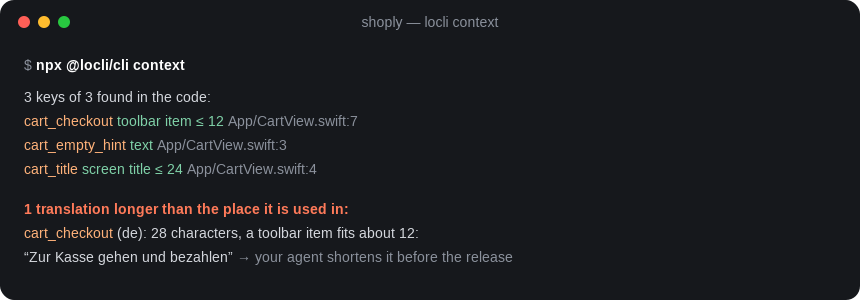
How it works
- Your agent writes the texts where they belong:
Localizable.xcstrings,strings.xmlor ICU JSON, under stable keys likecart_checkout, never hard-coded strings. locli pushuploads new keys and texts and never overwrites what translators changed.- The agent translates with your project's tone, glossary and the place each text appears.
locli contextfinds that place in the code: a toolbar item fits about 12 characters, a screen title about 24. Placeholders, plurals and glossary terms are checked on every upload. - You approve a release in the locli web app: each changed text with a diff, then the release as a whole.
locli pullwrites exactly that release into the app. Builds stay reproducible.
Works with Claude Code, Cursor, Codex and any MCP client; no lock-in to one agent.
This repository holds what runs on your machine:
| Folder | What |
|---|---|
cli/ | @locli/cli: init, login, push, pull, status, context, areas, guide and the MCP server (npx -y @locli/cli mcp) |
plugin/ | The Claude Code plugin: a skill that tells the agent when and how to use locli, plus the MCP server |
cli/skill/ | The full agent skill that locli init installs into a repository |
Get started
In your app's repository:
npx @locli/cli init
Or ask your coding agent: "Set up locli for this app's texts." (docs: https://locli.dev/docs/agents.md).
Claude Code
/plugin marketplace add mariohahn/locli
/plugin install locli@locli
Cursor, Codex and other MCP clients
{ "mcpServers": { "locli": { "command": "npx", "args": ["-y", "@locli/cli", "mcp"] } } }
Sign in once with npx @locli/cli login (it opens the browser to approve the CLI). CI uses
a project token in LOCLI_TOKEN.
Data
The CLI and MCP server talk to one service: the locli server in locli.json (apiURL,
default https://locli.dev, hosted in Frankfurt). They send the app's texts, their keys,
comments and plural forms, and short usage notes such as "used as a toolbar item"; they do not
send source code or file contents. Texts stay in the locli project until it is deleted. The
sign-in token is stored in ~/.config/locli/credentials.json (or $XDG_CONFIG_HOME), readable
only by you. Privacy policy: https://locli.dev/app/privacy/
Issues
Bugs and ideas: open an issue. The locli server and web app are not part of this repository.
License: MIT