Listed from the MCP registry; nobody on Odel publishes it.

zeeta
Outliner where a node can have multiple parents. Each tree is a remote MCP server for your notes.
Runs on your machine from its package; the steps are below.
What it does
- Reads
- Writes
- High impact
At most: creates or changes data: records, files, settings.
What it costs
FreeOdel charges nothing per call. The publisher may charge for its own service.
Runs locally
This server runs on your machine over stdio, but its source registry didn't list a distribution package. Check the source repository for setup instructions.
zeetaweb
English | 日本語

A web outline editor that organizes nodes as a tree in which a node can have multiple parents (a DAG). It runs on Cloudflare Pages / Workers / D1 / R2 / Workers AI / Vectorize.
Try it: https://zeetaweb.jp (free; sign in with Google)
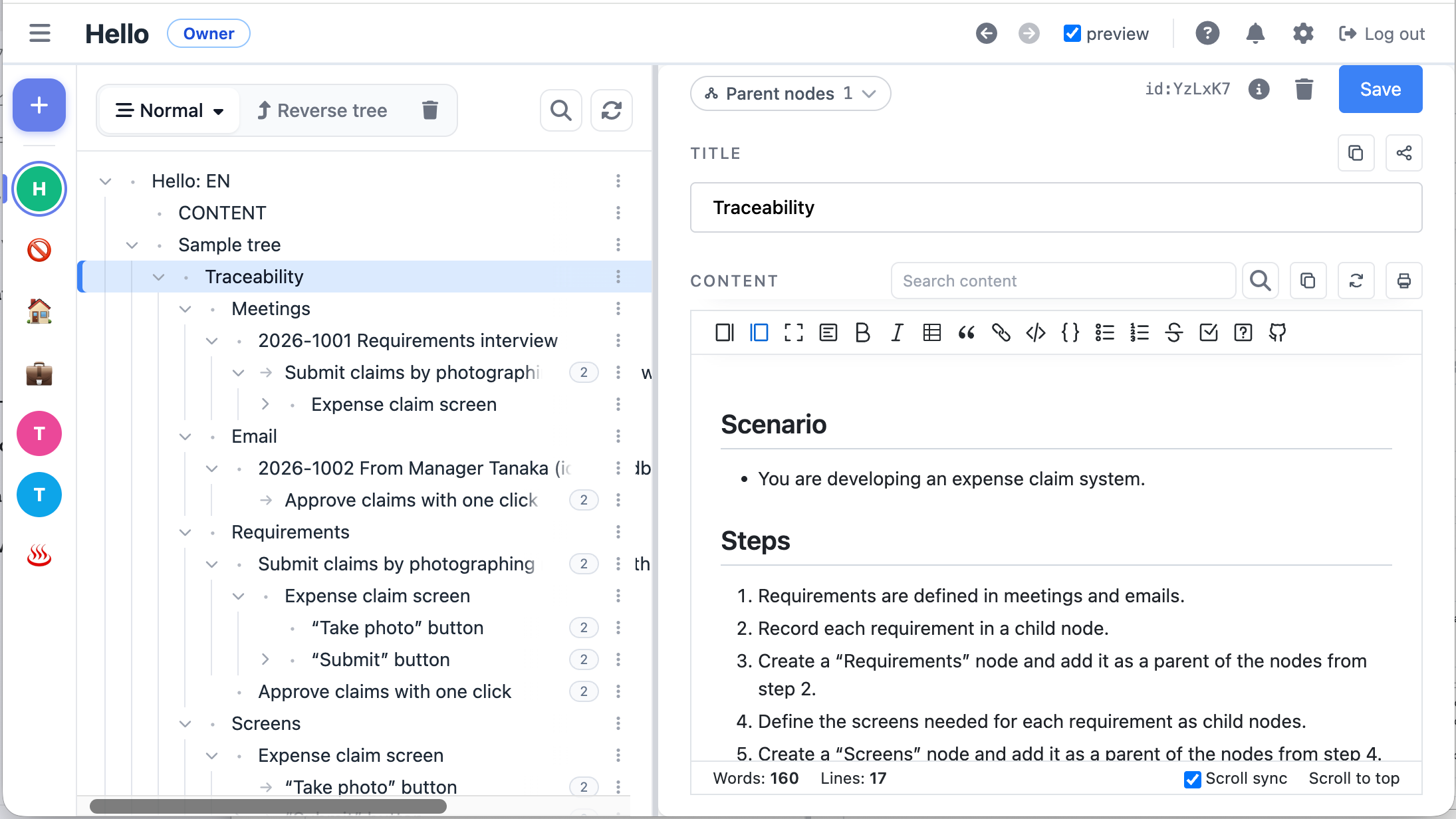
Features
- Sign in with a Google account (OAuth)
- Create, edit and reorder trees and nodes. A single node can sit under multiple parents (structural links / reference links)
- Markdown rendering of node content, image attachments (R2), edit history and restoring past versions
- Keyword search and vector search with Workers AI + Vectorize (production only)
- Tree sharing (email invitations, viewer / editor roles)
- MCP server (OAuth authorization). MCP clients such as Claude can read and write your trees
- Japanese / English UI
About this repository (please read)
- Cloudflare only. The database (D1), image storage (R2), search (Workers AI / Vectorize), and build and deploy (Pages / Wrangler) are all implemented with Cloudflare features. It will not run in other environments (a typical server, AWS, Vercel, etc.) without being rewritten.
- No warranty. As stated in the MIT License, the author accepts no liability for data corruption or loss, service outages, or anything else arising from use of this software.
- The hosted version run by the author comes with no guarantees. Continued availability and data preservation are not guaranteed. If you want to keep using it, fork this repository and run it on your own Cloudflare account.
- Issues and pull requests are not accepted. They may be closed without a response. No support is provided.
Requirements
- Node.js 22 or later
- A Cloudflare account (D1 / R2 / Pages; Workers AI / Vectorize for vector search)
- A Google OAuth app (a GitHub OAuth app is optional; without it, sign-in is Google only)
- Mailgun, if you want to send invitation emails (if unset, sending is skipped and everything else still works)
Setup
1. Dependencies and config files
npm install

cp wrangler.toml.example wrangler.toml
cp wrangler.local.toml.example wrangler.local.toml
cp .dev.vars.example .dev.vars
wrangler.toml / wrangler.local.toml / .dev.vars are in .gitignore. Do not commit them.
2. Create Cloudflare resources
# D1 (local development, production, staging)
npx wrangler d1 create zeeta2-production
npx wrangler d1 create your-app-production --location apac
npx wrangler d1 create your-app-staging --location apac

# R2 (regular and preview)
npx wrangler r2 bucket create your-app-images
npx wrangler r2 bucket create your-app-images-preview

# Vectorize (matches the output dimensions of @cf/baai/bge-m3)
npx wrangler vectorize create your-app-prod --dimensions 1024 --metric cosine
npx wrangler vectorize create your-app-dev --dimensions 1024 --metric cosine
Write the names of the resources you created, and the database_id shown when each D1 database is created, into the placeholders (<...>) in wrangler.toml and wrangler.local.toml.
- The local npm scripts (
db:migrate:local/db:seed/dev:sandbox, etc.) refer to the local D1 by the fixed namezeeta2-production. Setdatabase_namein the top-level[[d1_databases]]tozeeta2-production. - The production scripts (
db:migrate:prod/db:console:prod) refer to the D1 in[env.production]through the binding nameDBand--env production. - The Pages project name is taken from
nameinwrangler.toml.
3. Environment variables (.dev.vars)
| Variable | Purpose |
|---|---|
JWT_SECRET | Signing key for session JWTs. A random value of 32 or more characters (e.g. openssl rand -base64 48) |
GOOGLE_CLIENT_ID / GOOGLE_CLIENT_SECRET | Google OAuth. The redirect URI is <APP_URL>/auth/callback/google |
GITHUB_CLIENT_ID / GITHUB_CLIENT_SECRET | Optional. GitHub OAuth; the callback URL is <APP_URL>/auth/callback/github. The login screen has no GitHub button, so leaving these unset is fine: the app starts and works with Google sign-in only |
APP_URL | The app's URL. http://localhost:3000 for local development |
ENABLE_TEST_ENDPOINTS | When true, enables the test login (/auth/test-login), locally only. Do not set it in production |
MAILGUN_API_KEY / MAILGUN_DOMAIN | Sending invitation emails. If unset, sending is skipped |
In production, set the same variables as Cloudflare Pages environment variables (secrets), except ENABLE_TEST_ENDPOINTS.
4. Run locally
npm run db:reset      # Recreate the local D1 and apply migrations and seed data
npm run build
npm run dev:sandbox   # http://localhost:3000
- In the browser, use
localhost, not127.0.0.1. The OAuth state cookie is scoped by host name, so signing in fails on127.0.0.1. - Test login:
http://localhost:3000/auth/test-login?user_id=1 - Do not run
npm run db:resetwhile the dev server is running. The DB file the running process uses is deleted, and every API that touches the DB returns 500. Stop the server, reset, then start it again.
5. Tests
npx playwright test tests/<file>.spec.js   # E2E (starts the dev server automatically)
npm run test:node                          # Node unit tests
6. Deploy to production
npm run build
npm run db:migrate:prod
node scripts/deploy-pages.js
Tech stack
- Backend: Hono (Cloudflare Pages Functions / Workers), TypeScript
- Data: Cloudflare D1 (SQLite), R2 (images), Workers AI + Vectorize (vector search)
- Frontend: Vanilla JavaScript
- Build: Vite, Wrangler
- Tests: Playwright, Node.js test runner
License
MIT © masa0703
Third-party assets under public/static/vendor/ are subject to their own bundled licenses.







