

Meridian
Claude Code has no memory between sessions. Meridian fixes that.
Open-source MCP server for persistent AI session memory — shared task log, pinned decisions, human-in-the-loop queue, and tiered handoffs. Works with Claude Code, Cursor, Cline, Claude Desktop, or any MCP client.









Why Meridian
Every AI coding session boots blind. You re-explain the architecture, re-describe the constraints, re-list what's been tried. When context fills up mid-task, everything is lost. This is context debt — and it compounds.
Meridian gives your sessions shared memory. They see the same task log, the same pinned decisions, the same goal state. When context fills up, a new session resumes from a compressed handoff in seconds. No copy-paste, no re-explaining from scratch.
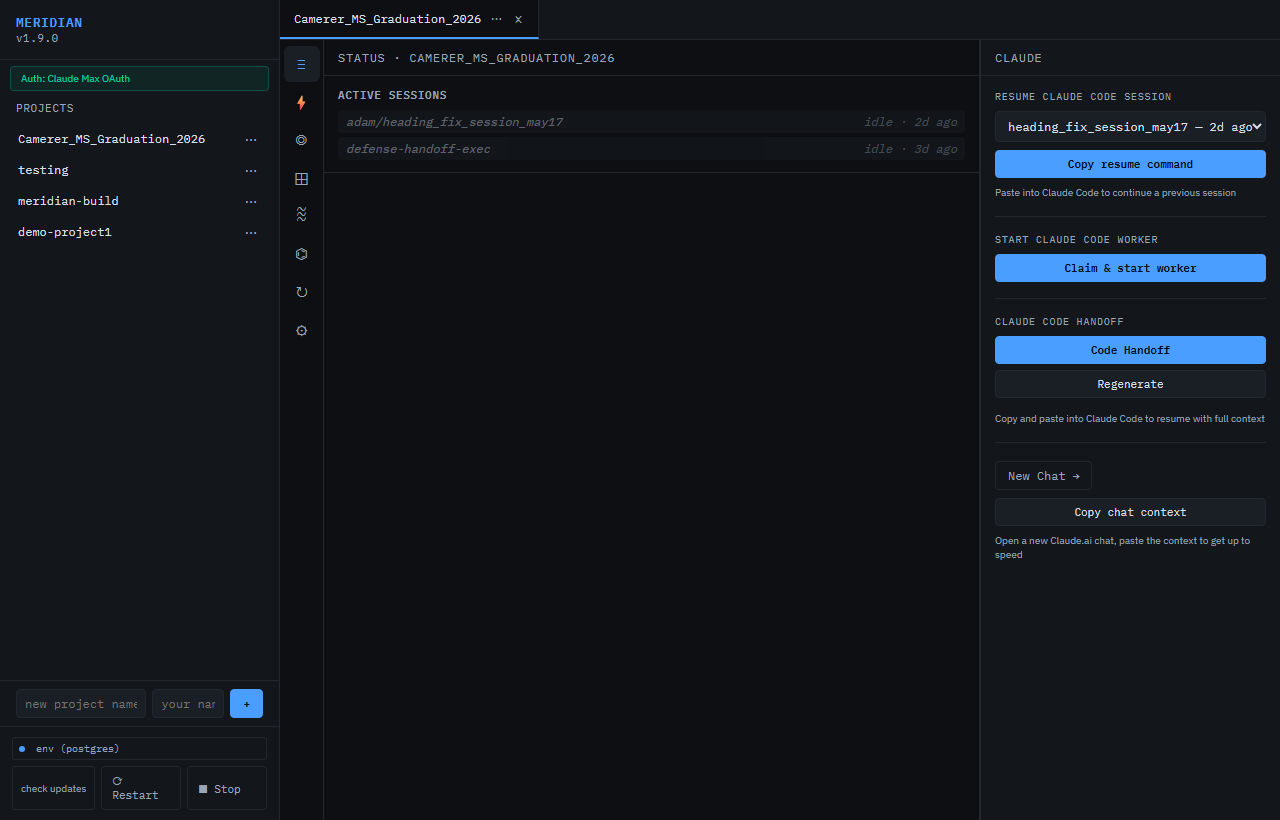
What it is, in 30 seconds
A local MCP server every AI session connects to. They share goal state, see each other's task log, and resume from a compressed handoff when context fills up.
Two ways to run Meridian:
- Self-host — free forever, any team size. Clone and run in 2 commands.
- Hosted at usemeridian.us — 30 days free (no card), then $20/mo Standard.
Quickstart
Option 1 — binary release (recommended)
Signed binaries for Windows, macOS (Apple Silicon), and Linux are attached to every GitHub release (current: v0.2.6).
Linux / macOS (one-liner via uv):
uv tool install meridian-server
meridian --tunnel --repo .
Linux / macOS (manual binary download):
curl -fsSL https://usemeridian.us/install.sh | sh
Windows (PowerShell, one-liner via uv):
uv tool install meridian-server
meridian --tunnel --repo .
Windows (PowerShell, manual binary download):
irm https://usemeridian.us/install-windows.ps1 | iex
Dashboard opens at http://localhost:7878. Data persists in ~/.meridian/ by default.
Option 2 — from source (dev setup / self-host)
Linux / macOS:
git clone https://github.com/meridianmcp/Meridian
cd Meridian
./install.sh
pixi run start
Windows (PowerShell):
git clone https://github.com/meridianmcp/Meridian
cd Meridian
.\install.ps1
pixi run start
Dashboard opens at http://localhost:7878. Data persists in ./data/meridian.db.
Wire it into your AI client
Claude Code
Drop a .mcp.json at your project root.
Hosted (no install) — generate an API key at usemeridian.us/settings:
{
  "mcpServers": {
    "meridian": {
      "type": "http",
      "url": "https://usemeridian.us/mcp",
      "headers": { "Authorization": "Bearer sk_meridian_YOUR_KEY_HERE" }
    }
  }
}
Self-host (from source):
{
  "mcpServers": {
    "meridian": {
      "command": "pixi",
      "args": ["run", "python", "-m", "meridian", "--mcp"],
      "cwd": "/absolute/path/to/Meridian"
    }
  }
}
Cursor / Windsurf
Same JSON snippet — both clients read .mcp.json from the project root.
Claude Desktop
Add the same mcpServers block to:
- Windows:
%APPDATA%\Claude\claude_desktop_config.json - macOS:
~/Library/Application Support/Claude/claude_desktop_config.json
Restart Claude Desktop. New chats have Meridian tools. If a newly deployed tool is still missing, follow the MCP tool-surface freshness guide before editing any client cache.
claude.ai web (recommended for planning chat)
Use dnakov/claude-mcp — included as a submodule — to bridge claude.ai to your local Meridian server:
git clone --recurse-submodules https://github.com/meridianmcp/Meridian
- Open
chrome://extensionsand enable Developer mode - Click Load unpacked and select
extensions/claude-mcp - Click the extension icon and set the URL to
http://localhost:7878/mcp
All 54+ Meridian tools (checkpoint, log_task, pin_decision, etc.) are now available directly in claude.ai planning chat. No copy-pasting session output.
Hosted tier (no install)
Sign in at usemeridian.us → Settings → MCP client setup → Generate API key → Copy config.
Or manually:
{"mcpServers":{"meridian":{"type":"http","url":"https://usemeridian.us/mcp","headers":{"Authorization":"Bearer sk_meridian_YOUR_KEY_HERE"}}}}
claude.ai (browser) users: install the dnakov/claude-mcp Chrome extension, then visit usemeridian.us/install-mcp for a step-by-step setup guide with one-click copy buttons.
Get your API key at usemeridian.us/settings after sign-in. Free tier: 30 days, no card, full features.
What you get
- Dashboard at
http://localhost:7878— sessions, tasks, sprint board, swimlane timeline, HITL queue, pinned decisions. - MCP tools —
start_session,log_task,claim_task,set_decision,pin_decision,request_hitl,generate_handoff, and ~50 more. - Symbol-level parallel safety —
claim_filecan claim a single class or function (parsed withast/ tree-sitter) so two sessions edit the same file safely; an overlapping claim is blocked with the free symbols listed. - Live work queue — planners inject sprint items mid-run; executors pick them
up at the next item boundary via a
board_changesignal, no interruption. - HITL recommended option —
request_hitlcan flag a safe-default option the dashboard highlights; Enter submits it, number keys pick others. - GitHub hub (hosted) — connect your repo once in Settings; sessions get
read_file,list_files,search_code,git_log,get_commitinjected automatically. No extra install. - Tiered handoffs — L0/L1/L2 compression so a fresh session can resume in seconds.
- Webhook intake — push events from LangGraph / Autogen / custom agents into the same dashboard.
- Works everywhere — Claude Code, Claude Desktop, Cursor, Windsurf, LangGraph, custom.
How it works
> start_session(project_id="meridian", session_name="feature-x")
  ✓ session registered · sprint loaded · 12 active tasks

> get_tasks(project_id="meridian", limit=5)
  [DONE]    backend / wire decisions_pinned table
  [PENDING] frontend / add notes vtab (claimed by session-2)

> claim_task(task_id="a1f3...")
  ✓ claimed — other sessions skip this one
State lives in data/meridian.db (SQLite) or a Postgres URL via MERIDIAN_DB_URL.
No cloud required for local use.
Team coordination
Point MERIDIAN_DB_URL at a shared Postgres (Neon free tier works great). Every
teammate runs their own local Meridian against the same DB — instant shared
sessions, no Meridian server in the cloud.
Auto-checkpoint with hooks
One command wires Claude Code and Codex to Meridian. Every session start injects your project context automatically. Every session end snapshots completed work and writes a delta handoff.
Mac/Linux:
curl -fsSL https://usemeridian.us/hooks.sh | bash
Windows:
irm https://usemeridian.us/hooks.ps1 | iex
Prompts for your Meridian server URL (default http://localhost:7878), then opens
your browser to connect this machine — no project ID or API token to paste. Writes
to ~/.claude/settings.json (Claude Code) or ~/.codex/config.toml (Codex). After
setup, every session automatically:
- On start — calls
POST /hooks/session-start→ injects goal, sprint items, recent tasks, and pinned decisions into the session context viaadditionalContext. - On stop — calls
POST /hooks/stop→ runsauto_captureand writes a delta handoff so the next session resumes from where this one ended.
No more manual start_session() calls. No lost work when context fills.
Hosted tier
| Standard | Pro | |
|---|---|---|
| Price | $20/mo | $49/mo (waitlist) |
| Storage | 1 GB included | 10 GB included |
| Compute | 2 CU · 100 hrs/mo | 4 CU · 300 hrs/mo |
| Bring your own Postgres | ✓ | ✓ |
| OAuth + email magic link | ✓ | ✓ |
| Extra storage | $0.50 / GB-month | $0.50 / GB-month |
| Support | Priority |
30-day free trial · no card required
License
MSL-1.0 — free for local and internal use at any team size. Paid license required if you host Meridian as a service for others. Converts to MIT after 6 years.
For licensing questions: hello@usemeridian.us
Contributors
Built by @ajc3xc
