
eighty MCP — docs, prompts, and screenshots



A public Model Context Protocol server that lets any MCP-compatible client — Claude Desktop, Claude.ai Connectors, Cursor, ChatGPT Apps, MCP Inspector — read and write a real-life RPG character sheet.
The server is live at
https://mcp.80l.app. This repo is the documentation, example prompts, and reference screenshots — not the server source.
What is this
eighty is a gamified self-improvement iOS app: real-world quests, character stats, skill trees, badges, streaks, leaderboards, social challenges. The MCP server exposes the same 35 actions the iOS app uses — browse_quests, create_quest, take_quest, complete_quest, get_profile, send_challenge, view_public_profile, the whole catalog — so an LLM client can drive the experience: plan your day as quests, coach you through them, send challenges to friends, react to your social feed, level up your character.
It's the same backend the iOS app talks to. No fork. Your MCP session and your iOS app are two views over one account.
Quickstart
Add to your claude_desktop_config.json:
{
  "mcpServers": {
    "eighty": {
      "url": "https://mcp.80l.app"
    }
  }
}
Restart Claude Desktop. On first tool call, OAuth opens in your browser — sign in with Google, Apple, or email/password. (New users get an account auto-provisioned at sign-in.) You're now connected.
Full setup for other clients (Cursor, Claude.ai web Connectors, MCP Inspector, ChatGPT Apps) is in docs/auth.md.
Try it without installing anything
Inspector — Anthropic's reference MCP client — runs locally with no setup:
npx @modelcontextprotocol/inspector
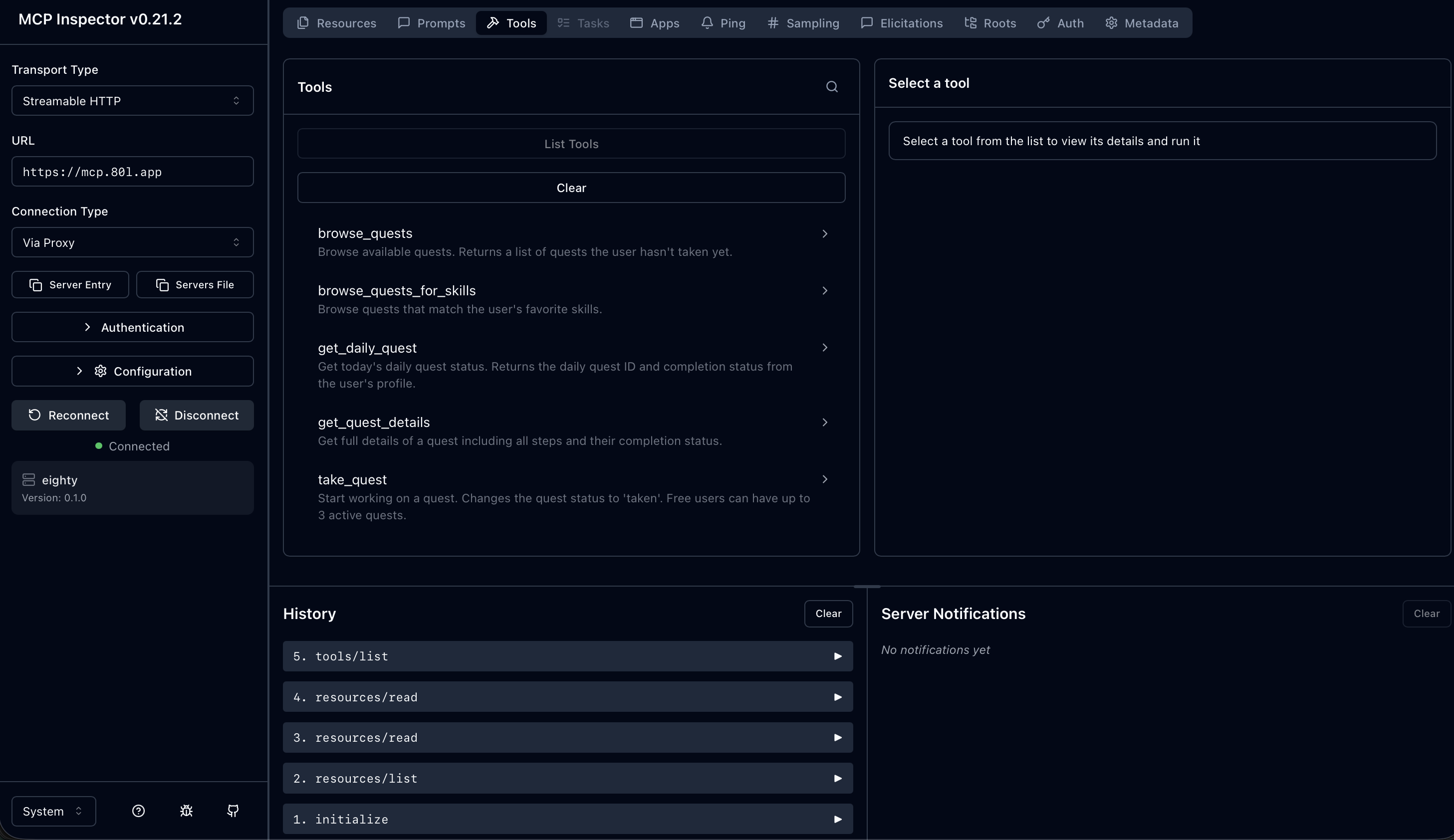
In the browser: set Transport Type to Streamable HTTP, URL to https://mcp.80l.app, Connection Type to Via Proxy, click Connect. Authorize via the OAuth popup. The full tool catalog loads in the sidebar.
Tools
35 tools across 7 categories — quests, quest creation, skills, profile, social, challenges, leaderboard. Plus 4 ambient resources and 3 pre-built prompts. Full reference in docs/tools-reference.md.
A few signature examples:
| Tool | What it does |
|---|---|
view_public_profile | Same rich profile shape the iOS app shows on tap (level, stats, streaks, badges, completed quests, follower counts). |
create_quest + publish_quest | Author a real quest from MCP that ships into eighty's catalog after review. |
send_challenge (Premium) | Real-time challenge to another user with a time limit — fires a push notification to their phone. |
whats_next (prompt) | One-shot personalized recommendation drawn from your profile, active quests, favorite skills, and today's daily quest. |
Hand-picked example prompts (copy-paste into your client) are in prompts/.
How it works
client → mcp.80l.app (OAuth 2.1) → same backend handlers the iOS app uses → persistence
The MCP server is a thin authorization shell — every tool delegates to the same handler the iOS app calls. One source of truth for business rules (quest caps, premium gating, social-graph privacy, idempotency). See docs/architecture.md.
Authentication
OAuth 2.1 + PKCE + Dynamic Client Registration (RFC 7591). No API keys, no developer-portal signup. Any spec-compliant MCP client auto-discovers the OAuth endpoints from /.well-known/oauth-protected-resource and registers itself. Full wire-level flow in docs/auth.md.
Premium features
Most of the surface is free. Four tools (challenges) plus the top-50 leaderboard rows (rows 11–50) require an active eighty Premium subscription, which is sold through the iOS App Store. See docs/premium-features.md for what's gated and how to upgrade.
Screenshots
Reference captures showing the server in use. Real demo data from staging; no PII.
Claude Desktop — claude-desktop/screenshots/
01-quests-browse-quests.png—browse_questslisting02-profile-character-sheet.png—get_profile(Atlas Lv 58)03-social-public-profile.png—view_public_profilerich response (Ember Lv 45)04-challenges-pending.png—list_challenges+get_challenge_details
MCP Inspector — inspector/screenshots/
07-inspector-tool-list.png— tool catalog + connected state08-inspector-browse-quests.png— tool execution + JSON response09-inspector-view-public-profile.png—view_public_profile(Ember)10-inspector-prompts.png— the three MCP prompts
Other first-party clients
- iOS — App Store
- Android — not on Android yet? Subscribe for updates.
Repo layout
.
├── README.md                       (you are here)
├── docs/
│   ├── architecture.md             (thin proxy → backend handlers)
│   ├── tools-reference.md          (all 35 tools with signatures)
│   ├── auth.md                     (OAuth 2.1 setup per client)
│   └── premium-features.md         (what's gated, how to upgrade)
├── claude-desktop/
│   ├── claude_desktop_config.json  (drop-in config snippet)
│   └── screenshots/                (4 + 2 bonus reference captures)
├── inspector/
│   └── screenshots/                (4 captures from MCP Inspector)
└── prompts/
    ├── README.md                   (index)
    └── 01–08-*.md                  (8 example prompts)
License
MIT.
Built by @alemetlem. Star the repo if you want to see more public MCPs for consumer apps.