VOC Amazon Reviews
Amazon review intelligence via Shulex OpenAPI. 10 marketplaces, verified-purchase & Vine signals.
Runs on your machine from its package; the steps are below.
What it does
- Reads
- Writes
- High impact
At most: only reads or looks up information.
What it costs
FreeOdel charges nothing per call. The publisher may charge for its own service.
Runs locally over stdio
This server isn't hosted — your MCP client launches it from a package registry. Use one of the commands below, or drop the config into your client (e.g. Claude Desktop).
Run
uvx voc-amazon-reviews-mcp
MCP client config
{
  "mcpServers": {
    "voc-amazon-reviews": {
      "command": "uvx",
      "args": [
        "voc-amazon-reviews-mcp"
      ]
    }
  }
}

Review Analyzer
Agent-native voice-of-customer for e-commerce.
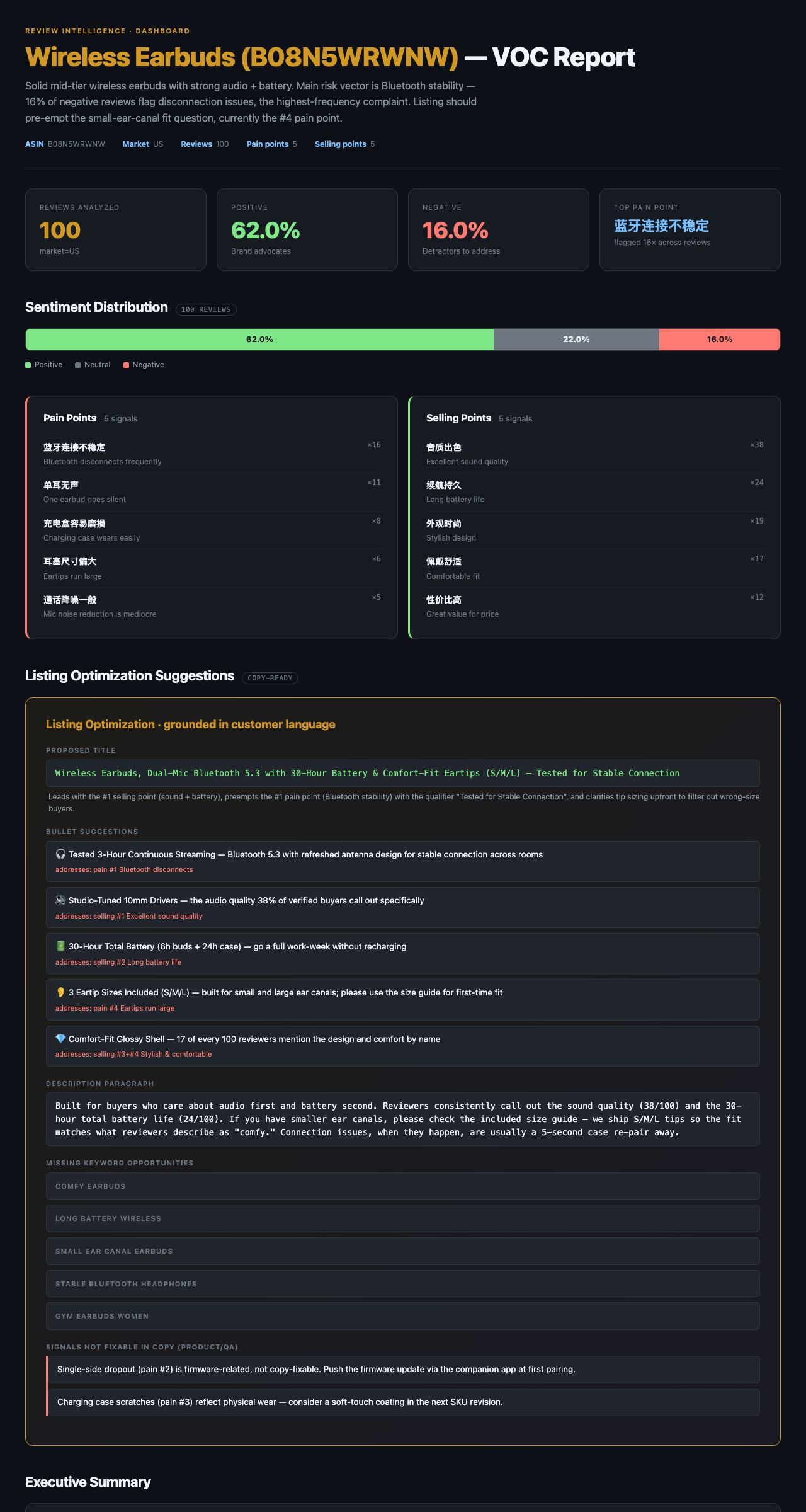
Drop in an ASIN or a CSV — get sentiment, pain points, copy-ready listing improvements,
and a black-gold HTML dashboard. 6 MCP tools. Backed by the most stable Amazon review data layer.






↑ Sample dashboard: B08N5WRWNW · 100 reviews · sentiment + pain points + listing improvements, generated by render_dashboard.
TL;DR
Two inputs, six tools, three outputs.
   ┌─────────────┐                                            ┌──────────────┐
   │   ASIN      │──┐                                       ┌─│ Markdown     │
   └─────────────┘  │      ┌─────────────────────────┐      │ │ report       │
                    ├──────▶ 6 agent-callable tools  ├──────┤ ├──────────────┤
   ┌─────────────┐  │      └─────────────────────────┘      │ │ Structured   │
   │  CSV / XLSX │──┘   fetch_reviews   analyze_csv         │ │ JSON         │
   └─────────────┘      analyze_reviews voc_full            │ ├──────────────┤
                        extract_listing_improvements        └─│ Black-gold   │
                        render_dashboard                      │ HTML deck    │
                                                              └──────────────┘
- Inputs — Amazon ASIN (auto-fetched via Shulex VOC OpenAPI, 10 markets) or any review CSV / Excel (Helium 10 / eBay / Shopify / custom — fuzzy column detection)
- Outputs — Markdown report · structured JSON · standalone HTML dashboard
- Surface — MCP server (works in Claude Code / Cursor / Cline / Continue) and Skill (works in Claude Code)
Quick start
Option A — As an MCP server (recommended)
Requires uv.
Add this to your MCP client config (Claude Code, Claude Desktop, Cursor, Windsurf, VS Code Copilot, Cline, Continue.dev):
{
  "mcpServers": {
    "voc-amazon-reviews": {
      "command": "uvx",
      "args": ["voc-amazon-reviews-mcp"],
      "env": {
        "VOC_API_KEY": "your-shulex-key"
      }
    }
  }
}
Get a free Shulex API key (100 calls/month, no credit card): apps.voc.ai/openapi.
Optional: Add "ANTHROPIC_API_KEY": "sk-ant-..." to enable extract_listing_improvements (the only tool that calls Claude directly — others work without it). Must be an actual Anthropic key; other providers won't work.
First run resolves dependencies in ~5s; subsequent runs are instant.
Try it
Ask any MCP-compatible agent:
Run a VOC report on
B08N5WRWNW, render the dashboard, and write it to~/Desktop/voc.html.
The agent will call voc_full → render_dashboard and hand you the file.
Option B — One-shot CLI
bash voc.sh B08N5WRWNW --limit 100 --market US
Option C — Bring your own reviews (CSV)
# Drop in any reviews CSV (Helium 10 export, eBay scrape, Shopify, custom)
python -c "from mcp_server.tools import analyze_csv, render_dashboard; \
  r = analyze_csv('reviews.csv', product_name='My Product'); \
  render_dashboard(r, output_path='dashboard.html')"
Option D — Hosted on Smithery (no install)
Connect to the server remotely — no uvx, no Python, no local install. Bring
your own Shulex API key (Smithery prompts for it on first connection).
This repo ships a Dockerfile and smithery.yaml for one-click deploy.
To run your own hosted instance:
- Fork or clone this repo to your GitHub.
- Sign in at smithery.ai with GitHub.
- Deploy a server → pick the repo. Smithery builds the container and exposes an HTTPS MCP endpoint.
- Share the URL with users; they paste it into Claude / Cursor / Cline.
The same image runs anywhere that takes a Dockerfile — Fly.io, Railway, Cloudflare Workers (with adapter), Render, Cloud Run.
To run the HTTP transport locally (e.g. for testing):
MCP_TRANSPORT=streamable-http PORT=8080 python -m mcp_server.server
Option E — Deploy to Vercel (serverless)
This repo also ships vercel.json + app.py for one-click Vercel
deploys. Sign in at vercel.com with GitHub, import the
repo, and Vercel auto-detects the Python function.
Set these in Project Settings → Environment Variables before the first deploy:
| Variable | Required | Notes |
|---|---|---|
VOC_API_KEY | yes | Shulex VOC OpenAPI key |
ANTHROPIC_API_KEY | optional | Only for extract_listing_improvements |
Timeout caveat: Vercel functions cap at 10s (Hobby default), 60s
(Hobby with maxDuration: 60 — already set in vercel.json), or 300s
(Pro). Long-running tools like voc_full (30-90s) and
extract_listing_improvements (20-60s) may exceed these limits. For
unbounded execution, prefer Option D (Docker/Render/Fly) or local install.
The MCP endpoint after deploy: https://your-project.vercel.app/mcp
Tools
| # | Tool | Input | Use when |
|---|---|---|---|
| 1 | fetch_reviews | ASIN | You want raw reviews; you'll analyze them yourself |
| 2 | analyze_reviews | reviews JSON | You already have reviews and want the VOC report |
| 3 | voc_full | ASIN | Default "give me a VOC report" — fetch + analyze in one call |
| 4 | extract_listing_improvements | ASIN | ★ Differentiator — copy-ready title / 5 bullets / description grounded in customer language |
| 5 | analyze_csv | CSV / Excel path or URL | The product is NOT on Amazon, or you have your own scrape |
| 6 | render_dashboard | VOC report | Generate a standalone black-gold HTML dashboard, no external deps |
All 6 tools speak MCP. All return JSON-serializable dicts. Full schemas in mcp_server/README.md.
Data layer — why this is the moat
Most "AI review tools" are a thin LLM wrapper over a brittle scraper. We invert that. The data layer is the moat:
| Typical seller-tool data layer | review-analyzer | |
|---|---|---|
| Source | Web scraper / undocumented scrape API | Paid Shulex VOC OpenAPI |
| Reliability | Breaks when Amazon updates HTML | API-grade, no DOM dependencies |
| Markets | US-only or 2-3 markets | 10: US, CA, MX, GB, DE, FR, IT, ES, JP, AU |
| Volume | 10–50 reviews (free-tier cap) | Up to 1,000 reviews per ASIN |
| Freshness | Daily snapshots, sometimes cached for days | Live pull |
| Schema | Strings only | Full: verified-purchase, helpful votes, vine, variant, dates |
| Non-English markets | Often broken / omitted | Native captures + AI translation |
| Access | Locked behind a UI | curl + JSON, fully scriptable, MCP-ready |
For non-Amazon platforms, analyze_csv accepts any review file — fuzzy column matching detects 内容 / 评价 / body / review / content so you don't have to reformat. Bring data from anywhere, get the same VOC report.
vs. the alternatives
| review-analyzer | Helium 10 / Data Dive | review-analyzer-skill (Buluu) | Generic review scrapers | |
|---|---|---|---|---|
| Input | ASIN or CSV | ASIN (manual UI) | CSV only | URL |
| Markets | 10 | 1-3 | depends on user's data | 1 |
| Output | JSON + Markdown + HTML dashboard | UI dashboard (locked) | CSV + MD + HTML dashboard | Raw CSV |
| MCP-callable | ✅ | ❌ | ❌ Claude Code only | ❌ |
| Listing copy gen | ✅ extract_listing_improvements (cite-by-pain-point) | Keyword research only | ❌ | ❌ |
| Cost | Shulex API + Anthropic API ($0.05-0.20/listing) | $99-249/month subscription | Free (uses your Claude quota) | Free, brittle |
| Open source | ✅ MIT | ❌ | ✅ MIT | varies |
Credit & inspiration: The 22-dimension tag system, fuzzy CSV column detection, and black-gold dashboard aesthetic were inspired by buluslan/review-analyzer-skill (MIT). We adapted them onto an MCP-native architecture with the Shulex VOC OpenAPI data layer.
Architecture
mcp_server/
├── server.py                  # 6 @mcp.tool decorators
├── tools.py                   # implementations (subprocess wrappers + Anthropic SDK)
├── csv_loader.py              # fuzzy column detection for CSV/Excel input
├── dashboard.py               # HTML rendering
├── dashboard_template.html    # black-gold template (placeholders)
├── tag_system.yaml            # 22-dim tag schema (customizable per category)
├── schemas.py                 # pydantic structured-output models
└── tests/                     # 36 unit tests (subprocess + Anthropic mocked)

fetch.sh / analyze.sh / voc.sh   # shell pipeline behind tools 1-3
- fetch + analyze loop: shell scripts (proven, reproducible, easy to debug)
- listing rewrites: Anthropic SDK direct (
claude-opus-4-7+ adaptive thinking + prompt caching on the system rubric) - dashboard: pure stdlib HTML rendering, no node / no react
Distribution / where to find us
| Channel | Status |
|---|---|
| punkpeye/awesome-mcp-servers PR #6528 | ✅ Open |
| cline/mcp-marketplace issue #1602 | ✅ Open |
| Glama | 🟢 Auto-indexed via GitHub topics |
| mcp.directory | 🟢 Auto-pull |
| mcp.so / PulseMCP | 🟡 Pending (manual form submit) |
| Smithery | 🟡 Container deploy ready (smithery.yaml + Dockerfile in repo) |
| Official MCP Registry | 🟡 Pending PyPI publish (W2) |
Roadmap
- Drop in CSV / Excel (any platform, fuzzy column detect)
- 22-dimension tag system (YAML-configurable)
- Black-gold HTML dashboard tool
- 6 MCP tools shipped
-
npx skills add mguozhen/review-analyzerone-line install - CLI subprocess engine option (use your Claude subscription, $0 API)
- PyPI publish + official MCP Registry submission
- Smithery deploy config (
smithery.yaml+Dockerfile) - Vercel deploy config (
vercel.json+app.py) - Smithery / mcp.so / PulseMCP form submissions
License
MIT. See LICENSE.
Acknowledgments: Tag schema, CSV column detection, and dashboard visual design inspired by buluslan/review-analyzer-skill. Data layer powered by Shulex VOC OpenAPI.