Listed from the MCP registry; nobody on Odel publishes it.

Context Bridge
Local-first search across past Claude and ChatGPT conversations, with citations.
Runs on your machine from its package; the steps are below.
What it does
- Reads
- Writes
- High impact
At most: creates or changes data: records, files, settings.
What it costs
FreeOdel charges nothing per call. The publisher may charge for its own service.
Runs locally over stdio
This server isn't hosted — your MCP client launches it from a package registry. Use one of the commands below, or drop the config into your client (e.g. Claude Desktop).
Run
uvx context-bridge-local
MCP client config
{
  "mcpServers": {
    "context-bridge": {
      "command": "uvx",
      "args": [
        "context-bridge-local"
      ]
    }
  }
}Search past ChatGPT, Claude and Claude Code conversations from one tool, with citations.
Why: Claude and ChatGPT each have memory, but their built-in memory does not search each other's chats or your Claude Code terminals. Context Bridge searches the conversations you explicitly import or approve across those tools.
0.10.0b1 · Apache-2.0 · Python 3.9–3.13 · macOS and Linux · local-first · no telemetry
Try it in 60 seconds
uvx --from context-bridge-local context-bridge demo
See three cited searches over ten invented conversations. The demo runs offline after package installation, removes its files, and never touches your library. Need uvx? Install options.
Then try your own Claude Code history—choose which projects to approve:
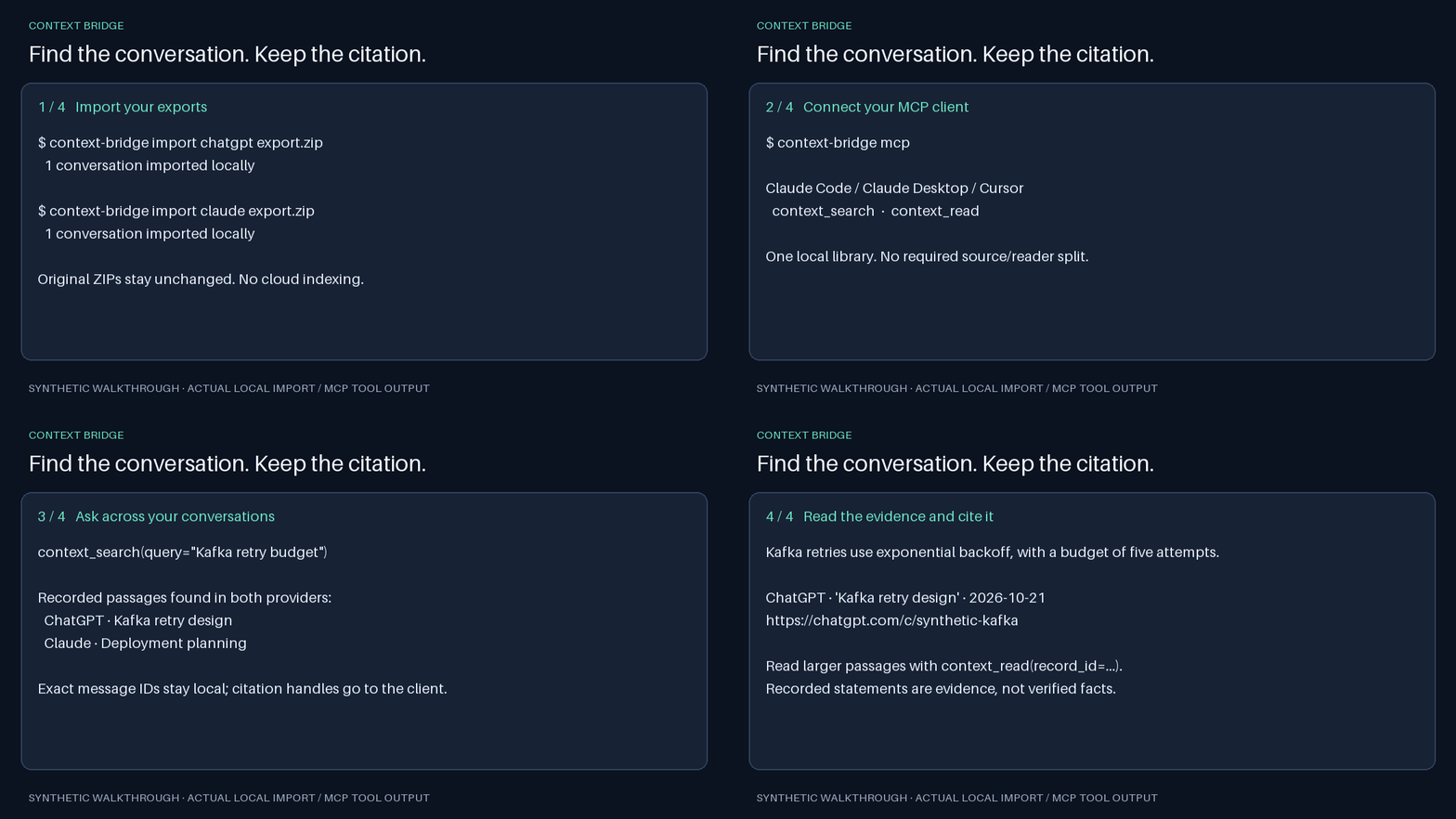
uvx --from context-bridge-local context-bridge import claude-code
claude mcp add --transport stdio context-bridge -- uvx --from context-bridge-local context-bridge mcp
Start a new Claude Code session and ask: “Use context_search to find a past deployment decision. Cite the source, and use context_read for surrounding turns.” New sessions in approved projects are discovered automatically.
Better recall
uvx --from context-bridge-local context-bridge semantic enable
context-bridge semantic enable downloads about 90 MB once, then searches locally and offline. Imports offer it once in an interactive terminal. Choosing “no” is remembered. Optional packages and model setup need network access. Setup details.
ChatGPT, Claude.ai and desktop conversations
Import an official data export:
uvx --from context-bridge-local context-bridge import chatgpt /path/to/export.zip
uvx --from context-bridge-local context-bridge import claude /path/to/export.zip
For ChatGPT desktop / Codex, approve local projects instead—no export:
uvx --from context-bridge-local context-bridge import codex
Connect ChatGPT desktop, Claude Desktop or Cursor. Profiles, account checks and removal.
Does it save tokens?
Not for quick lookups. In a pre-registered benchmark of 40 documentation research tasks, reusing past sessions used 84% more tokens than researching again, with no loss in accuracy and safe handling of outdated answers. Context Bridge's value is finding what only your history contains (decisions, reasons and context) across tools, not cutting model costs.
For your own library, context-bridge savings --explain gives local estimates and context-bridge repeats shows how often you revisit similar questions. The agent-guide command prints REUSE/CHECK/REDO instructions for CLAUDE.md or AGENTS.md, and an optional Claude Code hook checks history on prompts. Query text is never logged by default.
How is this different?
- claude-historian-mcp searches Claude Code history. Context Bridge also imports ChatGPT and Claude.ai exports and approved desktop/Codex threads.
- Built-in Claude and ChatGPT memory operate within their own products. Context Bridge provides cross-tool search with links or opaque record citations back to the recorded conversation.
- The index stays on your machine, has no telemetry, and searches only imported or approved sources. Retrieved passages are shared with your AI client; a cloud model provider receives the passages you retrieve.
Privacy and results
Search returns recorded evidence, not verified facts. Recognized secrets are redacted, but pattern matching cannot detect every secret. The local database is plaintext. Removal prevents future retrieval; it cannot recall previous answers. Security boundaries.
Results are grouped by conversation. context_read returns surrounding indexed turns with pagination. ChatGPT imports follow the active branch; tool output, thinking and known injected context are excluded. Usage and sources · Passage reading.
Contribute
Installation · Contributing · Roadmap · Architecture · Verification · Third-party notices
Tests use synthetic conversations: PYTHONPATH=prototype python3 -m unittest discover -s prototype/tests -v. Historical experiments are archived and are not public CLI commands. Original project code is licensed under Apache-2.0.
The public-document benchmark provides a preregistered, isolated comparison of balanced reuse with fresh research. Its current report uses fake provider responses only; it does not establish measured token savings.







