
Mneme Memory
Cross-session memory for AI coding agents via six tools; local-first SQLite store.
Runs on your machine from its package; the steps are below.
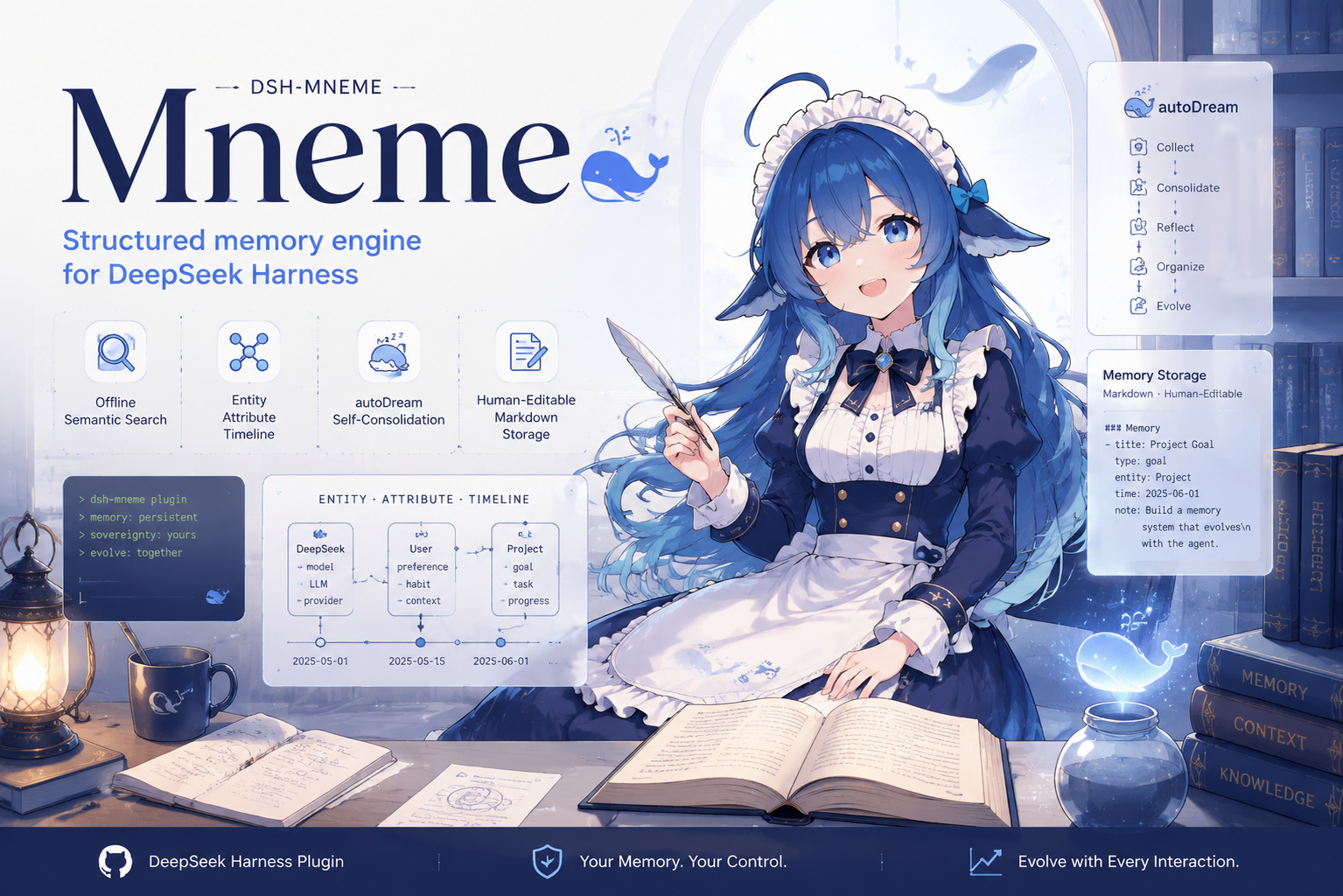
What it does
- Reads
- Writes
- High impact
At most: creates or changes data: records, files, settings.
What it costs
FreeOdel charges nothing per call. The publisher may charge for its own service.
Runs locally over stdio
This server isn't hosted — your MCP client launches it from a package registry. Use one of the commands below, or drop the config into your client (e.g. Claude Desktop).
Run
npx -y mneme-memory
MCP client config
{
  "mcpServers": {
    "mneme-memory": {
      "command": "npx",
      "args": [
        "-y",
        "mneme-memory"
      ]
    }
  }
}
dsh-mneme





🧬 给 LLM 装上会自我进化的记忆
dsh-mneme 是 DeepSeek Harness (DSH) 的跨会话记忆插件。它不只「存得下」,更「管得好」:后台自动去重合并、矛盾先冻结等你裁决、全程可回放审计、默认全离线,还支持导出成人可读的 Markdown。
Mneme(Μνήμη)源自希腊记忆女神 Mnemosyne。她掌管记忆与梦境——正如
autoDream在后台默默巩固你的记忆库。
它解决什么问题
每次新开对话,AI 都像第一次认识你?
dsh-mneme 给 DeepSeek Harness 装上跨会话记忆。 你聊过的项目、提过的偏好、做过的决定,AI 都记得——即使关掉了窗口,下次打开还在。
| 场景 | 没装插件 | 装了插件 |
|---|---|---|
| 周一聊完项目需求,周三继续 | "能再描述一下你的项目吗?" | "你指的是上周提到的博客重构吗?当时你说想用 Astro。" |
| 告诉 AI 你的编码习惯 | 每轮都要重复交代 | 一次设定,长期生效 |
| 整理大量资料后关窗口 | 资料丢了 | 自动归档,随时检索找回 |
但 dsh-mneme 的可信之处,恰恰在你看不见的后台。下面这些,才是它和「一个会存东西的插件」的本质区别。
为什么可以信任它
- 🧾 可回放、可追责 — 每次自动整理都留一张「决策凭证」:输入快照 + 决策明细 + 结果哈希,同样的整理可复现回放,不默默吞错、不留无法追溯的改动。
- ⚖️ 矛盾先冻结,等你裁决(可关)— 两条记忆打架时,不擅自替你做主。可疑冲突会挂起待审,状态页冲突队列里并排对比、一键裁决(保留 A / 保留 B / 仅标记),确认后才生效。复杂判断,人永远在线。
- 🔐 记忆按 agent 与工作区隔离(可关)—
scopeEnabled开启后,每条记忆标注由哪个 agent、在哪个工作区写入;检索时本会话作用域优先(命中加权,他 scope 降权仍可见);strictScope再进一步——显式声明收窄到他者作用域的记忆在检索/注入里完全不可见(载体自动标注只降权,不硬挡)。多 Agent、多项目互不串台。 - 🌙 夜深人静才动手(可关)— 空闲时自动分层归档:常看的留在热区、久不用的压成摘要、陈旧的彻底归档。记忆库越用越精炼,不膨胀。
- 🧠 本地语义检索,默认离线 — 自带本地 Embedding 与精排,不强求 API Key,网络断了也能检索。
- 📝 Markdown 双向同步 — 记忆就是本地
.md文件,随时打开编辑;人工改动会被优先尊重,不会被机器覆盖。 - 💾 删对话 ≠ 删记忆 — 清空聊天窗口,已保存的记忆仍在(可配置)。
5 分钟上手
# 安装插件
dsh plugin --profile web add @modusensus/dsh-mneme
dsh web
装完即可用。想在 5 分钟内看到它的价值:
- 聊:新开对话,跟 AI 聊几句关于你的偏好或手头项目(比如"我写代码更喜欢 4 空格缩进")。
- 等:关掉窗口,重开新对话。如果它还记得刚才的事,说明记忆已经写入。
- 调:去「设置 → 记忆库设置」按需打开下面三个开关(见快速配置)。
快速配置(可选)
| 需求 | 配置项 | 默认值 | 改法 |
|---|---|---|---|
| 完全离线运行 | embedProvider | openai | 改为 local |
| 删除对话时保留记忆 | sessionLifecycleEnabled | false | 改为 true |
| 自动提取结构化实体 | entityExtractionEnabled | false | 改为 true |
| 多 Agent / 多项目记忆隔离 | scopeEnabled(需要更强隔离再加 strictScope,硬隔离只对显式声明生效) | false | 改为 true |
以上均在 DSH 设置面板 → 记忆库设置 中修改。完整配置见 配置章节。
记忆库落点建议
记忆库默认在 ~/.dsh/memory,天然在宿主 profile 作用域之外;但真实落点由 memoryDir 配置决定。若把它指进 profile 作用域(形如 …/profiles/<名字>/…),宿主清理或迁移 profile 时记忆库会被连带带走(#218 末楼记录的实际事故)。插件启动时检测到这种落点会打一条告警——只提示、不搬库。安全做法:memoryDir 保持在 profile 之外(默认值即可);要迁移库 = 停止写入 → 复制整个目录 → 改配置指向新位置 → 重启。
一图看懂记忆闭环
  写入 ──► 质量过滤(无用信息先拦下)
    │
    ▼
  SQLite + 本地 Markdown 镜像
    │(空闲时)
    ├─ autoDream :去重 / 合并 / 归档 / 修正 / 冲突冻结
    └─ Sleep Mode :分层压缩 + 模式发现 + 关系补全(可关)
    │
    ▼
  召回(混合检索 + 精排)──► 注入会话上下文
界面预览
面板内置中英双语,跟随你的 DSH 界面语言显示。以下为中文截图,英文版请切至文末 English 段落。
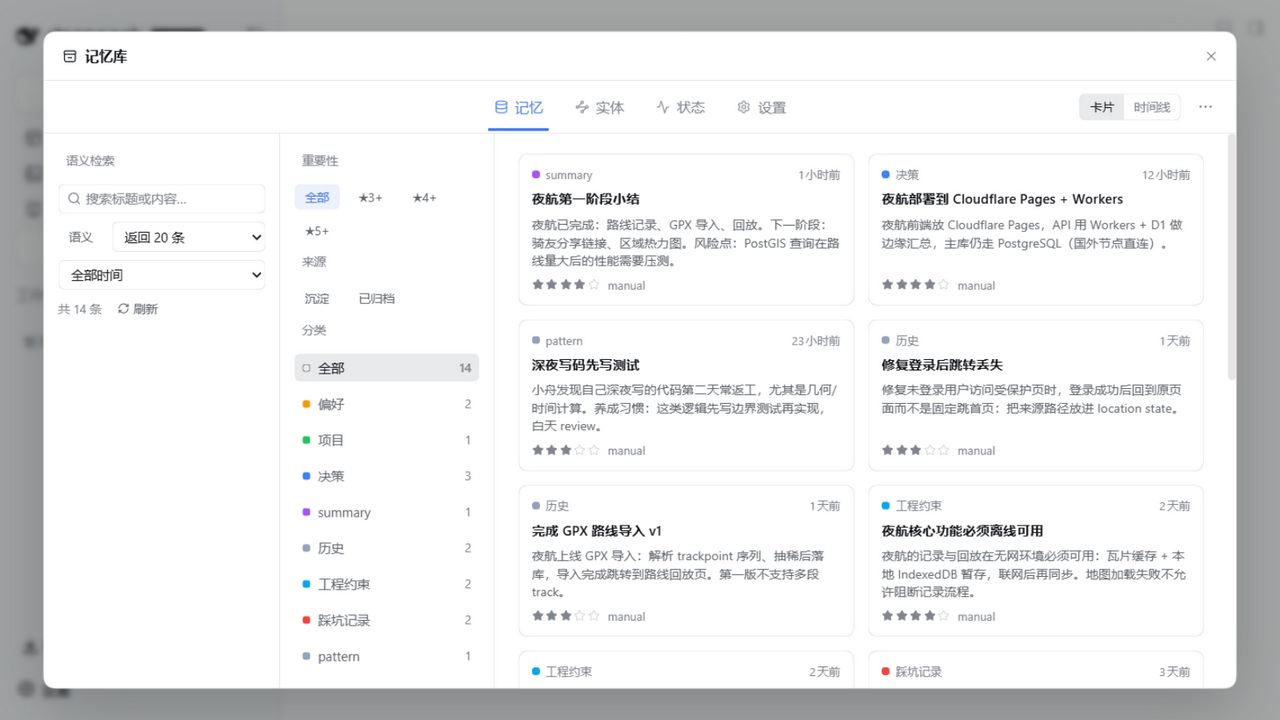
记录、浏览与筛选你的记忆。
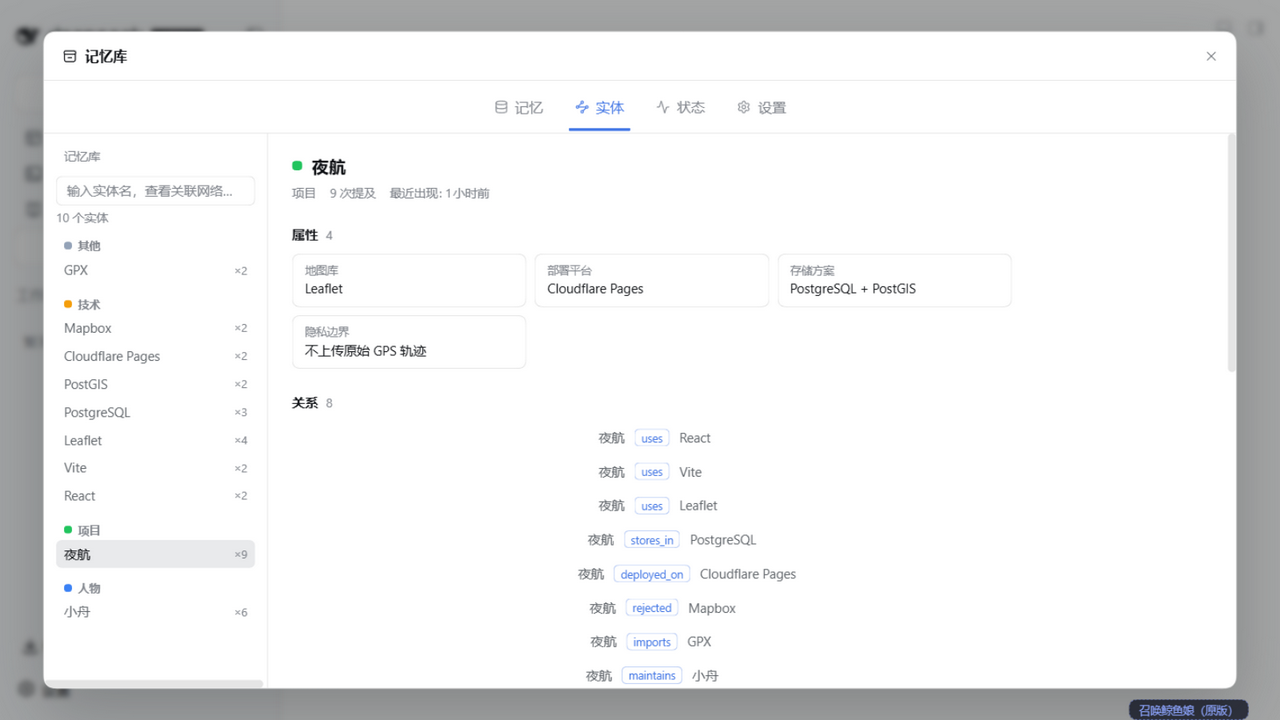
自动从记忆里提炼实体,构建带属性的关系图谱。
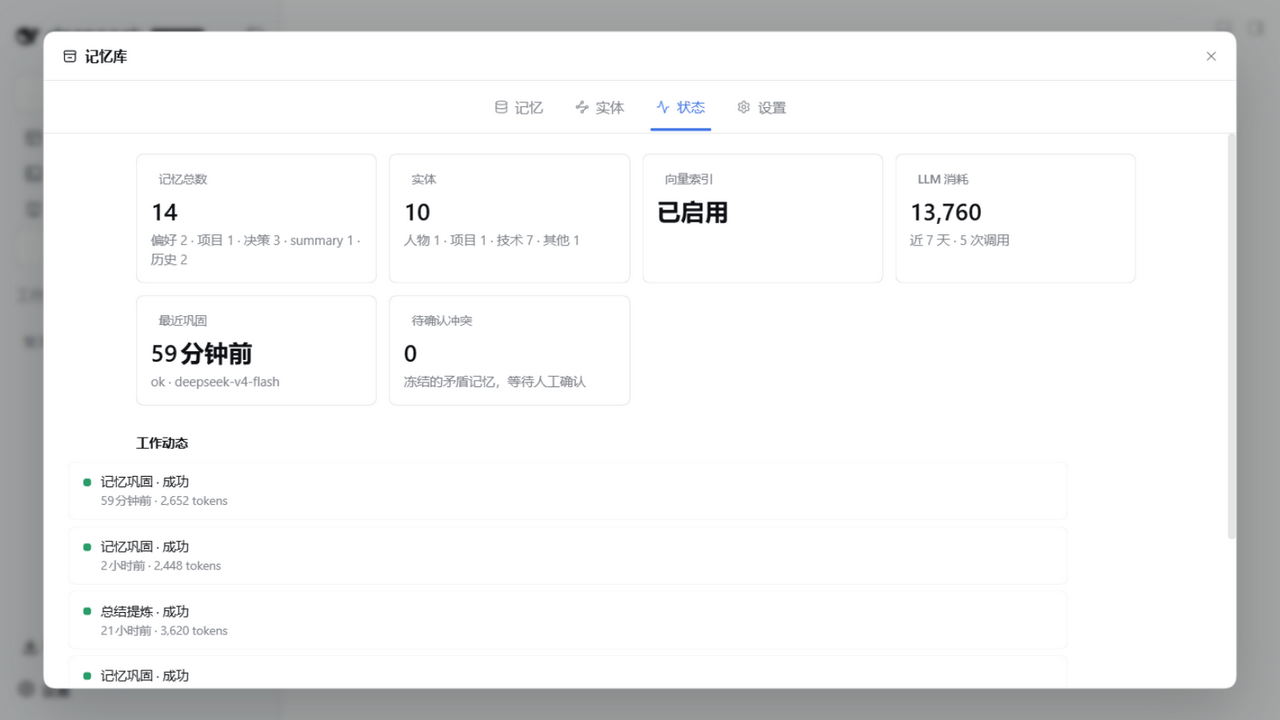
状态面板一眼看清向量索引、LLM 消耗与自动巩固记录。
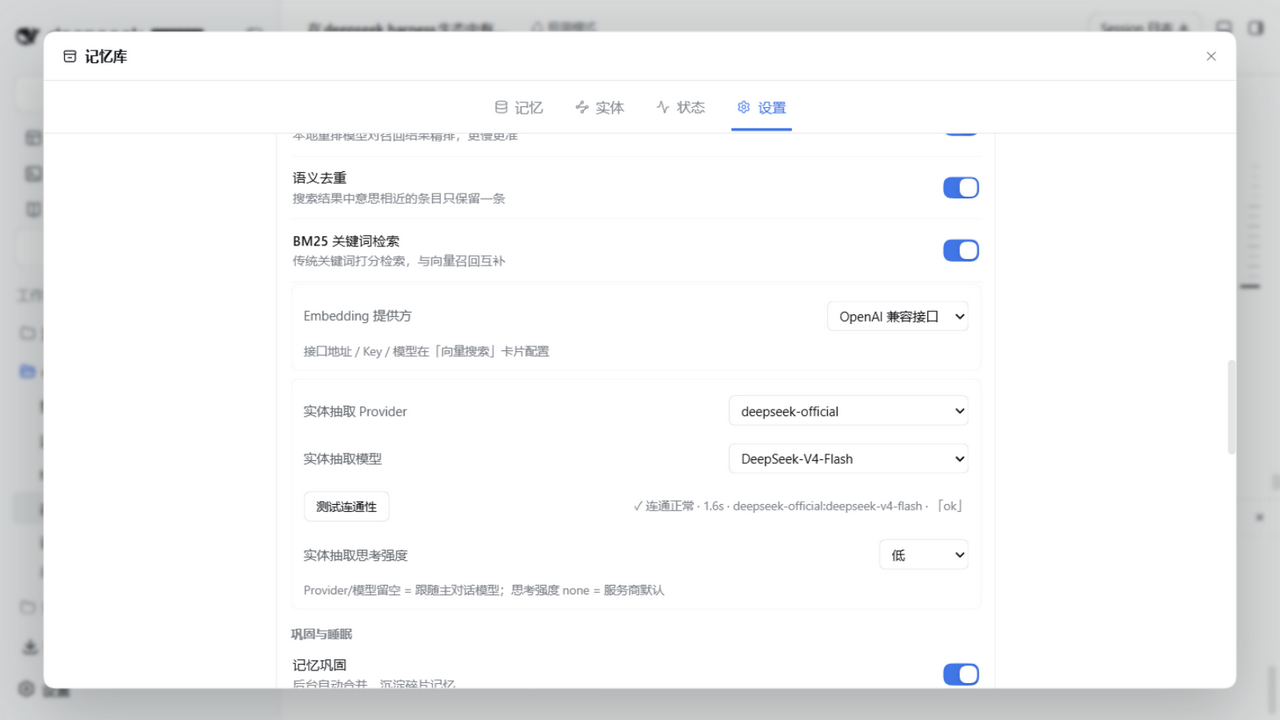
检索、实体抽取与记忆巩固开关都在设置里一站式配置。
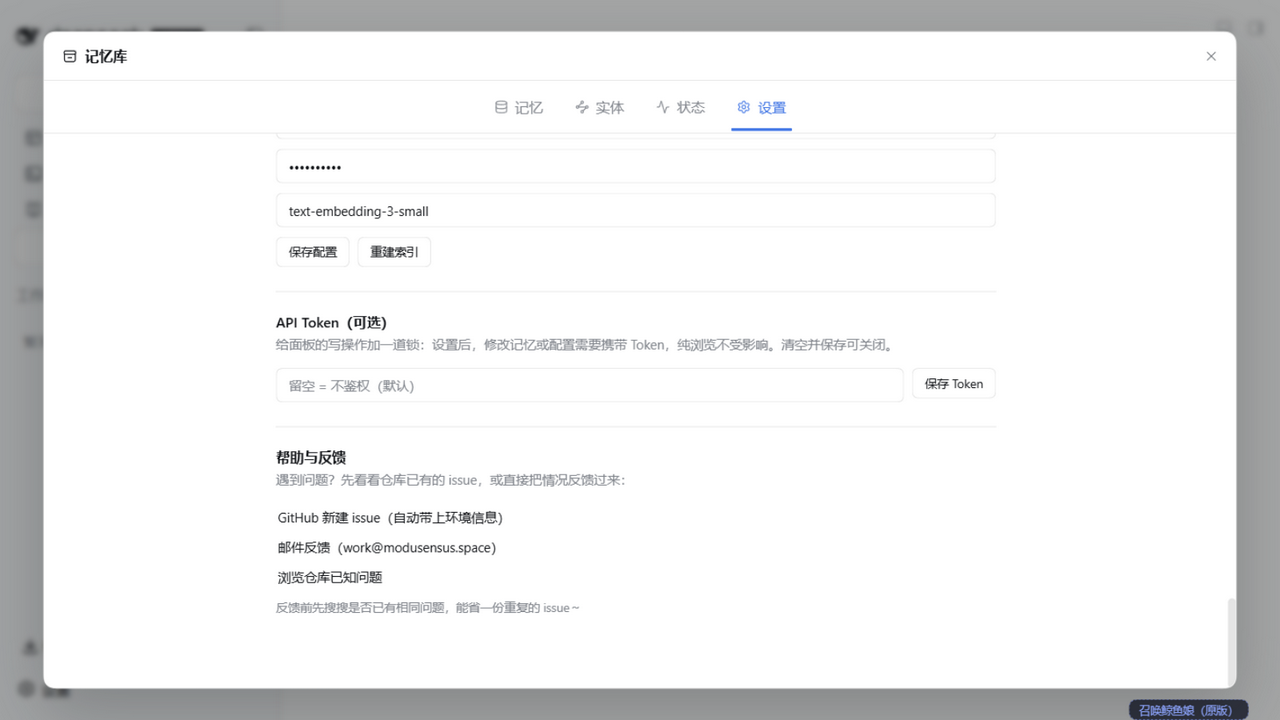
可选写保护 Token,以及本地化的反馈通道,让记忆库完全本地、可审计。
隐私承诺
- 数据只存在你的电脑本地,不上传任何服务器
- 记忆是 Markdown 文件,人类可读、可手工编辑
- 默认零网络依赖,不需要 API Key
- 无遥测、无分析、无远程日志
用在其他 AI 工具里(MCP)
插件自带零依赖 stdio MCP server(独立 npm 包 mneme-memory,bin 名 mneme-mcp),任何 MCP 客户端都能挂载记忆六件套(memory_save / memory_search / memory_list / memory_get / memory_update / memory_delete)。
前置条件(一次性):
- DSH 在运行且插件已安装(MCP 数据面走插件的独立 API
127.0.0.1:8790) - 在 DSH 面板「设置 → 外部访问 API」生成 token
各客户端挂载(<你的token> 替换为上一步生成的值):
| 客户端 | 挂载方式 |
|---|---|
| Claude Code | 项目根 .mcp.json:{"mcpServers": {"mneme-memory": {"command": "mneme-mcp", "env": {"MNEME_TOKEN": "<你的token>"}}}} |
| Cursor | 设置 → MCP → Add Server,command 填 mneme-mcp,env 加 MNEME_TOKEN |
| Codex | ~/.codex/config.toml:[mcp_servers.mneme-memory] 段,command = "mneme-mcp",env = { MNEME_TOKEN = "<你的token>" } |
| Hermes | ~/.hermes/config.yaml 的 mcp_servers: 段:mneme-memory: {command: "mneme-mcp", env: {MNEME_TOKEN: "<你的token>"}},重启生效 |
| OpenCode | opencode.json:{"mcp": {"mneme-memory": {"type": "local", "command": ["mneme-mcp"], "environment": {"MNEME_TOKEN": "<你的token>"}}}} |
| OpenClaw | openclaw mcp add mneme-memory --command mneme-mcp --env MNEME_TOKEN=<你的token>,或 Control UI → Settings → MCP |
旧挂载兼容:已部署的
dsh-mneme-mcp+DSH_MNEME_TOKEN写法继续有效(bin 与 env 变量均保留,无需迁移)。未全局安装 npm 包时,把command换成npx并追加参数-p mneme-memory mneme-mcp(Claude Code/OpenCode 写进 args 数组,Codex 写args = ["-p", "mneme-memory", "mneme-mcp"])。配置细节与安全注意事项见完整文档。
不开 DSH 也能服务(独立服务 daemon)
dsh-mneme-serve 把记忆库跑成常驻数据面——DSH 关着,第三方集成(网页端桥接、脚本、自有面板)照样读写同一份记忆:token 与 DSH 面板/CLI 共用,路由与「外部访问 API」同源,端口被占直接报错(与 DSH 外部访问二选一)。第一期无 LLM(巩固/蒸馏仍属 DSH 宿主);检索默认 local 嵌入(首次启动自动取件模型,--embed off 可关)。
npm i -g @modusensus/dsh-mneme
dsh-mneme-serve          # 默认 ~/.dsh/memory + 127.0.0.1:8790
社区适配器
社区项目把 mneme 接入更多平台——它们不是本仓库的一部分,兼容性由各自维护者跟进:
| 项目 | 平台 | 说明 |
|---|---|---|
| Mneme-Bridge | DeepSeek 网页端 | 浏览器扩展 + 本地服务:网页端会话蒸馏进 mneme 记忆库、DSH 侧记忆按话题回注,两侧共享同一份记忆。embedded(挂载 lib)与 remote(standalone API,不开 DSH 时配合上面的 daemon)双模式 |
想被收录?在 Discussions 开帖介绍你的项目,或直接提 PR 补充本表。
文档
| 文档 | 路径 |
|---|---|
| 插件完整文档(功能 / 安装 / 配置 / 架构) | dsh-mneme/README.md |
| stdio MCP server——Claude Code / Cursor 等任意 MCP 客户端接入记忆六件套 | dsh-mneme/README.md · MCP Server |
| 独立服务 daemon(不开 DSH 常驻数据面) | dsh-mneme/docs/DAEMON.md |
| 配置说明(全键参考) | dsh-mneme/docs/CONFIGURATION.md |
| 实体结构化设计 | dsh-mneme/docs/ENTITIES.md |
| 语义架构 | dsh-mneme/docs/SEMANTIC.md |
| 本地模型部署指南 | dsh-mneme/docs/LOCAL_MODEL.md |
| 版本历史 | dsh-mneme/CHANGELOG.md |
| 安全策略 | SECURITY.md |
🗺️ 路线图
🧬 记忆基因 → 🛡️ 审计加固 → 💤 睡眠维护 → 🕸️ 召回融合与图谱 → ✨ 面板增强 → 🌡️ 自进化记忆 → 🕸️ 图谱增强
| 版本 | 主题 | 状态 |
|---|---|---|
| v0.3 | 记忆基因:实体 / 属性(带时间轴)/ 关系 | ✅ |
| v0.4 | Sleep Mode:空闲四阶段深度维护 | ✅ |
| v0.5 | 召回融合与记忆可视化:BM25 + 图谱 + 热记忆 | ✅ |
| v0.6 | 会话生命周期:删对话 ≠ 删记忆 | ✅ |
| v0.7 | 自进化记忆:热度衰减 + 睡眠双保护 + 桌面端工作台/功能开关 | ✅ |
| v0.8 | 作用域隔离(agent/workspace 双维隔离 + 检索加权 + opt-in 硬过滤)+ 冲突队列人工裁决 + 归属显式声明 + 生态化(stdio MCP server / 图召回轴 / 冷启动 / 注入截断与状态条 / 蒸馏可靠性 / 注入形态与 agent 主动整理接口 / 配置说明与 issue 模板) | ✅ 已发布(至 v0.8.9) |
完整逐小版本说明见 CHANGELOG。
🧪 本地开发
cd dsh-mneme && npm install
npm test        # 1651 个测试
npm run stress  # 三轴线压测
npm run sync    # src → lib 同步
🙏 致谢
autoDream 的理念溯源(理念借鉴、实现原创):
- Claude Code 的 Auto Dream(Anthropic,Memory 2.0):理念源头——会话间隙由后台子代理整理记忆文件(去重、修矛盾、清衰减)。
- Sleep-time Compute: Beyond Inference Scaling at Test-time(UC Berkeley & Letta,arXiv:2504.13171):Auto Dream「离线巩固」思想背后的学术脉络。
- cc-haha:早期实现思路的参照之一。
在上述工作之上,dsh-mneme 做了自己的工程发展:K-Means++ 聚类预分组、类型化决策清单(keep / merge / archive / conflict / update,及 sleep 侧 supersede / differentiate)与可回放的 sha256 摘要审计链(dream_runs / receipt_chain)。如有遗漏的灵感来源,欢迎提 issue 指出。
🧬 Give Your LLM a Memory That Evolves
dsh-mneme is a cross-session memory plugin for DeepSeek Harness (DSH). It does not just store your memories — it manages them: background deduplication and merging, conflicts frozen for your review, a fully replayable audit trail, offline by default, and export to human-readable Markdown.
Mneme (Μνήμη) comes from Mnemosyne, the Greek goddess of memory and dreams — just as
autoDreamquietly consolidates your memory store in the background.
What problem does it solve
Every time you start a new chat, the AI acts like it's never met you?
dsh-mneme gives DeepSeek Harness cross-session memory. Projects you've discussed, preferences you've mentioned, decisions you've made — the AI remembers them even after you close the window.
| Scenario | Without plugin | With plugin |
|---|---|---|
| Continue a project discussion from Monday on Wednesday | "Can you describe your project again?" | "You mean the blog refactor from last week? You mentioned wanting to use Astro." |
| Tell the AI your coding habits | Repeat every session | Set once, remember forever |
| Close window after organizing research | Notes are lost | Auto-archived, retrievable anytime |
But what makes dsh-mneme trustworthy lives in the background you never see. These are the traits that set it apart from "a plugin that just saves things."
Why you can trust it
- 🧾 Replayable, accountable — every consolidation leaves a "decision receipt": input snapshot + decision detail + result hash. The same run reproduces the same outcome. No silent mis-merges, no untraceable changes.
- ⚖️ Conflicts freeze, you decide (opt-in) — when two memories contradict, it does not take sides for you. The suspected conflict is parked for review, compared side-by-side in the status-page conflict queue, and resolved with one click (keep A / keep B / mark reviewed). On hard judgments, a human stays in the loop.
- 🔐 Memories isolated by agent & workspace (opt-in) — with
scopeEnabled, every memory is stamped with which agent wrote it and in which workspace; retrieval favors the current scope (weighted hits, out-of-scope demoted but visible);strictScopegoes further — memories explicitly scoped to other agents/workspaces become invisible to search and injection (auto carrier labels are demoted only, never hard-blocked). Multiple agents and projects, zero cross-talk. - 🌙 It works while you sleep (opt-in) — idle time triggers tiered archiving: frequent memories stay hot, stale ones compress to summaries, old ones archive. The store stays lean as it grows.
- 🧠 Local semantic search, offline by default — built-in local Embedding + reranking. No API key required; retrieval still works without a network.
- 📝 Two-way Markdown sync — memories are local
.mdfiles you can open and edit; human edits are respected, never clobbered by the machine. - 💾 Delete the session ≠ delete the memory — clearing a chat window keeps what was saved (configurable).
5-minute quickstart
# Install the plugin
dsh plugin --profile web add @modusensus/dsh-mneme
dsh web
It works out of the box. To feel its value in five minutes:
- Chat — start a session and tell the AI something about your preferences or a project (e.g. "I prefer 4-space indentation.").
- Verify — close the window, open a new one. If it recalls what you said, the memory has landed.
- Tune — open Settings → Memory Settings and flip the three switches below as needed.
Quick config (optional)
| Need | Config key | Default | Change |
|---|---|---|---|
| Fully offline | embedProvider | openai | Change to local |
| Keep memories when deleting sessions | sessionLifecycleEnabled | false | Change to true |
| Structured entity extraction | entityExtractionEnabled | false | Change to true |
| Memory isolation per agent / workspace | scopeEnabled (add strictScope for stronger isolation — hard blocking applies to explicit declarations only) | false | Change to true |
All of these live in DSH Settings → Memory Settings. Full config docs in the Configuration section (Chinese, bilingual file).
Where to put the memory library
The library defaults to ~/.dsh/memory, which is naturally outside any host profile scope; the actual location follows your memoryDir config. If it points inside a profile scope (a path like …/profiles/<name>/…), the library is taken away along with the profile when the host cleans or migrates it (an actual incident recorded in #218). The plugin logs a warning at startup when it detects such a location — advisory only, it never moves your data. Safe practice: keep memoryDir outside profiles (the default already is); to migrate, stop writing → copy the whole directory → point the config at the new location → restart.
The memory loop in one diagram
  write ──► quality filter (drop noise first)
    │
    ▼
  SQLite + local Markdown mirror
    │ (when idle)
    ├─ autoDream   : dedupe / merge / archive / fix / freeze-conflict
    └─ Sleep Mode  : tiered compression + pattern discovery + relation completion (opt-in)
    │
    ▼
  recall (hybrid search + rerank) ──► inject into the conversation
Screenshots
The panel is bilingual and follows your DSH interface language. English shots below; see the Chinese section for the localized UI.
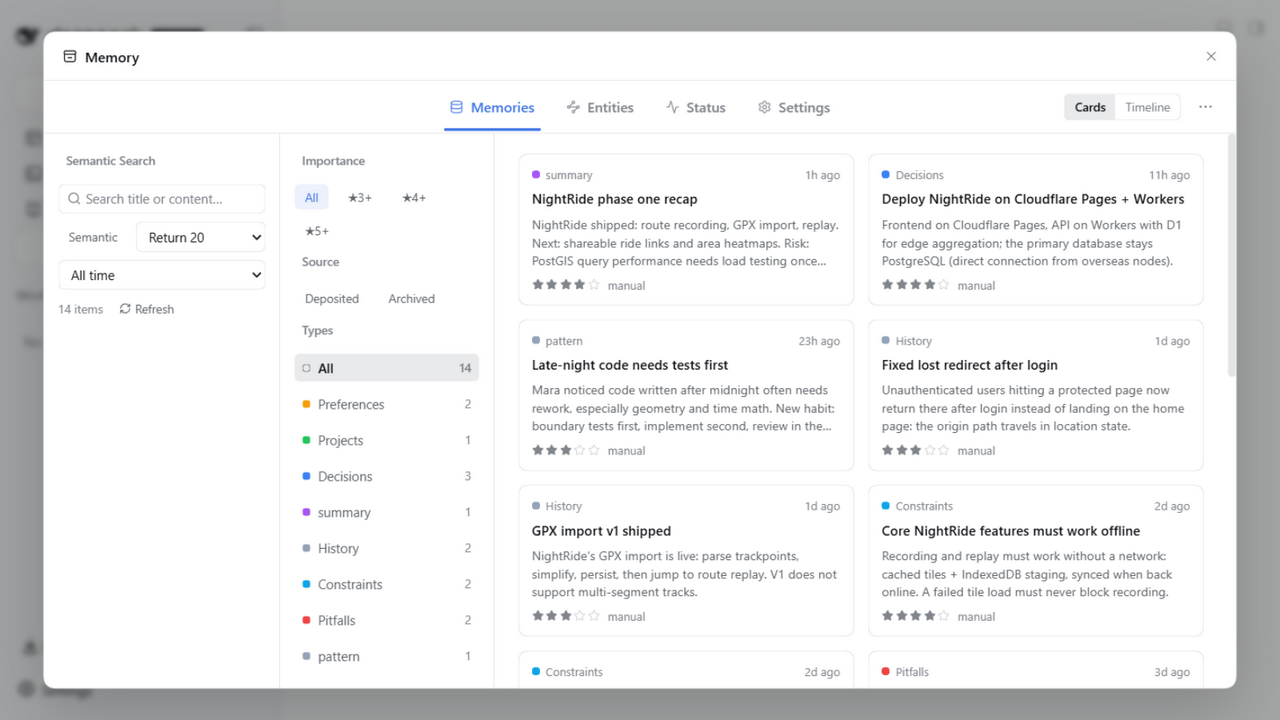
Record, browse and filter your memories.
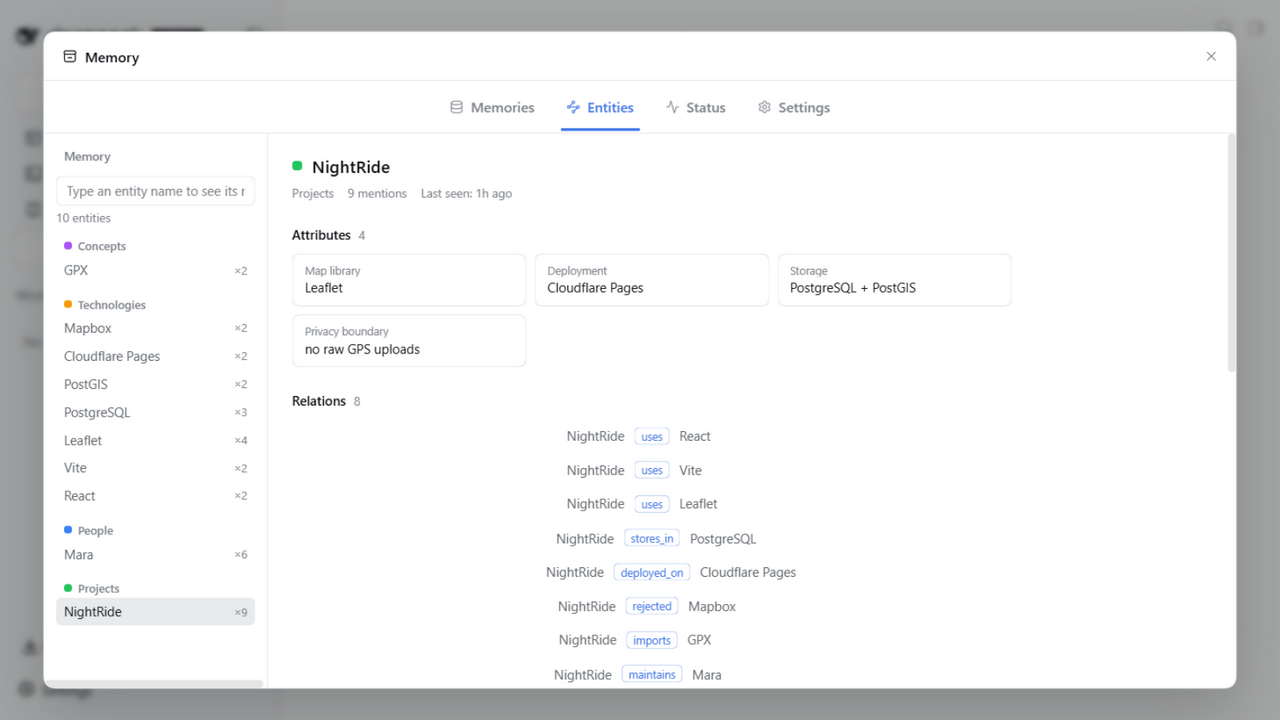
Entities are extracted from your memories, building a relation graph with attributes.
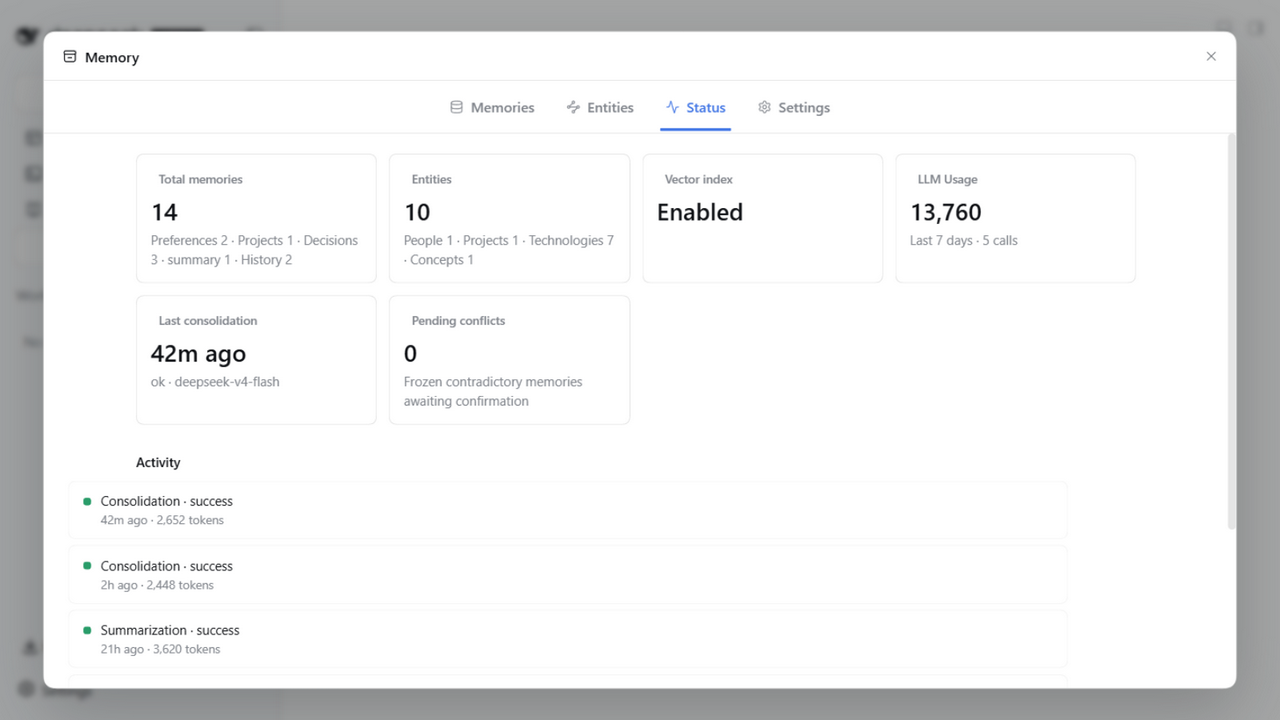
The status panel shows your vector index, LLM spend and consolidation activity at a glance.
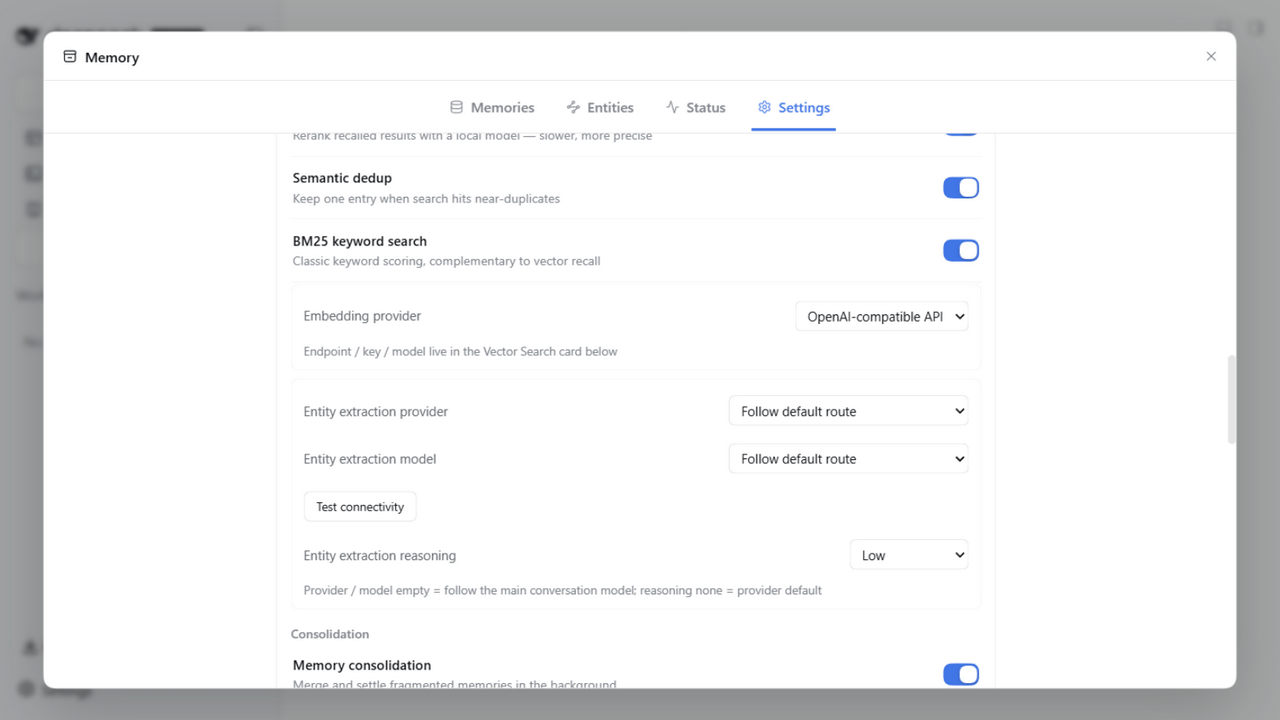
Retrieval, entity extraction and consolidation toggles are all configured in one place.
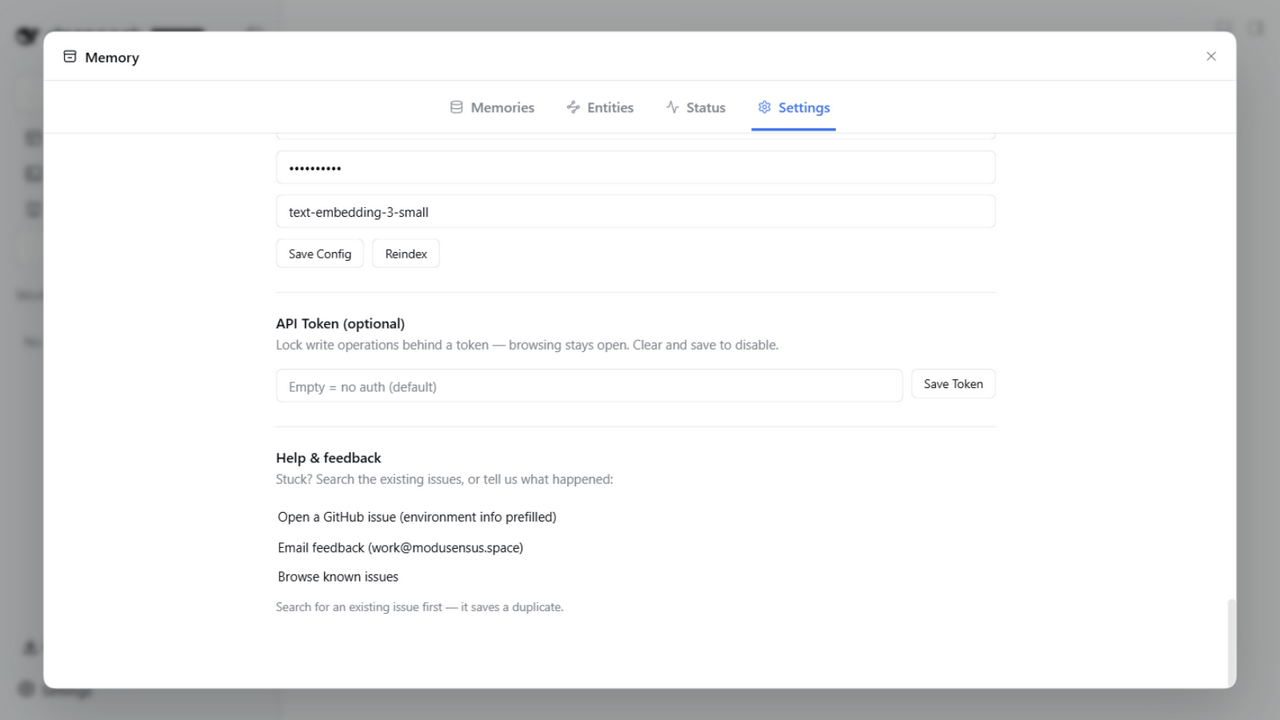
Optional write-protect token and feedback channels for a fully local, auditable setup.
Privacy
- Data stays on your machine only, never uploaded
- Memories are Markdown files, human-readable and editable
- Zero network dependency by default, no API key required
- No telemetry, no analytics, no remote logging
Use it in other AI tools (MCP)
The plugin ships a zero-dependency stdio MCP server (standalone npm package mneme-memory, bin mneme-mcp). Any MCP client can mount the six memory tools (memory_save / memory_search / memory_list / memory_get / memory_update / memory_delete).
One-time prerequisites:
- DSH is running with the plugin installed (the MCP data plane goes through the plugin's standalone API at
127.0.0.1:8790) - Generate a token in the DSH panel under Settings → External API
Per-client setup (replace <your-token> with the value from the previous step):
| Client | Setup |
|---|---|
| Claude Code | Project-root .mcp.json: {"mcpServers": {"mneme-memory": {"command": "mneme-mcp", "env": {"MNEME_TOKEN": "<your-token>"}}}} |
| Cursor | Settings → MCP → Add Server; command mneme-mcp, env MNEME_TOKEN |
| Codex | ~/.codex/config.toml: [mcp_servers.mneme-memory] section, command = "mneme-mcp", env = { MNEME_TOKEN = "<your-token>" } |
| Hermes | mcp_servers: section of ~/.hermes/config.yaml: mneme-memory: {command: "mneme-mcp", env: {MNEME_TOKEN: "<your-token>"}}, then restart |
| OpenCode | opencode.json: {"mcp": {"mneme-memory": {"type": "local", "command": ["mneme-mcp"], "environment": {"MNEME_TOKEN": "<your-token>"}}}} |
| OpenClaw | openclaw mcp add mneme-memory --command mneme-mcp --env MNEME_TOKEN=<your-token>, or Control UI → Settings → MCP |
Legacy mounts keep working:
dsh-mneme-mcp+DSH_MNEME_TOKENremain supported (both the bin and env vars are preserved; no migration needed). If the npm package is not installed globally, usenpxas the command with args-p mneme-memory mneme-mcp(an args array in Claude Code/OpenCode;args = ["-p", "mneme-memory", "mneme-mcp"]in Codex). Full config details and security notes: full docs (Chinese).
Serve memories without DSH (standalone daemon)
dsh-mneme-serve runs the memory store as a long-lived data plane — with DSH closed, third-party integrations (web-bridge tools, scripts, your own panels) still read and write the same memories: the Bearer token is shared with the DSH panel/CLI, routes mirror the external API, and a busy port is a hard error (pick either the daemon or DSH's external API, not both). Phase 1 is LLM-free (consolidation/distillation stay with the DSH host); retrieval defaults to local embeddings (runtime + model auto-provisioned on first boot, --embed off to disable).
npm i -g @modusensus/dsh-mneme
dsh-mneme-serve          # defaults: ~/.dsh/memory + 127.0.0.1:8790
Community adapters
Community projects that wire mneme into more platforms — not part of this repository; compatibility is tracked by their maintainers:
| Project | Platform | Description |
|---|---|---|
| Mneme-Bridge | DeepSeek web | Browser extension + local service: web chats are distilled into the mneme store and DSH memories are injected back by topic, so both sides share one memory. Embedded (mounts the lib) and remote (standalone API — pairs with the daemon above) modes |
Want your project listed? Open a Discussion or send a PR adding a row to this table.
Docs
| Doc | Path |
|---|---|
| Full plugin docs (features / install / config / architecture) | dsh-mneme/README.md(中文) |
| stdio MCP server — plug the six memory tools into any MCP client (Claude Code / Cursor / …) | dsh-mneme/README.md · MCP Server(中文) |
| Standalone daemon (serve memories without DSH) | dsh-mneme/docs/DAEMON.md(中文) |
| Configuration reference (all keys) | dsh-mneme/docs/CONFIGURATION.md(中文) |
| Entity structure design | dsh-mneme/docs/ENTITIES.md |
| Semantic architecture | dsh-mneme/docs/SEMANTIC.md |
| Local model guide | dsh-mneme/docs/LOCAL_MODEL.md |
| Changelog | dsh-mneme/CHANGELOG.md |
| Security | SECURITY.md |
🗺️ Roadmap
🧬 Gene → 🛡️ Audit hardening → 💤 Sleep maintenance → 🕸️ Recall fusion & graph → ✨ Panel enhancement → 🌡️ Self-evolving memory → 🔐 Scope isolation
| Version | Theme | Status |
|---|---|---|
| v0.3 | Gene: entities / time-boxed attributes / relations | ✅ |
| v0.4 | Sleep Mode: idle 4-phase deep maintenance | ✅ |
| v0.5 | Recall fusion & visualization: BM25 + graph + hot memory | ✅ |
| v0.6 | Session lifecycle: delete session ≠ delete memory | ✅ |
| v0.7 | Self-evolving memory: heat decay + sleep dual-protection + desktop workbench/feature toggles | ✅ |
| v0.8 | Scope isolation (agent/workspace stamping + retrieval weighting + opt-in hard filter) + conflict review queue + explicit attribution + ecosystem (stdio MCP server / graph recall axis / cold-start bootstrap / injection truncation & status bar / distill reliability / injection shaping & agent-driven organize / configuration reference & issue templates) | ✅ Released (up to v0.8.9) |
Full per-minor-version changelog in CHANGELOG.
🧪 Local development
cd dsh-mneme && npm install
npm test        # 1651 tests
npm run stress  # three-axis stress test
npm run sync    # src → lib sync
Acknowledgements
Provenance of the autoDream concept (ideas credited, implementation original):
- Auto Dream in Claude Code (Anthropic, Memory 2.0): the conceptual origin — a background sub-agent consolidates memory files between sessions (dedupe, resolve contradictions, prune decay).
- Sleep-time Compute: Beyond Inference Scaling at Test-time (UC Berkeley & Letta, arXiv:2504.13171): the academic thread behind the offline-consolidation idea.
- cc-haha: an early reference for the implementation approach.
On top of these, dsh-mneme adds its own engineering: K-Means++ cluster pre-grouping, a typed decision list (keep / merge / archive / conflict / update, plus supersede / differentiate on the sleep side), and a replayable sha256-digest audit chain (dream_runs / receipt_chain). If any source of inspiration is missing, please open an issue.
📜 License
MIT







