Listed from the MCP registry; nobody on Odel publishes it.

Software Dock
List, update, install and uninstall the software on a Windows PC; running apps, startup apps.
Runs on your machine from its package; the steps are below.
What it does
- Reads
- Writes
- High impact
At most: moves money, runs code or commands, deletes data, or sends messages for you.
What it costs
FreeOdel charges nothing per call. The publisher may charge for its own service.
Runs locally over stdio
This server isn't hosted — your MCP client launches it from a package registry. Use one of the commands below, or drop the config into your client (e.g. Claude Desktop).
Distributed as an MCP bundle (`https://github.com/molidestroyer/windows-software-mcp/releases/download/v0.4.0/SoftwareDock-mcp-win-x64.mcpb`) — download it and import the bundle in your MCP client.

Software Dock
The software on your Windows PC, one click from the taskbar — and one tool call from your AI agent.


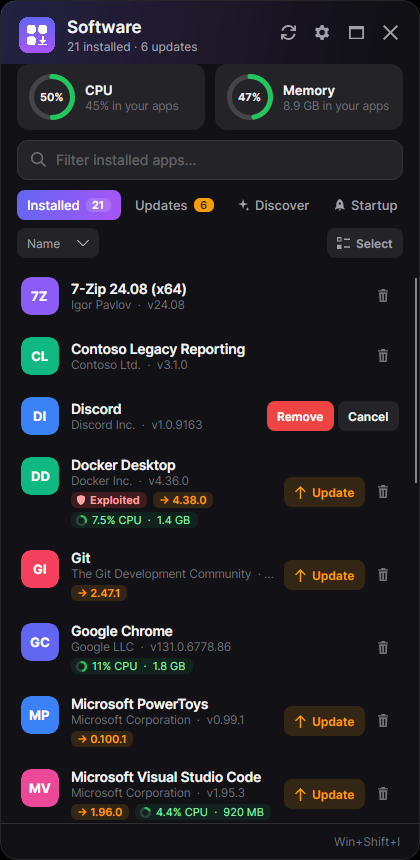
Windows makes managing installed software tedious: Settings › Installed apps cannot update anything or remove more than one app at a time, WinGet is a console, and the Store only knows its own apps. Software Dock lives in the notification area and opens a panel on the right edge of the screen with everything that is installed, what can be updated, what is running and how much it uses, and a search box over the WinGet and Microsoft Store catalogs.
The same capabilities are exposed as an MCP server, so Claude Code, Copilot or any MCP client can answer "what do I have installed?", "what is eating my memory?", "update everything" or "install VLC".
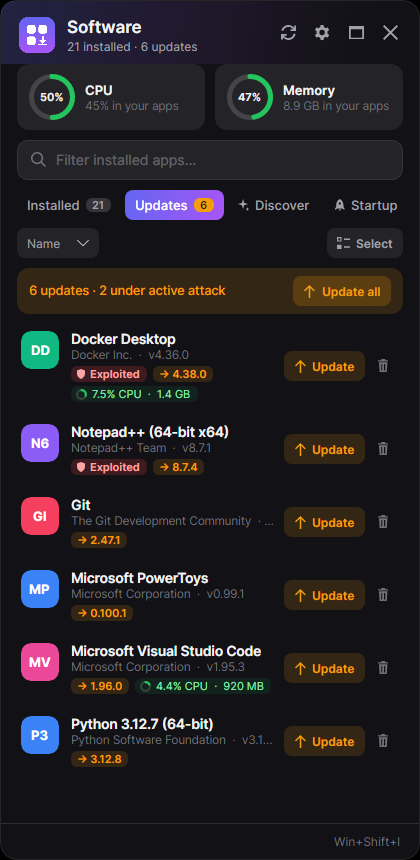
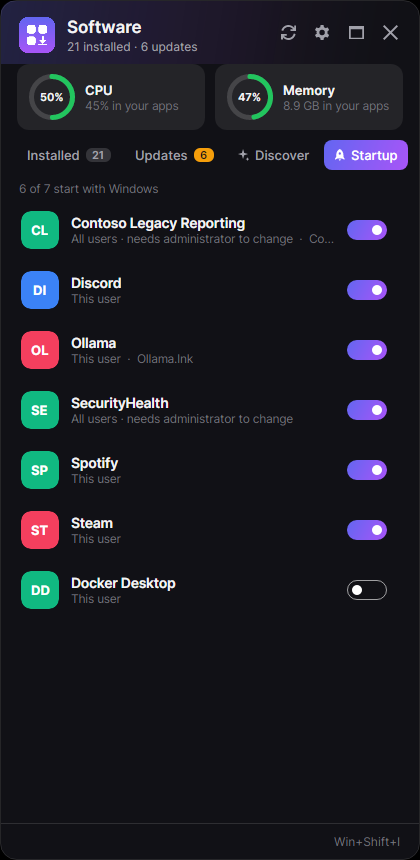
| Installed + gauges | Updates + security | Startup apps |
|---|---|---|
|  |  |
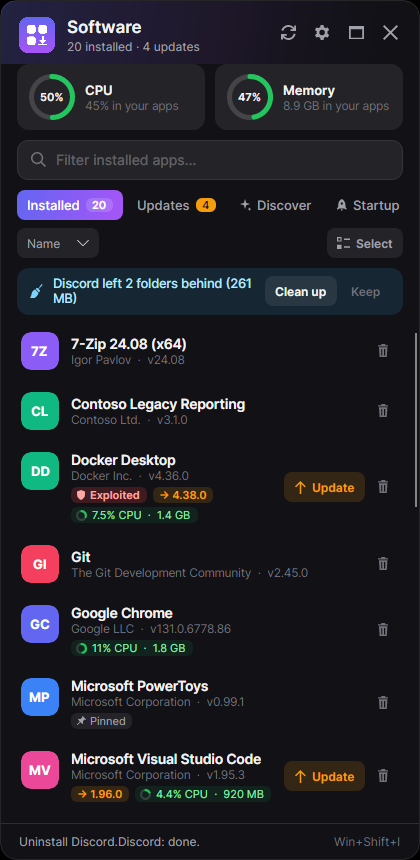
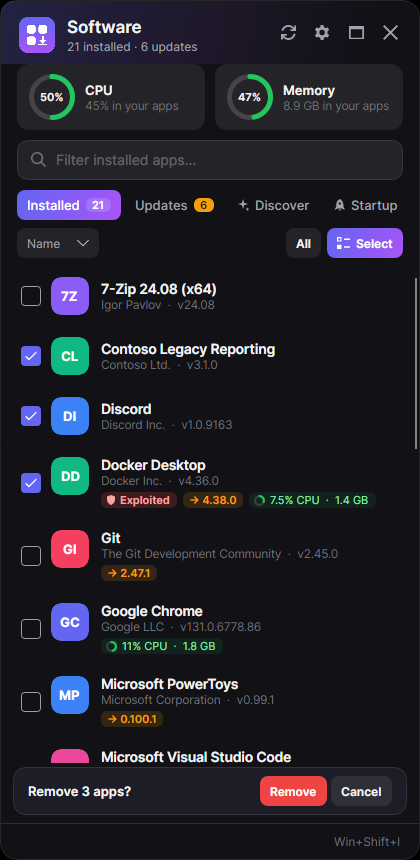
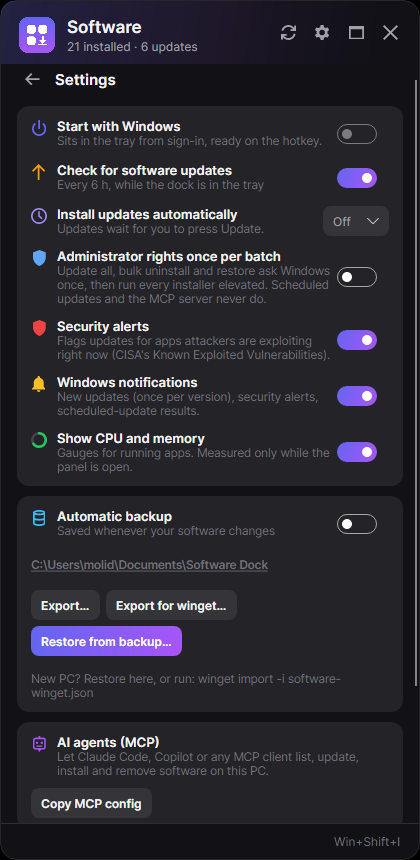
| Leftovers, pinned, unused | Bulk uninstall | Settings |
|---|---|---|
 |  |  |
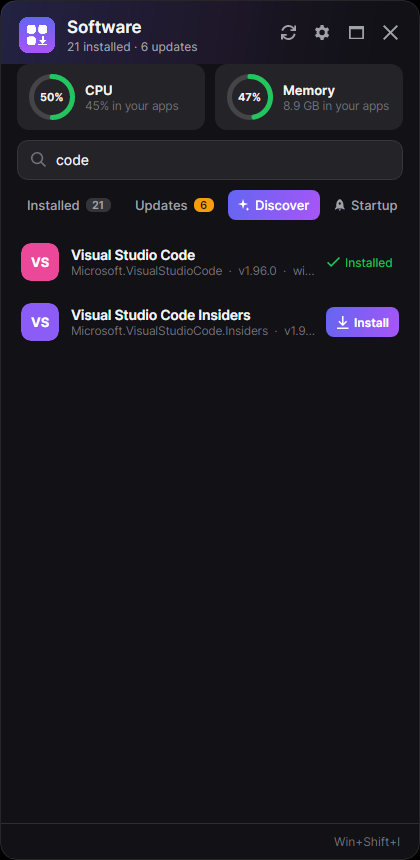
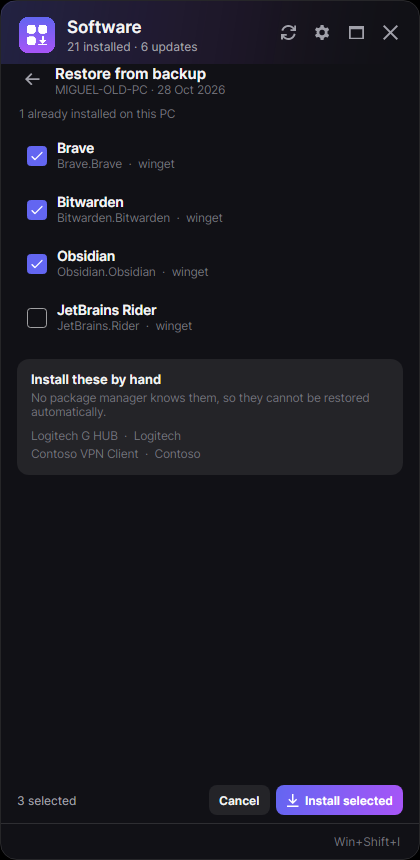
| Discover | Restore from backup |
|---|---|
 |  |
Rendered by the headless UI tests from the real window, in demo mode.
Features
- Tray icon as a status light — green: up to date · amber: updates waiting · blue: working · red: the inventory could not be read. Click it, or press Win+Shift+I, to toggle the panel. Updates are checked in the background every 6 hours, so the tray turns amber on its own.
- 📌 Anchored / 🪟 floating — anchored, the panel hugs the right edge at full height and hides when it loses focus; floating, it is a normal draggable window.
- One inventory — the
Uninstallregistry keys (what Installed apps shows) reconciled with WinGet (ids, available updates) and MSIX/Store apps, with real icons. - Bulk uninstall — Select, tick several apps (or All), Uninstall: they are removed one after another. Something Windows itself does not offer.
- Update one or all, install from the catalog, uninstall anything — through WinGet when
it knows the app, otherwise through the app's own uninstaller (silently for MSI and
QuietUninstallString, never with guessed switches). - CPU and memory gauges — for the machine and for every running app, measured only while the panel is open. Sort by memory in use to find the heavy ones.
- Backups that survive a reinstall — an automatic backup in
Documents\Software Dock(OneDrive usually syncs it), updated whenever your software changes, in two formats: Software Dock's, and WinGet's, which restores a new PC with nothing butwinget import -i software-winget.json. Restore from backup lists what is missing, ticks it all, installs it in one go, and names the apps you will need to fetch by hand. - Security alerts — apps with an update pending that attackers are exploiting right now (CISA's Known Exploited Vulnerabilities catalog) get an Exploited badge and go first in Updates.
- Startup apps — everything Windows starts at sign-in, with Task Manager's own switch: disable without deleting, re-enable any time.
- Leftovers — after an uninstall, the folders it left behind (install folder, AppData, ProgramData) are offered for cleanup, to the Recycle Bin.
- Unused apps — Not opened for 8 months badges from Windows' own launch history, and a Least used sort to find what to remove.
- Pin or skip — right-click an app: Skip version 2.47.1 or Pin — never update.
- Administrator rights once per batch (opt-in) — Update all, bulk uninstall and restore ask Windows once and run every installer elevated, instead of one UAC prompt per app. The elevation ends with the batch; scheduled updates and the MCP server never use it.
- Updates on a schedule — every night or every Sunday night; a run missed while the PC was off happens when it wakes.
- Windows notifications — new updates (once per version), security alerts first, scheduled-run results, a new dock version.
- Start with Windows, single instance, per-monitor DPI, settings per user.
- Updates itself from GitHub releases (Velopack): it downloads in the background and offers Restart to update.
- MCP server with discovery instructions, tool annotations and a
--read-onlymode.
Install
Download SoftwareDock-win-Setup.exe from the latest release
and run it. It installs per user (no admin) to %LOCALAPPDATA%\SoftwareDock, adds a Start-menu
entry and starts in the tray. A portable zip is attached to every release too.
The installer is not code-signed yet, so SmartScreen may ask you to confirm the first time.
Or with WinGet, once the package has been accepted into the community repository:
winget install MiguelMolina.SoftwareDock
Build from source
Requirements: .NET 10 SDK and WinGet (App Installer, preinstalled on current Windows).
dotnet run --project src/SoftwareDock.App
Without touching your machine (in-memory demo PC):
dotnet run --project src/SoftwareDock.App -- --demo
Test:
dotnet test SoftwareDock.slnx
appsettings.json next to the executable configures the hotkey and panel width; everything you
change in ⚙️ is stored in %LOCALAPPDATA%\SoftwareDock\settings.json.
Releasing
Bump <Version> in Directory.Build.props and push to main. When no release exists for that
version, CI tests, publishes self-contained, packs with Velopack, tags vX.Y.Z and creates the
release that installed docks update from. Pushing a v* tag by hand does the same.
Then it attaches the MCP bundle, publishes to the MCP Registry and opens the WinGet PR — see
Distribution.
Connect an AI agent (MCP)
Claude Desktop: download SoftwareDock-mcp-win-x64.mcpb from the
latest release and open it:
it installs the server, no dock needed. The server is also listed in the
MCP Registry as io.github.molidestroyer/software-dock.
Any other client: from the tray menu choose Copy MCP config, or print it:
SoftwareDock.Mcp.exe --print-config
and paste it into your client's .mcp.json:
{
  "mcpServers": {
    "software-dock": {
      "type": "stdio",
      "command": "C:\\Tools\\SoftwareDock\\SoftwareDock.Mcp.exe",
      "args": []
    }
  }
}
On connect, the server sends instructions that tell the agent what it is for, which identifier each tool takes and where it comes from, and to confirm changes with the user first.
| Tool | Kind | What it does |
|---|---|---|
list_installed_software | read-only | Installed apps with version, available update and key; filter, only-updates, refresh |
get_software_details | read-only | Location, date, size and how it would be uninstalled |
search_software_catalog | read-only | WinGet + Microsoft Store search, returns packageId |
install_software | changes the PC | Silent install of a packageId |
upgrade_software | changes the PC | Upgrade an installed app by key |
uninstall_software | destructive | Remove an installed app by key |
list_running_software | read-only | Running apps with CPU % and memory, heaviest first |
export_software_backup | read-only | Backup JSON in Software Dock or winget import format |
get_security_advisories | read-only | Apps with pending updates that are actively exploited (CISA KEV) |
list_unused_software | read-only | Apps not opened for N days, largest first |
list_startup_apps | read-only | What starts with Windows, enabled or not, and which app it belongs to |
set_startup_app_enabled | changes the PC | Enable/disable a startup app the way Task Manager does |
Add "args": ["--read-only"] to expose only the read-only tools.
Architecture
src/
  SoftwareDock.Domain          pure model and rules — no I/O
  SoftwareDock.Application     use cases over ports (inventory, operations)
  SoftwareDock.Infrastructure  Windows adapters: registry, WinGet CLI, uninstallers
  SoftwareDock.Mcp             MCP server (stdio)
  SoftwareDock.App             Avalonia tray dock
tests/                         one test project per layer, incl. headless UI and MCP end to end
docs/adr/                      architecture decisions
Decisions worth reading before changing things:
- Ports and adapters around a pure domain
- WinGet through its CLI first, behind a port
- A tray app in Avalonia, not a PowerToys module
- MCP: discovery through instructions, safety through the domain
- Releases and self-update with Velopack
- PC hygiene: startup, security, leftovers, unused apps, schedules, notifications
How it compares
| Software Dock | UniGetUI | WinGet's built-in MCP server | PowerToys Command Palette | |
|---|---|---|---|---|
| Lives in the tray | ✅ panel docked to the screen edge | ✅ window + tray menu | — | launcher (Win+Alt+Space) |
| Installed apps WinGet does not know | ✅ registry reconciled | partial | — | — |
| Update / uninstall | ✅ | ✅ (+ Scoop, Chocolatey, npm…) | — (find, install) | install |
| Bulk uninstall | ✅ | ✅ | — | — |
| CPU / memory per app | ✅ | — | — | — |
| Backup / restore | ✅ (+ winget import format) | ✅ | — | — |
| Exploited-vulnerability alerts | ✅ | — | — | — |
| Startup apps / leftovers / unused apps | ✅ | — | — | — |
| MCP server for agents | ✅ inventory + install/upgrade/uninstall | — | ✅ find + install | — |
UniGetUI is the most complete GUI if you want many package managers. Software Dock is deliberately smaller: Windows software only, one glance from the taskbar, and an agent-friendly API.
License
AGPL-3.0 © Miguel Molina






