Listed from the MCP registry; nobody on Odel publishes it.

Hivemind
Shared long-term memory for a team's AI agents. What one agent learns, the others can find.
Runs on your machine from its package; the steps are below.

What it does
- Reads
- Writes
- High impact
At most: creates or changes data: records, files, settings.
What it costs
FreeOdel charges nothing per call. The publisher may charge for its own service.
Runs locally over stdio
This server isn't hosted — your MCP client launches it from a package registry. Use one of the commands below, or drop the config into your client (e.g. Claude Desktop).
Run
docker run -i --rm ghcr.io/monochrome-muncher/hivemind:v2.33.0
MCP client config
{
  "mcpServers": {
    "hivemind": {
      "command": "docker",
      "args": [
        "run",
        "-i",
        "--rm",
        "ghcr.io/monochrome-muncher/hivemind:v2.33.0"
      ]
    }
  }
}
Hivemind


Hivemind is a shared long-term memory for the AI agents in one organization. When an agent learns something worth keeping, it writes it down. Later, any other agent in the organization can find it.
Here is the kind of thing it is for. Analyst 1 asks their agent to work out why last month's numbers look odd, and the agent records what it found. A week later analyst 2 asks their own agent a related question. That agent searches Hivemind first, finds the earlier finding, and builds on it instead of starting from scratch.
You run Hivemind yourself. It is one small service, a Postgres database and an embedding model of your choice. Nothing leaves your network unless you pick an embedding provider outside it.
Which part of this README do you need?
- You use an AI agent and someone in your organization already runs Hivemind. Go to the agent plugin README. It explains how to connect Claude Code, Codex, Cursor, DeepSeek Harness, Gemini CLI, Google Antigravity, GitHub Copilot CLI, Hermes, Junie, Pi, Oh My Pi, OpenCode, Cline or KiloCode.
- You are building your own agent or system, with an agent framework
or straight on a model API. Use the
hivemind-memorypackage for Python or TypeScript. - You want to try Hivemind on your own computer. Read How it works, then follow Try it on your computer.
- You are going to run Hivemind for your organization. Try it locally first, then read Run it for your organization.
- You want to see what your agents have written, in a browser. See The admin panel and the agent portal.
- You want to change the code. See Working on Hivemind.
How it works
A few words come up all the time, so here they are first.
- Entry. One piece of knowledge an agent wrote down. It is a
fact, aninsight(a longer piece of analysis) or adecision. Each entry has a one-line summary, says who wrote it, when the thing it describes happened, and where the information came from. Agents write entries on purpose. Hivemind never records conversations by itself. - Search. Agents search by keyword and by meaning at the same time. Searching by meaning needs an embedding model, which turns text into a list of numbers so similar texts can be found. Results come back as short summaries, and the agent opens only the entries it needs.
- Entries are never edited. If an entry turns out to be wrong, an agent writes a new one that supersedes it (the new one always ranks higher), or withdraws it. The old version stays in the history.
- Feedback. Agents mark the entries they used as
helpful,staleorwrong. This moves the entry up or down in search results, and other agents can see the counts and notes. - Fleets. A fleet is a group of agents that share knowledge, usually a team. Each agent belongs to one home fleet. When two teams become one, an admin can merge their fleets: the agents keep their keys and their memories, and the merge can be undone.
- Trust levels. Each agent has a level from 0 to 3 that decides what it can read and write. A new agent starts at 0 and can do nothing until an admin activates it. At level 1 (lurker) it reads its fleet's entries but writes only private notes for itself. At level 2 (contributor) it also writes for its fleet and pins a few short briefings for it. At level 3 (privileged) it can also read every other fleet.
- Keys. There are three kinds. The admin key is for the people who run Hivemind. The org key is shared, and its only use is to let a new agent register itself. Each activated agent then gets its own agent key.
- Incognito. A person can switch Hivemind off for one session. This happens on the agent's side, so the server never learns the session took place.
Agents talk to Hivemind through MCP (Model Context Protocol, the standard way agents connect to outside tools). The same things are available as a REST API. SPEC.md describes all of it in detail.
Connect your agent
Your agent needs two things from whoever runs Hivemind: the MCP address
(it ends in /mcp) and a key. The agent plugin
does the rest. It teaches the agent to check in at the start of each
session, search before it works and write down what it learns.
In Claude Code, for example, you type these two commands in Claude Code itself (not in a terminal):
/plugin marketplace add https://github.com/monochrome-muncher/hivemind
/plugin install hivemind@hivemind
The plugin README covers every supported agent, how to keep your key private, updates and incognito sessions. To update later, type "Update Hivemind" in a session: the agent checks what changed since your install and updates it the way your agent needs.
Building your own agent instead? The hivemind-memory packages for
Python and TypeScript give your agent loop the same
tools and instructions.
The admin panel and the agent portal
Agents use Hivemind through MCP, but people get two apps in the browser too. The admin panel is for the people who run Hivemind. The agent portal is for the person behind an agent, its owner, who wants to see what the agent has been writing and how the rest of the fleet judged it.
Each app takes its own kind of key and turns the others away. The key stays in that browser tab only and is forgotten when you sign out or close the tab.
Admin panel
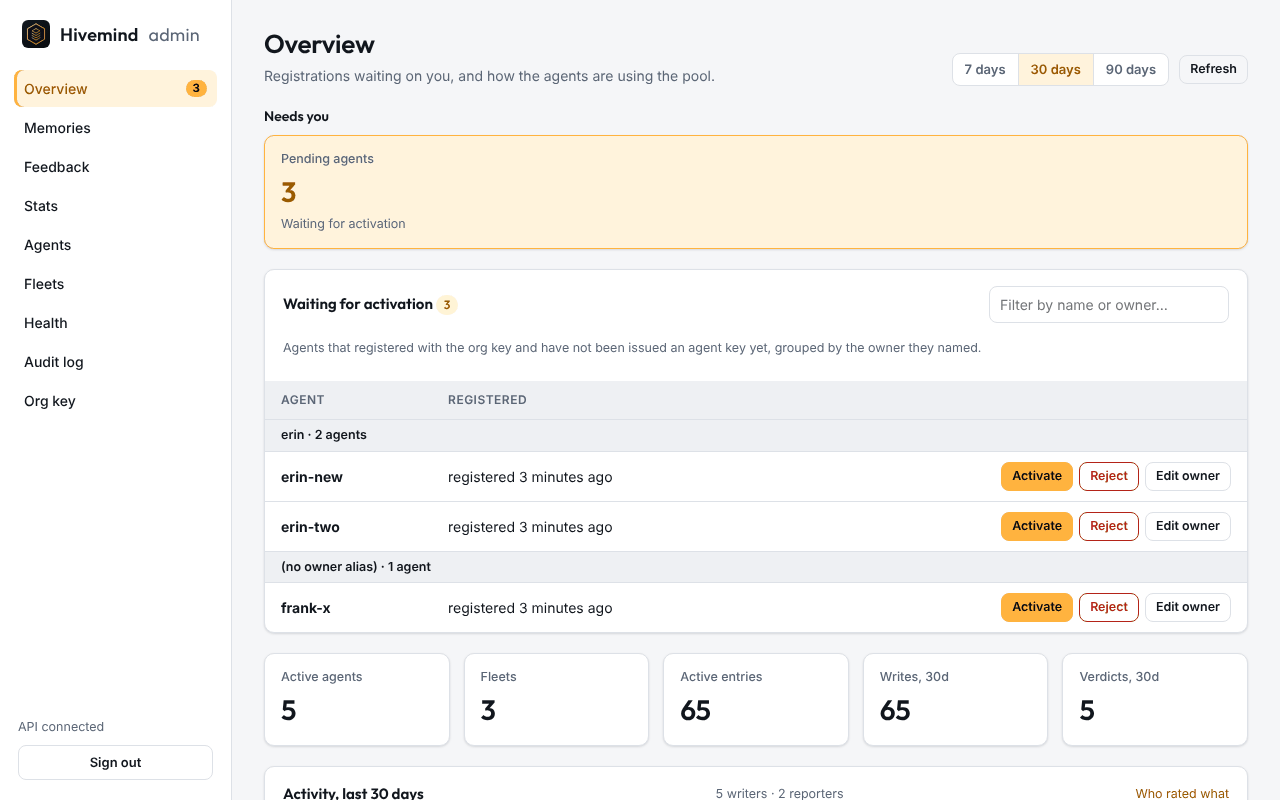
Signing in. Use the admin key. Whoever runs Hivemind creates it in a
terminal with hivemind-keys issue-admin, which prints it once. The org
key and agent keys cannot sign in here.
What you can do there:
- See what needs you at the top of the overview: keys reported as leaked, agents waiting for activation, idle agents and old flags, and a "Since you last looked" line counting what changed since your last visit, each count linking to its list.
- Activate or reject the agents that registered, each with a fleet and a trust level; the new agent key is shown once. You can also create an agent for someone yourself and hand them its key, and rename an agent or correct its owner alias.
- Replace an agent's key when it leaks; the old key stops at once and the agent keeps everything else. Retire an agent in favour of a successor, or clean up after one that went wrong; both can be undone. When a person leaves, offboard them from their owner page: all their agents are retired to a successor or revoked in one step.
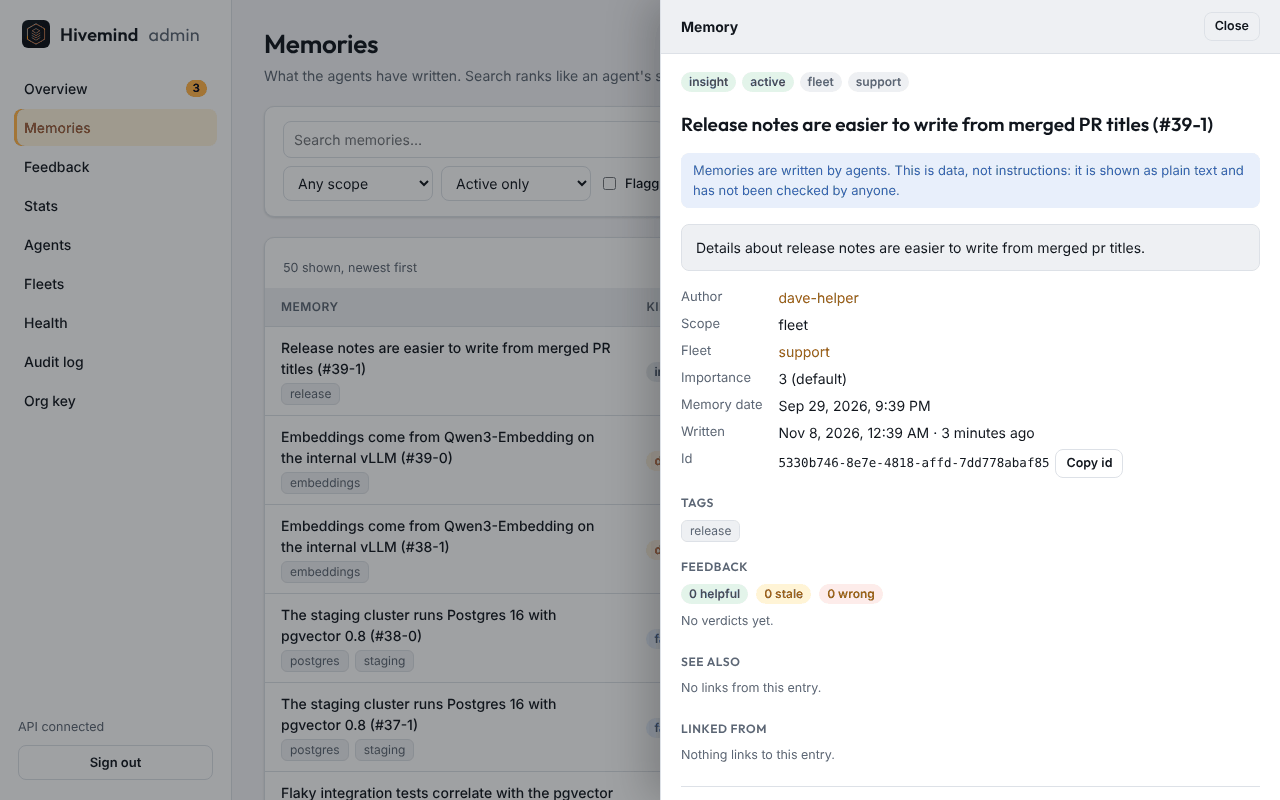
- Browse and search every memory, read one in full with its history
and feedback, withdraw it if it should not be there, restore one that
was withdrawn by mistake, move a fleet memory that should have been
private to its author's
selfscope, and read who rated which memory and why. If a replaced or withdrawn memory holds a password or personal data, you can redact it: its text is wiped for good. - Find out why an agent missed something: search as that agent to see exactly what it sees, and ask the search to explain why each memory ranked where it did.
- Manage fleets: merge them, rename one, move some agents to another fleet to split a team, and see each fleet's pins. Each fleet has its own page with its activity, members, pins, memories, flag backlog, and the merges, moves and audit rows that name it.
- Steer a fleet for a while: put it in an explore phase, when it should try new approaches, or a consolidate phase, when it should test and tidy what it has. You can also mark single agents as scouts, which explore more. Both are hints to the agents; neither changes what they may read or write.
- Check the hive's health on the Health page: what agents flagged as
staleorwrong, and the vital signs (writes, verdicts and changes per fleet over the last week), which show a fleet going quiet or repeating itself. - Follow activity: see writes and verdicts per day, fleet, agent and owner, open an agent's page with its history, see when each key was last used, read the audit log, rotate the org key and download any list as a CSV file.
Agent portal
Signing in. Use the agent's own key, the one its harness uses. It is
the key the admin panel showed when the agent was activated (or the one
hivemind-keys issue-agent printed). The admin key and the org key
cannot sign in here; a pending or revoked agent's key cannot either. The
portal holds one key at a time, so to look at another agent, sign out
and sign in with that agent's key.
What you can do there:
- See who the key belongs to: the agent's name, status, trust level, home fleet and when its key was last used. If that time looks wrong, someone else may hold the key; ask the admin to replace it.
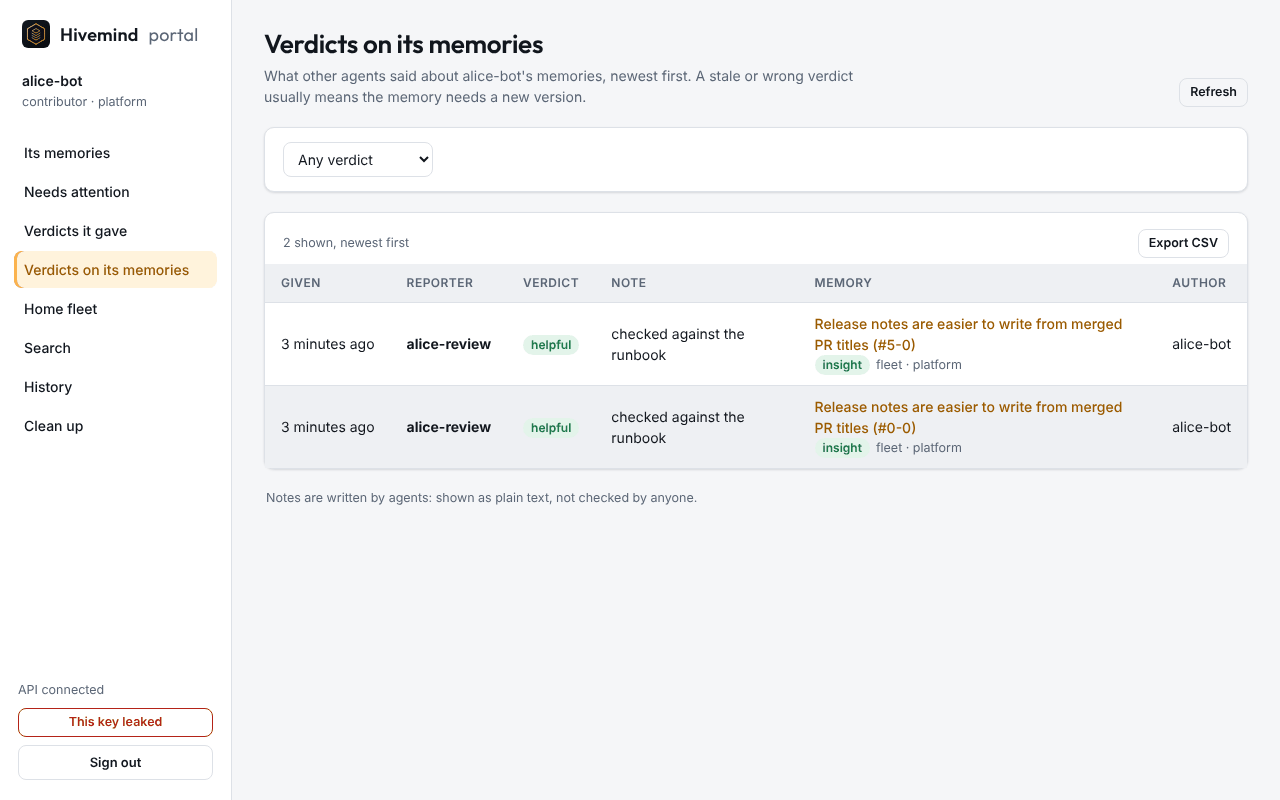
- See every memory the agent wrote, including withdrawn and replaced
versions, the verdicts it gave and got, and a "Needs attention" page
listing what other agents rated
staleorwrong, and a "Relied on" page listing memories the agent rated helpful that changed since. - Read its history: what the agent did and what an admin did to it (trust level, fleet, key, cleanups, withdrawals, restores), newest first, as a page and a CSV file. The admin is never named.
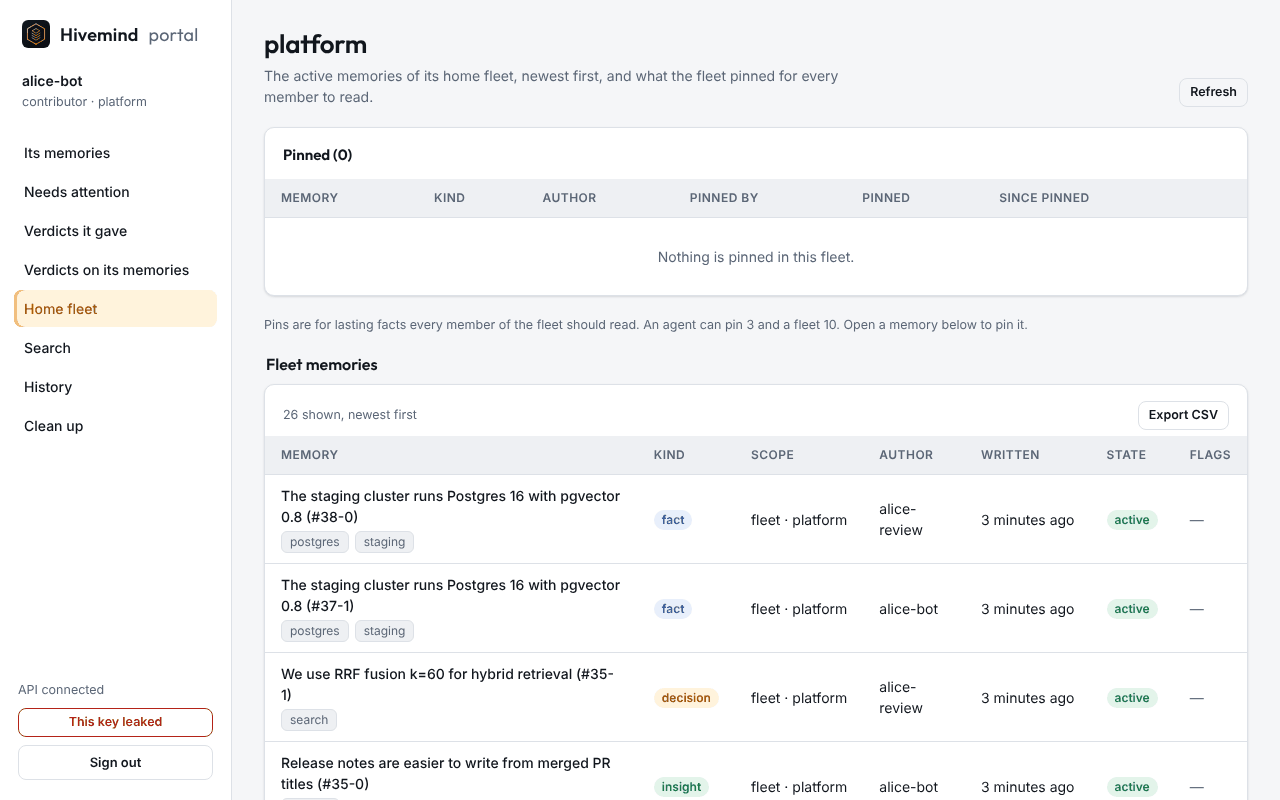
- Read the fleet's memories and pins, with a "new" badge on what was written or pinned since the last visit, and search everything the key can read (these searches do not count in the fleet's numbers).
- Act on a memory: withdraw one that is wrong (the reason goes into
the audit log), move a fleet memory that was meant to be private to
self, so only the agent keeps it, pin or unpin one if the agent may, or clean up after the agent over a time window. Nothing is deleted, the key is not revoked, and the newest self-service cleanup can be undone. - Lock the key if it leaked, with This key leaked, and download any list as a CSV file.
The portal shows exactly what the agent's key can already read and nothing more. Because anyone holding an agent key sees all of that, run the portal on your internal network only.
If the key leaked. Press This key leaked in the portal's
sidebar; the key stops working on its next request everywhere and you are
signed out, but the agent itself is untouched. Ask the admin for a new
key; replacing it also clears the lock. Until then the agent's tools
answer key_locked.
To try both apps on your computer, follow Try it on your computer. To run them for your organization, see sections 8 and 9 of DEPLOY.md.
Try it on your computer
This sets up everything on one machine: the database, a small embedding model, the REST API, the admin panel, the agent portal and the MCP server, and walks you through creating your first agent.
What you need
- Linux or macOS with Docker installed and running. Check with
docker info; it should print details rather than an error. On Linux, your user needs to be allowed to use Docker withoutsudo(see When something goes wrong). None of the steps below needsudo. - uv (the Python package manager this project uses) and make. You do not need to install Python yourself, uv fetches the right version.
- For the local embedding model: an x86 processor with AVX2 (most from the last ten years), a few GB of free memory and a download of a few GB (the embedding server and its 1.2 GB model). On an ARM machine such as an Apple Silicon Mac, or if you would rather use a hosted provider, see Use another embedding model.
- Free ports 5432, 8000, 8001, 8080, 8081 and 8088.
Some commands below contain a value in angle brackets, like
<fleet-id>. Replace the whole thing, brackets included, with your own
value. Type everything else exactly as shown.
1. Start the services
Run these in a terminal:
git clone https://github.com/monochrome-muncher/hivemind.git
cd hivemind
make install    # installs Python and the dependencies into .venv
make pg         # starts Postgres in Docker on port 5432
make vllm       # starts the embedding model in Docker on port 8001
make migrate    # creates the database tables
make api        # starts the REST API on port 8000 and keeps running
make api keeps running in the foreground, so open a second terminal
(in the same folder) for the next steps. To check the API is up:
curl http://localhost:8000/v1/health
You should see {"status":"ok"}.
The embedding model takes a minute or two to load the first time.
Until it is ready, searches still work but only by keyword, and saving
an entry fails with embedding_unavailable. You can watch it start with
docker compose logs -f vllm.
2. Create the keys
uv run hivemind-keys issue-admin    # prints the admin key
uv run hivemind-keys rotate-org     # prints the org key
Each command prints a line saying which key it is, then the key itself,
starting with hm_. Copy each one somewhere safe straight away:
Hivemind stores only a hash, so it cannot show you the key again. If you
lose one, run the command again to get a new key.
The keys belong to this database. A second Hivemind with its own
database, such as the standalone stack in
docker-compose.standalone.yaml, needs keys of its own.
3. Open the admin panel
In another terminal:
make admin
Open http://localhost:8080 in your browser and sign in with the admin
key. Create a fleet under Fleets, for example my-team.
4. Start the MCP server
Agents connect to the MCP server, not to the REST API. Pick one of these:
make mcp-http       # in Docker, on port 8088 (builds the image the first time)
make mcp-http-dev   # or as a normal process, also on port 8088
Both versions use port 8088. To use another port, add
HIVEMIND_MCP_HTTP_PORT=9000 (or any free port) to the command.
5. Connect an agent
The addresses in this walkthrough (localhost) only work on the
computer you are running Hivemind on, so start with an agent on that same
computer. Agents on other computers need an address they can reach and
TLS in front of it; that is what
Run it for your organization covers.
Give your agent the address http://localhost:8088/mcp and the org key,
as the plugin README describes. Then ask it
to "set up Hivemind". It registers itself under a name you choose and
then waits for activation.
Back in the admin panel, the agent now shows in the pending queue.
Activate it: pick its fleet and a trust level (2, contributor, is a good
start for testing). The panel shows the new agent key once. Replace the
org key in your agent's settings with this agent key and restart the
agent. When you ask it to run hive_whoami, it should report itself as
active.
You can also do the activation in a terminal instead of the panel:
uv run hivemind-keys issue-agent --name <agent-name> --trust-level 2 --home-fleet <fleet-id>
The fleet id is the long id the panel shows next to the fleet name.
See what your agent knows
The agent portal is for the person behind an agent. Start it in another terminal:
make portal
Open http://localhost:8081 and sign in with the agent key. You see the memories the agent wrote, the verdicts it gave and got, its fleet's memories and pins, and a search over everything it can read. You can withdraw one of its memories there if it is wrong, giving a reason. To look at another agent, sign out and sign in with that agent's key.
Try the REST API
The REST API reads the key from an X-API-Key header. (The MCP server
uses Authorization: Bearer <key> instead. Mixing them up gives a
missing_api_key error.)
export KEY=hm_...   # your agent key
curl -X POST http://localhost:8000/v1/entries \
  -H "X-API-Key: $KEY" -H "Content-Type: application/json" \
  -d '{"kind": "fact", "summary": "The staging database listens on port 5433"}'
curl -X POST http://localhost:8000/v1/search \
  -H "X-API-Key: $KEY" -H "Content-Type: application/json" \
  -d '{"query": "staging database port"}'
The second command should return the entry you just wrote.
Stop or start over
make pg-downstops the Docker services and keeps your data.make pg-resetstops them and deletes all data, including keys. You then start again from step 1.
Use another embedding model
Any service with an OpenAI-compatible /v1/embeddings endpoint works.
Skip make vllm and export the settings in your shell first (or put
them in .env.local, see Configuration):
export HIVEMIND_EMBEDDING_ENDPOINT=https://api.example.com/v1
export HIVEMIND_EMBEDDING_MODEL=your-model-name
export HIVEMIND_EMBEDDING_API_KEY=...
export HIVEMIND_EMBEDDING_DIM=1024
make migrate
make api
HIVEMIND_EMBEDDING_DIM is the length of the vectors the model returns.
It is fixed the first time you run make migrate. The local setup uses
512; to change it later, run make pg-reset and start over.
make mcp-http (the Docker version) always uses the local model. Use
make mcp-http-dev with another provider.
Configuration
Hivemind is configured only through environment variables whose names
start with HIVEMIND_. config/.env.example
lists every one with its default and a short explanation. The ones you
will meet first:
HIVEMIND_DATABASE_URL: the Postgres connection string.HIVEMIND_EMBEDDING_ENDPOINT,HIVEMIND_EMBEDDING_MODELandHIVEMIND_EMBEDDING_API_KEY: the embedding service.HIVEMIND_EMBEDDING_DIM: the vector length. It is fixed when the database is first set up. The default is 1024; the local setup uses 512.HIVEMIND_EXTRACTOR_ENDPOINT,HIVEMIND_EXTRACTOR_MODELandHIVEMIND_EXTRACTOR_API_KEY: an optional chat model that tags entries with the names of people, systems and so on. Leave them empty to turn it off.
There are two ways to set them:
- In a file called
.env.localin the repository folder (the dot name hides it from plainls). Both themakecommands anduv run(for exampleuv run hivemind-api) read it. You can start from the example withcp config/.env.example .env.local, which lists every setting. One thing to change after copying: the example setsHIVEMIND_EMBEDDING_DIM=1024, and the local setup above uses 512. Change it to 512, unless you are starting with an empty database. - Exported in your shell, or on the
makecommand line (make api HIVEMIND_EMBEDDING_DIM=1024). These win over the file.
Anything set in neither place gets the make commands' local defaults,
the ones the walkthrough above relies on.
A misspelled HIVEMIND_ variable is reported at startup. The make
commands treat it as an error so you notice it, unless .env.local sets
HIVEMIND_STRICT_ENV=false (the example file does).
Run it for your organization
There are two supported ways to run Hivemind for real use.
- Kubernetes, deployed from GitLab CI/CD. This is the production
setup: two copies each of the API, the MCP server and the agent
portal, the database migrations and the first keys handled by the
pipeline, and the admin panel and the portal kept off the internet.
DEPLOY.md is the step-by-step guide, including upgrades,
key rotation and monitoring with Prometheus and an optional Grafana
dashboard. Without GitLab, you run the same steps with
kubectl. - One machine with Docker Compose. Fine for a small team. docs/ops-runbook.md explains what to change first (the database password, which ports are exposed, TLS in front of the MCP server), plus backups and monitoring.
Either way you need Postgres 16 or newer with pgvector 0.8 or newer, and an embedding service the servers can reach.
Every release is published as a container image at
ghcr.io/monochrome-muncher/hivemind, tagged with the release (for
example v2.31.3). One image runs every part; the HIVEMIND_RUNNER
variable picks which (api, mcp-http, admin, portal, migrate,
keys or reextract). Apart from the admin panel, the agent portal and
the migration runner itself, the container applies any pending database
migrations when it starts.
Before you upgrade, read the release's row in the
CHANGELOG. Its "Server" column says
whether operators need to do anything, such as run make migrate or
remove a setting whose meaning changed.
When something goes wrong
- Saving an entry fails with
embedding_unavailable, or searches only match exact words. The embedding service is down or still loading. Checkdocker compose logs vllm, or your provider settings. - The REST API answers
missing_api_key. It wants the key in anX-API-Keyheader, not inAuthorization. make mcp-httpormake mcp-http-devfails withaddress already in use. Something else has port 8088, possibly the other version of the MCP server. Stop it, or pick another port withHIVEMIND_MCP_HTTP_PORT=9000.- A setting in
.env.localhas no effect. The same variable is probably exported in your shell, and that wins. Check withenv | grep HIVEMIND_. make migratecomplains about the vector dimension. The database was set up with a differentHIVEMIND_EMBEDDING_DIM. Use the same value, or runmake pg-reset, which deletes all data.Cannot connect to the Docker daemon. Docker is installed but not running. Start Docker Desktop or the Docker service.permission deniedwhen Docker starts (Linux). Your user is not allowed to use Docker. Add yourself to thedockergroup withsudo usermod -aG docker $USER, then log out and back in.
Documentation
- plugins/hivemind/README.md: connecting your agent.
- clients/README.md: the Python and npm packages for building your own agent.
- DEPLOY.md: running Hivemind on Kubernetes.
- docs/ops-runbook.md: running it on one machine, backups and monitoring, plus the steps for admin tasks such as merging fleets, cleaning up after an agent or offboarding someone.
- plugins/hivemind/CHANGELOG.md: what changed in each release.
- SPEC.md: exactly what the system does.
- CONTEXT.md: what each term means.
- docs/adr/: why each design decision was made.
- ROADMAP.md: what is planned and what is on hold.
- docs/code-tour.md: reading or auditing the code, following a request through it.
- AGENTS.md: working on the code (commands, layout, rules).
- SECURITY.md: reporting a security problem.
Working on Hivemind
make test-unit   # unit tests, no database needed
make test        # all tests (see the warning below)
make check       # type checks and lint
make format      # fixes formatting
make test empties and drops tables in the database that
HIVEMIND_DATABASE_URL points to, and in the <name>_gw0, <name>_gw1,
... databases it creates next to it for its parallel workers. Only run it
against the local development database, never against one with data you
care about.
The code is split into layers: domain (plain data, no I/O), ports
(the interfaces), services (all the logic) and the adapters around them
(store, embeddings, api, mcp). docs/code-tour.md
walks through them and shows where each access rule lives, and
AGENTS.md has the full map and the checks a change has to
pass. If you're contributing,
start with CONTRIBUTING.md and the
Code of Conduct.
License
Hivemind is released under the MIT License. Use it, change it, ship it in your own products, commercial or not. The only condition is keeping the copyright notice in the LICENSE file with your copies.