Listed from the MCP registry; nobody on Odel publishes it.

FigmaMCP
Claude Code or Codex read and edit your open Figma file. Needs the free FigmaMCP Mac app.
Runs on your machine from its package; the steps are below.
What it does
- Reads
- Writes
- High impact
At most: creates or changes data: records, files, settings.
What it costs
FreeOdel charges nothing per call. The publisher may charge for its own service.
Runs locally over stdio
This server isn't hosted — your MCP client launches it from a package registry. Use one of the commands below, or drop the config into your client (e.g. Claude Desktop).
Distributed as an MCP bundle (`https://github.com/MrCoder/figmamcp-releases/releases/download/v0.1.26/figmamcp-0.1.26-darwin.mcpb`) — download it and import the bundle in your MCP client.
Let Claude Code or Codex read and edit the Figma file you already have open. A free Mac app with a local MCP server and a Figma plugin. No Figma API token, and no call quota to watch.
Download for Mac · Website · Setup guide
Install in 3 steps
- Download and open the app from figmamcp.dev/download. It is notarized for macOS and checks for Figma, Claude Code and Codex.
- Click through the checklist. The app adds the plugin to the Figma desktop app and connects the MCP server to your AI. There is no manifest to import and no config file to edit.
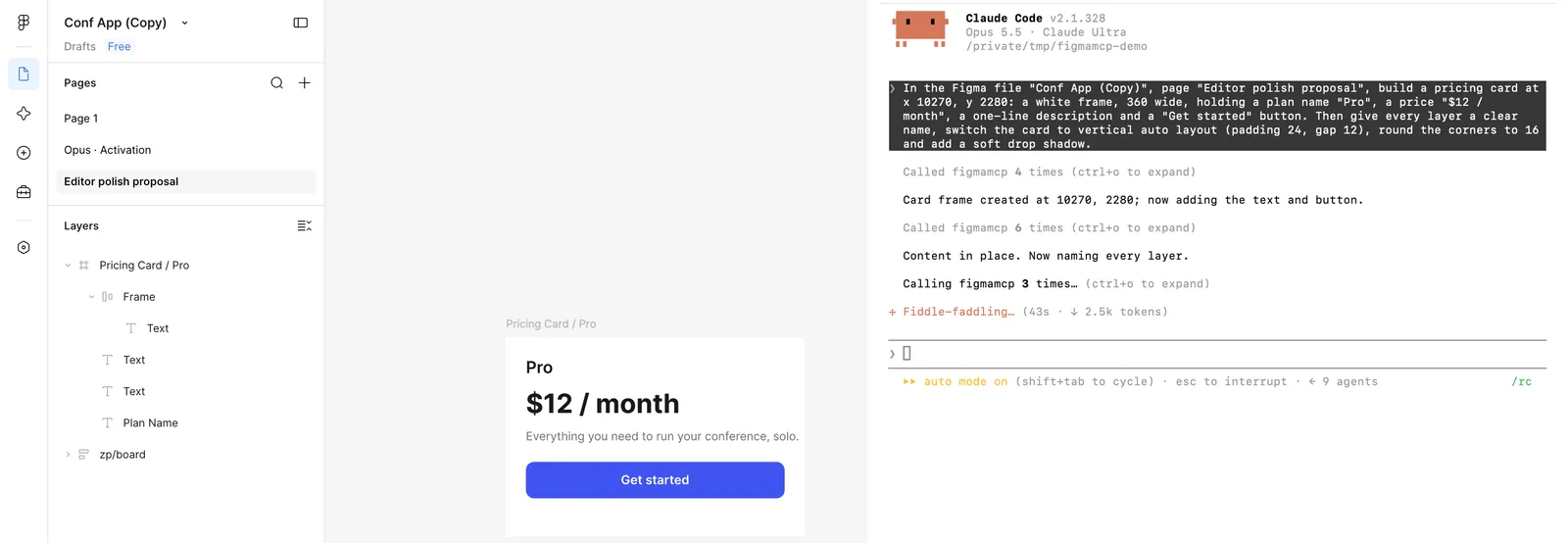
- Ask your AI. Open a Figma file and ask for a change. The AI reads the file first, then edits it in place while you watch.
FigmaMCP works through Figma's Plugin API on your own machine. It makes no calls to Figma's hosted MCP server.
Or let your agent install it
Paste this into Claude Code or Codex on your Mac. The agent downloads and installs FigmaMCP, asks you to open the plugin in Figma and to restart it once, then makes one small edit. Needs macOS 14 or later and the Figma desktop app. The same prompt is on the setup page.
Install FigmaMCP on this Mac, then make one small edit in my open Figma file. Use only the commands below, and ask me before anything else.

1. Check that `sw_vers -productVersion` is 14 or later and that /Applications/Figma.app exists. If not, stop and tell me.
2. Download and install the app:
   curl -fL -o /tmp/FigmaMCP.dmg https://github.com/MrCoder/figmamcp-releases/releases/latest/download/FigmaMCP.dmg
   hdiutil detach /tmp/figmamcp-dmg 2>/dev/null; hdiutil attach -nobrowse -readonly -mountpoint /tmp/figmamcp-dmg /tmp/FigmaMCP.dmg
   pgrep -x FigmaMCP && osascript -e 'quit app "FigmaMCP"'
   rm -rf /Applications/FigmaMCP.app && ditto /tmp/figmamcp-dmg/FigmaMCP.app /Applications/FigmaMCP.app
   hdiutil detach /tmp/figmamcp-dmg
3. Run /Applications/FigmaMCP.app/Contents/Resources/bin/figmamcp setup and read its output. Exit code 3 means a step still needs doing. If Figma has never been opened, ask me to open it once, then run setup again. If Figma must restart, ask me before you run setup --restart-figma.
4. Ask me to open a file in the Figma desktop app and run Plugins > Development > FigmaMCP. Then run figmamcp doctor from the same folder until it exits 0.
5. Ask me to restart you so you load the figmamcp tools: quit, run claude --continue (Claude Code) or codex resume --last (Codex), and type "continue".
6. Call figmamcp's page_info, then create_text with "Hello from FigmaMCP" on the current page, using the page id and exact name from page_info. If the edit is refused because editing is off, ask me to turn on "AI can edit this file" in the plugin.
What it can do
- Read pages, layers, styles, variables, components, annotations and prototype reactions.
- Export a layer as an image so the AI can check its own work.
- Create frames, text, shapes, SVG, components and instances.
- Edit fills, strokes, effects, corner radius, auto layout, text and layer structure.
- Manage your design system: styles, variables, variable bindings, component properties and instance overrides.
AI skills
Skills are short instruction files that teach an AI agent how to do one Figma task well with FigmaMCP. They are in skills/:
| Skill | What it does |
|---|---|
figma-spec-to-frames | Builds a screen from a written spec as auto-layout frames with named layers, then exports a PNG to check it. |
figma-rename-layers | Renames a frame's layers clearly and consistently, after you approve the list. |
figma-handoff-notes | Reads a frame's layout, type, colors, styles and tokens, and writes Figma annotations plus a handoff summary. |
figma-design-qa | Scores a frame against a written rubric, fixes the weakest categories, and repeats until it reaches 9 out of 10 or the round limit. |
figmamcp | The base skill: the plugin's safety rules, error codes and how to pick a tool. |
Install: copy a skill's folder into your agent's skills folder, then start a new agent session.
- Claude Code:
~/.claude/skills/<skill-name>/(for one project only:.claude/skills/<skill-name>/in that project) - Codex:
~/.codex/skills/<skill-name>/
The FigmaMCP app already installs and updates the figmamcp skill for Claude Code and Codex, so you only need to copy the task skills. Each task skill needs FigmaMCP running with the plugin open in your file.
Supported agents
| Agent | Status |
|---|---|
| Claude Code | Tested |
| Codex | Tested |
| Cursor | Works with MCP; not yet tested by us |
Safety
- Every edit must name its exact target layer.
- A bulk edit with one invalid item changes nothing.
- A switch in the plugin makes the file read-only for the AI.
- Two AI sessions can work in one file; one cannot overwrite a layer the other is editing.
Requirements
- macOS (Windows and Linux are not supported yet)
- The Figma desktop app
- Claude Code or Codex
Privacy
FigmaMCP itself sends no design content anywhere. The plugin sends only a random install ID and anonymous tool-call counts; no file names or design content. Your AI agent does send what it reads from your file to its own model provider, under that provider's terms, so choose your agent with that in mind. Details: figmamcp.dev/privacy.
Report a problem
Open an issue, or write to support@figmamcp.dev. Do not attach private design files or secrets.
About this repository
This repository holds downloads, issue reports and the AI skills in skills/. The source code is at MrCoder/figmamcp (MIT). Downloads are on the Releases page.
FigmaMCP is a fork of figma-edit-mcp by Neo Product LLC. It includes third-party software; see THIRD_PARTY_NOTICES.txt. Not affiliated with or endorsed by Figma, Inc.






