Listed from the MCP registry; nobody on Odel publishes it.

DesignScan
Extract a website’s design tokens (colors, type, spacing, shadows) as DESIGN.md, W3C, or CSS.
Runs on your machine from its package; the steps are below.
What it does
- Reads
- Writes
- High impact
At most: creates or changes data: records, files, settings.
What it costs
FreeOdel charges nothing per call. The publisher may charge for its own service.
Runs locally over stdio
This server isn't hosted — your MCP client launches it from a package registry. Use one of the commands below, or drop the config into your client (e.g. Claude Desktop).
Run
npx -y @designscan/extractor
MCP client config
{
  "mcpServers": {
    "designscan": {
      "command": "npx",
      "args": [
        "-y",
        "@designscan/extractor"
      ]
    }
  }
}URL → design tokens → DESIGN.md. Point it at any website and get a
spec-compliant DESIGN.md file
(YAML tokens + prose) that AI coding agents can read to match that site's look.
Preview
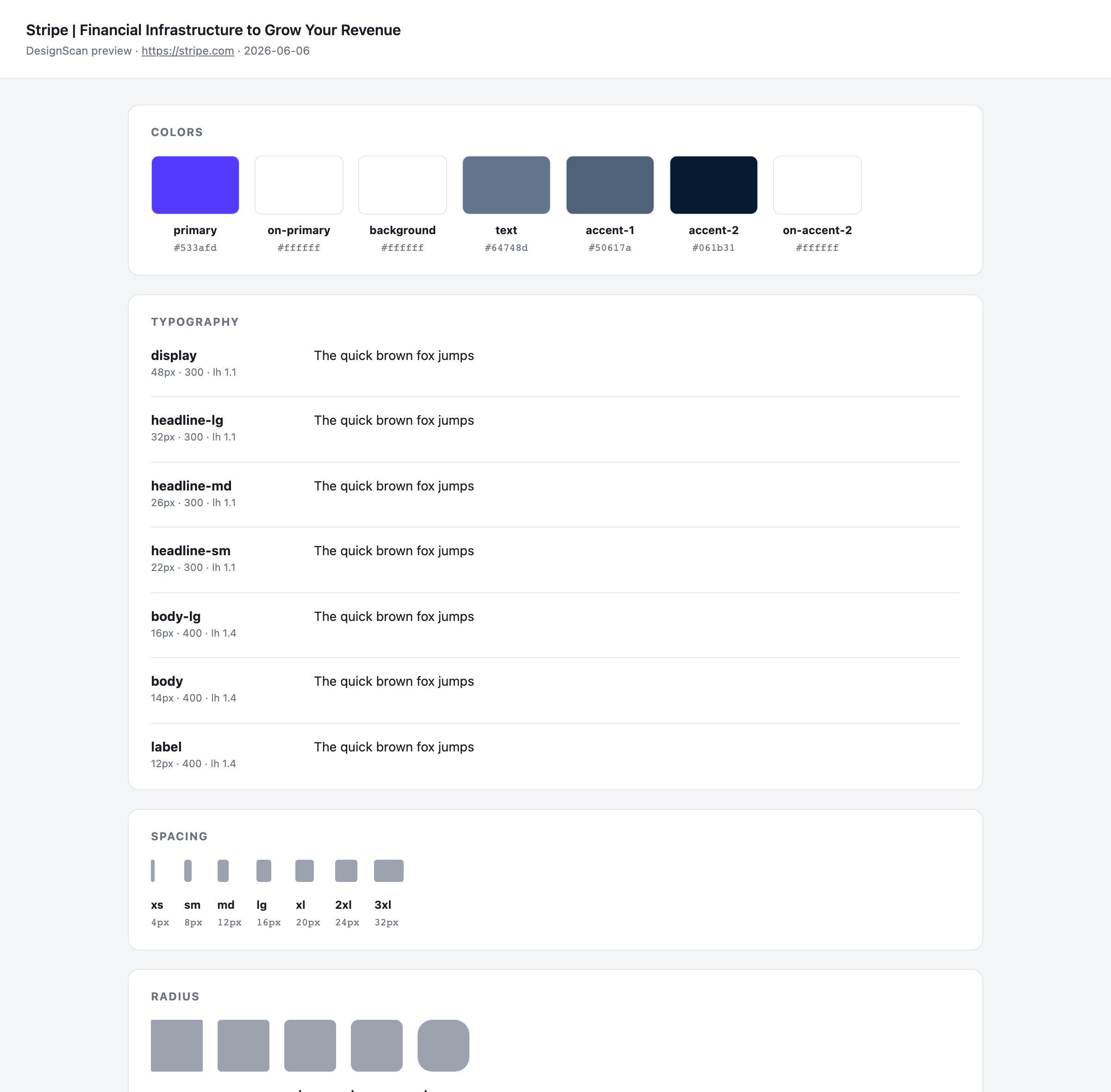
Every run can also emit a self-contained HTML proof sheet (--preview) that
renders the extracted tokens — color roles, type specimens, spacing/radius
scales, components — so you can eyeball the result before trusting it:
Notes for your coding agent
A DESIGN.md is always consumed by an AI coding agent (Cursor, Claude Code, …).
So rather than run our own LLM to resolve semantic intent, every file ends with a
Notes for your coding agent section: deterministic, per-extraction
instructions computed from the actual tokens — heading hierarchy vs. a muted
text color, sub-AA body contrast, brand-font fallback, the primary-button
contract, shape/spacing rhythm. The reasoning stays on our side (no API key); the
application happens for free inside the agent you already use.
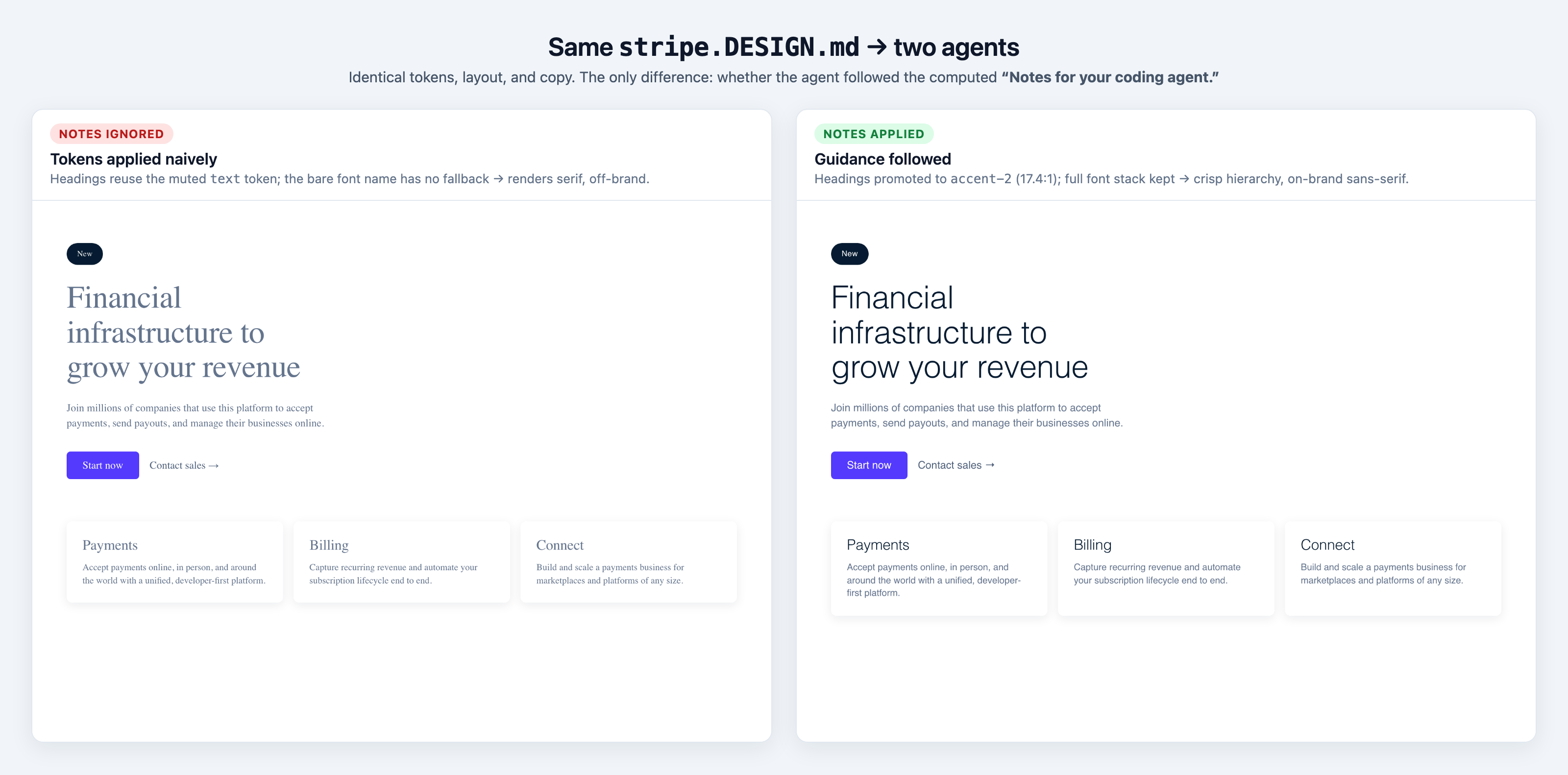
It measurably changes the output. Below: the same stripe.DESIGN.md cloned by an
agent that ignored the notes (left) vs one that followed them (right) —
identical tokens, layout, and copy:
Brand corpus
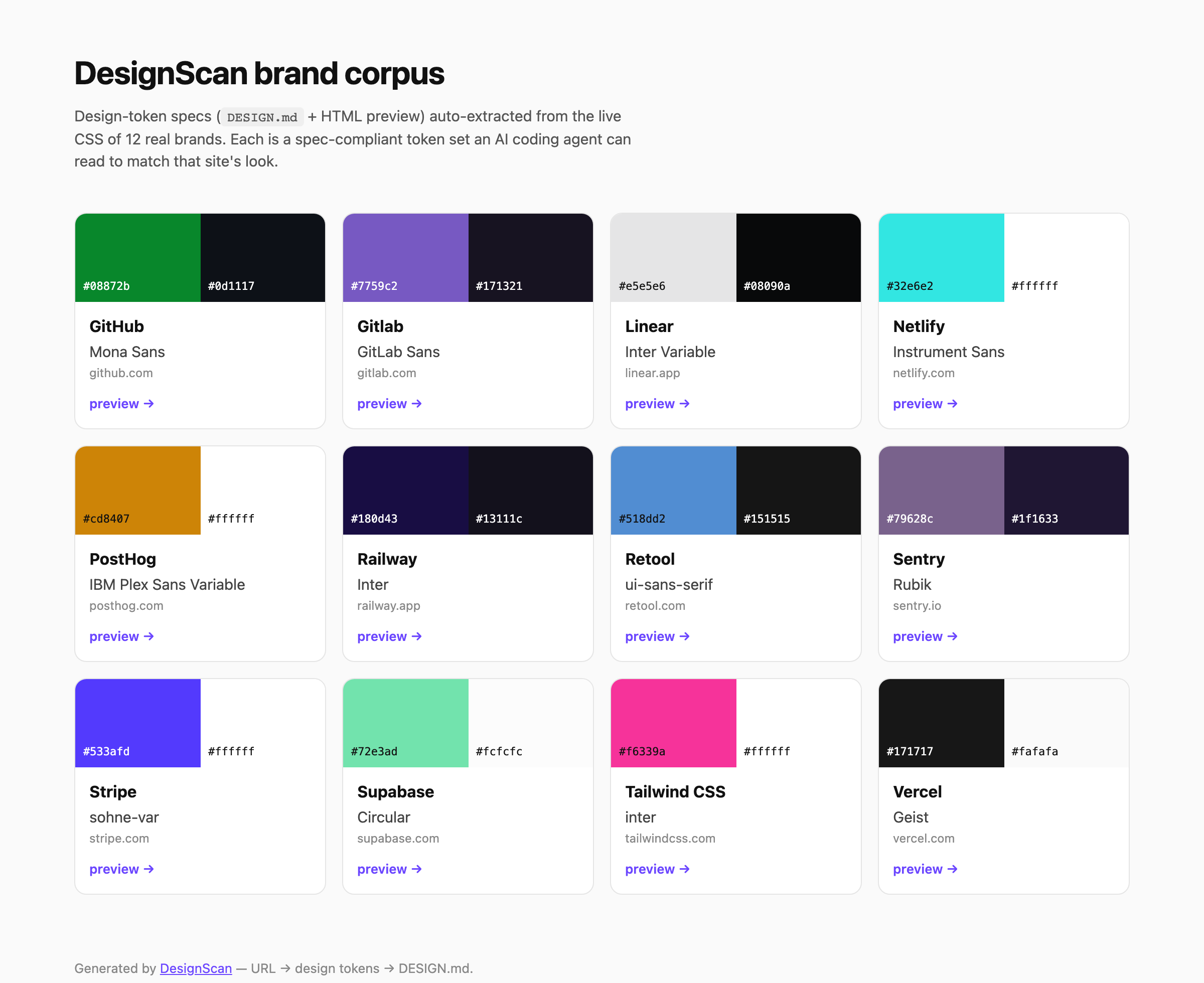
A growing, curated library of real-brand specs lives in examples/ —
each one a DESIGN.md, an HTML preview, and the raw token JSON, indexed in
examples/README.md (visual gallery: index.html).
Rebuild it from the committed JSON with pnpm seed rebuild (no network), or add
brands with pnpm seed add <url> — degenerate / bot-challenged pages are skipped
automatically so the corpus only holds trustworthy specs.
Monorepo layout
| Path | What |
|---|---|
packages/extractor | The extraction + generation engine (Playwright → tokens → DESIGN.md). |
packages/designscan | The short npm name — a thin CLI shim over the engine (npx designscan <url>). |
examples/ | The brand corpus — DESIGN.md + HTML preview + token JSON per brand, with a gallery index. |
Install (as a CLI / library)
The engine ships as the publishable @designscan/extractor
package — a designscan CLI and a typed library — with
designscan as its short npx alias.
# one-off, no install
npx designscan stripe.com --md --out stripe.DESIGN.md

# or install the CLI
npm i -g @designscan/extractor
npx playwright install chromium   # one-time (the engine drives headless Chromium)
designscan stripe.com --md --preview --out stripe.DESIGN.md
Quick start (from this repo)
This is a pnpm workspace (corepack enable to get pnpm).
pnpm install
pnpm --filter @designscan/extractor exec playwright install chromium  # one-time

# token profile (JSON) for any URL
pnpm extract stripe.com

# generate a DESIGN.md (light theme by default)
pnpm extract stripe.com --md --out out/stripe.DESIGN.md

# pick a theme: light (default) | dark | both
pnpm extract vercel.com --md --theme dark --out out/vercel.dark.DESIGN.md

# both = bundle light + dark into one file (parallel *-dark tokens)
pnpm extract vercel.com --md --theme both --out out/vercel.DESIGN.md

# --preview = also write a self-contained HTML proof sheet beside the file,
# rendering every token (swatches, type specimens, scales, components) so you
# can eyeball the extraction before trusting it (--theme both adds a Light/Dark toggle)
pnpm extract stripe.com --md --preview --out out/stripe.DESIGN.md
# → out/stripe.DESIGN.md  +  out/stripe.preview.html

# --format = pick your output: json (profile) | md (DESIGN.md) | w3c | css
pnpm extract stripe.com --format w3c --out out/stripe.tokens.json  # W3C Design Tokens (Style Dictionary etc.)
pnpm extract stripe.com --format css --out out/stripe.tokens.css   # CSS custom properties, paste-ready
# (--theme both folds a genuinely distinct dark pass into every format)

# --strict = exit non-zero if the result looks degenerate (bot challenge / too
# few signals), for CI/automation that must not consume junk tokens
pnpm extract stripe.com --strict --quiet

# seed / rebuild the curated brand corpus under examples/
pnpm seed add tailwindcss.com vercel.com   # extract live + add to the corpus
pnpm seed rebuild                          # regen md/preview/gallery from JSON
Scripts (root)
| Script | Does |
|---|---|
pnpm extract <url> [--format json|md|w3c|css] [--theme light|dark|both] [--preview] [--strict] [--timeout ms] [--out f] | Extract tokens in your format: profile JSON, DESIGN.md (--md shorthand), W3C Design Tokens, or CSS custom properties (--theme both = light + dark in one file; --preview = HTML proof sheet beside it; --strict = non-zero exit on a degenerate result) |
pnpm seed rebuild / pnpm seed add <url…> | Build the brand corpus under examples/ (md + preview + gallery; add extracts live) |
pnpm build | Compile the publishable package (tsc → dist) |
pnpm typecheck | Type-check all packages |
pnpm test | Run the test suite (vitest) |
pnpm check | Biome — format + lint (use pnpm format to auto-fix) |
pnpm lint:designmd | Validate examples/*.DESIGN.md against the official spec |
All of these run on every push/PR via GitHub Actions.
The engine is consumable as a library through its public API
(packages/extractor/src/index.ts).
Status
- Step 1 — Extraction engine (Playwright → clean token profile)
- Step 2 — Generator (token profile → spec-valid
DESIGN.md, lint-clean) - Step 3 — HTML preview (
--preview→ self-contained token proof sheet, light/dark toggle) - [~] Step 4 — agent guidance. Each
DESIGN.mdnow ships a Notes for your coding agent section: deterministic, per-extraction instructions (contrast, heading hierarchy, font fallback) so the consuming agent applies the tokens with intent — no LLM on our side. (Optional LLM-refined prose still future.) - [~] Step 5 — brand-seed library (
pnpm seed, curated corpus + gallery) done;npx … add/ checkout next
See packages/extractor/README.md for the full
roadmap and engine details.






