Listed from the MCP registry; nobody on Odel publishes it.

Storeshots
Render store-ready App Store and Google Play screenshots: device frames, headlines, exact sizes.
Runs on your machine from its package; the steps are below.
What it does
- Reads
- Writes
- High impact
At most: creates or changes data: records, files, settings.
What it costs
FreeOdel charges nothing per call. The publisher may charge for its own service.
Runs locally over stdio
This server isn't hosted — your MCP client launches it from a package registry. Use one of the commands below, or drop the config into your client (e.g. Claude Desktop).
Run
npx -y storeshots-mcp
MCP client config
{
  "mcpServers": {
    "storeshots": {
      "command": "npx",
      "args": [
        "-y",
        "storeshots-mcp"
      ]
    }
  }
}storeshots-mcp
Generate App Store and Google Play screenshots from the command line, or let your AI coding agent do it.
storeshots turns raw app screenshots into finished store-listing visuals — device frames, benefit-driven headlines, brand backgrounds, and exact store dimensions for iOS and Android. Describe your whole listing in one storeshots.json, run storeshots build, and get every platform in every language. Your AI agent (or you) writes and translates the copy; storeshots renders the pixels. It's a CLI first, with an MCP server for agents that have no shell. No design tool, no subscription, no API keys.
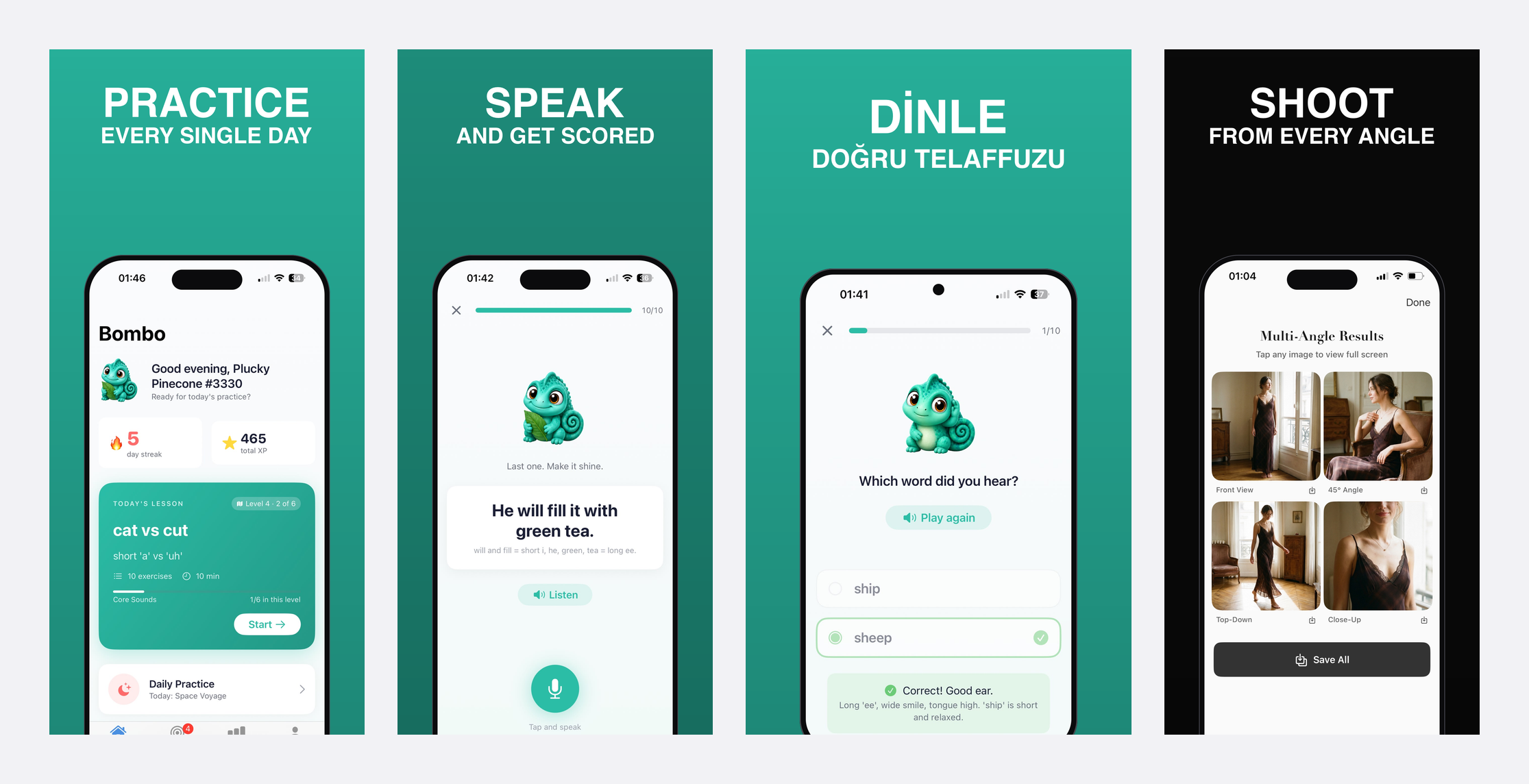
Real screens from two shipped apps: bombo (panels 1–3) and Studio Zero (panel 4). Panel 3 is the Android preset with Turkish headlines, uppercased with locale-correct İ and Ğ.


The idea
Store screenshots are two jobs pretending to be one. There's a creative job (what to say, which screen sells which feature, how to phrase it in six languages) and a production job (frames, typography, exact pixel dimensions, no alpha channel). Design tools make you do both by hand; screenshot SaaS locks the production job behind a subscription.
storeshots-mcp splits them and gives each to whatever is best at it:
| Your AI agent decides | storeshots renders |
|---|---|
| Which screens to feature | Device frames at exact scale |
| The headline for each one | Typography, contrast, and layout |
| Idiomatic translations | Correct casing per language (Turkish İ, German ß) |
| Brand color and order | Deterministic PNGs at exact store dimensions |
Because the render path is pure and local, the same inputs always produce the same pixels — no model in the loop, nothing uploaded anywhere.
Quick start
npx storeshots init --langs en,tr --bg "#E31837"   # finds ./screenshots, writes storeshots.json
# replace the TODO headlines in storeshots.json
npx storeshots build --watch                       # renders everything, re-renders on save
init lists your raw screenshots (from screenshots/, raw-shots/, raw/, shots/ or fastlane/screenshots/, or --screens <dir>) in a config like this:
{
  "background": "#E31837",
  "presets": ["ios-phone", "android-phone"],
  "languages": ["en", "tr"],
  "outputDir": "output",
  "screens": [
    { "screenshot": "screenshots/home.png",
      "copy": { "en": ["Track", "your daily mood"], "tr": ["İzle", "günlük ruh halini"] } },
    { "screenshot": "screenshots/stats.png", "variant": "tilted",
      "copy": { "en": ["Discover", "weekly insights"], "tr": ["Keşfet", "haftalık içgörüler"] } }
  ],
  "featureGraphic": { "screen": 1 },   // optional: Play Store 1024 × 500 header
  "showcase": true                     // optional: one preview strip per set
}
build renders every screen × preset × language:
output/
  en/ios-phone/en_01.png … en_06.png
  en/android-phone/en_01.png …
  en/play-feature-graphic/en_feature.png
  tr/ios-phone/tr_01.png …
  showcase/en_ios-phone.png …
Rendering is deterministic, so build only redraws what changed: edit one Turkish headline and only that file is rendered again. Delete a screen and its old files are removed. Every output is checked against its store's rules before it's written.
Install globally with npm i -g storeshots-mcp if you'd rather type storeshots than npx storeshots.
Commands
| Command | What it does |
|---|---|
storeshots init | Create storeshots.json from a folder of raw screenshots, and add a storeshots section to AGENTS.md / CLAUDE.md |
storeshots build | Render the whole config. --watch, --lang tr, --preset ios-phone, --dry-run, --force, --jobs 4 |
storeshots compose | Render one screenshot from flags, no config needed |
storeshots showcase | Stitch images or folders into one preview strip |
storeshots validate | Check files or whole folders against store rules (exits 1 on failure, so it fits CI) |
storeshots presets | List presets and exact dimensions |
After a first successful build, storeshots asks once whether you'd like to star it on GitHub. It never asks in CI; set STORESHOTS_NO_STAR=1 to turn it off. Every command takes --json for machine-readable output and --help for details. Exit codes: 0 ok, 1 render or validation failure, 2 bad usage or config. Config errors list every problem at once, each with its path (screens[2].copy.tr: missing).
Config reference
| Field | |
|---|---|
background | Brand color, 6-digit hex. Required. |
presets | Any of ios-phone, android-phone, ipad-13, android-tablet. Default: both phones. |
languages | BCP-47 codes. Default: the languages in the first screen's copy. |
screens[] | Up to 10, in store order. Each takes a screenshot, a copy per language (["verb", "descriptor"] or {"verb", "descriptor"}), and optionally its own variant or background. |
screens[].screenshot | A path relative to the config. Use {lang}, {preset} and {platform} (ios/android) for localized or per-platform captures, e.g. "shots/{platform}/{lang}/home.png". You can also give an object keyed by preset id, with a "default" fallback. |
variant | text-top (default), text-bottom, or tilted. Applies to the whole set; a screen's own variant overrides it. |
panorama | { "to": "#hex" }: one gradient flowing from background across every panel. |
frame | A custom frame, or one per preset id. |
featureGraphic | { "screen": n } reuses a screen's shot and copy. You can also give screenshot, copy and background directly. |
showcase | true writes a preview strip per language and preset into output/showcase/. |
outputDir, noGradient | Output folder (default output). noGradient turns off the subtle vertical gradient. |
With an AI agent
storeshots splits the creative work from the production work. Your agent reads your app, picks a benefit for each screen, writes and translates the headlines into storeshots.json, and runs storeshots build. That needs no setup in any agent that has a shell: Claude Code, Cursor, Codex, Windsurf and others. For the guided flow, install the Claude Code plugin.
"Take the screenshots in
./raw-shotsand make a full App Store and Play Store set. Brand color#E31837, English and Turkish."
MCP server. For clients without a shell (Claude Desktop, for example), the same engine runs as a stdio MCP server:
claude mcp add storeshots -- npx -y storeshots-mcp
{ "mcpServers": { "storeshots": { "command": "npx", "args": ["-y", "storeshots-mcp"] } } }
Codex CLI uses ~/.codex/config.toml:
[mcp_servers.storeshots]
command = "npx"
args = ["-y", "storeshots-mcp"]
What it produces
5 presets, each at the exact size its store requires:
| Preset | Store | Dimensions |
|---|---|---|
ios-phone | App Store, iPhone 6.9" | 1320 × 2868 |
android-phone | Google Play, phone | 1080 × 1920 |
ipad-13 | App Store, iPad Pro 13" | 2064 × 2752 |
android-tablet | Google Play, 10" tablet | 1600 × 2560 |
play-feature-graphic | Google Play feature graphic | 1024 × 500 |
And the finishing touches that make a set look designed:
- Built-in device frames — iPhone (dynamic island), Pixel-style Android (punch hole), iPad, and tablet, drawn programmatically at exact scale. Bring your own with custom frames.
- Layout variants —
text-top,text-bottom, andtilted; mix them across a set so it doesn't look like one template copied six times. - Panoramic sets — one gradient flowing continuously across every panel, so the row reads as a single image in the store. See panoramas.
- Benefit-first headlines — a bold verb plus a short descriptor, auto-uppercased with locale-correct special characters and contrast-aware color.
- Showcase composer — one wide preview image of the whole set for your repo, launch post, or client deck.
Every output is flattened to remove the alpha channel that App Store Connect rejects, and validated against its preset before it's written.
MCP tools
| Tool | What it does |
|---|---|
build_project | Build a storeshots.json, re-rendering only what changed. This is the same engine as storeshots build. |
generate_set | Batch-render an ordered set for one platform and language. Supports panoramas. |
compose_screenshot | Render one screenshot (background, frame, headline, source image) |
create_showcase | Stitch generated screenshots into one preview strip |
validate_screenshot | Check an image against store dimension and format rules |
list_presets | List every preset with its store and exact dimensions |
Each tool returns file paths plus a structured summary, so the agent can review and iterate.
Multi-language sets
Translation happens in the agent, not in storeshots. Add a language key to each screen's copy and storeshots renders it with locale-correct casing: Turkish i → İ, German ß is kept. storeshots build --lang de rebuilds a single language.
Panoramic sets
Add "panorama": { "to": "#1E3A8A" } and each panel's solid background becomes one horizontal gradient sliced across the whole set. Placed side by side in the store, the screenshots then read as a single continuous image.
Custom frames
Prefer a specific device look? Supply your own frame PNG (transparent where the screen shows through) and the pixel rectangle the screenshot fills:
{
  "frame": {
    "image": "./frames/iphone-16-pro.png",
    "screenX": 40, "screenY": 40,
    "screenWidth": 1080, "screenHeight": 2280
  }
}
Use it as "frame" in storeshots.json, either one frame for every preset or { "ios-phone": {…}, "android-phone": {…} }. You can also pass it to storeshots compose --frame frame.png --frame-screen 40,40,1080,2280, or to the compose_screenshot and generate_set tools. Paths are relative to the config, and a changed frame image triggers a re-render. Leave it out to use the built-in frames.
Agent setup
Project instructions. storeshots init adds a short, marker-delimited storeshots section to your project's agent instruction file. Coding agents (Claude Code, Codex, Cursor and others) then know how this project's screenshots are made: edit storeshots.json, run storeshots build, and never hand-edit the PNGs.
- It uses
AGENTS.mdand/orCLAUDE.md, whichever already exist. When CLAUDE.md just imports@AGENTS.md, only AGENTS.md gets the section. - If neither file exists, it creates
AGENTS.mdplus aCLAUDE.mdthat imports it. - Rerunning updates the section in place.
--no-agentsskips it, andstoreshots init --agents-onlyadds it to an existing project.
Claude Code plugin. The bundled skill adds a guided workflow. It discovers a benefit for each screen from your codebase and gets your approval on headlines before rendering. It then keeps storeshots.json up to date, adds languages, and walks you through the upload.
/plugin marketplace add mtbun/storeshots-mcp
/plugin install storeshots@storeshots
Then ask Claude Code for "store screenshots for this app".
llms.txt summarizes the commands and config format in one file for agents.
Design principles
- Deterministic — no AI image generation in the render path; same input, same pixels.
- Zero config — no API keys, no accounts, fully offline.
- Store-correct by construction — dimensions are enforced and validated, not suggested.
- Agent-native — tools expose structured data; the copywriting stays in the model where it belongs.
Roadmap
- Claude Code skill with a guided benefit-discovery workflow
- Play Store feature graphic preset (1024 × 500)
- Layout variants — text-top, text-bottom, tilted
- Custom device frames
- Panoramic sets
- Project config with incremental
buildand--watch - Claude Code plugin and AGENTS.md / CLAUDE.md integration
- App preview video frames
- More stores (Mac App Store, Chrome Web Store)
Contributing
Issues and PRs welcome. AGENTS.md documents the architecture and conventions, for human contributors and coding agents alike.