Listed from the MCP registry; nobody on Odel publishes it.

ldraw-mcp
Render LDraw/LEGO models to images with real part geometry via headless Blender + ImportLDraw
Runs on your machine from its package; the steps are below.
What it does
- Reads
- Writes
- High impact
At most: creates or changes data: records, files, settings.
What it costs
FreeOdel charges nothing per call. The publisher may charge for its own service.
Runs locally over stdio
This server isn't hosted — your MCP client launches it from a package registry. Use one of the commands below, or drop the config into your client (e.g. Claude Desktop).
Run
uvx ldraw-mcp
MCP client config
{
  "mcpServers": {
    "ldraw-mcp": {
      "command": "uvx",
      "args": [
        "ldraw-mcp"
      ]
    }
  }
}ldraw-mcp
Give your MCP client eyes for LEGO® models.
Render LDraw files (.ldr / .mpd / .dat) to images with real part
geometry — studs, slopes, window glass — using headless Blender and the
ImportLDraw addon. The output looks like a BrickLink Stud.io render, with no
GUI anywhere in the loop.


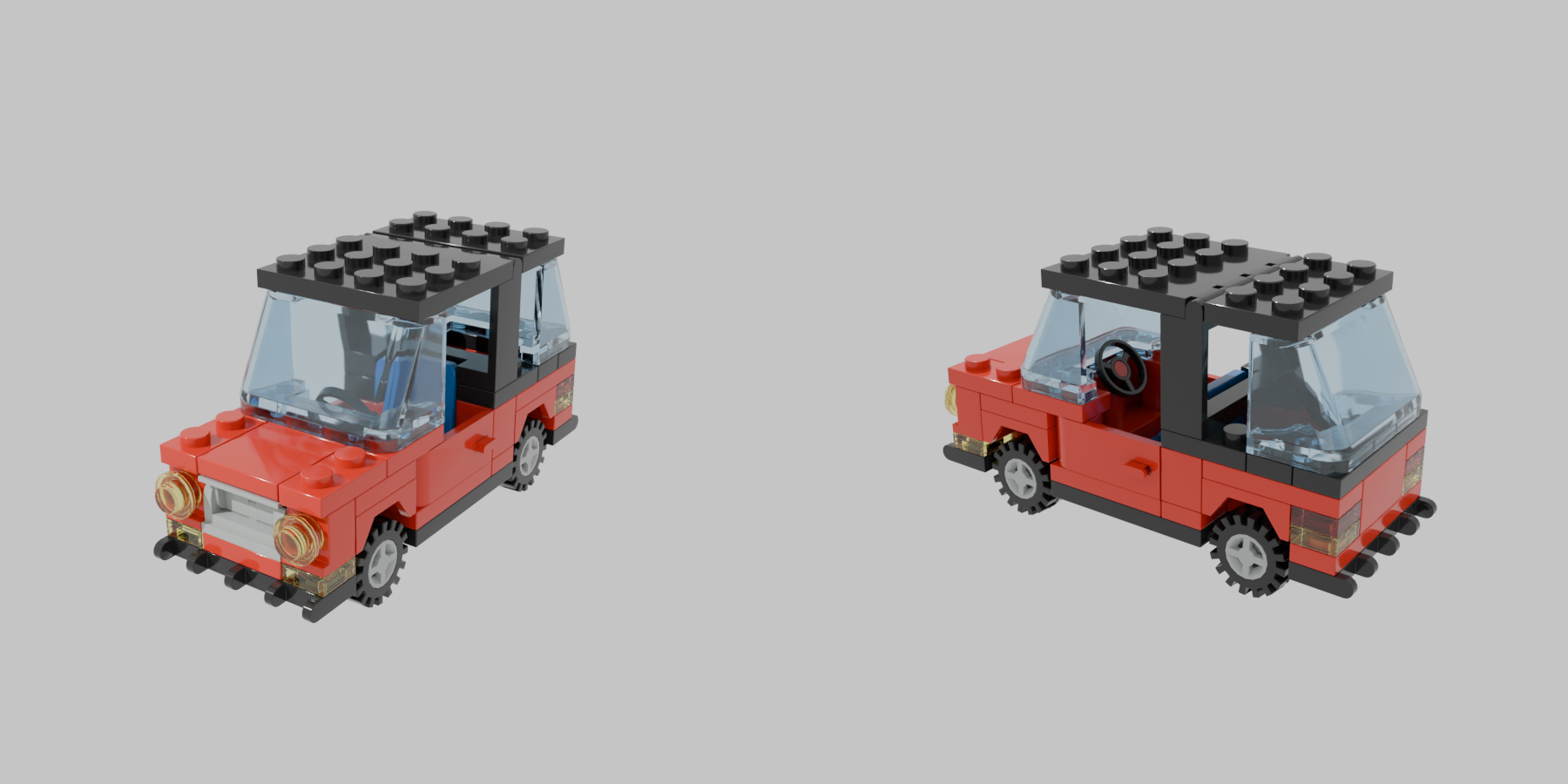
A ~90-line .ldr rendered front-left and rear-right — actual bricks, not a geometric proxy.
Point a vision-capable model at a build and it sees the actual bricks: crossed rotation matrices, floating plates, sunken windows — the kinds of export bugs a geometric proxy render will happily hide.
Quickstart
# 1. install
pip install ldraw-mcp

# 2. install the LDraw parts library + ImportLDraw addon
ldraw-mcp-setup

# 3. register with Claude Code
claude mcp add ldraw -- ldraw-mcp
Then ask things like "render output/build.ldr and tell me what looks wrong" — the model sees the render, not just the text.
Blender is a prerequisite (see Requirements); it is not installed by
ldraw-mcp-setup.
Tools
| tool | what it does |
|---|---|
render_ldraw_file(path, azimuths="-60,120", resolution=640, samples=24) | Render a model file to a PNG (multi-view, stitched side by side) |
render_ldraw_text(ldr, azimuths="-60,120", resolution=640, samples=24) | Render inline LDraw content without writing a file first |
check_renderer() | Diagnose the Blender / addon / parts-library setup |
bill_of_materials(path="", ldr="") | Part × colour × quantity rows for a model file or inline text |
lookup_color(query) | Colour code ↔ name / RGB / edge / alpha from LDConfig.ldr |
search_parts(query, limit=50) | Library parts whose description or file name contains query |
azimuths is a comma-separated list of view angles in degrees; each is
rendered and the views are stitched horizontally. Elevation is fixed at
22°. Higher samples = cleaner but slower.
A part the LDraw library does not have cannot be drawn. The render tools still return the picture of the rest, followed by a text block that names each file the importer could not find. When every file is found, the image comes alone.
The render tools and bill_of_materials follow the same references. Files
next to the model (sub.ldr, models/wheel.ldr) and library parts are
followed. A reference that could leave the folder it is looked up in (..,
an absolute path, a drive, ~), or a file in the model's folder that links
outside it, is refused with the same message by every tool. Inline text
follows the same rule.
The three query tools are read-only and need no Blender. bill_of_materials
expands MPD sub-models (and sibling .ldr/.mpd files next to the model) with
their multiplicity, and resolves colour 16 to the colour of the referencing
line; colour 24 (edge) is reported as 24. It counts without a parts library —
descriptions and colour names are then null. A colour code LDConfig.ldr
does not define is listed under unknown_color_codes, a part the library lacks
under parts_not_in_library; neither is dropped. A sub-model reference cycle is
an error that names the cycle. lookup_color and search_parts need the
library (ldraw-mcp-setup).
Requirements
- Blender 4.x on
PATH, or pointLDRAW_MCP_BLENDERat the binary. Install it yourself (package manager, blender.org, or a local build);ldraw-mcp-setupdoes not install Blender. - ImportLDraw addon (
io_scene_importldraw) in Blender's addons dir — installed byldraw-mcp-setup. - LDraw parts library at
~/.ldraw(orLDRAW_LIBRARY_PATH) — installed byldraw-mcp-setup.
Environment variables
| var | meaning |
|---|---|
LDRAW_MCP_BLENDER | Path to the blender binary (overrides PATH lookup) |
LDRAW_MCP_DISABLE | Set to 1 to turn rendering off: check_renderer reports unavailable, renders refuse |
LDRAW_LIBRARY_PATH | Path to the LDraw parts library (community convention) |
Manual setup
If ldraw-mcp-setup can't detect things automatically:
- LDraw library: download
complete.zip
and unzip so that
~/.ldraw/parts/exists. - ImportLDraw addon: download the latest release from
TobyLobster/ImportLDraw
and install it via Blender > Preferences > Add-ons > Install, or unzip
into
~/.config/blender/<version>/scripts/addons/io_scene_importldraw/. (Launch Blender once first so the config directory exists.)
Troubleshooting
check_renderersays NOT FOUND: runldraw-mcp-setup, or set the relevant env var above.- No GPU / WSL2 / containers: rendering uses Cycles on CPU, which works headless everywhere — no GPU or display needed. A ~150-part model takes a few seconds at the default 640px / 24 samples.
- "no mesh objects imported": the addon couldn't resolve parts —
usually a wrong or incomplete LDraw library path. Re-run setup or check
LDRAW_LIBRARY_PATH. - Addon not enabled: the render script enables it automatically per
run; if a manual Blender session complains, enable
io_scene_importldrawin Preferences > Add-ons.
Provenance
This renderer was extracted from the prompt2brick project, where it started life as the vision critic's "see the actual model" path. prompt2brick keeps its own vendored copy of the render wrapper and Blender script, but this repo is the canonical source going forward — fixes and improvements to the renderer should land here first and be ported back into prompt2brick.
License
MIT — see LICENSE.
LEGO® is a trademark of the LEGO Group, which does not sponsor, authorize, or endorse this project. This tool is not affiliated with the LEGO Group, BrickLink, or the LDraw.org organization.






