Listed from the MCP registry; nobody on Odel publishes it.

HTPD
Answer questions from PDFs converted to .htpd: exact text with pages, or 'Not found in this file.'
Runs on your machine from its package; the steps are below.
What it does
- Reads
- Writes
- High impact
At most: only reads or looks up information.
What it costs
FreeOdel charges nothing per call. The publisher may charge for its own service.
Runs locally over stdio
This server isn't hosted — your MCP client launches it from a package registry. Use one of the commands below, or drop the config into your client (e.g. Claude Desktop).
Run
uvx htpd-reader
MCP client config
{
  "mcpServers": {
    "htpd": {
      "command": "uvx",
      "args": [
        "htpd-reader"
      ]
    }
  }
}





Turn long PDFs into documents AI reads correctly - exact text, every answer with its page.


In plain words · See it work · Install · Use with your AI · For developers · Quality
In plain words
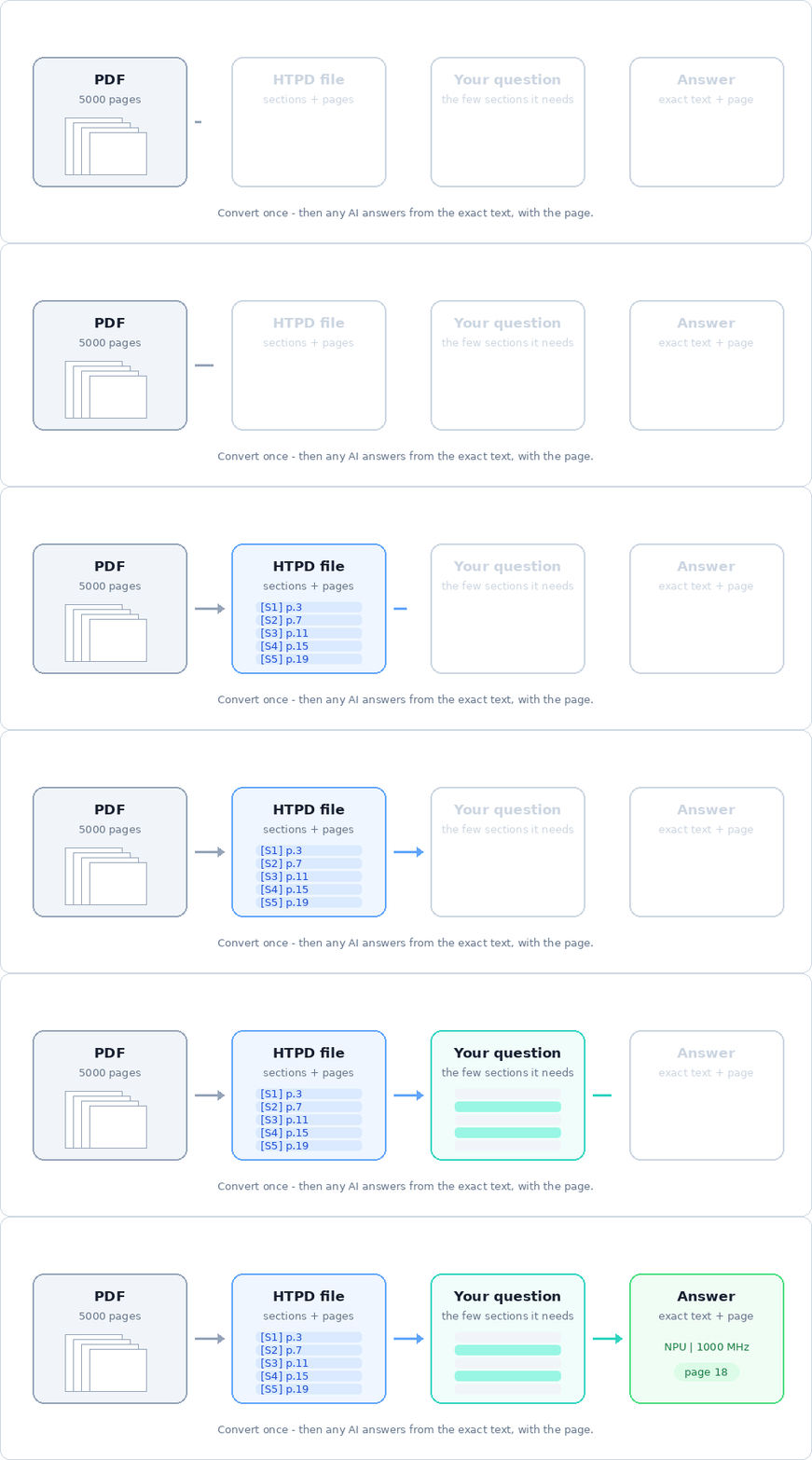
You have a long PDF - a 300-page datasheet, a 5000-page reference manual, a policy, a report - and a question about it. Given the whole PDF, an AI often answers slowly, misses details, mixes up tables and cannot show where its answer comes from.
HTPD prepares the document for the AI. The converter turns the PDF into
one .htpd file: the same text, word for word, cut into the document's own
chapters and sections, with the page of every paragraph, the tables as rows,
and the figures as pictures. The AI then reads only the few sections a
question needs and answers from the exact text - with the page, so you can
check it.
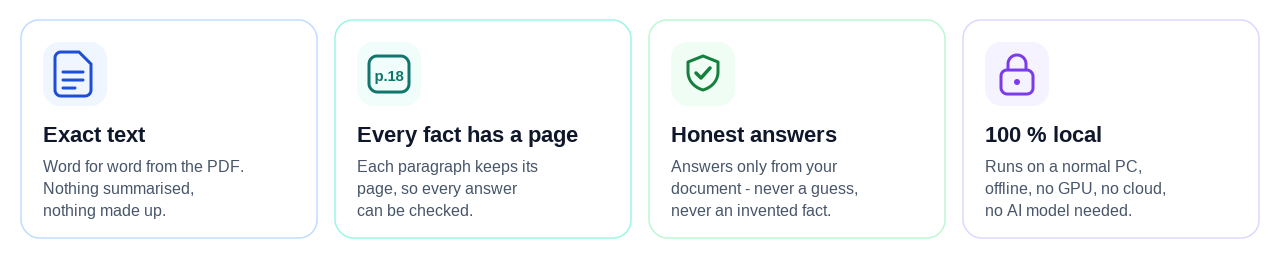
| What you get | What it means for you |
|---|---|
| Exact text | Values, part numbers and register names exactly as in the PDF. Nothing is summarised or rewritten. |
| A page for every fact | Every answer can be checked in the original document in seconds. |
| Honest answers | When the document does not hold the answer, HTPD says so instead of guessing. |
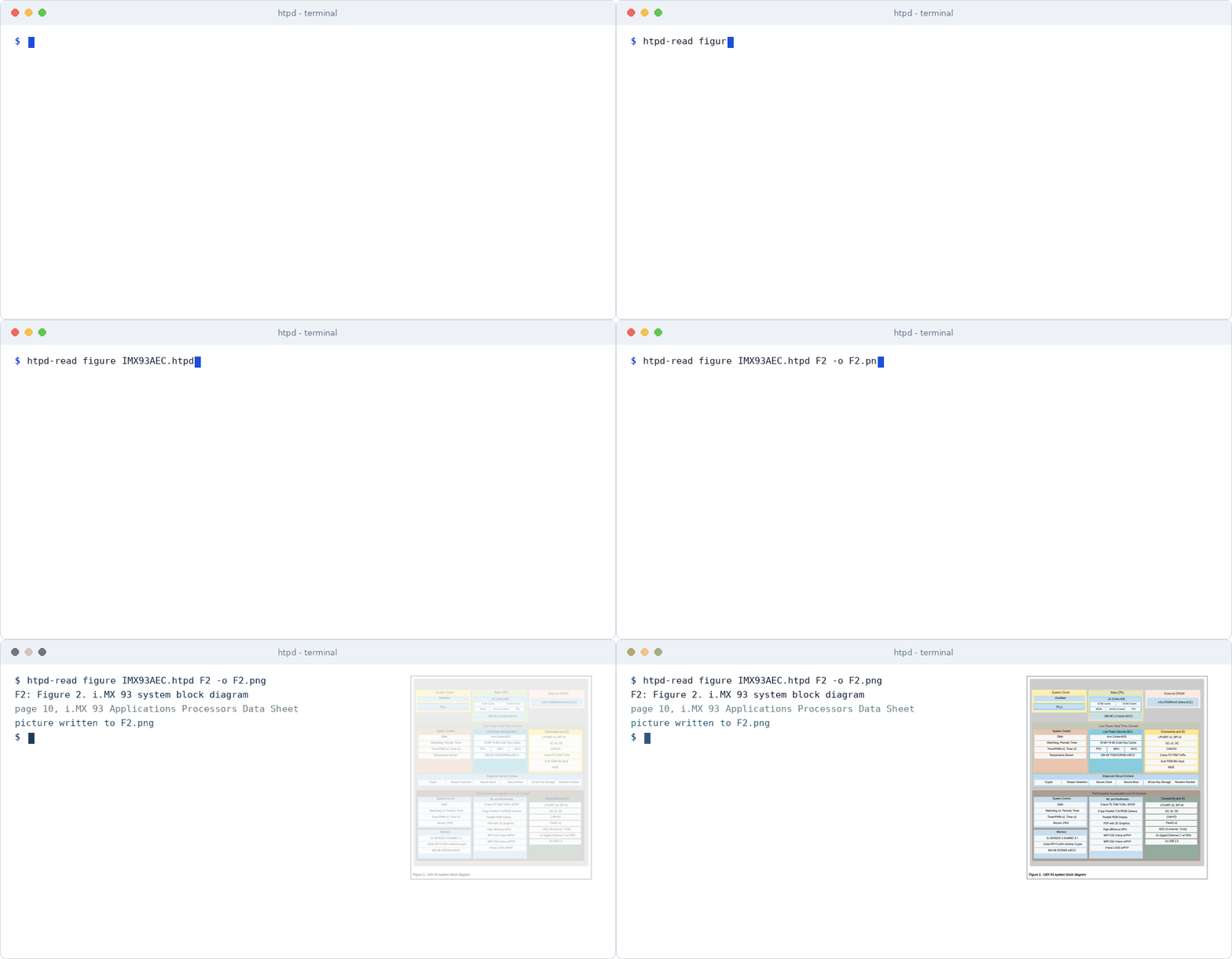
| Tables and figures | Tables stay rows with their columns; diagrams and photos are kept as pictures with their caption. |
| Scanned pages too | Text in scans and pictures is read by OCR (free Tesseract), marked so you know. |
| Private and free | Runs on your own computer. No GPU, no account, no cloud. Open source. |
Try it in the browser: HTPD Studio.
See it work
Real commands and their output on a public 109-page data sheet (NXP i.MX 93, shortened where long).
1. Convert the PDF once - about a second for 100 pages:
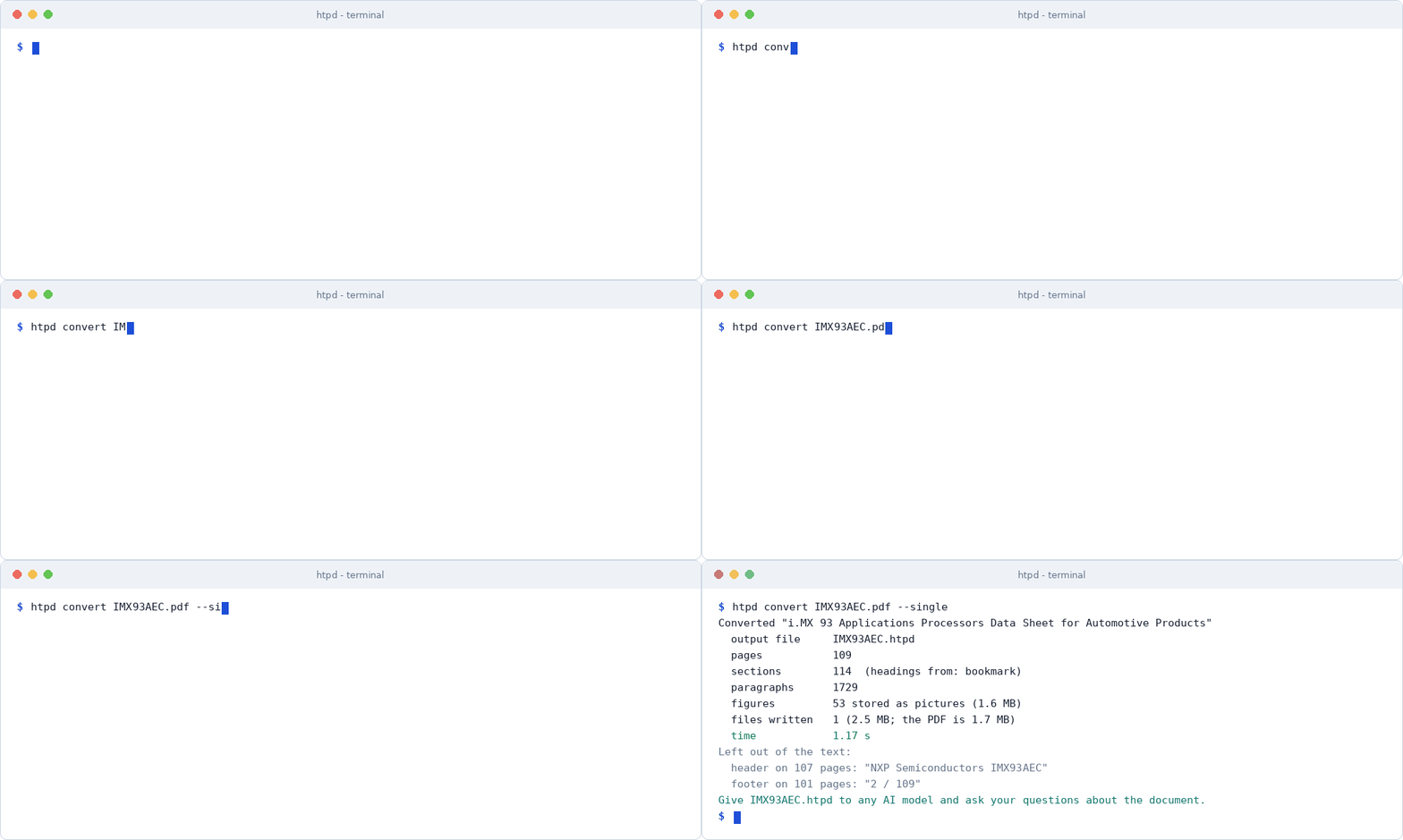
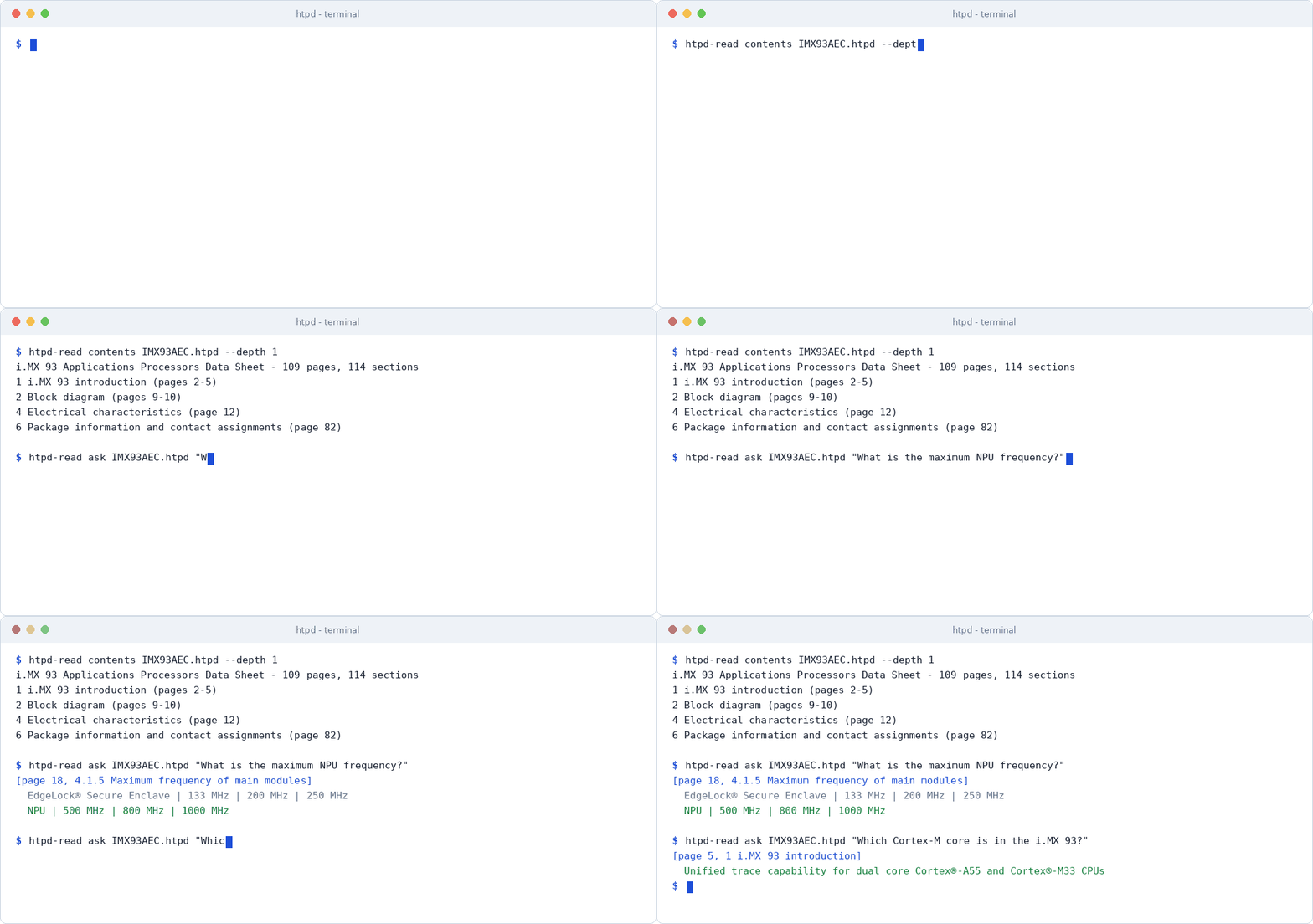
2. Ask in your own words - the exact line from the document, with its page and section:
3. Figures stay pictures - an AI that can see images looks at the diagram itself:
In daily use you do not type these commands: you give the .htpd file to
your AI, or let the plugin, the skill or the MCP server do it for you.
Install in one minute
| You use | Do this |
|---|---|
| Claude Code | /plugin marketplace add narendrachampaneri/htpd then /plugin install htpd@htpd - converts PDFs and answers from them; the MCP server is included |
| Claude app and other apps with skills | Add htpd-skill.zip under Customize → Skills |
| Any MCP client (Antigravity, Codex, Cursor, ...) | pip install htpd-reader, then the command htpd-mcp --bundles <folder> - or find io.github.narendrachampaneri/htpd in the MCP registry |
| ChatGPT, Gemini | Upload the .htpd file, or make a custom GPT / Gem with the ready instructions |
The converter (PDF → .htpd) | Download htpd-0.1.2-linux-x64.tar.gz (Linux, Windows with WSL) and run ./htpd convert manual.pdf --single |
The converter and the reader run on your computer. What reaches an AI is only the text you give it.
Use it with your AI
Any AI chat - just upload the file
htpd convert manual.pdf --single writes one .htpd file. It begins
with the reading rules for the model - answer only from this file, give the
page of every fact, say so when the answer is not there - then the contents
and every section with its pages.
Upload it to Claude, ChatGPT, Gemini or any other assistant instead of the
PDF. If an app does not accept the extension, rename it to
manual.htpd.txt - it is plain text. For a ChatGPT custom GPT or a Gemini
Gem that always has your document, see
docs/AI-APPS.md
(instructions ready to paste).
Best for documents that fit in the chat (a datasheet of a few hundred pages). For very large manuals use the skill, the plugin or MCP below.
Claude app and apps with skills - the htpd skill
| App | How to add it |
|---|---|
| Claude app | Customize → Skills, upload htpd-skill.zip, switch it on (code execution must be on). Then upload a .htpd file to a chat and ask. |
| Claude Code | Install the plugin (below), or unzip into ~/.claude/skills/. |
Other agents that read SKILL.md | Unzip into their skills folder. |
The skill runs a small script that needs only Python - no packages, no
model. It finds the right sections and returns the exact lines with
[page, section]. Because the AI reads only what the script returns, this
works even for manuals of thousands of pages.
Claude Code - the htpd plugin
/plugin marketplace add narendrachampaneri/htpd
/plugin install htpd@htpd
Then ask in plain words - "convert datasheet.pdf to htpd", "what is the
maximum NPU frequency in datasheet.htpd?" - or run /htpd:convert datasheet.pdf --single. The first conversion downloads the released
converter once (Linux and WSL, about 4 MB, checked by SHA-256). The PDF
never leaves the computer.
Agents with MCP - the htpd-mcp server
pip install htpd-reader                                   # htpd-read and htpd-mcp, nothing else needed
claude mcp add htpd -- htpd-mcp --bundles ~/manuals       # Claude Code
For Antigravity, Codex, Cursor or any MCP client: command htpd-mcp,
arguments --bundles /path/to/your/htpd/files. The server is also listed in
the official MCP registry as io.github.narendrachampaneri/htpd (clients
start it with uvx htpd-reader). Tools: list_bundles, contents,
open_section, search, ask, figure (the picture of a figure, as an
image), check.
For developers
How it works
flowchart LR
    PDF["📄 PDF<br/>scanned or digital"] -->|htpd convert| H["HTPD<br/>sections · pages · tables · figures"]
    H -->|upload| CHAT["AI chat<br/>(file + reading rules)"]
    H -->|skill · plugin · MCP| AGENT["AI agent<br/>(Claude, Antigravity, Codex)"]
    CHAT --> ANS["Answer from the exact text<br/>with page numbers"]
    AGENT --> ANS
| Part | What it does |
|---|---|
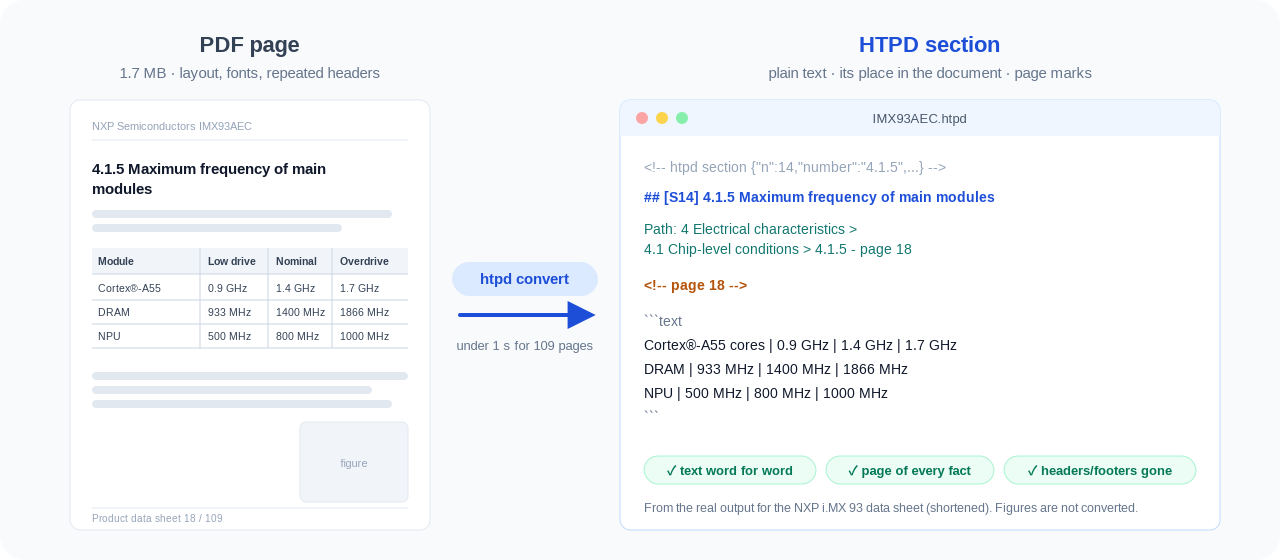
Converter htpd (C++23, PDFium) | Reads every character with its position and font, removes headers and footers, finds the headings (bookmarks, the PDF's own tags, a printed table of contents, numbering, font size), cuts the text into sections, reads tables as rows (from the lines the page draws, the PDF's tags or the text; cells over columns or rows are marked) and keeps code as code, stores figures as PNG with their caption, reads scans with OCR. |
Reader htpd-read (Python, standard library only) | Finds the sections that answer a question (word search, the tree of titles, a small trained re-ranker), packs only that text with its pages, picks the exact answer lines, and says when the file cannot answer. Also as a skill, a plugin and an MCP server. |
Quick start
Download (no build needed) from the release page:
tar xzf htpd-0.1.2-linux-x64.tar.gz
cd htpd-0.1.2-linux-x64
./htpd convert manual.pdf --single           # writes manual.htpd
sudo apt install tesseract-ocr               # optional: read scanned pages too
Build from source - Linux (Ubuntu 24.04, also WSL), g++ 13+, make or CMake, Python 3.10+:
git clone https://github.com/narendrachampaneri/htpd.git && cd htpd
./scripts/get_pdfium.sh        # the PDF engine, once (about 4 MB)
make                           # builds build/htpd
make test                      # the C++ tests
Convert and ask:
./build/htpd convert manual.pdf --single     # one file: manual.htpd  (for AI chats)
./build/htpd convert manual.pdf              # a folder: manual.htpd/ (for tools and agents)

pip install htpd-reader                      # or: python3 -m pip install -e .
htpd-read ask examples/single-file/sample.htpd "What is the maximum bus voltage?"
[page 2, 2.1.1 Limits]
  Parameter | Min | Typ | Max | Unit
  Bus voltage | 200 | 400 | 480 | V
Every answer line is copied word for word from the file; --context adds
the whole sections for the AI. More commands: contents, section,
search, figure, check - see
reader/README.md.
The format
An HTPD document is plain UTF-8 text: Markdown with a few fields. Any model,
editor or grep can read it.
One section of an HTPD file (shortened)
<!-- htpd section {"n":14,"id":"sections/0014-4-1-5-maximum-frequency-of-main-modules","number":"4.1.5","level":3,"pages":[18,18,18],"parent":"sections/0008-4-1-chip-level-conditions"} -->
## [S14] 4.1.5 Maximum frequency of main modules

Path: 4 Electrical characteristics > 4.1 Chip-level conditions > 4.1.5 Maximum frequency of main modules - page 18

<!-- page 18 -->

```text
Cortex®-A55 cores | 0.9 GHz | 1.4 GHz | 1.7 GHz
DRAM | 933 MHz | 1400 MHz | 1866 MHz
NPU | 500 MHz | 800 MHz | 1000 MHz
```
- Sections follow the document's own headings and form a tree: parent, children, previous, next.
- Page marks
<!-- page N -->stand above the text of every page. - Tables are rows with
|between cells (a cell over columns or rows is marked[>]/[=]where the page draws the lines of the table); code and listings keep their spacing. - Figures are PNG pictures with caption and page, stored inside the file.
- Two forms, same content: a single
.htpdfile (for chats) and a folder with one file per section (for tools), which is also a valid Open Knowledge Format bundle.
The full specification is docs/FORMAT.md.
Examples: examples/single-file/sample.htpd and
examples/sample.htpd/.
Quality
Speed and size - single file, figures and OCR on, a 2-core cloud machine:
| Document | Pages | Sections | Figures | PDF → .htpd | Time |
|---|---|---|---|---|---|
| NXP i.MX 93 Automotive Data Sheet | 109 | 114 | 53 | 1.7 MB → 2.5 MB | 1.2 s |
| NXP i.MX 93 Reference Manual | 5 652 | 5 929 | 637 | 56.3 MB → 39.8 MB | 67 s |
| RISC-V Debug Specification | 119 | 164 | 3 | 2.4 MB → 0.7 MB | 3.4 s |
| Arm AAPCS64 | 65 | 125 | 5 | 0.4 MB → 0.3 MB | 0.3 s |
| RISC-V Unprivileged ISA | 670 | 760 | 25 | 4.5 MB → 2.8 MB | 4.9 s |
Most of a file with figures is their pictures, at its very end; the text comes first. --figures off leaves them out.
Finding the answer - 133 test questions about two public manuals (eval/report.md, written by the evaluation harness):
| Right section first | Right section in the first 5 | Right page | Answer in the text for the AI | |
|---|---|---|---|---|
| HTPD reader | 0.78 | 0.95 | 0.64 | 0.86 |
| Plain word search over HTPD sections | 0.64 | 0.87 | 0.55 | 0.83 |
| Plain word search over 500-token chunks | 0.32 | 0.72 | 0.51 | 0.83 |
The text handed to the AI is about 6 % of the whole document, and the reader correctly says "not in this file" for 95 % of the questions the manuals do not answer.
Many kinds of PDF - 45 PDFs of known text, made by Word, LaTeX, Chrome,
wkhtmltopdf and slide software, scanned, and with letters drawn as shapes
(tests/zoo):
99 % of the text in order, 96 % of the headings, 89 % of the table rows exact.
Robustness - a stress test of 34 difficult PDFs (two columns, sideways tables, rotated pages, 1500 pages, encrypted, truncated and corrupted files): no crash, no hang, every file valid, no word lost. 102 C++ tests and 155 Python tests run on every change.
Project layout
Folders and documentation
include/ src/ cli/      the converter (C++23, PDFium is used in one file only)
reader/htpd_reader/     the reader: bundle, check, search, retriever, re-ranker, packer, answer, MCP server
skills/htpd/            the skill for AI apps (scripts/build_skill.py packs it)
skills/convert/         the plugin's skill that converts PDFs
.claude-plugin/         the Claude Code plugin and its marketplace (this repository is both)
eval/                   evaluation harness, baselines, report
model/                  the training of the re-ranker
tests/                  C++ tests, test PDFs, the stress test, the document zoo
docs/                   FORMAT.md · CONVERTER.md · READER.md · AI-APPS.md · BACKGROUND.md
examples/               a converted document in both forms
| Document | For |
|---|---|
docs/FORMAT.md | The format: anyone can write a reader from it |
docs/CONVERTER.md | Building, options, how the converter works, what was tested, limits |
reader/README.md | The reader, its commands and its Python API |
docs/READER.md | How the reader finds the answer, and how it is measured |
docs/AI-APPS.md | ChatGPT custom GPT and Gemini Gem |
docs/BACKGROUND.md | Why HTPD is built the way it is |
AGENTS.md | Rules for contributors and coding agents |
Contributing
Issues and pull requests are welcome. Before you change anything, read
AGENTS.md; the short version:
- All tests pass before a change is merged:
make testandpython3 -m pytest. - Every new rule in the code comes with a test that fails without it.
- Never lose text and never make text up.
- A change to what is written into an HTPD file updates
docs/FORMAT.mdin the same commit.
License
HTPD is open source under the Apache License 2.0: you may use,
change and share it, also in commercial products, as long as you keep the
copyright and license notices (NOTICE) and mark what you changed.
The license includes a patent grant from every contributor.
PDFium, which the converter uses, is not part of this repository and has its
own license (BSD-style with an Apache-2.0 part); after
scripts/get_pdfium.sh its license texts are in
third_party/pdfium/licenses/. If you give the program to others together
with libpdfium.so, give them those files too.
Made by Narendra Champaneri · HTPD Studio · Releases · PyPI






