Listed from the MCP registry; nobody on Odel publishes it.
GoCloak MCP
Security-first, read-only Keycloak MCP server built in Go with GoCloak v15.
Runs on your machine from its package; the steps are below.
What it does
- Reads
- Writes
- High impact
At most: only reads or looks up information.
What it costs
FreeOdel charges nothing per call. The publisher may charge for its own service.
Runs locally over stdio
This server isn't hosted — your MCP client launches it from a package registry. Use one of the commands below, or drop the config into your client (e.g. Claude Desktop).
Run
docker run -i --rm ghcr.io/nerzal/gocloak-mcp:0.3.0
MCP client config
{
  "mcpServers": {
    "gocloak-mcp": {
      "command": "docker",
      "args": [
        "run",
        "-i",
        "--rm",
        "ghcr.io/nerzal/gocloak-mcp:0.3.0"
      ]
    }
  }
}




A security-first, read-only Keycloak MCP server built in Go with the official MCP Go SDK and GoCloak v15. Supports Stdio (default) and Streamable HTTP transports, multi-realm allowlisting, and full read-only parity across Users, Clients, Client Scopes, Roles, Groups, Realms, Events, Authentication Flows, Required Actions, Identity Providers, and Keycloak 26+ Organizations.
In Stdio mode, standard output is strictly reserved for JSON-RPC frames and all structured JSON logs are written to standard error with automatic redaction.
Performance Benchmarks (v0.3.0)
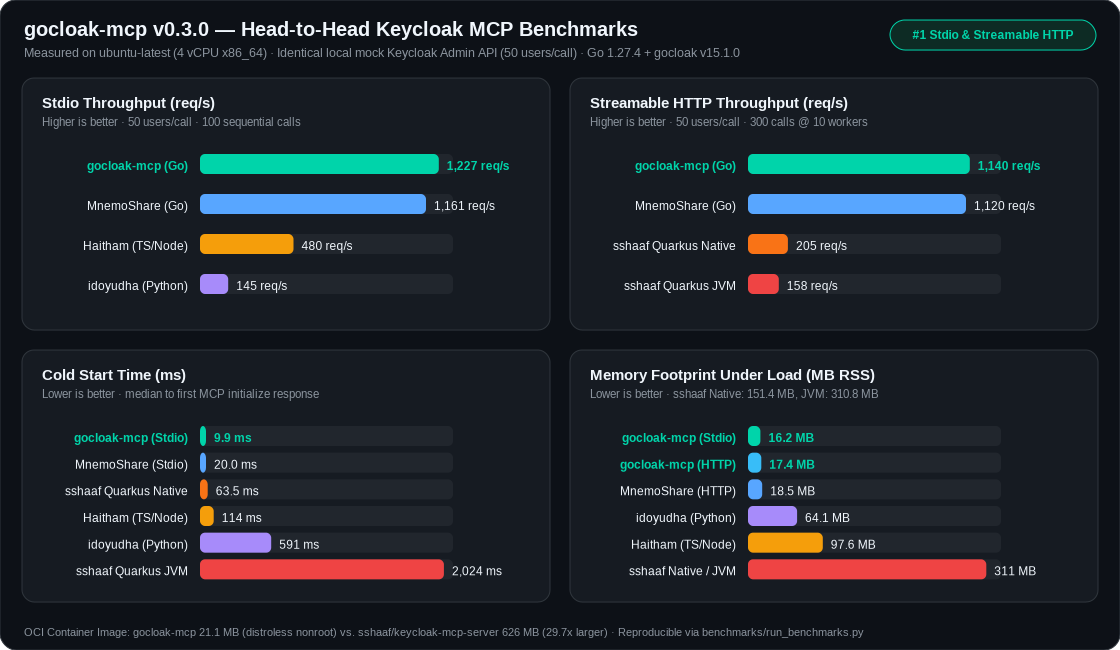
Measured head-to-head on ubuntu-latest (4 vCPU x86_64) against an identical local mock Keycloak Admin API (50 users/call). See Security & Benchmarks for the full OWASP MCP Top 10 control matrix, pprof optimization progression, and reproducible harness (benchmarks/run_benchmarks.py):
| Server | Transport | Binary / Image | Cold Start | RSS (Load) | Throughput |
|---|---|---|---|---|---|
gocloak-mcp (v0.3.0, Go 1.27 + gocloak v15.1) | Stdio / HTTP | 10.2 MB / 21.1 MB | 9.9 ms / 22.7 ms | 16.2 MB / 17.4 MB | 1,227 / 1,140 req/s |
MnemoShare/mnemoshare-keycloak-mcp (Go) | Stdio / HTTP | 10.4 MB | 20.0 ms / 21.7 ms | 17.4 MB / 18.5 MB | 1,161 / 1,120 req/s |
HaithamOumerzoug/keycloak-mcp (TS/Node 22) | Stdio | Node runtime | 114.1 ms | 97.6 MB | 480 req/s |
idoyudha/mcp-keycloak (Python 3.12 / FastMCP) | Stdio | Python venv | 591.4 ms | 64.1 MB | 145 req/s |
sshaaf/keycloak-mcp-server (Quarkus Native) | HTTP | 74.1 MB | 63.5 ms | 151.4 MB | 205 req/s |
sshaaf/keycloak-mcp-server (Quarkus JVM) | HTTP | 23.4 MB JAR / 626 MB | 2,024.1 ms | 310.8 MB | 158 req/s |
Requirements
- Go 1.27.4 or newer
- A Keycloak confidential client with service accounts enabled
- A client secret supplied through the environment
Configuration
The server validates configuration before it starts and exits without printing secrets when validation fails.
| Environment variable | Required | Default | Description |
|---|---|---|---|
KEYCLOAK_URL | Yes | — | HTTPS Keycloak base URL (a /auth prefix is allowed); loopback HTTP is allowed for local development |
KEYCLOAK_REALM | Yes | — | Default target realm and token-issuing realm |
KEYCLOAK_ALLOWED_REALMS | No | KEYCLOAK_REALM | Comma-separated allowlist of realms tools may query (KEYCLOAK_REALM is always included) |
KEYCLOAK_CLIENT_ID | Yes | — | Service-account client ID |
KEYCLOAK_CLIENT_SECRET | Yes | — | Service-account client secret |
KEYCLOAK_REQUEST_TIMEOUT | No | 15s | Per-request timeout; valid range is > 0 and <= 2m |
MCP_TRANSPORT | No | stdio | Transport mode: stdio or http (Streamable HTTP) |
MCP_HTTP_ADDR | No | 127.0.0.1:8080 | Listen address when MCP_TRANSPORT=http |
MCP_HTTP_BEARER_TOKEN | Conditional | — | Optional on loopback; required (min 32 chars) when MCP_HTTP_ADDR binds to a non-loopback address |
MCP_HTTP_ALLOWED_ORIGINS | No | Loopback only | Comma-separated additional Origin allowlist for browser clients on Streamable HTTP (DNS rebinding protection) |
Use your deployment platform's secret manager to provide secrets. Do not put credentials in command-line arguments, configuration files, or logs.
Minimal Keycloak permissions
Create a dedicated confidential client with service accounts enabled and assign
only the read-only realm-management roles required for the tools you use:
query-users,view-users— user, session, and group-membership toolsquery-clients,view-clients— client, client-role, and client-scope toolsquery-groups— group toolsview-realm— realm, role, auth-flow, required-action, and IdP toolsview-events— login and admin event tools
Do not use the master realm or grant realm-admin unless explicitly required.
Installation
Homebrew (macOS & Linux)
brew install --cask nerzal/tap/gocloak-mcp
Prebuilt binaries (GitHub Releases)
Download the archive for your platform (darwin, linux, windows for amd64 and arm64) from the GitHub Releases page, verify the SHA-256 checksum against checksums.txt, and place gocloak-mcp on your PATH.
Docker / GHCR (multi-arch: linux/amd64, linux/arm64)
docker pull ghcr.io/nerzal/gocloak-mcp:latest
The image contains a static binary on gcr.io/distroless/static-debian12:nonroot.
Go install (from source)
go install github.com/Nerzal/gocloak-mcp/cmd/gocloak-mcp@latest
MCP client configuration
Native binary (Stdio)
Works with Claude Desktop, Cursor, VS Code, Claude Code, and other Stdio MCP clients:
{
  "mcpServers": {
    "keycloak": {
      "command": "gocloak-mcp",
      "env": {
        "KEYCLOAK_URL": "https://keycloak.example.com",
        "KEYCLOAK_REALM": "example",
        "KEYCLOAK_CLIENT_ID": "gocloak-mcp",
        "KEYCLOAK_CLIENT_SECRET": "<injected by your secret manager>"
      }
    }
  }
}
Docker container (Stdio)
Run isolated without installing a local binary:
{
  "mcpServers": {
    "keycloak": {
      "command": "docker",
      "args": [
        "run", "-i", "--rm",
        "-e", "KEYCLOAK_URL",
        "-e", "KEYCLOAK_REALM",
        "-e", "KEYCLOAK_CLIENT_ID",
        "-e", "KEYCLOAK_CLIENT_SECRET",
        "ghcr.io/nerzal/gocloak-mcp:latest"
      ],
      "env": {
        "KEYCLOAK_URL": "https://keycloak.example.com",
        "KEYCLOAK_REALM": "example",
        "KEYCLOAK_CLIENT_ID": "gocloak-mcp",
        "KEYCLOAK_CLIENT_SECRET": "<injected by your secret manager>"
      }
    }
  }
}
Run directly
Stdio mode (default)
export KEYCLOAK_URL=https://keycloak.example.com
export KEYCLOAK_REALM=example
export KEYCLOAK_CLIENT_ID=gocloak-mcp
export KEYCLOAK_CLIENT_SECRET='<injected by your secret manager>'
go run ./cmd/gocloak-mcp
Streamable HTTP mode
export MCP_TRANSPORT=http
export MCP_HTTP_ADDR=127.0.0.1:8080
export MCP_HTTP_BEARER_TOKEN='<at least 32 random chars for non-loopback>'
go run ./cmd/gocloak-mcp
Or via Docker:
docker run --rm -p 127.0.0.1:8080:8080 \
  -e MCP_TRANSPORT=http \
  -e MCP_HTTP_ADDR=0.0.0.0:8080 \
  -e MCP_HTTP_BEARER_TOKEN='<at least 32 random chars>' \
  -e KEYCLOAK_URL=https://keycloak.example.com \
  -e KEYCLOAK_REALM=example \
  -e KEYCLOAK_CLIENT_ID=gocloak-mcp \
  -e KEYCLOAK_CLIENT_SECRET='<injected by your secret manager>' \
  ghcr.io/nerzal/gocloak-mcp:latest
Exposes /mcp (Streamable HTTP MCP endpoint) and /healthz (liveness probe).
Read-Only Tools (32)
All tools declare readOnlyHint: true, idempotentHint: true, and
destructiveHint: false, accept an optional realm parameter checked against
KEYCLOAK_ALLOWED_REALMS, cap pagination at max <= 100 (default 50), and
return safe allowlist DTOs (never exposing credentials, client secrets, IdP
config secrets, or raw admin-event payloads).
- Users:
list_users,get_user,count_users,get_user_sessions,get_user_groups,get_user_roles - Clients & Scopes:
list_clients,get_client,get_client_service_account,list_client_roles,list_client_scopes,get_client_scope - Roles:
list_realm_roles,get_realm_role,get_users_in_role,get_users_in_client_role - Groups:
list_groups,count_groups,get_group,get_group_members,get_group_roles - Realms & Events:
list_realms,get_realm_info,list_events,list_admin_events - Auth Flows & Required Actions:
list_authentication_flows,get_flow_executions,list_required_actions - Identity Providers:
list_identity_providers,get_identity_provider - Organizations (Keycloak 26+):
list_organizations,get_organization_members
Build and verification
make check
Building the container locally
docker build -t gocloak-mcp .