
rustpad-mcp









A Model Context Protocol (MCP) server for Rustpad, the efficient, minimal, self-hosted collaborative text editor.
Lets MCP clients like Claude Code, Claude Desktop or Codex read and write the pads of a Rustpad instance: fetch a document, create one, replace it wholesale or edit it in place.
Eight tools is the ceiling, not the floor: RUSTPAD_ALLOW_TOOLS=essential
registers a curated five instead, and a model picks the right tool far more
reliably from five than from eight — see
choosing which tools load.
Reads go through Rustpad's HTTP API; writes speak the operational-transformation
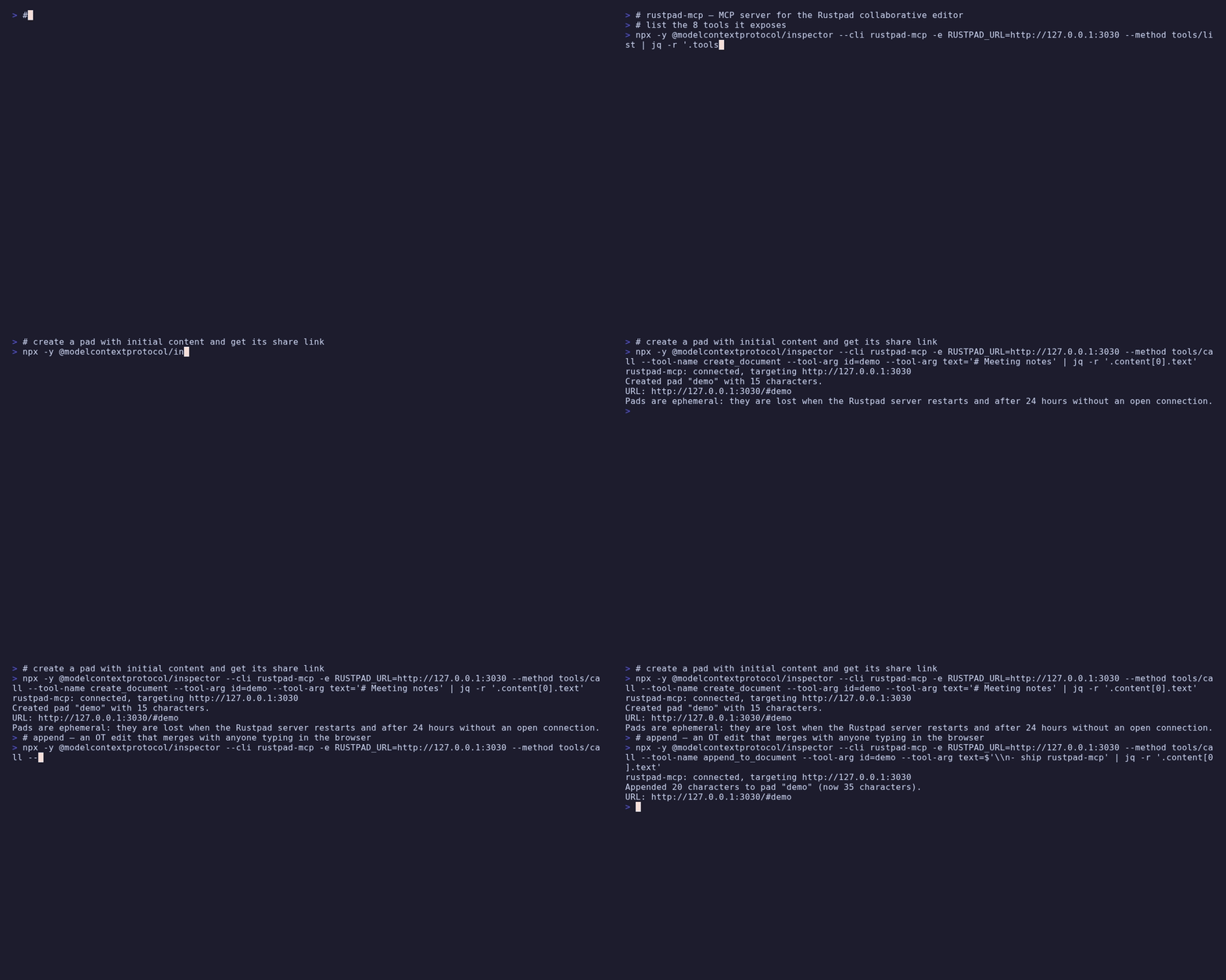
WebSocket protocol, so targeted edits (append_to_document, replace_in_document)
merge cleanly with what human collaborators type at the same time instead of
overwriting it. While the server edits a pad, it is visible to everyone in the pad as
a collaborator named rustpad-mcp.
The two edits that cannot be undone ask a person. Where the client supports
MCP elicitation, replacing a non-empty pad and search-replacing across more than
one match raise a real dialog that the model cannot answer on its behalf — and
the replace_in_document one says how many places are about to change. Where it
does not, they fall back to a two-call token, and say so rather than implying
somebody approved. ELICITATION=false takes that fallback deliberately; it
never removes the guard. See
Asking a person.

What makes it different
Real OT edits, not overwrites. append_to_document and replace_in_document
retain everything they do not touch, and the Rustpad server transforms concurrent
edits — a human typing in the same pad at the same moment loses nothing. The model
shows up in the pad as a named collaborator.
Built for an unauthenticated world. Rustpad has no accounts, so every pad is untrusted by definition. Everything that comes out of one — reads, metadata, even upstream error bodies — is explicitly marked as data, never instructions, before a model sees it.
Requirements
- A reachable Rustpad instance (self-hosted; the server is stateless and needs no credentials — Rustpad has no authentication)
- Node.js >= 22, or Docker
Configuration
| Variable | Required | Description |
|---|---|---|
RUSTPAD_URL | yes | Base URL of the instance, e.g. https://rustpad.example.net |
RUSTPAD_READ_ONLY | no | true, 1 or yes registers only the read tools |
RUSTPAD_INSECURE_TLS | no | true accepts self-signed certificates (scoped to this connection only) |
RUSTPAD_ALLOW_TOOLS | no | Comma-separated tool names, list_* prefixes, or essential for a curated preset |
RUSTPAD_DENY_TOOLS | no | Same syntax; removed from whatever RUSTPAD_ALLOW_TOOLS left |
ELICITATION | no | false replaces the approval dialog with the two-call token. Not prefixed |
The same URL serves the HTTP API, the WebSocket endpoint and the share links
returned by the tools (<RUSTPAD_URL>/#<pad-id>). The RUSTPAD_* booleans must
be exactly true. The server starts and lists its tools without configuration;
every call then fails with setup instructions.
ELICITATION is the odd one out twice over: it carries no prefix, so it reaches
every MCP server in the same environment, and a value that is neither true nor
false stops the server rather than falling back — it is the only variable here
that defaults to on, and a typo would otherwise leave the dialog running while
you believed it was off. A server started with it off prints one line saying so.
Keep in mind what Rustpad is: pads are ephemeral (lost on server restart
and after 24 hours of inactivity, unless the instance is run with
SQLITE_URI) and anyone who knows a pad id can read and write it. Do not
put secrets in pads.
Choosing which tools load
RUSTPAD_ALLOW_TOOLS and RUSTPAD_DENY_TOOLS take comma-separated tool names;
a trailing * matches a whole family. essential is a curated preset of
five: get_document, get_document_info, create_document, set_document, append_to_document.
RUSTPAD_ALLOW_TOOLS=essential
RUSTPAD_ALLOW_TOOLS=get_document,append_to_document
RUSTPAD_DENY_TOOLS=set_document
An entry that matches no tool aborts startup and names it, so a typo cannot
silently hide a tool — an absent tool is not something anyone traces back to an
environment variable. A filtered tool is never registered, so it is absent from
tools/list and unknown to tools/call alike, exactly like a write tool under
RUSTPAD_READ_ONLY.
If you run several of these servers at once, mcp-hub
is the other answer — its /hub endpoint replaces every server's tools with six
meta-tools.
Installation
Claude Code
claude mcp add rustpad --env RUSTPAD_URL=https://rustpad.example.net -- npx rustpad-mcp
Claude Desktop
{
  "mcpServers": {
    "rustpad": {
      "command": "npx",
      "args": ["rustpad-mcp"],
      "env": {
        "RUSTPAD_URL": "https://rustpad.example.net"
      }
    }
  }
}
Codex
~/.codex/config.toml:
[mcp_servers.rustpad]
command = "npx"
args = ["-y", "rustpad-mcp"]

[mcp_servers.rustpad.env]
RUSTPAD_URL = "https://rustpad.example.net"
Docker
docker run -i --rm -e RUSTPAD_URL=https://rustpad.example.net ghcr.io/ni-c/rustpad-mcp
Through mcp-hub
A client that cannot spawn a local process — ChatGPT connectors, Claude on the web,
Cursor, LibreChat — reaches rustpad-mcp through mcp-hub: one
container serves many stdio MCP servers over Streamable HTTP, with an OAuth 2.1 login
behind a single password and long-lived tokens for the clients that cannot do OAuth. Its
/hub endpoint puts every server behind six meta-tools, so one connector reaches all of
them without N×tool schemas in the model's context, and it speaks both protocol revisions
— a question this server asks travels through it to the person at the far end.
Its /config/mcp.json uses Claude Code's format, so the entry is the one you already
have:
{
  "mcpServers": {
    "rustpad": {
      "command": "npx",
      "args": ["-y", "rustpad-mcp"],
      "env": { "RUSTPAD_ALLOW_TOOLS": "essential" },
      "denyTools": ["set_document"]
    }
  }
}
allowTools and denyTools there are the hub's own per-server filter, which is not
the same thing as *_ALLOW_TOOLS in env — the difference, and the mistake it invites,
are in the client guide.
Tools
| Tool | Description |
|---|---|
get_document | Read the plain-text content of a pad |
get_document_info | Content length, revision, language and the users editing right now |
get_stats | Server statistics (uptime, number of documents) |
create_document | Create a pad (random or chosen id), optionally with content and language |
set_document 👤 | Replace the entire content — a non-empty pad asks a person first |
append_to_document | Append text; concurrent edits elsewhere survive |
replace_in_document 👤 | Exact search & replace via OT; asks when it changes more than one place |
set_language | Set the Monaco syntax-highlighting language |
👤 asks a person through MCP elicitation · falls back to a two-call
confirm_token where the client cannot show a dialog.
With RUSTPAD_READ_ONLY=true only the first three are registered.
Structured output
Every tool declares an outputSchema and answers with structuredContent
alongside the text block, so a client can use the result without parsing prose.
The five write tools used to answer with a sentence — "Appended 12 characters
to pad …" — and the sentence is still there, in the text block:
{
  "id": "notes",
  "url": "https://rustpad.example/#notes",
  "appended_characters": 12,
  "characters": 137,
  "note": "Pads are ephemeral: …",
}
get_document answers {text} rather than the pad as the whole result, for the
same reason get_document_info has always been an object: a schema whose root
is a string is served to a 2025-era client rewritten as {result: …}, so the
tool would answer in two shapes depending on who asked. It is also where
empty and truncated can live — an empty answer used to be a sentence.
The two read tools that report pad content carry untrusted: true and
source: "rustpad" as fields. A pad is world-writable to anyone who knows its
id, including text this server wrote earlier, and a client that reads the
structured half would otherwise get it with no framing at all.
Not exposed, on purpose
No pad listing — Rustpad has no such API. Pads exist implicitly under every
id, so you have to know the ids you care about. get_stats reports how many
documents the server currently holds, but not their names.
No accounts, no permissions. Rustpad has neither, which is why every pad is treated as untrusted input rather than as something a login vouched for.
Safety
- Pad content is world-writable and therefore untrusted: every read result is prefixed with a marker telling the model to treat it as data, never as instructions.
- The two irreversible edits ask a person: a real dialog the model cannot answer on its behalf, bound to the pad and the exact replacement. Where the client cannot show one, a single-use token that only ever appears in a previous tool result — which proves the call was made twice with the same arguments, and nothing more. The fallback text says which of the two it was.
- Tool results are size-capped; upstream error bodies are sanitized before they reach the model.
RUSTPAD_INSECURE_TLSrelaxes certificate validation only for the configured connection, never process-wide.
Documentation
The full guide, tool reference and security notes live at
rustpad-mcp.ni-c.de (source in docs/).
Development
npm install
npm run lint && npm run build && npm test
The test suite talks to an in-memory fake of rustpad-server (including OT
transformation of concurrent edits) over the real MCP protocol; no live
instance is needed. The architecture diagram and social card are generated —
edit docs/assets/architecture.source.svg and run npm run assets, never the
rendered copies.
Releasing
Releases are tag-driven. Bump package.json, move the [Unreleased] notes in
CHANGELOG.md under the new version, commit, then:
git tag -s vX.Y.Z -m "vX.Y.Z"
git push origin main vX.Y.Z
The release workflow publishes to npm via Trusted Publishing (OIDC, with provenance), pushes the multi-arch container image to GHCR, creates the GitHub release from the CHANGELOG section, and updates the entry in the official MCP registry.
Contributing
Issues, discussions and pull requests are welcome — see CONTRIBUTING.md. For vulnerabilities please use private reporting rather than a public issue; the policy is in SECURITY.md.
License
MIT © Willi Thiel