Listed from the MCP registry; nobody on Odel publishes it.
Is this yours? Claim it
vid2context
Turn any video into context for AI agents: transcripts, metadata, chapters, timestamps.
One address for any MCP client. Your key stays in your Odel vault.
What it does
- Reads
- Writes
- High impact
Not assessed yet.
What it costs
FreeOdel charges nothing per call. The publisher may charge for its own service.
Tools
None listed · checked 20 Nov 2026Odel could not list its tools without signing in.




Turn any video into context for AI agents. An MCP server, CLI, HTTP API and library that gives Claude, ChatGPT, Cursor, VS Code Copilot and any other agent the transcript, metadata and chapters of a video, playlist, podcast or media file, with timestamps it can cite.
Try it now, no install: paste a link into vid2context.com/app, or run npx vid2context <link> (CLI) or npx vid2context-mcp (MCP server). Works with YouTube, X (Twitter) posts, podcasts, Bilibili, Vimeo, Loom, the 1,000+ sites yt-dlp supports, and local files.
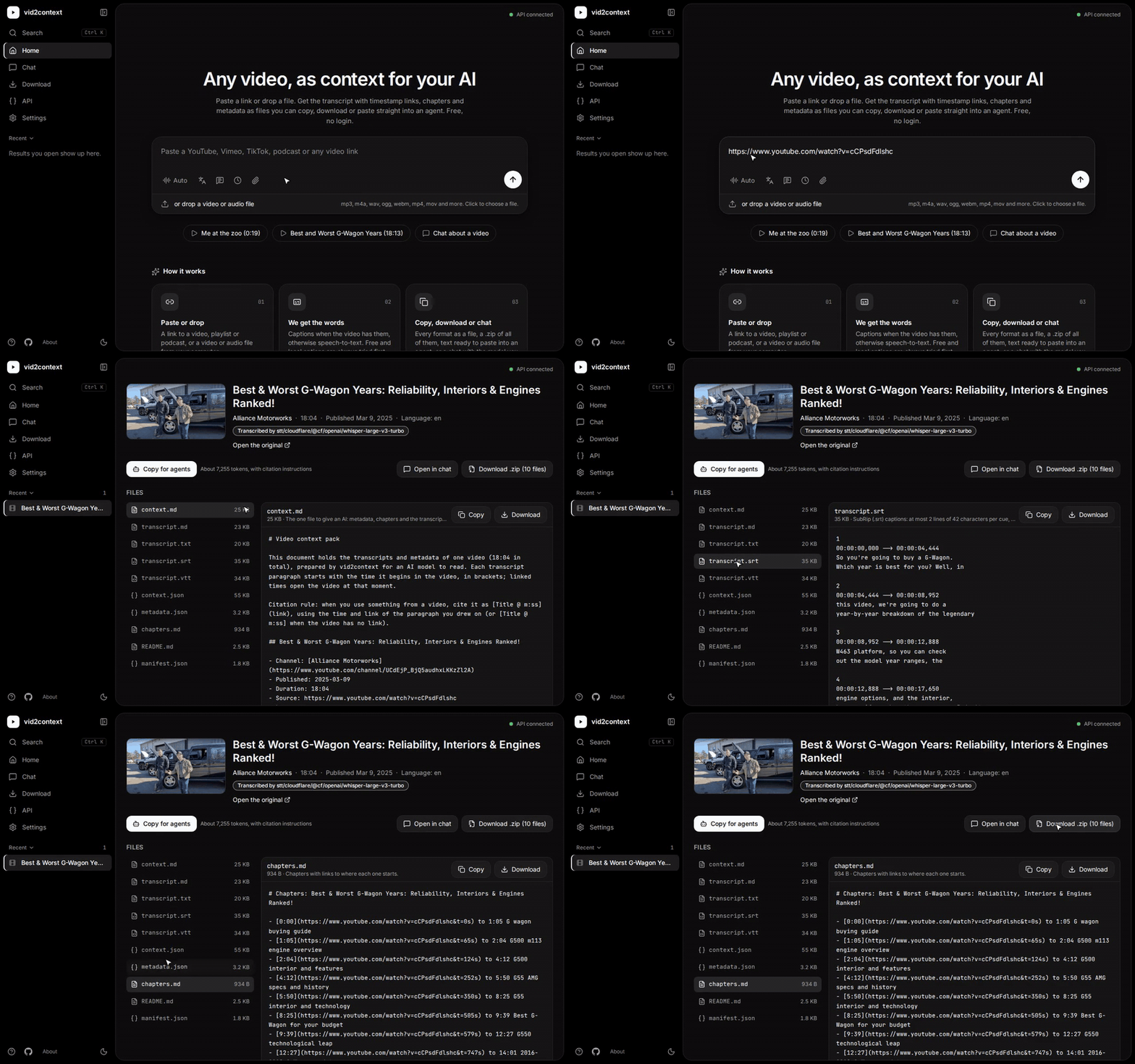
The web app on an 18 minute YouTube video: paste the link, then copy or download the transcript, captions, chapters or a context pack sized for an agent. Recorded live against the local API, shown at 2x speed. MP4 version.
Paste a video link or drop in a media file. vid2context returns the transcript, metadata and chapters in a form your agent can read and cite: plain text with [m:ss] timestamps, JSON, Markdown, SRT, VTT, or one Markdown context pack for many videos that you can upload to ChatGPT Projects, Claude Projects or a custom GPT.
It is free first. Local models run first, then hosted free tiers with your own key, then keyless hosts that need no account. Paid APIs are used last, and only when you set their key. With zero configuration it already works.
$ vid2context https://www.youtube.com/watch?v=jNQXAC9IVRw --timestamps
[0:01] All right, so here we are, in front of the elephants
[0:05] the cool thing about these guys is that they have really...
[0:07] really really long trunks
[0:12] and that's cool
Why
Research happens on video. A playlist explaining which used car to buy, a conference talk, a course, a podcast. Agents cannot watch any of it. vid2context turns those videos into text with timestamps, so an agent can absorb a whole series and answer "which model year should I buy?" while citing the episode and the moment that said so.
Design rule: raw transcripts are always kept. Summaries, briefs and extractions are an added layer, never a replacement.
How it works
For every input, vid2context resolves the source, fetches metadata and chapters, then walks a fallback chain until it has a transcript:
- Creator-uploaded captions
- Platform auto-captions
- Download the audio and run speech-to-text
- Video model mode, where a multimodal model watches the video so on-screen text, slides and code are captured too (planned)
Each speech-to-text and LLM step runs through a rung chain. A rung is one provider, one model and one credential. Rungs are tried in tier order and the chain falls through on errors, rate limits and outages, with cooldowns so a failing rung is skipped for a while. Every attempt is recorded, so you can always see what was tried and why it succeeded or failed:
Attempts:
  resolve  ok      youtube  youtube:jNQXAC9IVRw
  metadata ok      youtube
  captions ok      youtube-captions  creator-captions
| Tier | Meaning | Example |
|---|---|---|
| local | Your machine, free and private | Ollama, LM Studio, speaches |
| free | Hosted free tier, your own key | Groq, Cerebras, Gemini AI Studio |
| keyless | Hosted, no account needed | OVH AI Endpoints, Pollinations |
| paid | Last backstop, only with a key | OpenAI |
Status
Version 0.2.0 (release notes), on npm as vid2context-mcp and vid2context. Everything below is built and covered by tests that replay real recorded responses.
| Area | What you get |
|---|---|
| Sources | YouTube (videos, Shorts, playlists, channels, comments, no key), any of the 1,000+ sites yt-dlp supports, Bilibili, X (Twitter) posts, Vimeo, Loom and Wistia transcripts, direct media URLs, Google Drive, Dropbox and OneDrive share links, local files, and every video embedded in a web page |
| Speech-to-text | Local whisper.cpp and Transformers.js (offline), any OpenAI-compatible server, Groq, Mistral, DeepInfra, Together, Cloudflare Workers AI, OVH (keyless), OpenAI |
| LLMs | Ollama, LM Studio, llama.cpp, vLLM and other local servers, in-browser WebLLM, free tiers (Groq, Cerebras, Gemini, Mistral, GitHub Models, NVIDIA, SambaNova, OpenRouter :free), keyless hosts, native Anthropic, Gemini and Vertex |
| Output | text, JSON, Markdown with timestamp links, SRT, VTT, the context pack, and a .zip bundle with all of them |
| Intelligence | Cited briefs across videos, Q&A with timestamp citations, schema extraction templates, translation, auto-chapters, key moments, on-screen text and slides from video frames, duplicate and reupload detection, SponsorBlock segments |
| Library | Collections fed from playlists, channels and feeds, keyword and vector search, on SQLite, Postgres with pgvector, or Cloudflare D1 and R2 |
| Surfaces | CLI, stdio MCP server (28 tools), remote MCP over Streamable HTTP with OAuth for ChatGPT and Claude.ai, HTTP API with OpenAPI, web app, chat app, browser extension, Telegram, Discord and Slack bots, LangChain.js loader, n8n nodes, Obsidian and Notion export |
| Deploy | Docker, Cloud Run, Railway, Alibaba Cloud, Cloudflare Workers, Vercel, GitHub Pages (client only) |
Planned: video mode, where a multimodal model watches the whole video. The --mode video flag exists, but no provider implements it yet.
Quick start (zero keys)
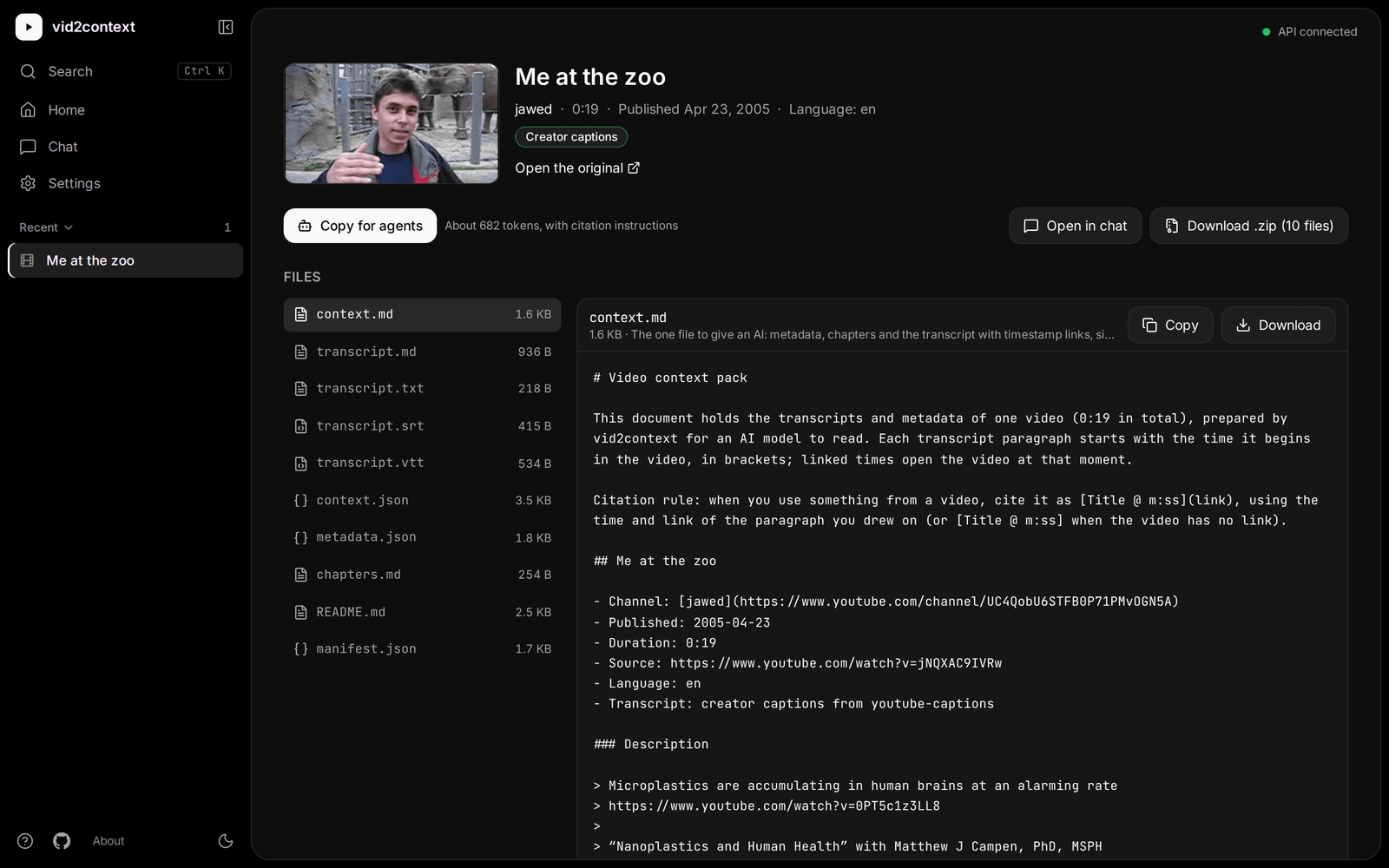
No install: open the web app at vid2context.com/app, paste a link and get every format as a file, a .zip, or text to paste into an agent. This is the real result for "Me at the zoo":
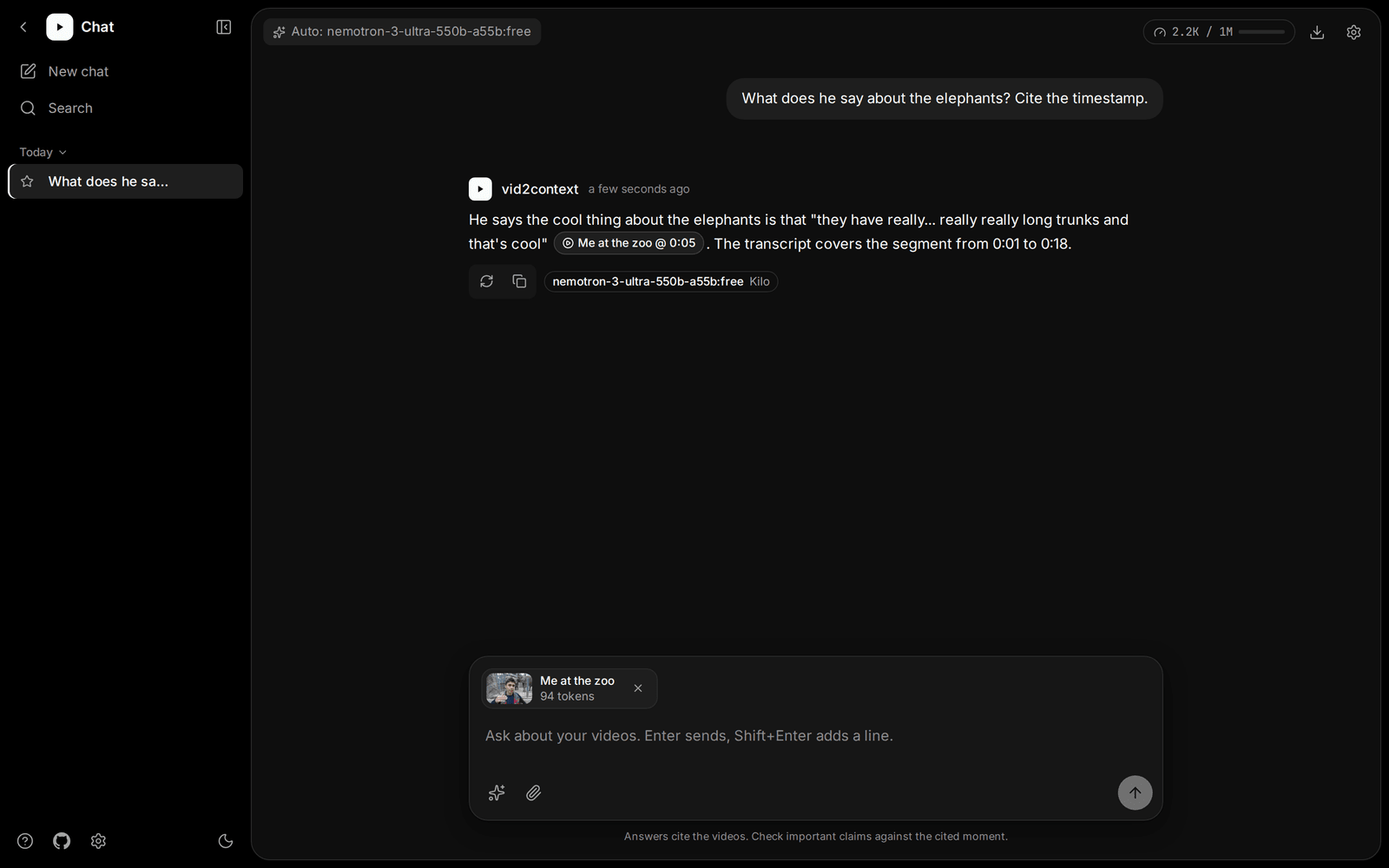
Then open it in chat and ask questions. Answers cite the moment in the video they came from, here using a free model with no key:
On your machine, it requires Node.js 22 or newer.
npx vid2context "https://www.youtube.com/watch?v=jNQXAC9IVRw" --timestamps
From source:
git clone https://github.com/nirholas/vid2context.git
cd vid2context
npm install
npm run cli -- "https://www.youtube.com/watch?v=jNQXAC9IVRw" --timestamps
A local audio or video file works too. With no keys set, it is transcribed by the keyless OVH Whisper rung:
npm run cli -- ./interview.mp3 --format json > interview.json
More in docs/examples: runnable examples for the library, CLI, HTTP API, MCP, LangChain and Python, each a file in examples/ whose output on the page is checked by the tests.
CLI
vid2context <input> [flags]            same as `vid2context get <input>`
vid2context <command> [args] [flags]

  get         Transcript and metadata for one video (the default command)
  list        Expand a playlist, channel, feed or page into video refs
  pack        One context pack (Markdown for an AI model) from one or many videos
  bundle      A .zip with every format, the context pack and a README for agents
  search      Keyword search over transcripts saved in the library
  library     Saved video contexts
  collection  Named groups of videos in the library
  models      Every rung by tier, whether it is enabled, and the env vars it needs
  doctor      Check Node, ffmpeg, yt-dlp, GPU, local servers, data directory, keys and network
  config      Resolved settings and where each came from, secrets masked
  serve       Start the HTTP API
  mcp         Start the stdio MCP server
  formats, completion, help
Common flags: -f, --format text|json|markdown|srt|vtt|pack|ass|ttml|sbv|lrc|csv, -t, --timestamps, --mode auto|captions|stt|video, --lang <code>, --policy free|local-only|quality, --only and --skip (rung ids or services), --json, -o, --out <file>, --verbose. Run vid2context help <command> for the rest. Full reference: docs/cli.md.
Program output goes to stdout and everything else to stderr, so vid2context URL > transcript.txt stays clean. On failure the CLI prints the error code, a hint on how to fix it, and every attempt that was made, and exits with a code per failure kind (3 unsupported input, 4 not found, 6 no transcript, 9 rate limited, 10 auth, and so on).
Use it from your agent
The MCP server is the npm package vid2context-mcp, listed in the MCP Registry as io.github.nirholas/vid2context. It needs no keys.



Claude Code
claude mcp add --scope user --transport stdio vid2context -- npx -y vid2context-mcp
Codex, Gemini CLI
codex mcp add vid2context -- npx -y vid2context-mcp
gemini extensions install https://github.com/nirholas/vid2context
Claude Desktop, Cursor, Windsurf, Cline and other clients
{
  "mcpServers": {
    "vid2context": { "command": "npx", "args": ["-y", "vid2context-mcp"] }
  }
}
To pass a key, add "env": { "GROQ_API_KEY": "..." } to the entry. Agents setting this up for you can follow llms-install.md.
From source
From the repo root:
claude mcp add vid2context -- "$PWD/node_modules/.bin/tsx" "$PWD/packages/mcp/src/bin.ts"
Tools
Ask your agent something like "get the transcript of https://youtu.be/jNQXAC9IVRw and summarize it with timestamps". The server exposes 28 tools:
| Group | Tools |
|---|---|
| One video | get_transcript, get_metadata, get_outline (chapters with token counts, start here for long videos), get_section, get_comments, get_key_moments, get_skip_segments, list_caption_languages, choose_caption_track, list_formats |
| Many videos | list_items (expand a playlist, channel, feed or page), research_videos, export_context_pack, find_duplicates, digest_videos |
| Library | create_collection, add_to_collection, get_collection, list_collections, search_transcript |
| Answers | ask (Q&A with timestamp citations), build_brief (cited brief across videos), extract (buyer guide, tutorial steps, comparison or your own JSON Schema) |
| Live and export | watch_live (transcribe a live stream as it runs), open_transcript_viewer (interactive viewer in MCP Apps clients), export_obsidian, export_notion |
| Setup | list_models |
It also ships the prompts brief, buyer_guide and digest, and resources for saved videos, transcripts and collections (collections are subscribable). Failures come back as tool errors carrying the error code, hint and attempts, so the agent can explain the problem or retry with another mode. Details: docs/guides/mcp.md.
ChatGPT and Claude.ai
These connect only to remote MCP servers over HTTPS. Two options:
- Context pack:
vid2context pack <url>...writes one Markdown file for one or many videos, sized for upload to a ChatGPT Project, Claude Project or custom GPT. Zero setup. - Remote MCP: run the Streamable HTTP server with a bearer token or the built-in single-owner OAuth 2.1 server, behind a Cloudflare Tunnel so requests to YouTube still come from your own connection. See docs/guides/remote-mcp.md and docs/guides/cloudflare-tunnel.md.
Add free keys (optional)
Everything is optional. Each key you add unlocks more rungs, and the chain uses them before falling back to keyless hosts. Set them in your shell or a .env file.
Speech-to-text
| Env var | Rung | Tier |
|---|---|---|
LOCAL_STT_BASE_URL + LOCAL_STT_MODEL | Any local OpenAI-compatible server (speaches, faster-whisper-server, LocalAI) | local |
GROQ_API_KEY | Groq whisper-large-v3-turbo, 25 MB per file | free |
| (none) | OVH AI Endpoints whisper-large-v3-turbo | keyless |
OPENAI_API_KEY | OpenAI whisper-1 | paid |
LLM
| Env var | Rung | Tier |
|---|---|---|
OLLAMA_MODEL (and OLLAMA_BASE_URL) | Ollama, default http://localhost:11434/v1 | local |
LMSTUDIO_MODEL (and LMSTUDIO_BASE_URL) | LM Studio, default http://localhost:1234/v1 | local |
LOCAL_LLM_BASE_URL + LOCAL_LLM_MODEL | Any local OpenAI-compatible server | local |
GROQ_API_KEY | Groq: qwen/qwen3.8-27b, openai/gpt-oss-120b, openai/gpt-oss-20b (one rung per model) | free |
CEREBRAS_API_KEY | Cerebras: gpt-oss-120b, llama-3.3-70b | free |
MISTRAL_API_KEY | Mistral mistral-small-latest | free |
GITHUB_TOKEN | GitHub Models meta/Llama-3.3-70B-Instruct | free |
GEMINI_API_KEY | Gemini AI Studio gemini-2.5-flash-lite | free |
| (none) | OVH AI Endpoints: Llama 3.3 70B, gpt-oss-120b | keyless |
| (none) | Pollinations openai-fast | keyless |
OPENAI_API_KEY | OpenAI gpt-5.4-nano | paid |
Every model id can be overridden with <PROVIDER>_MODEL (a comma-separated list, in order) for LLMs, or <PROVIDER>_STT_MODEL for speech-to-text. To pool several free keys for one provider, put the extras in <PROVIDER>_FALLBACK_KEYS, for example GROQ_FALLBACK_KEYS=key2,key3. Each key becomes its own rung.
Chain controls
| Env var | Effect |
|---|---|
VID2CONTEXT_POLICY | free (default: local, free, keyless, paid), local-only (nothing leaves your machine) or quality (best model first, tier as tie-breaker) |
VID2CONTEXT_ALLOW_PAID=0 | Never use paid rungs, even when a key is set |
VID2CONTEXT_KEYLESS=0 | Turn off keyless rungs, which send data to third parties without an account |
VID2CONTEXT_SKIP=svc1,svc2 | Skip named services, e.g. pollinations,ovh |
VID2CONTEXT_LOG_LEVEL | Log verbosity on stderr, e.g. info |
Deploy your own
Run your own vid2context server in one click. Each button creates a copy in your account and asks for (or generates) VID2CONTEXT_API_KEYS, which keeps the API private. Cloud Run, Render, DigitalOcean and Koyeb run the full image with yt-dlp, deno and ffmpeg. Vercel runs the site, web app and API without those binaries.


Guides for the rest: Railway, Alibaba Cloud, Cloudflare Workers, Docker and the full Cloud Run setup. What each button builds, and why Railway, Alibaba and Cloudflare have no button yet: docs/deploy/one-click.md. On any datacenter host, YouTube may refuse captions or downloads at times; the robust setup is a home machine behind a Cloudflare Tunnel.
Architecture
TypeScript, ESM and npm workspaces, so the same code runs on Node, Cloudflare Workers, Vercel and in the browser.
packages/
  core/        Contracts, rung chain, pipeline, formatters, chunking, caption cleanup, long audio.
               Runtime-neutral, no Node-only imports.
  registry/    Per-runtime provider registries (node, workers, browser), generated on install.
  cli/         The vid2context command.
  mcp/         The stdio MCP server; mcp-http/ serves it remotely, mcp-apps/ and mcp-agentic/ add
               the viewer, sampling and elicitation.
  server/      HTTP API on Hono with OpenAPI, for Node, Workers, Vercel and containers.
  web/ chat/ extension/   Web app, chat app and browser extension.
  ask/ insights/ translate/ chapters/ search/ library/ ...   Intelligence and library features.
  discovery/   npm bundles, MCP Registry and directory manifests (server.json, glama.json, ...).
providers/     One package per source, speech-to-text, LLM, embedding or storage backend
               (youtube, ytdlp, bilibili, media-file, stt-whisper-cpp, llm-local, storage-sqlite, ...).
scripts/
  gen-registry.mjs         Scans providers/*/package.json and writes the generated registries.
Key decisions:
- Providers are separate packages. Each declares the runtimes it supports in its
package.json("vid2context": {"runtimes": [...]}) and default-exports a provider.npm run genbuilds one registry per runtime, so Node-only providers never end up in a Workers or browser bundle. - Plain
fetchover vendor SDKs. Most speech-to-text and LLM APIs are OpenAI-compatible HTTP, which keeps providers edge-compatible and dependencies few. - Providers never read
process.envor the globalfetch. Everything comes through thectxobject passed to each call, so the same provider works in every runtime and in tests. - Formats live in one map. Every surface lists formats from
formattersinpackages/core/src/format, so a new formatter appears in the CLI, MCP and API at once. - stdout is for output only. Logs go to stderr, which keeps CLI pipes and the MCP stdio protocol clean.
Start reading at packages/core/src/types.ts, packages/core/src/provider.ts and packages/core/src/chain.ts.
Development
npm install          # also generates the provider registries
npm run typecheck    # tsc
npm run lint         # Biome
npm test             # vitest, against real recorded fixtures
npm run test:live    # LIVE=1: hits the real services
npm run check        # typecheck + lint + test
npm run cli -- <url> # run the CLI from source
npm run mcp          # run the MCP server on stdio
npm run examples:docs # rewrite docs/examples from the scripts in examples/
Tests use real responses recorded from the live services, never invented data. Live tests run only with LIVE=1.
Adding a provider
- Create
providers/<name>/with apackage.jsonthat names the package@vid2context/provider-<name>, depends on@vid2context/core, and declares"vid2context": {"runtimes": [...]}. - Default-export a provider built with
defineProviderfromsrc/index.ts. Read config and make requests only throughctx. - Add tests under
providers/<name>/test/with a recorded fixture, plus a live test gated byLIVE=1. - Run
npm install(ornpm run gen) to pick it up in the registry. Never hand-edit the generated files.
Roadmap
Next up: video mode (a multimodal model watches the video, so on-screen action is captured as well as speech), Gemini and Deepgram or AssemblyAI speech-to-text, and podcast feeds with podcast:transcript. DRM services are out of scope. The full plan and what each work item covers is in docs/ROADMAP.md.
FAQ
How do I give Claude, ChatGPT or Cursor a YouTube video? Add the MCP server (above) and paste the link into your chat. The agent calls get_transcript and gets the transcript with [m:ss] timestamps. ChatGPT and Claude.ai need the remote MCP server or a context pack upload (see ChatGPT and Claude.ai).
Does it need an API key? No. Creator captions and auto-captions need no key, and speech-to-text falls back to keyless hosts. Keys only add faster or local options.
What if a video has no captions? vid2context downloads the audio and runs speech-to-text, preferring a local Whisper server, then free tiers such as Groq, then keyless hosts.
Can I keep AI processing on my machine? Point it at a local speech-to-text server and a local LLM and set VID2CONTEXT_POLICY=local-only. No hosted AI service is used; fetching a YouTube video still needs the network, a local file does not.
Can it transcribe X (Twitter) videos? Yes, from a post link with no X account or key: creator captions when the poster uploaded them, otherwise speech-to-text on the post's audio, plus direct links to every MP4 quality. Try it on vid2context.com/app or see docs/guides/x.md.
How is it different from youtube-transcript-api or other YouTube MCP servers? Those fetch YouTube captions. vid2context also transcribes videos that have none, reads X, podcasts and 1,000+ other sites, keeps the raw transcript next to any summary, and lets agents read long videos chapter by chapter with citations. When a smaller tool is the better fit: docs/comparison.md.
Is it a YouTube transcript API? Yes: a library, a CLI and an HTTP API with OpenAPI (vid2context serve, see docs/guides/http-api.md). It returns text, JSON and timestamps, keeps the raw transcript, and records every provider it tried.
Does it work on long videos and whole playlists? Yes. Agents read the outline first and fetch only the chapters they need (about 12k tokens per hour of speech), long audio is split and transcribed in parallel, and list_items or vid2context list expands a playlist, channel or feed into its videos.