Listed from the MCP registry; nobody on Odel publishes it.

MCP for Primavera P6
Primavera P6 MCP server: critical path, DCMA checks, what-if and safe write-back to the P6 database
Runs on your machine from its package; the steps are below.
What it does
- Reads
- Writes
- High impact
At most: moves money, runs code or commands, deletes data, or sends messages for you.
What it costs
FreeOdel charges nothing per call. The publisher may charge for its own service.
Runs locally over stdio
This server isn't hosted — your MCP client launches it from a package registry. Use one of the commands below, or drop the config into your client (e.g. Claude Desktop).
Distributed as an MCP bundle (`https://github.com/nizarhamza/p6-mcp/releases/download/v3.3.0/p6mcp-3.3.0.mcpb`) — download it and import the bundle in your MCP client.




MCP for Primavera P6: Primavera P6 MCP Server
MCP for Primavera P6 is a local Model Context Protocol (MCP) server that connects Claude, ChatGPT, Cursor, VS Code and any other MCP client to your Oracle Primavera P6 Professional schedules on Windows. It reads the P6 database itself (P6 Professional standalone, SQLite), plain XER files, or projects of a live P6 EPPM server (on premises or Oracle Cloud), and answers scheduling questions with real computations: critical path and driving path, total float, the DCMA 14-point check, look-ahead, baseline and update comparison, CPM what-if and Monte Carlo schedule risk. Unlike XER-only MCP servers, it can also write changes back: to the P6 database (durations, logic, constraints, actuals, units and UDFs), or to the P6 EPPM server through a push you approve. Each change is previewed in a dry run, applied only after your confirmation, backed up first and recorded in an edit log.
MCP for Primavera P6 is an independent project. It is not affiliated with, endorsed or sponsored by Oracle. Oracle, Primavera and P6 are trademarks of Oracle and/or its affiliates.
Contents: What it does · Install · Connect your MCP client · Tools · Compared with XER-only servers · Safety · Privacy · P6 skills · FAQ · Troubleshooting
What it does
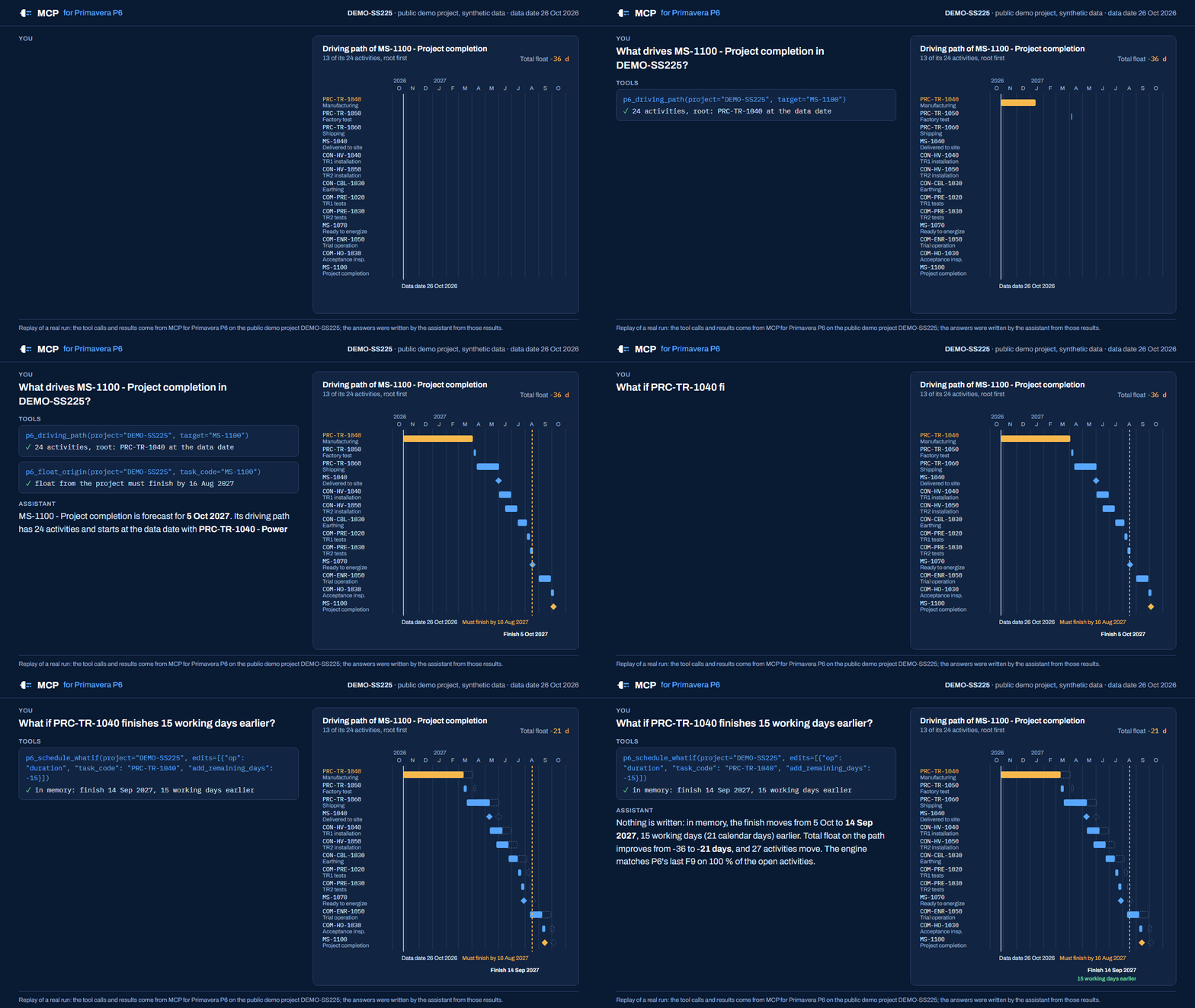
Ask your assistant "what drives the finish date?", "run a DCMA health check on the March update", "what changed since the last update?" or "what happens if procurement takes four more weeks?". The server computes the answer from the schedule; the model explains it. Dates and float come from P6's last schedule run (F9).
- Schedule analysis: projects and EPS, WBS roll-ups, activities filtered by status, float, dates, activity codes or UDFs, relationships with the project's lag calendar rule, critical path (total float or longest path), driving path, float paths, where an activity's float comes from, float distribution, look-ahead windows.
- Schedule quality: DCMA 14-point check with the project's own P6 thresholds, logic density and a weighted grade, comparison with earlier checks, out-of-sequence progress, dangling ends, redundant links.
- Comparisons, what-if and risk: two updates or a baseline compared activity by activity and link by link,
with slip causes and float erosion; an integrity review of an update against the previous one (questions to
raise, not proof); a CPM engine checked against P6's F9 (
p6_cpm_validatereports the match) for what-if scenarios and Monte Carlo risk, run in memory and never written. - Progress and reporting: S-curves and earned value at the data date, resource and cost summaries, groups by status, WBS or code, and a one-page Excel dashboard with native charts.
- XER files: inspect, import (new project, baseline, update), export, or analyse XER files alone in XER-only mode, without a P6 database or P6 installed.
- P6 EPPM server (3.0): pull projects and their baselines from a live P6 EPPM server into a local working copy (REST API, optional read-only SQL account), run every tool on it, edit locally, push the changes after a conflict check and your yes, and schedule on the server with P6's own scheduler.
- Edits (off by default): durations, constraints, actual dates, physical % complete, resource assignment units, activity UDF values, relationships, schedule options, EPS, deletes, backups and restore.
Install
MCP for Primavera P6 runs on Windows 10 or 11, next to P6 Professional. Nothing else to install: Python is bundled.
- Download
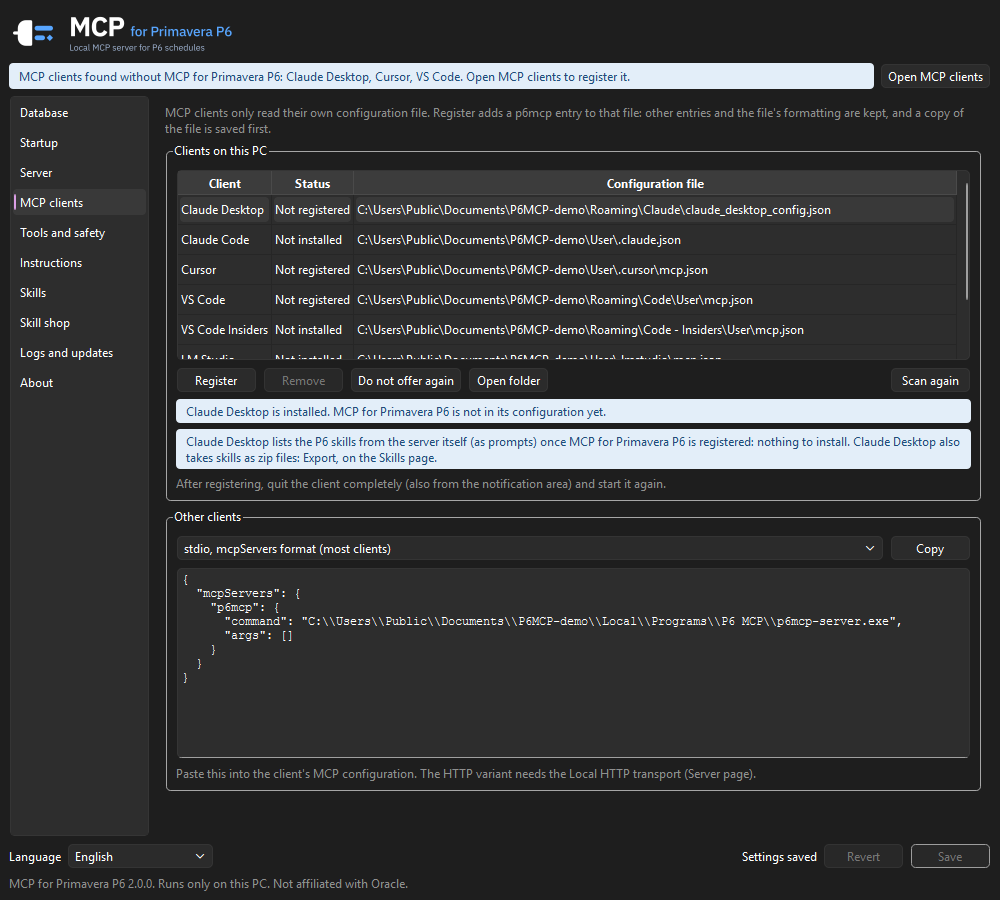
P6MCP-Setup-<version>.exefrom Releases and check it againstSHA256SUMS.txt(certutil -hashfile P6MCP-Setup-3.1.1.exe SHA256). - Run it. It installs for your Windows user only (no administrator rights) and, on its last page, offers to register the server with every MCP client it finds (Claude Desktop, Claude Code, Cursor, VS Code, LM Studio, Cline). Untick the ones you do not want.
- MCP for Primavera P6 Settings opens. Under Database, pick your P6 database (suggestions come from P6's own connection list), click Test connection (read only), then Use this database, and Save. The server never picks a database by itself: until you do this, every tool answers "No database configured".
- Restart your MCP client completely.
Release builds are not code signed yet: Windows SmartScreen may warn on first launch ("More info", "Run anyway").
Check the SHA-256 first. Other packages on the release page: a portable zip (no installation) and an
MCP bundle (.mcpb, server only) that Claude Desktop installs in one click; it is also the package listed in
the official MCP Registry as
io.github.nizarhamza/p6-mcp.
Connect your MCP client
The installer and Settings > MCP clients write the client configuration for you: they add (or repair, or
remove) only the p6mcp entry, after a timestamped backup, keeping every other entry, comment and the file's
formatting. The manual steps below are for reference. In every snippet, replace <you> with your Windows user
name (or copy the snippet from Settings > MCP clients > Other clients, which fills in the real path).
Claude Desktop
Either let the installer register it, or double-click the .mcpb bundle (Settings > Extensions shows it; pick
the database there), or edit %APPDATA%\Claude\claude_desktop_config.json:
{
  "mcpServers": {
    "p6mcp": {
      "command": "C:\\Users\\<you>\\AppData\\Local\\Programs\\P6 MCP\\p6mcp-server.exe",
      "args": []
    }
  }
}
Quit Claude Desktop completely (also from the notification area) and start it again. The P6 skills appear as prompts in the + menu.
Cursor
The installer registers it in %USERPROFILE%\.cursor\mcp.json, or add the same mcpServers entry as Claude
Desktop above to that file. Cursor lists the tools under Settings > MCP.
VS Code (GitHub Copilot agent mode)
The installer registers it in %APPDATA%\Code\User\mcp.json (VS Code Insiders: ...\Code - Insiders\User\mcp.json).
By hand, run MCP: Open User Configuration and add:
{
  "servers": {
    "p6mcp": {
      "type": "stdio",
      "command": "C:\\Users\\<you>\\AppData\\Local\\Programs\\P6 MCP\\p6mcp-server.exe",
      "args": []
    }
  }
}
Then open Copilot Chat in Agent mode and pick the tools from the tools menu.
ChatGPT
- ChatGPT in the browser (3.2, beta, tested with the Free plan): turn on remote access and add its connector address as a custom MCP server. The same address works in claude.ai.
ChatGPT cannot start a program on your PC, so the other routes go through Codex or a tunnel of OpenAI. Neither is tested by the maintainer yet: please report how it goes in an issue.
-
Codex (in the ChatGPT desktop app, or the Codex CLI) starts local MCP servers from
%USERPROFILE%\.codex\config.toml:toml[mcp_servers.p6mcp] command = 'C:\Users\<you>\AppData\Local\Programs\P6 MCP\p6mcp-server.exe' args = [] -
ChatGPT chat reaches MCP servers over HTTPS only. OpenAI's Secure MCP Tunnel runs a small client on your PC that starts the server (stdio command above) and forwards ChatGPT's requests to it, without opening an inbound port; you then add a custom MCP server in ChatGPT with Tunnel as the connection. It needs an OpenAI platform API key and a ChatGPT plan or workspace that allows custom MCP servers. The tool results then pass through OpenAI's service, like any ChatGPT conversation.
Claude Code, LM Studio, Cline and other clients
The installer registers Claude Code (%USERPROFILE%\.claude.json), LM Studio (%USERPROFILE%\.lmstudio\mcp.json)
and Cline as well. For Claude Code by hand:
claude mcp add --scope user p6mcp -- "$env:LOCALAPPDATA\Programs\P6 MCP\p6mcp-server.exe"
Any other client that starts stdio servers takes the mcpServers snippet above. Clients that need HTTP can use
the local HTTP transport. From the command line (the installer uses the same commands):
& "$env:LOCALAPPDATA\Programs\P6 MCP\p6mcp-server.exe" clients list
& "$env:LOCALAPPDATA\Programs\P6 MCP\p6mcp-server.exe" clients register cursor
Tools
65 tools: 39 read-only (11 of them in the Basic profile), 3 that write a file, 22 write tools (off by default; a dry run, then your confirmation; a backup first) and 1 that changes the app's own settings. Generated from the code by tools/gen_docs.py.
Projects and structure
| Tool | What it does | Access | Basic |
|---|---|---|---|
p6_list_projects | Projects with data date, start, finish, status, baseline and EPS; filter by EPS | Read | yes |
p6_list_eps | EPS tree with depth, path and project counts | Read | |
p6_project_summary | One-call overview: dates, activity counts, critical counts, % complete by units, physical and duration, baseline variance and SPI | Read | yes |
p6_list_wbs | WBS tree in P6 order with roll-ups: activities, dates, float, units % and baseline planned % | Read | yes |
p6_list_calendars | Calendars with work week, hours per day and holiday exceptions | Read | |
p6_list_udfs | User defined fields (UDF columns) with how much each one is used | Read | |
p6_schedule_options | Schedule options of a project, of an XER file, or both side by side | Read |
Activities and relationships
| Tool | What it does | Access | Basic |
|---|---|---|---|
p6_query_activities | Search activities by name, Activity ID, WBS, status, total float, dates, activity code or UDF, with chosen columns | Read | yes |
p6_get_activity | Everything about one activity: dates, durations, float, constraints, logic, resources, codes, UDFs, notebooks | Read | yes |
p6_get_relationships | Predecessors and successors of an activity, lags in hours and days | Read | yes |
p6_lookahead | What starts, finishes or is in progress in the next weeks, critical work flagged | Read | yes |
p6_milestones | Milestones against the baseline: variance in working and calendar days, float, critical | Read |
Critical path and float
| Tool | What it does | Access | Basic |
|---|---|---|---|
p6_critical_path | Critical activities as the project defines them (total float or longest path) | Read | yes |
p6_driving_path | The chain of driving predecessors behind an activity's dates, back to its root cause | Read | |
p6_float_paths | Float paths of the last P6 schedule run, in P6 order | Read | |
p6_float_origin | Where an activity's total float comes from: the successor chain that sets its late dates | Read | |
p6_float_analysis | Total and free float distribution by range | Read | yes |
Schedule quality
| Tool | What it does | Access | Basic |
|---|---|---|---|
p6_health_check | DCMA 14-point check (the project's own P6 thresholds when set), critical path test, CPLI, BEI and a weighted score | Read | yes |
p6_health_check_compare | Health check now against an earlier run: what got better or worse | Read | |
p6_dangling | Open starts and open finishes, each with a suggested link to close it | Read | |
p6_redundant_links | Links that are candidates for removal (transitive, duplicate, to completed work) | Read | |
p6_progress_check | Out-of-sequence progress and status inconsistencies | Read |
Progress and reporting
| Tool | What it does | Access | Basic |
|---|---|---|---|
p6_progress_curve | S-curve by month or week (units or cost) against the baseline, earned value at the data date | Read | |
p6_group_summary | Activities, units and dates grouped by status, type, WBS level or activity code | Read | |
p6_resource_summary | Units and costs per resource, and activities per status | Read | |
p6_export_dashboard | Excel project controls dashboard: one A3 page with charts, plus detail sheets | Writes a file |
Comparison, what-if and risk
| Tool | What it does | Access | Basic |
|---|---|---|---|
p6_compare_projects | Two updates or a baseline compared activity by activity and link by link, with slip causes and float erosion | Read | |
p6_update_integrity | Review of an update against the previous one: changes a reviewer should question | Read | |
p6_cpm_validate | Runs the built-in CPM engine against P6's last F9 and explains each difference: changed since the F9, bad input, an engine rule or unknown | Read | |
p6_schedule_whatif | What-if in memory: add or remove links, change durations or constraints, see the new finish and what a reviewer would question | Read | |
p6_schedule_risk | Monte Carlo schedule risk in memory: finish percentiles, on-time probability, criticality index | Read |
XER files
| Tool | What it does | Access | Basic |
|---|---|---|---|
p6_inspect_xer | Reads an XER file without importing it and runs the import pre-flight checks | Read | |
p6_import_xer | Imports an XER as a new project, a baseline or an update of an existing project | Write | |
p6_export_xer | Exports a project to an XER file, schedule options included | Writes a file |
P6 EPPM server
| Tool | What it does | Access | Basic |
|---|---|---|---|
p6_eppm_projects | Lists the projects the P6 user can read on the P6 EPPM server | Read | |
p6_eppm_pull | Copies projects and their baselines from the P6 EPPM server into the local working copy | Writes a file | |
p6_eppm_status | Working copy of the P6 EPPM server: projects, pull time, pending local changes, changes on the server since | Read | |
p6_eppm_discard | Drops pending local changes of the P6 EPPM working copy, one by one or all, without a new pull | Write | |
p6_eppm_push | Sends the pending local changes to the P6 EPPM server after a conflict check and your yes | Delete or replace | |
p6_eppm_schedule | Schedules projects on the P6 EPPM server (P6's own F9), returns its log, then pulls them again | Write |
Edits (off by default)
| Tool | What it does | Access | Basic |
|---|---|---|---|
p6_update_activity | Edits an activity: name, durations, constraint, actual dates, physical % complete | Write | |
p6_update_activities | Edits many activities in one all-or-nothing change (a progress update) | Write | |
p6_update_assignment | Sets budgeted, actual or remaining units of one resource assignment | Write | |
p6_update_assignments | Sets the units of many assignments in one all-or-nothing change | Write | |
p6_update_udf | Sets or clears one activity UDF value | Write | |
p6_update_udfs | Sets or clears many activity UDF values in one change | Write | |
p6_add_relationship | Adds a relationship (FS, SS, FF, SF, with lag) | Write | |
p6_add_relationships | Adds many relationships in one all-or-nothing change | Write | |
p6_update_relationship | Changes the type or lag of a relationship | Write | |
p6_update_relationships | Changes many relationships in one change | Write | |
p6_delete_relationship | Deletes a relationship | Write | |
p6_delete_relationships | Deletes many relationships in one change | Write | |
p6_set_schedule_options | Writes a project's schedule options, or copies them from an XER file | Write | |
p6_create_eps | Creates an EPS node | Write | |
p6_delete_activity | Deletes an activity and everything attached to it, as P6 does | Delete or replace | |
p6_delete_project | Deletes one or more projects, as P6 does | Delete or replace |
Backups, log and diagnostics
| Tool | What it does | Access | Basic |
|---|---|---|---|
p6_backup_database | Takes a backup of the P6 database now | Write | |
p6_list_backups | Lists the backups, automatic (before writes) and manual | Read | |
p6_restore_backup | Puts a backup back in place, after a safety backup of the current database | Delete or replace | |
p6_edit_log | Every confirmed write, with its parameters, before and after values | Read | |
p6_diagnose | Configuration, database, P6 version and P6 running state at a glance | Read | yes |
p6_sql_select | Read-only SQL on the P6 database, as a last resort | Read |
Skill shop
| Tool | What it does | Access | Basic |
|---|---|---|---|
p6_shop_search | Searches the skill shop (ready-made P6 workflows shared on GitHub) | Read | |
p6_shop_get | Shows one skill of the shop in full | Read | |
p6_shop_install | Installs or updates a skill from the shop, after your confirmation | App settings |
Compared with XER-only MCP servers
Several MCP servers read Primavera P6 XER files; some can also edit an XER and export a new one to import back into P6. MCP for Primavera P6 works on the P6 Professional database itself, and reads XER files too.
| MCP for Primavera P6 | Typical XER-file MCP server | |
|---|---|---|
| Reads XER files | Yes: inspect, import, export, XER-only mode | Yes |
| Reads the P6 Professional database directly (every project, baselines, EPS, codes, UDFs, schedule options) | Yes | No: export an XER first |
| Writes changes back to P6 | Yes, into the database: open P6 and press F9 | No, or edits an XER you import again |
| Preview, confirmation token, backup before each write, restore, edit log | Yes | Not applicable, or varies |
| Refuses to write while P6 is running, or on an untested P6 schema | Yes | Not applicable |
CPM engine checked against P6's own F9 dates (p6_cpm_validate), used for what-if and Monte Carlo risk | Yes | Varies |
| DCMA 14-point check with the thresholds set in P6 | Yes, DCMA defaults when none are set | Varies |
| Excel dashboard, P6 skills (ready-made workflows) | Yes | Varies |
| Installation | Windows installer with a Settings window; registers your MCP clients | Usually a Python package (pip, uvx) |
| Runs on macOS or Linux | No: Windows only, like P6 Professional | Usually yes |
| P6 EPPM server (on premises or Oracle Cloud) | Yes (3.0): pull, local edits, push you approve, server schedule | No (XER only) |
"Varies" means some XER servers do it and others do not: check the one you are looking at.
Safety
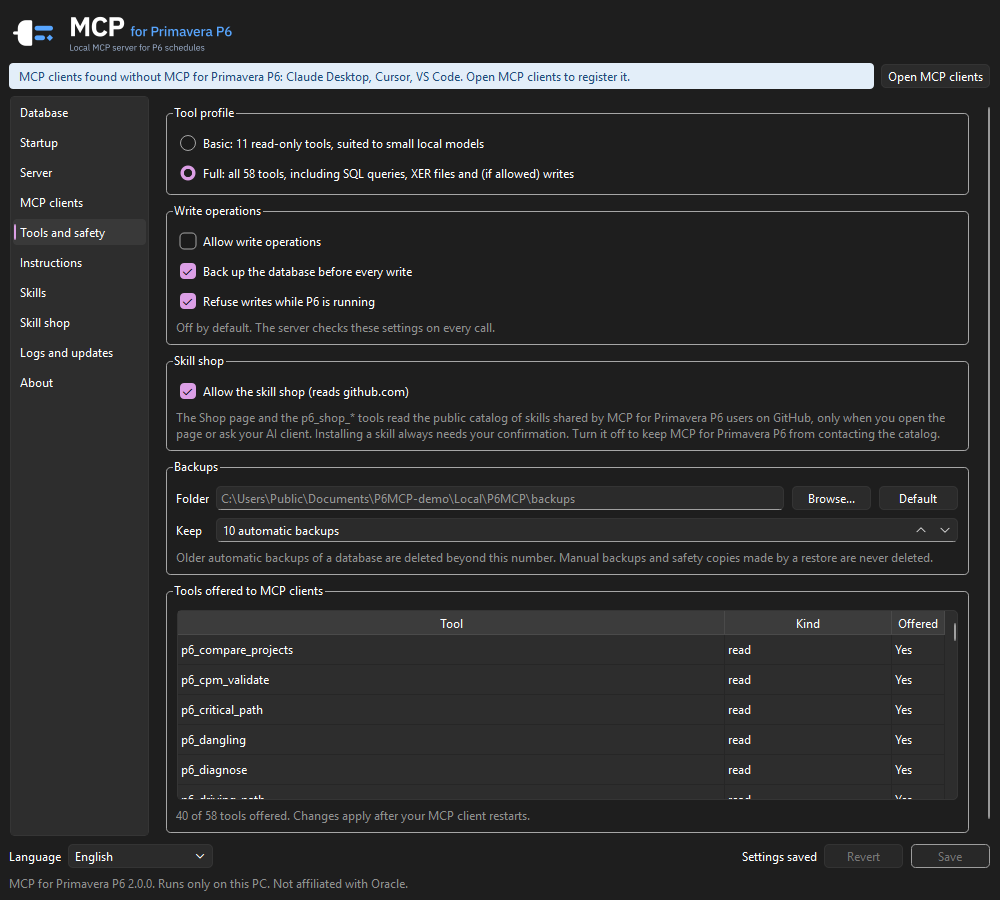
- Tool profiles: Basic (11 read-only tools, suited to small local models) or Full (all 65).
- Writes are off by default. With the Full profile and "Allow write operations", every write takes two calls: a dry run that shows the plan and returns a single-use confirmation token, then, after your explicit yes, the same call with that token. Deleting a project or an activity and restoring a backup also need a confirmation text. If the database changed in between, the write is refused.
- With a P6 EPPM server, edits change only the local working copy.
p6_eppm_pushreads every changed object on the server first and refuses on any change made there since the pull; it needs the confirmation textPUSH TO <server>, sends one object per call and stops at the first failure, with a journal of what was sent. - A backup is taken before every write (with a retention you choose), writes are refused while P6 is running, and every write goes to the edit log with its parameters.
- Writes are refused on a P6 schema version the server was not tested with, unless you trust it explicitly.
- Remote access (claude.ai, ChatGPT in the browser; off by default): each connection is approved on the PC (Connect with this PC in the browser that started it, or the code typed); remote clients never get delete, restore, file or shop tools, edit only with the remote edit switch and a connection approved with edits, and every call is in the audit log. See Remote access.
- These rules are enforced by the server itself on every call, not only by the Settings window.
Writes go straight to the database and bypass P6's own application logic. The server updates the audit
fields (update_date, update_user, create_*) the way P6 does and never writes planned, early or late dates
or float: close P6 before writing, then open it and press F9. See SECURITY.md for the list of
what the write tools can change.
Privacy
The server runs only on your PC: no cloud component, no telemetry. Its only network requests go to GitHub: the updates (releases of this repository), which you can turn off under Logs and updates, and the skill shop (reads of its public catalog when you open the Skill shop page or ask for it, at the first start of the Settings app for the core set, on Restore core skills, and with automatic updates on for newer skill versions), which you can turn off under Tools and safety (the core set then comes from the copy shipped with the app).
The data returned by the tools goes to the AI model your MCP client uses, which may be a cloud service. For confidential schedules, use a local model (for example in LM Studio).
Remote access (off by default) adds one path: the tool results of claude.ai and ChatGPT pass through your own Cloudflare account (the relay and the tunnel; TLS ends at Cloudflare's edge) on their way to the AI vendor. The database and XER files are never uploaded. During the setup the app calls the Cloudflare API with your token; when a client connects it reads that client's public metadata document (claude.ai, chatgpt.com); with the IP allowlist on it reads OpenAI's published address list once a day.
P6 skills
P6 skills are ready-made workflows that chain the tools into one fixed report: weekly update review, schedule quality audit, safe update import, update integrity audit, schedule risk, delay what-if, baseline variance, Excel dashboard and more. They all come from the skill shop. At its first start the Settings app installs the core set from the shop (when GitHub cannot be reached, from the copy of the core set shipped with the app, updated from the shop later). Restore core skills (Skills or Skill shop page) installs the core set again: missing skills come back and edited ones get the shop's version. With automatic updates on (Logs and updates), the tray app also installs newer shop versions of your shop skills, except the ones you edited here: those show Update available on the Skill shop page, and Update asks before replacing your changes.
Most skills need the Full tool profile (the import also needs writes). MCP clients > Install skills writes
each one as an Agent Skills folder p6-<name> (a SKILL.md and its reference files);
the client's AI uses a skill when your request matches its description, and Claude Code also runs it as
/p6-<name>:
| Client | Skills folder |
|---|---|
| Claude Code, Cursor, VS Code / VS Code Insiders | %USERPROFILE%\.claude\skills (one folder read by all three) |
| Cline | %USERPROFILE%\.cline\skills |
The app keeps them in line with the saved settings: every Save (skills turned on or off, installed from the shop, edited, or a change of the tool settings) and every start rewrite the files that differ, in the folders that already hold P6 skills. Update skills does the same for one client; Remove skills (and uninstalling) deletes only the files the app wrote. From the command line:
& "$env:LOCALAPPDATA\Programs\P6 MCP\p6mcp-server.exe" clients skills install --detected
The server also offers them as MCP prompts: Claude Desktop lists them in the + menu, VS Code as
/mcp.p6mcp.<name>, Claude Code as /mcp__p6mcp__<name>. Claude Desktop has no skills folder: export a skill as
a zip file (Skills > Export) and upload it in Claude Desktop's settings to add it as a skill.
The Skills page of the Settings app lists them with whether the current tool settings offer them and where
they come from (Shop, Shop edited here, Yours). Turn a skill off, edit it, or add your own (New, or Copy to
my skills to start from a shop skill): a name, a title, a description that says what it does and when to use it
(clients pick a skill by it), inputs written as {input} in the instructions, the P6 tools to use, and up to 5
text reference files (checklists, thresholds, examples; never scripts). The P6 rules are appended to your
instructions. The Instructions page shows the instructions every client receives when it connects; turn
built-in lines off (the two-step write rule stays on) or add your own, such as "When you show an activity, write
it as Activity ID - Activity name". Click Save (the clients' skills folders follow) and restart the MCP client for
the prompts.
Skill shop
The Skill shop page lists the P6 skills of the public catalog
nizarhamza/p6-mcp-shop: the core set maintained with the app and the
skills other users shared. Reading it needs no account; the app reads it only when you open the page or ask your
AI client (tools p6_shop_search, p6_shop_get and p6_shop_install, Full profile; an install shows the whole
skill first and needs your confirmation). Read a skill before installing it: it is instructions for the AI, and a
skill that uses write tools can change your schedule once you confirm the change. Turn the shop off under
Tools and safety.
To share one of your skills, select it on the Skills page and click Share on GitHub: the app copies the skill
to the clipboard and your browser opens the GitHub share form; sign in if asked (a free GitHub account is needed),
paste the skill in the Skill field and click Create (nothing is sent by the app itself). The maintainer reviews
it and, once approved, a GitHub Action checks it and publishes it in the catalog under the Apache-2.0 license.
Without a GitHub account, Export the skill to a zip file and send it; Import adds a zip (or any skill
folder with a SKILL.md and text files) after you review it.
Local HTTP transport
By default each client starts its own server (stdio). Under Server you can switch to a local HTTP server, hosted by the notification area app, for clients that need HTTP or to share one server:
- listens on
127.0.0.1only (http://127.0.0.1:<port>/mcp), with a port check; - every request needs
Authorization: Bearer <token>; the token lives in the Windows Credential Manager (shown masked, copy, regenerate); - Host and Origin headers are checked to block DNS rebinding.
Remote access (claude.ai and ChatGPT in the browser)
Beta since 3.2. Remote access lets claude.ai and ChatGPT, in the browser or on a phone, use MCP for Primavera P6 on your PC. Off by default; turn it on under Remote access in the Settings window.
How it works: the AI app calls an HTTPS address in your own Cloudflare account (free plan, no domain needed:
https://p6mcp-<your PC>.<your account>.workers.dev/mcp). A small relay there passes the requests through a
tunnel that this PC opens to Cloudflare (no inbound port, nothing to configure on your network) to a remote
access server on this PC, which listens on 127.0.0.1 only. No server of this project is involved.
- Create a free Cloudflare account, then click Create the API token in the Settings window: Cloudflare opens with the four permissions ticked (Account Settings Read, Cloudflare Tunnel Edit, Workers Scripts Edit, Connectivity Directory Admin). Paste the token and click Set up. The token is used once and never saved: delete it in Cloudflare afterwards. A domain of your own on Cloudflare works too.
- Tick Turn on remote access and save. The notification area app runs the remote access server and the tunnel.
- Copy the connector address and add it:
- claude.ai: Customize, Connectors, Add custom connector (works in Claude on the phone and in Claude Desktop too, since the connector belongs to your account);
- ChatGPT: Settings, Apps and Connectors, Advanced settings, Developer mode, then Add custom MCP server, authentication OAuth (tested with the Free plan, edits included, on 2026-11-26).
- The browser page shows a 6-character code and a Connect with this PC button. Click it: the Approve a connection window opens on the PC with the code filled in; tick Allow edits if you want this connection to edit, and approve. The button is only offered in the browser that started the connection, and the PC accepts it only from your own connector address, so a request started by someone else cannot be approved by a click. The other way: open Approve a connection from the tray notification or menu and type the code.
What a remote client gets:
- read tools; edits only with Allow edits from remote clients on (Settings), Allow write operations on (Tools and safety) and a connection approved with edits, and every edit still takes the dry run and your confirmation in the chat, with a backup first and an edit log entry naming the app;
- never: deleting, restoring a backup, importing or exporting files, the skill shop;
p6_sql_selectreads P6's password columns as empty; - local paths shown as file names; results up to 100,000 characters (long lists continue on the next page).
Connections are OAuth: an access token for an hour, renewed for 30 days of use; Connected apps lists them,
with End connection. Every request, sign-in and tool call is written to an audit log
(%LOCALAPPDATA%\P6MCP\remote\audit_*.jsonl, 90 days; no values, tokens or query strings). Optional: accept only
Anthropic's and OpenAI's published addresses. The tray menu has Stop remote access now.
The PC must be on, with you signed in to Windows and the notification area app running (it keeps the PC awake while remote access is on). When it is off, the AI app says that the PC is not reachable.
Excel dashboard
Ask for example "export the dashboard of DEMO-A to D:\Reports\DEMO-A.xlsx" (Full profile). The template is built
into the server: p6_export_dashboard reads the last F9 and writes a finished workbook (values and native Excel
charts, no formulas), so press F9 in P6 first. An existing file is replaced only when you say so (overwrite).
| Sheet | Content |
|---|---|
| Dashboard | One A3 landscape page, protected (no password) with its charts fixed: 7 cards (overall progress, critical and delayed activities, schedule variance, forecast completion, remaining duration, late milestones); S-curve; finish variance by level 1 WBS in working days; WBS progress (level 1) and level 2 progress, actual against baseline planned; milestones; critical and delayed activities |
| Schedule Overview | Every activity under a band per WBS (opens folded to level 2): baseline, current and actual dates, % complete, labor units, original, remaining and actual durations |
| Critical Path | The P6 float paths of the last F9, a bold line between paths (without stored paths: the activities with total float up to near_critical_days) |
| Reports | DCMA 14 checks, sources, settings and definitions |
Options: baseline (default the project baseline), baseline_dates (planned or current), milestones
(Activity IDs), near_critical_days (10: Delayed beyond it, At risk up to it), period (month or week),
prepared_by, revision, and for this export only company (shown in the sidebar) and colors
("primary,accent" in hex). Slip and variance are in working days, as P6 variance columns.
XER-only mode
Under Database > Data source, choose XER files only, add one or more XER files and click Load and
check. The files are read into a private read-only copy; every read tool works on it. Load two updates of the
same schedule to compare them: a Project ID already used by the first file gets a ~2 suffix.
P6 EPPM server
Under Database > Data source, choose A P6 EPPM server, click Add server... and give its address
(https://<host>; the REST API is /p6ws/restapi). Enter the database name shown on P6's sign-in page, your
P6 user and password, then Test connection: it signs in (a session on premises, an OAuth token on Oracle
Cloud), counts the projects you can read and signs out. A password is kept in the Windows Credential Manager
only once a test shows it works. Optionally add a read-only SQL account (SQL Server or Oracle): it reads
every table as stored and is faster; its driver is downloaded from PyPI only when you ask, and each file is
checked against the checksum PyPI publishes. Click Use this server, then Save.
Then, from your MCP client:
p6_eppm_projectslists the projects your P6 user can read;p6_eppm_pullcopies the ones you name, with their current baseline, into a local working copy (by SQL, or by REST alone: the project from P6's XER export, its baseline from REST objects, the schedule options from REST). Every other tool reads that copy.- Edits (with "Allow write operations") change the working copy only: activity fields, relationships and
assignment units, each with its dry run and your confirmation.
p6_eppm_statuslists the pending changes (netted per object and field) and whether the server changed since the pull. p6_eppm_pushsends them: it reads each changed object on the server and refuses on any change made there since the pull, then, after your yes and the textPUSH TO <server>, sends one object per call and stops at the first failure; a journal records what reached the server, and a new push sends the rest.p6_eppm_scheduleruns P6 EPPM's own scheduler (optionally with a new data date), returns its log and pulls the projects again. It never runs by itself after a push.
Not in this version: deleting activities, UDF edits, schedule options and other structure changes through the working copy (do them in P6 EPPM, then pull again). Tested against P6 EPPM 25.12 on SQL Server.
FAQ
What is an MCP server for Primavera P6? MCP (Model Context Protocol) is the open standard AI assistants use to call tools. This server gives an assistant 65 tools that read and analyse Primavera P6 schedules, so you can ask questions in plain language and get answers computed from the schedule rather than guessed by the model.
Can the AI change my schedule? Only if you allow it. Writes are off by default; when on, each one is previewed in a dry run and applied only with a single-use token after your explicit yes, a backup is taken first, and P6 must be closed. Planned dates and float are never written: P6 computes them when you press F9.
Does my schedule leave my PC? The server runs locally and sends nothing anywhere. What the tools return goes to the AI model of your MCP client; with a cloud model that means its provider. For confidential projects use a local model, for example in LM Studio.
Which P6 versions and databases are supported? P6 Professional standalone (SQLite), tested with 25.12; other versions are read only until tested or trusted. XER files from P6 Professional 24.12 and from the server's own export. P6 EPPM servers through their REST API (and optionally a read-only SQL account), tested with P6 EPPM 25.12 on SQL Server. P6 Professional connected directly to SQL Server or Oracle is not supported.
Do I need P6 installed? Not for XER files: XER-only mode analyses them without P6 or a P6 database. Not for a P6 EPPM server either: the server is reached over the network.
How does the DCMA 14-point check work?
p6_health_check runs the 14 DCMA checks on the last F9, with the thresholds set in P6's schedule check settings
for the project when they exist, else the DCMA defaults. The critical path test delays an activity in the
server's CPM engine and runs only when that engine matches P6's dates. See the
DCMA 14-point check guide.
Are the dates computed by the AI?
No. Dates and float come from P6's last schedule run. What-if and risk use the server's CPM engine, and
p6_cpm_validate shows how closely it matches P6's own dates on your project before you rely on it. It
explains every difference, with the calendar, constraints, links and schedule options both sides used: the
schedule changed after its last F9 (press F9 first, or check a frozen copy), invalid input, an engine rule, or
unknown. Matching P6 does not make a plan achievable: p6_schedule_whatif flags what a reviewer would question
in the edits (deep duration cuts, open ends, hard constraints, negative lags, SS links with no lag, new
near-critical work, DCMA checks before and after) and says that it checks logic, not crews, materials or access.
Which AI clients work? Claude Desktop, Claude Code, Cursor, VS Code, LM Studio and Cline are registered automatically; any MCP client that starts stdio servers or speaks Streamable HTTP works too. ChatGPT works through Codex or OpenAI's Secure MCP Tunnel (see ChatGPT).
Does it run on macOS or Linux? No. P6 Professional is a Windows program and the server is built for Windows 10 and 11.
Is it free? Yes, under the Apache License 2.0.
Tested versions
| Component | Tested |
|---|---|
| Windows | Windows 11 |
| P6 Professional standalone (SQLite) | 25.12 (schema fingerprint in p6mcp/schema.py); other versions are read only until tested or trusted |
| XER files | written by P6 Professional 24.12, and by the server's own export |
| MCP clients | registration tested on sample configuration files of every client listed above; stdio and HTTP tested with the MCP Python SDK client; end-to-end use with each client is in the release checklist. Codex and the ChatGPT tunnel are not tested yet |
| MCP SDK | mcp 2.3 (1.8 or later supported) |
Troubleshooting
- "No database configured": open MCP for Primavera P6 Settings, select a database, Test connection, Use this database, Save.
- A tool is "not available in the Basic profile": switch to Full under Tools and safety, Save, restart the client.
- The client does not show the tools: restart it completely (also from the notification area), then check
MCP clients: the entry may need Repair. Ask the assistant to run
p6_diagnose. - "P6 (PM.exe) is running": close P6 before a write.
- "Unknown P6 schema": your P6 version was not tested; reads work. You can trust the schema under Database (after a backup).
- HTTP server error: Server shows the last error (often a port in use: pick another one).
- An install or update did not take effect (
p6_diagnosestill shows the old behaviour): Setup writes a log of each install in%TEMP%(Setup Log <date> #<n>.txt; an automatic update writes%LOCALAPPDATA%\P6MCP\updates\setup.log). It lists every file replaced and any error. - Logs: Logs and updates > Open log folder (
%LOCALAPPDATA%\P6MCP\logs). Settings live in%APPDATA%\P6MCP\config.json; backups, edit log and XER copies in%LOCALAPPDATA%\P6MCP.
Versions 1.x were called P6 MCP: the install folder, the program names and the settings folders keep that name, so updates and client registrations carry over.
Uninstall
Windows Settings > Apps > MCP for Primavera P6. The uninstaller removes the program, the p6mcp entries from your
MCP clients and the startup entry. Your settings, backups and logs are kept.
Development
python -m venv .venv
.venv\Scripts\pip install -e .[dev]
.venv\Scripts\python -m pytest -q
.venv\Scripts\python -m p6mcp.settings_app      # Settings window
.venv\Scripts\python tools\gen_docs.py          # tool tables of README.md and site/llms.txt
.venv\Scripts\python tools\build_site.py        # landing site pages from site-src/pages
.venv\Scripts\python tools\serve_site.py        # preview site/ with its headers on http://127.0.0.1:8642
Tests run on a synthetic P6 database and synthetic XER files built by the tests (tests/fixtures/make_db.py).
Never commit a real schedule, database, XER file or log. Building the installer and releasing:
docs/RELEASING.md. The landing site in site/ is generated from
site-src/pages by tools/build_site.py (a test fails when the two are out of step): edit the
sources, never the generated pages.
To contribute, start with an issue: see CONTRIBUTING.md and the code of conduct. Accessibility: ACCESSIBILITY.md.
License
Apache License 2.0. Copyright 2026 Nizar Hamza. See NOTICE.
Primavera and P6 are trademarks of Oracle. This project is not affiliated with or endorsed by Oracle.