Noeto
Work a Noeto kanban board: read and search it, create, move and comment on cards, keep docs on them.
Runs on your machine from its package; the steps are below.
What it does
- Reads
- Writes
- High impact
Not assessed yet.
What it costs
FreeOdel charges nothing per call. The publisher may charge for its own service.
Runs locally over stdio
This server isn't hosted — your MCP client launches it from a package registry. Use one of the commands below, or drop the config into your client (e.g. Claude Desktop).
Run
docker run -i --rm ghcr.io/noeto-tasks/noeto-mcp:v0.6.5
MCP client config
{
  "mcpServers": {
    "noeto": {
      "command": "docker",
      "args": [
        "run",
        "-i",
        "--rm",
        "ghcr.io/noeto-tasks/noeto-mcp:v0.6.5"
      ]
    }
  }
}noeto-mcp

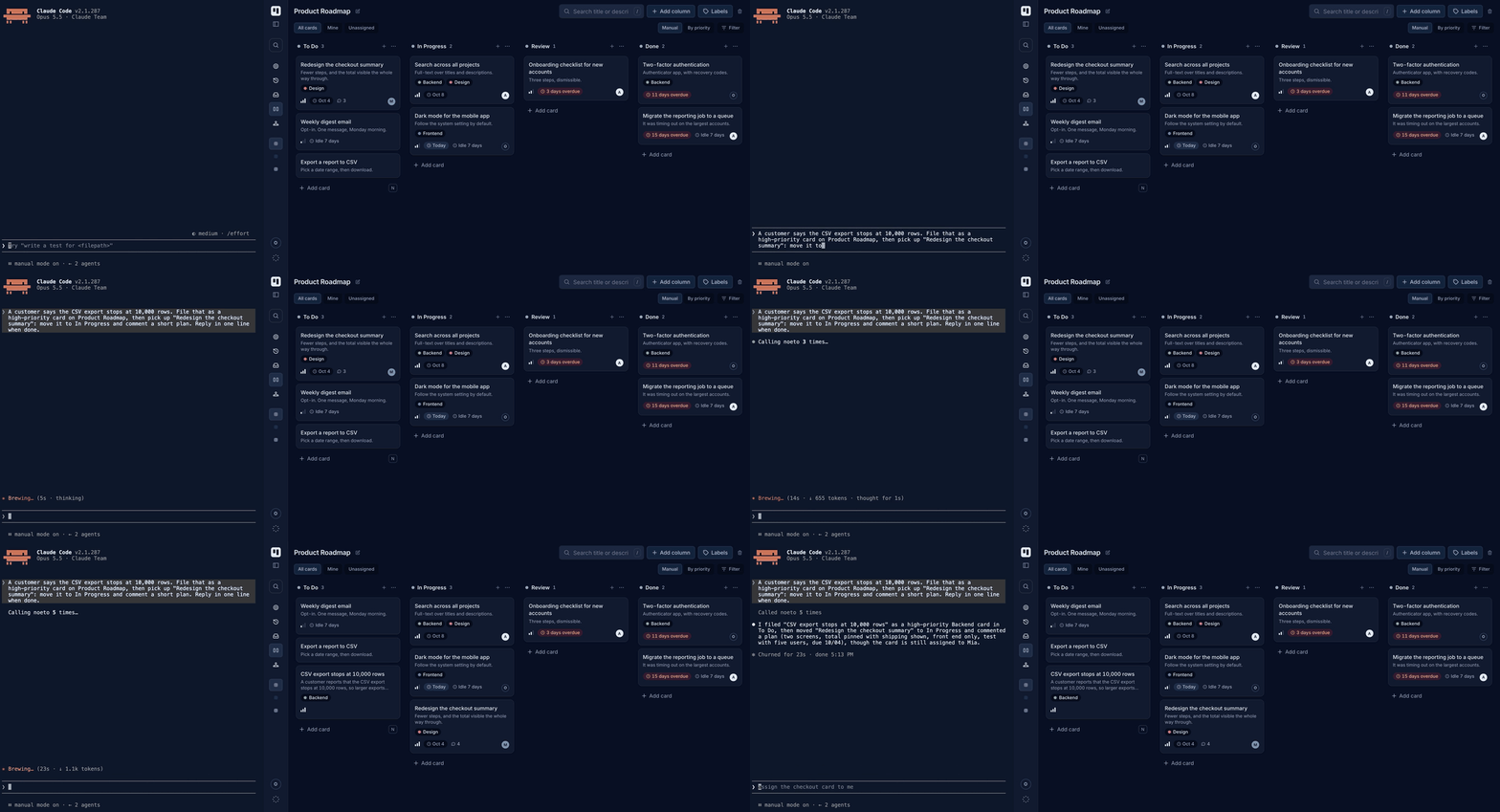
An MCP server that lets an AI agent work a noeto kanban board: read it, create and update cards, move them, comment, and keep a written document on a card.
Quick start (Claude Code)
-
In noeto, Settings → Access tokens → Create token, and copy the secret.
-
Install the plugin. It bundles the server and the
/cardworkflow:sh/plugin marketplace add noeto-tasks/noeto-mcp /plugin install noeto@noeto-mcp -
Export the token and restart Claude Code:
shexport NOETO_TOKEN=noeto_pat_… export NOETO_API_URL=https://api.noeto.online/api/v1
Then ask: "What's on my board?" More in the plugin README.
Other ways to run it
Docker, for any MCP host:
claude mcp add noeto -s user \
  -e NOETO_TOKEN=noeto_pat_… \
  -e NOETO_API_URL=https://api.noeto.online/api/v1 \
  -- docker run -i --rm -e NOETO_TOKEN -e NOETO_API_URL ghcr.io/noeto-tasks/noeto-mcp:v0.6.5
Or by hand in ~/.claude.json, .mcp.json or Claude Desktop's config:
{
  "mcpServers": {
    "noeto": {
      "command": "docker",
      "args": ["run", "-i", "--rm", "-e", "NOETO_TOKEN", "-e", "NOETO_API_URL",
               "ghcr.io/noeto-tasks/noeto-mcp:v0.6.5"],
      "env": {
        "NOETO_TOKEN": "noeto_pat_…",
        "NOETO_API_URL": "https://api.noeto.online/api/v1"
      }
    }
  }
}
Native binary, with Homebrew:
brew install noeto-tasks/tap/noeto-mcp
claude mcp add noeto -s user \
  -e NOETO_TOKEN=noeto_pat_… \
  -e NOETO_API_URL=https://api.noeto.online/api/v1 \
  -- "$(brew --prefix)/bin/noeto-mcp"
Or take an archive from releases
(macOS, Linux, Windows). The binary is unsigned, so on macOS run
xattr -d com.apple.quarantine noeto-mcp first. Point the config at it by
absolute path.
Good to know
- One server serves one team — the token decides which. For two teams, add two
entries with their own tokens (
noeto-work,noeto-personal). - Against a local noeto from Docker, use
http://host.docker.internal:8081/api/v1(macOS, Windows) or--network host(Linux). - It runs as a local process, so it works in Claude Code and Claude Desktop, not in claude.ai in the browser or the mobile apps.
Tools
| tool | what it does | |
|---|---|---|
list_boards | the team's boards, with card counts | reads |
get_board | one board: columns in order and the cards in them | reads |
find_cards | search every board by text, assignee, label, priority, column, due date | reads |
get_card | one card in full, with comments and the files on it | reads |
list_members | who is on the team | reads |
whoami | which member the token belongs to | reads |
create_card | add a card to a column | writes |
update_card | title, description, assignee, priority, due date, labels | writes |
move_card | to another column, or reorder within one | writes |
comment_on_card | post a comment | writes |
read_document | the Markdown of a document on a card | reads |
attach_document | write one, replacing the previous copy of that name | replaces |
read_attachment | a text or image file on a card | reads |
download_attachment | save any file on a card to disk and return its path | saves locally |
- Boards, columns, labels and people can be named:
move_card(card, column: "Done"). The card itself needs its id, so a typo can never edit the wrong card. noneclears a field:update_card(card, due: "none"). An omitted argument leaves it alone.- Documents and text files are capped at 512 KB, images at 1.5 MB. Bigger files
and other types go through
download_attachment. - Downloads land in
NOETO_DOWNLOAD_DIR(default:noeto-attachmentsin the system temp directory). In Docker, mount that directory at the same path on both sides — the plugin's config already does.
It deliberately cannot delete anything a person made, and does not create boards, columns or labels. The reasoning behind these and the other choices is in docs/internals.md.
Development
make test         # hermetic, against a fake API
make smoke        # contract check against a running noeto (needs NOETO_TOKEN)
make lint
make docker       # build the image for this machine
make release-dry  # build release artifacts into dist/, publish nothing
Run make smoke after any API change.
Releasing: Actions → Release → Run workflow, with the version (0.6.3).
It tests, pins the version, pushes the image, tags, publishes the GitHub release
and Homebrew cask, and lists the version in the MCP Registry. It needs a
HOMEBREW_TAP_TOKEN secret that can write to noeto-tasks/homebrew-tap.
make release-plugin RELEASE=x.y.z does the same from a laptop, except the
registry: run the Publish to MCP Registry workflow afterwards.