
EnvSync-LE: Zero Hassle .env Sync
Spot missing keys across your .env files before they bite
Automatic checks, a status bar counter, and a plain markdown report




Useful? A star or rating is how other developers find it — ★ GitHub · ★ Open VSX · ★ Marketplace
What it does
EnvSync-LE compares the variable names across the .env files in your
workspace and tells you which files are missing which keys. It never reads
or compares values, and it never modifies your files. Works in VS Code and
in VS Code–based editors like Cursor and VSCodium (installable from Open VSX).
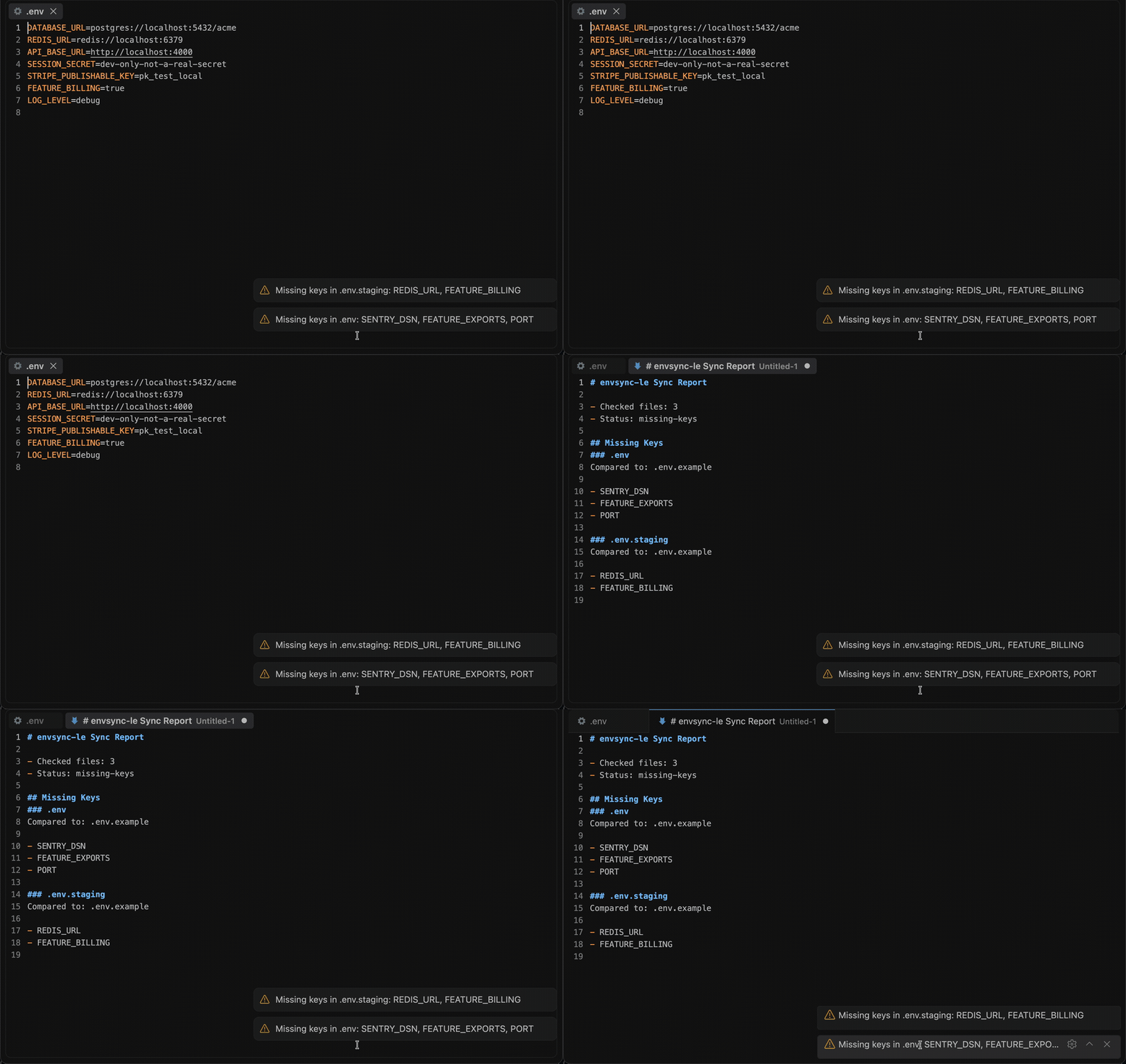
- Automatic checks — a debounced sync check runs whenever a watched
.envfile changes - Status bar counter — the current issue count, one click away from the full report
- Markdown report —
Show Details(Ctrl+Alt+S/Cmd+Alt+S) lists every missing key per file - Three comparison modes —
auto(union of all keys),manual(only the files you list),template(validate everything against one reference file; also reports keys a file has that the template lacks) - Ignore list — temporarily exclude files (e.g.
.env.example) from checking
Install
| Where | What you get | Install |
|---|---|---|
| VS Code | The same comparison, live, in your editor | Marketplace |
| Cursor, VSCodium, Windsurf | The same extension | Open VSX |
| A terminal or a CI step | The same run over a whole tree, with exit codes | cargo install envsync-le · crates.io |
| Any MCP agent, via Node | compare_env_files over stdio | npx envsync-le-mcp · npm |
| Zed | The MCP server as a context server | add it by hand (no listing yet) |
Use it from an AI agent
The same engine runs as an MCP server, so an agent can call it directly instead of you running a command.
| Editor | How |
|---|---|
| VS Code 1.101+ | Nothing to install — the extension registers compare_env_files with agent mode |
| Zed | No listing yet — add the MCP server by hand |
| Claude Code | claude mcp add envsync-le -- npx -y envsync-le-mcp |
| Cursor, Windsurf, anything else | point it at npx envsync-le-mcp |
compare_env_files(files[], mode?, templatePath?, caseSensitive?, maxResults?)
Takes file contents directly and reports which keys are missing from which file. Only key names are returned, never values — a dotenv file is where credentials live and the answer does not need them.
The server takes content and returns data — it reads no files and makes no network requests of its own. Published as envsync-le-mcp on npm and as io.github.nolindnaidoo/envsync-le in the MCP registry.
Configuring it by hand — any host with an MCP config file
Most hosts read a JSON config. Add one entry:
{
  "mcpServers": {
    "envsync-le": {
      "command": "npx",
      "args": ["-y", "envsync-le-mcp"]
    }
  }
}
-y skips the install prompt on first run. Pin a version if you would rather not track releases — envsync-le-mcp@2.2.6.
Prefer not to go through npx on every launch? Install it once and point at the binary instead:
npm install -g envsync-le-mcp
{
  "mcpServers": {
    "envsync-le": { "command": "envsync-le-mcp" }
  }
}
It speaks MCP over stdio and needs no environment variables, no API key and no configuration of its own. To check it before wiring it into anything:
echo '{"jsonrpc":"2.0","id":1,"method":"tools/list"}' | npx -y envsync-le-mcp
That prints the tool list and exits — if you see compare_env_files, the server works.
File classification
| Filename | Type |
|---|---|
.env | base |
.env.local, .env.*.local | local override |
.env.example, .env.template | template |
.env.production, .env.prod | production |
.env.development, .env.dev | development |
.env.test | test |
anything.env, unknown segments | base |
Classification is segment-based on the basename — app.device.env is not
"development", and Windows paths classify correctly.
The CLI
The same comparison runs from a terminal or a CI step: a Rust CLI in
crate/, sharing one corpus with the extension —
crate/fixtures/ — so the two can never read a
dotenv file differently.
envsync-le .                            # have these environments drifted?
envsync-le --template .env.example .    # will this deploy break?
envsync-le mcp                          # the same comparison over MCP on stdio
.env: missing STRIPE_KEY, SENTRY_DSN (in .env.example)
.env.production: missing SENTRY_DSN (in .env.example)
out of sync — 2 files with mismatches across 3 files
The exit code is the product — 0 in sync, 1 out of sync, 2 malformed question. Finding no dotenv files at all is 0: there is nothing to be out of sync with. Unlike the extractors in this family there is no list to pipe onward; the number is the answer.
It never reads a value. Only key names are parsed, compared or reported, and three separate checks enforce that rather than a promise.
Commands
| Command | Description |
|---|---|
EnvSync-LE: Show Details (Ctrl+Alt+S / Cmd+Alt+S) | Run a sync check and open the markdown report |
EnvSync-LE: Compare Files | Compare the key sets of two or more selected .env files |
EnvSync-LE: Set Template | Mark a .env file as the reference template |
EnvSync-LE: Clear Template | Return to automatic comparison |
EnvSync-LE: Ignore File | Exclude a .env file from sync checking |
EnvSync-LE: Unignore File | Re-include a previously ignored file |
EnvSync-LE: Clear Ignored Files | Empty the ignore list |
EnvSync-LE: Open Settings | Open VS Code settings filtered to EnvSync-LE |
EnvSync-LE: Help & Troubleshooting | Built-in documentation |
Settings
| Setting | Default | Description |
|---|---|---|
envsync-le.enabled | true | Master switch for sync checking |
envsync-le.watchPatterns | [".env*"] | Glob patterns for files to watch and compare |
envsync-le.excludePatterns | [] | Glob patterns to exclude; patterns without / match the basename (so .env.*.local excludes nested files too) |
envsync-le.notificationLevel | important | all = missing + extra keys, important = missing keys + errors, silent = nothing |
envsync-le.statusBar.enabled | true | Show the status bar item (applies immediately) |
envsync-le.debounceMs | 1000 | Delay between a file change and the sync check |
envsync-le.caseSensitive | true | Treat DB_URL and db_url as different keys |
envsync-le.comparisonMode | auto | auto, manual, or template |
envsync-le.compareOnlyFiles | [] | In manual mode, only compare these files (workspace-relative) |
envsync-le.templateFile | — | The reference file for template mode (set via Set Template) |
envsync-le.temporaryIgnore | [] | Files currently ignored (managed by the ignore commands) |
envsync-le.telemetryEnabled | false | Local-only event log (see Privacy) |
Parsing notes
- Keys must match
[A-Za-z_][A-Za-z0-9_-]*; anything else left of=is reported as a parse error for that line (the rest of the file still counts). export KEY=valueis accepted; duplicate keys count once.- Values quoted with
",', or`may span multiple lines; an unterminated quote is reported as an error. - In
automode the reference is the union of all keys, so "extra keys" only exist intemplatemode.
Languages
Twelve languages besides English:
German · Spanish · French · Indonesian · Italian · Japanese · Korean · Portuguese (Brazil) · Russian · Ukrainian · Vietnamese · Chinese (Simplified)
Both halves are covered — the manifest (command titles, setting names and descriptions) and everything shown while the extension runs (notifications, the status bar, quick-picks and prompts). The extension follows VS Code's display language, so it matches whatever the editor is already set to; no setting of its own.
Privacy & security
- No network access. The extension never sends data anywhere. The
telemetryEnabledsetting only writes events to a local Output Channel you can inspect (envsync-le). - Values are never read, displayed, or logged — only key names are compared.
- The MCP server returns key names, never values. A dotenv file is where credentials live, so the server reports which keys are missing or extra and nothing about what they contain. It takes file contents as an argument rather than paths, so it reads no files and makes no network calls; the bundle gate asserts a known value is absent from its response.
- Error notifications redact home directories and credential-shaped fragments.
Documentation
| What | Where |
|---|---|
| What the tool is allowed to say — scope, output contract, refusals, non-goals | crate/SPEC.md |
| How the extension is built and held together — architecture, invariants, toolchain, release | AGENTS.md |
| How the CLI is built and held together | crate/AGENTS.md |
| What changed | CHANGELOG.md · crate/CHANGELOG.md |
| The tool's page, and the other fifteen | letools.dev/tools/envsync-le |
Performance
| Input | Size | Found | Time | Rate | Scan speed |
|---|---|---|---|---|---|
| 4 files x 500 keys | 0.02 MB | 1,910 | 0.18 ms | 10,816,443/sec | 102.3 MB/s |
| 24 files x 500 keys | 0.11 MB | 11,103 | 0.84 ms | 13,263,252/sec | 125.5 MB/s |
| 4 files x 8,000 keys | 0.32 MB | 31,172 | 1.48 ms | 21,071,644/sec | 218.4 MB/s |
Median of 7 runs after warmup, on Apple M5 Pro, 24 GB RAM, Node 24.3.0. Inputs are generated
by scripts/benchmark.ts rather than checked in, so the sizes above are
exactly what was measured. Reproduce with bun run benchmark.
These are machine-specific and are not asserted in CI — a benchmark that gates a build only tells you how busy the runner was.
Testing
| Metric | Coverage |
|---|---|
| Statements | 89.95% |
| Branches | 84.00% |
| Functions | 93.24% |
| Lines | 90.28% |
185 test cases across 14 files, plus an integration suite that runs
in a real VS Code extension host and an end-to-end test that installs the
built .vsix into a clean profile.
Generated from a real run — coverage/coverage-summary.json and
coverage/test-results.json — by scripts/coverage-readme.js; CI fails if
this section drifts. Reproduce with bun run test:coverage, and the case
count is the one vitest prints.
More from the LE family
Sixteen single-purpose tools for the work in front of every model. Each ships a Rust CLI and an MCP server. One page: letools.dev
Get it out
- String-LE — Extract every string in a codebase, with its position, so a person can read them
- Numbers-LE — Extract every hardcoded number in a codebase, so a person can check them
- Units-LE — Extract every quantity with its unit, normalized, and refuse the ambiguous ones by name
- Dates-LE — Extract every date and timestamp, and the exact instant each one resolves to
- IDs-LE — Extract every UUID, ULID, NanoID, ObjectId and Snowflake, and decode the time inside
- IPs-LE — Extract every IP address, CIDR block and MAC, normalized and classified by scope
- URLs-LE — Extract every URL in a codebase, with its protocol and exact position
- Paths-LE — Extract every file path in a codebase, and say whether it still points at anything
- Colors-LE — Extract every color in a codebase, and say which ones are not in your palette
Check it
- Regex-LE — Find every regex in a codebase, and report which can be driven into catastrophic backtracking
- Versions-LE — Find where one dependency is constrained differently across a repository's manifests
- i18n-LE — Identify the i18n library a project uses, then audit its catalogs by that library's rules
- Scrape-LE — Check whether a page is scrapeable before the scraper is written, and say when it cannot tell
Guard it
- Secrets-LE — Find hardcoded credentials in a codebase, and never print one into the report
- EnvSync-LE — Compare the dotenv files in a tree, and say which keys are missing from which
- Unicode-LE — Find the Unicode that hides meaning — bidi controls, invisibles, homoglyphs, mixed scripts
Each stands on its own: no shared crate, no published core. Where two of them agree, it is because the same answer was right twice.
Contact — nolindnaidoo.com · GitHub · LinkedIn
Also by nolindnaidoo
Rust — pixelcoords and pixelactions are one loop: pixelcoords answers where, pixelactions acts there. Their own tools, their own voice — not part of the LE family.
- pixelcoords — Freeze your screen, mark regions, get pixel-exact coordinates and crops pixelcoords.dev · crates.io · docs.rs
- pixelactions — Consume human-verified coordinates, perform the interaction, confirm it landed pixelactions.dev · crates.io · docs.rs
License
MIT © nolindnaidoo