Listed from the MCP registry; nobody on Odel publishes it.

O'So MCP Server for PrestaShop
Lets Claude, ChatGPT or Cursor connect to PrestaShop, with each employee approving what they may do.
Runs on your machine from its package; the steps are below.
What it does
- Reads
- Writes
- High impact
At most: moves money, runs code or commands, deletes data, or sends messages for you.
What it costs
FreeOdel charges nothing per call. The publisher may charge for its own service.
Runs locally
This server runs on your machine over stdio, but its source registry didn't list a distribution package. Check the source repository for setup instructions.













Talk to your PrestaShop shop from Claude, ChatGPT or the assistant built into your back office.
Free and open source - PrestaShop 8.0 to 9.x - English, French, Spanish, German
Download the latest version · Documentation · Ask a question
https://github.com/user-attachments/assets/3ed9d7ce-a317-4ec7-bf12-03241dd6544f
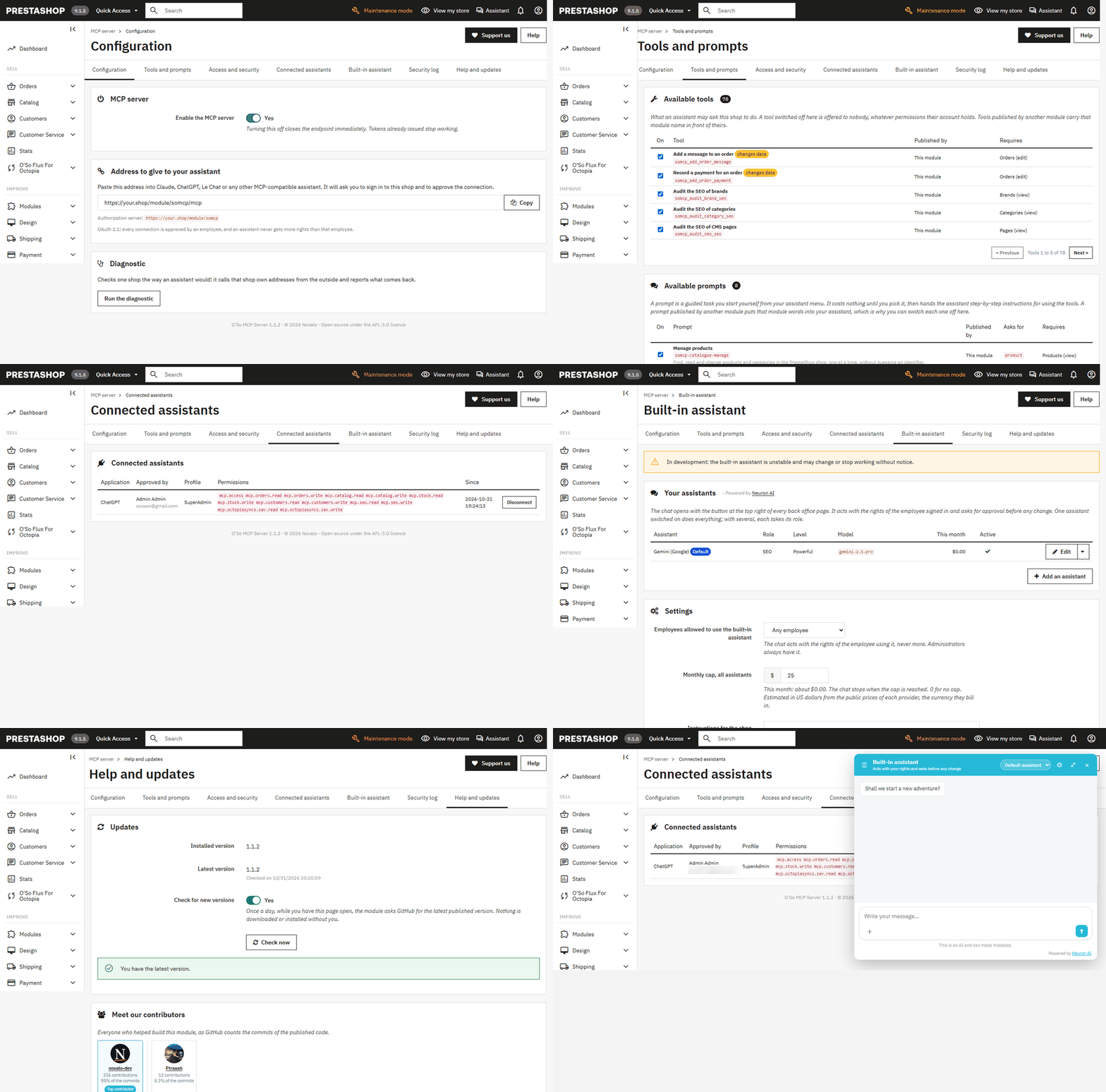
Ask your AI assistant to find an order, change a status, check your stock or audit a product page, and it does it in your back office - with the rights of the employee who connected it, and never more.
In the back office the module is called O'So MCP Server.
News
Compact mode comes to O'So MCP Server. Inspired by the MCP servers of Cloudflare and Azure, which put thousands of operations within an assistant's reach without listing them all: connected assistants receive six tools instead of the whole list, search the one they need, then run it - with the same permissions and the same checks. Compact mode.
What you can ask
"Which orders are still waiting for shipment since Monday?"
"Mark order #1042 as shipped."
"Which products are almost out of stock?"
"Show me last month's sales."
"Audit the SEO of my best-selling product and fix its meta description."
"Who is the customer behind order #1042, and what else did they buy?"
The tools cover orders, carriers and their delivery zones, taxes, catalogue, stock, customers, statistics, SEO, content pages, modules and appearance, and ready-made prompts guide the assistant through the usual jobs. See them all.
Requirements
| PrestaShop | 8.0 to 9.x |
| PHP | 8.1 or later, with the cURL extension |
| Address | the shop reachable from the internet over HTTPS, so online assistants can connect to it |
| Friendly URLs | enabled (Shop Parameters > Traffic & SEO) |
| Location | the shop enabled, and installed at the root of a domain or subdomain, not in a subfolder |
| Multistore | supported: each shop has its own address and settings |
| Languages | English, French, Spanish, German |
The Run the diagnostic button in the module checks all of this from the outside: certificate, SSL setting, friendly URLs, location, the addresses an assistant calls and the sign-in page where you approve it. No line should be red before you connect an assistant.
Install
- Download
OSo-MCP-Server-x.y.z.zipfrom the latest release. Do not unzip it. - In your back office, open Modules > Module Manager, click Upload a module and drop the zip, then Configure.
Then use it either way, or both: connect Claude, ChatGPT or another assistant over MCP, or open the chat built into your back office.
With Composer, on PrestaShop 9, for agencies and automated deployments, from the shop's root folder:
composer config allow-plugins.composer/installers true
composer require novalo/prestashop-mcp-server
php bin/console prestashop:module install somcp
The module lands in modules/somcp, as with the zip, and its dependencies join
the shop's own vendor/. On PrestaShop 8, use the zip: some packages of its
core declare PHP 8.0 at most, and the module needs 8.1, so Composer refuses to
install them together.
1. MCP server: Claude, ChatGPT and other assistants
Your shop becomes a remote MCP server: an assistant you already use connects to it and works with the shop's tools.
Connect an assistant
- In the Access and security tab, turn on Consent page - it is off unless you are connecting an assistant.
- Copy the address to give to your assistant - it looks like
https://your-shop.example/module/somcp/mcp- and paste it into Claude, ChatGPT or another assistant (where to paste it).
The first time, the assistant opens a page of your shop: you sign in with your back office email and password, type the code e-mailed to you, check where the answer goes, and approve what it may do. Then turn Consent page off again: the assistant keeps working. Step by step with screenshots: Installation.
Compatible assistants
Any assistant that connects to a remote MCP server with OAuth can use your shop's address. These can:
- Chat: Claude (web, desktop, mobile), ChatGPT, Le Chat (Mistral), Dust
- Command line: Claude Code, Codex (OpenAI), Gemini CLI (Google), GitHub Copilot CLI
- Code editor: Cursor, VS Code (GitHub Copilot), Windsurf (Devin Desktop), Zed
- Automation: n8n (Cloud and self-hosted), Make
Where to paste the address in each of them: Connect an assistant.
Files
A product photo, a brand logo, a module archive, an invoice: every file goes
through two tools, and no other tool hands out a file or its address on its
own. somcp_upload_file puts a file on the shop for the tool that needs it -
the file you attached in the assistant's conversation when its client passes
it (ChatGPT does), the file itself sent in the call, a web address, sent by the
assistant to the shop when it can make web requests, or dropped by you on a
page of your back office when nothing else works. somcp_download_file hands
the assistant any file of the shop another tool found - a photo, a logo, an
attachment, an invoice: attached to its answer (a photo as a picture), so the
assistant reads it instead of handing you a link. Only a file too large for
that comes as an address it fetches itself, or a link for you. An assistant that runs code in a sandbox often limits which sites it may
reach: allowing your shop's domain in the assistant's
network or allowed-domains settings lets it send files without asking you. It
says so when it is blocked.
Compact mode
A long list of tools weighs on every request an assistant makes, and some clients cap the count: VS Code stops at 128. In compact mode, connected assistants receive six tools instead of the whole list:
| Tool | What it does |
|---|---|
somcp_ping | ● Test the connection |
somcp_upload_file | ● Put a file on the shop, kept in the list so the assistant's client can pass it a file |
somcp_download_file | ● Get a file from the shop |
somcp_search_tools | ● Search the shop tools, and give their parameters |
somcp_run_read_tool | ● Run a tool that only reads |
somcp_run_write_tool | ✎ Run a tool that changes the shop, flagged so assistants ask you first |
Nothing else changes: the same permissions, the same switches, the same checks on every call. A tool the search does not offer cannot be run either. The search and the runners come from Novalo's open-source library novalo/mcp-tool-discovery: the assistant says the action, the object and the request in separate words, and the right tool comes first far more often than with one sentence. The guides (prompts) tell the assistant which runner each of their tools goes through.
Turn it on or off in Tools and prompts › Settings › Compact list of tools: on by default for a new shop, off for a shop that updates. The shop cannot tell a connected assistant that its list changed. One on the latest version of the protocol reads it again once its copy expires (How long an assistant keeps the list of tools, five minutes by default); the others, ChatGPT among them today, keep theirs until you refresh their tools in their own settings. The built-in assistant is not concerned: it already searches its tools itself.
2. The chat built into your back office
No account to connect: a chat button at the top of every back office page opens an assistant that works with the same tools, with the rights of the employee signed in, and asks for your approval before any change.
- Bring your own key from Claude, ChatGPT, Gemini, Mistral, DeepSeek, Grok or Cohere - each link opens the page where that provider gives out keys.
- Or run an AI on your own computer, such as Ollama or LM Studio, with O'So AI Relay: no key, and nothing opened on your network.
Switches of each conversation
Set from the + menu of the chat, for each conversation.
| Switch | What it does | Needs |
|---|---|---|
| Deep thinking | The assistant thinks the request through before it answers: slower, for an audit, a plan or a tricky order | a model that can think: Claude 3.7 and later, Gemini 2.5 and later, OpenAI's reasoning models |
| Web search | The assistant looks things up on the web when the shop's data does not answer, and names its sources | Claude or Gemini, or another assistant lending one of them |
| Memory | The assistant keeps what matters from one conversation to the next | memory switched on in the module's settings |
A team of agents, each with its role
Switch on several assistants and give each a Role: they work as a team. The Default one leads the conversation and hands each agent the work of its role, then brings their answers back into the chat.
- One agent per job: for example Claude for orders and customers, Mistral for SEO and product pages, Gemini or ChatGPT at the Images level to create product photos.
- Product photos: the image agent creates the picture, the chat shows it, and the lead agent can add it to the product page once you approve.
- Safe by design: an agent sees only the task it was handed - not the conversation, not the shop's tools. Every change to the shop goes through the lead agent and waits for your approval.
The lead agent hands out the work with somcp_ask_assistant, one of the
tools of the chat only.
Tools of the chat only
Besides the shop's tools, the chat has these of its own. They are not offered over MCP, so no connected assistant sees them.
| Tool | What it does | Needs |
|---|---|---|
somcp_find_tools | ● Find a tool | nothing: the chat loads only the tools a request needs |
somcp_ask_assistant | ● Ask another assistant | a second assistant switched on, with its Role (agents) |
somcp_web_search | ● Web search | web search switched on in the + menu |
somcp_get_module_settings | ● Read the module settings | super administrator |
somcp_update_module_setting | ✎ Change a module setting | super administrator |
More in the wiki: Built-in assistant.
Your shop stays protected
- Each employee decides. An assistant only gets the rights of the employee who connected it, page by page, exactly as set in Team > Permissions, and only on the shops that employee is attached to.
- No password and no all-powerful API key. Assistants sign in with OAuth 2.1, and every connection can be withdrawn in one click from the module.
- A connection takes your password and a code by e-mail, on a page that stays closed - the shop's "page not found" - until you open it in Access and security > Consent page.
- You choose what is offered. Each tool and prompt, or a whole group of them such as Orders - changes, can be switched off for connected assistants, for the built-in assistant, or both. A group switched off also holds back the tools a later update adds to it. Changes are flagged as such, which assistants use to ask you before making them.
- Every refusal is logged, in a security log that never contains a token or a secret.
- Tested before every release. Each version is installed and run on more than 30 PrestaShop versions (more than 70 PrestaShop and PHP combinations), attacked by more than 35 security tests on a live shop and driven through the back office by a real browser. The report is attached to every release.
Found a security issue? Please do not open an issue: report it privately, see SECURITY.md.
Tools
Offered both to assistants connected over MCP and to the chat built into your back office. Grouped by back office page, each object's reads before its writes. ● reads only and is safe to repeat; ✎ changes data, one thing per call, and is flagged so assistants ask you before running it. The last column is the right the employee needs in Team › Permissions for the assistant to use the tool. Details of every tool are in docs/TOOLS.md.
🔌 Connection
| Tool | What it does | Needs, in Team › Permissions |
|---|---|---|
somcp_ping | ● Test the connection | nothing |
somcp_upload_file | ● Put a file on the shop | the right of the tool the file is for |
somcp_download_file | ● Get a file from the shop | the right of the tool that reads the file: Orders › view for a document of an order, Products › view for a product photo |
🧾 Orders
| Tool | What it does | Needs, in Team › Permissions |
|---|---|---|
somcp_search_orders | ● Search orders | Orders › view |
somcp_get_order | ● Get an order | Orders › view |
somcp_list_order_statuses | ● List order statuses | Statuses › view |
somcp_list_return_statuses | ● List return statuses | Statuses › view |
somcp_list_carriers | ● List carriers | Carriers › view |
somcp_get_carrier | ● Read a carrier | Carriers › view |
somcp_update_carrier | ✎ Change a carrier | Carriers › edit |
somcp_delete_carrier | ✎ Delete a carrier | Carriers › delete |
somcp_get_shipping_preferences | ● Read the shipping preferences | Shipping preferences › view |
somcp_update_shipping_preferences | ✎ Change the shipping preferences | Shipping preferences › edit |
somcp_get_payment_preferences | ● Read the payment preferences | Payment preferences › view |
somcp_update_payment_restrictions | ✎ Change the payment restrictions | Payment preferences › edit |
somcp_get_email_settings | ● Read the e-mail settings | E-mail settings › view |
somcp_update_email_settings | ✎ Change the e-mail settings | E-mail settings › edit |
somcp_list_email_logs | ● List the sent e-mails | E-mail settings › view |
somcp_delete_email_log | ✎ Delete a sent e-mail from the list | E-mail settings › delete |
somcp_erase_email_logs | ✎ Erase the list of sent e-mails | E-mail settings › delete |
somcp_send_test_email | ✎ Send a test e-mail | E-mail settings › edit |
somcp_get_order_settings | ● Read the order settings | Order settings › view |
somcp_update_order_settings | ✎ Change the order settings | Order settings › edit |
somcp_get_product_settings | ● Read the product settings | Product settings › view |
somcp_update_product_settings | ✎ Change the product settings | Product settings › edit |
somcp_get_customer_settings | ● Read the customer settings | Customer settings › view |
somcp_update_customer_settings | ✎ Change the customer settings | Customer settings › edit |
somcp_list_titles | ● List the social titles | Titles › view |
somcp_create_title | ✎ Create a social title | Titles › add |
somcp_update_title | ✎ Change a social title | Titles › edit |
somcp_delete_title | ✎ Delete a social title | Titles › delete |
somcp_list_contacts | ● List the contacts | Contacts › view |
somcp_create_contact | ✎ Create a contact | Contacts › add |
somcp_update_contact | ✎ Change a contact | Contacts › edit |
somcp_delete_contact | ✎ Delete a contact | Contacts › delete |
somcp_list_zones | ● List zones | Zones › view |
somcp_create_zone | ✎ Create a zone | Zones › add |
somcp_update_zone | ✎ Change a zone | Zones › edit |
somcp_delete_zone | ✎ Delete a zone | Zones › delete |
somcp_list_countries | ● List countries | Countries › view |
somcp_get_country | ● Read a country | Countries › view |
somcp_update_country | ✎ Change a country | Countries › edit |
somcp_get_country_options | ● Read the country options | Countries › options |
somcp_update_country_options | ✎ Change the country options | Countries › options |
somcp_list_states | ● List states | States › view |
somcp_create_state | ✎ Create a state | States › add |
somcp_update_state | ✎ Change a state | States › edit |
somcp_delete_state | ✎ Delete a state | States › delete |
somcp_set_order_status | ✎ Change the status of an order | Orders › edit |
somcp_set_order_tracking | ✎ Set the tracking number of an order | Orders › edit |
somcp_add_order_message | ✎ Add a message to an order | Orders › edit |
somcp_set_order_note | ✎ Set the private note of an order | Orders › edit |
somcp_add_order_payment | ✎ Record a payment for an order | Orders › edit |
somcp_issue_partial_refund | ✎ Issue a partial refund on an order | Orders › edit |
somcp_issue_standard_refund | ✎ Issue a standard refund on an order | Orders › edit |
somcp_return_order_products | ✎ Return products of an order | Orders › edit |
somcp_cancel_order_products | ✎ Cancel products of an order | Orders › edit |
somcp_add_order_product | ✎ Add a product to an order | Orders › edit |
somcp_update_order_product | ✎ Edit a product line of an order | Orders › edit |
somcp_delete_order_product | ✎ Remove a product line from an order | Orders › edit |
somcp_generate_order_invoice | ✎ Generate the invoice of an order | Orders › edit |
somcp_set_invoice_note | ✎ Set the note on an invoice | Orders › edit |
somcp_get_order_document | ● Get a document of an order | Orders › view |
somcp_add_order_discount | ✎ Add a discount to an order | Orders › edit |
somcp_delete_order_discount | ✎ Remove a discount from an order | Orders › edit |
somcp_set_order_address | ✎ Change an address of an order | Orders › edit |
somcp_set_order_carrier | ✎ Change the carrier of an order | Orders › edit |
somcp_set_order_currency | ✎ Change the currency of an order | Orders › edit |
somcp_resend_order_status_email | ✎ Resend the email of an order status | Orders › edit |
somcp_create_order | ✎ Create an order | Orders › add |
somcp_create_return_status | ✎ Create a return status | Statuses › add |
somcp_update_return_status | ✎ Change a return status | Statuses › edit |
somcp_delete_return_status | ✎ Delete a return status | Statuses › delete |
somcp_create_order_status | ✎ Create an order status | Statuses › add |
somcp_update_order_status | ✎ Edit an order status | Statuses › edit |
somcp_delete_order_status | ✎ Delete an order status | Statuses › delete |
📦 Catalog - Products
| Tool | What it does | Needs, in Team › Permissions |
|---|---|---|
somcp_search_products | ● Search products | Products › view |
somcp_get_product | ● Get a product | Products › view |
somcp_create_product | ✎ Create a product | Products › add |
somcp_update_product | ✎ Change a product | Products › edit |
somcp_set_product_active | ✎ Switch a product on or off | Products › edit |
somcp_delete_product | ✎ Delete a product | Products › delete |
🗂️ Catalog - Categories
| Tool | What it does | Needs, in Team › Permissions |
|---|---|---|
somcp_list_categories | ● List categories | Categories › view |
somcp_get_category | ● Get a category | Categories › view |
somcp_get_category_kpis | ● Category KPIs above the list | Categories › view |
somcp_create_category | ✎ Create a category | Categories › add |
somcp_update_category | ✎ Change a category | Categories › edit |
somcp_set_category_active | ✎ Show or hide a category | Categories › edit |
somcp_delete_category | ✎ Delete a category | Categories › delete |
🏷️ Catalog - Brands
| Tool | What it does | Needs, in Team › Permissions |
|---|---|---|
somcp_list_manufacturers | ● List brands | Brands › view |
somcp_get_manufacturer | ● Get a brand | Brands › view |
somcp_create_manufacturer | ✎ Create a brand | Brands › add |
somcp_update_manufacturer | ✎ Change a brand | Brands › edit |
somcp_set_manufacturer_active | ✎ Enable or disable a brand | Brands › edit |
somcp_list_manufacturer_addresses | ● List brand addresses | Brands › view |
somcp_get_manufacturer_address | ● Get a brand address | Brands › view |
somcp_create_manufacturer_address | ✎ Add a brand address | Brands › edit |
somcp_update_manufacturer_address | ✎ Change a brand address | Brands › edit |
somcp_delete_manufacturer_address | ✎ Delete a brand address | Brands › delete |
🚚 Catalog - Suppliers
| Tool | What it does | Needs, in Team › Permissions |
|---|---|---|
somcp_list_suppliers | ● List suppliers | Suppliers › view |
somcp_get_supplier | ● Get a supplier | Suppliers › view |
somcp_create_supplier | ✎ Create a supplier | Suppliers › add |
somcp_update_supplier | ✎ Change a supplier | Suppliers › edit |
somcp_set_supplier_active | ✎ Enable or disable a supplier | Suppliers › edit |
🎨 Catalog - Attributes
| Tool | What it does | Needs, in Team › Permissions |
|---|---|---|
somcp_list_attributes | ● List attributes | Attributes › view |
somcp_get_attribute_group | ● Get an attribute group | Attributes › view |
somcp_create_attribute_group | ✎ Create an attribute group | Attributes › add |
somcp_update_attribute_group | ✎ Change an attribute group | Attributes › edit |
somcp_delete_attribute_group | ✎ Delete an attribute group | Attributes › delete |
somcp_get_attribute_value | ● Get an attribute value | Attributes › view |
somcp_create_attribute_value | ✎ Create an attribute value | Attributes › add |
somcp_update_attribute_value | ✎ Change an attribute value | Attributes › edit |
somcp_delete_attribute_value | ✎ Delete an attribute value | Attributes › delete |
📋 Catalog - Features
| Tool | What it does | Needs, in Team › Permissions |
|---|---|---|
somcp_list_features | ● List features | Features › view |
somcp_get_feature | ● Get a feature | Features › view |
somcp_create_feature | ✎ Create a feature | Features › add |
somcp_update_feature | ✎ Change a feature | Features › edit |
somcp_delete_feature | ✎ Delete a feature | Features › delete |
somcp_get_feature_value | ● Get a feature value | Features › view |
somcp_create_feature_value | ✎ Create a feature value | Features › add |
somcp_update_feature_value | ✎ Change a feature value | Features › edit |
somcp_delete_feature_value | ✎ Delete a feature value | Features › delete |
📎 Catalog - Files and taxes
| Tool | What it does | Needs, in Team › Permissions |
|---|---|---|
somcp_list_attachments | ● List files | Files › view |
somcp_list_tax_rules | ● List tax rules | Tax Rules › view |
somcp_get_tax_rule | ● Get a tax rule | Tax Rules › view |
somcp_list_taxes | ● List taxes | Taxes › view |
somcp_list_languages | ● List languages | Languages › view |
somcp_create_language | ✎ Add a language | Languages › add |
somcp_update_language | ✎ Change a language | Languages › edit |
somcp_delete_language | ✎ Delete a language | Languages › delete |
somcp_install_language_pack | ✎ Add or update a language from PrestaShop | Translations › add / update a language |
somcp_get_localization_settings | ● Read the localization settings | Localization › view |
somcp_update_localization_settings | ✎ Change the localization settings | Localization › edit |
somcp_import_localization_pack | ✎ Import a localization pack | Localization › edit |
somcp_get_general_settings | ● Read the general settings | General › view |
somcp_update_general_settings | ✎ Change the general settings | General › edit |
somcp_get_maintenance_settings | ● Read the maintenance settings | Maintenance › view |
somcp_update_maintenance_settings | ✎ Change the maintenance settings | Maintenance › edit |
somcp_list_currencies | ● List currencies | Currencies › view |
somcp_get_currency | ● Read a currency | Currencies › view |
somcp_create_currency | ✎ Add a currency | Currencies › add |
somcp_update_currency | ✎ Change a currency | Currencies › edit |
somcp_delete_currency | ✎ Delete a currency | Currencies › delete |
somcp_update_exchange_rates | ✎ Update the exchange rates | Currencies › update exchange rates |
somcp_create_tax | ✎ Create a tax | Taxes › add |
somcp_update_tax | ✎ Change a tax | Taxes › edit |
somcp_delete_tax | ✎ Delete a tax | Taxes › delete |
somcp_get_tax_options | ● Read the tax options | Taxes › view |
somcp_update_tax_options | ✎ Change the tax options | Taxes › edit |
somcp_create_tax_rule | ✎ Create a tax rule | Tax Rules › add |
somcp_update_tax_rule | ✎ Update a tax rule | Tax Rules › edit |
somcp_delete_tax_rule | ✎ Delete a tax rule | Tax Rules › delete |
somcp_add_country_rule | ✎ Add a country to a tax rule | Tax Rules › New tax rule |
somcp_update_country_rule | ✎ Change a country of a tax rule | Tax Rules › row edit |
somcp_delete_country_rule | ✎ Delete a country from a tax rule | Tax Rules › row delete |
📊 Stock
| Tool | What it does | Needs, in Team › Permissions |
|---|---|---|
somcp_get_stock | ● Get the stock of a product | Stock › view |
somcp_list_low_stock | ● List low stock | Stock › view |
somcp_list_stock_movements | ● List stock movements | Stock › view |
somcp_set_stock_quantity | ✎ Set the stock of a product | Stock › edit |
👥 Customers
| Tool | What it does | Needs, in Team › Permissions |
|---|---|---|
somcp_search_customers | ● Search customers | Customers › view |
somcp_get_customer | ● Get a customer | Customers › view |
somcp_create_customer | ✎ Create a customer | Customers › add |
somcp_update_customer | ✎ Change a customer | Customers › edit |
somcp_list_customer_groups | ● List customer groups | Groups › view |
somcp_get_customer_group | ● Get a customer group | Groups › view |
somcp_update_customer_group | ✎ Change a customer group | Groups › edit |
📈 Statistics
| Tool | What it does | Needs, in Team › Permissions |
|---|---|---|
somcp_get_sales_summary | ● Get a sales summary | Stats › view |
somcp_list_best_sellers | ● List best-selling products | Stats › view |
📄 Content
| Tool | What it does | Needs, in Team › Permissions |
|---|---|---|
somcp_list_cms_pages | ● List content pages | Pages › view |
somcp_get_cms_page | ● Get a content page | Pages › view |
🧩 Modules
| Tool | What it does | Needs, in Team › Permissions |
|---|---|---|
somcp_list_modules | ● List modules | Module Manager › view |
somcp_get_module | ● Get a module | Module Manager › view |
somcp_install_module | ✎ Install a module | Module Manager › add |
somcp_upload_module | ✎ Upload a module | Module Manager › add |
somcp_upgrade_module | ✎ Upgrade a module | Module Manager › add |
somcp_set_module_active | ✎ Enable or disable a module | Module Manager › edit |
🖌️ Appearance
| Tool | What it does | Needs, in Team › Permissions |
|---|---|---|
somcp_list_menu_links | ● List main menu entries | Module Manager › view |
somcp_add_menu_link | ✎ Add a main menu entry | Module Manager › edit |
somcp_update_menu_link | ✎ Change a main menu custom link | Module Manager › edit |
somcp_get_theme | ● Get the theme and page layouts | Theme & Logo › view |
somcp_update_theme_setting | ✎ Change the layout of a page | Theme & Logo › edit |
⚙️ System
| Tool | What it does | Needs, in Team › Permissions |
|---|---|---|
somcp_get_cache_status | ● Read the performance settings | Performance › view |
somcp_clear_cache | ✎ Clear the cache | Performance › delete |
🔎 SEO
| Tool | What it does | Needs, in Team › Permissions |
|---|---|---|
somcp_get_seo_settings | ● Read the SEO and URL settings | SEO & URLs › view |
somcp_list_meta_pages | ● List the shop pages and their SEO | SEO & URLs › view |
somcp_audit_page | ● Audit a public page of the shop | SEO & URLs › view |
somcp_check_links | ● Check the links of the shop's public pages | SEO & URLs › view |
somcp_audit_sitemap | ● Audit the shop's sitemaps | SEO & URLs › view |
somcp_audit_product_seo | ● Audit the SEO of products | Products › view |
somcp_audit_category_seo | ● Audit the SEO of categories | Categories › view |
somcp_audit_cms_seo | ● Audit the SEO of CMS pages | Pages › view |
somcp_audit_brand_seo | ● Audit the SEO of brands | Brands › view |
somcp_update_cms_seo | ✎ Change the SEO of a CMS page | Pages › edit |
somcp_update_meta_page | ✎ Change the SEO of a shop page | SEO & URLs › edit |
somcp_get_robots_txt | ● Read the robots.txt file | SEO & URLs › view |
somcp_generate_robots_txt | ✎ Generate the robots.txt file | SEO & URLs › add, edit, delete |
🤖 AEO
| Tool | What it does | Needs, in Team › Permissions |
|---|---|---|
somcp_audit_product_schema | ● Compare a product page with its structured data | Products › view |
somcp_audit_product_entities | ● Audit how complete products are for answer engines | Products › view |
somcp_check_ai_crawler_access | ● Check whether AI crawlers can read the shop | SEO & URLs › view |
somcp_audit_store_policies | ● Audit the store policy pages | Pages › view |
somcp_get_llms_txt | ● Read the llms.txt file | SEO & URLs › view |
somcp_generate_llms_txt | ✎ Generate the llms.txt file | SEO & URLs › add, edit, delete |
🛒 Sales
| Tool | What it does | Needs, in Team › Permissions |
|---|---|---|
somcp_list_abandoned_carts | ● List abandoned carts | Shopping Carts › view |
somcp_list_search_terms | ● List shop search terms | Stats › view |
somcp_list_viewed_not_sold | ● List products viewed but not sold | Stats › view |
somcp_list_unsold_products | ● List products never purchased | Stats › view |
somcp_list_cart_rules | ● List cart rules | Cart Rules › view |
somcp_get_cart_rule | ● Get a cart rule | Cart Rules › view |
somcp_create_cart_rule | ✎ Create a cart rule | Cart Rules › add |
somcp_update_cart_rule | ✎ Change a cart rule | Cart Rules › edit |
somcp_set_cart_rule_active | ✎ Switch a cart rule on or off | Cart Rules › edit |
somcp_list_catalog_price_rules | ● List catalogue price rules | Catalog Price Rules › view |
somcp_create_catalog_price_rule | ✎ Create a catalogue price rule | Catalog Price Rules › add |
somcp_ping needs no right: it only tells the assistant which shop, account,
language and currency it is connected to. somcp_upload_file and
somcp_download_file carry files for the other tools, so they ask for the
right of what they reach: a file is put on the shop only for a tool the
assistant may use, and handed over only to an account that may use the tool
that found it.
Prompts ship with the module, such as finding an order, changing an order status, checking stock, auditing SEO or getting recommended by AI assistants; each one is described in docs/TOOLS.md. The built-in assistant offers them too, each with its icon: those of the page you are on first, and all of them from the + of its field.
Need help?
- Documentation: the wiki
covers requirements, installation, settings, each assistant and the built-in
assistant. The same guide comes as a PDF,
readme_en.pdf, with every release. - A bug or an idea: open an issue.
- Installation, setup or a tool made for your shop: Novalo.
- What changed in each version: CHANGELOG.md.
For developers
How the module works (OAuth, MCP, multistore), how to install it from the sources, how to publish tools from your own module, how to contribute and where help is wanted: CONTRIBUTING.md.
Contributors
Everyone who helped build the module, the top contributor in the middle. The names and the counts are read from GitHub each time this page is shown, so they are always up to date. The settings page of the module shows the same list, read from GitHub, under Help and updates > Meet our contributors.
2nd 
|
1st  Top contributor |
3rd 
|
Want to be next? CONTRIBUTING.md explains how.
License
Academic Free License 3.0, like the rest of the Novalo modules.