Listed from the MCP registry; nobody on Odel publishes it.

Kebivo
Your chatbot reports misses via REST or MCP; Kebivo groups and routes them. Self-hosted, no signup.
Runs on your machine from its package; the steps are below.
What it does
- Reads
- Writes
- High impact
At most: creates or changes data: records, files, settings.
What it costs
FreeOdel charges nothing per call. The publisher may charge for its own service.
Runs locally over stdio
This server isn't hosted — your MCP client launches it from a package registry. Use one of the commands below, or drop the config into your client (e.g. Claude Desktop).
Run
docker run -i --rm ghcr.io/ocnai/kebivo:0.4.0
MCP client config
{
  "mcpServers": {
    "kebivo": {
      "command": "docker",
      "args": [
        "run",
        "-i",
        "--rm",
        "ghcr.io/ocnai/kebivo:0.4.0"
      ]
    }
  }
}

Kebivo: the inbox for questions your AI couldn't answer
For developers who built their own support or docs chatbot. Your app reports each question the bot couldn't answer, over REST or MCP. Kebivo groups the repeats and routes them to you or your team, so you can fix your docs. It runs in one container on your own server, with no signup.




Status: 0.4.0. Run the published image
ghcr.io/ocnai/kebivo:0.4.0(linux/amd64,linux/arm64) or build it from this repository. Licensed under Apache-2.0.
Try it with Docker and a free port 8000:
docker run --name kebivo -p 127.0.0.1:8000:8000 -v kebivo-data:/data ghcr.io/ocnai/kebivo:0.4.0
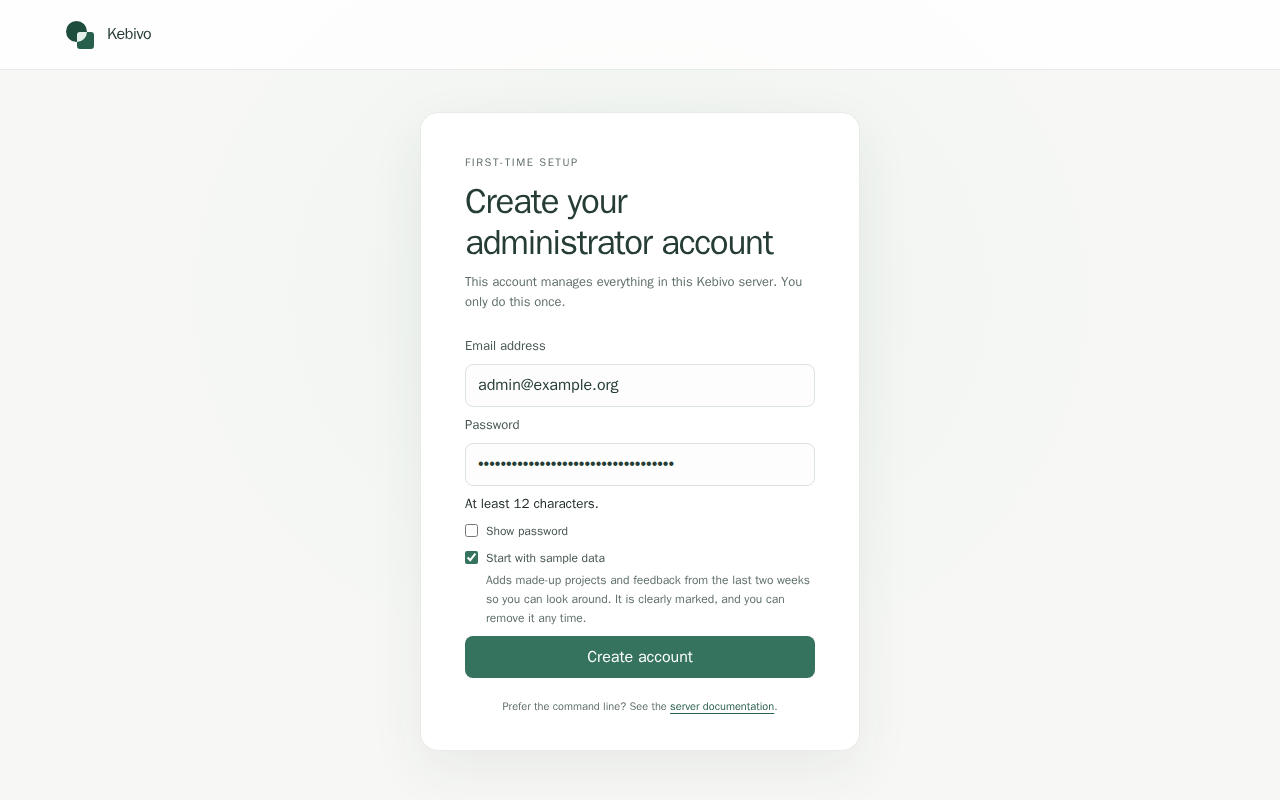
Open the Kebivo setup: link printed in the terminal, create your administrator, and keep Start with sample data selected to see a filled inbox. The link expires after 60 minutes; restart for a new one. The named volume holds the generated keys as well as the database; see key custody before using real credentials.
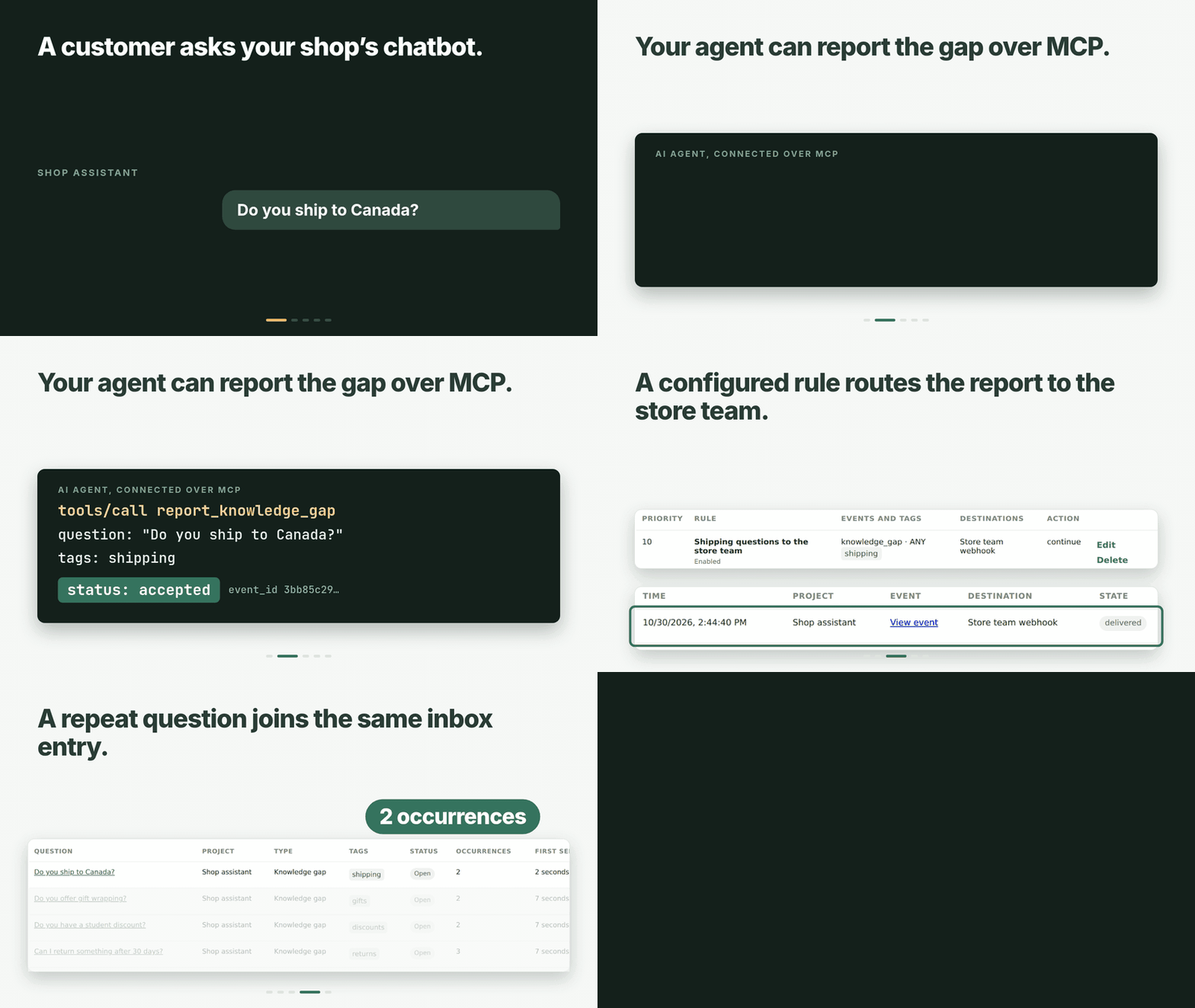
Without Kebivo: your bot says it couldn't find the answer, your customer gives up, and the question sits in a log you don't read.
With Kebivo: the question shows up once in your inbox with a repeat count, and your routing rules can send it to you or your team over Slack, email or a webhook.
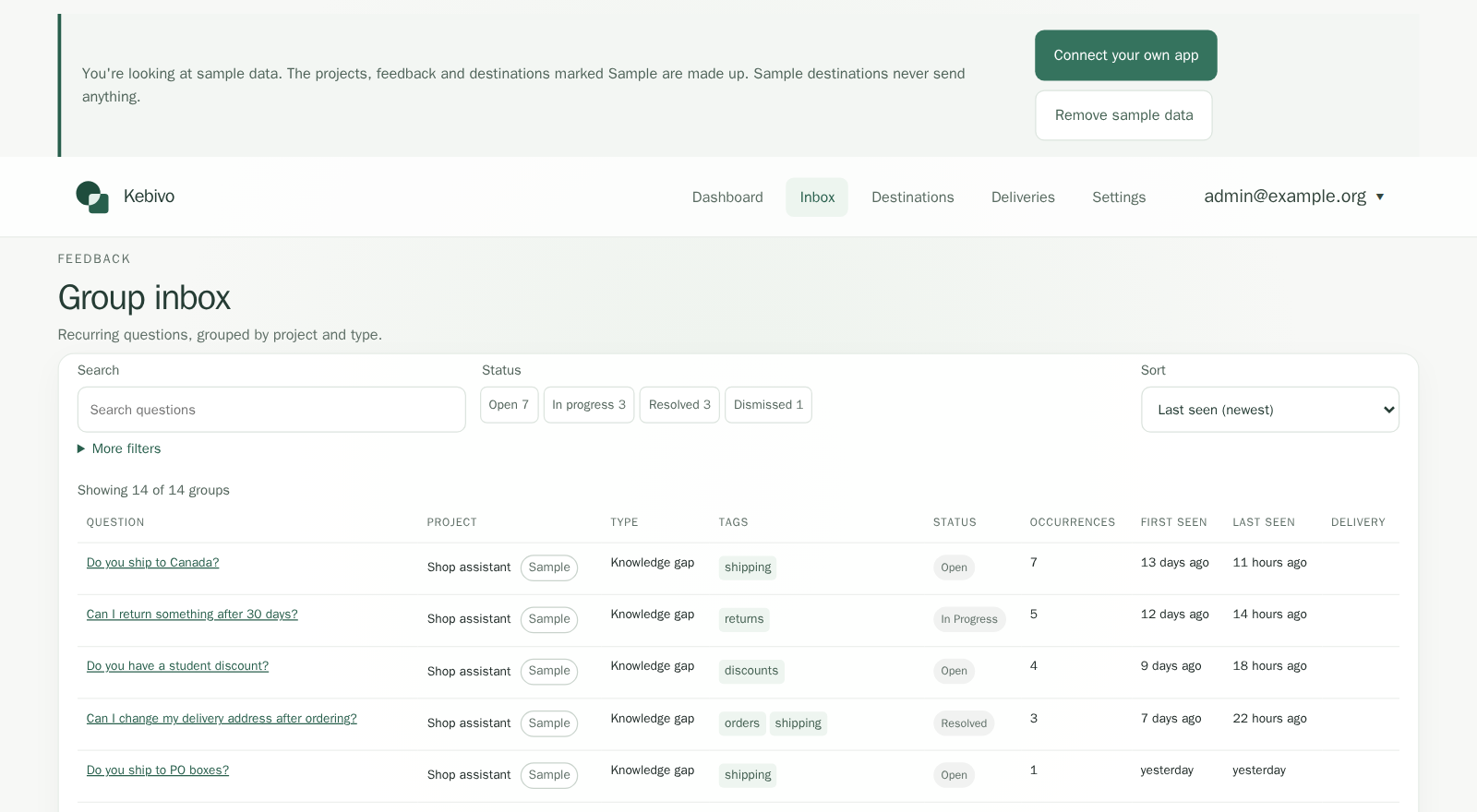
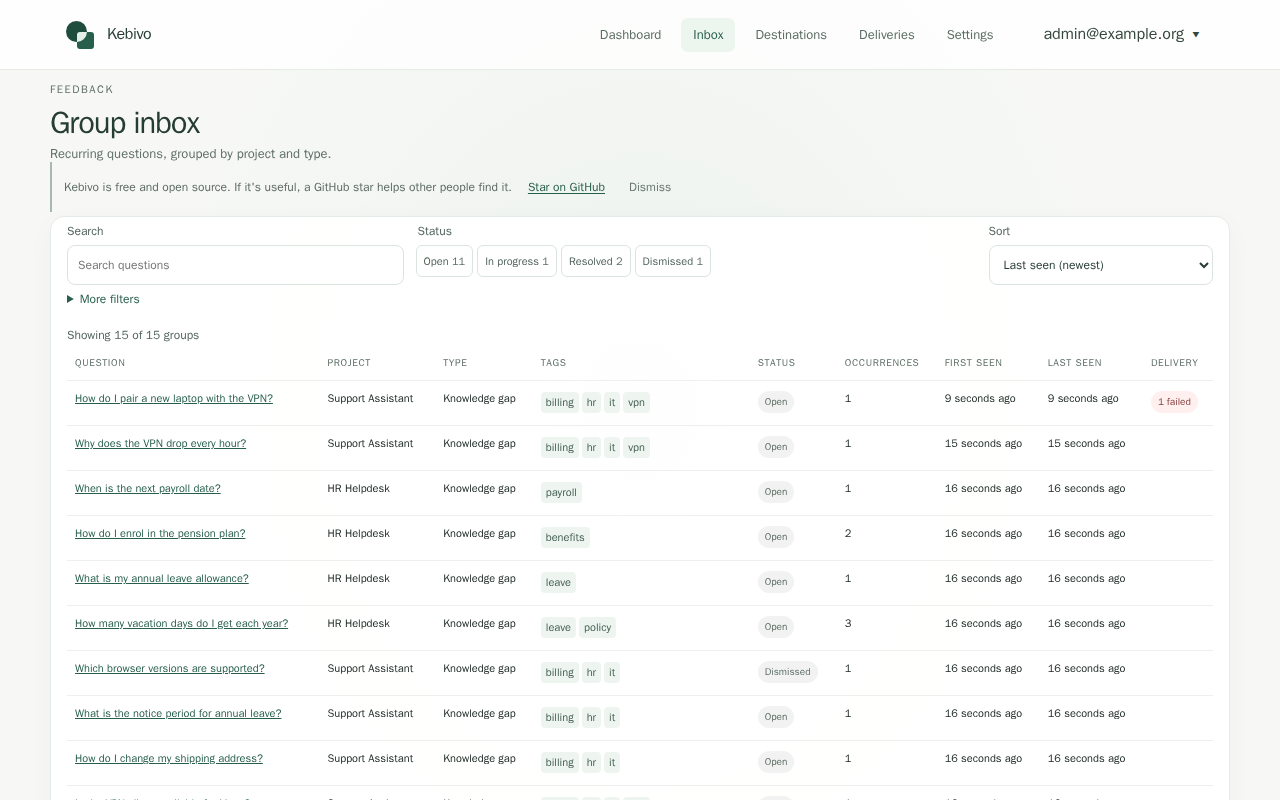
Group inbox from a real Kebivo container with sample data.
Continue with the Quickstart to report a question. The full documentation is at docs.kebivo.com, and framework tutorials are in the Kebivo Guides.
Why
When your chatbot cannot answer, you may never see the question. The same question can fail again for the next customer, and corrections your customers offer in chat may never reach your team. Kebivo collects those questions in one place, where you can triage them and route them to the tools your team uses.
When to use Kebivo
- Your assistant, chatbot or RAG app can identify an unanswered question and report it over REST or MCP.
- The same questions recur, and you need a grouped count and an inbox to prioritize them.
- Different teams own different topics, so you need to route reports by project or tags to Slack, email or signed webhooks.
- Your customers suggest corrections (an opt-in setting, off by default), and you or your team review each one before anything changes in your docs.
- You need a self-hosted feedback workflow that runs without a cloud account or AI provider.
Features
- Send reports from application code through REST, or give agents the Streamable HTTP MCP tools
report_knowledge_gapandsubmit_knowledge_correction. - Create one project per assistant or team, with default tags, a corrections policy, and bearer tokens that are shown once, can expire and can be revoked.
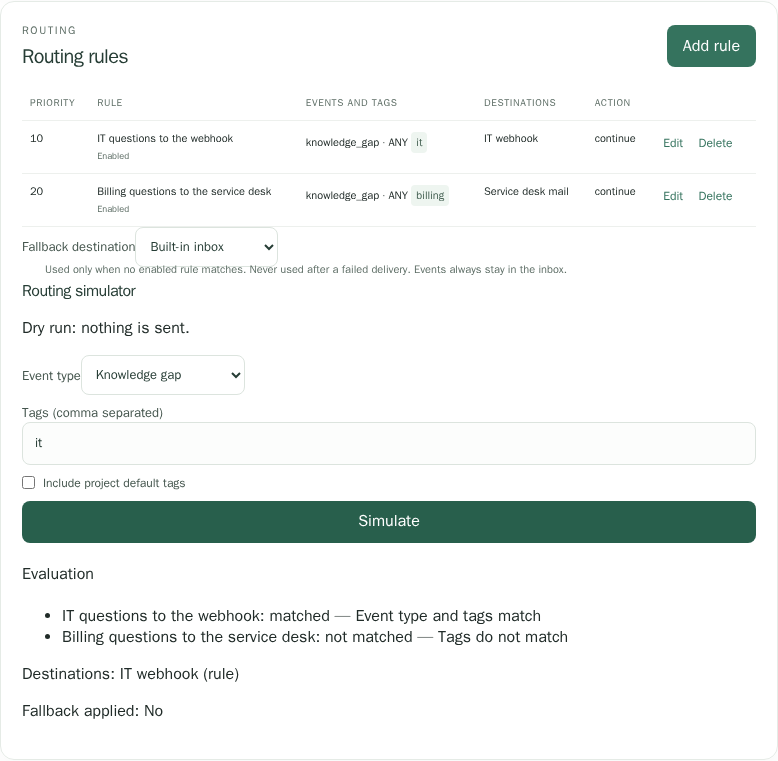
- Route reports with ordered rules, ANY/ALL tag matching, several destinations per rule, a fallback, and a dry-run simulator.
- Deliver to signed webhooks with a versioned JSON payload, Slack incoming webhooks, SMTP email, or the built-in inbox. Deliveries have durable retries with backoff, restart recovery, a delivery log and manual retry.
- Questions that match exactly, ignoring case, extra whitespace, quote and dash styles, and trailing
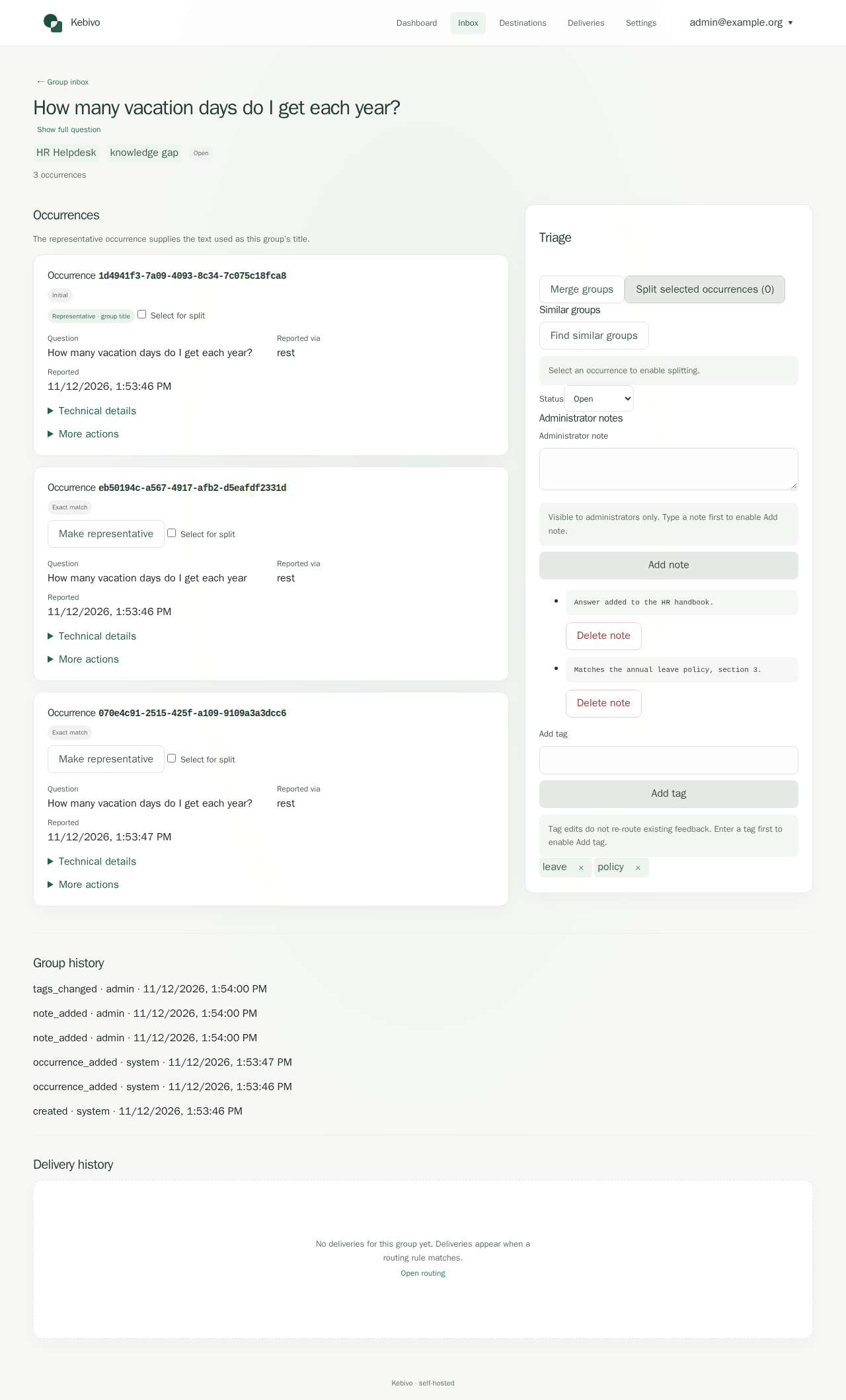
?,!or., are grouped automatically. Per project, you can opt in to an LLM judge that groups paraphrases (OpenAI-compatible, Azure OpenAI or local providers such as Ollama and LM Studio) or to embeddings that group near-identical rewordings (Ollama or an OpenAI-compatible/embeddingsendpoint). Both are off by default. - Triage reports in the inbox with search, filters, statuses, notes, tags, merge, split and deletion. Each group has a full history.
- Run one container with one SQLite file. Startup migrations, online backup and checked restore, retention (on by default), JSON Lines export, and health checks are included.
Screenshots
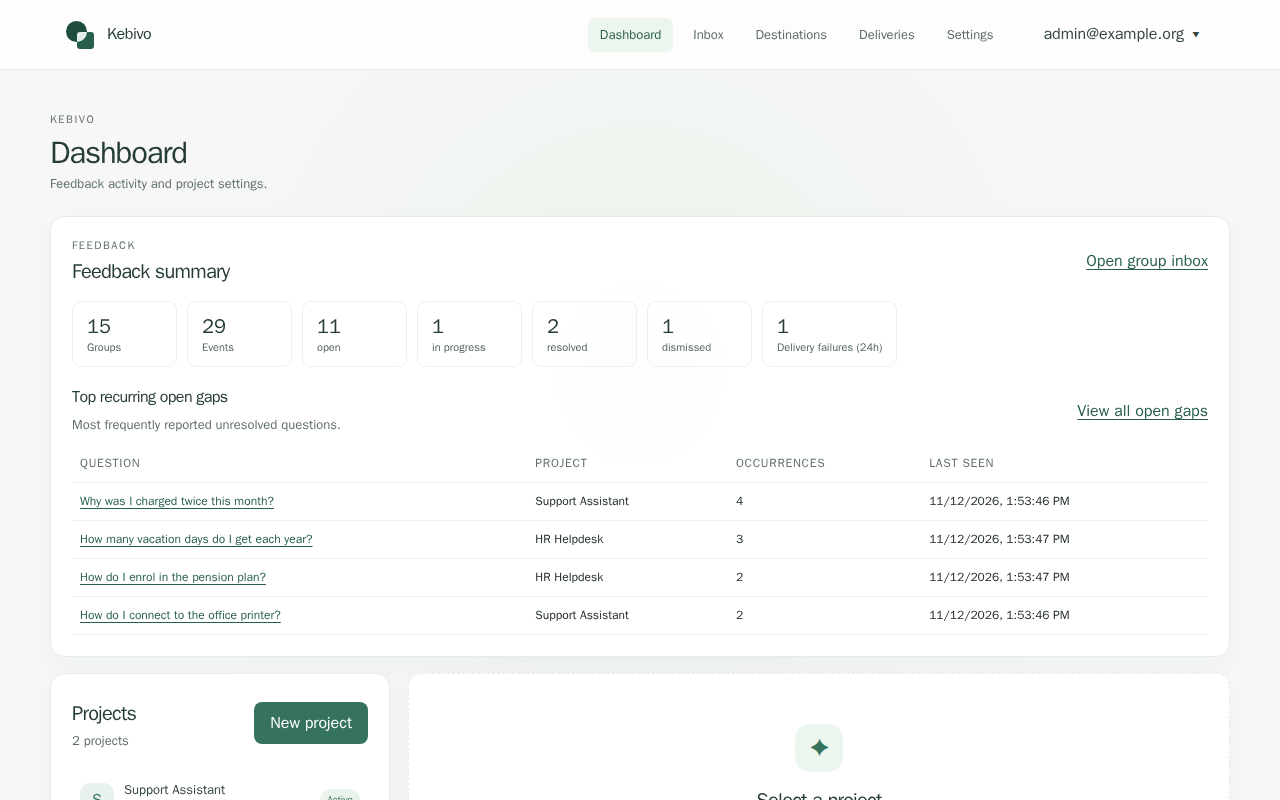
All screenshots use synthetic data.
 |  |
| First-run setup | Dashboard |
 |  |
| Inbox | Feedback group |
 |  |
| Connect a client | Routing rules |
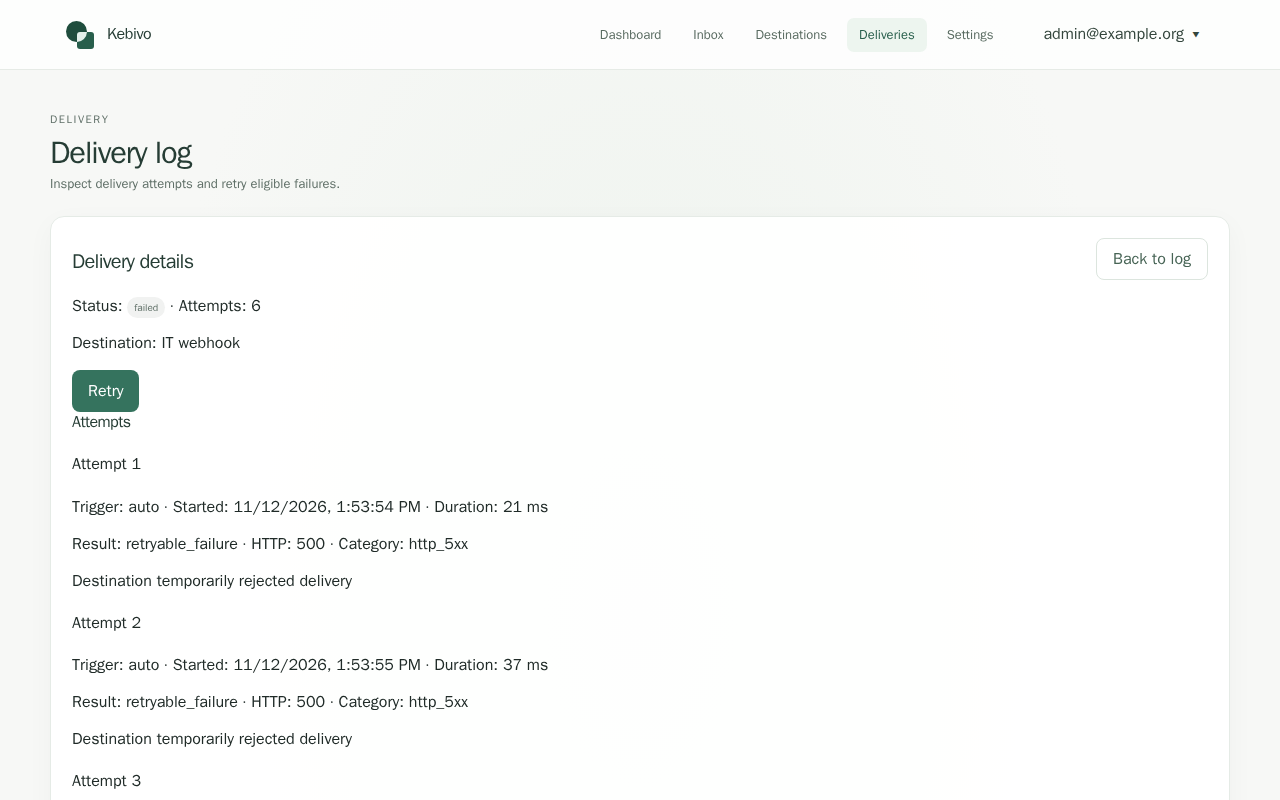 | 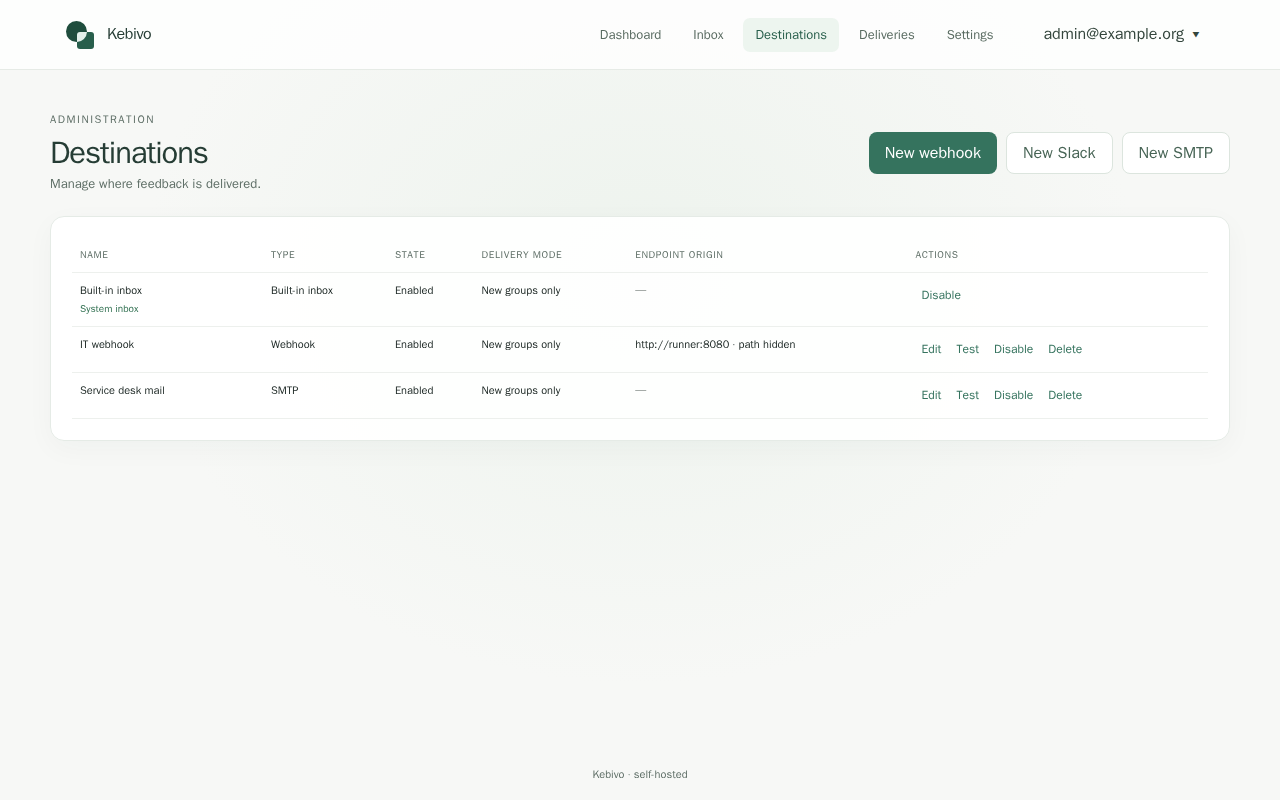 |
| Failed delivery | Destinations |
More: settings, LLM settings, sign-in. Regenerate them with make e2e-ui SCREENSHOTS=1.
The demo's product frames come from a real container with sample data; its chat and end card are drawn. See the demo source.
Quickstart
You need Docker, Python 3 and a free port 8000. No account, cloud service or API key. The published image is typically ready in about 12 seconds after download.
1. Start Kebivo. Skip this step if you ran the command above. Keep the terminal open for the one-time setup link.
docker run --name kebivo -p 127.0.0.1:8000:8000 -v kebivo-data:/data ghcr.io/ocnai/kebivo:0.4.0
Open the printed Kebivo setup: link, create an administrator with a password of at least 12 characters, and keep Start with sample data selected to see a filled inbox. If you mapped another host port, change 8000 in the link. The sample-data banner lets you remove the examples later.
2. Report the same unanswered question twice. In Projects, create a real project named Shop assistant and a token. Copy the token when shown; it is issued once. In a second terminal, run these commands in bash (on macOS, type bash first). Each occurrence needs a different idempotency key.
read -rsp 'Project token: ' KEBIVO_TOKEN; printf '\n'
curl -i http://127.0.0.1:8000/api/v1/feedback \
  -H 'Content-Type: application/json' -H "Authorization: Bearer $KEBIVO_TOKEN" \
  -H 'Idempotency-Key: canada-gap-001' \
  --data '{"event_type":"knowledge_gap","question":"Do you ship to Canada?","tags":["shipping"]}'
curl -i http://127.0.0.1:8000/api/v1/feedback \
  -H 'Content-Type: application/json' -H "Authorization: Bearer $KEBIVO_TOKEN" \
  -H 'Idempotency-Key: canada-gap-002' \
  --data '{"event_type":"knowledge_gap","question":"Do you ship to Canada?","tags":["shipping"]}'
Both responses are 202 Accepted with distinct event_id values. Find Do you ship to Canada? from your Shop assistant project in the Inbox with 2 occurrences. The row with 7 occurrences is labelled Sample and stays separate.
If this fails: A 401 means the project token is missing or invalid; create a new token in Projects and retry. If Docker says port 8000 is already allocated, change the first 8000 in -p 127.0.0.1:8000:8000 to an unused host port and use that port in the URLs. For Compose, set APP_PORT in .env (see network and access). If the setup link has expired and no administrator exists yet, restart the container and open the new link printed in its log.
If this was useful, a GitHub star helps other people find Kebivo.
To route the question to its owner over a signed webhook and then resolve it, continue in the same terminal with steps 3 and 4 of the Docker guide.
REST or MCP? Call REST from your application's fallback when every miss must be captured. With MCP, the model decides whether to call
report_knowledge_gap, so some misses may go unreported.Every miss matters? Use REST. Agent decides when to report? Use MCP.
Where Kebivo fits
Kebivo works alongside Langfuse and Phoenix, which help engineers inspect runs. Kebivo collects and routes misses; it does not diagnose why retrieval failed. It does not answer questions, update a knowledge base, or apply proposed corrections; people review the reports. Use something else if you need a ticketing system, analytics, multi-user accounts, SSO, or high availability. Kebivo is self-hosted with one local administrator, one process and one SQLite file. See the technical documentation for deployment and limits.
Build from source
Use this path if you want to change the code. Compose requires keys in .env and still supports the CLI bootstrap.
git clone https://github.com/OCNAI/kebivo.git
cd kebivo
cp .env.example .env
printf 'SECRET_KEY=%s\n' "$(openssl rand -hex 32)" >> .env
printf 'ENCRYPTION_KEY=%s\n' "$(openssl rand -hex 32)" >> .env
printf 'ALLOWED_ORIGINS=http://127.0.0.1:8000\n' >> .env
docker compose up --build -d
curl -fsS --retry 30 --retry-all-errors --retry-delay 1 http://127.0.0.1:8000/health/ready
To stop the published image from another terminal: docker stop kebivo (data stays in the volume). To stop a Compose build: docker compose down (data is kept). docker compose down --volumes deletes all data. For production (TLS, backups, upgrades, every setting), read the self-hosting guide.
Report from your chatbot with REST
Send POST /api/v1/feedback with a project token. A 202 means the report is stored durably; routing and delivery happen in the background. Send an Idempotency-Key and reuse it on retries. Retry 429 and 5xx responses with backoff; do not retry other 4xx errors. To add the call to your chatbot's no-answer branch, follow Report from your own app.
For Python applications, install the kebivo-client distribution from the standalone Python SDK directly from GitHub with pip install "git+https://github.com/OCNAI/kebivo#subdirectory=sdk/python" (not published to PyPI):
from kebivo_client import Kebivo

client = Kebivo("https://your-kebivo.example", "<PROJECT_TOKEN>")
accepted = client.report_gap("How do I reset my VPN?", tags=["it"])
print(accepted["event_id"])
For Node 20+ applications, use the standalone TypeScript SDK from a local path. It has no runtime dependencies and is not published to npm. Keep project tokens on the server; never embed them in browser code.
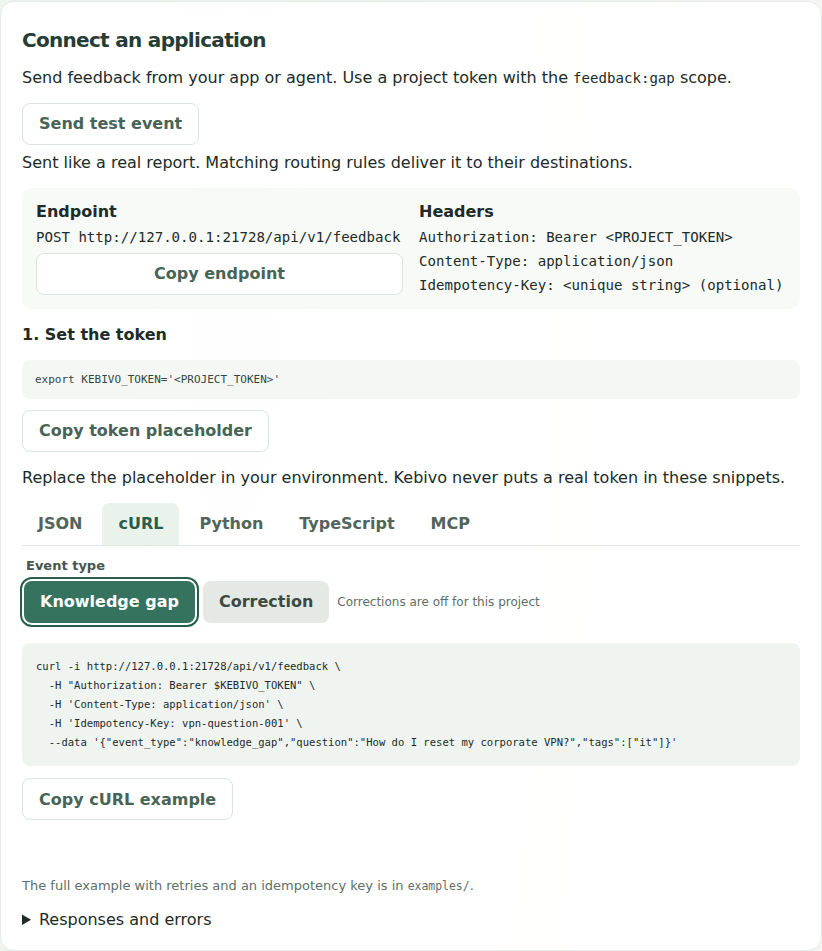
Runnable clients for cURL, Python (standard library) and TypeScript (Node.js 24, no build step) are in examples/, and the project page in the UI shows the same snippets with your endpoint. The REST integration guide covers fields, authentication, idempotency, errors, retries and rate limits.
Report knowledge gaps with MCP
Point an MCP client at http://127.0.0.1:8000/mcp with the header Authorization: Bearer <PROJECT_TOKEN>. For Claude Code:
claude mcp add --transport http kebivo http://127.0.0.1:8000/mcp --header "Authorization: Bearer <PROJECT_TOKEN>"
Tokens with feedback:gap see report_knowledge_gap; submit_knowledge_correction also needs feedback:correction and a project that accepts corrections. A model may not call a tool when it should, so use REST where every report matters. See the MCP guide, a client configuration, a Python client and copyable agent instructions.
Destinations and routing
| Destination | What it sends |
|---|---|
| Built-in inbox | Always available; every event is in the admin inbox. |
| Webhook | HTTPS POST with a versioned JSON payload, Standard Webhooks signatures, optional bearer or custom headers. A receiver example verifies both. |
| Slack | A Block Kit message to a Slack incoming webhook with the question, project, tags, occurrence count and, when PUBLIC_URL is set, a link to the group. |
| SMTP email | A message (plain text with an escaped HTML alternative) to 1–20 recipients over STARTTLS, implicit TLS, or an unauthenticated local relay. |
Each project has ordered rules: a rule matches ANY or ALL of its tags and sends to one or more destinations, optionally stopping evaluation. Unmatched events go to the fallback destinations. For example, it → IT email, customer-service → the support webhook. Each destination delivers either for new groups only or for every occurrence. See routing and destinations.
Optional AI
No model is called by default. To group questions that are worded differently, configure an LLM provider (Settings → LLM providers in the UI) and switch a project to semantic deduplication after acknowledging that question text will be sent to that provider. The embeddings method is precision-first: at its default threshold it grouped about 3 in 100 paraphrases in calibration, so use the LLM judge when you need paraphrase grouping and tune embeddings on your own data. If the provider fails, the event keeps its own group and is still routed and delivered. See deduplication and LLM providers.
Security
- Run behind a TLS reverse proxy and keep the app port on loopback (guide).
- On the one-command path, protect the named volume: it contains the generated keys and database. The database-only
backupoutput excludes the keys, so save them separately for restore. With Compose, keep.envprivate and back it up separately. - Feedback is stored unencrypted in SQLite. Protect the volume and backups, and do not ask assistants to send secrets or unnecessary personal data.
- Give each client its own token, give customer-facing agents only
feedback:gap, and revoke tokens you no longer use. - Webhooks and LLM providers cannot reach private or loopback addresses unless you opt in per destination or provider; cloud metadata addresses are always blocked, also for SMTP. Admin writes need the configured Origin and a CSRF token.
- Logs never contain feedback content or credentials.
Report vulnerabilities as described in SECURITY.md.
Data, retention and export
Retention is on by default: feedback older than 180 days, finished delivery attempt details older than 30 days, and audit entries older than 90 days are deleted daily. Change or disable each with an environment variable (0 turns it off). Retention does not touch backups you already made. An administrator can export a project's feedback as JSON Lines. See retention and export.
Known limits
- At-least-once delivery. A receiver may see a delivery twice; deduplicate by the webhook ID or delivery ID.
- One administrator, one instance, one SQLite file on local storage. No replicas, no network filesystem.
- MCP needs a manually configured bearer token; OAuth-only clients cannot connect. Responses are stateless JSON without streaming notifications.
- Rate limits are counted in memory and reset when the container restarts.
- Deleted feedback cannot be recalled from destinations that already received it or from existing backups.
- No encryption at rest for feedback content.
Documentation
Framework tutorials are in the website Guides. Runnable clients and framework examples are in examples/. The pages below cover the technical details.
| Guide | Contents |
|---|---|
| Self-hosting | Requirements, every setting, TLS proxy, secrets, backup and restore, upgrades, credential rotation, troubleshooting |
| REST API | Authentication, fields, idempotency, errors, retries, examples |
| MCP | Connecting clients, tools and permissions, testing, limitations |
| Routing and destinations | Rules, fallback, webhooks, signatures, SMTP |
| Deduplication and LLM providers | Exact grouping, LLM judge and embeddings, providers, privacy |
| Feedback management | Groups, search syntax, statuses, merge, split, deletion |
| Retention and export | Automatic deletion, JSON Lines export |
| Releasing | Versioning, image labels, release and upgrade checks |
| Third-party licenses | Inventory of shipped dependencies |
| Changelog | User-visible changes per version |
Contributing
Development setup, make targets, style, tests and the documentation rule are in CONTRIBUTING.md. In short: make install, then make check before every commit, and update the docs in the same change. Sign off every commit (git commit -s) under the Developer Certificate of Origin; there is no CLA.
Everyone taking part follows the Code of Conduct. Ideas under consideration, none of them committed, are in the roadmap.
License
Kebivo is licensed under the Apache License 2.0. Contributions are accepted under the same license with a Developer Certificate of Origin sign-off; there is no CLA. The third-party license inventory lists the licenses of everything the image ships.







