Listed from the MCP registry; nobody on Odel publishes it.

Runs on your machine from its package; the steps are below.
What it does
- Reads
- Writes
- High impact
At most: creates or changes data: records, files, settings.
What it costs
FreeOdel charges nothing per call. The publisher may charge for its own service.
Runs locally over stdio
This server isn't hosted — your MCP client launches it from a package registry. Use one of the commands below, or drop the config into your client (e.g. Claude Desktop).
Run
npx -y @oktopeak/mycase-mcp
MCP client config
{
  "mcpServers": {
    "mycase": {
      "command": "npx",
      "args": [
        "-y",
        "@oktopeak/mycase-mcp"
      ]
    }
  }
}MyCase MCP Server
Connect Claude to your MyCase legal practice management system. Ask Claude to look up cases, find contacts, check your calendar, review billing — all without leaving your conversation.
Built by Oktopeak — AI transformation & automation for law firms
Digital transformation for legal and healthcare businesses. We build AI integrations, workflow automation, and custom software your firm owns outright — including this connector. → Book a 30-min call
Tip
Not a developer? You don't need to be.
The README below assumes someone comfortable editing a JSON config file. If that's not you or your team, we deploy this for law firms — scoped credentials, audit log wired in, one custom workflow, training.
→ Whole firm? The Firm Plan: $300 a month. Set up in your own cloud, every attorney signs in with their own login, one audit log, one automation built for you each month, no setup fee, cancel any time. → oktopeak.com/firm-plan/, or book a 30-min call
Jump to: Demo · Installation · Available tools · Security · Need it deployed for you?
Demo
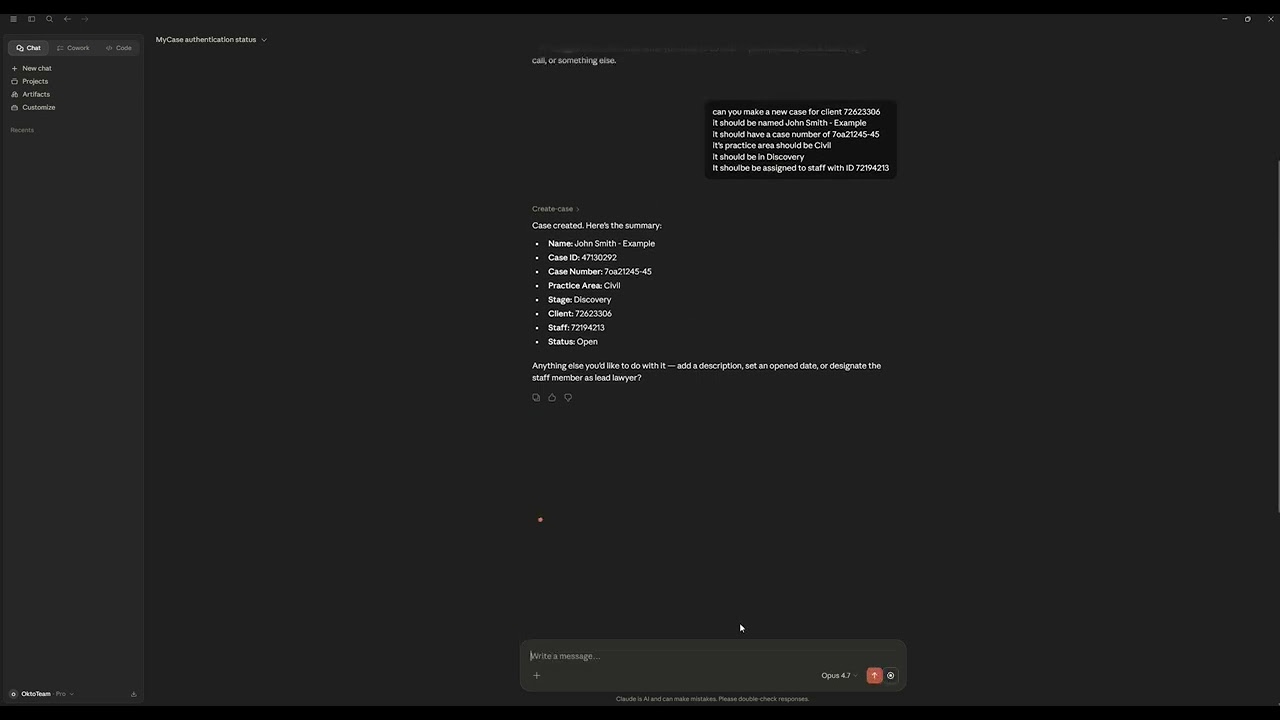
Watch Claude pull live data from MyCase in under a minute — cases, contacts, documents, calendar — without copying client information into chat.
▶ Watch the 60-second demo on YouTube
Setup tips + ABA Opinion 512 compliance updates for firms building with Claude + MyCase.
→ Subscribe to Oktopeak Builder Notes — short emails, easy unsubscribe.
What it does
Once connected, Claude can talk directly to your MyCase firm data. You can ask things like:
- "What open cases do we have for Jane Smith?"
- "Show me all tasks due this week"
- "What's the outstanding balance on the Anderson case?"
- "Log a 20-minute call with client #1234 about the settlement"
- "List documents attached to case 98765"
Everything goes through MyCase's official OAuth 2.0 API. Your credentials never leave your machine — tokens are stored locally, encrypted with AES-256-GCM.
Prerequisites
- Node.js 18+
- A MyCase account with firm admin access
- MyCase API credentials — reach out to MyCase support to request OAuth client credentials for your firm. You'll receive a
client_idandclient_secret.
Installation
With Claude Desktop (recommended)
Add this to your Claude Desktop config file:
macOS: ~/Library/Application Support/Claude/claude_desktop_config.json
Windows: %APPDATA%\Claude\claude_desktop_config.json
{
  "mcpServers": {
    "mycase": {
      "command": "npx",
      "args": ["-y", "@oktopeak/mycase-mcp"],
      "env": {
        "MYCASE_CLIENT_ID": "your_client_id",
        "MYCASE_CLIENT_SECRET": "your_client_secret"
      }
    }
  }
}
Restart Claude Desktop and you're done.
Tip
On Windows? The config above works on macOS but not on Windows out of the box. You'll likely hit Could not attach to MCP server mycase (npx invocation), UNABLE_TO_VERIFY_LEAF_SIGNATURE (corporate antivirus SSL inspection), and an OAuth redirect port mismatch. The Windows-friendly config plus all five fixes are in our install guide.
→ MyCase MCP on Windows: The Install Guide We Wish Existed — covers all five Windows gotchas plus the real 13-business-day MyCase API credential timeline.
Standalone / development
npm install -g @oktopeak/mycase-mcp
Tip
Not the person who edits config files?
If the install above looks like too much, we can deploy it in your firm for you — scoped OAuth credentials, audit log wired into your stack, one custom workflow designed with your team, and training. Most law firms find this is the faster path.
→ Whole firm? The Firm Plan: $300 a month. Set up in your own cloud, every attorney signs in with their own login, one audit log, one automation built for you each month, no setup fee, cancel any time. → oktopeak.com/firm-plan/, or book a 30-min scoping call
Configuration
If running locally (not via Claude Desktop env vars), copy .env.example to .env and fill it in:
cp .env.example .env
# From MyCase support
MYCASE_CLIENT_ID=your_client_id
MYCASE_CLIENT_SECRET=your_client_secret

# OAuth callback port (default: 5678)
# Must match the redirect URI registered with MyCase support
MYCASE_REDIRECT_PORT=5678

# ENCRYPTION_KEY is optional — a key is auto-generated on first run and
# stored in your OS keychain. Only set this for CI or headless environments.
# ENCRYPTION_KEY=your_64_char_hex_encryption_key
Note: The redirect URI registered with MyCase support must match
http://127.0.0.1:{MYCASE_REDIRECT_PORT}/callback. If you're unsure which port was registered, check with MyCase support.
Secret handling
MYCASE_CLIENT_SECRET is the only sensitive credential that needs to live in your config file. The encryption key is managed automatically by the OS keychain — it never appears in any config file.
When using claude_desktop_config.json, restrict that file's permissions so other users on the machine can't read your client secret:
macOS:
chmod 600 ~/Library/Application\ Support/Claude/claude_desktop_config.json
Windows: Right-click the file → Properties → Security → Edit → remove access for all accounts except your own user.
log-call (experimental)
The log-call tool is gated behind an environment variable while its API endpoint is being verified:
MYCASE_EXPERIMENTAL_TOOLS=1
Add this to your claude_desktop_config.json env block or .env file to enable it. Leave it unset to keep it hidden from Claude.
Authentication
The first time you use it, you need to authenticate with MyCase:
- In Claude, call the
authenticatetool - Your browser will open the MyCase login page
- Log in and grant access
- Return to Claude — you're connected
Access tokens are valid for 24 hours and refresh automatically. Refresh tokens typically last 2 weeks (set by the MyCase API). Once the refresh token expires you'll need to re-authenticate.
Your encrypted token file lives at ~/.oktopeak-mycase/tokens.enc. To log out and remove it, call the logout tool.
Note: If the OS keychain is cleared or the encryption key is lost, the existing token file can no longer be decrypted. The server will silently treat it as absent and you'll need to re-authenticate — no data is lost, just the stored session.
Available tools
Authentication
| Tool | Description |
|---|---|
authenticate | Open the MyCase OAuth page and store your tokens |
auth-status | Check if you're connected and when your token expires |
logout | Remove stored tokens from disk |
Cases
| Tool | Description |
|---|---|
list-cases | List cases, optionally filtered by status (open/closed) or updated date |
get-case | Get full details for a case by ID |
create-case | Create a new case with clients, staff, and metadata |
Contacts
| Tool | Description |
|---|---|
search-contacts | Search for clients, people, or companies by name, email, or phone |
get-contact | Get full contact details by ID |
Tasks
| Tool | Description |
|---|---|
list-tasks | List tasks, optionally filtered by case or completion status |
create-task | Create a new task linked to a case |
Documents
| Tool | Description |
|---|---|
list-documents | List documents, optionally filtered by case |
get-document-url | Get a download URL for a specific document |
Calendar
| Tool | Description |
|---|---|
list-calendar-events | List upcoming events within a date range |
Calls
| Tool | Description |
|---|---|
log-call | Log a phone call linked to a case or contact (experimental — requires MYCASE_EXPERIMENTAL_TOOLS=1) |
Staff
| Tool | Description |
|---|---|
list-staff | List all staff members in the firm |
get-staff | Get full details for a staff member by ID |
Billing
| Tool | Description |
|---|---|
list-time-entries | List billable time entries, filtered by case or date range |
get-billing-summary | Get total billed, outstanding, and paid amounts for a case |
A note on multi-user support
This server is single-tenant by design — it stores one set of credentials at a time and is intended for a single firm running it locally. If you authenticate as a different user, the previous token is overwritten.
If you need multiple firms or users, you'd need to run separate instances with separate configurations.
Development
git clone https://github.com/oktopeak/mycase-mcp.git
cd mycase-mcp
npm install
cp .env.example .env   # fill in your credentials
npm run build
npm run inspect        # opens the MCP inspector in your browser
Running tests
npm test               # run once
npm run test:watch     # watch mode
Security
- OAuth tokens are encrypted at rest using AES-256-GCM
- The encryption key is auto-generated on first run and stored in your OS keychain (macOS Keychain / Linux Secret Service / Windows Credential Manager) — it never appears in any config file
- Token and audit log files are stored in
~/.oktopeak-mycase/with mode0600(owner-read/write only) on Unix/macOS - On Windows, restrict
%APPDATA%\.oktopeak-mycasevia folder Properties → Security - All API calls go directly from your machine to
external-integrations.mycase.com
Vulnerability scan
npm audit --omit=dev reports 0 production vulnerabilities. The vitest dev-dependency carries 5 moderate findings (esbuild, vite) that are unreachable in production and require a major vitest version bump to resolve. They have no impact on deployed server instances.
Need more than the connector?
The open-source connector reads your MyCase data and lets Claude work with it. That handles about 20% of what most firms eventually want.
We help two ways, depending on your scope:
→ Whole firm? The Firm Plan: $300 a month. Set up in your own cloud, every attorney signs in with their own login, one audit log, one automation built for you each month, no setup fee, cancel any time. → oktopeak.com/firm-plan/
→ Legal AI Integration — For multi-workflow builds, document automation, intake automation, custom AI agents, and full compliance architecture across your stack. → oktopeak.com/services/legal-ai-integration/
ABA Opinion 512 compliant from day one. Want a polished overview of this connector with video demo and FAQ? → oktopeak.com/mycase-mcp/
Want to talk first? → Book a 30-min scoping call
Other connectors by Oktopeak
We ship the same kind of connector for other practice management platforms. Each has its own overview page on oktopeak.com:
- Clio MCP: open-source MCP connector for Clio practice management. Source: github.com/oktopeak/clio-mcp. npm:
@oktopeak/clio-mcp - Filevine MCP: open-source MCP connector for Filevine practice management. Source: github.com/oktopeak/filevine-mcp. npm:
@oktopeak/filevine-mcp - Lawmatics MCP: open-source MCP connector for Lawmatics legal CRM and intake, with a config-level read-only mode. Source: github.com/oktopeak/lawmatics-mcp. npm:
@oktopeak/lawmatics-mcp - IntakeQ / PracticeQ MCP — HIPAA-aware MCP connector for IntakeQ/PracticeQ (healthcare / behavioral & allied-health clinics). Audit logging on every PHI read/write, BAA + Zero-Data-Retention guidance. npm:
@oktopeak/intakeq-mcp
Same architecture, same audit logging, same encryption at rest. All MIT licensed.
Supporting this project
This connector is free, MIT licensed, and maintained by Oktopeak. It always will be — we don't take donations. If it saved you time, the things that actually help:
- Star this repo. It is genuinely how other firms find it.
- Tell another firm running MyCase.
- Leave a review if we helped you directly.
- Need it deployed, extended, or maintained for your firm? Commercial support — that is what funds the free work.
Who we are
Oktopeak — digital transformation for law firms and healthcare.
We're a 7-person in-house product team building AI solutions for regulated industries: AI integrations, workflow automation, and custom software our clients own outright. We maintain five open-source MCP connectors — Clio, MyCase, Filevine, Lawmatics, and IntakeQ — and deploy them inside real practices with scoped credentials, audit logs, and workflows built around how your team actually works.
- 🌐 oktopeak.com
- 📅 Book a 30-min call
- ✉️ office@oktopeak.com — security reports welcome
License
MIT — see LICENSE.
Built with the Model Context Protocol SDK by Anthropic.