Listed from the MCP registry; nobody on Odel publishes it.

Section Anything
A PDF's real sections for agents: heading tree, pages and section text. Free mode is local.
Runs on your machine from its package; the steps are below.
What it does
- Reads
- Writes
- High impact
At most: only reads or looks up information.
What it costs
FreeOdel charges nothing per call. The publisher may charge for its own service.
Runs locally over stdio
This server isn't hosted — your MCP client launches it from a package registry. Use one of the commands below, or drop the config into your client (e.g. Claude Desktop).
Run
uvx section-anything-mcp
MCP client config
{
  "mcpServers": {
    "section-anything": {
      "command": "uvx",
      "args": [
        "section-anything-mcp"
      ]
    }
  }
}


Find the real sections of a PDF: every heading, its level, the pages it spans and the exact text under it. Built for RAG pipelines and document tools that need structure, with a dial from free rules to an LLM that reads the whole document, and a hard cost cap on every paid run.
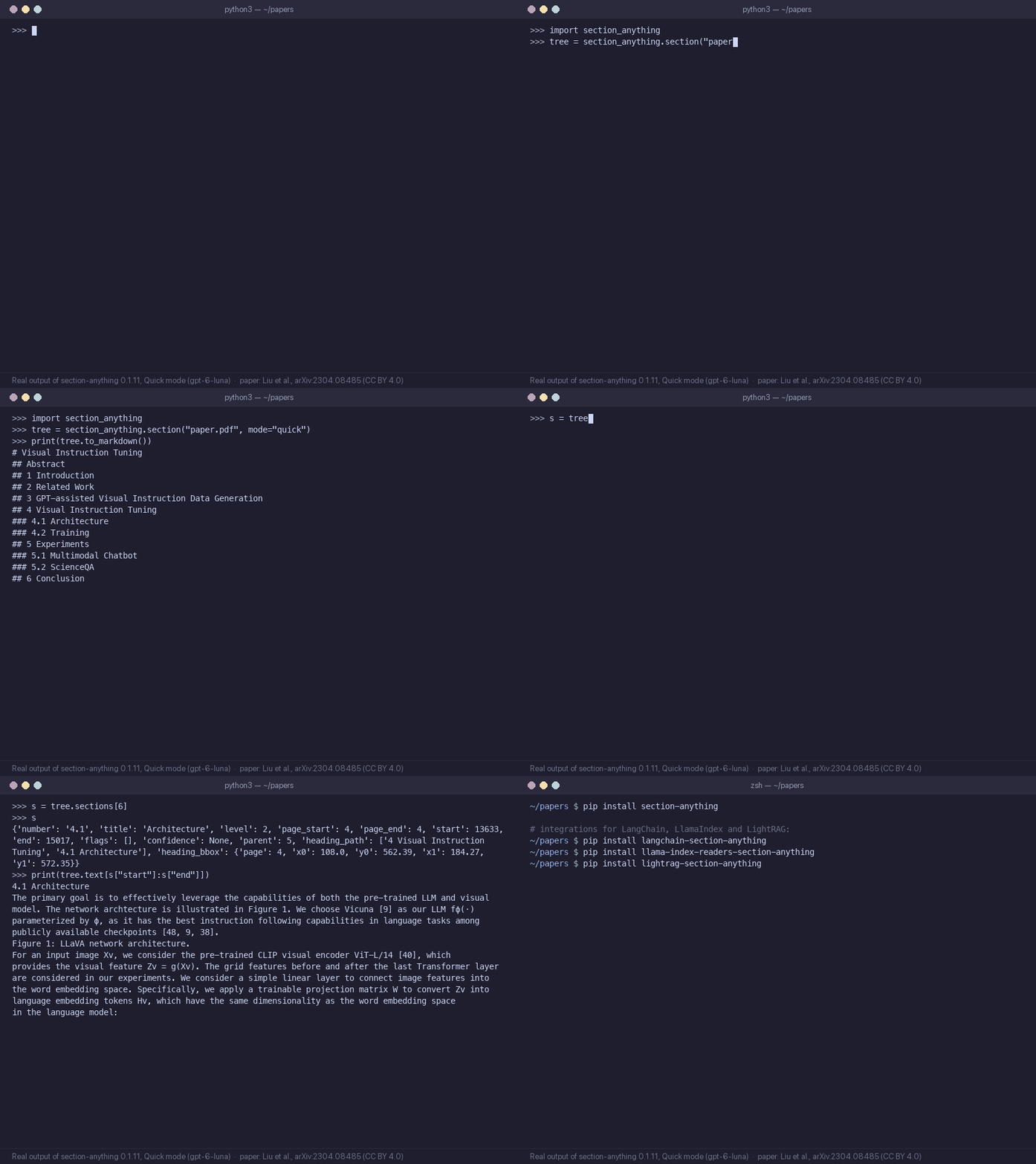
Real output of section-anything 0.1.11, Quick mode (gpt-6-luna), on Visual Instruction Tuning, Liu et al., arXiv:2304.08485, CC BY 4.0; the wait for the run is shortened (capture, script). Quick mode's output can vary slightly between runs. Try it on that paper in the Colab notebook (Free mode, no key needed), or in the browser on the Hugging Face Space (Free mode on any PDF, plus saved Quick check and Standard runs on three example papers; don't upload confidential documents).
Pre-release (0.1). The API may change before 1.0.
Website: https://omniwot.github.io/section-anything/ (how it works, benchmarks, examples)
import section_anything

tree = section_anything.section("paper.pdf", mode="quick")
print(tree.to_markdown())
# # A Study of Sectioning
# ## 1 Introduction
# ### 1.1 Scope
# ## 2 Methods
print(tree.summary())  # mode, model, pages, sections, calls, tokens, cost_usd, seconds
Use from an agent
An agent can take a PDF's outline first and then read only the sections it needs (0.1.6 or newer).
MCP server for Claude Code, Claude Desktop, Cursor and other MCP hosts, with four read-only
tools: outline_pdf (the outline as text: one line per section with its index, heading and pages;
free mode by default, no model, $0), section_pdf (the same heading tree as JSON, about five times
the tokens), read_sections (the text of chosen sections) and estimate_cost (what quick and
standard would cost). An agent reads the outline first and then fetches the sections it needs by
index.
claude mcp add --transport stdio section-anything -- uvx --from "section-anything[mcp]" section-anything-mcp
Other hosts take the same command in their mcpServers JSON:
{"mcpServers": {"section-anything": {"command": "uvx",
  "args": ["--from", "section-anything[mcp]", "section-anything-mcp", "--max-usd", "0"]}}}
Paid modes use the API keys in the server's environment (claude mcp add --env OPENAI_API_KEY=...)
and are capped per document by --max-usd (default 0.50; 0 keeps every run free). --root DIR
limits the folders the server may read.
Agent skill: copy skills/section-anything into your
agent's skills folder (Claude Code: ~/.claude/skills/) and the agent uses the command line the
same way: outline, then the sections it needs.
Shell: section-anything paper.pdf --format json --body prints every section with its
heading_path, parent, pages and text.
Notebooks
All run in Free mode, with no API key.
notebooks/quickstart.ipynb: install, section one paper, read one section (optional Quick mode with your own key).notebooks/heading-levels.ipynb: heading trees from Section Anything, Docling (default and with its heading hierarchy on) and pymupdf4llm on three papers, side by side.notebooks/markdown-chunks.ipynb:tree.to_markdown(body=True)and pymupdf4llm Markdown through the same LangChainMarkdownHeaderTextSplitterand LlamaIndexMarkdownNodeParser; chunks with a heading path, chunks starting mid-sentence.
Why
PDF converters mostly infer headings from how a line looks, so paper titles, author names, captions and theorem statements can come out as sections, and real subsections can get the wrong level. Anything that chunks or navigates by headings inherits those mistakes. Section Anything combines the PDF's own outline (bookmarks) and printed table of contents, typography and numbering rules, and optionally a model that reviews or reads the text.
Results
Heading-tree similarity (TEDS, 0–100, higher is better) on READoc
with READoc's own scoring code. Docling and MinerU convert whole documents (layout, tables, figures,
formulas, OCR); these numbers compare only the heading tree. Papers not used while developing the
method, run end to end from the PDFs with release 0.1.11 on 13 November 2026 (one run; quick and
standard vary slightly between runs):
| READoc arXiv papers (held out) | Docs | TEDS |
|---|---|---|
Section Anything quick (gpt-6-luna) | 905 | 69.9 |
Section Anything standard (gpt-6-luna) | 905 | 68.0 |
Section Anything free (no model) | 905 | 61.7 |
| Docling 2.140 (heading hierarchy on; measured October 2026) | 905 | 49.4 |
On these papers quick is 1.9 points ahead of standard (95% CI +1.2 to +2.6), and standard is 1.9
lower than its October run (95% CI −2.5 to −1.3); which release caused that is not isolated.
Before 0.1.11 this table read standard 70.0 (October), quick 68.0 (release 0.1.2) and free 60.0
(release 0.1.5), on text extracted by earlier releases. 0.1.1 found the abstract's heading (journals often set it
small, bold or run into the first line): +2.4 to free and +3.7 to quick in a pre-registered
held-out test (0.1.0: 54.8 and 63.9). 0.1.2 keeps a section number that the PDF extractor split
off its title ("1" | "Introduction"): +0.7 to free (95% CI +0.5 to +1.0) and +0.5 to quick
(95% CI +0.4 to +0.8; +1.7 on the 291 papers it changes) in a second pre-registered test (0.1.1:
57.2 and 67.4).
0.1.5 gives back matter (References, Acknowledgements, Appendix) and appendix sections the level of the
numbered sections: +2.1 to free (95% CI +1.7 to +2.4; 136 papers better, 4 worse) in a fourth
pre-registered test on these papers (0.1.4: 57.9); READMEs unchanged.
standard uses none of these. See the changelog.
On the same 905 papers with MinerU's cloud (3.4.4, VLM; measured October 2026): our quick 69.9, our
standard 68.0, MinerU + its own LLM title levels (gpt-6.1-sol) 64.8 (paired difference: quick +5.1,
95% CI +4.1 to +6.1, or +3.0, 95% CI +1.9 to +4.0, without the 154 papers where that step, run by us on
gpt-6.1-sol, returned no parsable levels and kept MinerU's raw levels; standard +3.2, 95% CI +2.2 to
+4.2, but about level without those papers: +1.0, 95% CI +0.0 to +1.9),
MinerU alone 53.9, Docling 49.4.
On GitHub READMEs, free scores higher than Docling: on the 1,124 READoc READMEs not used in
development, 81.4 against 75.2 (+6.2, 95% CI +5.2 to +7.1; release 0.1.11, Docling 2.140 from October).
In October, on the 1,112 of them that had bookmarks, free scored 81.9 against 75.5, and Docling reached
79.7 with the opt-in outline check we proposed upstream
(docling#5002), the same idea as free's
outline check.
On 27 UK government reports never used in development (answer keys from each report's HTML
version), the outline check improved free by +5.7 (95% CI +0.4 to +12.2; 43.1 → 48.8; measured on 0.1.0).
Where others win: on the 1,124 held-out READoc READMEs our quick and standard are only about
level with Docling (76.3 against 75.2; +1.1, 95% CI −0.0 to +2.2), five points below our own free
there. On the 905 held-out papers Docling scored higher than quick on 79 papers and lower on 774 (by
more than 0.5 points). Nougat, an OCR model trained on arXiv, has the highest published READoc arXiv score
(88.5 in the READoc paper, older tool versions; we have not run it). Docling and MinerU also read
scanned pages with OCR; Section Anything needs a text layer. Better headings improved RAG retrieval in our
Qasper test but not answer quality.
Settings and cost
| Mode | What runs | Sent to a model | Cost per 1,000 pages |
|---|---|---|---|
free (default) | bookmarks or the printed contents as the outline, then typography and numbering rules; headings a complete-looking outline does not list are dropped | nothing | $0 |
quick | rules propose candidate heading lines; a small model keeps the real ones and sets levels | candidate lines only | about $0.07 (gpt-6-luna) |
standard | a model reads every line, with font hints, and marks where sections start and end | the document text | about $0.12 (gpt-6-luna, the default; measured on 0.1.11); $2.90 with gpt-6.1-sol (measured in October) |
local:<model> | quick, answered by a local Ollama model | nothing leaves the machine | $0 |
auto | free, then quick only for documents where Free is unsure of its headings | nothing, or what quick sends | $0 for documents Free is sure of; quick's cost for the rest |
Every paid run is estimated first and capped (default $0.50 per document); over the cap it downgrades (standard → quick → free) or fails, as you choose.
For many long documents of one type, standard can take optional collection tuning: a short
guidance text on what that type's sections look like, which the library can write from a few sample
PDFs (write_guidance, or section-anything guidance samples/*.pdf -o sheet.md) and which is
appended to the model's instructions (Settings(heading_guidance=...)). Off by default; quick
ignores it, since sheets made it drop real sections in tests. In pre-registered tests, sheets a
model wrote from a few sample documents raised Claude Haiku 5.5's section F1 by 0.081 (95% CI
+0.037 to +0.127, 39 documents of four types) and gpt-6-luna's by 0.028 (CI +0.006 to +0.053, 40
documents); a sheet written from unrepresentative samples can lower it. See the
package README.
The default model for quick and standard is gpt-6-luna, the model behind their READoc scores
above. standard can run on gpt-6.1-sol instead (SECTIONANY_STANDARD_MODEL=gpt-6.1-sol or
model="gpt-6.1-sol") at about 18 times the cost when both were measured in October. On development documents only (98 READoc papers
and 100 READMEs, same code) it scored 5.8 points higher on READMEs (95% CI +2.1 to +9.6) and 0.9
higher on papers (CI -0.3 to +2.1, not significant); this is not confirmed on held-out documents.
Install
Python 3.11 or newer:
pip install section-anything
pip install "section-anything[anthropic]" # optional: Claude models on Anthropic's own API
pip install "section-anything[docling]"   # optional: tree.to_docling_document()
pip install "section-anything[langfuse]"  # optional Langfuse tracing
pip install "section-anything[mcp]"       # optional MCP server: section-anything-mcp
# latest from GitHub:
pip install "git+https://github.com/Omniwot/section-anything#subdirectory=packages/section-anything"
Command line:
section-anything paper.pdf                                # free, Markdown headings
section-anything paper.pdf --mode quick --format json     # JSON with spans and cost
section-anything paper.pdf --mode standard --max-usd 0.5  # cap this document at $0.50
API keys come from the environment only (SECTIONANY_API_KEY, or OPENAI_API_KEY for OpenAI's
endpoint); any OpenAI-compatible endpoint works. Claude models run on Anthropic's own API with
the anthropic extra and ANTHROPIC_API_KEY; on development documents Claude Haiku 5.5 tied the
default at about 3 times the cost (Providers). Full options, output format and the security
model for untrusted PDFs: packages/section-anything/README.md.
Integrations
One document per section, with the heading path, pages and character span as metadata. Each
package depends only on section-anything and the framework's core package.
pip install langchain-section-anything
pip install llama-index-readers-section-anything
pip install lightrag-section-anything
| Framework | Package | Use |
|---|---|---|
| LangChain | langchain-section-anything | SectionAnythingLoader("paper.pdf", mode="free").load() |
| LlamaIndex | llama-index-readers-section-anything | SectionAnythingReader(mode="free").load_data("paper.pdf"), or as the .pdf reader of SimpleDirectoryReader |
| LightRAG | lightrag-section-anything | parser engines (sectionany_free, sectionany_quick, ...) for LightRAG's heading-based chunker, without a MinerU or Docling service |
Section records for RAG need no loader: every section already carries its title, heading
path, level, page span, the heading's position on the page (heading_bbox, PDF points) and, with
to_dict(text=True), its text (examples/section_records.py, with
its output on RFC 8747):
from section_anything import section

for sec in section("rfc8747.pdf").to_dict(text=True)["sections"]:
    print({k: sec[k] for k in ("title", "heading_path", "level", "page_start", "page_end", "heading_bbox", "text")})
# {'title': 'Abstract', 'heading_path': ['Proof-of-Possession Key Semantics ...', 'Abstract'], 'level': 2,
#  'page_start': 1, 'page_end': 1, 'heading_bbox': {'page': 1, 'x0': 65.91, 'y0': 545.84, 'x1': 128.24, 'y1': 560.24},
#  'text': 'Abstract\nThis specification describes how to declare in a CBOR Web Token ...'}
Chunks with a size cap come from the tree itself: tree.chunks() splits a long section on
paragraph breaks (then sentence ends, then cuts) up to max_chars, merges short sibling sections
up to min_chars, keeps a heading with no body as a chunk of its own, and gives every chunk its
heading path and pages (examples/section_chunks.py):
from section_anything import section

for chunk in section("report.pdf").chunks(max_chars=1500, min_chars=200):
    print(chunk.heading_path, chunk.page_start, chunk.page_end, len(chunk.text))
    chunk.prefixed_text  # "3 Safety > 3.2 Storage\n\n..." for embedding
# ['3 Safety', '3.2 Storage'] 12 13 1472
length= takes a token counter (tiktoken's lambda s: len(enc.encode(s))) to cap by tokens, and
the LangChain loader and LlamaIndex reader take chunk=True or chunk={"max_chars": 1500} to
return chunks with heading_path and chunk_index in their metadata.
To run Docling's HybridChunker or Unstructured's chunk_by_title on these headings, export the
tree with tree.to_docling_document() or tree.to_unstructured_elements()
(how). If you already
run Docling, section("report.pdf", docling=doc) takes its layout labels as hints, and
section(doc) sections a scanned PDF from Docling's text
(how).
Limitations
- Reads the PDF's text layer; scanned PDFs need OCR first, or Docling's output of them (Use with Docling, opt-in).
- Tables, figures and equations are not structured; their text stays in the section text.
freeis best when the PDF has bookmarks or a printed table of contents. When the bookmarks look complete, it drops headings they do not list; if the bookmarks stop at the top levels, real deeper headings are lost (about 6% of READMEs lose more than 5 points). Turn this off withSECTIONANY_DEMOTE_UNLISTED_HEADINGS='[]'.quickandstandardsend text to the provider you configure.
Repository
| Path | What it is |
|---|---|
packages/section-anything/ | the library and CLI (Apache-2.0) |
packages/langchain-section-anything/ | LangChain document loader |
packages/llama-index-readers-section-anything/ | LlamaIndex reader |
packages/lightrag-section-anything/ | LightRAG parser plugin |
backend/, frontend/ | a demo web app: upload a PDF, see the sections highlighted (docs/app.md) |
site/ | project website and benchmark tables (site/data/results.js) |
corpus/ | our test corpus: answer keys, results and the tools that rebuild it (no PDFs stored) |
docs/ | write-ups: RAG on Qasper, the Docling contribution, plans and a paper draft |
Data and credits
- Benchmarks use READoc (dataset MIT, Hugging Face) with READoc's own scoring code, which is not included here.
- Unseen-document checks use HiPS law-book annotations (CC BY-NC 4.0), UK government reports (Open Government Licence v3) and Canadian federal acts (Justice Laws website).
- Every corpus source and its licence:
corpus/DATA-LICENSES.md. - To cite this project, see
CITATION.cff.
Licence
Code: Apache-2.0 (LICENSE, NOTICE). The data under corpus/ keeps its sources' licences: see
corpus/DATA-LICENSES.md.






