
OneUptime
Manage incidents, alerts, monitors, status pages, on-call and telemetry in OneUptime.
One address for any MCP client. No sign-in needed on this server.
What it does
25 read25 act
Grouped by tool name. At most: moves money, runs code or commands, deletes data, or sends messages for you.
What it costs
FreeOdel charges nothing per call. The publisher may charge for its own service.
Tools
50 · grouped by tool name · checked 19 Oct 2026Read · 25Look things up
- get_team
- list_teams
- count_teams
- get_label
- list_labels
- count_labels
- get_security_case
- list_security_cases
- count_security_cases
- get_security_case_note
- list_security_case_notes
- count_security_case_notes
- get_security_detection
- list_security_detections
- count_security_detections
- get_security_playbook
- list_security_playbooks
- count_security_playbooks
- get_status_page
- list_status_pages
- count_status_pages
- get_on_call_policy
- list_on_call_duty_policies
- count_on_call_duty_policies
- get_monitor
Act · 25Change something
- create_team
- update_team
- delete_team
- create_label
- update_label
- delete_label
- create_security_case
- update_security_case
- delete_security_case
- create_security_case_note
- update_security_case_note
- delete_security_case_note
- create_security_detection
- update_security_detection
- delete_security_detection
- create_security_playbook
- update_security_playbook
- delete_security_playbook
- create_status_page
- update_status_page
- delete_status_page
- create_on_call_policy
- update_on_call_policy
- delete_on_call_policy
- create_monitor
English · 简体中文 · 繁體中文 · 日本語 · 한국어 · Español · Français · Deutsch · Português · Italiano · Русский · हिन्दी · فارسی · Nederlands · Dansk · Svenska · Norsk



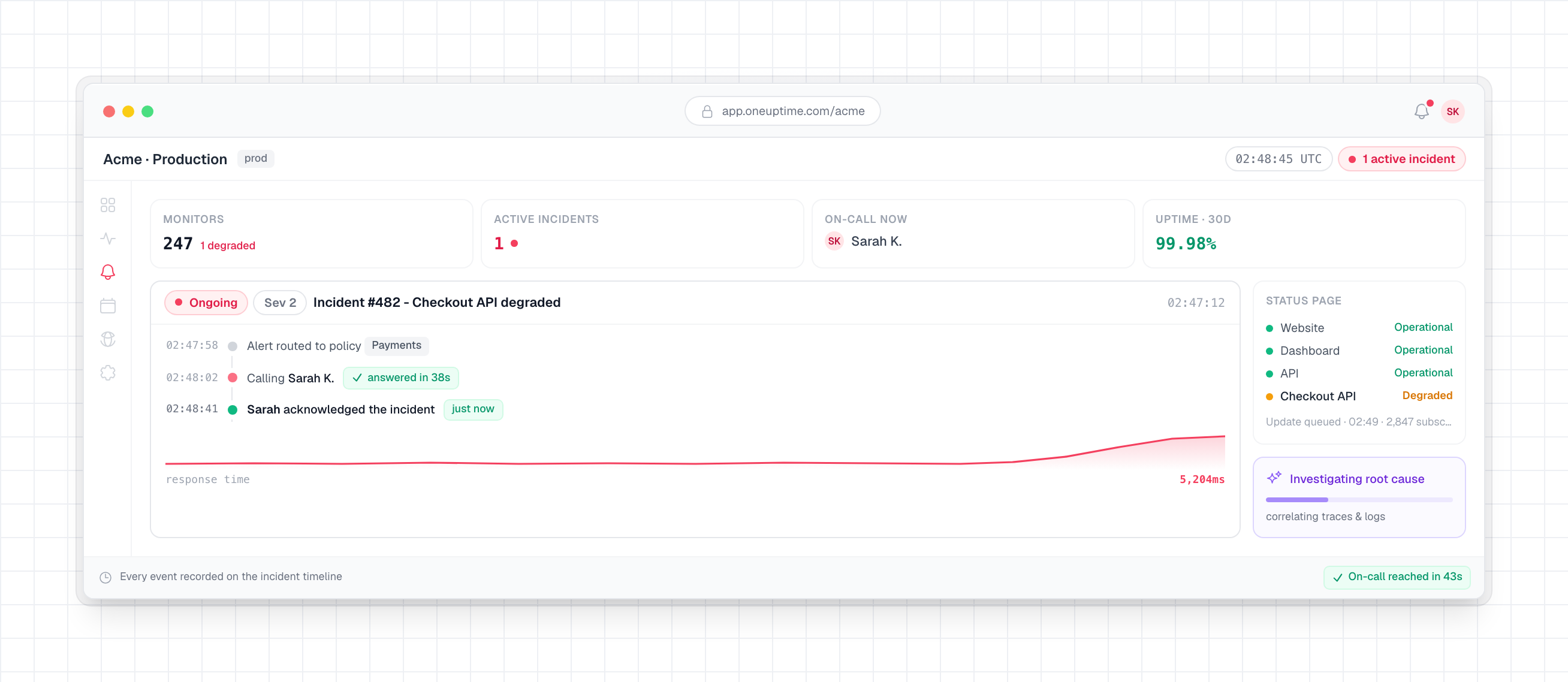
OneUptime is an open-source observability platform. It checks that your websites, APIs and servers work, collects the logs, metrics and traces your apps send, pages whoever is on call when something breaks, and tells your customers on a status page. It all happens in one product, so the tool that notices a problem is the one that pages your team.
You can use it on OneUptime Cloud or run it on your own servers.
What it does
- Monitoring: Check websites, APIs, ports, DNS and certificates from probes around the world or from inside your own network. OneUptime also watches servers, Kubernetes, Docker, VMware, databases and network devices.
- Incidents and on-call: Work each incident on one timeline. Page whoever is on call by phone, SMS, email, push, Slack or Microsoft Teams, and escalate until someone responds.
- Status pages: Keep customers informed on public or private status pages, and announce scheduled maintenance there.
- Logs, metrics and traces: Send them with OpenTelemetry, search them and build dashboards. Exceptions, profiles, real user monitoring and security events live in the same place.
- Workflows and runbooks: Automate routine work, and connect Jira, ServiceNow and the other tools your team already uses.
- OneUptime AI: Investigates new incidents and alerts and posts a root cause analysis with citations. When you turn fixing on, it can open a pull request with a fix for your team to review.
- API, CLI and Terraform: Automate OneUptime from your scripts and CI, and manage monitors, status pages and on-call as code.
Everything else is in the docs.
Get started
OneUptime Cloud
Sign up and create a project. The free plan needs no credit card.
Self-host with Docker Compose
You need a Linux server with at least 8 GB of memory, and Docker, Docker Compose, Git and Node.js.
Before step 3, set HOST in config.env to the domain name or IP address people will use to reach OneUptime, without http://. Keep localhost only to try OneUptime on your own computer.
# 1. Clone the release branch
git clone --depth 1 --single-branch --branch release https://github.com/OneUptime/oneuptime.git
cd oneuptime

# 2. Create your config
cp config.example.env config.env

# 3. Start everything
npm start
npm start checks the server, gives every secret in config.env its own random value and starts OneUptime. When it prints OneUptime is up!, open http://localhost, or your server's address, and sign up. The first account becomes the instance's admin.
The Docker Compose guide covers server sizes, HTTPS, backups and updates.
Kubernetes with Helm
For production at scale, or high availability, install the Helm chart. Set host to the domain name or IP address people will use to reach OneUptime:
helm repo add oneuptime https://helm-chart.oneuptime.com/
helm install my-oneuptime oneuptime/oneuptime --set host=oneuptime.example.com
The chart's README covers storage, HTTPS, databases and upgrades.
Community and Enterprise
- Community Edition: Free and open source, with everything above, including SAML and OIDC single sign-on.
- Enterprise Edition: Adds SCIM provisioning, audit logs, team compliance and instance health dashboards, with priority support. Production use needs a license: contact sales.
The docs compare the two editions.
Get help
- Ask questions in the OneUptime community on Slack.
- Report bugs and request features in GitHub issues.
- Report a security vulnerability privately, as SECURITY.md explains.
- Email support@oneuptime.com about anything else.
Contributing
Bug fixes, features, docs and tests are all welcome. The local development guide shows how to run OneUptime from source, and the contributing guidelines explain how pull requests and licensing work. Issues labeled good first issue are a good place to start.
If OneUptime is useful to you, star this repository or sponsor the project.
License
OneUptime is open source under the Apache License 2.0, except for the ee/ directory. That directory holds the Enterprise Edition and is licensed under the OneUptime Enterprise License. The Community Edition image contains no code from ee/. The root LICENSE file sets out this split.