Listed from the MCP registry; nobody on Odel publishes it.

Reelsaw
Drive a self-hosted Reelsaw: turn long videos into vertical clips, edit, re-render and export them.
Runs on your machine from its package; the steps are below.

What it does
- Reads
- Writes
- High impact
Not assessed yet.
What it costs
FreeOdel charges nothing per call. The publisher may charge for its own service.
Runs locally over stdio
This server isn't hosted — your MCP client launches it from a package registry. Use one of the commands below, or drop the config into your client (e.g. Claude Desktop).
Run
docker run -i --rm ghcr.io/osbytes/reelsaw:0.54.0
MCP client config
{
  "mcpServers": {
    "reelsaw": {
      "command": "docker",
      "args": [
        "run",
        "-i",
        "--rm",
        "ghcr.io/osbytes/reelsaw:0.54.0"
      ]
    }
  }
}







Self-hosted, AI-powered long-form → short-form video clipper. Paste a YouTube link or upload a video; Reelsaw transcribes it, asks an LLM for the most clippable moments, then renders vertical 9:16 clips (or 4:5, 1:1 and 16:9) with word-highlight captions and a hook overlay. A hosted service at app.reelsaw.com runs the same code (Free, then $12 / $29 / $59 a month, metered in source minutes).
Pure TypeScript. Any AI vendor via the AI SDK. One-step deploy with Docker Compose.

One video through the five queues: ingest → transcribe → refine ×3 → pick moments → render. A worker restarts mid-render and resumes from its last save. Full-quality MP4, or play it on reelsaw.com.
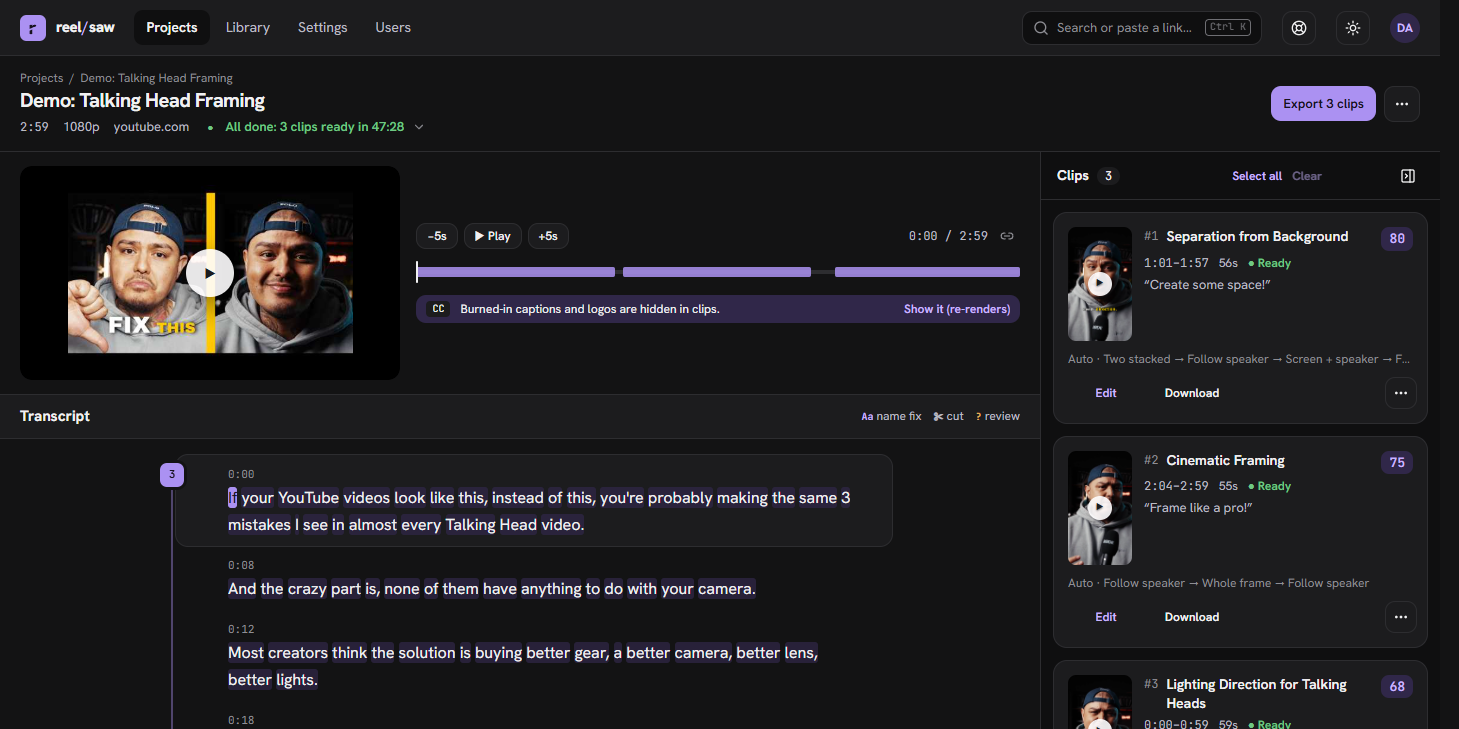
Auto reframing in one clip: split → face → stack → fit
Features
Pipeline
- Any AI vendor – language model, transcription model and caption-alignment model are each a
provider:modelstring: OpenAI, Anthropic, Google, Groq, Deepgram, AssemblyAI, Vercel AI Gateway, OpenCode (Zen and Go on one key), or any OpenAI-compatible server (Ollama, vLLM, LM Studio, local Whisper servers). Fully local with no API keys is supported. - Research-backed clip selection – map → pool → rank: the transcript is chunked at long pauses with 20% overlap (no "lost in the middle" on long videos), every standalone moment is collected per chunk in parallel, candidates are snapped/deduped, then scored on a rubric (hook / value / flow / shareability, plus relevance with a focus) as the median of k samples (every candidate of a batch scored, each sample reading the batch in another order), and the top 10 get K sliding pairwise head-to-head passes (PRP-Sliding-K;
ANALYZE_PAIRWISE_PASSES, default 3 so the top 3 you see first are placed reliably) with positions swapped to cancel judge bias. Cost: at most Σ(n−1−p) pairs × 2 calls, i.e. 48 calls for the top 10 with 3 passes (18 with 1); pairs met twice are judged once. No target count: in auto mode weak picks are dropped by a gate relative to the run, not a fixed number, because pointwise scores do not transfer between judge models: a clip is dropped below max(ANALYZE_MIN_SCORE_FLOOR= 25, median −ANALYZE_SCORE_MAD_K= 1 × MAD) of the pooled rubric totals, and the best clip is always kept (ANALYZE_SCORE_RULE=absoluterestores the old fixed 45). The threshold and its median/MAD are in the project'scandidatesartifact. Candidates whose scoring failed are never compared with rubric totals; they only fill in when fewer than 3 scored clips survive. Optional "at most N" cap, and "Find clips about …" keeps only on-topic moments. Click a clip's score for the breakdown.ANALYZE_JUDGE_MODELlets a different model score and compare (less self-preference than judging its own hooks).ANALYZE_CONCURRENCY,ANALYZE_SCORE_SAMPLES,ANALYZE_PAIRWISEtune cost (auto: 1 call at a time, 1 sample, no pairwise for a self-hosted judge; 4 / 3 / on for cloud). - Clip only the parts that matter – on a long video, pick ranges on New project's timeline (the video's length
is looked up before anything downloads; click, drag or type them; each range finds clips inside it or is the
clip), take YouTube's Most replayed peaks as suggestions, or send ranges from a pipeline (
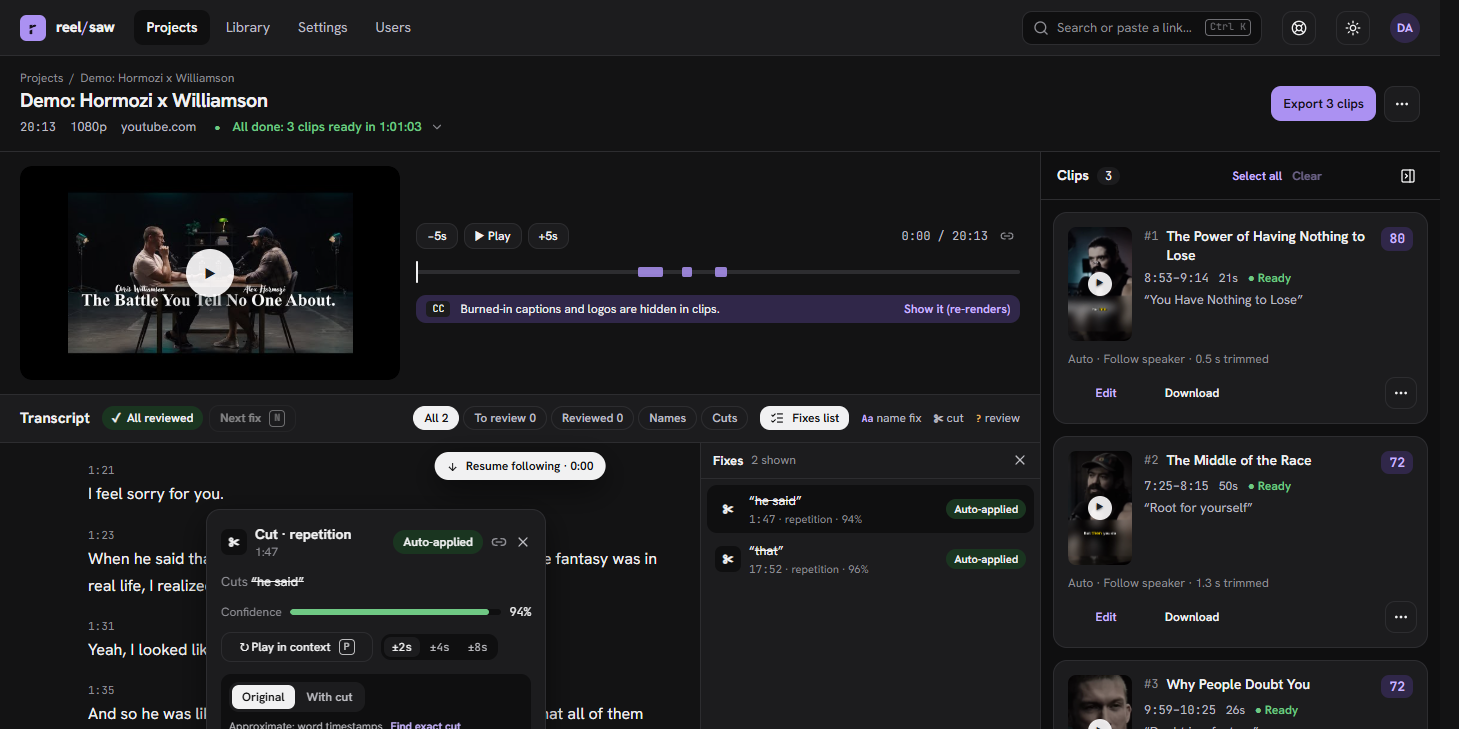
create_project { ranges, rangesFrom: { mostReplayed } },reelsaw create-project --range 25:00-26:50:clip --most-replayed 5). Only the ranges are downloaded (yt-dlp sections, joined on the source clock), transcribed, picked from and counted against minutes;check_sourceprices them first, and a range'srefcomes back on its clips and their webhooks. The project page draws them with their clips and adds more (extend_project { ranges }). See docs/specs/range-clipping.md. - Clean transcripts – names are fixed from vocabulary hints and a constrained LLM correction, and fillers, repetitions and false starts are cut with jump cuts. Every cut is located by forced alignment and checked by listening to the seam, so karaoke highlights land on the syllable. Each fix shows inline in the transcript with accept/reject, and long pauses can be shortened (details below).
- Smart reframing – YuNet (230 KB ONNX with five face landmarks, CPU via
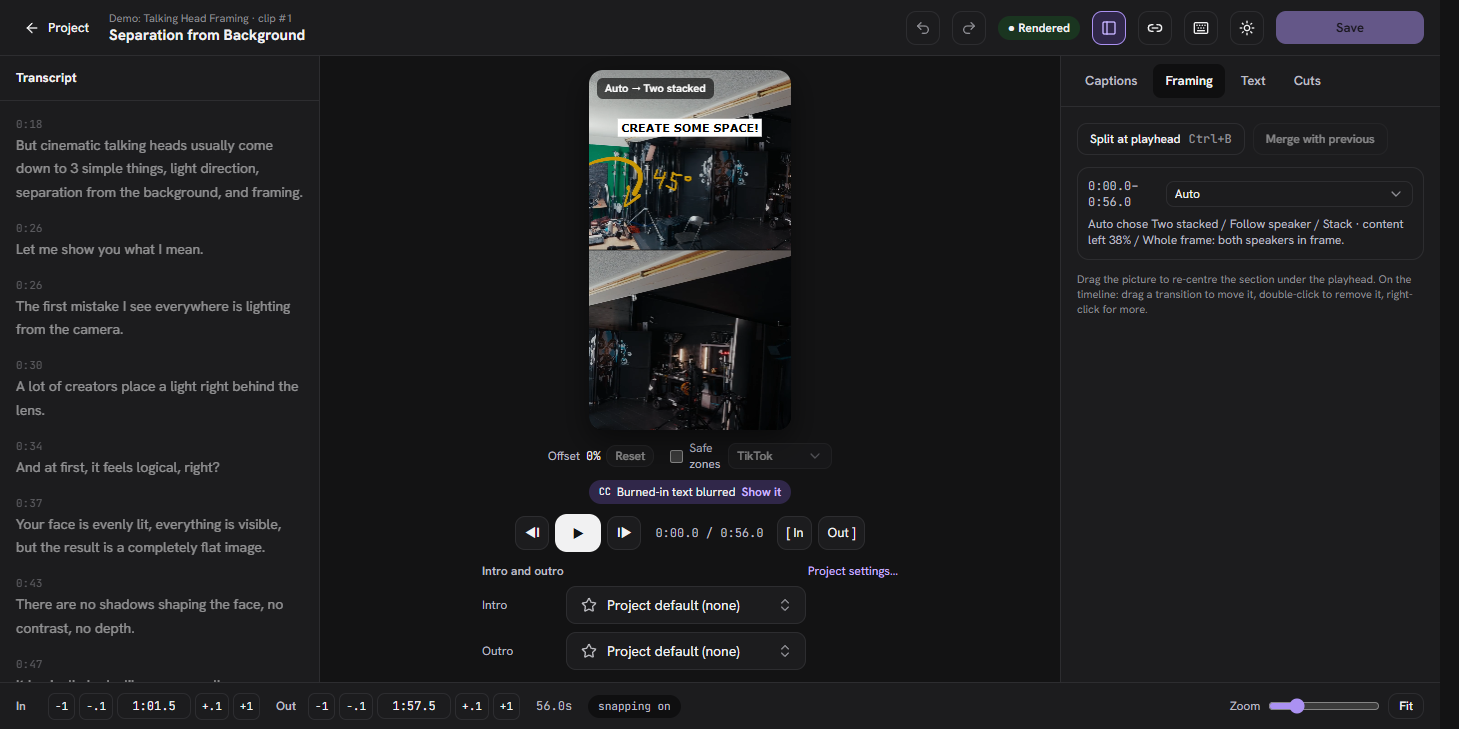
onnxruntime-node, at 640x360 about the per-frame cost of the 320x240 UltraFace it replaced) samples each clip at 4 fps (a tracker keeps one id per face across frames) and picks a layout per segment (clips are split at scene cuts and face-presence changes, so a picture-in-picture intro can be "fit" and the talking head after it "face"; shot cuts are detected on every clip, and a multi-camera edit that alternates a close-up with a wide shot every second or two changes layout at each cut): face (crop follows the speaker with "heavy tripod" smoothing: dead zone, capped pan speed, instant snap at scene cuts), split (two speakers stacked), stack (slides/screen on top, the webcam tile below — the picture-in-picture box of a Zoom, Teams, Meet or OBS recording, not a face-sized crop that reaches into the slides), or fit (whole frame over a blurred background when there is no face, e.g. graphics and b-roll, or when three or more people share the frame). A shot without a face where one thing clearly moves (b-roll of a ship or a car, a product turned in the hand) gets a 9:16 crop that follows it instead: motion from the frames the face detector already decodes, the camera's own pan taken out, held still or tracked per shot; anything less clear (diffuse motion, text the crop would cut, a subject wider than the crop) stays whole. A phone video edited into a 16:9 frame between blurred or black bars is cropped to the picture itself, filling the 9:16 frame instead of shrinking it to a third of the width. With two people in a wide shot the crop follows whoever is talking: LR-ASD (3.4 MB, an audio-visual model trained on AVA-ActiveSpeaker, ONNX on CPU) scores each face's mouth against the speech, so a listener who laughs or drinks is not mistaken for the talker and an off-camera interviewer is attributed when the face on screen is silent; minimum 2.5 s per shot, falling back to a split when detection isn't confident (and to the older mouth-motion synchrony heuristic when the model is off). Override per project, per clip or per section, including a hand-set crop. Reference for every layout, its triggers, caveats and fixtures: docs/LAYOUTS.md. - Output shapes – every clip renders 9:16 by default, or 4:5, 1:1 or 16:9 per project or per clip (Captions tab → Shape;
shapeinupdate_clip/update_project_style;reelsaw update-style --set shape=1:1). The same framing decision is drawn at the frame's size: the face crop is a window of that shape, "Whole frame" fits the frame over a blur, split and stack stay two stacked panes in 4:5 and 1:1 and show the whole frame in 16:9 (so a 16:9 source comes out as itself). Text keeps its size in pixels of the short side, captions and the hook keep their positions as fractions of the frame, the platform safe-zone overlay is shown for 9:16 only, and a 16:9 clip's export text drops#Shorts. The editor previews the clip at its shape. - Captions – AI-picked key words per clip coloured and enlarged (editable in the editor), readability limits (≈2 short lines, comma/sentence breaks, a line stays up long enough to read: at least 0.7 s, 0.3 s per word and 20 characters per second), ASS karaoke word highlight (any colour), boxed, or outlined; font (the nine in the image or any
.ttf/.otf/.woff/.woff2an admin uploads under Settings → System → Captions,add_font,reelsaw fonts add), size, words on screen (1 = one word at a time), uppercase; hook overlay with its own duration. Punch-in zooms on the key words (off by default; Captions tab → "Zoom in on key words", 1.05-1.3x, default 1.12x): a short eased scale-up of the picture on each key word's first use, on face and centre crops and on an inset or fixed crop that fills the frame, never on split or stack panes and never across a scene cut, jump cut or framing change; the editor preview zooms the same way, andget_cliplists the zooms the last render burned in (punchIn/punchInScaleinupdate_clip/update_project_style,reelsaw update-clip --style,reelsaw update-style --set punchIn=true). Caption and hook positions are free x/y set by dragging on a live preview at the clip's shape that uses the renderer's crop math and font metrics, with a platform safe-zone overlay. In split and stack sections that last 2.5 s or more, captions sit on the line between the two panes instead of on the lower speaker (a switch turns it off). Project-wide defaults, per-clip overrides. Burned in with ffmpeg + libass, in every script the transcription model takes: the image carries Noto for each one (Devanagari, Bengali, Thai, CJK, Arabic, Tamil, Georgian, …), libass falls back to it from any caption font, uploaded ones included, and CI renders every language through the shipped ffmpeg so a missing glyph fails the build.
Editing
- Workspace and clip editor – source player and clickable transcript on the left, clips streaming in on the right as they render, with score, layout badge, post caption + hashtags copy and download. The editor has a live preview of the source with the clip's framing and captions and a multi-lane timeline (ruler, transcript words, clip range, layout track, layers) with zoom, snapping to words/scene cuts/playhead, nudge buttons, typed timestamps and I/O keys for frame-accurate trims. Split the layout track (⌘/Ctrl+B, the Split button, a double-click or the right-click menu) into sections that are Auto or forced to face/split/stack/fit/centre; drag the picture to re-centre a section; right-click for Set crop… (a box on the source, or
crop/crop2/contentCroponupdate_clip); "Use for all clips…" copies one clip's framing to the project (apply_framing). Add, drag and remove transitions; ⌘/Ctrl+Z / ⇧⌘Z undo and redo every edit. - Act on many projects at once – tick projects on the Projects page (hover a card, or tap the box on a phone; while something is selected a click adds or removes a card, Esc clears) and a compact bar retries the failed ones, re-renders their clips or deletes them. Every action asks first and shows its progress until the server is done. The selection is in the link (
#sel=). The same through MCP (delete_projects,retry_projects,rerender_projects) and the CLI (reelsaw delete-projects,retry-projects,rerender-projects). - Deletes can be undone – deleting a project or a clip (card ⋯, the selection bars, the editor, ⌘K) stops its work and hides it. The toast always offers Undo, Delete forever, and See deletions. Everything restorable lives on Deleted (account menu) as one selectable list: each row says when it was deleted and when it is deleted forever, and a compact bar restores the selection or deletes it forever. Storage still counts until you delete it forever (MCP
list_deletedpluspurge_project/purge_clip/purge_asset/purge_layer_template;reelsaw purge-project,purge-clip,library purge,templates purge). Minutes, hourly creates and first-video-free are never refunded. Re-picking moments keeps every clip you made or edited (text, bounds, framing, style, intro/outro) and only replaces untouched AI picks, which can be restored too. The same through MCP (delete_clip,delete_clips,delete_projects,restore_project,restore_clip,list_deleted) and the CLI (reelsaw deleted,restore,delete-clip,delete-clips,restore-clip,purge,purge-project,purge-clip). - Learns from your decisions – what you accept, reject, cut, correct and edit is kept in a decision log (with the words or clip text it was about, the models that proposed it and a fingerprint of the source video) that outlives deleted projects: cuts you rejected are shown to the filler detector as examples to keep, and an export turns your decisions into eval cases (
reelsaw decisions export,export_decisions, thedecisionssuite). Settings → Learning turns it off or forgets everything; deleting a project (or "Delete forever") can forget what it learned from that project, applied when it is purged, even automatically. It never leaves your instance. See docs/specs/decision-log.md. - Command palette and bulk export – ⌘K searches projects and clips with status, length and age, opens a row's actions (open, export, resume, retry failed clips, re-run refine, re-render, download, delete project or clip), takes pasted links (one project each, or opens the existing one) and offers retry-all shortcuts. "Export all" zips every rendered clip with platform-ready metadata: a paste-ready
.txt(title, description, tags, caption), a.youtube.json(YouTube Data API v3videos.insertbody, private by default) and a.tiktok.json(Content Posting APIpost_info,SELF_ONLY) per clip, plusmanifest.json,clips.csv(with rendered duration) and a README. Descriptions carry a timestamped link to the exact moment in the parent video. - Share links – a clip's ⋯ menu copies a link anyone can download it from without signing in (the project and selection menus do the same for the zip), for schedulers (Buffer, Metricool), Instagram's
video_url, Zapier/Make file fields or a person. The link answers with the file itself (a plain 200, no redirect), serves the clip's latest render, lasts 90 days by default (MEDIA_LINK_TTL_DAYS; "Never" whereMEDIA_LINK_ALLOW_NEVER), and can be revoked one at a time, per clip or project, or all at once under Settings → Share links. Deleting a project or clip stops its links (restoring it brings them back; purging it from the trash deletes them), and Clear removes revoked and expired links from the list. MCPget_media_links,list_media_links,revoke_media_link,clear_media_links;reelsaw media-links. See docs/specs/media-links.md. - Webhooks – Settings → Webhooks sends signed JSON (Standard Webhooks:
webhook-id,webhook-timestamp,webhook-signature) to your URLs onproject.created,project.done(every clip with share links and the zip),project.failed,clip.doneandclip.failed, so n8n, Zapier, Make or a script can act the moment clips are ready instead of polling. Deliveries commit with the event, are retried 8 times over about 22 hours, and an endpoint that fails for 3 days is turned off with an email; each has a delivery log with the request, the answer and Resend. A project'smetadata(create_project) comes back in every webhook for it. MCPcreate_webhook/delete_webhook(how a Zapier or Make app subscribes),list_webhooks,update_webhook,rotate_webhook_secret,test_webhook,list_webhook_deliveries,resend_webhook_delivery;reelsaw webhooks. See docs/specs/webhooks.md. - SRT / VTT in and out – every rendered clip's ⋯ menu offers its captions as
.srtor.vtt(the same lines and times as the video, intro included, even when the style has captions off), and "Export all" adds them next to each clip asclips/NN-title.srtand.vtt; clips rendered before this feature need a re-render first. The project's ⋯ menu ("Transcript files…") downloads the transcript the same way (VTT can carry a timestamp before every word) and imports a subtitle file you already have: right after creating a project (only the video is fetched) or on a done or failed one (it cleans the transcript up and picks clips again). Imported cues become segments and their words are spread over the cue by length; the render re-aligns words to the audio. AlsoGET /api/clips/:id/captions.srt|vtt,GET /api/projects/:id/transcript.srt|vtt(?words=1for VTT word times), the MCP toolsget_clip_captions,get_project_transcript_fileandimport_transcript, andreelsaw captions,transcript-fileandimport-transcript.
Library, layers and templates
- Library – intros and outros, logos, stickers, b-roll, music and sound effects (PNG, JPG, GIF, WebP, SVG, video, audio). Drop many files at once (duplicates are detected), search your items plus a bundled catalog and, with an admin key, Pexels, Pixabay, Freesound, Iconify, Giphy and Klipy. Each clip is rendered as intro + clip + outro in a single encode, fitted to vertical over a blurred background.
- Per project and per clip – a project follows the default intro/outro, uses none or a specific item; each clip can follow the project, use none or pick its own. An unusable asset is skipped with a plain-language event instead of failing the clip.
- Layers – one timeline lane for image/video overlays, text and sound (
update_clip { layers },reelsaw clip-layers): position, size, opacity, fade in / out, any of the instance's fonts (shipped in the image or uploaded by an admin), several music tracks with fade, loop and sidechain ducking under speech. Right-click a layer on the 9:16 preview to edit, centre, reorder, copy or remove; double-click text to retype it. ⌘C / ⌘V copy and paste layers. - Even loudness – every clip's speech is measured on the range it comes from (EBU R128) and brought to −14 LUFS, the level TikTok, Reels and Shorts play at, with one gain so the voice keeps its shape; the finished mix (speech, music, intro and outro) goes through a peak limiter, so no clip clips. The measured level and the gain are in the clip's diagnostics (
get_clip). - Fades and transitions – fade the clip in from black and out to black (picture and sound), and join the intro and outro with a cut, a dip to black or a crossfade; previewed live in the editor's Style tab, per clip or for every clip, and in Project defaults. Over MCP and the CLI they are style fields (
fadeIn,fadeOut,bumperTransition,bumperTransitionSeconupdate_clip { style },update_project_style,reelsaw update-style --set); a picture or text layer takesfade. See docs/specs/transitions.md. - Layer templates – save a look once (a logo pop in the first seconds, a follow card at the end, a watermark or a music bed, plus an intro and outro) with timing from the start, the end, the whole clip or a share of its length, then apply it to selected clips or set it on a project so every new clip gets it (
list_layer_templates,apply_layer_template,reelsaw templates).
Agents and automation
- MCP server –
/api/mcp(Streamable HTTP) lets Claude Code, Claude Desktop, Cursor or a script create projects, wait for them, read timed transcripts, edit layers and framing, create and re-render clips, manage the library and layer templates, and export the results. On a hosted plan the same tools are available, including Free. Authenticate with an API key from Settings, or withMCP_OAUTH=trueso claude.ai and Claude Desktop connectors sign in through the browser. - Operator CLI –
docker compose exec app reelsaw …inspects and fixes a running instance:status,events,clip,rerender,stuck,recover,logs,cuts,align,hear,flags,storage,retention,deleted,restore,purge,users,users-bulk,approve,make-admin,set-password,library,templates,apply-framing,import-reportand more (every command is in Operator CLI).
Hosting and accounts
- Accounts, approval and quotas – the first account is the admin;
SIGNUP_MODE=open|approval|closeddecides who gets in, sign-up rules hold, block or allow particular addresses, emails, domains and abuse flags in front of it, and admins approve, suspend, promote and remove people on the Users page, with usage per account (projects, source minutes, clips, model calls and tokens, stored bytes). Optional per-user quotas, retention of old files, captcha on sign-in, email (approval notices, password reset, verification, and a note when clips finish if you've stepped away) and terms/privacy links. Everyone has their own Project defaults (vocabulary, instructions, language, clip length, pauses, caption style, intro and outro) and API keys. - Models and providers at runtime – admins switch the language, transcription and alignment models under Settings → System → Models without a restart: pick a provider, enter its key or server URL there (stored encrypted, never shown again), and choose from live model lists; local Ollama and Speaches models download with a progress bar. Keys and models are tested when saved.
Operations
- Reliable, resumable, scalable – every stage is a pg-boss job in Postgres that checkpoints its output, so a crashed or restarted worker picks up where it left off; a worker that stops heartbeating (every 15 s) has its job re-queued by pg-boss within about a minute or two, and a reconciler re-enqueues anything orphaned. A long stage saves its parts as they finish (each 3-minute window of Finding moments), so a retry or a timeout on a slow local model continues where it stopped instead of starting over, and a timeout says how far it got (
LLM_CALL_TIMEOUT_SECONDS,STAGE_IDLE_TIMEOUT_MINUTES). Run extraworkercontainers to scale. Every run (first pass, retry, re-render, re-analyze) is recorded with its own timings, and the UI shows elapsed against expected time per stage, learned from your finished projects. The browser gets live updates over a tRPC SSE subscription with automatic reconnect. - Storage and install – local volume or
s3(AWS S3, MinIO, Cloudflare R2, Backblaze B2…); superseded renders, expired sources and orphaned files are swept hourly (reelsaw storagereports,reelsaw storage sweepruns it). One-line installers for macOS/Linux (bash) and Windows (PowerShell), and Report an issue saves a zip of a project's data, decisions and logs, with secrets left out. - Observable and fail-fast – every service is built in
mainand self-checks, so the process exits with a readable reason if a model id is wrong, a key is missing, a binary is absent, the bucket is unreachable or the DB is down.LLM_TRACE=logsorlangfusecaptures every prompt/response (tokens, latency, project/clip/stage), andOTEL_ENABLED=trueturns on OTLP traces and metrics for HTTP, Postgres, pg-boss jobs, AI SDK calls (model, tokens and prompt version per call; never the prompt), ffmpeg/yt-dlp and each stage, with stage, download and transcription time per second of video and per-proxy download health.
Contributing
See CONTRIBUTING.md (principles, tests, sign-off). Questions, bugs and supported versions: SUPPORT.md. Also CODE_OF_CONDUCT.md, GOVERNANCE.md, TRADEMARKS.md and the threat model. Roadmap for learning from user decisions: docs/SELF-IMPROVEMENT.md.
Read docs/PRINCIPLES.md first: the consistency, concurrency and UI rules every change follows. Overlay stacking (Select inside a Dialog, z-index, portals) and the mobile viewport (h-dvh, not h-screen) are docs/UI.md. Agent instructions live in AGENTS.md (the only agent file; see the process principles).
Install (no source needed)
Needs Docker (Docker Desktop on macOS and Windows). One command: it looks at the machine (RAM, GPU, Docker's memory, free disk, an Ollama already running and the models it has, the port), proposes a setup, asks three questions in a terminal (local Ollama or a hosted provider, which model, go ahead) and installs Ollama for you (Homebrew, ollama.com or winget) if you pick local and it is missing:
curl -fsSL https://raw.githubusercontent.com/osbytes/reelsaw/main/deploy/install.sh | bash
On Windows (Docker Desktop), in PowerShell:
irm https://raw.githubusercontent.com/osbytes/reelsaw/main/deploy/install.ps1 | iex
WSL2 users can run the bash one-liner as is (with Docker Desktop's WSL integration on).
It writes ~/reelsaw (compose file + .env with generated secrets), pulls the published image and
the model, starts everything and waits until http://localhost:3000 answers (or the next free port).
Fully local is the default when the machine can carry a useful model: qwen2.5:14b (~9 GB) with
24 GB of RAM or a 12 GB GPU, qwen2.5:7b from 12 GB, gemma3:4b below that, and a good model that
Ollama already has is reused instead of downloaded; with an NVIDIA GPU and the container toolkit,
Ollama and Speaches run on the GPU (and renders encode with NVENC; see "Using a GPU" below). Hosted
providers (OpenAI, Anthropic, Google, Groq, Vercel AI Gateway) are a choice in the same prompt: the
key is asked for and never echoed, and Anthropic and Google pair with local Speaches for
speech-to-text. Without a terminal, or with REELSAW_YES=1, the proposed answers are taken;
REELSAW_AI, REELSAW_LLM, REELSAW_PORT and friends answer in advance and REELSAW_DRY_RUN=1
prints the plan and stops (every option is listed at the top of the script).
Manual setup: deploy/README.md.
The scripts are deploy/install.sh and deploy/install.ps1;
they are served from main (see docs/RELEASING.md).
Quick start (from source)
git clone <this repo> reelsaw && cd reelsaw
cp .env.example .env
# edit .env: set BETTER_AUTH_SECRET, APP_URL, and at least one AI provider key
docker compose up -d --build
Open http://localhost:3000, create an account (it becomes the admin), start a project. Set SIGNUP_MODE=closed or approval afterwards if the instance is public.
Scale workers:
docker compose --profile workers up -d --scale worker=2
Each worker keeps its own scratch copies of the sources and renders it works on. With an S3 store
they are a cache: idle copies of finished projects are evicted after SCRATCH_CACHE_HOURS (24), a
job short of disk evicts the least recently used ones first, and a worker that still cannot make
room hands the job to a worker that has it and stops taking media jobs until its disk recovers
(Settings → System → Workers shows "disk full"). A job leases the scratch it is about to write
against its volume's live leases before the first byte lands, so two large ingests on one box
cannot both pass the free-space check and both run out mid-download: the second waits for the
first. Processes sharing a volume (the app and worker replicas of one host) share one ledger;
a worker on another host never contends.
Cores and memory are leased the same way, per machine: every ffmpeg pass that decodes or encodes video takes its threads from what the machine's other jobs have left (a shot-cut scan 1 to 4, a render encode its share of the machine's renders), and a render leases its memory and its place among the machine's renders for as long as it runs. So parallel scans, renders and worker replicas on one machine share its cores instead of each assuming it owns them. Settings → System → Workers shows the leased cores, memory and disk. Design: docs/specs/resource-leases.md.
Use MinIO for local S3 testing:
docker compose --profile minio up -d
# then in .env: STORAGE_DRIVER=s3 S3_ENDPOINT=http://minio:9000 S3_FORCE_PATH_STYLE=true S3_BUCKET=reelsaw S3_ACCESS_KEY_ID=reelsaw S3_SECRET_ACCESS_KEY=reelsaw123
(Create the bucket once via the MinIO console at http://localhost:9001.)
Model configuration
The language model and the transcription model are independent; mix vendors freely (Anthropic has no speech-to-text, so pair it with Deepgram/OpenAI/AssemblyAI/Groq). Each needs only its own key.
| Env | Example values |
|---|---|
AI_MODEL | openai:gpt-4o-mini, anthropic:claude-sonnet-4-5, google:gemini-2.5-flash, groq:llama-3.3-70b-versatile, gateway:anthropic/claude-sonnet-4-5, opencode:<model>, opencode-go:<model>, compat:qwen2.5:14b |
TRANSCRIPTION_MODEL | openai:whisper-1, deepgram:nova-3, assemblyai:best, groq:whisper-large-v3-turbo, openrouter:openai/whisper-large-v3-turbo |
The transcription model must return word timestamps (captions and cuts need them). Reelsaw does not
guess which models do from their names: the first time it meets a model it transcribes a bundled
5-second clip and checks the answer, then remembers the result for 30 days (Test under Settings →
Models checks again). A model that returns none, such as openai:gpt-4o-transcribe, is refused with
that reason.
Fully local (no API keys)
Ollama only serves language models; it has no speech-to-text. So the local stack is Ollama for AI_MODEL plus Speaches (faster-whisper behind an OpenAI-compatible API, word timestamps supported) for TRANSCRIPTION_MODEL. Both ship as a compose profile:
docker compose --profile local-ai up -d            # Speaches; use your native Ollama (macOS: Metal GPU)
docker compose --profile local-ai --profile ollama up -d   # Linux: also run Ollama in a container
ollama pull qwen2.5:14b                            # or: docker compose exec ollama ollama pull qwen2.5:14b
.env:
AI_MODEL=compat:qwen2.5:14b            # qwen2.5:7b or gemma3:4b on less RAM
OPENAI_COMPATIBLE_BASE_URL=http://host.docker.internal:11434/v1   # native Ollama; http://ollama:11434/v1 for the container
OPENAI_COMPATIBLE_API_KEY=ollama
TRANSCRIPTION_MODEL=openai:Systran/faster-whisper-small
OPENAI_BASE_URL=http://speaches:8000/v1
OPENAI_API_KEY=local
Notes: the app requests response_format: json_schema from the compat server (OPENAI_COMPATIBLE_STRUCTURED_OUTPUTS=false to disable) and falls back to lenient parsing when a model ignores it, but small models still pick weak moments and write bland hooks. gemma3 4b works; qwen2.5 14b (the installer's default on 24 GB or more), llama3.1 8b or gemma3 12b are noticeably better. On first boot the app auto-downloads the whisper model into Speaches and verifies the Ollama model is pulled (it exits with ollama pull <model> otherwise). Speaches CPU with faster-whisper-small runs roughly real-time; use the latest-cuda image and faster-whisper-large-v3 on a GPU. The OPENAI_* variables are reused for Speaches because it speaks the OpenAI audio API, which is why the LLM goes through the compat provider instead.
OpenRouter and other OpenAI-compatible cloud APIs
Routers such as OpenRouter go through the compat provider too, for the
language model and for transcription (its /audio/transcriptions). Name it so model ids read
naturally:
OPENAI_COMPATIBLE_NAME=openrouter
OPENAI_COMPATIBLE_BASE_URL=https://openrouter.ai/api/v1
OPENAI_COMPATIBLE_API_KEY=sk-or-v1-...
AI_MODEL=openrouter:anthropic/claude-sonnet-4.5            # any id from openrouter.ai/models after "openrouter:"
TRANSCRIPTION_MODEL=openrouter:openai/whisper-large-v3-turbo
Not every OpenRouter speech model returns word timestamps, and OpenRouter's model list doesn't say
which do, so boot checks the one you pick with a short test clip (see above) and names the problem if
it fails. Any other vendor works for transcription too, e.g.
TRANSCRIPTION_MODEL=groq:whisper-large-v3-turbo with GROQ_API_KEY.
Only the first : separates the provider, so vendor/model ids (and OpenRouter's :free suffixes)
pass through unchanged. Don't point OPENAI_BASE_URL at OpenRouter: that sends every openai: call
there and treats it as a self-hosted server. The compat server is capped at 2 model calls in flight, sized for a local machine; a
cloud router takes more, so raise it with PROVIDER_CONCURRENCY=openrouter=8.
Using a GPU
Three things can use one, each in its own container, so the GPU is a Compose override rather than
a different image: docker-compose.gpu.yml reserves every NVIDIA device for speaches, ollama,
app and worker. Host side you need the NVIDIA driver (nvidia-smi works) and the
NVIDIA Container Toolkit
(sudo nvidia-ctk runtime configure --runtime=docker && sudo systemctl restart docker; on Windows,
Docker Desktop on WSL2 with the Windows driver only). Then in .env:
# Linux/macOS (colon). On Windows use a semicolon: docker-compose.yml;docker-compose.gpu.yml
COMPOSE_FILE=docker-compose.yml:docker-compose.gpu.yml
SPEACHES_IMAGE=ghcr.io/speaches-ai/speaches:latest-cuda
WHISPER_MODEL=Systran/faster-whisper-large-v3      # or deepdml/faster-whisper-large-v3-turbo-ct2
TRANSCRIPTION_MODEL=openai:Systran/faster-whisper-large-v3
and docker compose --profile local-ai up -d as before. What changes:
- Transcription is the big one: faster-whisper on CUDA runs
large-v3in a fraction of real time, wheresmallon a CPU was about real time (the transcribe factor in the table below). - The language model uses the card when Ollama runs in the
ollamacontainer (--profile ollama). A native Ollama (macOS, or Linux on the host) already uses the GPU on its own. - Renders encode with
h264_nvencinstead of libx264:FFMPEG_ENCODER=autoprobes it at boot and keeps libx264 when the card is not there. Filters (crops, blur, captions) still run on the CPU, and render was already the short stage, so expect seconds, not minutes. A hardware encode that fails mid-clip (NVENC session limit, driver reset) is redone with libx264 for that clip. - The on-device models (face, text, alignment) stay on the CPU by default.
ONNX_EXECUTION_PROVIDER=cudamoves them, but the published image carries no CUDA libraries for onnxruntime, and on Apple silicon CoreML measured slower than the CPU for all three; seedocs/CONFIG.md.
Settings → System → Overview and docker compose exec app reelsaw machine show the GPU the app
process sees, the encoder in use and why, and where each on-device model runs. Workers (and
reelsaw workers) lists every API and worker replica with its specs and what it is processing —
needed when the HTTP process is not the one doing the work. macOS has no CUDA in
Docker: run Ollama natively for Metal, and leave Speaches on the CPU (or point OPENAI_BASE_URL at a
whisper.cpp or MLX server running on the host, which speaks the same API).
What to expect: processing time
Every stage scales with the length of the video. Expected seconds for a stage ≈ video seconds × factor, where the factor depends on the models (local vs vendor) and your machine:
| stage | what sets the factor | local CPU (measured¹) | vendor (measured²) |
|---|---|---|---|
| download | your bandwidth and the site | 0.015 | 0.015 |
| transcribe | whisper size on CPU/GPU, or the STT vendor | 0.25 | 0.065 |
| refine (fillers, names) | LLM latency × number of candidate windows | 0.5 | 0.03 |
| find moments | LLM latency × (video minutes ÷ 5 + 1) calls | 0.2 | 0.02–0.07 |
| render | ffmpeg + face tracking per clip, ÷ render concurrency | 0.04 (3 clips) | 0.05 (3 clips) |
Rule of thumb: a vendor stack finishes a video in about a fifth of its length; a local CPU stack takes about as long as the video. Refine runs alongside finding moments, so the stages don't add up exactly. Finding moments saves each part it finishes, so on a long video and a slow model a retry or a timeout continues from the last finished part instead of starting over, and the project shows "N of M parts, about X left".
¹ Apple-silicon laptop, qwen2.5:14b on Ollama + faster-whisper-small on Speaches (CPU), 20-minute podcast: download 15 s, transcribe 4.9 min, refine 10 min, find moments 4 min, render 47 s; 20 min in all. On a local 14B model the disfluency verifier (one call per candidate, ~40 s each) is the bottleneck, not transcription; a smaller model or DISFLUENCY_LLM=false cuts refine to a fraction. ² Same video through the Vercel AI Gateway, whisper-1 + claude-haiku-4.5: download 13 s, transcribe 77 s, refine 31 s, find moments 24 s, render 56 s; 3.4 min in all. Gemini 2.5 Flash took 5 min (long "thinking" outputs), Sonnet 4.5 about 4. Mixing a vendor LLM with a local TRANSCRIPT_ALIGN_MODEL makes render the slowest stage (5–9 min: every cut is re-aligned on the CPU); keep alignment on the same vendor as transcription. Full numbers in eval/bench/results/.
These factors are only the starting point. The app learns from its own finished projects: each stage's expected time is the median over your recent projects that ran with the same models, shown next to the elapsed time on the project page while it runs, in the activity feed when a stage finishes (Transcribe finished in 4:50 (expected ~4:00)), and as a per-stage expected vs actual table under Settings → System → Machine. There is no calibration step; the runs are the calibration.
Switching models without a restart
.env names the default models and keys; an admin can change both at any time under Settings →
System → Models. Each of the three pickers (language, transcription, alignment) opens provider
first: pick a provider and, if it has no key or server URL yet, enter it right there; its models
then appear. Cloud vendors are asked live, a self-hosted Ollama or Speaches shows what is installed
and downloads anything else with a progress bar, and the search box filters every provider at once.
Saving a key tries it first (the provider's models are listed with it) and a wrong one is refused;
saving a model checks it too (key present, server reachable and model installed, and for
transcription a 5-second test clip that must come back with word timestamps; the picker notes which
models passed). Keys are stored encrypted in the database with a key derived from
BETTER_AUTH_SECRET and never shown again (the UI sees the last four characters); rotating that
secret makes stored keys unreadable, and the UI asks for them again. Changes survive restarts and
reach worker processes within seconds; a stage already running finishes with the model it started
with. "Back to .env" / "Remove" drop an override. Over the API: admin.models.*, admin.providers.*.
Accounts and roles
The first account created on an instance is the admin; everyone else is a user. Admins see
the system settings (models, storage, resource meters) and the Users page; users see their own
projects and settings only. SIGNUP_MODE decides who gets in:
SIGNUP_MODE | Behaviour |
|---|---|
open (default) | Anyone can sign up and use the app at once. Right for a single-user box and for a public instance that already confirms email. |
approval | New accounts wait on a "Waiting for approval" page until an admin approves them (Users page, or reelsaw approve <email>). Admins get an email when EMAIL_DRIVER is set. Right for a private box, not a public product. |
closed | No sign-ups. (The older ALLOW_SIGNUP=false is still read as closed; use SIGNUP_MODE.) |
Sign-up rules (Settings → System → Sign-up rules, reelsaw signup-rules, list_signup_rules /
manage_signup_rules) are a firewall in front of the mode: keep sign-ups open and send only the
ones that look wrong to approval. A rule matches an address or CIDR range (203.0.113.0/24), an email
pattern (spam*@gmail.com, also checked against the real mailbox, so dots and +tags do not dodge it),
an email domain and its subdomains, or an abuse flag worked out at sign-up (shared_ip: the third account
from one address in 7 days; signup_burst; disposable_email). Each rule holds a match for
approval, blocks it, or allows it at once even when the mode is approval. Block beats allow
beats hold; no match follows SIGNUP_MODE, and closed still refuses everyone. A held account sees
the same "Waiting for approval" page as in approval mode and is never told why; admins see the rule
on its row in Users, and get the usual approval email. Each rule counts what it caught; on a hold rule
that count (or the "held" badge on an account) opens Users filtered to the accounts it held
(list_users / reelsaw users with heldBy / --held "ip 203.0.113.0/24"), ready to approve together.
Rules apply to new sign-ups only; to send an account that already exists back to approval, use
Require approval on the Users page (or manage_users / reelsaw users-bulk with hold), which
works on a selection such as every flagged account. Add sign-up rule… in an account's ⋯ menu makes
a rule from what it signed up with (its address, that address's /24, its email or its domain) and can
send that account back to approval in the same step. An allow rule on an email or domain trusts an
address nobody has confirmed yet, so pair it with REQUIRE_EMAIL_VERIFICATION.
Every user has Settings → Project defaults (vocabulary, instructions, language, clip length,
pauses, caption style…) applied to each new project they or their agents start; the new-project
form starts from them and can save its current values back. Admins also see the System section
(models, storage, resource meters) and /api/health includes machine numbers only for them (or
with HEALTH_DETAILS=true).
The Users page lists accounts a page at a time, pending first, with whether each email address is
verified. One bar above the list searches names and emails (a whole address finds just that account), filters by
status, verification and flag (any flag, or one reason such as shared ip; a flag chip lists everyone flagged for
that reason), groups and sorts; the filters in force show as chips beside the count of every match, and all of it
runs in the database and stays in the link. Projects (search titles, filter by status, sort by date added, title,
length or last change) and Templates (search names, sort) have the same bar, as do list_projects and
list_layer_templates over MCP. "Group by flag"
splits the same list into sections, one per reason and then the unflagged (folded), each with its own count,
paging and "Select all" over just that section; an account flagged twice is in both. Inside shared ip and
signup burst the accounts are split again by sign-up address, busiest first, so you see which accounts came from
which address and can select or suspend one address's accounts at once. "Group by address" does the same for the
whole list: one section per address that more than one account signed up from, then the rest (folded); "Only this
address" narrows the page to one. Check rows (or "Select all" to take every match, not only the loaded page) to approve,
require approval again, suspend, reinstate or delete them together; each account goes through the same checks as one at a
time (never yourself, never the last admin) and anything refused is listed with the reason. The same
list and actions are list_users / manage_users over MCP and reelsaw users / reelsaw users-bulk
on the box.
Suspending an account (Users page) ends its sessions and refuses its API keys at the next request;
removing one deletes its projects, clips and files. Locked out of the password? Sign-in has Forgot
password when email is on. Without email, an operator sets a new one from the shell (docker compose exec app reelsaw set-password you@example.com); --must-change makes them pick their own
at the next sign-in, without asking for the temporary password (the session is the proof they knew
it). To promote an account from the shell: docker compose exec app reelsaw make-admin you@example.com.
Email (EMAIL_DRIVER=smtp|resend, EMAIL_FROM, SMTP_URL or RESEND_API_KEY) turns on approval
notices, password reset, the ready note and, with REQUIRE_EMAIL_VERIFICATION=true, verification
before the first sign-in. Confirmation and reset links work for 24 hours and only once; an expired
link lands on a page that sends a new one. Sign-in has Forgot password? when email is on;
choosing a new password signs out other devices. Without email everything else works; approvals
are handled on the Users page.
The ready note is one email when projects finish and you have not come back to see them. The first
project to finish schedules it (EVENT_PROJECT_DONE_READY_EMAIL_DELAY_MINUTES, default 20, Settings → System →
Operations); another project that finishes while it is waiting joins the same note instead of
sending its own. Opening the app, or an API or MCP call, counts as being here, so clips you stayed to
watch are left out of the note. The first project, and later the 10th, 25th, 50th and 100th,
get a line of their own. Nothing is sent when email is off. Each note has a one-click unsubscribe
(the List-Unsubscribe header mail apps show, and a link in the footer); people can also turn it
off under Settings → Account, with set_email_preferences over MCP, or an operator with
reelsaw email-prefs <email> --ready off. Optional mail is split into topics, each with its own switch: ready and product_updates, the occasional email about new features. Reelsaw does not send product updates itself; an operator sending one (a Resend broadcast, say) mails the verified accounts that have the topic on, with the provider's unsubscribe link, and records unsubscribes with reelsaw email-prefs <email> --product_updates off.
Language and region. Every string a person reads (the app, errors, notices, emails, MCP results, CLI lines and
reelsaw.com) comes from a message catalogue, and numbers, sizes, amounts and dates are formatted for the reader's
locale. Each account picks its language and time zone under Settings → Account → Language and region,
set_locale_preferences over MCP or reelsaw locale-prefs <email>; mail is written in the recipient's language
with dates in their time zone. English and Russian ship today; a translation is a pull request to the catalogues
(docs/I18N.md).
Hosting for many people
Everything below is off by default and switched on by environment (deploy/.env.example lists
them), so a single-user box stays as it is:
- Quotas:
MAX_PROJECTS_PER_USER,MAX_SOURCE_MINUTES_PER_DAY,MAX_SOURCE_MINUTES_PER_MONTH,MAX_NEW_PROJECTS_PER_HOUR,MAX_STORAGE_MB,MAX_LIVE_JOBS_PER_USER(jobs queued or running from one account's own requests),MAX_RERENDERS_PER_HOUR(re-renders, hand-made clips and re-runs such as re-analyze and refine, per hour),MAX_REQUESTS_PER_MINUTE,MAX_REQUESTS_PER_HOURandMAX_WEBHOOKS_PER_USER(0 = unlimited), with per-user overrides on the Users page. Storage counts sources, uploads (an upload already copied into a project counts once), rendered clips and intros/outros, and is checked on every way a file arrives. A refusal is a sentence that says what to do ("Monthly limit of 300 minutes reached (312 used); resets on 1 November"). The monthly window is the account's billing period when it has a plan, else the UTC calendar month. A video longer than the account's minutes cover is not refused: Reelsaw processes its start (whole 10-minute transcription chunks; a Free account's long first video gets its first 60 minutes) and the project says how much is left. "Clip the rest" (extend_project,reelsaw extend-project) processes more when the minutes are there. An upgrade started from a project (its offer or its Download) finishes that project and renders its clips without the watermark by itself; the other projects wait for the account's pick in the welcome dialog after checkout or on the Billing page (list_upgrade_work/start_upgrade_work,reelsaw upgrade-work/start-upgrade-work), so a plan change never spends the new minutes on videos nobody asked for. It picks up where it stopped: the transcript gets the new words appended (fixes and decisions on the part already done stay), and new clips are picked only in the new part, around the clips you have. An extension's minutes count in the period it runs in. Only a video of which not even 10 minutes fit is refused: a link whose site reports its length when the project is created (with the upgrade offer), otherwise before the download or once the file is probed, once, without being fetched again. The first video of a plan with a free allowance is the first one whose length is known. New Project checks before you submit: once a link is pasted (or a file picked, by its length) it says what your minutes cover, how much of a long video is clipped now, and the reason and the upgrade offer, with its price, for a video that would be refused, before anything is created or uploaded. Agents ask the same withcheck_source, operators withreelsaw check-source. Ranges are the other way to fit a long video in: only the chosen parts count, admitted whole or refused with the upgrade offer (never cut short), and ranges added later count only time no range covered yet. - Watermark:
WATERMARK_NON_ADMINS(default on) burns the logo (WATERMARK_LOGO_PATH) withWATERMARK_TEXT("reelsaw.com") under it into the clips of accounts that are not admins; a paid plan removes it, and an admin can switch it per user on the Users page (Limits). Decided at render time, so a re-render after the change applies it. Clips already rendered keep what they were rendered with until a plan change takes the watermark off: then the account's watermarked clips (its 20 most recent projects) are rendered again without it, by themselves. On a hosted instance, a project whose finished clips carry it names the plan that takes it off and its price, and Download on a watermarked clip asks first. - Usage (Users → Usage): projects, minutes of source, clips rendered, model calls and tokens
(every model call writes a
llm_usagerow attributed to the project's owner), stored bytes. - Retention:
SOURCE_RETENTION_DAYS/CLIP_RETENTION_DAYSdelete stored files from finished projects (the store object and the local copy); rows and history stay. A clip re-renders from its source; once the source is removed, "fetch again" (Retry on the project) downloads it first.reelsaw retentionruns a sweep by hand. With an S3 store,SCRATCH_CACHE_HOURS(24) is how long a worker keeps its local copies of stored files once a project is finished and idle; the bucket copy stays and comes back when a job needs it. - History pruning:
EVENT_RETENTION_DAYS(90),LLM_USAGE_RETENTION_DAYS(180) andADMIN_EVENT_RETENTION_DAYS(365) delete old rows in batches once a day (0 keeps everything); a project's run skeleton (created, run started, done) is always kept. - Bot protection:
CAPTCHA_PROVIDER(Cloudflare Turnstile, reCAPTCHA, hCaptcha) with site and secret keys puts a widget on sign-up, sign-in and password reset. - Free-tier abuse (all off unless set;
apps/server/src/abuse.ts):MAX_SIGNUPS_PER_IP_PER_DAYcaps accounts per network address (behind a proxy,TRUST_PROXYreadsCF-Connecting-IP,X-Real-IP,X-Forwarded-For);BLOCK_DISPOSABLE_EMAILSrefuses temporary-address domains; one account per real mailbox (john.doe+x@gmail.comisjohndoe@gmail.com);MAX_REQUESTS_PER_MINUTE/_HOURcap changes (API mutations, MCP tool calls) per account, with plan and per-user overrides like the other quotas. An hourly pass flags accounts that share a sign-up address, arrive in bursts or use a temporary domain; the Users page shows the flags, filters and groups by reason,reelsaw abuselists them, and nothing is suspended automatically; a sign-up rule on a flag (flag shared_ip hold) sends new matches to approval. Every refusal is a sentence. - yt-dlp from a datacentre: YouTube refuses many cloud IPs.
YTDLP_PROXYis one URL or an operator-ranked pool (a home Pi, a cheap VPS, a paid proxy).{session}in a URL is replaced per download so a residential gateway can sticky-session one video and rotate the next. Reliability is a circuit breaker on each candidate and never changes the ranking among healthy ones.YTDLP_COOKIES_FILEhelps too; a blocked download fails with "upload the file instead".reelsaw ytdlp-proxiesshows the pool. - Legal:
TERMS_URL/PRIVACY_URLappear on the sign-up form. - MCP over OAuth (
MCP_OAUTH=true): Reelsaw becomes an OAuth 2.1 authorization server for MCP connectors (claude.ai, Claude Desktop): dynamic client registration, sign-in and a consent page in the browser, discovery at/.well-known/oauth-protected-resource/api/mcp(which names the issuer,<APP_URL>/api/auth, whose metadata is at/.well-known/oauth-authorization-server/api/auth). API keys keep working for CLIs. The consent page shows the address the approval returns to, registrations are capped at 20 per network address per day, and each person lists and revokes the apps they allowed under Settings → Account → Connected apps. - Client address behind a proxy (
TRUST_PROXY,TRUSTED_PROXY_HEADER,TRUSTED_PROXY_HOPS): the sign-up cap and the registration limit key on the client address. With the defaultx-forwarded-forit is the entryTRUSTED_PROXY_HOPSplaces from the right (1 behind Caddy, 2 behind Cloudflare and Caddy), so addresses a client prepends do not count; the other headers are read only when selected. On Railway setTRUSTED_PROXY_HEADER=x-real-ip: its edge puts the visitor's address there, and the server warns at boot when it is left onx-forwarded-for.
Billing (enterprise edition)
The hosted service at app.reelsaw.com adds plans and billing through Stripe. That code lives in
apps/server/src/ee and apps/web/src/ee under its own licence (LICENSING.md),
ships in the same image, and runs only with REELSAW_EE=true plus STRIPE_SECRET_KEY and
STRIPE_WEBHOOK_SECRET. Nothing else changes for a self-hosted install.
- A plan is a named set of the limits above (
ee/billing/plans.ts); the account's plan sits between the instance setting and the admin's per-user override. Free is a plan too: what an account with no, or a lapsed, subscription gets. - Stripe is the source of truth. A webhook (
POST /api/billing/webhook) is acknowledged only once its event row and abilling.syncjob have committed together; the job rewrites the account's row from Stripe, so events that arrive late, twice or out of order converge. A daily reconcile andreelsaw billing syncrepair anything a lost webhook left behind. - Settings → Plan and billing shows the plan, the period's usage and the plan grid; Checkout and the
Billing Portal are Stripe's pages.
get_billing,billing_checkout_urlandbilling_portal_urldo the same over MCP;reelsaw billing <email>shows the row, Stripe's view and the last webhook events. - A cancellation keeps the plan until the subscription ends (at the period end, or on the date set in Stripe), then
the account is on Free; nothing is deleted. The Billing page,
get_billingand a mail say ahead of time which Free limits the account would be over (storage, projects, this month's minutes), and a second mail says when it ends. - A failed payment keeps the plan for
BILLING_GRACE_DAYS(7), then the account is on Free. Admins can grant a plan without Stripe (Users → Limits → Plan, orreelsaw billing set-plan). A lapse or downgrade does not re-watermark clips already rendered; only new renders get the watermark. An account that already has a live Stripe subscription is sent to the Billing Portal to change it, never to a second Checkout. - Setting up a Stripe account:
pnpm --filter @reelsaw/server stripe:setup --webhook --portal(rebuilds@reelsaw/sharedfirst) creates the products, prices (by lookup key), webhook endpoint and portal configuration from the plan list, idempotently. Developing without a Stripe account:pnpm --filter @reelsaw/server stripe:mockstands in for api.stripe.com (STRIPE_API_BASE=http://host.docker.internal:4242) andtest/billing-stack.test.tsdrives the whole lifecycle through signed webhooks.
Design and decisions: docs/specs/ee.md.
MCP: drive Reelsaw from an agent
Reelsaw is an MCP server (Model Context Protocol, Streamable HTTP) at /api/mcp. It speaks the
2026-07-28 protocol and every 2025 revision (2024-10-07 through 2025-11-25), so newer and older
clients both connect; reelsaw mcp (stdio) does the same. With
MCP_OAUTH=true (on at app.reelsaw.com), a client needs only the address: you sign in and approve
it in the browser, and Settings → API keys and MCP shows the command and connector address.
claude mcp add --transport http reelsaw https://your-host/api/mcp # then /mcp in Claude Code to sign in
In claude.ai or Claude Desktop, add a custom connector with the same address.
Downloading clips from an agent. A connector's sign-in stays with the client: the agent's own
shell never holds it, and the file routes (/media/…, export.zip) take API keys and the app's
session only. So an agent signed in through a connector downloads with share links:
export_project returns one for the zip by default (share: false asks for the keyed link), and
get_media_links gives one per clip. If the download still fails with 403, that answer comes
from the client's sandbox, not Reelsaw (which answers 401 or 404): allow the Reelsaw host (for
example app.reelsaw.com) in the client's network allowlist; in Claude, that is Settings →
Capabilities → domain allowlist for code execution.
Scripts, and clients that cannot sign in, use an API key. Create one in Settings → API keys and MCP (shown once) and point the client at it:
claude mcp add --transport http reelsaw https://your-host/api/mcp --header "Authorization: Bearer rs_…"
{ "mcpServers": { "reelsaw": { "type": "http", "url": "https://your-host/api/mcp", "headers": { "Authorization": "Bearer rs_…" } } } }
Key permissions. A key acts as you, with one exception: the instance-administration tools
(every tool marked Admins only in the table below, such as get_instance_settings,
set_instance_settings, list_users, manage_users, set_user_resources, and instance-wide
report_issue) need a key
created with Allow instance administration (admin tools over MCP), a checkbox admins see in
Settings. Keys are created without it by default, and a key that lacks it is refused with "This
key cannot change instance settings". Keys created before permissions existed were given the administration grant when the
database upgraded, so they keep working; it shows on the key in Settings, where you can revoke it
or replace the key. A key with no permission record is never an administrator.
Connectors that sign in through OAuth (MCP_OAUTH=true) never get the admin tools, whoever
signs in.
Clients that launch a command instead of calling a URL with a header (Claude Desktop without
MCP_OAUTH, Cursor's stdio entries) use reelsaw mcp: the same tools over stdio, forwarded to a
running instance. It needs no database or models, only REELSAW_URL (default: the app in the same
container) and REELSAW_API_KEY:
{ "mcpServers": { "reelsaw": { "command": "docker", "args": ["exec", "-i", "-e", "REELSAW_API_KEY=rs_…", "reelsaw-app-1", "reelsaw", "mcp"] } } }
Reelsaw is listed on the MCP registry as
io.github.osbytes/reelsaw (server.json, published on every release), so registry-aware clients
can install the bridge from the image without a running container to exec into:
{ "mcpServers": { "reelsaw": { "command": "docker", "args": ["run", "-i", "--rm", "-e", "REELSAW_URL=https://your-host", "-e", "REELSAW_API_KEY=rs_…", "ghcr.io/osbytes/reelsaw", "reelsaw", "mcp"] } } }
Automation tools can call the same endpoint without an MCP client: it is stateless and answers plain
JSON, so a tools/call POST is one HTTP request. docs/n8n has ready-made n8n
workflows that clip every new upload on a YouTube channel and, on the signed project.done webhook,
queue each clip in Buffer (or upload it to YouTube Shorts), with a polling variant for an n8n that
cannot receive webhooks, docs/make builds the same pipeline from Make's own modules
(MCP Client and Custom webhook), and integrations/zapier
is the source of a Zapier app built on the same tools (instant triggers through create_webhook). To be told when clips are ready instead of
waiting, add a webhook (create_webhook, or Settings → Webhooks) and verify each delivery with any
Standard Webhooks library:
import { Webhook } from "standardwebhooks";
const event = new Webhook(process.env.REELSAW_WEBHOOK_SECRET).verify(rawBody, request.headers); // throws if forged or stale
if (event.type === "project.done") for (const clip of event.data.clips) console.log(clip.title, clip.shareUrl);
The tools (generated from apps/server/src/mcp-tools.ts; each tool's full description and input
schema say what it returns, whether it runs in the background and which neighbour to use instead):
| Tool | What it does |
|---|---|
list_projects | Your projects, most recently updated first (the Projects page). |
get_project | One of your projects: status, settings, effective intro/outro, transcript summary, and every clip (id, title, hook, bounds, score, status, download links); replacedClips lists deleted or replaced clips for restore_clip; partial (non-null): only the video's start was processed (extend_project clips more). |
check_source | Before create_project: would this video be accepted now? |
create_project | Start clipping a video from a URL (anything yt-dlp fetches) or a file you uploaded: POST /api/upload with the file as the body, header x-filename and your API key as Authorization: Bearer, then pass the uploadId it returns. |
update_project | Rename a project and/or change its saved settings (focus, instructions, clip length, maxClips, caption style, framing, pauses, refineEntities, refineDisfluency, disfluencyLlm, refineScenes); only the fields you pass change. |
wait_for_project | Block until the project is done or failed, or timeoutSeconds pass. |
get_transcript | The project's transcript as timed lines "[m:ss] text", optionally only a time range. |
get_clip_captions | The captions of a clip's last render as an SRT or WebVTT file: the same lines and times as the video (intro included), even when the style has captions off. |
get_project_transcript_file | The project transcript as an SRT or WebVTT subtitle file, one cue per transcript segment, in source-video seconds. |
import_transcript | Use an SRT or WebVTT file as the |